


View Installed Software
To get an overview of applications running in your network, with versions and endpoints where they are deployed, go to the Installed Software view.
This view shows all applications deployed on the managed endpoints in the Action1 Enterprise or the selected Action1 Organization.
NOTE: To view the list of installed apps, a role with at least the View Installed Software permission for the corresponding scope is required.
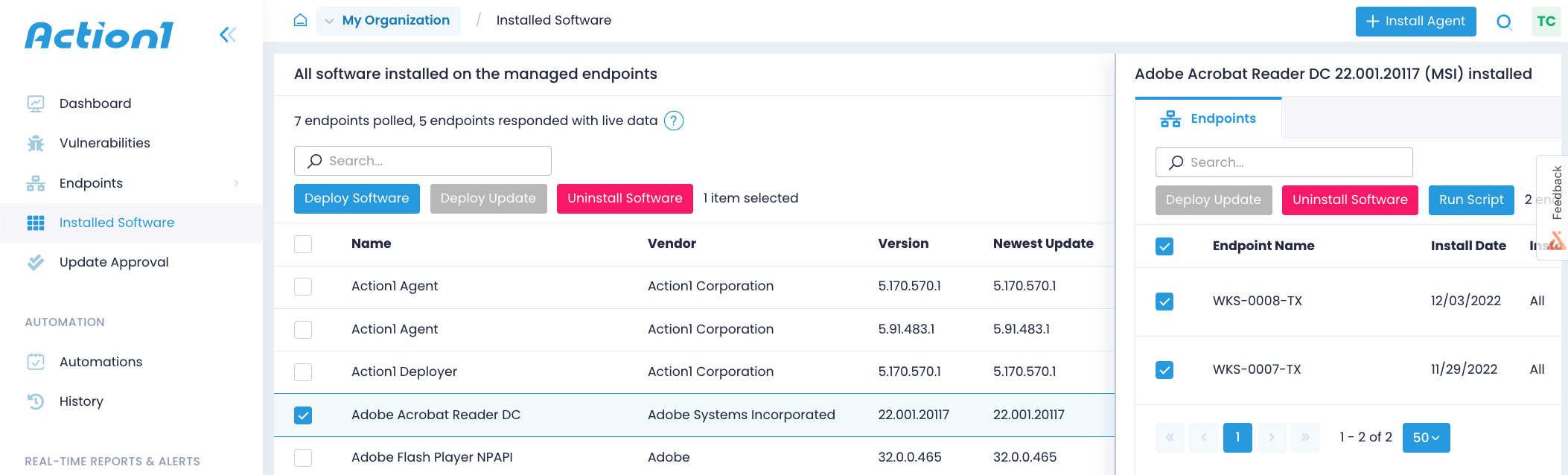
You can browse the apps list, expand each app to see endpoints where it is installed, search for specific apps, and see if updates are available.
- To update the application, select it from the list and click Deploy Updates. See Roll out and Deploy Updates for details.
- To uninstall the application, follow the steps described in Uninstall Software.
NOTE: Each Linux software package can contain a binary file and other files (e.g., fonts, libraries, config, etc.) that are deployed to different directories. The Installed Software tab will display only the Linux packages containing binary files, and their package-level properties. Packages containing no binaries do not appear in the list. This refers, for example, to packages including only fonts, kernel files, or libraries.
To view software installed on a certain endpoint:
- Open the Endpoints view.
- Select the one you need
- Go to its Installed Software tab. There you can also deploy the available software updates or uninstall the application.
NOTE: To view the list of installed apps for a certain endpoint, a role with View Installed Software or with View Endpoints permission is required.
To learn how you can keep track of the installed applications using the API, see Software Deployment. Installed Software Inventory.
Built-in Reports
Action1 also offers a number of built-in reports on the software inventory, including the Installed Software summary report and detailed reports on specific applications (web browsers, instant messengers, and others). They are available under Built-in Reports | IT Asset Management | Software Inventory. See Software Inventory for more information.
See also: Roll out and Deploy Updates, Uninstall Software.