
Example: Preparing a Custom Package for DMG Setup
Use the install.sh script from the Webex app package (provided below) as a template.
You will need to provide the following parameter values for function main():
- display_name – name of your deployment package that Action1 will use when displaying History messages.
- proc_names – application processes for the app you need to install.
- default_app_folder – default application folder.
- dmg_root_folder – folder where the application package will appear after mounting.
- binary_path – path to setup binary (is used to detect app target architecture).
Important! It is strongly recommended that you edit the script on a macOS machine using the Mac tools. If you plan to use a Windows machine and an editing tool like Notepad++, consider that it may append the “CR” (‘r’) character to each line when saving the file. In this case, make sure that you have removed these characters from the code; otherwise, the script will fail to run.
#!/bin/bash
export PATH=$PATH:/sbin:/usr/sbin
source "common.sh"
trap 'finally_dmg "$dmg_mount_point" $?' EXIT SIGINT
result=''

# external named parameters
# -m "install"|"upgrade"
# -p "/Applications"|"custom_path"
# -f "App folder name.app", for upgrade only
# -s "error|kill|ignore". Default="kill" and continue deployment
# -v "ERR|WARN|INFO|DBG". Default="INFO"
# -b "app.new.build.number"

agruments="$@"
inv_script="$(basename "$0")"
log_started "$inv_script" "$agruments"

validate_params "$@" || exit $?
deploy_mode="$m"
inst_root_folder="$p"
app_process_mode="$s"
upgrade_app_folder="$f"
new_app_ver="$b"
log_level="$v"
#log_level="DBG"

### Webex install\update

function main() {
  # internal parameters
    display_name='Webex' # for messages only
    log -m "$(printf 'start deploying "%s"' "$display_name")" -n "INFO"

    proc_names=("Webex" "CiscoSparkPerformanceCollection")  # array, f.e. ("process1" "process2")
    dmg_mount_point='./local_mnt'
    default_app_folder="/Webex.app"
    dmg_root_folder="${dmg_mount_point}/Webex"
    src_app_folder="${dmg_root_folder}/${default_app_folder}"
    binary_path="./${src_app_folder}/Contents/MacOS/Webex"
    get_setup_by_ext "dmg" && setup_file="$result" || exit $?

    if [[ "$deploy_mode" == 'install' ]]; then
        app_folder_name="$default_app_folder"
    else
        app_folder_name="$upgrade_app_folder"
    fi

  # attach dmg file
    attach_dmg "$setup_file" "$dmg_root_folder" "$src_app_folder" "$dmg_mount_point" || exit $?

  # test application binary architecture
    test_binary_arch "$binary_path" || exit $?

  # test running processes
    if [[ "$app_process_mode" == 'kill' ]]; then
        kill_process "${proc_names[@]}"
    fi

    if [[ "$app_process_mode" != 'ignore' ]]; then
        test_process "${proc_names[@]}" || exit $?
    fi

  # deploy software\update
    copy_app_folder "$src_app_folder" "$inst_root_folder" "$app_folder_name" "$deploy_mode" || exit $?

  # detach_dmg, see in trap (finally_dmg)
    exit 0
}

main
NOTE: MacOS is case-sensitive, so make sure you copy and paste all names correctly.
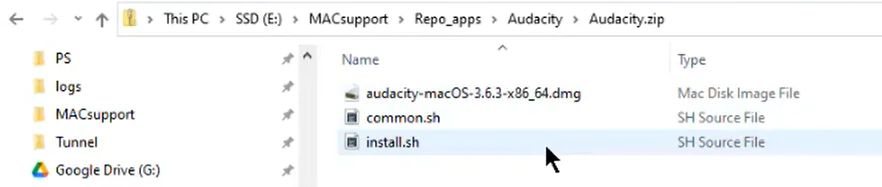
After you have edited the install.sh, save the file and include it in the ZIP archive together with common.sh and the application setup (DMG file).
How the install.sh works for DMG files?
- It mounts the DMG file to the predefined mount point.
- Then it checks the application target architecture.
- It checks if there is an application process running. If found, it terminates the process.
- It copies the content of the mounted DMG into the application folder, replacing the existing files.
- Finally, it unmounts the file from the mount point.