






TL;DR
- Operating system patching protects Windows, macOS, and Linux devices by deploying security updates, bug fixes, performance improvements, and feature updates that reduce cyber risk and improve system stability.
- The operating system patch management lifecycle includes asset discovery, vulnerability identification, risk-based prioritization, testing, phased deployment, verification, documentation, and continuous compliance reporting.
- Leading operating system patch management solutions include Action1, Microsoft Intune, ManageEngine Patch Manager Plus, NinjaOne, Atera, Automox, Ivanti Neurons, and ManageEngine Endpoint Central, each offering different capabilities for automation, compliance, remote management, and cross-platform support.
- Modern patch management platforms automate vulnerability remediation, missing patch detection, deployment scheduling, rollback planning, and verification to reduce manual effort while improving security and operational efficiency.
- Effective OS patching helps organizations comply with security frameworks and regulations such as ISO 27001, SOC 2, PCI DSS, HIPAA, NIST, and CIS Controls by providing centralized management and audit-ready reporting.
- Cloud-native patch management solutions simplify patching across hybrid and remote environments by eliminating VPN dependencies, providing real-time endpoint visibility, and ensuring devices remain secure and compliant wherever they are located.
Operating system (OS) patching is the process of deploying vendor-released fixes, known as patches or updates, to Windows, macOS, or Linux endpoints to address vulnerabilities, fix bugs, improve performance, or introduce the latest features.
Installing these patches across your systems as soon as they’re released keeps them secure, compliant, and stable day after day. The challenge isn’t patching itself, it’s patching at scale. A handful of endpoints is manageable manually. Thousands of desktops, laptops, servers, and VMs are not, which is why enterprises need patch management software to deploy updates on time, with minimal manual effort, and without leaving blind spots.
With such a solution, most of the work stops being manual. The platform gives you crystal-clear visibility across your systems, identifies known vulnerabilities in real time, tests patches through controlled workflows, runs deployments during convenient maintenance windows, and helps fix weak spots before cybercriminals turn them into a path to privilege escalation, ransomware deployment, malware infections, or data theft.
In this guide, we’ll break down OS patching in plain English: what it is, why it matters, how patches improve security and performance, and what can happen when critical updates are delayed. We’ll also compare manual and automated OS patching, walk through testing, scheduling, rollback, monitoring, audit trails, and end-of-life software challenges, and then compare Action1, NinjaOne, Atera, Automox, and ManageEngine Patch Manager Plus so you can choose a platform that works in practice, not just on paper.
Let’s waste no more time and get to work.
What is OS Patching?
OS patching is how operating systems stay secure, stable, and up to date. More specifically, it’s the process of applying vendor-released updates to an operating system like Windows, macOS, or Linux to fix vulnerabilities and bugs, deliver new features, and improve system performance. The process starts with identifying missing patches, continues with testing and deployment, and ends with monitoring, reporting, and documenting the final result. Deploying these patches protects your endpoints from cyber threats, supports compliance with the regulations your company is subject to, and helps maintain stable system performance.
Why OS Patching Matters
Skipping or delaying patch deployments means your endpoints run an outdated operating system version, turning them into easy targets for cybercriminals. Once a vendor releases a fix, be it for Windows, macOS, or Linux, threat actors have their ways to find systems that haven’t applied it yet, exploit that flaw, and launch a cyberattack. Regular OS patching closes these flaws and reduces the risk significantly.
To put that risk in perspective, we referenced Action1’s 2026 Software Vulnerability Ratings Report throughout this section, so the numbers you’re about to read aren’t estimates. They’re confirmed vulnerability data from 2025.
But closing security gaps is just the most obvious reason why OS patching matters. Here are the rest:
- It stops hackers from using known vulnerabilities to penetrate your systems: Every time a patch is released and you apply it promptly, you close the window hackers have to find that vulnerability in your systems and use it for privilege escalation, remote code execution, data theft, ransomware deployment, or broader network compromise. In 2025, 28.3% of vulnerabilities with publicly available exploits were attacked within 24 hours of disclosure.
- It blocks the second stage of most attacks: OS patches fix the EoP vulnerabilities cybercriminals rely on after gaining initial access to reach deeper into your environment, disable security systems, and deploy ransomware. EoP vulnerabilities within operating systems grew 176% in 2025, and on Windows, they now account for 40% of all Windows CVEs. Patch your systems, and you take away the tools threat actors need to go further.
- It protects the foundation everything else depends on: Keeping the OS of each endpoint patched and up to date lays a strong foundation for your other security tools and measures like EDR, XDR, firewall rules, antivirus programs, and access policies. If the OS is vulnerable, all of these lose effectiveness. They can’t protect you from vulnerability exploitation, but the patch can.
- It makes audits easier and compliance gaps less likely: Regulations and frameworks like HIPAA, PCI DSS, NIST, and GDPR expect your company to address software vulnerabilities within specific timeframes and don’t make exceptions or tolerate delays. Consistent OS patching keeps you compliant and gives you the deployment history auditors ask for. Without that paper trail, even fully updated systems won’t save you from a failed audit. Learn what a compliant patching program actually looks like in our patch compliance guide.
- It keeps systems stable and reliable: OS patches deliver bug fixes that address performance problems, compatibility issues, and reliability defects that directly affect your employees’ daily work. Fewer crashes, fewer errors, fewer support tickets, and more stable systems are what consistent patching looks like in practice.
- It addresses risk growing faster than most teams realize: Linux and macOS are no longer considered lower-risk platforms, and the numbers confirm it. In 2025, macOS vulnerabilities rose by more than 1,000%, with EoP vulnerabilities up 5,600% and RCE flaws growing 420%. This means that Windows, macOS, and Linux devices all deserve the same patching discipline if you want to minimize your attack surface and reduce the chance of a successful cyberattack.
- It keeps remote and hybrid endpoints just as protected as office ones: Cyberattacks don’t happen through office-based endpoints only. Hackers exploit vulnerabilities wherever they find them, and it makes no difference whether the device is connected to your office network or your employee’s home network. If it’s vulnerable, it can be compromised. Keep every endpoint updated with no exceptions if you want to reduce your cyber risk.

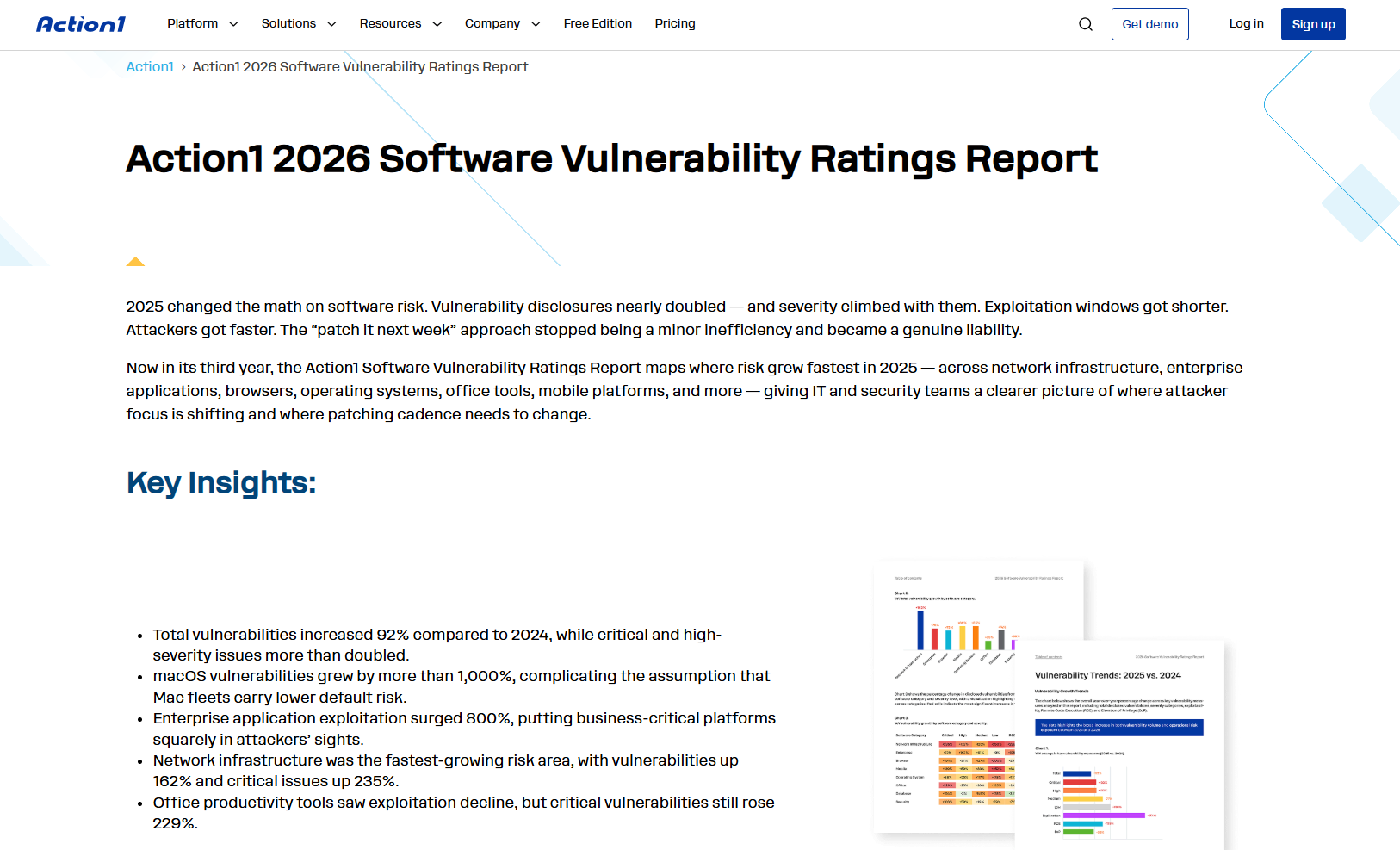
All vulnerability statistics in this section are sourced from Action1’s 2026 Software Vulnerability Ratings Report.
How can Patches Support OS Security and Performance?
Patches support OS security and performance by fixing weak spots in core system components, resolving bugs that cause crashes, optimizing how the OS uses memory and processing power, and improving compatibility with drivers, hardware, and applications.
As we’ve already outlined, some updates address security flaws while others target stability and performance. And honestly, patching isn’t just about installing updates. It’s a never-ending loop that removes known problems before they escalate into security incidents, slow systems, crashes, or the kind of everyday frustration that makes your employees want to throw their endpoints out the window.
| Area | What OS Patches Do | What You Get in Reality |
|---|---|---|
| Core OS Components | Patches update system files, services, libraries, kernels, authentication components, and networking stacks that the entire endpoint depends on. | You’re not fixing one visible issue. You’re strengthening the pieces every endpoint relies on daily. When those components are outdated, the whole system becomes easier to compromise and destabilize. |
| Authentication and Encryption Components | OS patches fix weaknesses in how the system handles credentials, certificates, session tokens, and encrypted communications, including flaws in Kerberos, NTLM, BitLocker, and Secure Boot that attackers use to intercept sessions or bypass security entirely. | Your authentication stack and encryption work the way they’re supposed to. When these components have known flaws, attackers don’t need to break through your security. They walk around it. |
| OS Bugs | Many patches fix software code defects that cause errors, failed processes, application problems, or behavior users can’t easily explain. | Fewer random issues, fewer support tickets, and fewer hours spent chasing problems that a patch already solved weeks ago. |
| Performance Issues | Some patches deliver performance enhancements by optimizing how the OS handles processes, memory, CPU usage, background tasks, and power management. | The system runs smoother not because you bought new hardware but because the OS uses existing resources more efficiently. Less friction, fewer slowdowns, more productive users. |
| Driver and Hardware Compatibility | OS patches improve how the system works with drivers, chipsets, docks, Wi-Fi adapters, and other connected hardware. | Devices work more reliably, peripherals stop disconnecting randomly, and users spend less time fighting basic hardware problems that shouldn’t interrupt their workday. |
| Application Compatibility | Some patches fix conflicts between the OS and business applications, browsers, security agents, or line-of-business software. | Critical apps keep working properly after OS updates. That prevents the classic situation where one broken dependency slows down an entire team for hours. |
| User Experience | By fixing security flaws, bugs, crashes, freezes, and performance issues, patches make the operating system safer and easier to use at the same time. | Users may not care which CVE was fixed or which OS component changed. They care that the device is faster, safer, more stable, and not interrupting their work every few hours. |
Real-World Consequences of Missing Patches
The financial and operational impact of unpatched systems has reached staggering proportions. Unpatched vulnerabilities are directly responsible for 60% of all data breaches, demonstrating how missing patches create direct pathways for attackers.
For example, the MOVEit vulnerability began being exploited on May 27, 2023, and affected thousands of organizations and almost 100 million individuals.
Fortinet’s CVE-2023-48788 demonstrates ongoing exploitation risks. Adversaries have exploited CVE-2023-48788 in FortiClient enterprise management servers to install unauthorized remote management and monitoring tools and PowerShell backdoors. This critical SQL injection vulnerability allowed attackers to execute system-level commands on unpatched servers.
Change Healthcare’s cyberattack shows how expensive security failures can become. UnitedHealth-owned prescription processor Change Healthcare was the victim of a massive cyberattack that cost the company nearly $3.09 billion and affected approximately 192.7 million individuals’ private data, making it the largest healthcare data breach in U.S. history and triggering federal investigations.
What is the Difference Between Manual and Automatic OS Updates?
Manual updates require user or administrator consent before installing any software update. In that case, your IT team must constantly search for, download, and test patches in controlled environments and then install updates manually across every single endpoint in your organization’s network. This approach gives you complete control over when and how your operating system receives security patches, but it requires a lot of time, labor, and resources.
Automatic updates, in contrast, function with minimal human intervention because a third-party patch management tool automatically downloads and installs software updates as soon as vendors release them. Such a solution handles vulnerability identification, missing patch detection, testing, scheduling, and deployment automatically, helping your endpoints receive timely updates without anyone having to manually kick off the process.
The choice between manual and automatic updates determines how effectively your team manages updates and addresses security vulnerabilities across your infrastructure.
See the difference for yourself, side by side.
| Manual OS Patching | Automated OS Patching | |
|---|---|---|
| Control | Every patch needs manual approval, which means someone has to be available to review and push updates constantly. At any real scale, that turns into a full-time job on its own. | The platform deploys patches based on your configured policies. You set the rules once and the process runs itself while you keep full oversight. |
| Testing | You test every patch manually before it touches a production endpoint, one at a time, which works but slows remediation down considerably and doesn’t scale past a handful of systems. | Testing happens automatically through staged rollouts and update rings. Patches that fail defined success metrics get stopped before they reach business-critical systems. |
| Speed of Deployment | Extremely slow process. Getting critical updates deployed manually across more than 10 endpoints is a nightmare that can delay remediation by days or even weeks, which significantly increases cyber risk. | Patches deploy as soon as they’re available and validated. Your endpoints get protected in hours or days instead of weeks, depending on your endpoint count, which directly reduces the window attackers have to exploit a known flaw. |
| Coverage Completeness | High risk of coverage gaps. Endpoints that were offline or out of the office during your maintenance window simply don’t get the update. It’s incredibly easy to lose track of which ones were covered and which ones weren’t. Add multitasking, interruptions, and back to back deployments into the mix and things get missed. | Low risk of coverage gaps. All managed endpoints get patched during the planned or emergency maintenance window. Systems that are offline at that time get updated automatically on their next boot. You also get real-time data on the patch and compliance status of every endpoint. |
| Difficulty on Patching Endpoints with Different Operating Systems | Extremely difficult. Patching multiple operating systems manually means managing Windows, macOS, and Linux endpoints separately, which multiplies complexity, time investment, and the chance of gaps significantly. | Low difficulty. Automated platforms manage macOS, Linux, and Windows environments from one unified console on the same schedule and the same policies. No separate workflows, no separate tools, no blind spots by OS type, and almost no manual intervention beyond the initial setup. |
| Scalability | Doesn’t scale. Managing updates manually across dozens of endpoints already feels like you’re on a hamster wheel. Across hundreds or thousands it’s simply not doable. | Scales without adding headcount. Whether you manage 50 or 50,000 endpoints the process runs the same way. In practice, a single administrator can handle thousands of endpoints comfortably. |
| Human Error Risk | Every manual step is a chance for something to go wrong. A missed update, a skipped endpoint, or a deployment at the wrong time can leave gaps nobody notices until it’s too late. | Automation removes the repetitive manual steps where most human error happens. Deployments run on schedule, every endpoint gets covered, and nothing gets skipped because someone was multitasking. |
| Compliance Difficulty | High difficulty. Requires your team to manually track and document every patch deployment. Easy to get wrong, easy to miss something important, and extremely time-consuming to pull together before an audit. | Low difficulty. Detailed patch data gets stored on the platform after each deployment cycle and can be turned into an audit-ready report with just a few clicks using the built-in customizable report templates. |
| Cost | Lower upfront cost since no dedicated tooling is required. The real cost shows up later in staff time, missed patches, security incidents, and failed audits, which consistently exceed the cost of automation at any meaningful scale. | The time saved and risk reduced typically outweigh the licensing cost once you’re managing more than a handful of endpoints, which is exactly where manual patching starts to fall apart. |
| Risk of Downtime | Higher risk. If a patch causes issues there’s no staged rollout to catch the problem before it spreads organization-wide. | Low risk. Staged deployments and update rings catch problematic patches on a small test group before they reach the rest of your environment. |
| Best for | Small environments with fewer than 50 endpoints and a dedicated IT person with enough bandwidth to track every update manually. Beyond that threshold it consistently breaks down. | Any organization that has outgrown manual patching, manages remote or hybrid endpoints, needs to meet compliance requirements, or can’t afford the risk of a missed critical patch. |
Best OS Patch Management Solutions
The best OS patch management solutions are Action1, NinjaOne, Atera, Automox, and ManageEngine Patch Manager Plus. These platforms automate the OS patching process end to end, offer flexibility and scalability, and come packed with features that actually make a difference. Where they differ is in the details.
To help you find the right tool to simplify patch management in your environment, we put together a comparison table covering OS support, deployment type, vulnerability prioritization, patch testing methods, remote and offline coverage, multi-tenancy, role-based access control, audit-ready reporting, pricing, and verified user ratings from G2 and Capterra.
| Action1 | NinjaOne | Atera | Automox | ManageEngine Patch Manager Plus | |
|---|---|---|---|---|---|
| Supported OS | Windows, macOS, Linux. | Windows, macOS, Linux. | Windows, macOS, Linux. | Windows, macOS, Linux. | Windows, macOS, Linux |
| Deployment Type | Cloud-native, agent-based platform. | Cloud-native, agent-based platform. | Cloud-native, agent-based platform. | Cloud-native, agent-based platform. | Cloud-based, agent-based. On-premises option also available. |
| Vulnerability Prioritization | Yes. Prioritizes using CVE numbers, CVSS scores, CISA KEV integration, active exploitation status, and correlation with active ransomware campaigns, drawing on multiple intelligence sources including VulnCheck NVD++ and MSRC. | Yes. Relies on AI-driven prioritization through Patch Intelligence AI, which flags unstable updates and automatically pauses risky patches. | Yes. Combines CVSS and CVE triage with AI-assisted context via AI Copilot | Yes. Ranks vulnerabilities by actual exploitation probability using CVSS scoring, the CISA KEV catalog, and EPSS data, natively ingesting findings from CrowdStrike, Rapid7, and Tenable to build a ranked remediation queue. | Yes. Applies AI-driven risk scoring that combines CVSS, active exploit availability, vulnerability age, and system exposure across affected endpoints. |
| Patch Testing Method | Uses update rings with customizable success metrics and deployment counts. Patches only advance autonomously when they meet defined thresholds. | Relies on ring-based deployments with a stagger feature to load balance patch installations. | Uses IT automation profiles to test and deploy patches on pre-defined schedules. | Follows a ring-based staged rollout. Patches deploy first to a small pilot group to catch issues early, and patch age filtering holds deployment for a set number of days before rolling out to the full fleet. | Relies on test groups for staged rollouts, limiting the impact of a problematic patch to specific endpoints before it reaches the rest of the environment. |
| Remote and Offline Endpoint Coverage | Patches and manages remote endpoints without VPN. Offline systems catch up automatically the moment they come back online. | Patches remote endpoints without VPN. Offline endpoints are patched on reconnection. | IT automation profiles queue updates for offline devices and deploy them on reconnection. No VPN required. | Remote endpoint control without VPN. Offline devices get patched the moment they reconnect after a missed maintenance window. | Cloud version patches remote endpoints without VPN. Offline endpoints get the latest updates on reconnection. On-premises version requires additional hardware and configuration for remote coverage. |
| Multi-Tenancy | Yes. Full multi-tenancy with per-organization isolated data, separate patching policies, schedules, and approval workflows. Built for MSPs and large enterprises. | Yes. Strong multi-tenant architecture built specifically for MSPs with per-client isolation and role-based access. | Yes. Multi-client management for MSPs. | Yes. Fully isolated per-client environments with centralized RBAC and SAML SSO. | Yes. Available through ManageEngine Endpoint Central MSP edition. Separate domains, patching policies, and compliance dashboards per client. Standard Patch Manager Plus is single-tenant only. |
| Role-Based Access Control | Yes. Fully customizable RBAC with customer-defined roles, scopes, and permissions. Email wildcards and organization scope for per-user endpoint visibility control. | Yes. Granular RBAC with per-client and per-technician permission levels. | Yes. Role-based access with permission levels per technician. | Yes. Seven pre-built roles plus fully customizable ones with read, write, edit, and delete permissions per feature. Least privilege enforced per user, organization, and endpoint group. | Yes. Role-based access scoped to AD OUs, IP ranges, or remote offices. Delegate patch approvals or deployments to junior staff without granting full admin rights. |
| Audit-Ready Reporting | 100+ built-in customizable report templates covering patching, vulnerabilities, software and hardware inventory, and security configuration. | Offers built-in customizable report templates. | Advanced reporting is available on higher-tier plans. Lower tiers offer basic reporting with limited customization. | Pre-built reports for CVE exposure, CISA KEV status, pre-patch readiness, and policy execution history. | Built-in report templates you can customize per client. Real-time endpoint data feeds in automatically so your compliance reports are always current. |
| Key Strengths | Autonomous patching. Windows 10 to Windows 11 upgrades. P2P patch distribution. Private secure software repository. Setup in under 5 minutes. Intuitive interface. Real-time reporting. Vulnerability management. Remote desktop control. Software deployment. Automated scripting. Seamless scalability. | AI-driven Patch Intelligence. Full RMM. Strong MSP multi-tenant architecture. Patch Caching for bandwidth efficiency. Strong reporting. PSA, backup and recovery, and MDM available to expand your service delivery. Unifies all endpoint operations in one platform. | All-in-one platform with RMM, PSA, ticketing, remote access, and patching in one console. AI Copilot included in every plan. MFA, data encryption, and integrations with leading security tools. Automates OS patching end to end. | Clean and intuitive interface. Strong cross-platform scripting with Worklets. Policy-driven automation. Native remote control powered by Splashtop. Automates OS patching across Windows, macOS, and Linux. | Transparent pricing. Strong rollback and test-and-approve controls. Cloud and on-premises deployment options. Automated OS patching. Real-time visibility and reliable remote access. |
| Cons as per G2 verified user reviews | No MDM for mobile devices. | Agents go offline unexpectedly. Interface is not as intuitive as some users expect. Data syncing delays. |
Reporting lacks depth and customization. Agent sync issues cause offline devices to get stuck in queue. |
Interface feels awkward and cluttered to new users. No P2P patch distribution. Patches sometimes fail without a clear error message. | |
| Free Tier or Trial | Free forever for up to 200 endpoints with no feature limits. Free one-time vulnerability assessment for unlimited endpoints. | 14-day free trial. No free tier. | 30-day free trial. No free tier. | 15-day free trial with full access to patching, automation, and reporting. No free tier. | Free forever for up to 25 endpoints and 1 technician, fully featured. 30-day free trial for unlimited endpoints. |
| Price | Paid plans start at a gradually lowering per-endpoint cost above 200. Contact sales for a quote. | Per-endpoint annual billing. Monthly billing available on a flexible case-by-case basis. Contact sales for pricing. | Professional: $169 per technician per month. Expert: $189 per technician per month. Master: $219 per technician per month. Enterprise: custom quote. | Patch OS: $1 per endpoint per month with annual commitment. OS patching only. Automate Essentials and Enterprise: custom pricing with volume discounts. | Professional: from $245 per year on-premises or $34.50 per month cloud. Enterprise: from $345 per year on-premises or $44.50 per month cloud. All plans start at 50 endpoints and 1 technician. |
| G2 and Capterra Ratings | G2: 4.7/5 (1,075+ reviews). Capterra: 4.9/5 (237+ reviews). | G2: 4.7/5 (4,390+ reviews). Capterra: 4.7/5 (290+ reviews). | G2: 4.6/5 (1,190+ reviews). Capterra: 4.5/5 (445+ reviews). | G2: 4.5/5 (295+ reviews). Capterra: 4.7/5 (150+ reviews). | G2: 4.5/5 (195+ reviews). Capterra: 4.6/5 (400+ reviews). |
| Best For | SMBs, large enterprises, government agencies, manufacturers, healthcare institutions, oil and gas sector, and education and finance organizations. | MSPs and large enterprises. | IT departments and MSPs. | SMBs, MSPs, and hybrid or remote-first teams. | SMBs, MSPs, and large enterprises. |
If Action1 already looks like the right fit, you can create a free account and start patching up to 200 endpoints today, no credit card required.
How We Evaluated These Tools
We selected these five platforms based on market presence, G2 and Capterra review volume, and direct comparability across the patch management capabilities that matter most to SMBs, MSPs, large enterprises and IT teams.
Our methodology followed four criteria:
- Third-party review data: Ratings and recurring themes were pulled from G2 and Capterra.
- Feature relevance: Each platform was evaluated on patch management depth, OS coverage, automation, multi-tenancy, RBAC, audit-ready reporting, and pricing transparency, the areas IT teams and MSPs evaluate most closely when choosing a patching solution.
- Deployment model: Each platform was assessed by deployment type, cloud-native, on-premises, or hybrid, and what that means for setup time and infrastructure requirements.
- Pricing and accessibility: We also looked at free tiers, trial availability, pricing transparency, and whether each platform is practical for SMBs, MSPs, and larger enterprise environments.
How to Manage OS Patches Effectively?
Effective OS patch management comes down to six things: a clear policy, reliable tooling, consistent testing, a regular patch cycle, ongoing monitoring, and a plan for end-of-life software. Most IT teams already do two or three of these. The ones they skip are usually the ones that come back to bite them. Here’s how to manage patches like cybersecurity pros, and keep your team off that list.
Build a Patch Management Policy
First, create a clear and structured patch management policy. Identify which systems need close monitoring, who will manage the process, and how often patches should be applied. This step is of utmost importance. Without defined roles and timelines, it’s easy to lose track and leave your systems exposed to critical vulnerabilities.
Use Reliable Patch Management Tools
The single most effective step you can take is equipping your company with an automated patch management tool, since it replaces repetitive manual processes with automated workflows for detection, testing, scheduling, deployment, and reporting. One of the greatest benefits is that, through automation, your IT team gains complete visibility over the patch status of every single endpoint connected to your network.
You’ll know when a new vulnerability emerges, identify the patch addressing it, test it in lab environments or through update rings, schedule patch deployments at convenient times to avoid downtime, and, most importantly, automatically gain detailed compliance reports for every installed update. Always choose a patch management tool that covers both OS updates and third-party software with the same level of precision and automation.
Always Test Patches Before Deployment
Never roll out updates across your endpoints without testing them first. It’s a critical mistake. So before deploying OS patches, test them in a lab environment or use an update rings feature like the one Action1 provides. With it, you can group your endpoints into so-called “rings” and set specific success metrics. Once an update meets these metrics, it progresses to the next ring, reaching the rest of the endpoints in your network. This feature prevents problematic updates from breaking your business-critical systems.
Schedule Regular Patch Cycles
Your employees have scheduled work hours, right? Your patching process should follow a schedule, too. A good practice is to divide your endpoints into groups, including non-critical systems and mission-critical infrastructure, and establish regular maintenance windows for routine patching. But routine schedules alone aren’t enough. Critical OS vulnerabilities require immediate action, which is why your patch management strategy also needs defined emergency windows and a pre-approved process for deploying urgent patches the moment a serious threat is discovered, even outside your regular schedule. This hybrid approach gives your team the flexibility it needs without compromising security.
Monitor and Review
After deploying patches, review the logs and confirm successful installation. It’s essential to monitor your systems for 24 to 48 hours after patching to ensure everything works as expected. Your IT team must closely track each system for missed or failed updates, as these can leave your organization exposed to severe security risks.
Keep in mind that with reliable patch management tools like Action1, you don’t just automate the process. You gain 360-degree visibility across your network with immediate alerts for both successful and failed update installations.
End-of-Life Software and Patching Challenges
What’s scarier than running outdated software? Running one that will never receive another security update. End-of-life (EOL) software is software that has stopped receiving vendor updates entirely, including security patches, which means any vulnerability discovered after that date will never be fixed.
Continuing to run an EOL operating system puts your entire company at risk in several ways:
- Unpatched critical vulnerabilities that hackers actively target, knowing they’ll never be fixed
- Compliance violation fines for failing to maintain supported, secure systems
- Higher risk of a data breach with no vendor patch available to close the gap
- Denial of insurance coverage for security incidents tied to known unsupported software
- Performance degradation as the OS falls further behind modern hardware and software demands
- Legal liability if a breach traces back to software you knew was unsupported
The fix is to start planning the moment a vendor announces an end-of-life date, not after patches stop coming. Here’s the process:
- Build a full inventory: Identify every endpoint still running the soon-to-be unsupported software.
- Assess dependencies: Determine which existing software relies on the old OS and flag potential compatibility issues with the newer version before you migrate.
- Migrate critical systems first: Prioritize anything handling sensitive data or customer information. For systems that can’t be upgraded immediately, add compensating controls like network segmentation, enhanced monitoring, and restricted access to limit exposure in the meantime.
- Set a firm migration deadline and stick to it: Every day of delay extends the window hackers have to exploit a system they already know will never be patched.
OS Patching Best Practices
The following four best practices will help your IT team streamline the entire process and transform it from reactive chaos into proactive protection that keeps your systems secure without breaking your business by causing unexpected issues or downtime.
Use Risk-Based Patch Prioritization
Prioritize patches based on their severity score, as treating them equally will deplete your resources and leave your organization vulnerable. Start using vulnerability management tools to promptly assess which vulnerabilities pose the greatest threat to your company. Then focus on deploying patches that address actively exploited flaws first, especially those affecting systems that store and handle sensitive information.
By using vulnerability or patch management solutions, you’ll be able to benefit from risk-based patch prioritization that gives you clear information about vulnerability severity, exploitation likelihood, and potential impact on your business.
This will enable your IT team to focus on patching critical flaws immediately, while less important systems and patches can wait for scheduled maintenance windows without posing security risks to your company. Risk-based prioritization ensures you’re addressing the most dangerous problems first rather than wasting time on low-risk updates, which minimizes the possibility of experiencing devastating cyberattacks.
Staged Rollout Strategies
Deploying OS patches across all devices on your network simultaneously is a serious mistake that leads to unexpected downtime caused by problematic updates. To avoid such a scenario, it’s essential to roll out updates in carefully planned stages, beginning with test endpoints, followed by non-critical production systems, and finally extending to business-critical devices.
Always group your systems based on their function and importance. Deploy patches to your least critical systems first, monitor for any issues, and then gradually expand to more important ones. This strategy will enable you to identify problems early, before they cause business operational disruptions.
Implement Patch Rollback Procedures
Even if you roll out updates in stages, patches may still break things worse than the vulnerabilities they’re supposed to fix. You might wonder, how can this be true if the updates show no issues in the testing group of endpoints? Well, sometimes problems appear on production endpoints, even when the same update showed no issues in the initial test group. Clear rollback procedures give system administrators the ability to quickly reverse a problematic patch before it causes wider damage.
That’s why it’s important to document the exact steps needed to uninstall patches and restore your affected systems to their previous healthy state, so you have a clear plan when unexpected situations occur. Before you start deploying updates across your network, make sure you’ve created system snapshots so you have a plan B, and then test your rollback procedures regularly to ensure they work flawlessly when you need them. This strategy gives your IT team the confidence to patch more aggressively without fear of permanent damage.
Maintain an Audit Trail
Last but not least, generate detailed patching reports that record every patch deployed, when it was installed, which systems were affected, and any issues encountered along the way. Such documentation will be invaluable for troubleshooting, compliance audits, and building a chronological patching history, so don’t underestimate its importance.
Why Third-Party OS Patching Software is a Must for Any Business
We already covered why your patch management tool matters as part of a solid patching strategy. Now let’s zoom out and look at the bigger business case for why dedicated third-party software, not just built-in tools like Windows Update, is worth the investment. Equipping your organization with such software gives you everything needed to improve your security posture, keep devices operating at peak performance, address software vulnerabilities quickly, and generate audit trails from a single dashboard with just a few clicks.
If your organization still relies on software with limited functionality, like Windows Update, or manually patches devices, you’re wasting time, money, and manpower instead of focusing your efforts on growing your business. It’s well known that automation boosts operational efficiency, eliminates time-consuming processes, and increases profitability for businesses operating across different industries. Here’s why your company can’t afford to skip dedicated patch management software:
Centralized Management Across Multiple Systems
Third-party OS patching tools give your IT team complete control over when and how they deploy updates across on-premises and remote endpoints. Such a solution gives you a unified interface to manage multiple servers, workstations, and remote endpoints from one place with just a few clicks. You can keep all of your organization’s systems up to date, schedule deployments at convenient times to avoid downtime, and significantly reduce the attack surface while minimizing the chance of vulnerability exploitation.
Enhanced Security and Vulnerability Management
Professional patch management solutions like Action1 give you vulnerability management capabilities that identify flaws in your OS and third-party apps before they become the reason for a security breach.
Such tools automatically download available software updates from trusted vendor websites or from their own software repository, prioritize them correctly, and offer flexible deployment options to help you remediate vulnerabilities in a timely manner, with the main goal of securing each endpoint in your network with minimal effort.
Business Continuity and Risk Reduction
Equipping your company with third-party OS patching software, apart from fixing bugs and addressing system vulnerabilities, delivers something way more important. It boosts your business continuity. These tools give you efficient rollback procedures, flexible scheduling, testing environments, and staged deployment options that minimize the chance of experiencing downtime, compatibility issues, or other operational disruptions caused by problematic patches.
Compliance and Reporting
OS patching software automatically generates audit trails and detailed reports that help organizations meet regulatory requirements without the manual paperwork nightmare. These tools track every patch deployed, document system changes, and provide instant proof of compliance for auditors and regulatory bodies.
You’ll never again scramble to answer questions like “When was that critical security patch applied?” or “Which systems are still vulnerable?” The software maintains comprehensive records of patch status, deployment timelines, and remediation efforts, giving you bulletproof documentation for SOX, HIPAA, PCI DSS, or any other compliance framework your industry demands.
Instead of spending hours manually compiling patch reports, you get automated dashboards showing compliance percentages, identified vulnerabilities, and remediation progress. This level of documentation not only satisfies auditors but also helps your security team track improvement over time and demonstrate the business value of your patch management investments to executive leadership.
Action1 is the Perfect Software for Operating System Patch Management
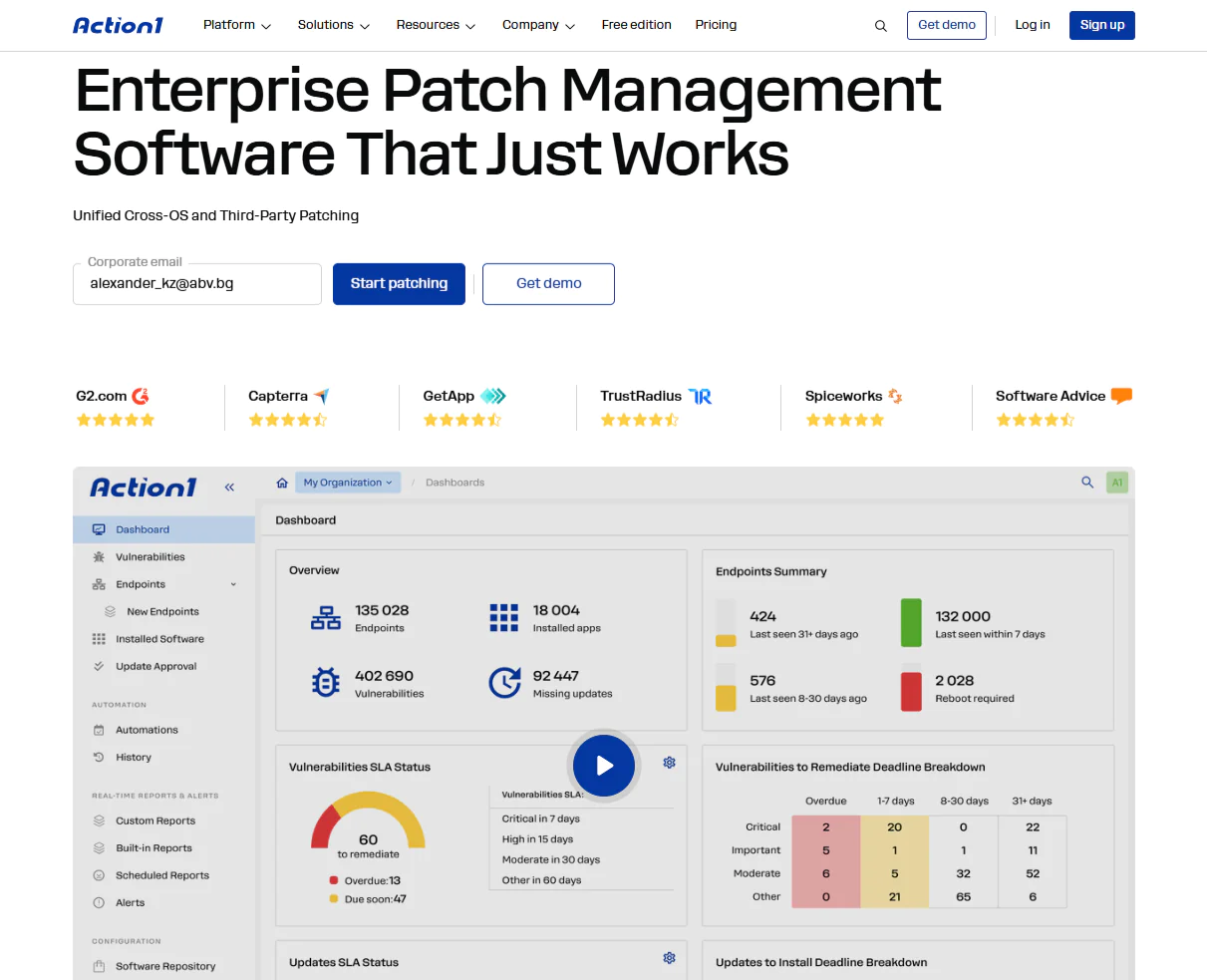
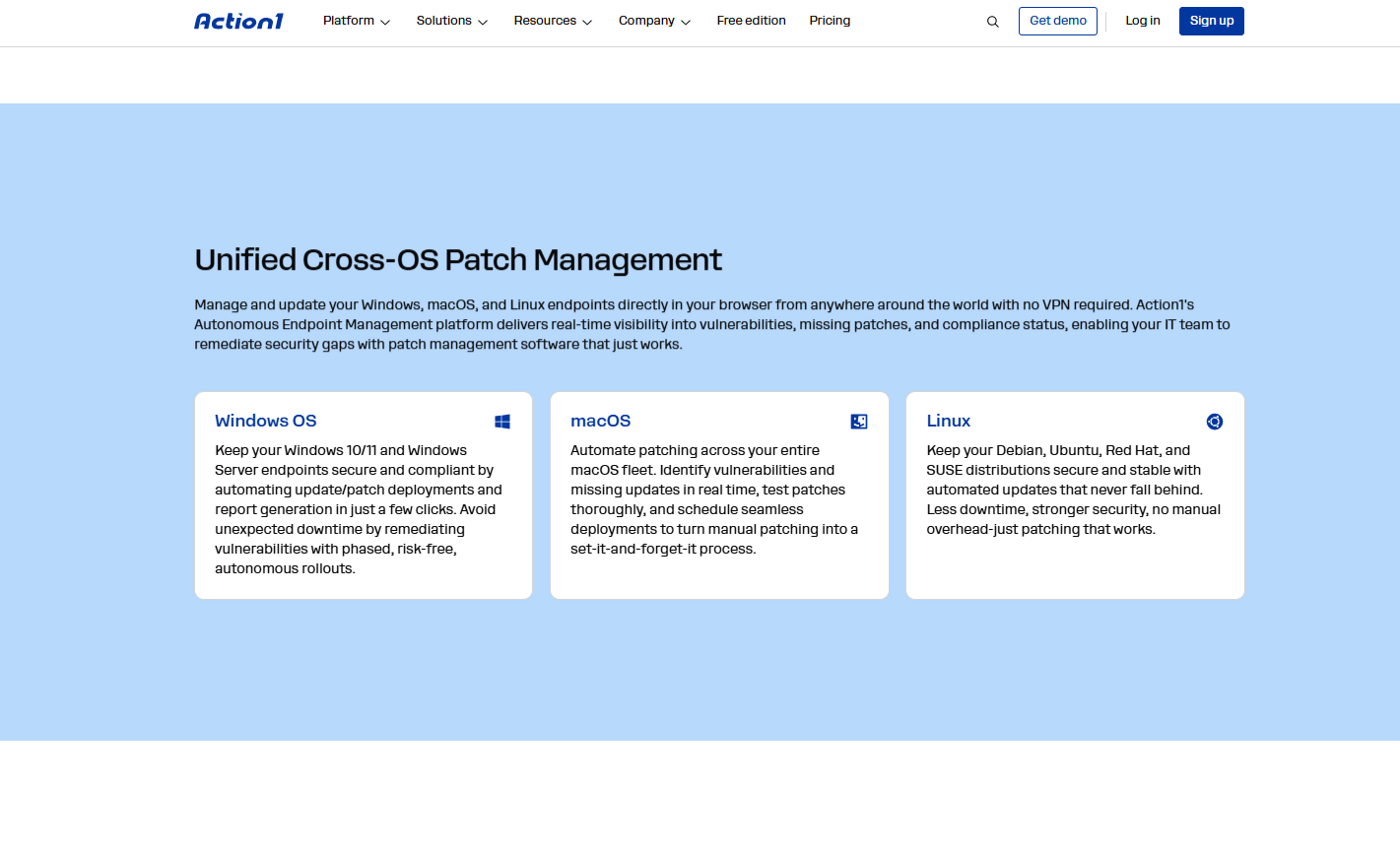
Action1 is a cloud-native platform that delivers fully automated patching for Windows, macOS, Linux, and third-party applications. The software is infinitely scalable, making it a perfect choice for businesses of all sizes, regardless of how many endpoints are in their network.
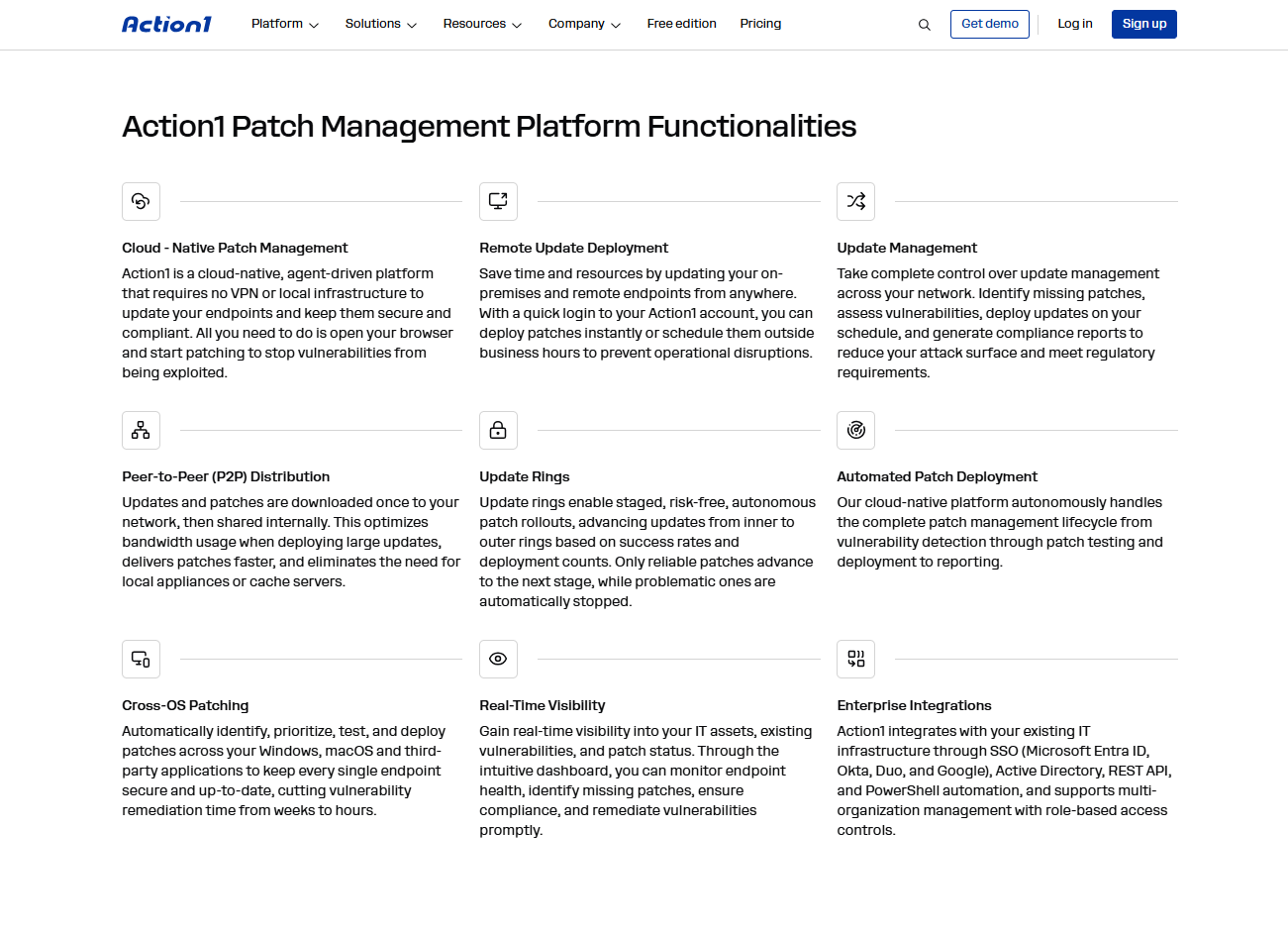
Once installed, Action1 detects known vulnerabilities across each managed endpoint (agents must be installed on each device) and prioritizes them based on CVSS scores and likelihood of exploitation, using data from CISA KEV, the Cybersecurity and Infrastructure Security Agency’s Known Exploited Vulnerabilities catalog. The platform then lists all missing updates across your OS and third-party apps and downloads them from a private, secure software repository, where each patch has been thoroughly tested for reliability and safety. P2P patch distribution delivers those updates faster and prevents bandwidth issues, optimizing your network traffic usage even when deploying large software packages across your endpoints.
This gives your IT team complete visibility into every endpoint, OS, and application status. Action1 automates patch rollouts through update rings, which let you create customizable groups of endpoints and ensure tested patches move through each stage before reaching your production environment.
You can establish specific success rates and deployment counts in each ring to determine if an update should proceed to the next stage. Updates that pass these metrics in earlier, or “inner,” rings move forward to the outer rings. There’s also an option to manually exclude updates if needed. This intelligent approach ensures that updates are regularly validated, reducing the risk of failures and unexpected downtime caused by problematic patches.
With flexible scheduling options, your IT team can create maintenance windows at convenient times, during weekends, or outside business hours to avoid disrupting business continuity. Managed Service Providers (MSPs) and large enterprises can take advantage of the newly introduced feature that allows for update approval or decline on a per-organization basis. This capability enables the deployment of specific updates across designated departments and clients, giving you the flexibility to improve your endpoint security while ensuring productivity remains unaffected. With this tool, you can access and control endpoints anywhere in the world, right in your web browser, without needing a virtual private network connection.
Action1 is certified for SOC 2 and ISO 27001, which is another reason why it’s trusted by thousands of enterprises and manages millions of endpoints worldwide. The software has an intuitive and user-friendly interface where you can easily generate automated compliance reports after each update deployment. This eliminates the countless hours your IT team would otherwise spend annually compiling the reports needed for regulatory compliance. Action1 offers 100+ built-in reports on patching, software and hardware inventory, and security configurations. You can also clone and customize existing reports by adding or removing columns, changing specific filters, ordering, grouping, and more.
If you still have doubts about whether Action1’s autonomous endpoint management platform is the right solution for OS patching, you can test it on up to 200 endpoints for free, without any functional limits and without paying a single dollar. This way, you can try it across your network to evaluate whether it meets your expectations and make informed decisions before deploying it across every single endpoint in your company.
For smaller businesses with fewer than 200 endpoints, you can enjoy free usage forever, and once you grow from hundreds to thousands of devices, you’ll benefit from a gradually lowering per-endpoint cost.
Make the smart move and start using Action1 to strengthen system security across your environment by automatically patching Windows, macOS, Linux, and third-party applications. While cybercriminals won’t like it, your IT team will definitely love having a patching solution that just works.
What IT Teams Are Saying About Action1
“I found that Action1 patching works really well. In a few steps, I can find missing updates, set up a patching policy, and schedule a reboot, and then it just goes and does it.” Marc Speed – Head of Cybersecurity, SkyBox Labs
“With Action1, we regained full control over our machines. Now we benefit from a more secure environment, faster response to critical vulnerabilities, and increased operational efficiency.” Franck Andreux – Chief Information Security Officer and Cybersecurity Manager, Circet France
“After switching to Action1, we can ensure that our clients are secure and compliant, and everything is up to date. That’s what our job is about.” Nathan Wilson – Proactive Monitoring Team Leader, ITC Service
Why OS Patching Can’t Wait a Second Anymore
OS patching is a critical process that keeps your endpoints’ core software secure, bug free, and running with the latest features and tools for better user experience and productivity. Deploying patches to your Windows, macOS, or Linux OS as soon as they’re released minimizes your company’s attack surface, boosts your employees’ productivity, and, importantly, helps you achieve compliance with the regulatory frameworks you’re subject to. All of this makes OS patch management a pillar of your cybersecurity strategy, especially now that Anthropic’s Claude Mythos Preview has shown how quickly AI can identify and help exploit vulnerabilities across major operating systems, browsers, and other critical software.
What that means is your organization needs a strong patch management strategy to stand a chance against today’s threat landscape. It’s clear that manual patching belongs to the past, and the present and future belong to automated patching. Action1 covers Windows, macOS, Linux, and third-party applications from one console, automates patching, reports in real time, and includes the remote access and security tools MSPs and large enterprises rely on day to day. The free tier for up to 200 endpoints, with no feature or time limitations, also makes it a great fit not just for enterprises but for SMBs, schools, and companies in the financial, manufacturing, healthcare, and oil and gas sectors.
In plain English, it works equally well across small and large, hybrid, remote, and on-premises environments, because it’s cloud-native, needs no VPN, hardware, or complex configuration, and it’s infinitely scalable and secure. In a world where hackers can now find a vulnerability in hours using AI tools, Action1 gives you the ability to scale fast. Install the agent on your unmanaged endpoints, protect them right away, and when you’re ready to expand, contact the sales team to work out pricing, which drops as your endpoint count grows.
So if you’re convinced Action1 is the right software for your company, visit our website, create your account, deploy the agent, and test it firsthand. Keep your wallet in your pocket. You won’t need it, since registration doesn’t require a credit card, just five minutes of your time to see the vulnerabilities across your endpoints and start remediating them on autopilot.





