TL;DR
- Patch compliance measures whether systems have the required patches installed within defined timelines.
- High patch compliance reduces vulnerability exposure and strengthens overall security posture.
- Organizations track patch compliance using metrics such as compliance rate, missing patches, remediation time, and failed deployments.
- Regulatory frameworks including PCI DSS, HIPAA, SOC 2, ISO 27001, and NIST require timely patching and evidence of compliance.
- Common patch compliance challenges include remote devices, legacy systems, deployment failures, and incomplete asset visibility.
- Continuous monitoring and automated reporting help identify non-compliant systems quickly.
- Risk-based prioritization ensures critical vulnerabilities are remediated first.
- Automated patch management improves consistency and reduces manual effort.
- Compliance reporting provides audit-ready evidence of patch deployment activities.
- Strong patch compliance programs combine visibility, automation, governance, and continuous verification.
A single unpatched operating system or third-party application on just one endpoint across thousands can trigger a successful cyberattack or a massive regulatory fine. Either way, it can ruin your business, drain your revenue, and make your customers see you as an unreliable partner. From there, it’s a one-way road to the bottom.
These scenarios are avoidable. Keep your systems updated, document the process, and you stay protected. It sounds straightforward, yet in practice things prove otherwise, especially without the right patch management platform. When regulatory bodies come knocking, patching everything isn’t enough. You need the paper trail to back it up.
In this blog post we cover what patch compliance is, why it matters, how it works, and where it differs from security compliance. But that’s not all, because we’ve focused on covering the most valuable parts for every one of you: the most common compliance requirements, which metrics and KPIs to track, how to generate audit-ready reports, the challenges you’ll face, the most common audit failures and how to avoid them, the best practices to follow, and of course, which platforms give you the best shot at achieving patch compliance without the headache.
Our goal today is to help you keep your endpoints compliant, secure, and updated with minimal manual effort. Let’s get into it.
What is Patch Compliance?
Patch compliance refers to the process of keeping the operating systems, third-party applications, and firmware across every system in your company updated with the latest security patches. They must be deployed on time, consistently, and across each and every endpoint. When you’re patch compliant, your devices aren’t carrying known vulnerabilities that hackers can exploit, and you have the documentation to prove it during audits. Patching is step one. Proving it is step two.
Patch Compliance by Definition
By definition, patch compliance means your endpoints continuously meet the patching requirements set by your internal policies, the security regulations governing your industry, or both. It’s also a measurable number. At any given moment it tells you exactly what percentage of your endpoints actually meet those requirements, and that number is what auditors, insurers, and security teams use to assess your program’s effectiveness.
However, just patching your devices doesn’t make you compliant. You need documentation to prove it, including the number of endpoints in your network, when they were patched, which vulnerabilities were remediated, which operating systems they’re running, which third-party applications are installed, and whether any exceptions were granted and why.
Without that paper trail, you can patch every single device in your environment and still fail an audit. Compliance isn’t just a technical state. It’s a documented, verifiable record that proves your environment meets the required standard.
Why Patch Compliance Matters
Patch compliance matters for more reasons than most IT teams realize. Security is the obvious one, but regulatory exposure, audit readiness, business continuity, and endpoint visibility are just as important.
Reducing Security Risk
Maintaining patch compliance means the software on your endpoints is up to date and all known vulnerabilities are patched. That way, there’s no way for hackers to exploit a vulnerability and penetrate your network, at least not a known one. Zero-day exploits are a different story.
Meeting Regulatory Requirements
Timely patching your workstations, virtual machines, servers, and other endpoints is a critical requirement for meeting strict regulatory standards like PCI DSS, GDPR, and HIPAA. Each of these frameworks has its own patching requirements, including defined remediation timeframes, mandatory documentation, and evidence of consistent enforcement across your environment. Miss just one of these things and you’re looking at failed audits, financial penalties, or even worse, loss of your operating license. With that in mind, it becomes obvious that patch compliance keeps your business legally protected, not just your endpoints patched.
Improving Audit Readiness
Patch compliance helps you stay audit-ready around the clock because you have the necessary documentation to provide during audits, explicitly showing which patches are deployed, patch timestamps, remediated CVEs, endpoint coverage rates, and exception logs.
Reducing Business Disruption
Unpatched vulnerabilities create both security and operational risks, and either one can cause unexpected downtime that nobody can predict how long it will last. In the first case, if a hacker exploits a software vulnerability, he can launch a ransomware attack, exfiltrate sensitive data, and cause other damage. In the second scenario, when a patch must be rolled out as soon as possible to remediate a high-risk vulnerability without going through the regular testing procedures, the risk of causing service disruption is huge.
But when you use an automated patch management solution, you minimize both risks, since you can deploy patches on a defined schedule, test them before they hit production, and use deployment rings to catch faulty patches before they spread across all your endpoints. In short, when the patching process is done properly, it keeps your endpoints stable and protected, your employees productive, and your business running without the kind of unplanned downtime that costs far more than any patching program ever would.
Improving Endpoint Visibility
You must have 360-degree visibility across your network to maintain patch compliance. That means maintaining a software and hardware inventory that’s constantly updated. By using a solution that automates the patch management process, you get detailed information about each endpoint, including its operating system, installed third-party applications, patch and compliance status, when it was last online, and hardware details like MAC address, CPU, ROM, and RAM. This kind of transparency allows you to patch your systems whether they’re on-premises or remote and also schedule automated deployments for endpoints that were offline during the initial patch deployment.
Patch Compliance vs Security Compliance
Patch compliance and security compliance are related, no doubt about that, but they’re not the same thing. Patch compliance is a subcategory of security compliance. It focuses only on deploying patches on time to address software vulnerabilities, harden your endpoints against attack, and, of course, generate audit-ready reports proving that you did.
Security compliance is the broader requirement. It covers patch compliance, access controls, encryption, incident detection and response, security policy enforcement, and more. You achieve it by equipping your organization with the right security tools and processes that your applicable regulations demand.
And as you can imagine, this also means you can be patch compliant and still fail a security compliance audit. The same way, you can have a strong security program overall and still fall out of patch compliance because your patching process doesn’t meet required timeframes or lacks documentation to prove it.
To make things even clearer, we’ve put together the following table for you.
| Patch Compliance | Security Compliance | |
|---|---|---|
| What it covers | Keeping systems updated with the latest OS and third-party patches | The full scope of an organization’s security controls and practices |
| Scope | Narrow, focused on patch deployment and documentation | Broad, covers access control, encryption, incident response, training, and more |
| Frameworks that require it | PCI DSS, HIPAA, CIS Controls, NIST, GDPR, Essential Eight | PCI DSS, HIPAA, SOC 2, ISO 27001, GDPR, NIST CSF |
| Primary metric | Patch compliance rate, MTTP, missing patch count | Audit pass/fail, control effectiveness scores, risk ratings |
| Documentation required | Patch logs, remediation records, exception reports | Policies, risk assessments, audit trails, incident reports, training records |
| Consequence of failure | Failed audits, regulatory fines, increased attack surface | Failed audits, regulatory fines, reputational damage, loss of operating license |
| Relationship | A required component of security compliance | The broader program that patch compliance feeds into |
How Patch Compliance Works
There are eight steps between “we need to patch this” and “we can prove we patched this.” Here’s what each one involves.
Asset Discovery
You or your IT team must identify all endpoints in your network, including servers, laptops, desktops, virtual machines, mobile devices, and IoT devices. But that’s just the first step. You also need detailed data about each one, including the OS and third-party apps installed on it, firmware version, hardware specifications, and current online/offline status. In most environments, the first full asset discovery scan turns up endpoints nobody on the team knew existed, unmanaged devices, forgotten servers, and personal laptops connected without IT approval. Every single one of them is a compliance gap and a potential attack vector.
This level of visibility is only possible with a patch management platform that deploys a lightweight agent across every endpoint to collect real-time data about any changes over time, whether that’s installing or removing software, updating firmware, or swapping out hardware. Some platforms also support agentless discovery via network scanning, which covers devices that can’t run an agent, like network switches, legacy systems, printers, and OT devices. Together, both methods give you a complete, continuously updated picture of everything on your network.
Patch Inventory
Once asset discovery is complete, your patch management platform starts monitoring every enrolled endpoint to check which patches are missing. One endpoint alone can run a single OS but easily have 10, 20, or even 50 third-party applications installed on it, each from a different vendor, each following its own patch release schedule. Miss one and you’re carrying a known vulnerability you didn’t even know was there.
That’s exactly why real-time patch inventory monitoring matters so much. The moment a vendor releases a new patch, your platform needs to flag it, map it to every affected endpoint in your environment, and add it automatically to your next scheduled or emergency maintenance window.
Vulnerability Assessment
Vulnerabilities must be ranked properly based on their severity, and this is possible by cross-referencing your missing patches against the National Vulnerability Database and CISA’s KEV catalog. Each flaw gets a CVSS score, a number from 0 to 10 that tells you how bad it is. A 9.0 or above means drop everything and patch it now. Below that, you have more breathing room.
But most importantly, you need to check whether the CVE is being actively exploited in the wild right now, because a flaw with a medium score that hackers are already using to penetrate systems beats a critical one that nobody has touched yet. Doing that manually is almost impossible, but when using a patch management platform like Action1, this process gets automated, and you see all identified software vulnerabilities prioritized on your dashboard without any manual effort on your part.
Patch Prioritization
Patch prioritization is the step where vulnerability data turns into a clear remediation plan, helping your team focus its patching efforts where they matter most. Your patch management platform takes the CVSS scores and KEV catalog data from the vulnerability assessment, maps each CVE to the patch that remediates it (and yes, one patch can address more than one flaw), and queues those patches for deployment based on your configured SLA policies. The most severe patches go first, either in an emergency deployment or your nearest maintenance window, depending on your policy. Everything else follows in order of severity.
Patch Deployment
Patch deployments follow two schedules: a regular maintenance window and an emergency one. The safest way to install missing patches across thousands of endpoints with minimal downtime is by using update rings. You create multiple groups of endpoints called rings, starting with a small test ring. From there, you set success metrics and deployment counts, and only patches that prove stable and meet those metrics move on to the next ring. The same process repeats until every system in your environment is covered.
Offline endpoints get patched too upon reconnection. The greatest benefit through all of this is that you keep complete control over the entire process. You decide when patches deploy, on which endpoints, and whether devices reboot immediately or wait so your employees can save their work first. Everything else, from missing patch detection to testing and deployment, happens automatically.
Patch Verification
Sometimes patch deployments fail due to software conflicts, insufficient disk space, or an unstable internet connection, so you must check the process after each deployment completes. Your patch management platform flags such failures automatically and retries the deployment or points your attention to a problem that needs manual intervention, like freeing up disk space so the update can install properly. In practice, even if everything goes as expected and all systems get patched, you still have to monitor them for 48 to 72 hours afterward, because there’s a chance a few endpoints experience unexpected behavior, application crashes, or performance issues caused by the newly installed patch.
Compliance Reporting
After each patch deployment, you must generate an audit-ready report containing information about what vulnerabilities were identified and addressed, across which endpoints, when it happened, whether there were any issues during the process, and whether any compensating controls were implemented. Most teams make the mistake of generating these reports only when an audit is coming, and that’s a huge mistake. By then, the timestamps are incomplete, exceptions were never properly documented, and pulling everything together becomes a last-minute scramble that nobody wants to deal with, because there’s a real chance of missing something and things going wrong.
A good patch management platform helps you generate these reports with just a few clicks after every deployment cycle, so when PCI DSS, HIPAA, or SOC 2 auditors ask for evidence, you export it in minutes or just show them your report library, instead of spending days reconstructing your patch history from scattered logs. Built-in customizable templates handle the formatting, so your compliance documentation is always audit-ready without anyone on your team having to build it from scratch.
Exception Management
Not every endpoint can be patched on time, and that’s perfectly normal as long as you deal with the problem adequately. Sometimes there are no released patches for particular vulnerabilities, some systems are too old to meet the vendor’s minimum requirements, or patching simply isn’t feasible for one reason or another. In these cases, you have the option to apply compensating controls, like uninstalling software until the patch is released or isolating an endpoint from the network. Then document these actions: the owner, the reason, the compensating control, and the expiration date. That paper trail is what stands between you and a failed audit.
Common Patch Compliance Requirements
Before you can meet your compliance requirements, you need to know what they are in the first place. Here’s a plain-language breakdown of what PCI DSS, HIPAA, SOC 2, GDPR, CIS Controls, and the Essential Eight each demand from your patching program.
PCI DSS Patch Compliance
PCI DSS (Payment Card Industry Data Security Standard) explicitly requires that all endpoints across an organization be fully patched and protected from known vulnerabilities by installing security patches within a maximum of 30 days of release. Quarterly vulnerability scans and documented proof of every patch activity are also mandatory. Most teams handle the patching itself just fine. What gets them is the paper trail. They forget to document exceptions with a named owner and a compensating control, never record why a patch failed and what they did about it, and don’t verify that their patch reports include exact deployment timestamps that prove the 30-day window was met. You can have a 98% patch compliance rate and still walk out of a PCI DSS audit empty-handed.
HIPAA Patch Compliance
HIPAA (Health Insurance Portability and Accountability Act) applies to hospitals, clinics, health insurers, and any vendor that has access to patient data. The Security Rule under 45 CFR 164.308(a)(5) explicitly requires that their systems must be patched and kept up to date. Unlike other frameworks, HIPAA sets no defined patching timeframes. Instead, it takes a risk-based approach, meaning the speed and scope of your patching depend on the risk level of each vulnerability in your specific environment.
In practice, that means each organization must maintain an accurate inventory of all assets, use risk-based prioritization, test patches in stages, and have a rollback procedure in place in case an update causes critical system failures or affects system availability. On top of all that, you need to document the entire patching process and securely store those records for at least six years, because when an auditor comes asking, the documentation is what proves your risk-based decisions were sound.
SOC 2 Patch Compliance
SOC 2 covers SaaS companies, cloud service providers, and any tech vendor that stores or processes customer data. Under Common Criteria CC7.1, you’re expected to detect vulnerabilities, roll out patches according to your patching policies, and keep documented proof that you did it regularly. That last part is where most teams underestimate what SOC 2 actually demands. Auditors don’t just check your current patch status; they dig into the last 6 to 12 months of your patch history, and honestly, consistency matters more than perfection here. One missed critical patch with a documented reason won’t sink you. A pattern of missed patches with no paper trail will. What they actually want to see is a written patch management policy with defined SLAs, weekly or bi-weekly vulnerability scans, a change management process for non-emergency patches, and documented exceptions with management sign-off for anything that slipped past the deadline.
GDPR Patch Compliance
GDPR covers any company worldwide that collects or processes personal data of EU citizens. If you have clients in the European Union, this regulation applies to you regardless of where your business operates. Article 32 expects you to implement appropriate technical measures to protect sensitive data, which includes keeping systems patched and free of known vulnerabilities. No patching deadlines exist, but if a breach occurs and investigators find a vulnerability you sat on, you’re facing fines up to 4% of global annual turnover or 20 million euros, whichever is higher. Timestamps, vulnerability assessments, patch deployments, and documented exceptions are what stand between you and those fines.
CIS Controls Patch Compliance
CIS Controls are a widely adopted cybersecurity framework used as a security benchmark across diverse IT environments, and patch compliance sits under Control 7, Continuous Vulnerability Management. No regulator will fine you for missing them, but your cyber insurer, your SOC 2 auditor, and your pen tester will all check, so in practice you can’t really ignore them. Control 7 is also one of the strictest patching standards out there, with timelines most legal frameworks don’t come close to matching: critical and high severity within 14 to 30 days, medium within 30 to 60, low within 60 to 90. But the timelines alone aren’t enough. You also need an automated patch management system running regularly, a complete software asset inventory, and documented exceptions for anything that can’t be patched on time. Hit all of that, and most other compliance frameworks take care of themselves.
Essential Eight Patch Compliance
The Essential Eight is a cybersecurity framework developed by the Australian Signals Directorate. It’s mandatory for Australian government agencies but is also widely adopted by private organizations operating in the country or working with government clients. It runs across three maturity levels with increasingly aggressive patching timelines. Extreme risk vulnerabilities that are actively exploited in the wild must be patched within 48 hours. High and critical severity vulnerabilities must be patched within 14 days. Everything else must be done within 30 days. Unsupported software that can’t be patched must be removed entirely, no exceptions. Every organization subject to this framework must run vulnerability scans at least every two weeks.
Patch Compliance Metrics and KPIs to Track
The key performance indicators below give you a real-time picture of your patch compliance program’s health. Track them consistently, and you’ll always know where you stand before an auditor does.
| Metric | What it Measures | Why it Matters | Target Benchmark |
|---|---|---|---|
| Patch Compliance Rate | How much of your environment is actually fully patched at any given moment. | Your baseline health score. If this number is low, everything else is a problem. | 95% or higher for most frameworks. 100% for critical patches. |
| Mean Time to Patch (MTTP) | How many days pass between a patch dropping and it actually being installed across all your endpoints. | The longer this window stays open, the more exposure you’re carrying. Auditors check this number directly against your SLA commitments. | Critical patches: 24 to 72 hours. High severity: 7 to 14 days. |
| Mean Time to Remediate (MTTR) | The time between identifying a vulnerability and confirming it’s completely remediated across every affected endpoint. | MTTP tells you how fast you patch. MTTR tells you how fast you actually fix the problem. A patch that deploys but fails verification doesn’t close the vulnerability. | Critical vulnerabilities: under 24 hours. Varies by severity for everything else. |
| Patch Success Rate | Out of all patches you pushed, how many made it to the finish line without something going wrong. | A low success rate means patches aren’t sticking. Your compliance numbers look fine on paper but your endpoints are still exposed. | 98% or higher. Anything below that needs investigation. |
| Patch Failure Rate | The percentage of patch deployments that failed or rolled back. | Even a small failure rate across thousands of endpoints adds up to serious gaps fast. Every failed patch is an unpatched vulnerability until it’s retried and verified. | Under 2%. Above 5% means something is systemically wrong. |
| Critical Vulnerability Remediation Rate | The percentage of your highest-risk CVEs that your team actually remediated on time. | This is the metric auditors care about most. It tells them whether you’re actually prioritizing what puts you at risk, not just patching whatever is easiest. | 100% within SLA. No exceptions for CVSS 9.0 and above. |
| Missing Patch Count | The total number of patches available but not yet deployed across your environment. | A raw count of your current exposure. The higher this number, the wider your attack surface. Watch it trend over time, not just as a snapshot. | Zero for critical patches. As low as possible for everything else. |
| Exception Rate | The percentage of endpoints or patches excluded from your standard compliance policies. | Some exceptions are legitimate. But a high exception rate usually means your patch process has a real problem that exceptions are covering up. | Under 5%. Every exception needs a documented owner, reason, and expiration date. |
| Endpoint Coverage Rate | The percentage of managed endpoints actively monitored and included in your patch management program. | You can’t patch what you can’t see. If this number isn’t 100%, you have blind spots that attackers can walk straight into. | 100%. Any unmanaged endpoint is a liability. |
| Policy vs. Actual Performance Gap | The difference between your documented patch SLAs and what’s actually happening in your environment. | This is where compliance on paper meets compliance in reality. A wide gap means your policy is decorative. Auditors find this gap every single time. | As close to zero as possible. The wider the gap, the more urgent the review. |
Patch Compliance Reporting
Patch compliance reporting is the process of tracking and documenting the patch status of every system across your environment. A report like this covers every patch deployed, every vulnerability remediated, every failure logged, and every exception justified. In short, it’s the documentation that proves your patch compliance rate, not just on your word but with verifiable evidence.
What Should Be Included in a Patch Compliance Report?
- Patch Deployment Logs – A complete log of every patch deployed, with detailed information about which endpoints received it, when, and whether it succeeded or not. Without exact timestamps, you can’t prove you met your SLA window, so double-check that they appear correctly in the report before you hit export or print.
- Missing Patch Reports – That’s a list of available but not yet deployed updates, categorized by severity and endpoint. Long story short, that’s your current exposure in plain numbers.
- Vulnerability Remediation Reports – A record mapping each remediated CVE to the patch that closed it, the affected endpoints, and the date it was fixed. Auditors use this to verify your critical vulnerability remediation rate against your defined SLA timelines.
- Patch Failure Reports – Every failed patch installation is logged with the reason for failure, the affected endpoints, and the actions taken to resolve the issue.
- Exception Reports – That’s your formal log of every system or patch excluded from your standard patching policy, including the owner, business justification, compensating control, and expiration date.
- Audit-Ready Evidence – Everything above packaged in an exportable format your auditors can work with directly, covering the full audit period, not just recent activity. PCI DSS, HIPAA, and SOC 2 auditors want historical evidence spanning months, not a report you generated this morning.
Common Patch Compliance Challenges
In theory, achieving patch compliance sounds straightforward. Install patches, document the process, and stay audit-ready. In reality, things are not that simple. Most organizations face serious challenges that get in the way of maintaining patch compliance consistently across their entire environment, from visibility gaps and managing remote devices to patch failures, legacy systems, and other operational headaches. That’s why we’ve listed the most common obstacles IT teams face when trying to keep every endpoint patched, secure, and compliant. Because effective patch management starts with knowing what stands in your way.
Incomplete Asset Inventory
Teams spend weeks patching everything they can see, then regulatory bodies come knocking, and during the audit, they uncover forgotten laptops, test servers, old virtual machines, or devices that stopped reporting a long time ago. Nobody ignored them on purpose. The problem is that you and your team simply didn’t know they were there in the first place, which is exactly why continuous monitoring matters more than periodic scans.
Remote and Offline Endpoints
During a maintenance window, the deployment gets approved, the rollout starts, and almost every single time, a good chunk of your endpoints are offline because your employees are traveling for work, working remotely, or simply haven’t connected to the VPN recently. These endpoints don’t get the update, and that creates security gaps and compliance risks that can turn into a full-blown disaster.
Third-Party Application Gaps
Your team starts updating operating systems, servers, drivers, and firmware, and then someone notices Chrome is six months behind, Adobe Reader hasn’t been patched since last year, and three different versions of Java are still floating around the environment. These third-party gaps mean one thing: patch compliance failure.
Manual Reporting
Ask anyone who has prepared for an audit using spreadsheets, and they’ll tell you the same thing. Gathering evidence, checking timestamps, verifying deployment status, and proving everything happened when it was supposed to happen took far longer than the actual remediation work. That’s the real nightmare.
Patch Failures
During every maintenance window, you’re almost certainly going to run into patch failures. Particular endpoints run out of disk space, VPNs disconnect, or users shut down their devices at the end of the day and stop the deployment halfway. Something going wrong is perfectly normal, especially when managing more than a hundred systems, and human error is behind more patch failures than most teams want to admit.
Legacy Systems
Legacy systems are part of every organization, regardless of its size. The problem is that nobody really knows what to do with them. They’re either forgotten and sitting somewhere on the network collecting dust, or everyone knows they’re there, but nobody wants to go near them, because the last time someone tried patching one of those, the OS loaded forever, threw a blue screen, or broke something that took days to fix. The application is critical, the vendor no longer supports it, and nobody is completely sure what will happen if it gets updated. So updates get postponed, leaving highly vulnerable systems sitting in your environment, and cybercriminals somehow find them at the most inappropriate moment.
Maintenance Window Constraints
Manufacturers, hospitals, public services, and some organizations have to maintain 24/7 uptime to keep business operations running, which makes it almost impossible to schedule regular maintenance windows. For these organizations, emergency windows are out of the picture entirely, and finding a safe time to deploy updates is harder than deploying them. However, regulators don’t care about your excuses, staffing problems, patch failures, budget limitations, legacy systems, or operational difficulties. They care whether you complied.
Unclear Patch Ownership
Unclear ownership of patching operations usually reveals itself after something goes wrong. Security thought the infrastructure was handling it. Infrastructure thought desktop support owned it. Desktop support assumed it belonged to someone else entirely. By the time everyone figures it out, the vulnerability has been sitting there for weeks.
Documented Compliance Without Actual Security
The dashboards look good. The percentages look good. Then a breach investigation discovers that critical systems weren’t included, exceptions were never reviewed, or vulnerable applications somehow weren’t accounted for at all. A single unpatched endpoint, OS, or third-party application is all it takes to push you out of compliance and damage your overall security posture.
Common Patch Compliance Audit Failures
Most audit failures aren’t caused by bad patching. They’re caused by bad (incomplete) documentation, inconsistent processes, and the gap between what your policy says and what your team actually does. Here are the ones that show up most often:
Policy vs. Reality Gap
Your policy sets a 30-day deadline for critical patches, but your actual average is 60. Auditors don’t just read your policy, they compare it against your deployment data and expect the two to match. That gap is an immediate finding. Either fix your process to match your policy or update your policy to reflect reality, keeping in mind that the second option might put you in violation of your regulatory requirements.
Missing Evidence
You can patch every endpoint, its OS, and third-party apps, and still fail an audit if you can’t prove it. If logs weren’t retained and exceptions were approved verbally but never documented, that’s a direct path to a costly fine. Build a habit of creating and storing the proper documentation. That’s the only reliable way to pass an audit.
Inconsistent Processes
If you have a solid patching process for endpoints but not for servers, you have a problem. Windows and macOS are covered, but Linux endpoints aren’t, that puts you immediately out of compliance. You have to enforce a strict patching protocol covering desktops, laptops, servers, cloud workloads, and every other endpoint in your environment, driven by a single automation on the same schedule. It’s up to you to build and follow a consistent process, because without one, audit failure is guaranteed.
Stale Documentation
Your patch management policy references tools you stopped using two years ago and describes processes that no longer reflect how your team actually operates. That’s also a regulatory violation. To avoid that scenario, you must conduct an annual policy review, because up-to-date documentation is part of running a defensible compliance program.
No Metrics or KPIs
Auditors want evidence of effectiveness, not just existence. If you’re not tracking mean time to patch, patch success rates, and vulnerability remediation rates, there’s no way to prove your program does what it’s supposed to do.
Patch Compliance Best Practices
The teams that consistently hit 95%+ patch compliance rates aren’t doing anything magical. They’re just doing these things right:
Maintain a Complete Endpoint Inventory
Maintain a complete hardware and software inventory. It’s obvious, it’s a cliché, but it’s true. Update your inventory weekly and use scanning tools to help you achieve that with less effort. Laptops, servers, virtual machines, cloud workloads, mobile devices, and anything else processing company data should be in that inventory. Missing even one device means a security gap and a potential audit failure, so don’t gamble your company’s future.
There are plenty of automated asset discovery tools available, so get one as soon as possible. If you’re using an agent-based patch management platform, deploy that agent across every endpoint, and you won’t have any coverage issues.
Define Clear Patch Compliance Policies
Document exactly how patching should be handled, step by step. That includes defining clear patching timelines, approval processes, testing requirements, exception procedures, and ownership responsibilities. Having these written down means everyone knows their responsibilities, when patching should happen, how it should happen, and what’s expected at every stage of the patching lifecycle. Don’t underestimate the importance that a document like this can have.
Prioritize Critical and Exploited Vulnerabilities
Prioritize vulnerabilities based on their severity and whether they’re currently being actively exploited. A huge mistake that many teams still make is treating all vulnerabilities the same way and obsessing over patch counts instead of actual exposure. You have to address the ones that are already on hackers’ radar first, the ones giving them a direct path into your network. Exploit activity, business impact, and asset criticality deserve as much attention as the severity score. Getting this right through risk-based prioritization is a key factor in improving your security posture and building better cyber hygiene.
Set Patch SLAs by Risk Level
A critical flaw that’s already being exploited shouldn’t be sitting in the same queue as a low-risk one. Set realistic patching timelines based on actual risk, not just severity scores. The teams that successfully protect their networks and minimize their attack surface aren’t the ones patching everything at once using a blanket approach. They’re the ones patching the right things first, and once those are addressed, they move on to the rest.
Automate Patch Detection and Deployment
Patch automation takes the pressure off your shoulders and helps you prevent blind spots, find vulnerabilities faster, deploy fixes sooner, and avoid the human mistakes that are known for creating compliance gaps. Find the right patch management software for your organization, one that covers all operating systems and third-party applications, set your defined patch policies, shape the process the way you envision it, and let it automate everything end to end. Make yourself accountable only for monitoring the end result. Automation is what you need, not more manual work managing patches one by one. We’re human beings, and when we’re multitasking, the result often isn’t the one we expect. That’s exactly how critical mistakes happen that lead to catastrophic consequences for both your business and your clients.
Use Patch Testing and Deployment Rings
Rolling out patches to every device at once without testing first is a great way to create a very bad day and spend hours fixing issues across affected endpoints. Seriously, don’t skip deployment rings. Start on a small group of endpoints first, watch what happens, and if everything works as expected, expand gradually once you’re confident nothing breaks. Deployment rings allow you to create groups of endpoints, separating non-critical and business-critical systems. You can configure success metrics and deployment counts and start the automated rollout. Only updates that meet those metrics progress to the next ring, ensuring timely vulnerability remediation with as little unexpected downtime risk as possible. Trust that method. It’s what keeps your systems stable and your endpoints compliant without the kind of unplanned downtime that kills productivity. Just follow what’s proven to work.
Track Patch Success and Failure Rates
A patch has been deployed successfully, great, but your work doesn’t end there. You have to check whether any devices didn’t reboot after the deployment, whether installations failed, whether there are software conflicts, and whether all of your on-premises and remote endpoints actually received the update in the first place. If you make the mistake of measuring what was deployed instead of what actually succeeded, your compliance numbers are probably more optimistic than reality.
Document Exceptions and Risk Acceptance
If you run into a system that can’t be patched for one reason or another, don’t leave things as they are. Take the proper actions instead. Uninstall the software if there’s no available patch to address the flaw, or isolate the endpoint entirely from the network to cut internet access and eliminate the possibility of facing a cyberattack. It’s the safest way to pause remediation while still minimizing your attack surface. In this scenario, you must document everything you’ve done to protect the network, because during audits, regulatory bodies will want to know exactly how you handled the issue. Missing that paper trail means failing the audit and facing a massive penalty. In short, when there’s no patch available, accept the risk, take the right actions, and protect your company from both a cyberattack and a penalty.
Automate Audit Evidence Collection
The best way to automate audit evidence collection is by using a patch management platform that helps you reduce the time spent preparing audit-ready reports. Generating such reports is mandatory after each patch deployment to document the entire process from vulnerability identification to remediation, including information about affected endpoints, the outcome, success rates, timestamps, ownership, and any compensating controls that were applied. What’s equally important is storing these reports somewhere safe. Use the 3-2-1 backup rule. Store copies on two different media and keep one copy offsite. That way, whatever happens, you won’t lose a single report. You’ll always be able to provide the necessary documentation to support audits without scrambling, so don’t underestimate that process, because it can save you thousands of dollars and just as many headaches.
Review Patch Compliance Reports Regularly
Look at the reports regularly to maintain compliance and catch problems before they become audit findings. They tell you where patches are failing, which devices aren’t reporting, where exceptions are piling up, and which problems keep repeating. Small issues are easy to fix when you catch them early. They’re much harder to explain later.
Best Patch Compliance Software and Solutions
Choosing the right patch management platform isn’t as simple as picking the one everyone talks about. Free tiers, architecture differences, OS coverage, and who the platform was actually designed for all change the equation completely. Here’s what you need to know about Action1, NinjaOne, Microsoft Intune, Ivanti Neurons for Patch Management, ManageEngine Patch Manager Plus, and Atera before making a decision.
| Action1 | NinjaOne | Microsoft Intune | Ivanti Neurons for Patch Management | ManageEngine Patch Manager Plus | Atera | |
|---|---|---|---|---|---|---|
| Core Focus | Autonomous patch management and endpoint management. | Unified RMM and patch management. | Cloud-based unified endpoint management and MDM. | Risk-based patch management and vulnerability remediation. | Automated patch management for enterprises. | All-in-one RMM, patch management, and PSA platform. |
| Best For | SMBs, enterprises, MSPs, and government agencies. | MSPs and large enterprises. | Windows-first organizations already invested in Microsoft 365. | Large enterprises. | Enterprises needing on-premises or cloud patching with rollback support. | MSPs and IT departments wanting an all-in-one platform. |
| Key Strengths | Autonomous patching. Cross-OS support. Third-party app patching. Risk-based prioritization. Real-time compliance reporting. Remote endpoint control. | Cross-OS support. Broad third-party application catalog. Patch Intelligence AI. Multi-tenant architecture. Remote endpoint control. | Deep Microsoft 365 integration. MDM and conditional access. Windows update rings. Hotpatch for reboot-free updates. | Risk-based prioritization via VRR scoring. Patch reliability insights. Continuous compliance enforcement. | Cross-OS and third-party patching. Automated patch testing. One-click rollback. LAN, WAN, DMZ, and remote support without VPN. | All-in-one platform. Per-technician pricing. AI Copilot. RMM, PSA, helpdesk, and patching in one console. |
| Architecture | Cloud-native. No VPN or hardware required. | Cloud-native. No VPN or additional hardware required. | Cloud-based. No on-premises infrastructure required. | Cloud-native. No VPN or additional hardware required. | Cloud-based and on-premises. Both deployment options available. | Cloud-native. No VPN or additional hardware required. |
| Free Tier | Yes. Free for up to 200 endpoints, no feature limits, forever. | No. 14-day free trial only. | No. 30-day standalone trial. | No free tier. Demo available on request. | 30-day free trial. Free forever for up to 25 endpoints after trial. | No permanent free tier. 30-day free trial. |
How Does Action1 Help Improve Patch Compliance?
Action1 helps you achieve patch compliance end to end, from spotting what’s vulnerable and finding the patches that fix it to deploying them automatically and documenting everything for your next audit. But the greatest advantage of the platform is that it turns patching from a manual or semi-automated process into a fully autonomous one. The cloud-native architecture allows you to monitor, manage, and secure your on-premises and remote endpoints, schedule automations based on your needs, and make patch management work for you, not the other way around. To make things clearer, let’s take a closer look at exactly how Action1 helps you improve patch compliance and what it brings to the table.
Real-Time Patch Compliance Visibility
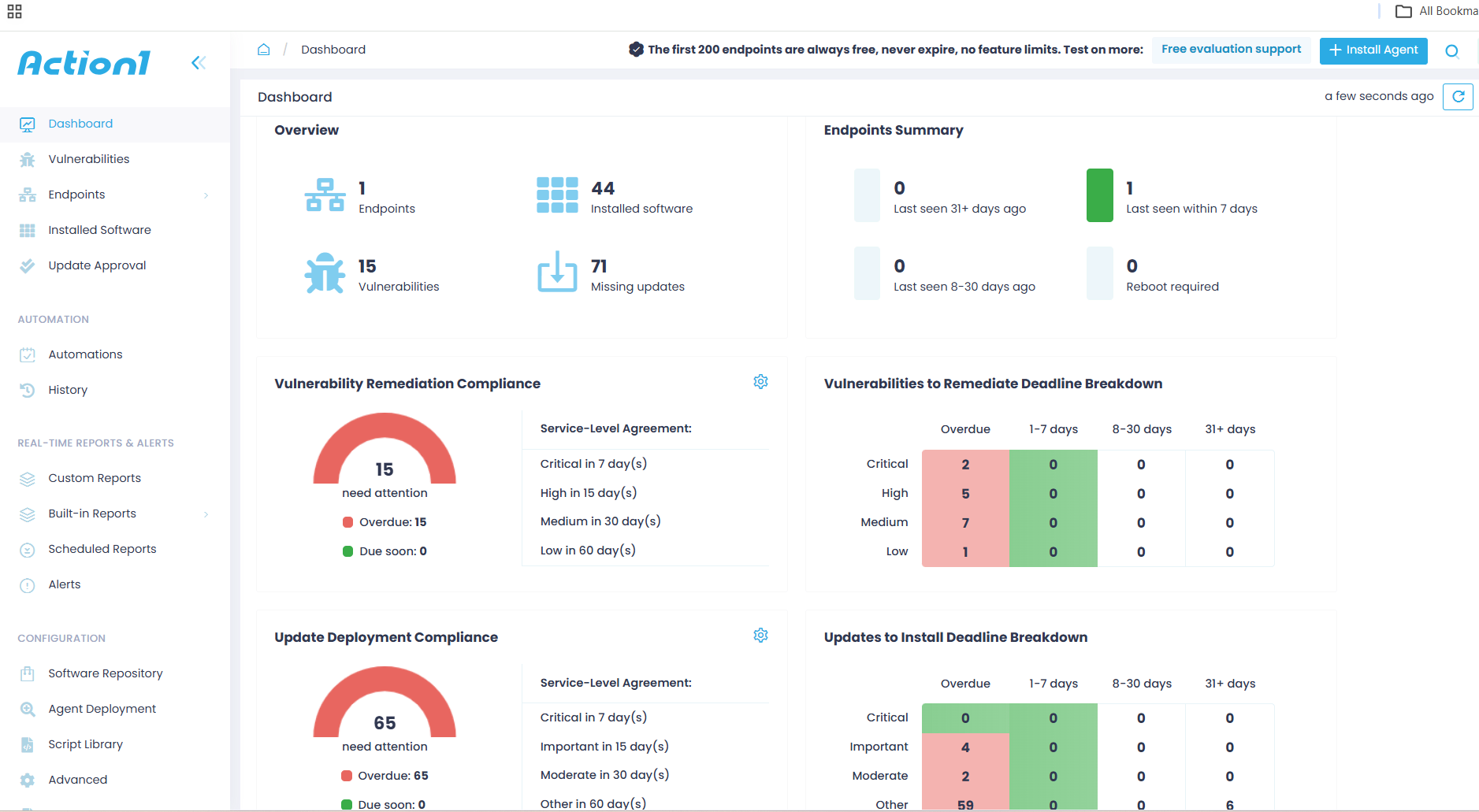
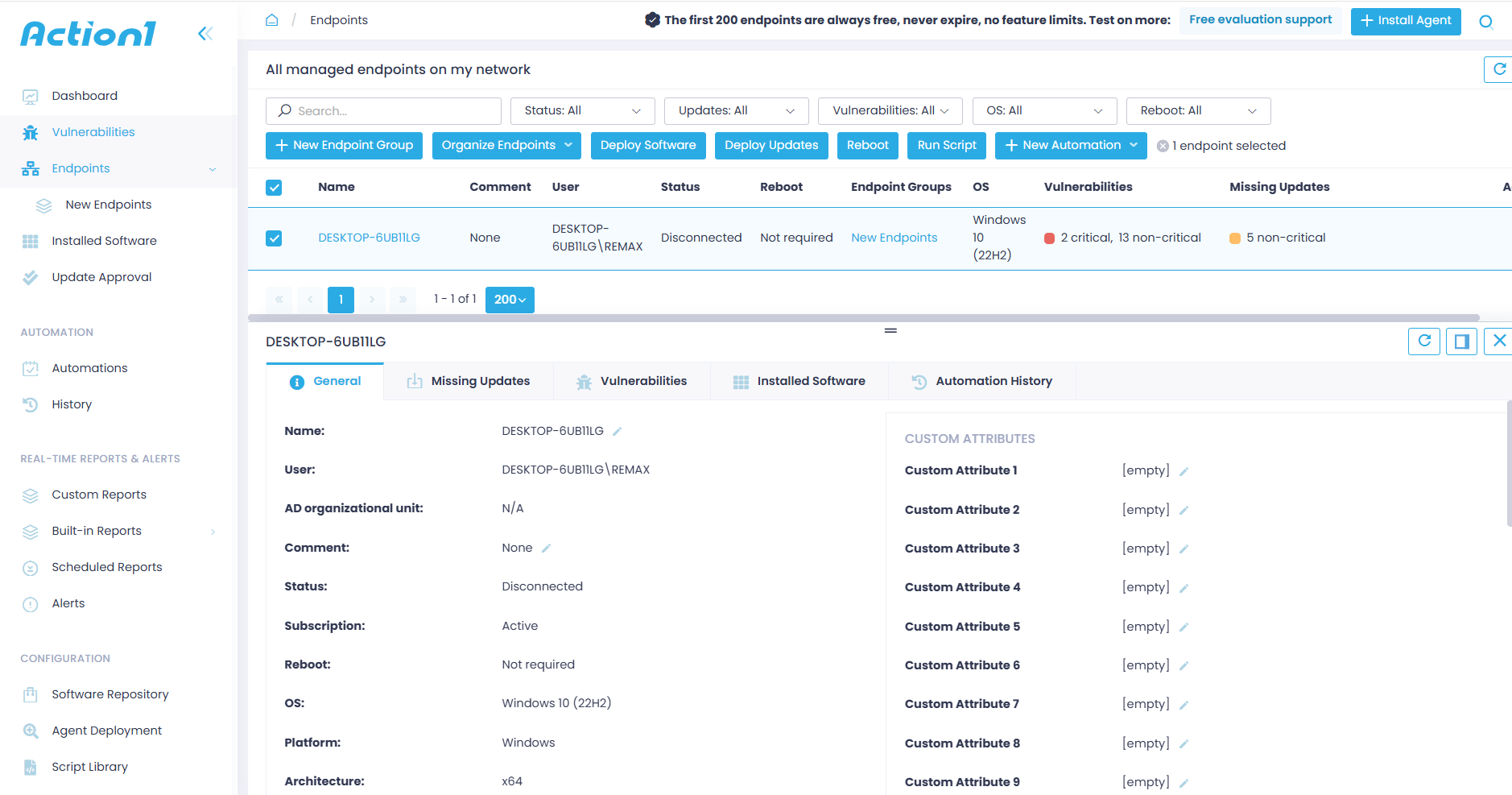
Logging into your account displays two compliance graphs: one showing Vulnerability Remediation Compliance and one showing Update Deployment Compliance, both updated in real time. Each graph shows you exactly how many vulnerabilities and missing updates need your attention right now, broken down by severity and SLA deadline, so you can see at a glance what’s overdue, what’s due soon, and whether you’re on track to meet your compliance targets. That way, you always know exactly where you stand and what needs your attention first. From there, through the advanced automation and built-in vulnerability remediation capabilities, you can start deploying the missing patches across your vulnerable systems right away.
Automated OS and Third-Party Patching
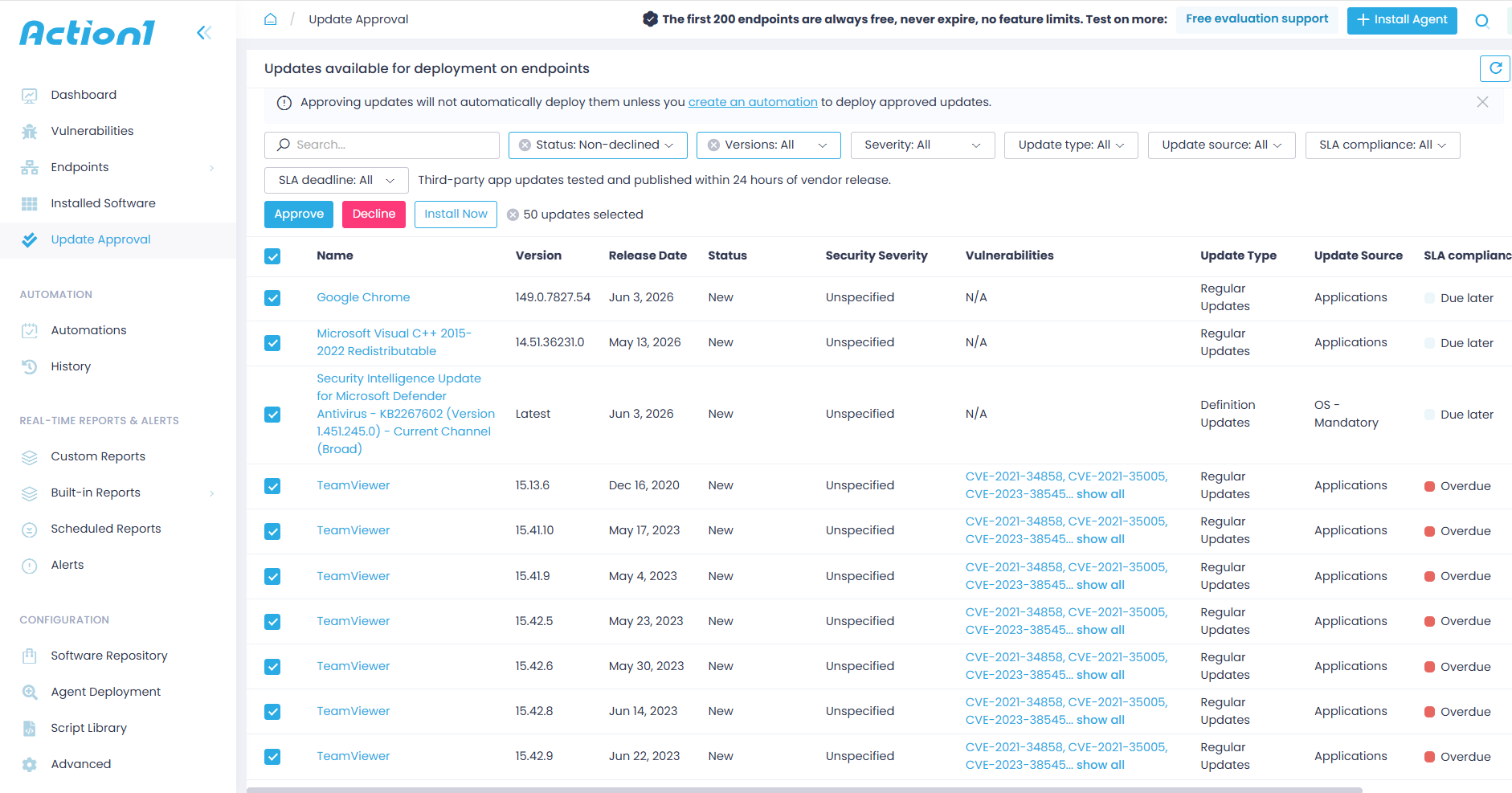
Action1 automates OS and third-party patch management, from vulnerability identification to remediation. The platform identifies software vulnerabilities in real time across your Windows, macOS, and Linux systems and applications, then prioritizes them based on severity and detects the missing patches that address them. From there, you can start shaping the patching process the way you want.
You can create regular and emergency maintenance windows using update rings. This feature allows you to create groups of endpoints, set success metrics and deployment counts, and patch all your systems in stages, where only reliable patches meeting those metrics progress to the next ring containing more endpoints, while problematic ones get stopped automatically.
This ensures vulnerabilities get remediated without delay, unplanned downtime risks are minimized, and all of that with almost no manual effort on your part. On top of that, you have the flexibility to decide when patches start deploying based on what works best for your organization, and you have complete control over reboot management too. In short, Action1 gives you the opportunity to shape and control the entire process your way, while the platform follows your configuration and automates the tedious, manual, and exhausting work time after time.
Risk-Based Vulnerability Remediation
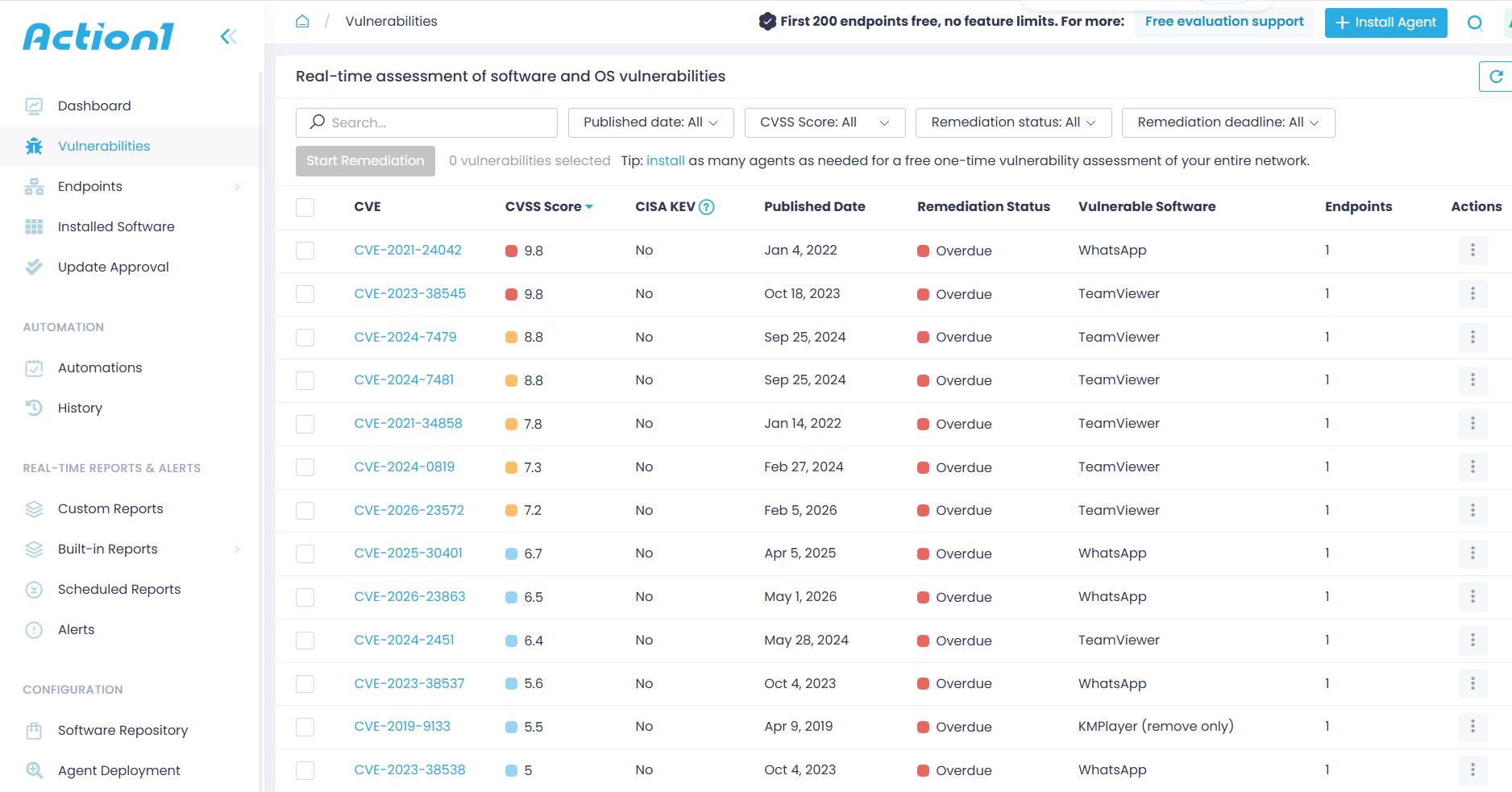
The platform uses multiple sources to give you the most accurate prioritization. It considers whether the vulnerability is actively exploited in the wild, pulls data from the CISA KEV catalog, cross-references it against the NVD, and factors in the CVSS score of each flaw. But it doesn’t stop there. Asset criticality and business impact are part of the equation too, so the most dangerous vulnerabilities on your most critical systems always get addressed first, not just the ones with the highest score on paper.
The result is a prioritized remediation queue that tells your team exactly what to fix, in what order, and why. No guessing, no manual cross-referencing across multiple databases, and no wasted time patching low-risk flaws while a critical actively exploited vulnerability is sitting there waiting.
Cloud-Native Patch Management
Action1 is built on a cloud-native architecture, meaning it works perfectly across on-premises and remote endpoints, including desktops, laptops, virtual machines, servers, and cloud workloads. Setup takes minutes. No hardware, no infrastructure, no complex configuration. You just have to install a lightweight agent on each system you want to manage, and from that moment on, you get complete control and continuous visibility over that endpoint.
No VPN is required either, which is a bigger deal than it sounds. Anyone who has managed patching through a VPN knows exactly what that headache looks like. With Action1, you can open your browser, log into your account, and monitor, manage, and secure your devices by deploying the latest patches, whether they’re on the next floor or on another continent, thousands of miles away.
On top of that, Action1 uses peer-to-peer patch distribution to keep your bandwidth under control. The update gets downloaded once to a single endpoint and then shared locally across every other device on the same network, so if you have 1,000 endpoints in one location, that patch downloads once, not 1,000 times. And because it’s cloud-native, it scales from 50 endpoints to 50,000 without a single infrastructure change on your end.
Patch Compliance Reporting and Audit-Ready Evidence
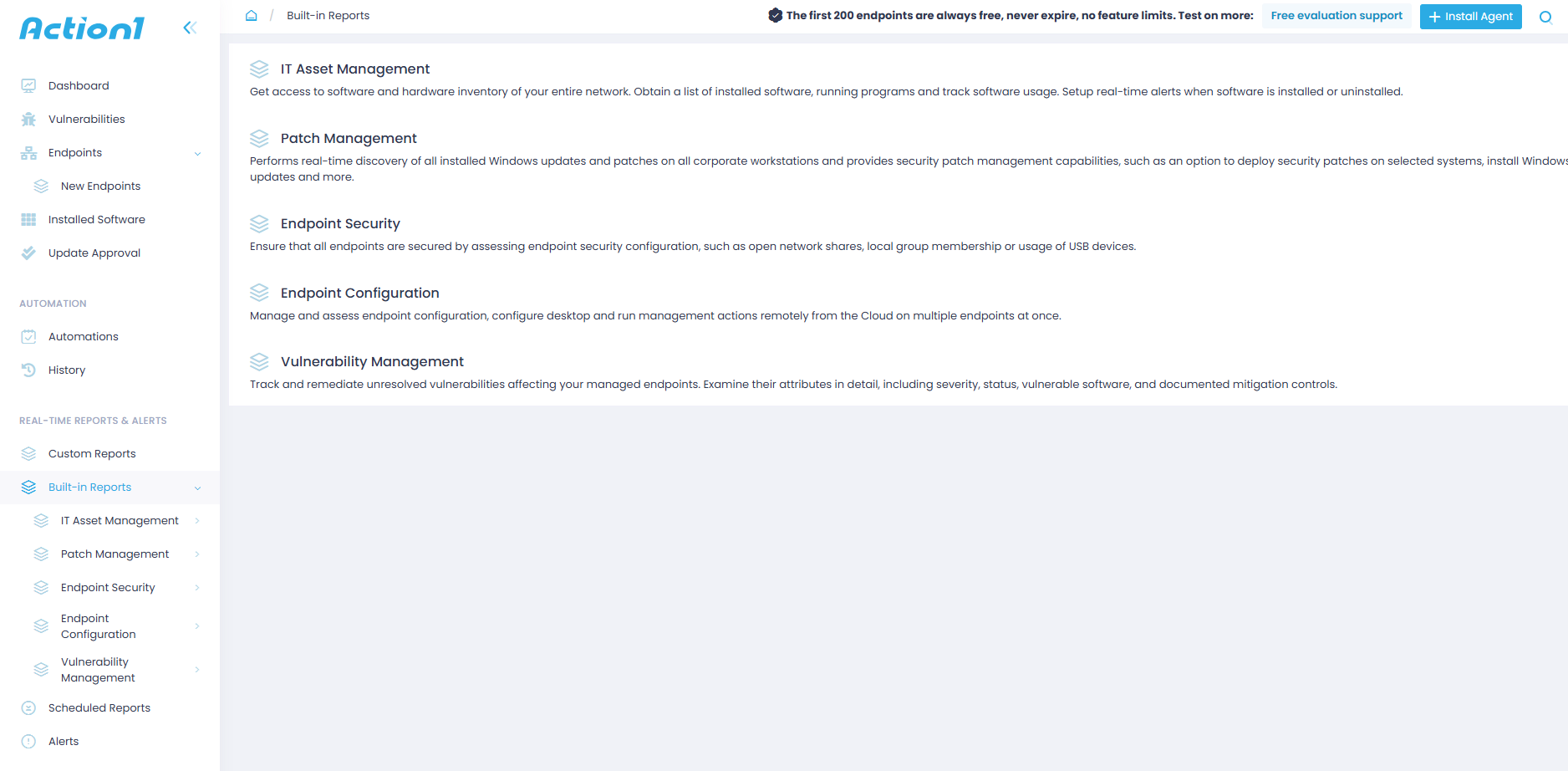
Action1 generates audit-ready reports with just a few clicks, covering everything an auditor would ask for, like which vulnerabilities were found and fixed, on which endpoints, when it happened, what succeeded, what failed, and whether any exceptions were granted and why. The data stays current in real time, so you’re never caught off guard when someone comes asking for evidence. You can use the 100+ built-in customizable report templates to cut the time spent on preparing regulatory documentation down to minutes.
Remote Endpoint Patching Without VPN Dependency
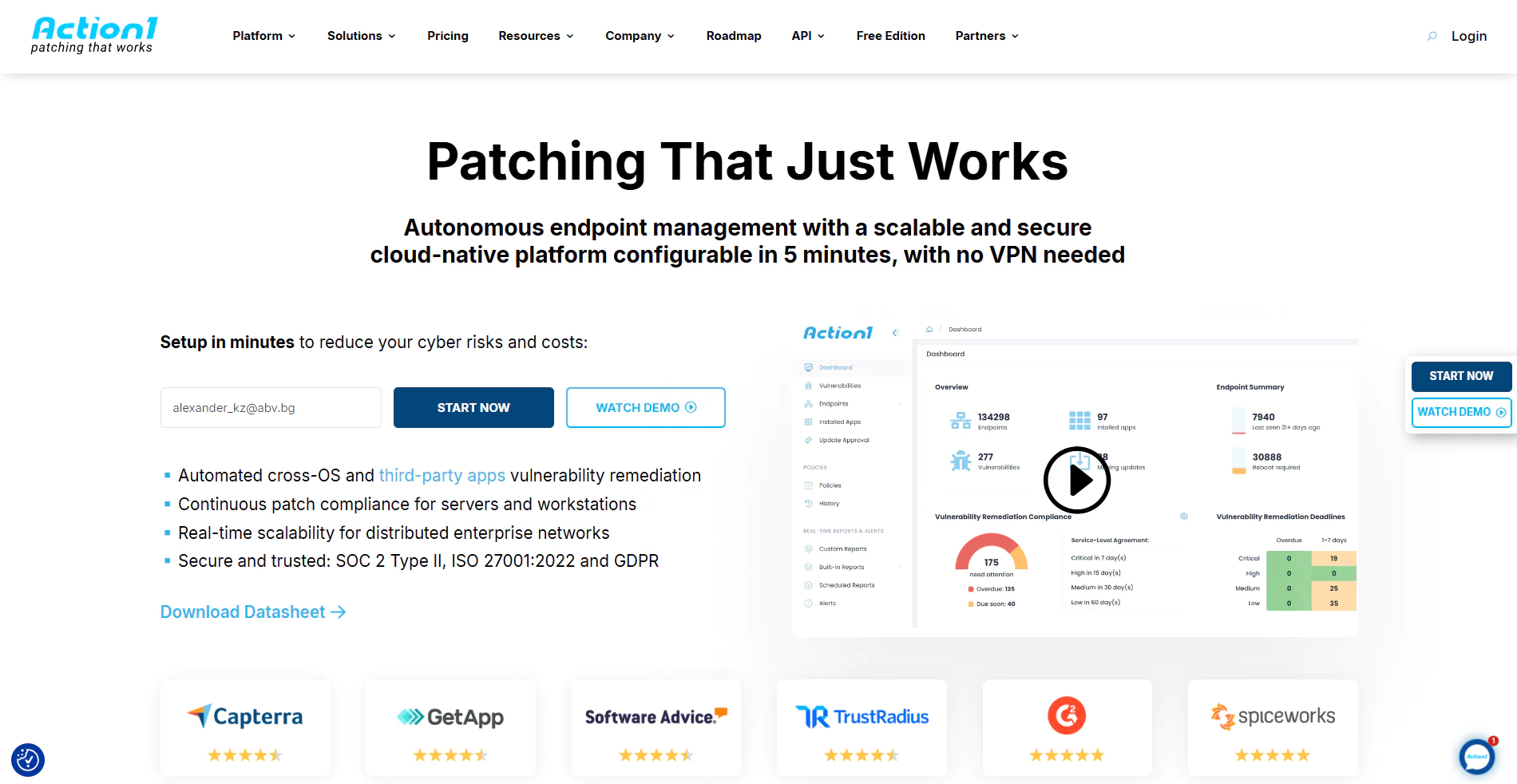
You don’t need a VPN anymore. Install a lightweight agent on each endpoint, and you’re done. From that moment on, you can monitor, manage, and patch every system in your environment from anywhere, at any time, directly in your browser. Windows, macOS, Linux, and third-party patches all deploy with ease, and the best part is that the platform automatically catches up any endpoint that was offline during the maintenance window the moment it reconnects. No blind spots, no weak links, no extra effort on your part. The agent handles everything, and it just works every single time.
Frequently Asked Questions
What is a Good Patch Compliance Rate?
A good patch compliance rate starts at 95% and above. Achieving 100% is always the target, but it’s not always achievable within the expected timeframes. That percentage directly depends on three things: your patch success rate, your speed of deployment, and your endpoint coverage rate. That last one trips up more teams than you’d think. You can have a near-perfect success rate and fast deployments, but if a chunk of your endpoints aren’t enrolled in your patch management program, your overall patch compliance rate will never reflect reality. With that in mind, if you want the highest possible patch compliance rate, you need to find the right automated patch management system that can speed up the process by providing 360-degree visibility, real-time monitoring, flexibility, advanced automation, staged deployments, and advanced reporting.
Can Patch Compliance be Automated?
Yes, patch compliance can be automated by using a patch management platform. These platforms are designed to automate each step of the patching process, from asset discovery and vulnerability identification to missing patch detection, testing, deployment, and report generation. Platforms like Action1 take it a step further by offering autonomous patch management capabilities with full cross-platform support across Windows, macOS, Linux, and third-party applications, where you configure the process the way you want it, and the platform does everything else. Updates get rolled out in stages and progress to the next endpoint group only when specific success rates and deployment counts are met. If they aren’t, they get stopped before spreading organization-wide.
When all your endpoints are continuously monitored, offline systems get patched upon reconnection, and you have 100+ built-in customizable report templates at your disposal, patch compliance can be almost entirely automated. Being brutally honest, the one thing that still needs manual intervention is preparing regulatory paperwork, but as we said, with these templates in hand, you can do that literally in minutes.
How Does Patch Compliance Reduce Cybersecurity Risk?
Patch compliance reduces cybersecurity risk by ensuring all your desktops, laptops, servers, virtual machines, and any other endpoints used across your organization are up-to-date, and specifically that their operating systems and third-party applications are running the latest software versions with known vulnerabilities addressed. When there are no known vulnerabilities across your systems, your attack surface is minimized, and the risk of falling victim to a cyberattack is significantly reduced. Hackers can’t penetrate your network by exploiting an unpatched flaw, but you can still experience a successful cyberattack through phishing, viruses, and malware. So yes, maintaining patch compliance reduces your cybersecurity risk, but it won’t make you immune to hackers’ nasty attacks.
What Patch Compliance Really Comes Down To
Effective patch compliance isn’t just a technical checkbox. It’s the documented, verifiable proof that your organization identified every vulnerability, deployed every required patch on time, and handled every exception properly. Without that proof, it doesn’t matter how good your patch compliance rate looks on your dashboard.
The process itself isn’t complicated. Asset discovery, patch inventory, vulnerability assessment, patch prioritization, deployment, verification, and reporting. Do each of those consistently, and frameworks like PCI DSS, HIPAA, SOC 2, GDPR, CIS Controls, and the Essential Eight take care of themselves.
The common challenges are real, incomplete inventories, offline endpoints, legacy systems nobody wants to touch, unclear ownership, and the gap between documented compliance and actual security. But every single one of them has a solution, and most of those solutions come down to two things: automation and documentation.
A good patch compliance rate starts at 95%. Getting there requires complete endpoint visibility, a defined patching policy, SLA-based prioritization, staged deployments, and audit-ready reporting. Track your patch compliance rate, mean time to patch, patch success rate, and endpoint coverage rate, and you’ll always know exactly where you stand before anyone asks.
Patch compliance won’t make you immune to every cyberattack. But an unpatched known vulnerability can ruin your business, bring you hundreds of thousands of dollars in regulatory fines, leave stains on your reputation that can’t be washed out, shrink your client base and revenues, and, in worst-case scenarios, become the reason for a business shutdown.
Action1 can help you avoid all of that by turning patch management into a fully autonomous process, where vulnerabilities get identified across Windows, macOS, Linux, and third-party apps and remediated following your configuration. You set the rules, and Action1 does the rest. Audit-ready reports can be generated in minutes and exported directly to the right people. Action1 uses a P2P patch deployment model, offers a private and secure software repository, patches offline endpoints upon reconnection, and comes with 100+ built-in customizable report templates, along with many more useful features, all with the main goal of helping you remediate vulnerabilities faster, safer, and with fewer business disruptions.
Action1 just works. Visit our website, create your account, deploy the agent, and start protecting your business and building trust in the eyes of your clients and auditors. The cloud-native platform needs no VPN or additional hardware, it’s deployable in under 5 minutes, and the best part is that it’s free for your first 200 endpoints, fully loaded, forever. Don’t reach for your credit card. You won’t need it to start with Action1. You’ll only need it when expanding above the free tier, but of course at a gradually lower price as your endpoint count grows.