






If you are in a hurry – here is a TL;DR & Summary of main key points
- UEM centralizes management for laptops, desktops, mobile devices, servers, IoT, and cloud workloads
- It combines MDM, MAM, EMM, patching, policy enforcement, and security controls
- UEM supports remote, hybrid, BYOD, kiosk, frontline, and corporate-owned devices
- Key benefits include visibility, automation, compliance, patching, and Zero Trust support
- Core features include enrollment, configuration, app control, patching, remote wipe, reporting, and scripting
- UEM reduces tool sprawl and enforces consistent policies across operating systems
- Best practices include full asset inventory, data separation, automation, user education, and privacy-aware BYOD policies


What is Unified Endpoint Management?
Unified Endpoint Management (UEM) is an enterprise technology framework for managing, securing, and deploying software across all endpoint devices in an organization. The term “Unified” reflects the convergence of multiple disciplines into a single solution, such as Mobile Device Management, Mobile Application Management, and Enterprise Mobility Management. UEM provides a centralized approach to manage all kinds of devices, including laptops, desktops, smartphones, tablets, servers, cloud workloads, and IoT devices. IT administrators can configure devices, enforce security policies, deploy applications, monitor compliance, and respond to threats, all from one platform.
UEM provides centralized visibility and control; administrators can view the status of all devices in real time, including health, installed applications, security posture, and user activity. From the same console, administrators can push security updates, lock or wipe devices’ data, troubleshoot issues, and enforce compliance policies. UEM supports diverse devices in a fast-paced work environment, with employees using a mix of operating systems, including Windows, macOS, Linux, Android, and iOS. As UEM platforms are usually cloud-based, they can support any device from anywhere. As long as the device has an internet connection, it remains under the corporate policy’s management and protection.
Why UEM Matters in Modern IT?
The shift towards remote and hybrid work has fundamentally increased the number of endpoints and how they are managed. Employees now access corporate resources from various locations and networks, with multiple devices simultaneously, such as laptops, tablets, smartphones, and personal devices, all accessing corporate resources from home networks, coffee shops, airports, etc.
Endpoints are the primary target of modern cyberattacks, as attackers gain initial access to corporate networks through compromised endpoints. Threat actors infect endpoints with malware and ransomware, use credential-harvesting techniques to escalate privileges, and ultimately engage in lateral movement to exfiltrate data from critical servers.
UEM mitigates these risks by ensuring that every managed device maintains a consistent, verified security posture by running vulnerability scans, deploying missing patches in a timely manner, allowing only approved software to install, and enforcing encryption and access control policies.
Traditional endpoint management often involves multiple disconnected tools, each handling a specific type of endpoint. This approach not only adds operational complexity but also inconsistent policy enforcement, such as certain security policies being enforced on Windows devices but not on macOS or Mobile devices. Regulatory compliance requirements such as GDPR, HIPAA, PCI DSS, and SOC 2 mandate consistent data protection and access control across all systems that access sensitive information. UEM enables organizations to define policies once and apply them uniformly across the entire endpoint ecosystem.
Core Value of UEM
UEM delivers comprehensive visibility across all endpoints, providing complete insights into device health, compliance status, and user activity. This visibility enables security teams to proactively detect issues early and take corrective actions before problems escalate. Its centralized policy enforcement allows organizations to define policies in a single location and enforce them uniformly across the entire endpoint fleet. UEM streamlines the entire lifecycle of endpoint devices from provisioning and onboarding of new devices, efficient deployment of applications and updates, and secure offboarding of outdated devices. By integrating management and security features, UEM implements Zero trust architecture that ensures continuous verification before granting access to sensitive data. By reducing manual efforts through automation, security teams can be freed up from repetitive tasks and focus on strategic tasks and anomaly investigations.
What is the Business and Technology Context Behind UEM?
Changing Nature of Enterprise Endpoints
Modern organizations no longer manage a simple fleet of desktop PCs; they now manage an increasing number of endpoint types. Now endpoints include desktops, laptops, smartphones, tablets, IoT devices, and cloud-based workloads, i.e., virtual machines and Containers. Work from home and hybrid working models have forced IT teams to manage different kinds of hardware and operating systems on different device types such as Windows, macOS, Linux machines, Android, and IOS smart devices.
Moreover, endpoints are no longer confined to corporate perimeter-based networks; remote employees now access corporate resources from all over the world. A device may be working on a secure office LAN in the morning, on a public coffee shop Wi-Fi network at lunchtime, and at night on a home network with limited security.
Rise of Work-from-Anywhere Operations
Organizations nowadays must maintain the same network performance and access quality for employees working in hybrid models. Remote work depends on reliable, secure access to corporate resources such as email, SaaS applications, and access to internal servers. These requirements include secure authentication, endpoint compliance checks, and encrypted communication channels, and require a unified solution such as UEM to ensure devices remain compliant and trusted when accessing sensitive resources.
Bring your own device (BYOD) policies allow employees to use personal laptops and smart devices for work. While this improves flexibility and reduces hardware costs, this approach increases risk around sensitive data and increases the complexity of implementing security controls. Users expect the same performance, access rights, and security protection whether they are in the office, on a public, or a home network. UEM provides this experience with silent application deployment and access control while maintaining security standards.
Escalating Endpoint Threat Landscape
Every endpoint connected to the corporate network is an opportunity for attackers to infiltrate it, unless it is properly secured. Cyber criminals target endpoints through phishing emails, malicious download links, and drive-by browser exploits.
Devices that are not visible to security teams or are not secured with controls like access control, encryption, and security configuration monitoring are practically security risks, where a security breach is just waiting to happen. Personal devices are less likely to have enterprise-level endpoint protection and can become easy targets of attacks as they may not have up-to-date OS and application versions and patches. They might have shared access at home, and if any malware infects the device there, it can easily move into the corporate network if the device is not properly assessed before granting access.
When a security incident occurs, such as a device being lost, stolen, or compromised, IT teams need to respond immediately and must have ways to connect to or communicate with the device. With UEM, IT can remotely wipe data, lock, or isolate devices within minutes of a reported incident, regardless of their geographic location.
How has Endpoint Management Evolved from MDM to UEM?
Early Phase: Mobile Device Management (MDM)
Mobile Device Management (MDM) was the first dedicated response to the adoption of mobile devices in enterprises. The goal was to have a certain level of control over corporate-owned smartphones, including BlackBerry devices, early iPhones, and Android devices. Admins can force settings such as Wi-Fi configurations, disable device cameras, restrict Bluetooth pairing, enforce lock-screen and PIN complexity, VPN profiles, and email account settings. The core capabilities of MDM covered the full lifecycle of a corporate device, from enrollment and encryption enforcement to application whitelisting to control application usage, monitoring device location for loss recovery, and remote lock or data wiping. MDM provided excellent control over hardware configurations; however, it was device-centric, and it did not differentiate between corporate and personal data. It was like an “all or nothing” approach; if a device was wiped for security reasons, users’ personal data was also lost.
Shift Caused by BYOD
The adoption of flexible Bring Your Own Device (BYOD) policies disrupted the MDM paradigm. Employees began bringing their personal devices, i.e., laptops, smartphones, tablets, to work and required the same access to corporate resources. The traditional MDM approach was designed for corporate devices and provided total control, which was too intrusive for personal devices. Privacy became a major concern; organizations needed a device management model that could protect corporate data, respect employees’ data privacy, and avoid legal and compliance risks. Industry was forced to shift from managing the entire device to managing the corporate-owned data within it.
Mobile Application Management (MAM)
Mobile Application Management emerged as the answer to privacy challenges due to the BYOD culture. It shifted the focus on mobile device management from controlling the device operating system to the individual applications used for work. With MAM, IT can manage access to corporate apps (e.g., email and document editors), take screenshots of application data, copy data, block sensitive documents from personal cloud storage, and remotely wipe only corporate data without affecting personal data. The key innovation in MAM is the logical separation of corporate and personal data, which allows Security teams to control corporate data while users retain full control over their personal apps and data. While MAM is effective at logically separating corporate and personal data, it depends on application compatibility, struggles to enforce policies outside managed apps, and its app-by-app control model becomes difficult to scale when there are too many applications to manage.
Enterprise Mobility Management (EMM)
Enterprise Mobility Management emerged as a unified suite that combined MDM’s device-level control and MAM’s application-level policies, and additional Mobile content Management (MCM) with Mobile Identity Management (MIM). It was focused on the mobile workforce to ensure that data was secure regardless of where the device was physically located, i.e., off-site or on-site. EMM platforms are integrated with identity providers such as Active Directory or Azure AD to make access decisions with more context to grant or restrict access based on device compliance status, user role, and network location. It enhanced data protection through identity-based, access controls, and comprehensive application-level policies, which not only improved employees’ experience but also respected their data privacy. One of the major limitations of EMM is its mobile device-centric approach; it does not fully address traditional endpoints like desktops and laptops, which require organizations to add a separate tool for Windows and macOS devices.
Emergence of UEM
Unified Endpoint Management solutions were born to converge the strengths of MDM, MAM, and EMM without their limitations, to provide a single solution that covers all device types, i.e., iOS, Android, Windows, macOS, ChromeOS, Linux, and even IoT devices. IT teams no longer need to maintain separate infrastructure for mobile device management, traditional desktop, and server management. A single set of security policies can be applied across the entire endpoint ecosystem. For example, a conditional access policy can state that no device can access the company database unless it is encrypted and running the latest OS update. Modern UEM platforms can be integrated with Endpoint Detection and Response (EDR) and Extended Detection and Response (XDR), Security Information and Event Management (SIEM) tools. This integration capability adds UEM into an organization’s security architecture, where endpoint management and security work together in real time.
What does UEM Cover?
Types of Endpoints Managed by UEM
Unified endpoint management software provides centralized control over the full range of endpoint devices employees can use to access business data and applications.
- Smartphones: used for work tasks such as email, messaging, and application access.
- Tablets: Frequently used for presentation or field work.
- Laptops: Most common enterprise endpoints for remote and office employees.
- Desktop computers: traditional office workstations
- Printers: Network printing devices that could be managed for their firmware updates and access control.
- IoT and smart devices: From smart thermostats to industrial sensors, UEM provides a framework to monitor their health and connectivity status.
- Virtual and specialized endpoint types: Virtual desktops, rugged devices, shared terminals, and industry-specific hardware.
Operating Systems and Platforms Supported
Windows: The most dominant enterprise operating system, UEM can handle patch management, policy enforcement, and large-scale application deployment on different versions of Windows devices.
macOS: UEM utilizes Apple’s native management framework to handle configuration profiles, software distribution, and compliance status.
iOS: For iPhones and iPads, UEM can manage app permissions, device restrictions, secure email, and remote wipe capabilities.
Android: Most widely used mobile OS globally, UEM can support Android enterprise for work profile, enterprise mobility policies, app deployment, and policy enforcement.
Linux: common in development and server environments, UEM can provide script-based management, compliance status reporting, and implement similar security baselines as consumer operating systems.
ChromeOS: Mostly used in the education sector, retail shops, or lightweight enterprise environments, UEM can enforce browser settings, device lockout policies, and device tracking.
Deployment Models and Ownership Scenarios
Unified endpoint management tools must be flexible enough to handle different levels of privacy and security control functionalities depending on who owns the hardware.
Corporate-owned devices: UEM can enforce comprehensive policies, monitoring, remote lock, and wipe capabilities without restriction on corporate-issued devices.
BYOD environments: Employees’ personal devices can be used for work, and UEM can use a secure work container to apply security policies while preserving the privacy of personal apps and data.
Kiosk devices: these are single-purpose devices, such as self-service terminals or check-in stations, that can be locked to a single approved application or tightly restricted through UEM.
Frontline and field devices: Rugged or shared devices used by workers in warehouses, factories, or in the field, which can be fully controlled by UEM for a simplified user experience and application access.
Remote and hybrid user devices: Employees working from home or across multiple locations need devices managed over the internet, and UEM can enable secure remote support, patching, and policy enforcement.
How does UEM Work?
Centralized Dashboard Model
At the heart of UEM is a centralized dashboard, a unified management console that acts as the nerve center for all endpoint operations. A single management console to manage different types of devices and operating systems, such as Windows patches, macOS configuration, and mobile security. Through a centralized dashboard, IT teams can monitor device health, deploy updates, enforce security settings, and troubleshoot issues across the organization. The dashboard provides a complete view of every enrolled and connected endpoint in the organization, regardless of location, which is critical in hybrid and remote work environments. Modern UEM solutions continuously update device health and security posture information in real time. Security teams can instantly see whether a device is compliant, missing patches, running outdated software, or showing any security risk.
Device Discovery and Visibility
UEM platforms maintain an inventory of all authorized and enrolled devices connected to corporate networks. These known devices are identified through the enrollment process, directory integrations, or through authentication systems. UEM tools can scan the network or can be integrated with directory services to find shadow IT devices that have access to the corporate network but are not yet enrolled or managed by UEM. Unlike traditional periodic scans, UEM updates inventory continuously, as accurate inventory is the foundational requirement of security, compliance, and asset management.
Unified Policy and Control Framework
UEM provides value beyond discovery and visibility; it is a powerful tool to enforce consistent, enterprise-wide policies across every device type and operating system. Through the centralized console, administrators can configure Password rules, encryption requirements, Wi-Fi settings, VPN profiles, and application restrictions. Security controls can be enforced across smartphones, laptops, desktops, and tablets from the same platform. UEM allows organizations to align with security frameworks like NIST or CIS. Standardized compliance checks can be enforced against devices through these benchmarks, such as patch levels, antivirus status, operating system versions, and security configuration baselines. Without UEM, maintaining consistent policies across different management tools for each device type creates the possibility of human error, inconsistent policies, and administrative overhead.
Automation and Orchestration
Modern UEM platforms can automatically perform routine actions such as provisioning new devices, installing software, enforcing settings, or retiring outdated assets. Automation not only reduces repetitive tasks and delays but also ensures tasks are completed consistently without relying on too much manual intervention. Administrator scans schedule workflows for updates, scans, backups, or policy enforcement during approved maintenance windows. One of UEM’s most powerful features is automatic response for security incidents in real time. Without waiting for human analysis and intervention, if a device risk score suddenly exceeds the threshold level, UEM can isolate the device from the corporate network, notify the security team, and initiate predefined remediation workflows.
What are the Core Features Capabilities of UEM?
Device Enrollment and Provisioning
Device enrollment is the first step in any UEM deployment. Before a device can be managed, secured, or configured, it must be registered with the management platform.
Self-service enrollment: Empowers users to register their own devices through a web portal or application, reducing the burden on the IT department.
Enforced enrollment: Organizations can enforce mandatory enrollment for all or select devices before they are allowed to access company resources. This ensures that only trusted and compliant devices connect to sensitive systems.
QR and Token-based methods: UEM platforms support modern enrollment methods such as scanning a QR code or entering a one-time enrollment token, which simplifies the enrollment process.
Serial/IMEI-based enrollment: Pre-registered hardware in UEM allows systems to recognize devices such as through Serial numbers, IMEI numbers, or MAC addresses. This functionality is useful for large batches of devices, like mobile and kiosk deployments.
Zero Touch and out-of-the-box setup: This method allows devices to integrate with programs like Apple Business Manager, Android Zero-Touch enrollment, or Windows Autopilot so that when devices first boot and get an internet connection, they can authenticate with the MDM server and self-configure without user interaction.
Device Configuration and Policy Management
UEM allows organizations to define and enforce configuration settings across all managed endpoints from a centralized console.
Centralized settings: IT administrators can control Wi-Fi settings, VPN profiles, certificates, browser settings, email configuration, and other device configurations from the UEM console.
Password/authentication enforcement: UEM can enforce strong passwords, PIN complexity, biometric authentication, or screen lock settings on devices to reduce the risk of unauthorized device access.
Encryption standards: UEM can enforce encryption on devices such as BitLocker for Windows, FileVault for macOS, or mobile encryption on Android or IOS devices.
Role-Based management: Different departments, user roles, or business groups can receive customized policies. For example, the finance department may receive stricter access controls, such as MFA, than contractors or temporary staff.
Application Management
Application Management enables IT teams to control which software can be installed, updated, or removed on managed devices:
Application distribution: organizations can publish only approved productivity, security, and business applications directly to managed devices.
Blocking unauthorized apps: UEM can detect and block the installation of applications that are not in the approved list. This helps prevent malware infection, shadow IT, and advanced persistent attacks.
Private app store: Organizations can publish their own private app stores from where employees can download tested and approved software.
Silent App deployment: Applications can be installed or updated in the background without user interaction, without disrupting productivity.
Removal of outdated or unwanted apps: IT teams can remotely uninstall unsupported or risky applications to maintain a consistent security posture across endpoints.
OS, Patch, and Update Management
Keeping devices up to date is one of the most important security functions of UEM.
Automated patching: The platform continuously scans devices to identify old operating system versions, missing patches, and third-party application updates such as Chrome or Zoom.
Automated patch deployment: security patches and software updates can be automatically distributed according to the defined schedules or severity level.
Firmware and software updates: Beyond just operating systems, UEM can provide automated updates for BIOS, firmware, drivers, and third-party applications.
Closing vulnerabilities: Through timely patching, UEM reduces exposure to known exploits and cyberattacks that target unpatched systems.
Security Controls
UEM provides integrated security capabilities to harden endpoints and ensure the health of the endpoint before it can be granted access to the corporate network.
MFA and Conditional Access: UEM can configure policies that require users to verify their identity with multiple factors before gaining access to the device or specific applications.
Encryption Management: UEM allows organizations to enforce encryption, either full disk or file-level encryption, on managed devices.
Firewall and antivirus update: UEM can monitor whether firewalls are active and antivirus tools are installed, updated, and functioning properly.
Web filtering and access restriction: Organizations can block malicious websites, restrict non-work-related URLs, and control internet access based on security policies.
Data Protection and Separation
UEM helps organizations separate corporate data protection and employees’ personal data on corporate-owned and BYOD devices.
isolation of work and personal data: Through managed profiles or containerization technologies built into the operating system. Files, credentials, and communications within a work-related context cannot be moved or shared into personal profiles.
Secure Containers: Managed workspaces or containers encrypt business apps, email, and files within a protected area on the device.
Privacy-respecting BYOD governance: IT can manage business data without interfering with personal data such as photos, messages, or personal apps.
Remote Support and Troubleshooting
Remote diagnostics: IT teams can review device health, logs, storage, battery status, connectivity, and system information remotely.
Remote cast and control: Support teams can view the device screen or remotely control it to troubleshoot issues faster. Administrators can transfer files, collect logs, or remove problematic files remotely.
Screen captures and session sharing: Sessions can be documented for training, compliance, or quality assurance. Recording capabilities also create an auditable record of what actions were taken on a device during a support session.
File push/Delete: Administrator can send configuration, collect logs, or remove malicious files remotely.
Ticketing Integration: UEM can integrate with IT Service Management (ITSM) solutions like ServiceNow or Zendesk to provide a full audit trail of support tickets. When helpdesk staff open a remote session, relevant ticket information, device history, and prior incidents are automatically displayed.
Lock, Wipe, Reset, and Recovery Controls
Security controls are essential for incident response and for managing lost devices.
Remote lock: UEM can instantly lock devices, requiring an administrative login to unlock.
Selective data wipe: Corporate data can be erased remotely from stolen, retired, or compromised devices.
Factory reset capability: Devices can be restored to factory default settings remotely before reassignment or disposal.
Monitoring, Reporting, and Analytics
You cannot manage what you cannot measure. UEM provides a high-level view of the entire endpoint ecosystem.
Compliance Monitoring: Administrators can track endpoint health, status, connectivity, battery health, storage usage, and security posture in real time.
Usage visibility: UEM provides insights into app usage and user behavior to help optimize licensing costs.
Device and application reports: Detailed reports help IT teams simplify software and hardware inventory management, endpoint lifecycle planning, and adherence to security policies.
Compliance monitoring: UEM continuously monitors devices to identify non-compliance, such as whether a device lacks encryption controls, is behind on patches, or has a prohibited app installed.
Operational analytics and alerting: Dashboards and alerts allow Security teams to identify trends, detect anomalies, predict potential failures, and point out devices or users that require attention before problems escalate into a security incident.
Scripting and Custom Actions
For advanced administration, UEM provides the capabilities to execute complex tasks that are not available through UI check boxes or toggle buttons in standard configurations.
- Multi-language scripting support: Administrators can use PowerShell scripts for Windows, Bash/Shell for macOS or Linux, and Python scripting for specialized tasks.
- AI-Assisted Scripting: Modern platforms increasingly use AI to help generate scripts, validate syntax, and recommend safe deployment workflows.
- Custom payload execution: Organizations can deploy custom commands, registry editing, or configuration changes through specific XML or. plist files.
Additional Administrative Controls
Modern UEM platforms extend beyond core endpoint management to specialized governance tasks.
- Certificate Management: Automatically deploy, rotate, and revoke digital certificates for secure authentication and encrypted communications.
- Conditional email access: Only compliant and enrolled devices can access corporate email systems.
- Multi-approver workflow support: UEM enables organizations to implement workflows that require approval from multiple administrators to prevent errors or insider threats.
- Real-time email alerts: Administrators can receive immediate notification about incidents, update failures, or compliance violations.
- Location tracking and geofencing: Organizations can locate assets or trigger specific actions when devices enter or leave approved geographic areas, for managed devices that support this functionality.
What is the Security Value of UEM?
Simplifying Endpoint Security
One of the biggest security benefits of UEM is the ability to simplify endpoint security management through a single, unified administrative platform. Security rules such as encryption, password requirements, and app restrictions are defined once and enforced consistently across all device types, eliminating the gaps that can arise when different tools manage different types of endpoints. UEM also reduces inconsistencies and configuration drift when devices gradually move away from approved security settings because of manual changes, missing updates, or unmanaged vulnerabilities. Another major advantage of UEM is a single layer of endpoint oversight, reducing the number of agents, consoles, and integrations that IT teams need to maintain across different management systems.
Visibility as a Security Advantage
UEM acts as a source of truth for the entire endpoint inventory and catalogs every device that attempts to access corporate resources. Devices are continuously identified that are connected across corporate networks and cloud environments, and used by remote workers. This visibility allows Administrators to view device ownerships, operating systems, patch level, encryption status, installed applications, location, and last check-in time. Such information helps organizations not only maintain an accurate inventory of all endpoints but also the accurate compliance status of each device and overall security posture.
Threat Detection and Response Support
Although UEM is not a full threat detection platform itself, it plays an important supporting role in endpoint threat response. UEM can help detect unusual device behavior such as jailbroken or rooted mobile devices, disabled encryption, repeated login failures, unauthorized software installation, and configuration changes. These indicators suggest devices may be compromised, misused, or engaged in risky behavior, requiring investigation. When policy violations or suspicious conditions are detected, UEM can trigger alerts and automated remediation workflows, e.g., it may notify the security team of an incident, quarantine a device, revoke the device access token, force a password reset, or require re-enrollment. UEM can provide IT teams with immediate remote access to managed devices to investigate device state, configuration history, application list, and users’ activity through event logs. These capabilities are crucial for forensic analysis and root-cause evaluation of a security incident.
Secure Remote Access Enablement
As remote and hybrid work models are the new normal, traditional network perimeters are becoming inefficient. UEM acts as a new guardian of security policies enforcer on all endpoints. It ensures that remote device connections are encrypted and the device itself is secure before it connects to corporate VPN or SaaS applications. Compliance status is always verified before giving access to servers with sensitive data, especially in environments where strict regulatory requirements are enforced. UEM can provide device posture data to Identity and Access Management (IAM) systems, which can evaluate the security posture of devices, such as OS version, antivirus status, certificate presence, and patch levels, to decide whether to grant full access, limited access, or no access at all.
Privilege and Access Control
UEM is essential for enforcing the principle of least privileged access on endpoints and ensuring that users can only have the necessary access they need to perform their job functions. UEM can remove local admin rights from users, restrict device functions, disable unnecessary services, block system security configuration changes, and control which users can access specific apps or data. UEM can enforce data separation in the context of logged-in users, block unauthorized data transfer to personal cloud storage or removable devices, and apply data loss prevention policies at the device that can prevent insider threat actors from misusing the system and sensitive data.
Security Through Patch and Application Control
Unpatched software remains one of the primary causes of cyberattacks. UEM improves security by providing automated and timely patching of operating systems, browsers, productivity tools, and approved applications across distributed endpoints. Application whitelisting allows users to only install approved software, which reduces the possibility of malware infections, prevents shadow IT application usage, and lowers the risk of software incompatibility that causes service downtime.
What are the Compliance and Governance Use Cases of UEM?
Simplified Regulatory Compliance
UEM enables organizations to enforce application-level and user-level access controls uniformly across all endpoints regarding regulated and business-critical sensitive data. Major regulatory frameworks such as GDPR, HIPAA, and PCI DSS mandate encryption as a requirement to protect sensitive data, and UEM allows organizations to configure full-disk encryption on laptops and built-in encryption of mobile devices. Also, UEM can control how data is accessed, stored, and transmitted on endpoints that support the data privacy and security requirements of GDPR and HIPAA. Continuous monitoring and reporting capabilities provide evidence to prove that consistent security controls are in place during audits and compliance verification.
Data Access Governance
Data governance within UEM focuses on containerization of corporate resources on endpoints to ensure that work data remains protected even when it leaves the corporate network. UEM supports identity-based and application-based access controls on endpoints to restrict access to sensitive data by only authorized users. Even on BYOD-managed endpoints, UEM creates a logical separation between personal applications and data and corporate data. Business data can be stored in encrypted corporate containers, while personal data remains separate. Unapproved or vulnerable applications can create major governance risk, and UEM can manage application usage by controlling which apps can be installed, updated, or executed on managed devices.
Auditing and Reporting Readiness
UEM continuously collects telemetry from all managed endpoints, such as device health, compliance status, application inventory, security events, policy violations, and user activity logs. This data creates a persistent, time-stamped record of all endpoints’ security posture over time in a centralized location from where comprehensive reports can be generated that serve as evidence for audits. When any security incident occurs, UEM provides the capability to collect forensic evidence to expedite the investigation and remediation process.
How does UEM Support Zero Trust?
Role of UEM in Zero Trust Strategies
In Zero Trust architecture, the location of a device, whether it is on the corporate network or outside, is irrelevant. Zero trust security operates on the principle of “Never trust, always verify,” and UEM supports this principle by maintaining a detailed security posture of each managed device, including ownership, OS version, installed software, encryption status, and health level, which are deciding factors while granting full or conditional access to a device. Before allowing access to the corporate network, UEM helps confirm that the device meets the defined trust requirements, e.g., a laptop missing security patches or a mobile phone with a disabled screen lock control may be considered untrusted and may not be allowed to connect to the network.
Least-Privilege Provisioning
The least privilege principle is the core philosophy of Zero Trust architecture that gives users and devices only the minimum level of access necessary to perform their tasks. UEM supports this by enforcing role-based access controls and allowing only approved, necessary applications, configurations, and permissions. UEM provides mechanisms to onboard only verified users and approved devices in the environment and maintains control over managed devices throughout their lifecycle. Access in a Zero Trust environment is not permanent. UEM helps in this regard by continuously validating whether a user or device should still have access based on conditions such as if the device is still compliant, the user is still logged in from an allowed location, the device is not reported lost or stolen, or if any suspicious activity is detected, the session can be terminated automatically.
Compliance-Driven Access
UEM integrates with Identity providers (IdPs) and creates a gatekeeping mechanism. For example, when a user tries to access an application, such as Outlook or Salesforce, the IdP asks UEM whether the device from which the user is attempting to access the resource is a compliant device. Now, if the device posture meets the predefined conditions, e.g., if the device is enrolled, the EDR agent is running, the latest OS version is installed, VPN is connected, and access is granted; otherwise, access can be denied. UEM also provides granular control over managed endpoints beyond just network access; it can enable security controls in the device itself, on the applications running on the device, and communication channels such as email or collaboration tools.
How does UEM compare with UEM, MDM, and EMM?
UEM vs. MDM
MDM was the first generation of enterprise endpoint management and was limited to mobile operating systems such as iOS and Android. It handles tasks such as remote wipe, enforcing passcodes and screen lock settings, Wi-Fi configuration, VPN and email settings, applying rest, and monitoring device compliance status. Whereas UEM expands device management beyond just mobile devices by providing a management framework for all kinds of endpoint categories, including smartphones, tablets, Windows laptops, macOS systems, Linux systems, desktops, and cloud workloads. UEM also provides granular control over device settings and applications, as well as a unified platform to apply consistent security policies across all endpoints.
UEM vs. MAM
Mobile Application Management (MAM) shifted the focus from the hardware to software; it was designed to secure business applications and corporate data rather than fully managing the endpoint. MAM allowed managing approved business applications, containerizing corporate data, applying restrictions on data transfer, and selective data wipe capabilities. IT was especially useful in BYOD environments, where employees’ privacy concerns required flexible security management policies. While MAM just focuses on application management, UEM provides full endpoint management, including device configuration, OS and application patching, storage encryption, integration with Identity providers, hardware health status of the endpoint, and integration with Threat management tools. UEM ensures that not only are applications secure, but the entire device can be trusted, depending upon its health and compliance status.
UEM vs. EMM
Enterprise Mobility Management evolved from MDM and was the intermediary stage that combined MDM and MAM together, but it was focused on Mobile devices. EMM was still largely focused on mobile workers, and mobile operating systems and organizations had to manage separate tools for on-site desktops and laptops. UEM eliminates the need for separate tools and teams for mobile devices and traditional workstations. UEM expands endpoint management coverage to corporate desktops in offices, remote employees’ laptops, shared workstation systems, retail POS terminals, and virtual desktops.
UEM and Endpoint Detection/Protection Relationships
UEM primarily focuses on the management of endpoints, such as configurations, patch updates, and enforcing security policies for compliance and data governance. Its core responsibilities include device, enrollment, policy enforcement, access readiness check, asset visibility, and the whole lifecycle of an endpoint from provisioning to decommissioning. UEM’s purpose is to reduce endpoint-related risks by maintaining endpoint security posture, whereas Endpoint Detection/Protection security tools, such as Endpoint Protection Platforms (EPP) and Endpoint Detection and Response (EDR) tools, act as a threat prevention and response layer. These tools look for active malware, suspicious activity patterns, Advanced persistent attacks, and lateral movement. What is changing rapidly is the convergence of these two layers; modern UEM platforms are feeding device health signals to security tools through APIs and connectors that help accelerate incident investigation and remediation actions.
What are the Best Practices for Effective UEM Implementation?
Build a Comprehensive Endpoint Strategy
A successful UEM deployment starts with a comprehensive inventory of all types of endpoints:
Inventory all device types: Begin with a full inventory of every device category that connects with corporate resources, e.g., laptops, desktops, employee-owned phones or laptops, shared kiosks, IoT devices, and field devices.
Users’ context awareness: Gather knowledge about how employees, contractors, and partners access cloud applications from home networks, public networks, and fixed locations.
Business needs: Create security and access policies that support productivity and business needs. For example, if a field worker needs a camera to scan or take pictures of products, the camera restriction of mobile devices will fail in business operations.
Separate Corporate and Personal Data
Containerization & work profiles: enforce creation of separate workspaces on endpoints to isolate corporate applications and sensitive data from mixing with personal data in BYOD scenarios.
Respect Employees’ Privacy: Employees are more likely to adopt UEM enrollment if they know the company has limited or zero visibility into personal data, such as personal messages or browser history.
Reduces liability: By separating corporate data and clear device usage policies, organizations can enable selective data wipe functionality on managed devices without affecting personal files or apps.
Include Content and Application Governance
Application control: Instead of letting users download and install any application, implement application whitelisting to ensure users can only install licensed and secure versions of software.
Malware Mitigation: By restricting the usage of unsafe applications, organizations can reduce shadow IT risk where users download and execute unapproved tools that can infect the endpoint.
Productivity Boost: UEM can automatically provision users with the required software when they join, according to their job role. However, implement a self-service portal so that users can request any software that they need, and UEM can silently install it after workflow approval.
Establish Troubleshooting Processes
Escalation paths: UEM-managed environments face new categories of support issues, such as enrollment failures, compliance policy conflicts, managed application crashes, certificate expiration, and remote access that depend on device management state rather than simple network or configuration issues. Define helpdesk tiers and ownership of device groups or regions, applications, so that these kinds of issues can be resolved quickly.
Response procedures: Define standard playbooks and standardized procedures so that helpdesk teams can easily resolve common issues and complex requirements, and investigate security incidents. Integrate UEM with ITSM, EDR, and SIEM tools so IT staff can get the support they need to resolve issues.
User Education: Establish communication channels for feedback, and conduct regular training and awareness programs to educate end users on how to request services or report security incidents to IT or security teams.
Focus on Seamless User Experience
Zero Touch Enrollment: Employees’ first experience with UEM is enrollment. Use zero-touch enrollment programs like Apple Business Manager, Android Zero-Touch, or Windows Autopilot to automate the onboarding process.
Feedback mechanisms: Regularly survey users about their device performance. If the UEM agent or policies are slowing down endpoints, the UEM configuration needs to be tuned to provide maximum possible performance on endpoints without compromising security.
Balanced approach in usability vs security: Security policies that users cannot practically comply with may produce the best security posture, but slow down productivity, and users try to find workarounds that might kill the whole point of security control. For example, an overly aggressive session timeout policy may prompt users to leave their devices unlocked to avoid constant re-authentication.
Use Automation Intelligently
Automate routine tasks: implement workflows that, after approval, can trigger automated bulk operations such as OS and application patching, Wi-Fi certificate renewal, and inventory updates.
Automated remediation actions: Set up pre-defined rules that trigger remediation actions based on device status, e.g., if a device is detected as “jailbroken” or “Rooted”, UEM can automatically revoke access to corporate email and other applications and trigger an alert for the security team.
Consistent policies: Automation enables UEM to deliver uniform policies deployed across thousands of endpoints without delay, even if they are distributed in different geographical locations. When a new security policy needs to be deployed, a new version of the operating system or any application is released, automation ensures that updates reach all affected devices in a timely manner.
What are the Common Challenges in UEM Implementation?
Managing Multiple Devices and Operating Systems
Diverse Hardware and platform requirements: Every operating system, such as iOS, Android, macOS, Windows, and Linux, has its own management framework. A major challenge for the UEM solution is to translate the intent of security policies into the specific technical commands required by each OS without losing functionality.
Centralized and consistent policies: Deployment of consistent security controls across platforms becomes difficult if one platform supports a feature, but another does not. For example, enforcing a complex password policy is standard in Windows, but it might require a different configuration on Android OS.
Importance of cross-platform support: The UEM platform is not just for supporting an operating system; it requires day-zero support for new updates, and UEM must have agility to adapt if new OS updates restructure the deployment mechanism, such as APIs. Because delayed support for new patches might leave devices temporarily unpatched.
Balancing Security and User Privacy
BYOD challenges: In BYOD scenarios, employees are often hesitant to enroll their personal devices if they believe IT can access their personal data. The best approach is to publish a clear and plain language privacy notice that explains what telemetry is collected by the UEM agent, i.e., device model, OS version, compliance status, app inventory, and what is never collected, i.e., SMS content, social media apps, browser history, GPS location, etc.
Separation of personal and business context: Containerization is used to create work profiles that separate corporate data from personal data. IT staff’s access and management capabilities must be bound to work containers so that organizations can respect employees’ data privacy and avoid legal issues in various regions.
Integrating with Existing IT Infrastructure
Legacy tool compatibility: Many organizations are heavily invested in legacy tools in terms of operational workflows and data migrations. Introducing a Modern UEM solution means either replacing these tools with modern technologies or coexisting with legacy tools.
API and existing ecosystem: UEM platform does not operate in isolation; it must be integrated with Identity and access management suite, security tools to ensure that only managed devices can access the corporate network. Setting up these API handshakes requires networking and security domain expertise that might need security teams’ training or hiring consultants.
Maintaining Consistency Across Distributed Environments
Diverse connection types and locations: Endpoints can be connected to the corporate network from halfway across the world, from a home Wi-Fi or ethernet connection, public hotspots, office workstation, or cellular connections on mobile devices. A UEM platform must be able to push critical security patches over low-bandwidth or unstable connections without system failure or hardware malfunction.
Uniform security controls for remote devices: UEM platform offers cloud-based management channels that do not require VPN connectivity for the remote workforce, and ensure that policy updates, compliance checks, and software deployment reach devices regardless of their physical location.
Security gaps between device types: Security controls effectiveness or implementation might differ depending upon whether it’s a corporate-owned or personal device, or a shared kiosk. If a lightly managed personal device is compromised, attackers might use it as a launching pad to access critical corporate resources. UEM helps organizations define a minimum baseline control that is applied consistently across every device class by accessing corporate data, regardless of ownership model.
What is the UEM Vendor and Solution Landscape?
Action1 End-Point Management
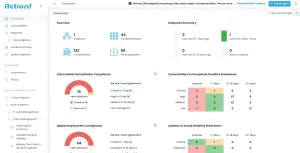
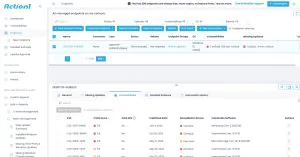
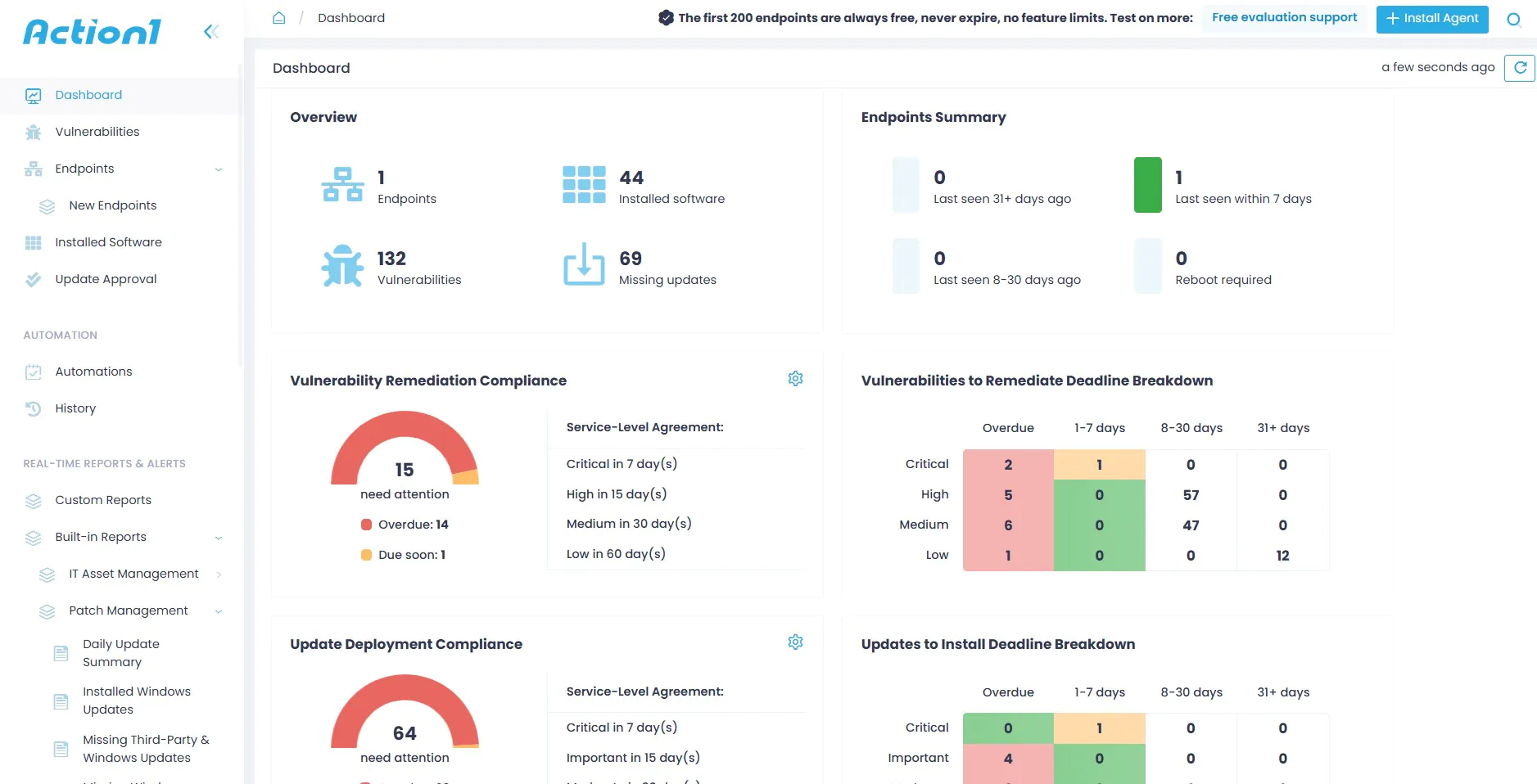
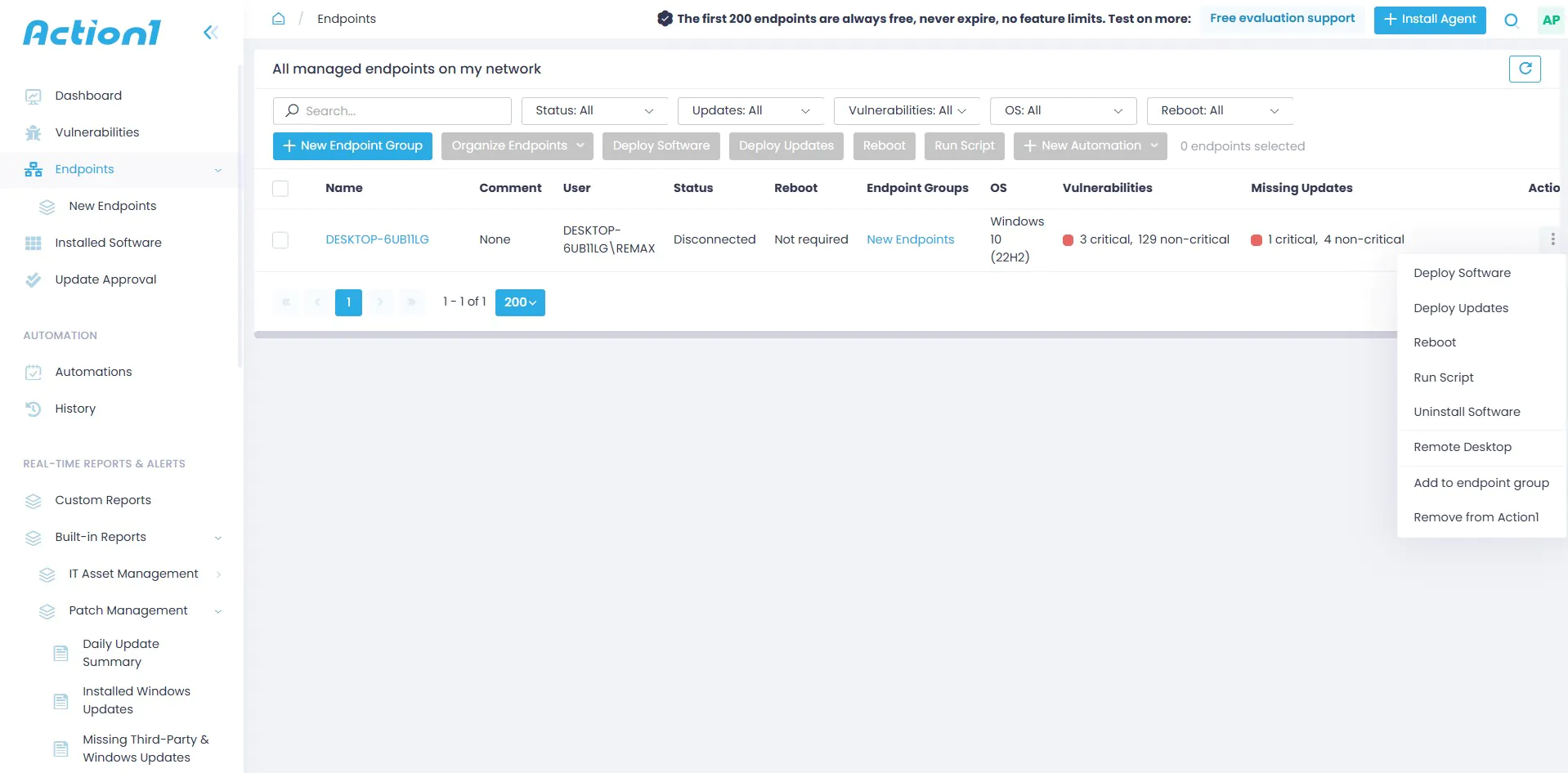
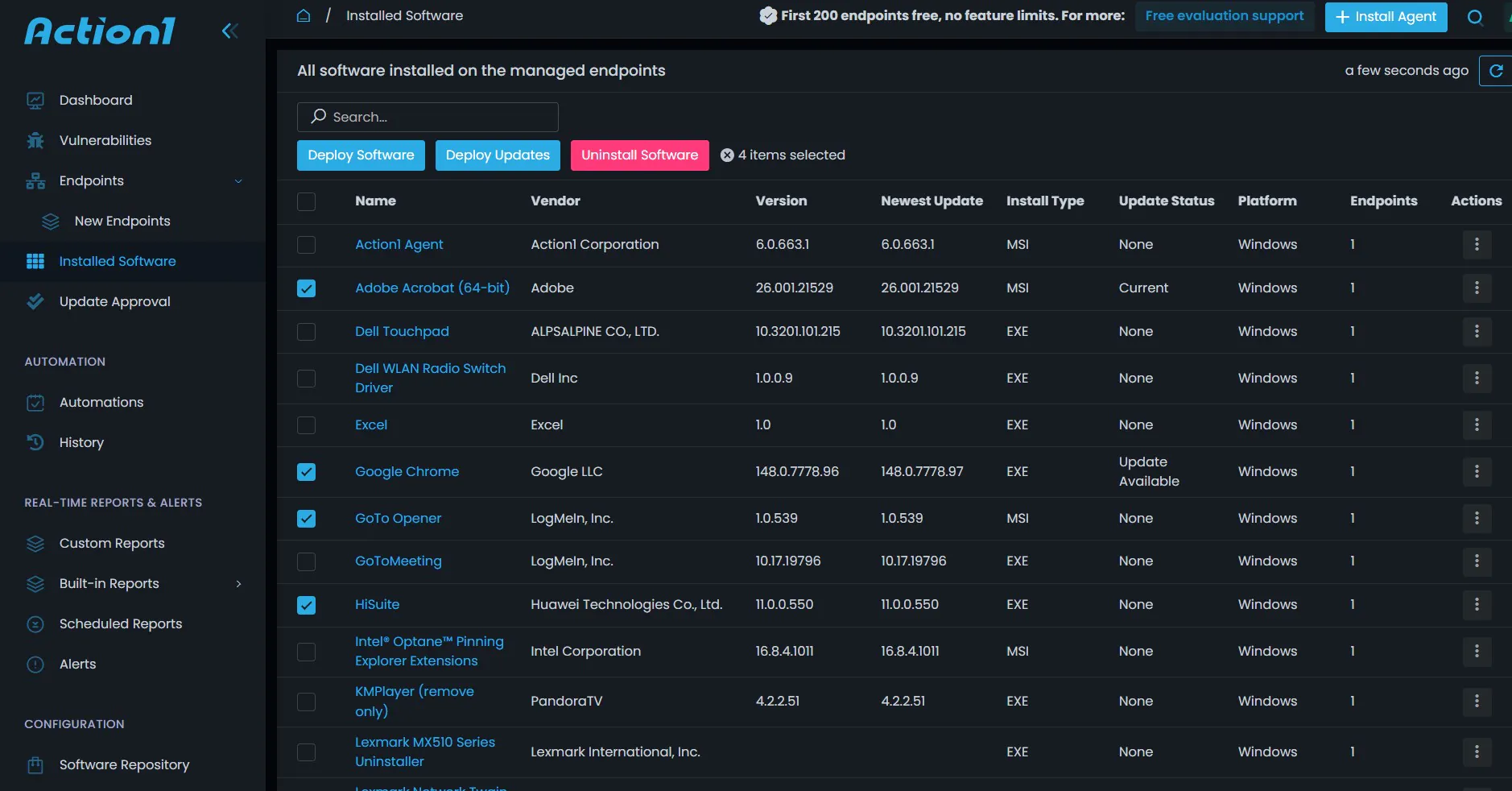
Action 1 is a cloud-native endpoint management software designed to manage endpoints connecting to the corporate network from anywhere. It provides cross-platform patching, software deployment, monitoring, and remote access all from a single console. A centralized dashboard shows all managed devices, connectivity state, operating system versions, patch status, vulnerabilities, and missing third-party application updates. Automated scanning helps detect vulnerabilities across endpoints, enabling prioritized remediation through centralized reporting and alerts. Delivers real-time inventory of hardware and software assets, and their health and compliance status across the entire network, which also detects shadow IT devices and unsafe applications installed on endpoints. Administrators can automate repetitive tasks such as running scripts, pending reboots, patch deployment, software installation, and complex security configuration through remote script execution. Action 1 includes remote desktop support functionality for IT teams that not only helps in troubleshooting but also helps in incident investigation and evidence collection.
Dashboard
View Endpoints
Vulnerability View

Reports
Manage Engine
ManageEngine Endpoint Central is another major endpoint management solution that provides unified endpoint management capabilities. It enables organizations to manage software and patch deployment, asset management, and remote monitoring, and offers endpoint protection and security features as well.
Broader Solution Characteristics Highlighted
Modern UEM leading solution offers the following key features:
- Cloud-Native Management solution: Organizations do not need traditional on-prem infrastructure, because the modern workforce is distributed across the globe, and with an on-prem solution, they will require extra tools to cover remote endpoints.
- Security-first Endpoint governance: Platform must offer a strong feature set for patching, vulnerability management, comprehensive and customizable reports for compliance, and integration with Identity providers and Security tools.
- Multi-OS support: Centralized command center from where different types of devices with different operating systems can be managed, to avoid context switching and managing different tools
- Real-time visibility: continuous monitoring capability on endpoints to send real-time or near real-time telemetry so that security teams can make decisions faster and execute remediation actions in a timely manner.
- Automation: Applications must support not only routine tasks automation, but also scripting support to automate complex tasks, so that IT teams can focus on strategic tasks.
What are the Emerging Trends and Future Direction of UEM?
Convergence of UEM and Unified Endpoint Security
Unified Endpoint Management and Unified Endpoint Security were traditionally owned by different departments, IT operations, and cybersecurity, with separate tools. However, modern UEM platforms provide better integration with endpoint security platforms, enabling organizations to manage devices and protect them from malware, unauthorized access, and security vulnerabilities through a single platform. By integrating management and security data, IT and security teams gain a holistic view of device health and compliance status. Modern UEM solutions are being designed to coordinate closely with security operations centers (SOC) and incident response teams, and when a threat is detected, administrators can quickly isolate devices, revoke access, and apply emergency controls from a single console.
Growing Role of Automation
UEM platforms are evolving into self-optimizing systems that automatically adjust policies based on device performance, user behavior, risk levels, or network conditions. Policy-driven remediation actions could be enforced by UEM-automated workflows, such as reinstalling certificates and applications, updating software when new versions are available, or restricting access until an issue flagged by a policy violation is resolved. UEM automation allows IT teams to manage thousands of devices with limited skilled administrators, with minimal manual intervention and reduced human error, because they manage policies rather than individual machines.
AI-Enhanced UEM Capabilities
Administrators can use natural language to generate complex deployment scripts with AI assistance. For example, instead of writing a PowerShell or Bash script, an admin can prompt AI to generate, test, and validate a script to uninstall legacy VPN software and clear the cache, which can then be executed on hundreds or thousands of endpoints. AI can help in analyzing complex patterns across an entire endpoint class from a large volume of telemetry data. It can predict when a laptop battery is likely to fail in the future or identify which OS update is causing app crashes on specific hardware models, preventing issues from escalating into large-scale catastrophes at the enterprise level. AI can monitor user behavior from activity logs to detect shadow IT or data exfiltration attempts, suggesting stronger control on specific devices. AI assistants can guide administrators through troubleshooting steps, policy creation, reports configuration, and scheduling tasks that might require different configurations per device and operating system type.
Increasing Strategic Importance in Work-From-Anywhere Models
In a decentralized modern workforce model, endpoints are the new perimeters, and UEM is now a strategic necessity rather than a nice-to-have utility. UEM can protect thousands of geographically distributed devices, zero-touch provisioning helps in shipping pre-configured devices to employees’ doorsteps, and provides a centralized command center to control all types of devices all the time. Businesses now view UEM as a disaster prevention and recovery tool, e.g., if a regional office network is compromised by malware or ransomware, UEM can remotely wipe, restore, and rescue the entire fleet of devices to ensure operational continuity.
What is the Conclusion?
UEM as the Modern Standard for Endpoint Governance
UEM has become the modern standard in endpoint management, combining device management, application control, policy enforcement, automatic patching, and continuous monitoring into a single unified platform. Instead of relying on multiple disconnected tools, organizations can manage all endpoint types from a single console, reducing complexity and enforcing consistent policies across diverse operating systems. UEM supports all major endpoint categories, including laptops, desktops, smartphones, tablets, rugged devices, virtual desktops, kiosks, and IoT devices, regardless of operating system, ownership model, or location (on-site, cloud-based, or remote). As organizations grow in size or due to mergers or acquisitions, the number of endpoints and device types can increase from hundreds to thousands. UEM simplifies complex implementation and monitors the requirements of such fast-growing organizations through centralized policies, automated processes, and standardized controls. Instead of jumping between five different consoles to check the health and compliance status of different device types, administrators can view and download reports of the entire endpoint landscape from one place, reducing human error and administrative overhead.
Strategic Value of Adopting UEM
Zero trust architecture: UEM enhances the security posture of endpoint fleets by enforcing encryption, password policies, compliance rules, secure access controls, and remote wipe capabilities that can significantly reduce the attack surface. Zero Trust architecture ensures ongoing monitoring and always verifies compliance status for granting access.
Centralized operational control: Dashboards and policy management views enhance IT teams’ visibility and control over all managed devices from a single console. IT teams can deploy updates, configure settings, monitor status, and resolve issues remotely without any delay when they detect any deviation from security policy.
Scalable deployment support: Modern organizations need to support employees working from offices, homes, while traveling, and multiple device types. UEM is designed to scale across distributed workforces that require secure remote management and policy enforcement from anywhere, anytime.
Compliance readiness: Industries that operate under strict regulations, such as HIPAA, GDPR, PCI DSS, and UEM, provide an automated audit trail of endpoint compliance status, with continuous monitoring and historical endpoint telemetry data.
User experience: Since IT teams have full visibility into the device state, they can troubleshoot issues faster. Self-service enrollment and application access requests enhance employees’ experience and productivity.
Conclusion
Unified Endpoint Management enables organizations to have complete visibility over their endpoint fleet while combining management and security capabilities into one governance framework. It not only enables organizations to create dynamic policies with strict security control but also allows the flexibility of managing personal devices with a uniform baseline security posture and equips administrators with tools to address operational needs and to prepare for growing endpoint complexity. It serves as a unified platform that enables secure access, optimized device experience, and resilient endpoint governance for the modern workplace.





