


MTTD (mean time to detect) measures the average time from the defined onset of a vulnerability or security issue to its detection.
MTTR (mean time to remediate) measures the average time from vulnerability detection to verified remediation. Together, these metrics help organizations understand how quickly they discover and fix vulnerabilities and where delays occur.
A vulnerable third-party application can remain undetected across hundreds of endpoints if scanning is infrequent or software inventories are incomplete. Even after detection, remediation may take days because of risk assessments, patch testing, approvals, deployment failures, or required restarts.
This guide explains how to calculate MTTD and MTTR, what the results mean, and how to reduce both through automated detection, risk-based prioritization, patch deployment, and verification.
Action1 finds vulnerable software in real time and patches it from one console. Start free on up to 200 endpoints, fully featured, or schedule a demo to see it work.
What Do MTTD and MTTR Measure?
| MTTD | MTTR |
|---|---|
| Mean time to detect: average elapsed time from defined issue onset to detection. | Mean time to remediate: average elapsed time from detection to verified remediation. |
Both metrics are measured in minutes, hours, or days. Lower values generally indicate shorter delays, but each metric measures a separate stage and must use clearly defined start and end events.
What is MTTD (Mean Time to Detect)?
MTTD measures the average elapsed time between a defined issue onset and its detection. In vulnerability management:
- Define the starting point clearly, such as when an endpoint first becomes affected by a software vulnerability.
- The clock stops when a vulnerability scanner, monitoring tool, or endpoint management platform identifies the issue.
Suppose an endpoint receives an outdated version of a third-party application containing a known vulnerability on Monday. A scheduled vulnerability scan identifies the vulnerable version on Thursday. The detection delay is three days. Across multiple endpoints or vulnerability instances, the average detection delay contributes to MTTD.
Scanning frequency, endpoint visibility, monitoring coverage, and alerting affect MTTD, and so do human decisions and processes. Incomplete software inventories, missed scans, and delayed alert processing can leave vulnerable applications undetected for longer.
What is MTTR (Mean Time to Remediate) in Vulnerability Management?
MTTR measures the average elapsed time between detecting a software vulnerability and verifying that it has been successfully remediated.
The letter R has different meanings in IT and incident management. Teams must define which interpretation they use to avoid inconsistent reporting.
| Meaning | Clock starts | Clock stops | Best used for |
|---|---|---|---|
| Mean time to remediate | Vulnerability detection | Verified remediation | Vulnerability and patch management |
| Mean time to repair | Issue identification | Repair completion | Repair workflows |
| Mean time to recovery | Service disruption | Service restoration | Service availability |
| Mean time to respond | Incident detection | Response completion, according to the defined process | Incident response |
| Mean time to resolve | Failure begins or is detected | Root cause fixed and recurrence prevented | Full incident lifecycle reporting |
This article uses MTTR exclusively to discuss mean time to remediate.
MTTR includes the time you spend assessing and prioritizing the vulnerability, testing and approving the fix, deploying it, handling failed installs and required restarts, and verifying the result. Take a critical vulnerability in a browser installed on every laptop. The clock keeps running while the update waits in a test ring, waits for change approval, waits for users to restart, and waits for a rescan to confirm the fix.
The remediation process can involve installing a patch, upgrading to a supported application version, removing vulnerable software, or applying another fix that eliminates the weakness. A temporary mitigation or compensating control, such as a firewall rule or a disabled feature, lowers risk without necessarily eliminating the underlying vulnerability, so track those cases separately.
MTTD vs. MTTR: Key Differences
MTTD and MTTR measure different parts of the vulnerability management process. MTTD reflects how effectively your tools discover vulnerabilities, while MTTR depends on tools, people, and operational processes working together.
| Metric | What it measures | Driven mostly by | How to lower it |
|---|---|---|---|
| MTTD | Time from defined issue onset (such as time from an endpoint becoming vulnerable) to detection | Scanning frequency, inventory accuracy, monitoring coverage, and alerting | Increase scan frequency, maintain accurate software inventories, and automate detection |
| MTTR | Time from vulnerability detection to verified remediation | Risk prioritization, testing, approvals, patch deployment, and verification | Automate patching, streamline approvals, use remediation scripts, stage rollouts, and automate verification |
Together, MTTD and MTTR can approximate the vulnerability exposure window:
Vulnerability exposure window = MTTD + MTTR
This calculation assumes that MTTD starts when an endpoint first becomes vulnerable, while MTTR starts at detection and ends at verified remediation. That equation only holds when your measurement boundaries are consistent. To calculate an average exposure window by adding average MTTD and average MTTR, both metrics must cover the same set of cases. For example, if MTTD includes all detected vulnerabilities but MTTR includes only completed remediation cases, the two averages represent different populations and cannot be added reliably. Use the same cases and measurement period for both metrics. A CVE (Common Vulnerabilities and Exposures) publication date does not necessarily indicate when an individual endpoint first became vulnerable.
MTTD vs. MTTA: Detection vs. Acknowledgment
MTTD measures how long it takes to detect a vulnerability or software issue. MTTA (mean time to acknowledge) measures the average time between an alert being raised and its acknowledgment by an assigned responder or an automated workflow, depending on your definition. For example, if a vulnerability scanner detects a critical CVE at 10:00 AM but the responsible administrator acknowledges the alert at 10:15 AM, the detection clock stops at 10:00 AM, while MTTA records the 15-minute acknowledgment delay. MTTA helps teams identify delays in alert ownership and handoffs before remediation begins.
How Do You Calculate MTTD and MTTR?
Both MTTD and MTTR formulas are simple averages. Start by defining what starts and stops the clock. Define that once, apply it to every case, and then derive every measurement from the same timestamps.
MTTR Formula
Calculate MTTR by dividing the combined detection-to-verification time for completed vulnerability remediation cases by the number of completed cases.
MTTR (mean time to remediate) = Total elapsed time from vulnerability detection to verified remediation ÷ Number of completed remediation cases
Define what counts as one remediation case. You might count each vulnerability finding on an affected endpoint as one case, or each remediation campaign as one case. Do not mix the two units in the same calculation.
Each case starts when the vulnerability is first detected under your defined measurement policy and ends when remediation is verified.
Suppose your team completes eight vulnerability remediation cases during a reporting period and the combined detection-to-verification time is 48 hours.
MTTR = 48 hours ÷ 8 cases = 6 hours
The average time to remediate is six hours per case. Report unresolved vulnerabilities separately so completed cases do not hide a growing remediation backlog.
MTTD Formula
Calculate MTTD by dividing the sum of detection delays across all detected cases by the number of detected cases.
MTTD = Sum of (detection timestamp – defined issue-onset timestamp) ÷ Number of detected cases
MTTD needs a clearly defined starting event. For endpoint vulnerabilities, that might be when a vulnerable application version is installed or when an existing version first becomes vulnerable, even if the weakness has not yet been publicly disclosed. The detection timestamp is when a scanner or monitoring tool identifies the issue. If the actual onset is unknown, you can use the public disclosure date as a measurement proxy, but document that it is an estimate, not the point when the software became vulnerable.
A CVE publication date does not necessarily indicate when a particular endpoint first became vulnerable. If you do not know the exact onset, use a consistently defined proxy and document the uncertainty rather than presenting an estimated timestamp as confirmed. Use the same definition across comparable cases.
Define Start and Stop Events for MTTD and MTTR
Your measurement policy should define when each metric starts and stops. Use this checklist to standardize measurements:
- Define what counts as one vulnerability remediation case, such as a vulnerability finding per endpoint or a remediation campaign.
- Record when the vulnerability was first detected.
- Record when the team assessed and prioritized it.
- Record when remediation was approved and deployed.
- Record whether additional actions, such as an endpoint restart, were required.
- Record when successful remediation was verified.
- Decide whether measurements use calendar time or business hours, including weekends, maintenance windows, and waiting periods.
Capture timestamps at every stage: detection → triage and prioritization → approval → deployment → activation → verification
Do not treat service restoration, deployment completion, or ticket closure as stop events. A deployed patch does not mean the vulnerability is remediated, because a pending restart can leave the old vulnerable code running.
Worked Example: Detecting and Remediating a Software Vulnerability
Consider an illustrative incident involving a vulnerable version of a third-party application installed on several managed endpoints. Your vulnerability scanner detects the issue, and your IT team deploys an approved security update.
Illustrative Incident Timeline · One Remediation Campaign
| Time | Event |
|---|---|
| 09:00 AM: Vulnerability onset | An installed application version first becomes vulnerable under the defined starting condition in your measurement policy. |
| 09:40 AM: Detection | The vulnerability scanner detects the issue on the affected endpoints. |
| 09:50 AM: Acknowledgment | The responsible administrator acknowledges the alert. |
| 10:30 AM: Deployment | An approved security update is successfully installed on all in-scope affected endpoints, with no outstanding restart requirement. |
| 10:45 AM: Verification | A verification scan confirms that the vulnerability has been remediated across all in-scope endpoints. |
Three metrics (MTTD, MTTA, MTTR) and the deployment interval are calculated as follows:
| Metric | Calculation | Result |
|---|---|---|
| MTTD | 09:00 to 09:40 | 40 minutes |
| MTTA | 09:40 to 09:50 | 10 minutes |
| MTTR | From detection at 09:40 to verified remediation at 10:45 | 65 minutes |
| Deployment-to-verification | 10:30 to 10:45 | 15 minutes |
The time to remediate for this specific case is 65 minutes; it is not an average across multiple cases. MTTR starts at detection, not when the administrator acknowledges the alert or deployment begins. The full vulnerability exposure window is 105 minutes, from the defined onset at 09:00 to verified remediation at 10:45.
Vulnerability exposure window for the worked example. Illustrative, not measured data.
Why Do MTTD and MTTR Matter in Vulnerability Management?
MTTD and MTTR help IT and security teams measure how quickly they discover and eliminate software vulnerabilities and other security issues. Together, they show how long vulnerable systems remain undetected and how much additional time endpoints stay exposed after detection. Reducing both metrics limits opportunities for attackers to exploit known weaknesses.
Prolonged MTTD and MTTR also increase the risk of downtime. Delays in detection give attackers more time to exploit a vulnerability, while poorly managed patch deployments can introduce application failures, disrupt operations, and create user-facing outages.
These metrics also indicate whether the organization is meeting SLA and compliance commitments. A delayed security update can leave assets exposed past internal remediation deadlines or regulatory requirements.
Use these questions to evaluate your vulnerability management process:
MTTD: How long do vulnerable application versions remain undetected on managed endpoints?
MTTA: How long do critical vulnerability alerts wait before an administrator acknowledges them?
MTTR: How long does it take to deploy a fix and verify remediation after detecting a vulnerability?
Remediation backlog: How many detected vulnerabilities remain unresolved beyond their assigned remediation deadlines?
Track these metrics to uncover issues in scanning coverage, alert ownership, patch deployment, and verification. You can use the results to improve remediation SLAs and produce evidence of vulnerability management activities for compliance audits.
How Can You Reduce MTTD and MTTR?
To reduce MTTD and MTTR, you need endpoint visibility, automated detection, efficient remediation workflows, and reliable verification.
Shorten MTTR with Automated Patch Deployment and Remediation Scripts
Manual patching makes remediation time increase with endpoint count. Automated deployment can apply the same approved update to all endpoints or endpoint groups in a single deployment window, reducing repetitive manual intervention.
Use these practices to shorten remediation time:
- Automate patch approvals: Define approval rules for known-safe security updates based on vendor, severity, update type, and testing results. Automatically approve updates that meet your criteria while routing higher-risk updates through manual review.
- Use staged deployments: Test patches on a pilot group before expanding deployment to the rest of your endpoints. This helps identify compatibility problems before they affect the wider fleet.
- Prepare remediation scripts: Create reusable scripts for common actions, such as restarting a service, removing vulnerable software, repairing a failed installation, or rolling back a problematic update.
- Deploy fixes to endpoint groups: Use centralized endpoint management to execute approved patches and scripts across multiple devices simultaneously.
- Automate verification: Check installation status and run follow-up vulnerability scans to confirm that the vulnerability is addressed.
Here is the math, using illustrative numbers. Suppose a manual fix takes 6 minutes per endpoint. For 50 endpoints that is 300 minutes of work. For 500 endpoints it is 3,000 minutes. An automated deployment that pushes the fix to all endpoints in parallel takes roughly the same window for 50 endpoints as for 500. Endpoints that are offline still wait until they reconnect.
| Fleet size (illustrative) | Manual, one by one (6 min each) | Automated, parallel (about 30 min window) |
|---|---|---|
| 50 endpoints | 300 minutes | About 30 minutes |
| 500 endpoints | 3,000 minutes | About 30 minutes |
| 5,000 endpoints | 30,000 minutes | About 30 minutes |
Illustrative numbers for explanation only. Real deployment windows vary with bandwidth, ring structure, and endpoint availability.
Automation does not guarantee a flat MTTR as the fleet grows. Network capacity, endpoint availability, installation failures, and restart requirements can still introduce delays. However, centralized deployment and parallel execution reduce the manual effort that would otherwise grow with every additional endpoint.
Action1 update rings test patches on a pilot group, then expand automatically so MTTR doesn’t stall. Start free on up to 200 endpoints, fully featured, or schedule a demo.
Automate Vulnerability Detection-to-Remediation Workflows
Delay hides in the hand-offs between stages: scan result to ticket, ticket to approval, approval to deployment, deployment to verification. Remove the hand-offs and you remove the waiting.
Automated detection reduces the time between a vulnerability appearing on an endpoint and your team discovering it. Configure software inventory scans to identify vulnerable application versions and generate alerts when newly discovered CVEs affect installed software.
You can also connect detection to remediation workflows. For example, when an endpoint management platform identifies an outdated application version, it can automatically create a remediation task or trigger an approved update. Similarly, a failed patch installation can trigger a predefined repair script and generate an alert if the retry also fails.
Lower MTTD with Continuous Inventory and Monitoring
Endpoints missing from your inventory can create visibility gaps and leave vulnerabilities undetected.
- Start with an accurate inventory of managed devices, installed operating systems, application versions, and relevant software configurations.
- Use real-time or frequent inventory updates to identify newly installed vulnerable applications.
- Schedule vulnerability scans frequently enough to detect newly disclosed weaknesses without leaving long gaps between assessments.
- Include remote and off-network endpoints in your monitoring strategy.
- Configure offline-device alerts and scan endpoints when they reconnect.
Create Runbooks for Critical CVEs and Failed Updates
Write runbooks for the common cases, such as a bad update, a failed install, and a critical CVE. Runbooks reduce delays in decision-making and give teams consistent steps to follow.
For example, a critical CVE remediation runbook might include:
- Detect and acknowledge. Confirm the affected software and version, assign an owner, and log the timestamp.
- Prioritize. Check CVSS score, evidence of active exploitation, and exposure of the affected endpoints.
- Approve. Approve the vendor patch, or choose removal or upgrade if no patch exists.
- Deploy. Push the fix to a pilot ring, check results, then deploy to all remaining endpoints.
- Handle exceptions. Re-run failed installs, schedule required restarts, and queue offline endpoints.
- Verify. Rescan, confirm the vulnerability is no longer detected, and log the timestamp.
- Roll back if needed. If the update breaks an application, run the rollback script and open a ticket for the vendor.
Keep scripts, rollback instructions, approval requirements, and verification commands with each runbook.
Sample remediation script outline (plain steps you can turn into PowerShell or Bash):
- Read the installed version of the target application.
- If the version is below the fixed version, stop the application’s processes and services.
- Install the approved update, or uninstall the vulnerable version if no fix exists.
- Restart the service, then record the new version and the result.
- Exit with a clear status code so the platform can flag failures for retry.
Run Patching and Zero-Day Response Drills
Run tabletop drills for patch failures and zero-day response. Walk the IT team through a bad update that breaks a line-of-business application, or a critical CVE with active exploitation, and time each stage. The drill exposes unclear owners and missing runbooks before a real incident does.
What Can Make MTTD and MTTR Misleading?
MTTD and MTTR measure vulnerability detection and remediation performance, but inconsistent definitions, incomplete timestamps, and reporting gaps can distort the results. Watch for these common mistakes.
Inconsistent MTTR Definitions
MTTR can stand for mean time to remediate, repair, recover, respond, or resolve. If one team measures detection to verified remediation while another measures deployment to ticket closure, their MTTR figures aren’t comparable. There is no universally standardized measurement approach either, so comparing your figures with another organization’s is unreliable unless both use the same boundaries. Define the metric, measurement unit, starting and stopping events, reporting period, and whether you use calendar or business hours. Apply the same rules across teams and reporting periods, and review trends regularly.
Starting MTTD and MTTR Measurements Too Late
Starting MTTD or MTTR at ticket creation can exclude time that a vulnerability spent undetected. Suppose a vulnerable application version is installed on an endpoint at 09:00, a scanner detects it at 10:00, and a ticket is created at 10:15. Measuring detection time from ticket creation instead of the defined vulnerability onset hides the first hour of exposure. Record the issue-onset and detection timestamps separately, and use the defined events when calculating each metric.
A Low MTTR Can Hide Recurring Problems
A quick workaround may produce a low MTTR without addressing the underlying cause. For example, administrators might repeatedly reinstall a security update on the same endpoints because a deployment configuration causes installation failures every month. The immediate remediation time looks acceptable, but the recurring problem remains. Track recurrence rates and MTBF with MTTR to identify repeated failures. Also report the median and 90th percentile (P90) because a small number of endpoints with lengthy remediation delays can be hidden by a low mean.
Offline and Unmanaged Endpoints Can Distort MTTD and MTTR
Incomplete endpoint visibility can make both metrics look better than they are. An endpoint that is offline or missing from your software inventory may not contribute to the measured dataset. Its vulnerability remains undetected, but your MTTD calculation excludes it, creating an artificially low average.
MTTR can also appear artificially low when reports include only reachable endpoints that were successfully remediated. Remote laptops, intermittently connected devices, stale inventory records, and endpoints that miss maintenance windows can remain vulnerable long after the rest of the fleet receives a patch.
Track these exceptions:
Detected but unreachable: The vulnerability is identified, but the endpoint cannot receive the remediation.
Offline during remediation: The device misses the scheduled patch installation.
Awaiting verification: The update was deployed, but its successful installation or vulnerability removal has not been confirmed.
Missing from inventory: The endpoint is not currently visible to your management and scanning tools.
When these endpoints reconnect, resume the remediation workflow, deploy outstanding patches, and verify the results. Don’t mark a campaign complete simply because the reachable endpoints have been patched.
For accurate reporting, include the total affected endpoint count, the number successfully remediated, and the number still pending. Report unresolved exposure separately.
MTTD and MTTR in Vulnerability and Patch Management
In patch management, MTTD and MTTR reveal different operational bottlenecks. MTTD shows how quickly endpoint inventory and vulnerability assessment identify affected software, while MTTR measures the time required to deploy an appropriate fix and verify remediation. Track patch approvals, installation failures, required restarts, offline devices, and outstanding exceptions so the metrics reflect the full workflow rather than only successful deployments.
CVE Disclosure, Detection, and Remediation: MTTD and MTTR Stages
A CVE identifier provides a standardized reference for a publicly disclosed software vulnerability. However, a published CVE does not automatically mean every endpoint in your environment is affected. Your team must identify whether the vulnerable operating system or third-party application version exists in its endpoint fleet.
The process involves the following stages, although their timing and order can vary.
- CVE published: A software vulnerability is publicly disclosed and assigned a CVE identifier.
- Vulnerability detected (MTTD): Software inventory and vulnerability scanning identify affected application versions on managed endpoints.
- Patch available: The software vendor releases a security update or another remediation becomes available.
- Patch deployed and verified (MTTR): IT deploys the fix, handles any required restarts, and verifies that affected endpoints are no longer vulnerable.
The disclosure-to-remediation window can be measured from public disclosure to verified remediation, but it differs from the MTTD + MTTR calculation, which starts at the endpoint’s defined vulnerability onset. Measuring disclosure-to-remediation requires the publication date and the organization’s verified-remediation timestamps. A Cloud Security Alliance and Miggo Security survey reported that 9% of teams remediated critical or high-severity production vulnerabilities within 24 hours, 39% took one to three days, and 35% took four to seven days.
Source: Cloud Security Alliance — Proof Is the Application Security Bottleneck (July 1, 2026)
The following illustrative table shows how patch latency can be reported by vulnerability severity. These figures are examples, not measured results or universal benchmarks.
| Severity | MTTD | MTTR | Exposure window |
|---|---|---|---|
| Critical, actively exploited | 4 hours | 20 hours | 24 hours |
| High | 12 hours | 3 days | 3.5 days |
| Medium | 1 day | 10 days | 11 days |
| Low | 2 days | 25 days | 27 days |
Illustrative example for explanation only, not measured data.
What are Good MTTD and MTTR Targets?
There is no universal target for MTTD or MTTR. The right targets depend on business criticality, vulnerability severity, SLAs, IT architecture, regulatory requirements, and which MTTR definition your organization uses.
Set your own baseline from your cases, track median and P90 over time, and compare with other organizations only when both use the same start and stop events. Make sure you set targets by severity tier, so a critical CVE gets a tight target and a low-risk update gets a relaxed one.
Set Targets by Service and Severity
Use severity-based targets as starting points, then adjust them to your organization’s risk tolerance, endpoint coverage, and remediation capacity.
Following are illustrative targets for organizations to adapt, not industry benchmarks or regulatory requirements.
| Severity | Example | MTTD target (example) | MTTR target (example) |
|---|---|---|---|
| Critical | Actively exploited CVE in an internet-facing app | Under 4 hours | Under 24 hours |
| High | Remote code execution flaw in a common desktop app | Under 24 hours | Under 7 days |
| Medium | Local privilege issue with no known exploit | Under 72 hours | Under 30 days |
| Low | Low-impact application vulnerability | Under 7 days | Next maintenance window |
MTTD Benchmarks
There is no established, universally applicable MTTD benchmark specifically for endpoint vulnerability detection. Don’t treat phishing or security incident detection targets as patch-management benchmarks. Instead, define detection targets around scan frequency, CVE disclosure, endpoint visibility, and vulnerability severity. For critical vulnerabilities, aim to identify affected endpoints as soon as the relevant vulnerability intelligence becomes available instead of waiting for the next routine scan.
How Do You Track MTTD and MTTR?
Metrics are useful only when people analyze them and act on them. Dashboards and regular reports help IT teams identify remediation delays, monitor vulnerability exposure, and demonstrate progress toward security objectives. They also show management and auditors how effectively your organization handles software vulnerabilities.
Align MTTD and MTTR Targets with Business Risk and SLAs
Connect MTTD and MTTR targets to business risk, internal remediation SLAs, and compliance obligations. Frameworks such as the NIST Cybersecurity Framework and ISO/IEC 27001 provide guidance on security and vulnerability management that can inform your measurement strategy. System and Organization Controls (SOC) 2 is an attestation reporting framework based on the applicable Trust Services Criteria, not a prescriptive vulnerability management standard. Its criteria can still help you demonstrate how your organization identifies, assesses, and addresses security risks.
Define remediation deadlines by vulnerability severity and business criticality, then use MTTD and MTTR reports to assess whether your team meets those targets. Retain patch deployment records, verification results, exceptions, and remediation timestamps as supporting audit evidence.
Build MTTD and MTTR Dashboards and Reports
Create a dashboard that displays MTTD and MTTR side by side so teams can distinguish detection delays from remediation delays. Include trends over time, severity-based breakdowns, and results by software title, CVE, patch, or endpoint group. Show the mean, median, and 90th percentile to reveal outliers that averages can hide. Also report the number of open vulnerabilities, overdue remediation cases, failed deployments, and endpoints awaiting verification. For leadership, summarize progress against SLAs, critical exposure, and recurring bottlenecks. For auditors, provide detailed timestamps, deployment records, verification evidence, and documented exceptions that support the reported figures.
Frequently Asked Questions
What Does MTTR Stand for in Vulnerability Management?
In vulnerability management, MTTR stands for mean time to remediate: the average time from detecting a software vulnerability to verifying that it is fixed. Lower MTTR reduces the window of exposure to potential exploitation. MTTR has related but distinct meanings in other contexts, such as Mean Time to Repair/Resolve/Recover in general IT incident management. In security and vulnerability management specifically, “remediate” is the standard expansion.
How Do You Calculate MTTR for Patching?
To calculate MTTR for patching, divide the total elapsed time from vulnerability detection to verified remediation by the number of completed remediation cases.
MTTR = Total remediation time ÷ Number of completed cases
For example, if your team takes 48 hours to remediate six vulnerabilities, your MTTR is 8 hours. Keep the case definition consistent and report unresolved cases separately.
Is MTTD Part of MTTR?
No. MTTD and MTTR measure separate stages. MTTD covers the time from issue onset to when your team detects it. MTTR starts at detection and ends when remediation is verified. Together, they approximate the exposure window.
When Should You Prioritize Improving MTTD Over MTTR?
Prioritize improving MTTD when vulnerabilities remain undetected for too long because of infrequent scans, incomplete software inventories, or limited endpoint visibility. Faster fixes will not help if you only learn about a vulnerable application days after it appeared. Improve scanning frequency, inventory accuracy, and automated vulnerability alerts first.
How Does Action1 Help Reduce MTTD and MTTR From Detection to Verified Remediation?
Action1 is a cloud-native autonomous endpoint management platform that helps reduce mean time to detect (MTTD) and mean time to remediate (MTTR) by shortening the path from detecting vulnerable software to remediating it on affected endpoints. It identifies vulnerabilities in supported Windows and macOS operating systems and third-party applications, while also supporting Linux patch management. Automation, real-time visibility, and reporting help reduce the manual work and delays between detection and remediation.
Once you install the agents and configure deployment policies, such as update rings for routine maintenance and emergency windows for immediate deployment, Action1 can automate much of the process. For platforms where vulnerability assessment and risk-based prioritization are supported, it identifies known weaknesses, maps available patches, and applies approved deployment policies. Real-time visibility and customizable reporting help you track outcomes, with only a small amount of manual work required to prepare audit-ready reports.
The following capabilities work together to reduce delays between identifying a vulnerability and confirming that remediation is complete.
- Real-time vulnerability detection and risk context: Action1 continuously assesses endpoint software and operating systems to identify known vulnerabilities. You can review associated CVE identifiers, CVSS scores, CISA KEV status, and known ransomware campaign usage to understand the risk. Action1 combines vulnerability intelligence from sources including VulnCheck NVD++, the National Vulnerability Database (NVD), CISA KEV, Microsoft Security Response Center (MSRC), and vendor release notes. That lowers the time it takes to find and prioritize vulnerabilities.

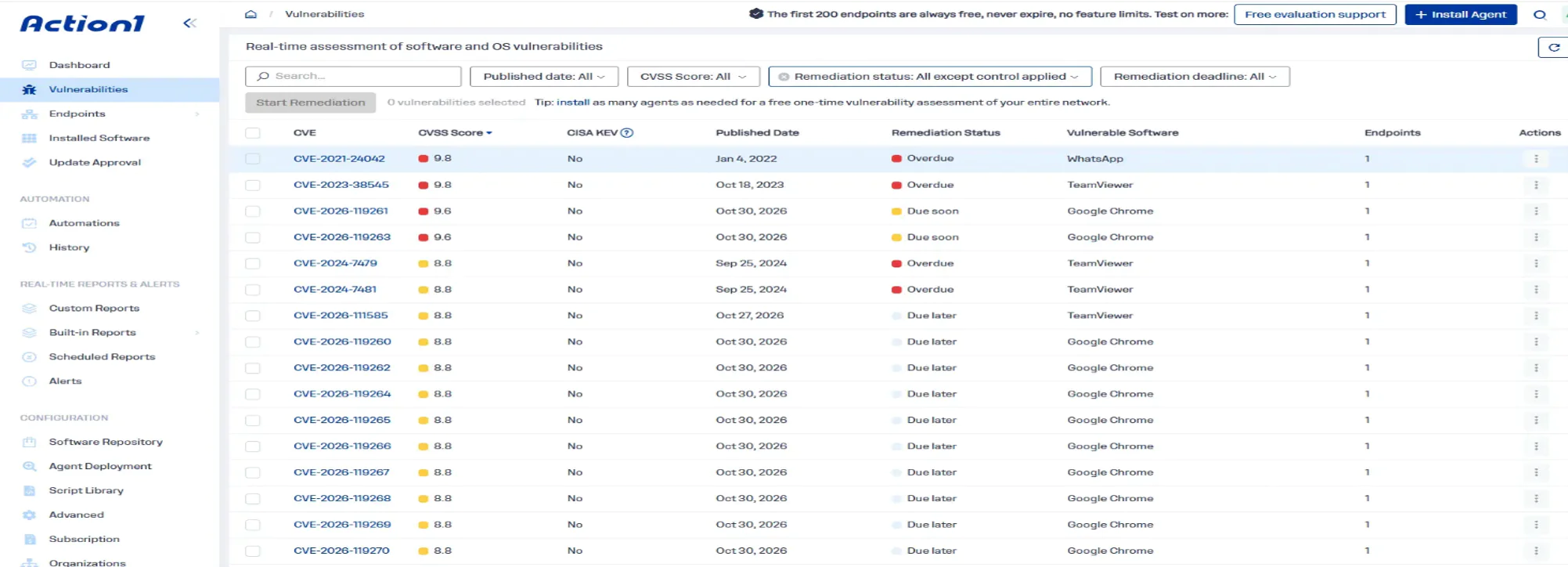
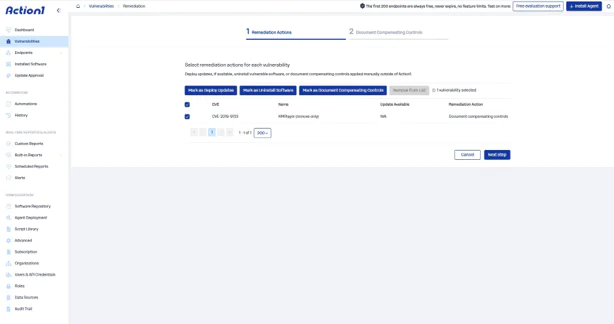
- End-to-end patch and vulnerability remediation: Once Action1 identifies a vulnerable endpoint, you can use the same platform to find and deploy an available operating system or third-party application patch. This reduces hand-offs between vulnerability assessment and patch management. If a vulnerability cannot be patched, you can remove unsupported or legacy software where appropriate and centrally document compensating controls. In this way, you can track remediation actions and outstanding risks.

- Autonomous update rings: Action1 supports staged update rollouts through update rings. Once you define the rings and success criteria, updates automatically progress from inner to outer groups based on deployment success metrics. This lets you validate updates with a smaller pilot group first, then expand safely to the rest of the fleet, thereby remediating faster without exposing every endpoint to a potentially faulty update at once.

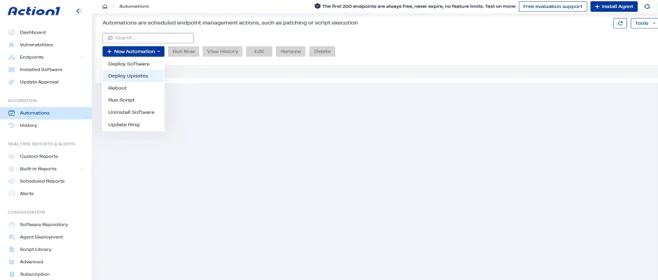
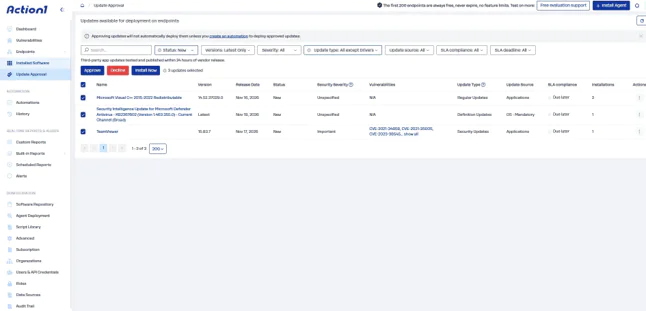
- Patching controls and software repository: You can configure automatic or manual update approvals, introduce optional deployment delays, and schedule deployments around your maintenance windows. Action1 also maintains a private, secure repository for supported third-party applications, so you can deploy available updates without relying on public package managers. These controls let you accelerate patching while retaining oversight of which updates enter your environment and when.

- Peer-to-peer (P2P) patch distribution: Action1 can distribute large update content between endpoints on the same network. Instead of every endpoint downloading the full content from an external source, endpoints can share it locally. This reduces external bandwidth consumption and helps updates reach larger endpoint groups more efficiently, without requiring you to maintain local cache servers.

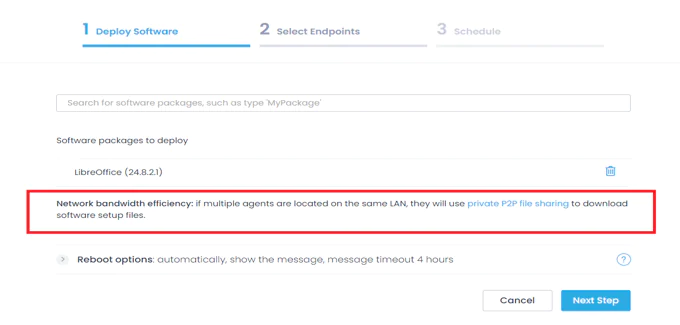
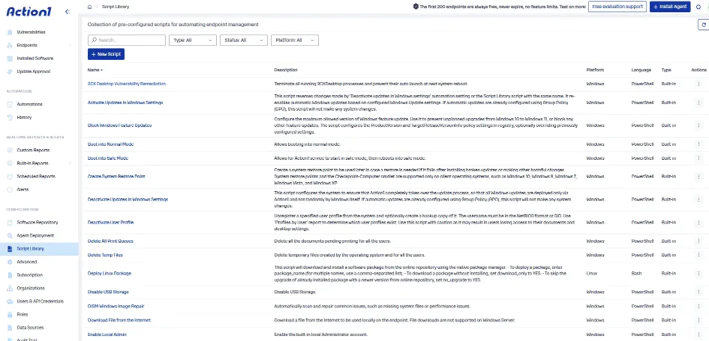
- Scripting, software deployment, and removal: Action1 includes a continuously updated script library and supports custom PowerShell, CMD, and Bash scripts. You can use scripts to automate remediation tasks, repair failed installations, deploy required software, or remove vulnerable, unsupported, and unwanted applications. This reduces manual intervention and helps your team remediate issues faster.

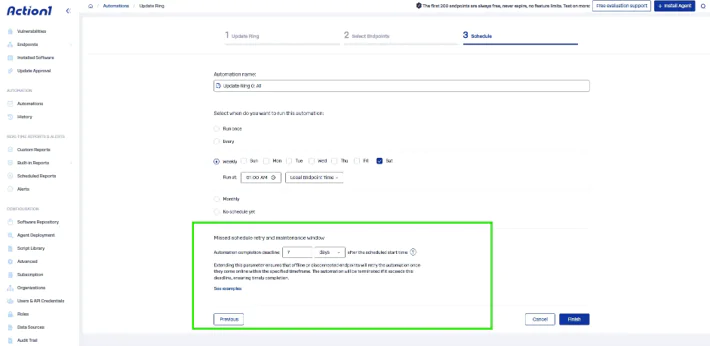
- Cloud-native management and offline endpoint catch-up: Action1 manages endpoints without requiring a VPN, on-premises appliances, or dedicated cache infrastructure. If an endpoint misses a scheduled action while offline, Action1 can execute the missed schedule after the device reconnects, according to the configured deadline. This prevents remote laptops and intermittently connected devices from becoming blind spots in your vulnerability and patch management process.

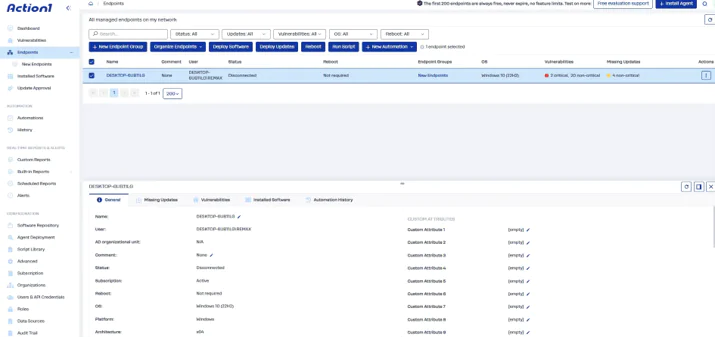
- Real-time endpoint visibility: Action1 maintains a continuous inventory of installed applications and versions, operating system details, hardware information, configuration data, and other endpoint attributes. This gives you immediate visibility into which devices are running vulnerable software and the full scope of an issue, without manually checking endpoints one by one, so your team can focus remediation efforts where they’re needed.

- Real-time and customizable reporting: Action1 provides more than 100 built-in reports covering vulnerability status, patching, software and hardware inventory, security configuration, and other endpoint data. Connected endpoints provide current information, while cached data helps maintain visibility into devices that are offline. You can customize reports, create reports using PowerShell output, drill down into results, export data to CSV, and subscribe to reports by email. These capabilities help you review remediation status, confirm patch deployment, track SLA targets, and prepare audit evidence. Report creation is semi-automated: after an update cycle, you can tailor the relevant data and generate a report in minutes.

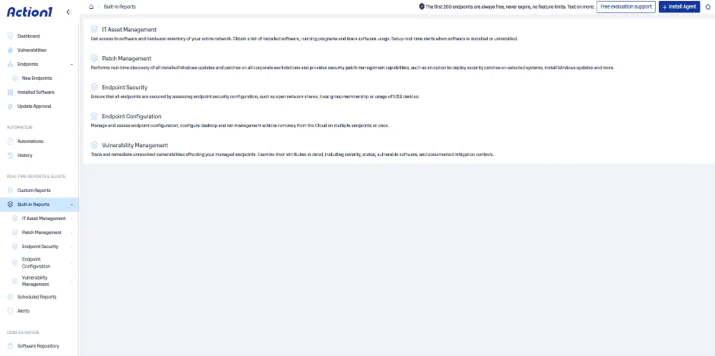
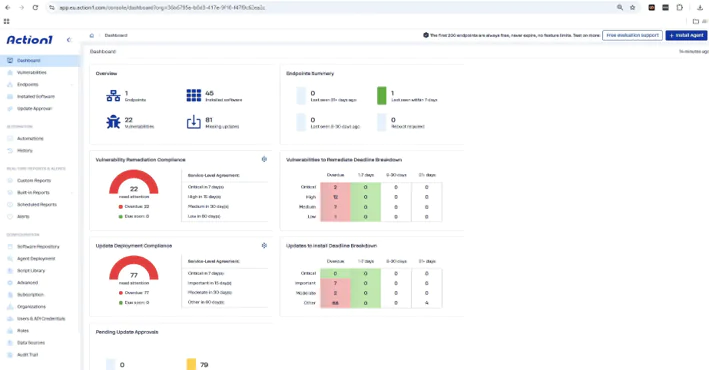
- Browser-based access: You can check, manage, and update endpoints through Action1’s web-based console from anywhere with an internet connection. You don’t need to be connected to your organization’s local network to monitor deployments or take action on managed devices.

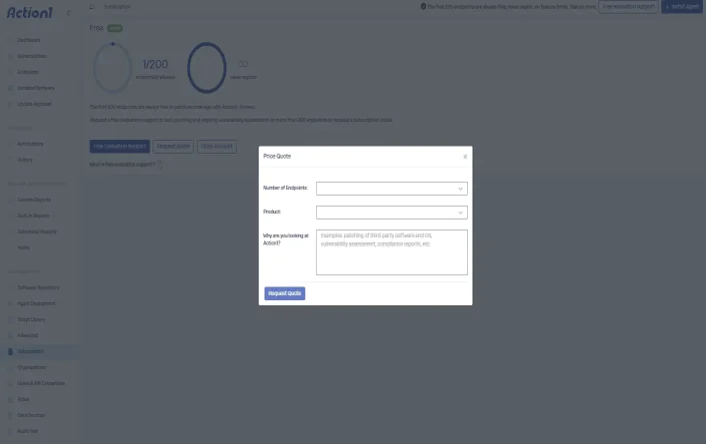
- Scalability: Action1 supports growth from its free tier of 200 endpoints to environments managing 200,000 or more endpoints. You can deploy agents across those additional endpoints and contact the sales team afterwards to arrange the appropriate expansion. Pricing can also become more cost-effective per endpoint as your managed fleet grows, depending on the pricing arrangements.

Action1 reports show what’s patched and what’s pending, so your MTTR holds up in an audit. Start free on up to 200 endpoints, fully featured, or schedule a demo.
What Other Metrics Should You Track Alongside MTTD and MTTR?
Several related metrics complement MTTD and MTTR, each capturing a distinct phase of the software incident lifecycle. They are MTTA, MTBF, MTTF, MTTC, MTTI, and MTTV.
MTTA: Mean Time to Acknowledge
MTTA measures the average time between an alert being raised and its acknowledgment by an assigned responder or automated workflow.
MTTA = Total time from alert to acknowledgment ÷ Number of incidents
A high MTTA can indicate alert fatigue, unclear ownership, or inefficient escalation procedures. For example, administrators who receive too many vulnerability alerts may overlook critical CVEs or delay assigning remediation tasks. Clear alert ownership, severity-based routing, and automated notifications can reduce acknowledgment delays.
Related reading: Action1 — Mean Time to Patch (including MTTA)
MTBF: Mean Time Between Failures
MTBF measures the average operating time between successive failures in a system or service. In software, it tells IT teams how long a service or endpoint fleet runs between failures, including failures caused by faulty updates or unsuccessful deployments.
MTBF = Total operating time ÷ Number of failures
For example, if an application runs for 900 hours and fails 5 times, its MTBF is 180 hours. A higher MTBF generally indicates better reliability, although it does not measure how quickly teams remediate vulnerabilities.
Related reading: Action1 — What Is MTBF?
MTTF: Mean Time to Failure
MTTF measures the average operating time until failure for an item that is not repaired after failing. It is commonly used for non-repairable components or products and is distinct from MTTR, which measures how quickly a defined problem is remediated. An end-of-life (EOL) software release is not itself an MTTF failure: end of vendor support is a lifecycle-management concern requiring an upgrade, replacement, or other risk treatment.
MTTD, MTTR, MTTA, MTBF, and MTTF Compared
The following table compares metrics that measure distinct aspects of software reliability and IT operations:
| Metric | What it measures | Formula | Better when | Best for | Software example |
|---|---|---|---|---|---|
| MTBF | Average operating time between failures of a repairable application or service | Total uptime ÷ Number of failures | Higher | Update stability | A deployment service fails three times in 720 hours |
| MTTR (remediate) | Average time from vulnerability detection to verified fix | Total detection-to-verification time ÷ Completed remediation cases | Lower | Patch and remediation speed | A critical CVE is fixed and verified 65 minutes after detection |
| MTTF | Average operating time before a non-repairable item fails | Total operating time ÷ Number of failures | Higher | Replacement planning | A non-repairable component is replaced after it fails. |
| MTTA | Average time to acknowledge an alert | Total alert-to-acknowledgment time ÷ Number of incidents | Lower | Alert ownership | A critical CVE alert is acknowledged after 10 minutes |
| MTTD | Average time to detect an issue | Sum of (detection – onset) ÷ detected cases | Lower | Detection quality | A vulnerable app version is found 40 minutes after it appears |
MTTC: Mean Time to Contain
MTTC measures the average time from detection to containment of a security threat or incident. In software security, containment might involve isolating an affected endpoint, blocking the execution of a vulnerable application, or disabling a compromised application to limit the impact of a security incident. MTTC helps security teams measure how quickly they stop the spread of a problem or limit an incident’s impact.
Related reading: Action1 — What Is Mean Time to Contain (MTTC)?
MTTI: Mean Time to Identify
MTTI measures the time between recognizing that something is wrong and identifying its underlying cause. For example, it covers the time you take to investigate repeated application deployment failures to determine whether a vulnerable software version, faulty package, or incorrect deployment script is responsible.
MTTV: Mean Time to Verify
MTTV measures the average time required to confirm that a remediation action has worked. In patch management, this means checking whether the security update installed successfully, whether any required restart or activation occurred, and whether subsequent vulnerability scans still detect the affected CVE.
For example, a patch deployment platform might report successful installation on 95% of endpoints. IT teams must investigate the remaining 5%, retry failed installations, and run verification scans before considering the remediation campaign complete. Track MTTV to identify delays between deploying a fix and confirming that affected endpoints are no longer vulnerable.