






TL;DR
-
WSUS falls short in modern hybrid environments due to limited automation, no third-party support, weak reporting, and lack of remote capabilities.
-
Top alternatives offer automated patching, cross-platform support (Windows, macOS, Linux), third-party app coverage, and detailed compliance reporting.
-
Best 7 WSUS replacements in 2026:
-
Action1: Cloud-native, free for 200 endpoints, robust patch automation, real-time compliance, and secure P2P distribution.
-
Microsoft Intune: Strong Microsoft ecosystem integration, MDM, endpoint protection, and compliance controls.
-
ManageEngine Patch Manager Plus: Cross-platform, patch testing, flexible policies, and insightful reports.
-
Ivanti Neurons: Risk-based patching, threat context, and advanced vulnerability intelligence.
-
PDQ Deploy & Inventory: Ideal for Windows-only networks, script automation, and device grouping.
-
SolarWinds Patch Manager: Integrates with WSUS/SCCM, pre-built packages, and VM support.
-
GFI LanGuard: Patch + vulnerability scanner, multi-OS support, and regulatory compliance tools.
-
-
Key decision factors: Cloud-readiness, endpoint diversity, regulatory compliance, and tool integration.
-
Conclusion: Action1 stands out for its flexibility, ease of use, strong security posture, and cost-effectiveness—ideal for both SMBs and enterprises.
WSUS is an “old-fashioned” platform that Microsoft has officially deprecated. It used to work for IT administrators who needed a reliable Windows patch management tool to control the distribution of security patches, updates, and drivers across their systems. But not anymore.
You shouldn’t build your cybersecurity strategy around WSUS today, because the platform is no longer under active development. Instead, you should focus on implementing modern, cloud-native alternatives.
And that’s what we are going to talk about in this article. We’ll compare the 7 best WSUS alternatives on the market: Action1, Microsoft Intune, ManageEngine Patch Manager Plus, Ivanti Neurons for Patch Management, PDQ Deploy & Inventory, SolarWinds Patch Manager, and GFI LanGuard.
For each platform, we cover the key features and strengths so you know exactly what each tool brings to the table. But we go further than a feature list. You will also learn what WSUS actually is, why its limitations are forcing IT teams to look elsewhere, what to look for in a replacement, and how each platform fits different environments, from small IT teams to large enterprises and remote or distributed workforces.
By the end, you will know exactly which WSUS alternative aligns with your environment, and which platform is worth every dollar and actually does what it says it does.
What is WSUS?
WSUS (Windows Server Update Services) is Microsoft’s on-premises patch management tool used to deploy updates across Windows systems. It has long served as the primary choice for organizations that rely on on-premises infrastructure to deploy updates across servers and endpoints to remediate vulnerabilities, fix bugs, and introduce the latest software improvements.
However, WSUS was never designed to support the complexity of IT environments as we know them today. As businesses expand with hybrid and remote workforces, they need to manage a growing number of on-premises and remote devices that run many third-party applications critical for business operations across multiple operating systems.
WSUS Limitations
While WSUS handles basic Windows patching needs, it has significant limitations that are increasing the attack surface across your endpoints and, consequently, the possibility of facing a successful cyberattack due to exploited software vulnerabilities. Here are the key limitations that force business owners and their IT teams to seek a reliable WSUS replacement:
-
Manual Patching Process: WSUS cannot automate patch deployment across your entire network without extensive administrative oversight, forcing your IT team to spend countless hours on routine management tasks that top-notch patch management solutions automate seamlessly.
-
Limited Operating System Support: WSUS only patches Windows.
-
No Third-Party Application Support: WSUS offers zero capability to deploy patches for critical applications like Adobe, Java, or Chrome, which often contain the most exploited software vulnerabilities that attackers target first.
-
Basic Reporting Features: The reporting capabilities remain painfully limited, making it really hard to track patch status across your endpoints or generate audit-ready patch reports needed for regulatory compliance.
-
Poor Bandwidth Management: You’ll struggle with downloading patches, especially large ones, as WSUS lacks intelligent bandwidth controls and advanced scheduling options that prevent network congestion during business hours.
-
Minimal Remote Monitoring: Remote access capabilities are virtually nonexistent, creating blind spots when managing distributed teams or cloud infrastructure, preventing your team from quickly identifying endpoints with missing patches or security risks across multiple locations.
Why are Businesses Replacing WSUS?
Businesses are moving away from Windows Server Update Services because it’s officially deprecated and requires on-premises infrastructure that brings additional expenses. It offers limited automation depth with no risk-based prioritization, doesn’t provide cross-OS support or a deep third-party application catalog, and makes remote endpoint management difficult. And to top it all off, its reporting capabilities are limited and, in many cases, completely unreliable.
At the end of the day, these limitations leave you with a tool that requires workarounds and additional solutions to keep your IT environment secure, compliant, and running smoothly. WSUS isn’t as effective as it used to be two decades ago, and today it can expose your business to security and compliance risks instead of protecting you from them.
Key Criteria for Choosing a WSUS Alternative
Let’s be blunt. Replacing WSUS isn’t just about choosing the highest-rated patch management platform. The right alternative depends on your environment, your operational needs, and the limitations you’re trying to leave behind.
So, to make the right decision, you should first grab a pen and a piece of paper and map things out. Write down the exact number of your endpoints, their operating systems, and the third-party applications they rely on. Take into account whether you have remote employees, assess your business’s compliance requirements, and of course, consider your budget ceiling.
Right after that, you can move on to evaluating which platform features actually matter to your business and whether they cover everything outlined in your checklist.
Assess Your Environment First
Before you start evaluating platforms and their features, understand the specifics of the endpoints across your network, such as:
-
Endpoint Count → Understand how many desktops, laptops, servers, virtual machines, digital printers, and switches you have.
-
Operating Systems → Are all your endpoints using Windows, or do they rely on a mix of Windows, macOS, and Linux?
-
Third-Party Applications → Which applications are business-critical and installed across your endpoints?
-
Remote Workers → Do you have employees working outside the office?
-
Servers and Critical Systems → Do you have servers or any critical systems that must be prioritized for uptime and security?
-
Compliance Requirements → Is your company operating in a highly regulated industry? Which frameworks must you follow (HIPAA, GDPR, PCI DSS, NIST)?
-
Budget Ceiling → Define your budget and account for potential hidden costs like infrastructure and maintenance.
Focus on the Features that Matter to You
Once you have a clear idea of your environment’s needs, the next step is to look for a platform that meets your expectations and fills the gaps WSUS leaves unaddressed.
A strong alternative should provide the following capabilities:
-
Cross-OS Support → Automates Windows, macOS, and Linux patching.
-
Third-Party Patching → Supports the third-party applications used across your environment and automates patch deployments.
-
Cloud-Native Architecture → Eliminates the need for VPNs, hardware, or complex configuration management. These platforms can protect both your on-premises and remote endpoints, which is essential for companies with hybrid environments.
-
Automation Capabilities → Gives you complete flexibility over scheduled deployments, staged rollouts, reboot control, and regulatory report preparation.
-
Real-Time Reporting → Gives you real-time visibility into the patch, compliance, and online or offline status of every desktop, laptop, server, or virtual machine across your network.
-
Scalability → Grows with you seamlessly, from 100 to 10,000+ endpoints, without requiring additional hardware investments.
-
RBAC → Gives you the ability to assign employees the right level of privileges to complete their daily tasks, nothing more, nothing less.
-
Multi-Tenancy → Lets you create multiple organizations or departments under one account, where each has its own patching schedule and rules.
-
Free Tier → Offers a free tier or at least a free trial, so you can test its capabilities firsthand before committing to a purchase.
Quick Comparison of the Top WSUS Alternatives
The top WSUS alternatives we’re comparing today are Action1, Microsoft Intune, ManageEngine Patch Manager Plus, Ivanti Neurons for Patch Management, PDQ Deploy & Inventory, SolarWinds Patch Manager, and GFI LanGuard.
They can all automate the patch management process, no doubt about that, but before we start the detailed comparison, let’s take a look at the basics, like the platform type, the key strengths, and the types of environments each platform is best suited for:
|
Tool |
Platform Type |
Key Strengths |
Best For |
|---|---|---|---|
|
Action1 |
Cloud-native |
Free for up to 200 endpoints; autonomous patch management; risk-based patching; cross‑platform; secure (SOC 2, ISO 27001, TX‑RAMP); real‑time compliance; P2P distribution; vulnerability management; advanced reporting; remote access; remote desktop. |
SMBs, large enterprises, manufacturers, MSPs, service providers, IT teams. |
|
Microsoft Intune |
Cloud (MDM) |
Deep integration with Microsoft ecosystem; MDM, endpoint protection, compliance controls |
Organizations relying on Microsoft 365 / Windows ecosystem |
|
ManageEngine Patch Manager Plus |
On‑prem or Cloud |
Cross‑platform support; patch testing; flexible policies; detailed reporting |
Teams needing multi‑OS support with rich controls |
|
Ivanti Neurons |
On‑prem or Cloud |
Risk‑based patching; threat context; advanced vulnerability intelligence |
Enterprises focused on threat-aware, prioritized patching |
|
PDQ Deploy & Inventory |
On‑prem (Windows-only) |
Script automation; device grouping; simple deployment for Windows environments |
Small/Mid IT shops managing Windows-only networks |
|
SolarWinds Patch Manager |
On‑prem (integrates with WSUS/SCCM) |
Pre‑built packages; VM support; centralized control |
Existing SolarWinds/SCCM customers |
|
GFI LanGuard |
On‑prem (multi‑OS) |
Combines patching with vulnerability scanning; regulatory compliance tools |
Security-conscious orgs needing integrated reporting |
Detailed Look at the Top WSUS Alternatives
Now that you have the big picture of each patch management platform, it’s time to take a closer look, see what’s under the hood, and learn more about their strengths, how they work, and what they offer.
Action1 Windows Patch Management Software
Action1 is a cloud-native autonomous endpoint management solution that automates end-to-end patch management from vulnerability detection to remediation. The software identifies flaws in real-time across your Windows, macOS, Linux, and third-party applications and prioritizes them based on CVSS score, CVE number, and real exploitation in the wild, so your team always knows which vulnerabilities to fix first.
Then it finds the missing patches that address them and allows you to test and deploy them the way that works best for you. Basically, it protects you from cyberattacks, data breaches, regulatory penalties, unexpected downtime, software bugs, and glitches.
If patching still feels slow, manual, or unreliable in your environment, that’s exactly where Action1 changes the game.
You define when updates are deployed, which endpoints are targeted, the number of deployment stages, and whether endpoints should reboot after being patched or at a specific time. You literally have complete control over the process, but Action1 automates each step, with the main purpose of securing your endpoints by keeping them up to date, secure, and compliant with the strict regulatory frameworks you’re obligated to follow.
The platform takes no more than 5 minutes to create your Action1 account, deploy the agent, and start remediating software flaws. It uses a privately maintained software repository and P2P patch distribution to minimize external bandwidth consumption and speed up deployments.
To help you deal with downtime risks, Action1 offers autonomous update rings, where updates progress from the inner to the outer rings (groups of endpoints), based on success metrics you define. So, if a patch proves reliable in the testing ring and meets, let’s say, a 99% deployment success rate, only then does it progress to a wider rollout. If not, it is automatically stopped.
That means you are not just patching faster, you are patching with confidence, without risking stability across your environment. On top of that, you can decide whether updates should be installed across all your departments or clients by using the update approval, decline, or hold options.
After each successful patch deployment, you can generate audit-ready reports in seconds by leveraging 100+ built-in, fully customizable templates.
Since the platform is cloud-native, you can patch your Windows OS and servers, macOS, and Linux endpoints and their third-party applications from anywhere, directly in your browser, with no VPN required.
And last, but definitely not least, the platform maintains compliance with globally recognized security standards and regulations such as SOC 2 Type II, ISO 27001, TX-RAMP, CSA, CISA Secure by Design, CAIQ, and GDPR. So from the moment you deploy the agent, Action1 keeps your endpoints patched, your data protected, and your business compliant.
Ready to see it for yourself? Your first 200 endpoints are free, forever. No credit card, no hardware, no setup headaches. Just create your account and start patching in 5 minutes.
Key Features:
-
Third-Party Patching → Automated patching of numerous software titles on Windows and macOS based on filters (severity, vendor, etc.) with real-time progress status and 99% coverage for typical enterprise environments (Adobe, Chrome, Zoom, etc.)
-
Ability to Patch Offline Devices → If a device is offline during a scheduled deployment, it automatically receives the update once it comes back online.
-
Vulnerability Management → Real-time identification with built-in remediation capabilities.
-
Risk-Based Patch Management → Prioritize and apply software patches and updates based on the level of risk they pose to your organization’s IT infrastructure and critical assets.
-
IT Asset Inventory → Complete visibility into every endpoint’s system health in real time.
-
Software Deployment → Streamlined deployment of prepackaged and custom apps.
-
Software Uninstall → Bulk uninstallation of unauthorized or legacy software.
-
Scripting Automation → Offers built-in scripts and supports custom PowerShell, CMD, or Bash scripting.
-
Real-Time Reporting → 100+ built-in reports with customization options.
-
Role-Based Access Control (RBAC) → Granular levels of access for user accounts.
-
Single Sign-On (SSO) → Leverage your existing identity provider for Single Sign-On (SSO): Entra ID (Azure AD), Okta, Google, or Duo.
-
Multi-Factor Authentication (MFA) → You can secure access to business-critical data and applications using multi-factor authentication (MFA) through email verification or authenticator apps like Google Authenticator and Duo to protect user credentials and enforce access controls.
-
Update Rings → Allows you to extensively test updates and patches before deploying them across your network, making the automated patch management process more intelligent, staged, and risk-free. With this feature, you can categorize your endpoints into groups (rings), set specific success rates, and update counts to minimize the risks of experiencing unexpected downtime.
-
P2P Distribution → Helps minimize external bandwidth usage and ensure rapid deployment of large updates without any on-premises cache servers.
-
Privately Maintained Secure Software Repository → Only thoroughly tested patches and updates reach your endpoints.
-
Real-Time Vulnerability Data → With CVE numbers, CVSS scores, and exploitation indicators.
-
Auto Repair of Windows Update Agent → For 99% patch compliance rates.
-
Custom Endpoint Attributes → Examples of custom attributes include attributes based on registry keys, installed or missing software, machine type (VM, physical, laptop, server, etc.), warranty expiration date, BitLocker status, free disk space, environment variables, BIOS version, and more.
-
Remote Access → Manage on-premises and remote endpoints from anywhere, directly in your browser, without a VPN connection.
-
Public Roadmap → With customer voting for feature release prioritization.
-
Full REST API Access → With OAuth 2.0 at no extra charge.
-
Windows Feature Updates → Upgrade Windows 10 to Windows 11.
-
Free for up to 200 Endpoints → Fully featured, with no functional limits, forever.
Action1 Windows Server Patch Management Software
Action1 provides automated, risk-based patch management for Windows Server environments, giving you complete control over deployment, compliance, and uptime across your most critical infrastructure.
As a cloud-native autonomous endpoint management platform, it works through agents installed on each of your servers, requiring no VPN or local hardware to function. You get the control needed to safely deploy updates across your production environment with minimal business disruption.
It identifies vulnerabilities across your Windows servers in real time, prioritizes them based on CVSS score, CVE number, and active exploitation in the wild, then detects the missing patches that address them. From there, you can create automation that tests, approves, and deploys patches based on your preferences.
Action1 brings structure and control to the process, but you decide when updates are applied, which servers are included, how deployments are staged, and whether reboots happen immediately or on a schedule that works for your environment. In practice, this means keeping your servers up to date, audit-ready at all times, and most importantly, with very little manual work on your side.
With update rings in your toolset, patches roll out autonomously in stages, starting from the test ring, a group of servers, and progressing to broader rings. But that doesn’t mean every update gets through. Not at all. Only those that prove stable and meet the success rates and deployment thresholds you define move on to the next ring. Unstable updates are automatically blocked.
On top of that, you reduce the time spent preparing regulatory reports from hours to minutes by leveraging a library of 100+ built-in, fully customizable templates. The dashboard gives you a clear view of every server’s patch status, compliance status, and online or offline state, so nothing in your environment goes unnoticed.
The platform also automatically patches any servers that were offline during a scheduled deployment. Once they reconnect, they get patched. No blind spots, no gaps in coverage, no manual follow-up required. Just like that, with a few clicks and a patching solution that just works.
Key Features:
-
Windows Server Support → Automated patching for Windows Server environments, including domain controllers, file servers, web servers, database servers, and virtual machines, with granular filters by severity, update type, and driver inclusion.
-
Third-Party Server Application Patching → Offers coverage for 630+ third-party applications, delivered from a private and secure software repository.
-
P2P Patch Distribution → Your servers get patched faster while consuming minimal external bandwidth, thanks to the ability to share files internally across a local network. A patch gets downloaded only once instead of separately by every server in your environment.
-
Autonomous Server Patching → Easily group your servers, set success rate thresholds and deployment criteria. Then let stable patches advance autonomously from the test ring to the other rings. Problematic or faulty ones get stopped from causing a domino effect.
-
Offline Server Catchup → No more blind spots and weak links, since each server gets patched even if it’s offline during a scheduled deployment. Once it reconnects, it will receive the latest updates automatically.
-
Server Vulnerability Management → Automated vulnerability management from identification to remediation. Deploy patches, uninstall software, or isolate endpoints from the network with just a few clicks. Once done, you can document the compensating controls for proving regulatory compliance.
-
Risk-Based Server Patch Prioritization → Each identified vulnerability gets ranked based on CVSS score, CVE number, active exploitation in the wild, and whether it’s commonly used in ransomware campaigns. So, remediation happens in the right order for faster and more efficient exposure window closure.
-
Server Infrastructure Inventory → Each agent delivers real-time data about the patch and compliance status of each server, including its online or offline state.
-
Server Software Deployment → Deploy applications, configuration packages, and custom software across your server infrastructure simultaneously, supporting multi-file setups and packages up to 32GB, without manual intervention on each machine.
-
Server Software Uninstall → Automate software uninstallation across thousands of servers in minutes instead of days or weeks.
-
Server Configuration Management → Automate server administration and various configuration tasks at scale using PowerShell, CMD, or Bash scripting. Note that you can use scripts from the built-in library or your own for firewall management, disk cleanup, network isolation, and more.
-
Server Compliance Reporting → Reduce the time spent preparing regulatory reports by using the 100+ customizable templates in the platform.
-
Privileged Access Control (RBAC) → Define exactly which team members can deploy patches, modify configurations, or run scripts across your production server environment to minimize security and compliance risks as much as possible.
-
Remote Server Access → Access, check, and manage your servers regardless of their location, directly in your browser, with multiple monitors and user account control.
-
Free Tier → Free for up to 200 endpoints, including your servers, with no feature or time limitations. No credit card required.
For your convenience we have created a step-by-step guide for initial setup of Action1:
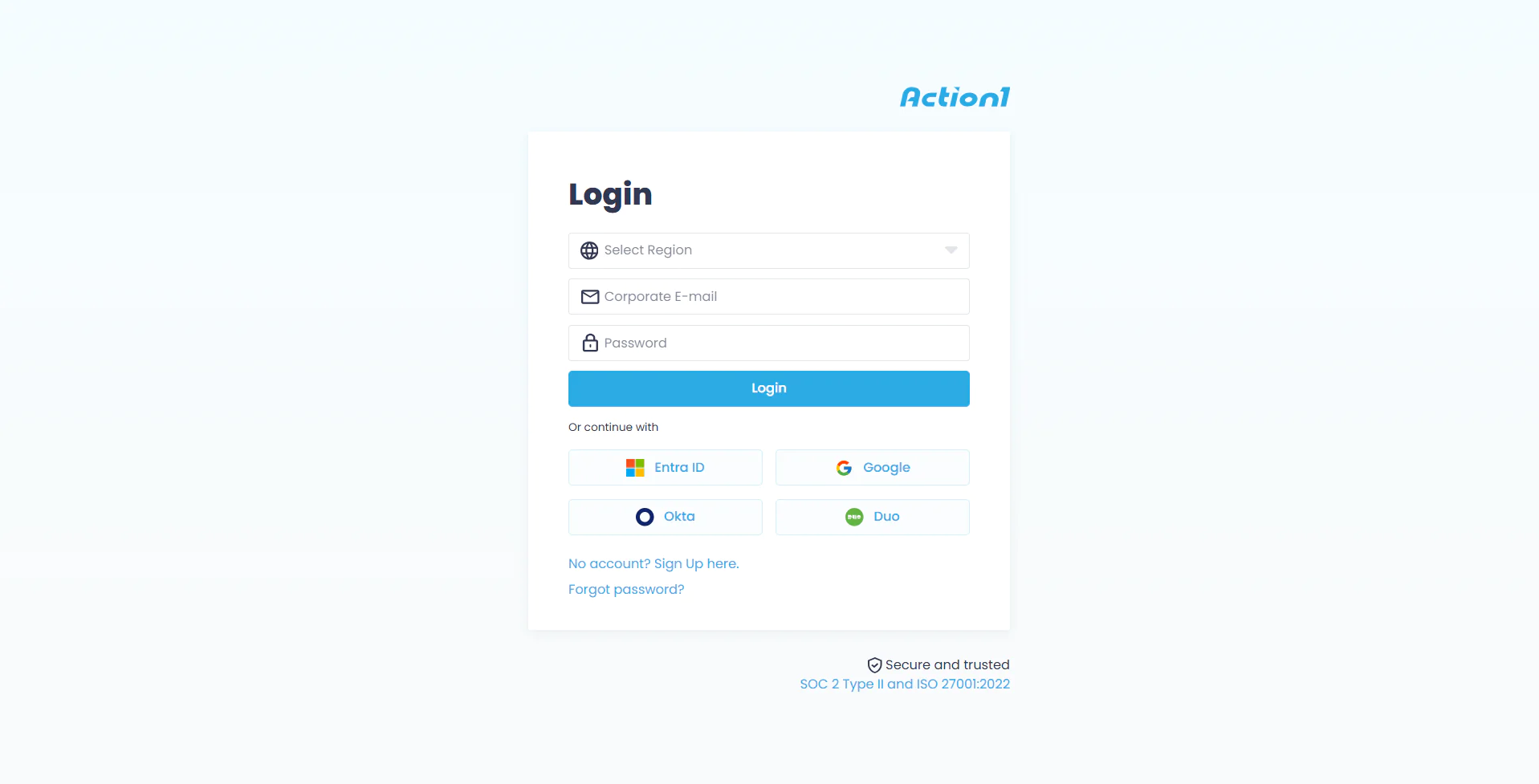
- Step 1. Go to Action1.com, then click Login, and select “No account? Sign up here.”

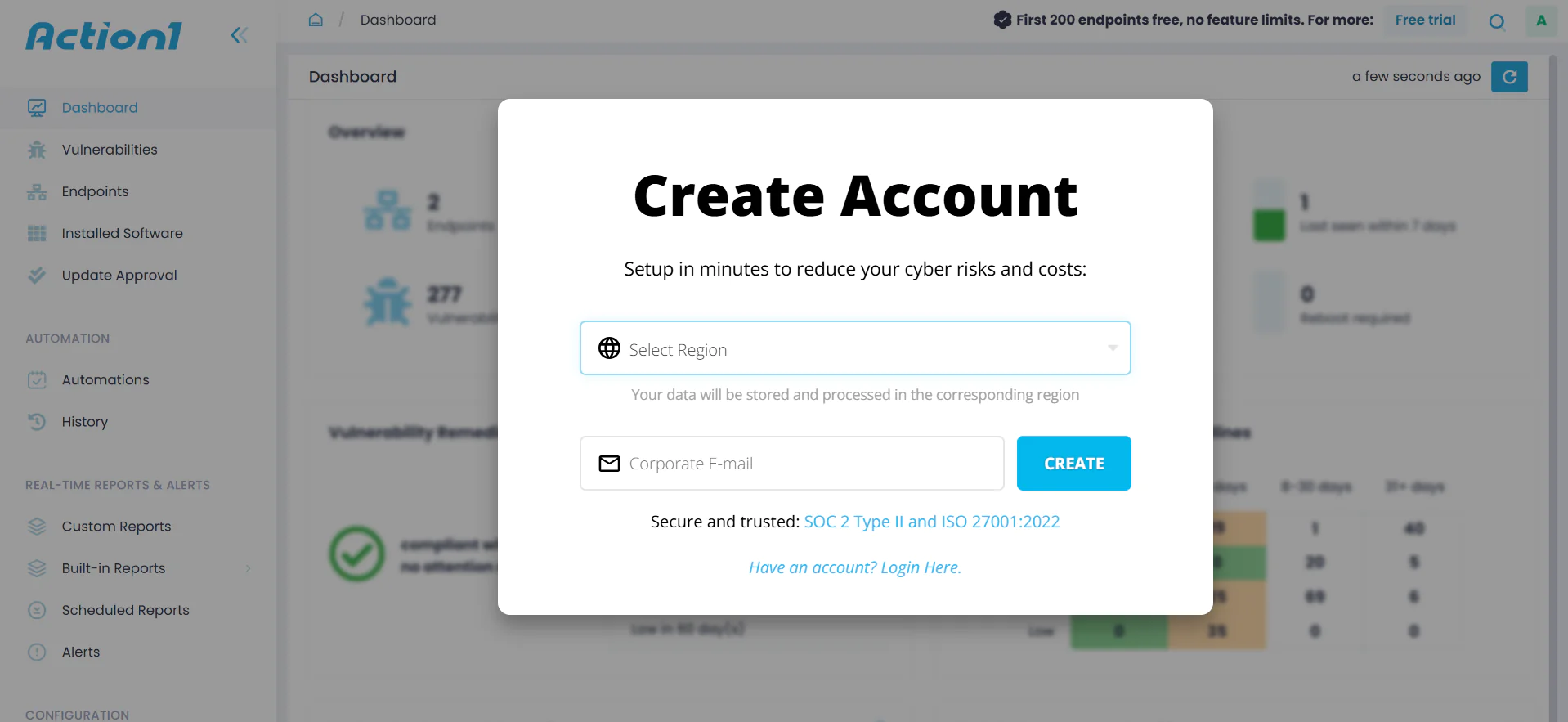
- Step 2. Select your region, and enter your email address; then you will receive additional instructions on your email in getting started.
- Step 3. Once you create your account, now you must install Action1’s agent on your Windows or macOS endpoint(s).
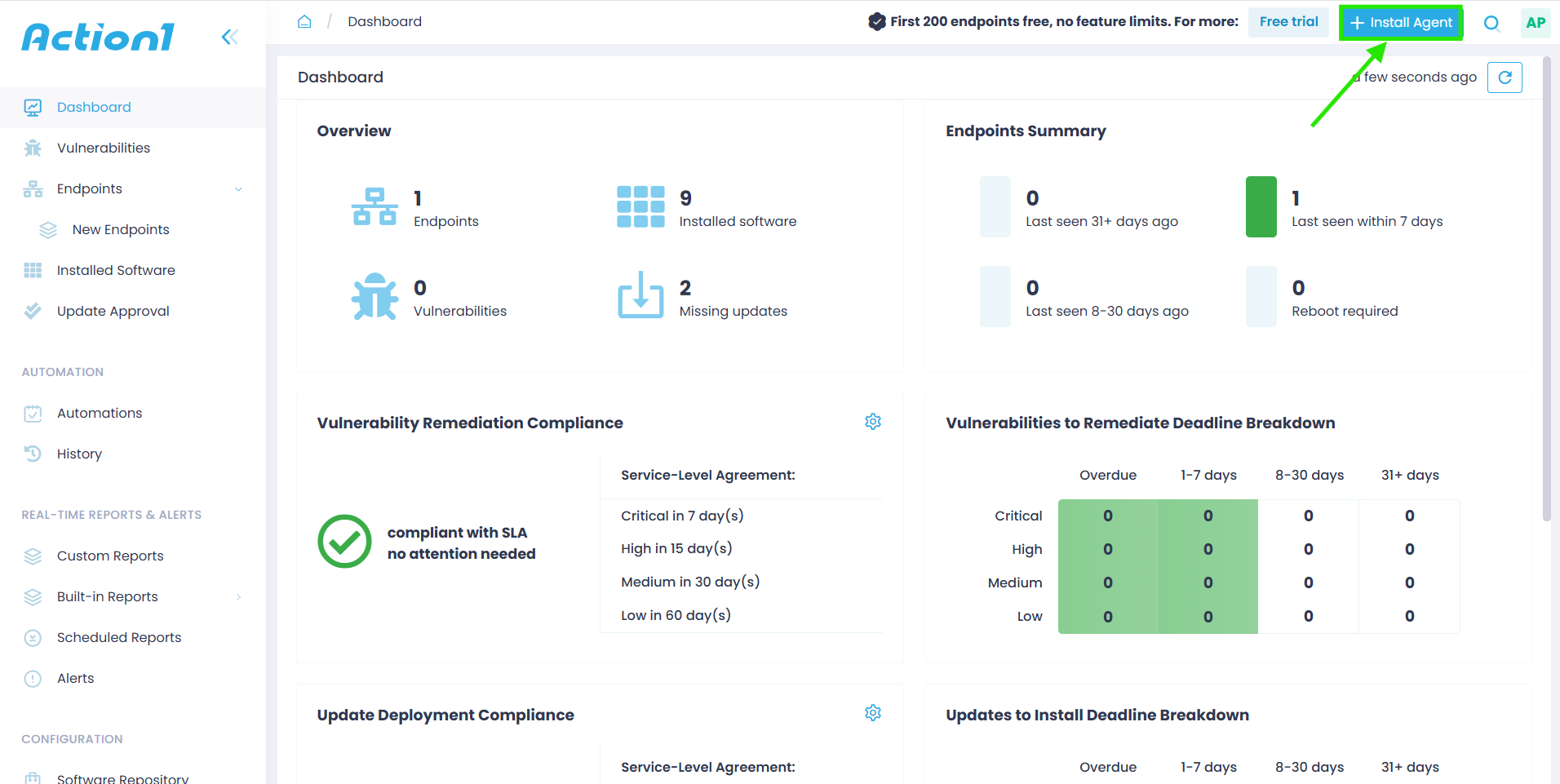
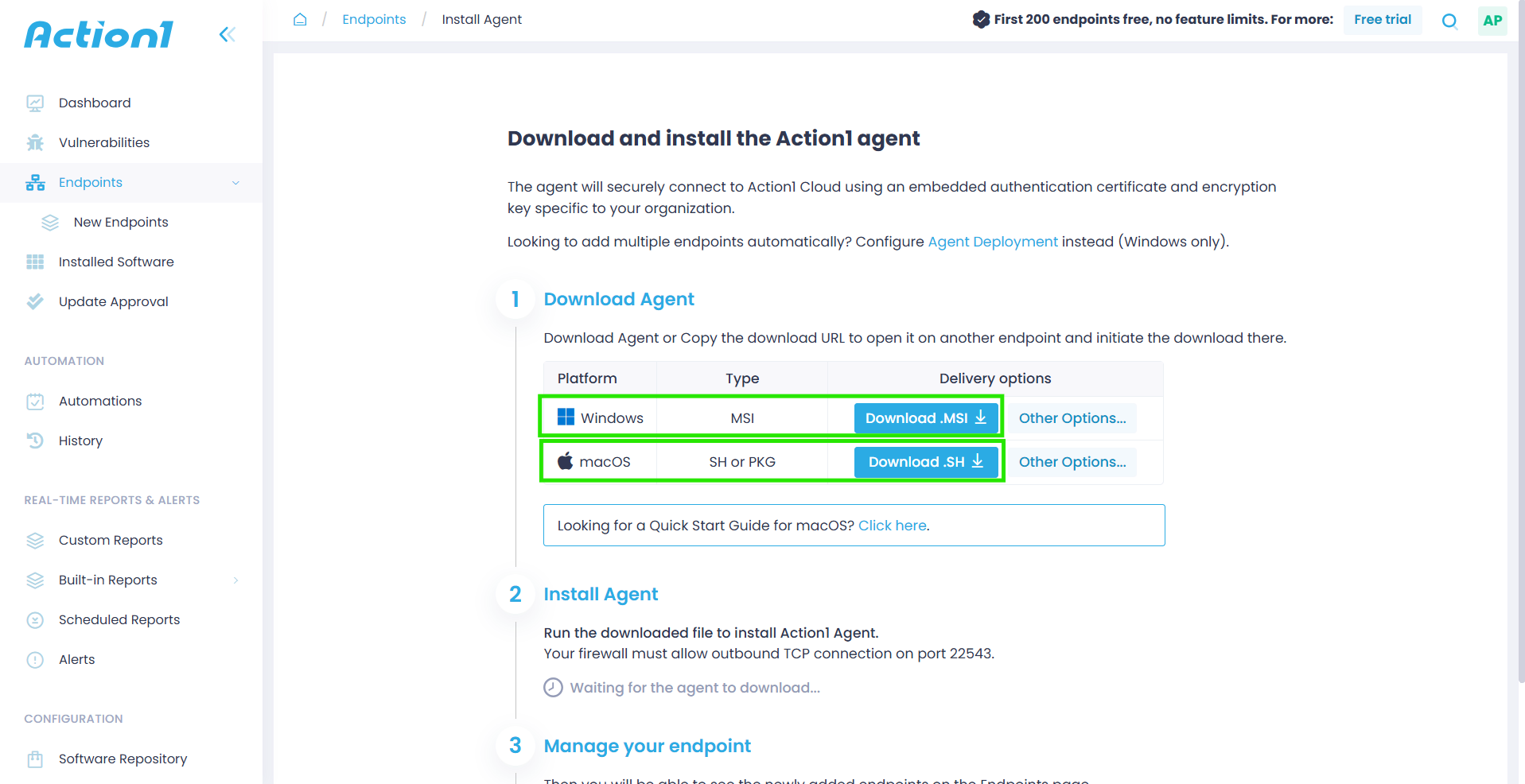
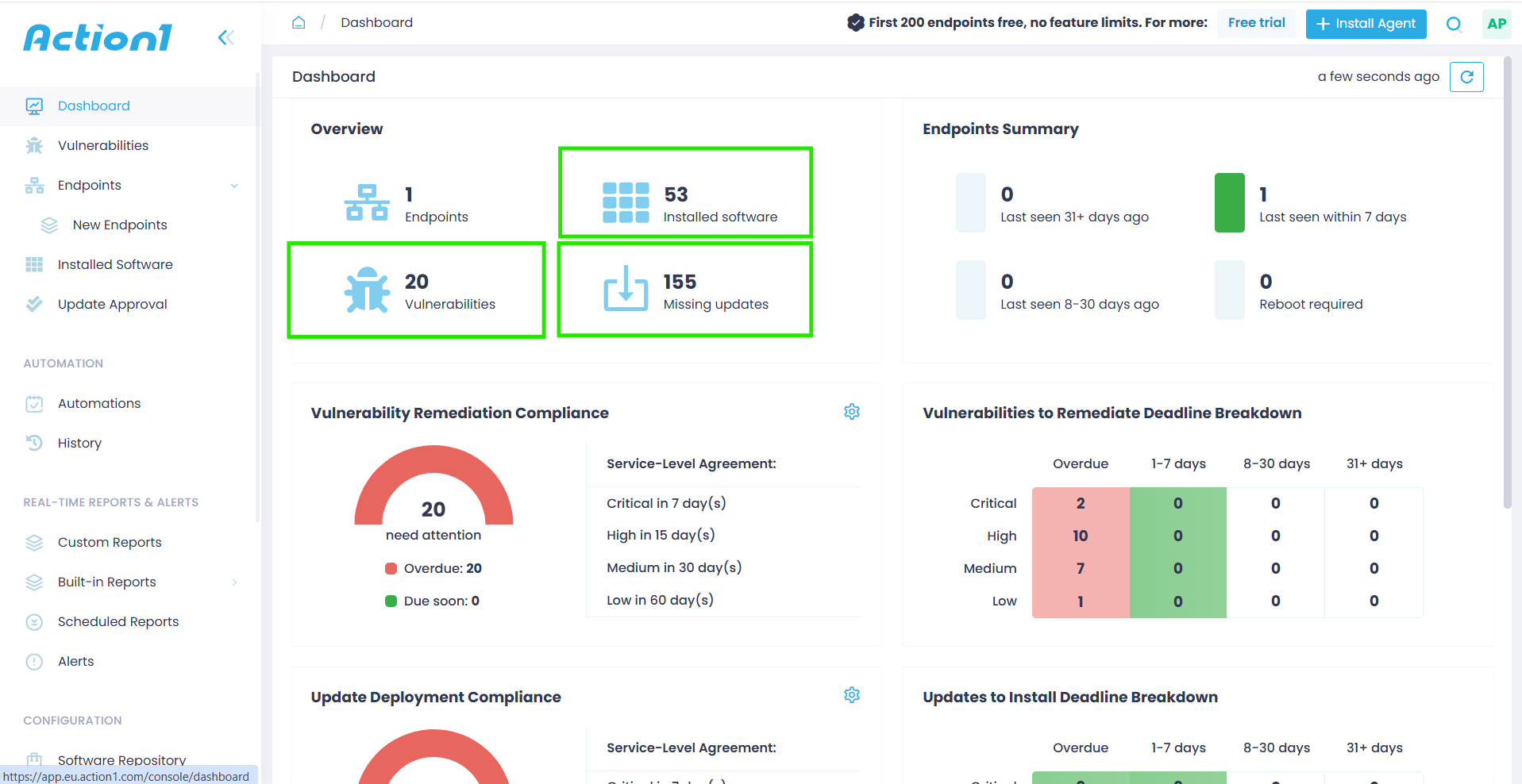
- Step 4. On the dashboard you will see all the existing vulnerabilities, missing updates, and currently installed software across your devices.

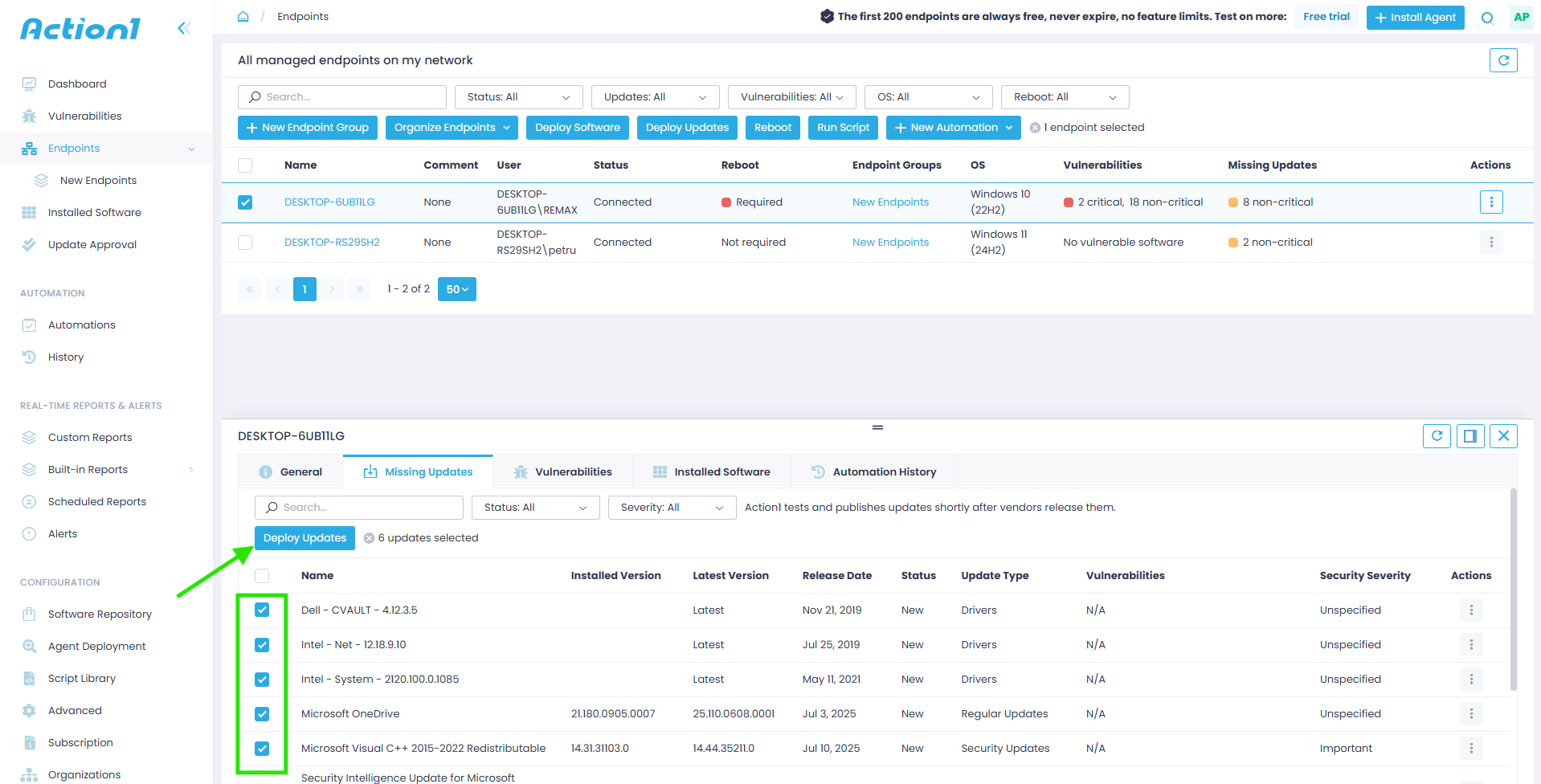
- Step 5. Select the missing updates you want to be installed, then click “Deploy updates.”

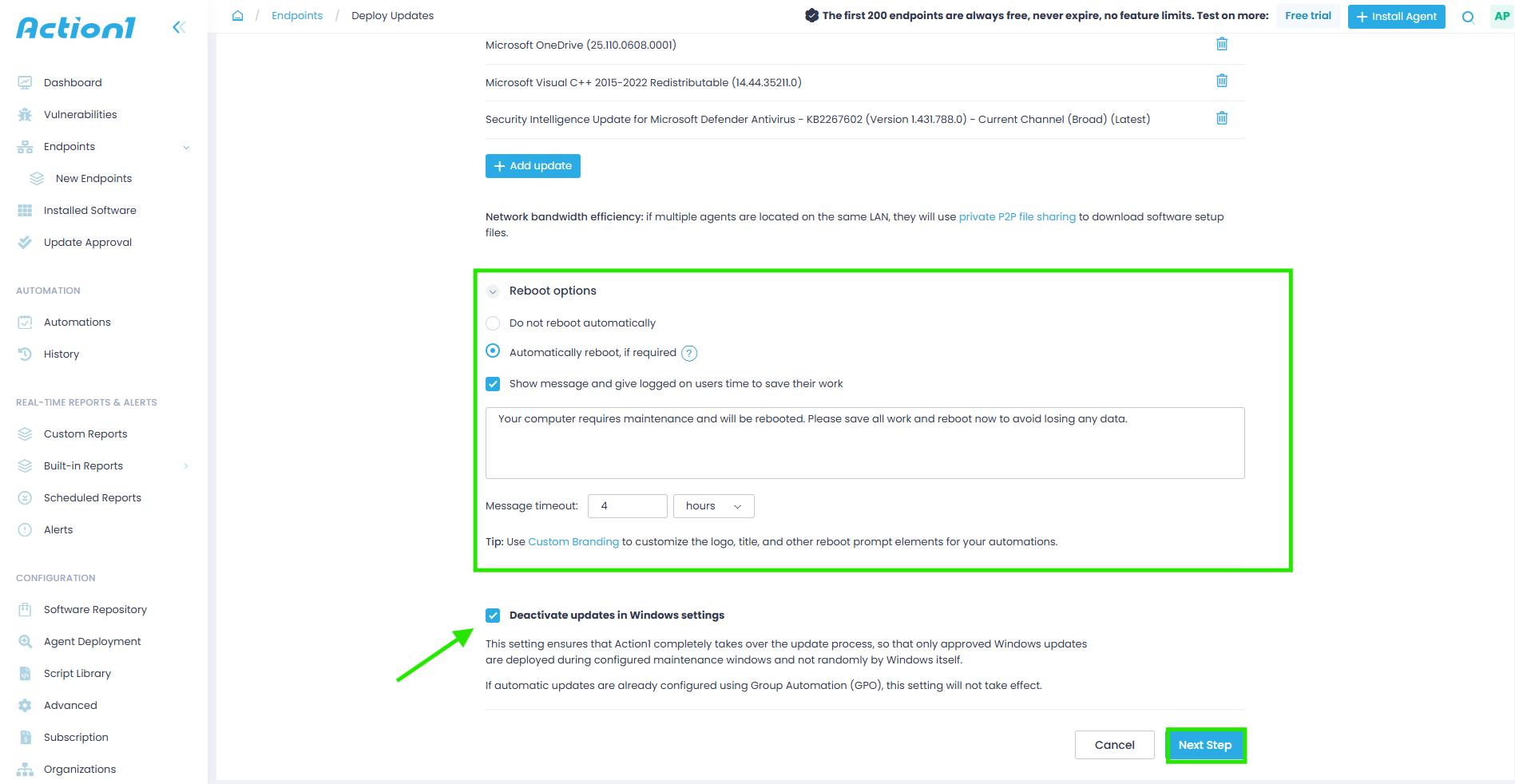
- Step 6. Configure the reboot options; you can also choose to Deactivate automatic updates in Windows settings to ensure updates only run through Action1. Afterwards, click “Next step.”

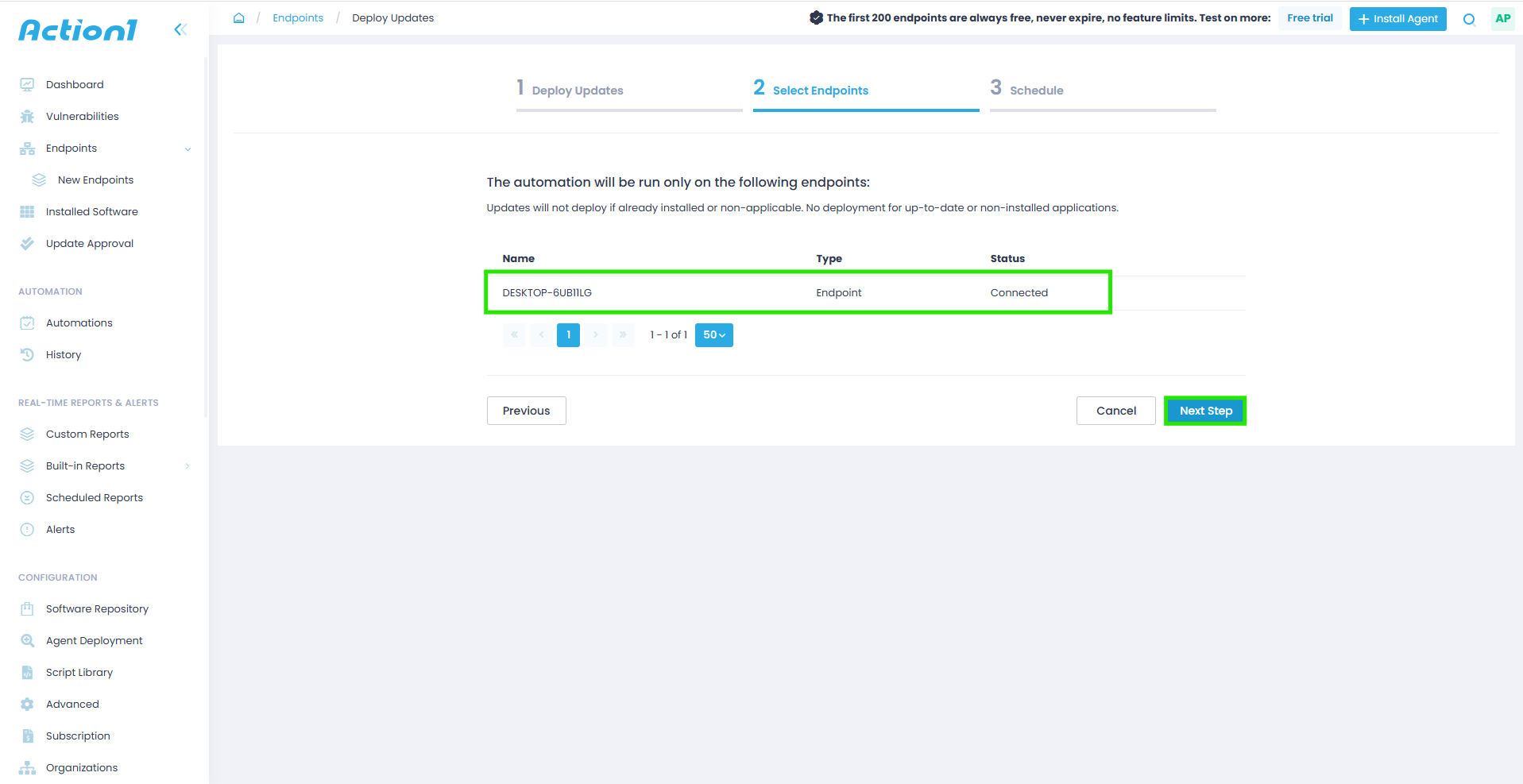
- Step 7. Now you must select the endpoint(s) you want to update. Then click “Next step.”

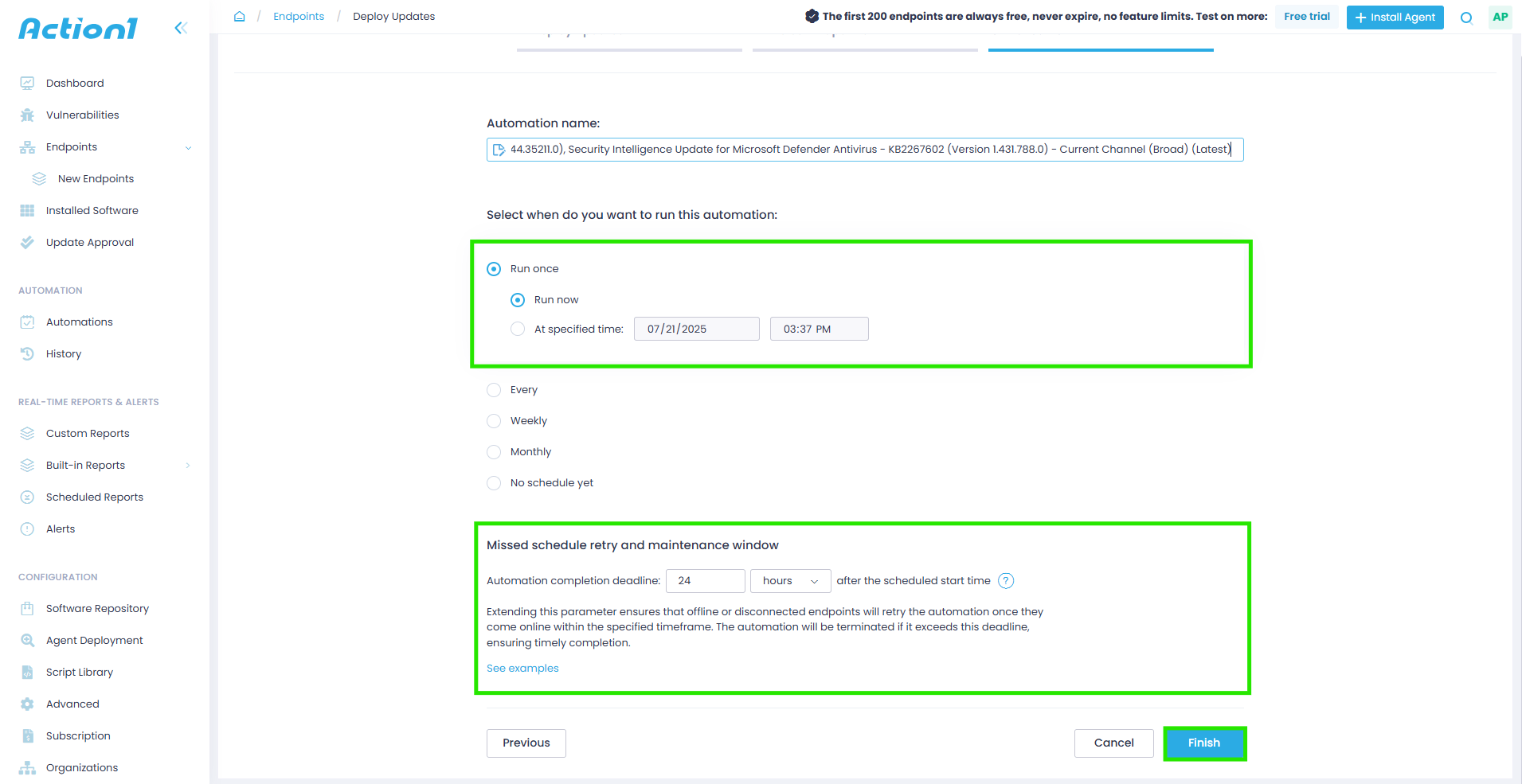
- Step 8. Schedule the update deployment, whether you want to run it now or at a specified time. Pay attention to the “Missed schedule retry and maintenance window.” It is used in case a particular device is not connected to the internet, or it is not currently online; as long as it reconnects within the specified deadline, it will get the update automatically.

- Step 9. Click “Finish” to start the update process as configured.
Microsoft Intune
Microsoft Intune is a cloud-native endpoint management platform that gives you centralized control over device enrollment, application management, and security policy enforcement across your Windows, macOS, Linux, iOS, iPadOS, Android, and ChromeOS devices. But keep in mind that, in terms of native patch management capabilities, it only covers Windows OS updates and applications from the tech giant’s catalog. For patching outside this perimeter, it requires additional tools, so you might end up putting some extra money on the table.
Key Features:
-
Mobile Device Management (MDM) → With Intune, you get complete control over iOS, Android, Windows, and macOS devices with policy enforcement.
-
Application Management → Enables you to deploy, update, and secure both Microsoft and third-party software across your endpoints.
-
Conditional Access → Equips your organization with intelligent security policies that grant access based on device compliance and user identity.
-
Endpoint Protection → Microsoft Intune integrates with Microsoft Defender for Endpoint to provide advanced threat detection capabilities and strengthen the security posture across your endpoints.
-
Compliance Reporting → Offers real-time visibility into device compliance status and security posture.
-
Remote Wipe and Lock → Instant security actions for lost or compromised devices.
-
Integration with Microsoft Products → Intune connects with Microsoft 365, Microsoft Entra ID, and Defender for Endpoint to offer a comprehensive solution for patch management.
ManageEngine Patch Manager Plus
ManageEngine Patch Manager Plus is a reliable software solution that automates and standardizes software maintenance across multiple operating systems and third-party applications. With it, you can detect, test, and deploy critical patches from a single console to ensure your systems are up to date and protected from vulnerability exploitation.
Key Features:
-
Cross-Platform OS Support → Supports patch management across Windows, macOS, and Linux operating systems.
-
Third-Party Patching → Deploys patches to third-party applications including Adobe, Java, Chrome, and other enterprise productivity applications.
-
Flexible Deployment Policies → Enables policy-based patch management with customizable deployment options for installation timing, user notifications, and reboot behavior based on your organizational requirements.
-
Test & Approve → Automatically tests patches on pilot groups and approves only successfully tested patches for production-wide deployment.
-
Insightful Reports → Delivers comprehensive reporting capabilities with real-time audits, patch compliance status tracking, and customizable reports for compliance purposes.
-
Remote Management → Enables you to deploy patches across LAN, WAN, and remote environments, including work-from-home systems, without requiring VPN connections.
-
Decline/Delay Non-Critical Updates → Allows you to decline patches for legacy applications or delay the deployment of less critical patches while prioritizing security updates.
-
30-Day Free Trial → To evaluate if the product is the right one for you before purchase.
Ivanti Neurons for Patch Management
Ivanti Neurons for Patch Management is another cloud-based option on our list, which enables organizations of all sizes to identify vulnerabilities within their network using risk-based prioritization and automatically deploy patches to successfully remediate them. By completely automating the patch management process, Ivanti ensures your endpoints remain protected against vulnerability exploitation and compliant with regulatory standards.
Key Features:
-
Cross-Platform OS Support → Windows, macOS, and Linux endpoints.
-
Third-Party Patching → Successfully patches a variety of third-party applications.
-
Risk-Based Patch Management → Prioritizes vulnerabilities using adversarial risk and exploit intelligence.
-
Active Threat Context → Provides real-time threat intelligence and ransomware attack context.
-
Ready-to-Use Compliance Reporting Templates → Generates audit-ready reports after each patch cycle with minimal manual intervention.
-
Advanced VRR System → Vulnerability Risk Rating system that surpasses traditional CVSS scoring methods.
-
Equal Access to SLA Tracking and Risk Intelligence for Both IT and Security Teams → A unified platform breaks down barriers between departments.
-
Security-Driven Patch Automation → Automates deployment based on security priorities and risks.
-
Integration with SCCM → Works alongside existing System Center Configuration Manager deployments.
PDQ Deploy & Inventory
PDQ Deploy & Inventory is a powerful device management solution that offers users an efficient approach to automatically manage system patching and software deployment. This tool is built on two components: PDQ Deploy and PDQ Inventory.
PDQ Deploy enables your IT team to update third-party software, deploy custom scripts, and handle configuration management changes, while PDQ Inventory is responsible for identifying your endpoints by constantly scanning your network, collecting information, and organizing devices for precise deployment cycles. The software successfully automates each step of the patch deployment process to help businesses of all sizes remediate vulnerabilities in a timely manner.
Key Features:
-
Windows OS Support → Only for on-premises or VPN-connected devices.
-
Third-Party Patching → Only for on-premises or VPN-connected devices.
-
Custom Device Groupings → Ability to group your endpoints for testing or security purposes.
-
Scheduled Update Deployments → Help you avoid operational disruptions and unexpected downtime.
-
Custom Scripts → Allows deploying and managing custom scripts on Windows devices.
-
Asset Discovery → PDQ Inventory automatically discovers all of your on-premises devices across your network.
-
Auto Sync with Active Directory (AD) → Enables syncing with Active Directory to import computer records automatically.
-
Collection Library → With it, you can organize your environment with prebuilt collections for quick insights.
-
Package Library → You can deploy updates from the library of popular apps or create custom deployments.
-
Secure Windows Device Management → Provides a tool suite for secure device management capabilities for IT professionals.
-
Compliance Reporting → Equips IT administrators with robust compliance reporting features to track software and hardware, identify non-compliant systems, and automate remediation.
-
14-Day Free Trial → With no functional limits to evaluate if the product fits your company’s needs before purchase.
SolarWinds Patch Manager
SolarWinds Patch Manager works alongside your existing Microsoft WSUS and SCCM systems, automatically installing Windows OS and third-party updates to fix software security flaws on your devices. This tool also provides your company with improved compliance reporting capabilities, aiming not only to keep your Windows endpoints up to date and protected but also to ensure they comply with the strict regulatory standards your organization must follow.
Key Features:
-
WSUS and SCCM Integration → Extends the capabilities of WSUS and SCCM, offering features like pre-tested updates, scheduling, and compliance reporting.
-
Third-Party Patching → Eliminates the need for SCUP and extends patching capabilities to multiple supported apps, including Oracle Java, Adobe Reader, and more, with prebuilt, tested, and ready-to-deploy packages.
-
Custom Package Wizard → Allows you to build custom packages for any application and deploy any MSI, MSP, or EXE via WSUS or SCCM without complicated scripting.
-
Automated Patch Publishing → Saves you time by automating the publishing of third-party updates to WSUS with pre-built, pre-tested packages for common apps.
-
Intuitive Web Interface → Through it, you can view the latest available patches, the top 10 missing patches in your environment, and a general health overview alongside other SolarWinds products in an integrated web console.
-
Advanced Scheduling Options → Provides the necessary control over patch scheduling with Wake-on-LAN capabilities to boot target systems and force real-time downloads through WSUS.
-
Compliance Reporting → Equips your company with effective reporting tools that enable you to quickly ascertain the patch status and prove to auditors that your systems are both patched and compliant.
-
Virtual Machine Support → You can easily patch offline virtual machines, organize VMs into groups, and perform comprehensive inventory across virtual environments.
-
30-Day Free Trial → Fully functional for 30 days to evaluate all features before purchase.
GFI LanGuard
GFI LanGuard successfully combines network security scanning with automated patch management, with the main purpose of equipping your company with a solution that identifies software vulnerabilities and remediates them by deploying missing patches across your endpoints.
Therefore, your IT team gains complete visibility into network devices, security applications, and potential vulnerabilities while automating the patch management process and maintaining security standards required by industry regulations.
Key Features:
-
Cross-Platform OS Support → Windows, macOS, and Linux systems.
-
Third-Party Patching → Supports Firefox, Java Runtime, Adobe Reader, and other applications.
-
Proactive Vulnerability Detection → Database with over 60,000 vulnerabilities.
-
Secure Web-Based Dashboard → Offers an encrypted HTTPS reporting interface with multi-site deployment support.
-
Current Threat Intelligence → Private threat database regularly updated by BugTraq, SANS Corporation, OVAL, CVE, and more.
-
Network Infrastructure Protection → Secures network hardware like switches, routers, wireless access points, and printers while scanning mobile devices such as smartphones and tablets across Windows, Android, and iOS platforms.
-
Complete Network Visibility → Provides detailed infrastructure analysis, including USB connections, mobile devices, software inventory, shared resources, open network ports, and weak authentication credentials.
-
Virtualization Platform Support → Supports virtualization technologies such as VMware, Hyper-V, Citrix, and Parallels.
-
Regulatory Compliance Management → Equips you with the ability to generate comprehensive reports with minimal manual intervention.
-
Runs in Agentless and Agent-Based Mode → Ensures that both on-premises and remote devices are secured and up to date.
-
30-Day Free Trial → Fully functional for 30 days to evaluate all features before purchase.
Additional Criteria to Choose the Right WSUS Alternative
Selecting the right WSUS replacement requires some effort from your side. You can’t simply pick the first solution you see. To make informed decisions, you have to carefully consider four critical factors that directly impact your company’s patch management success. This is why you must select a solution that aligns with your infrastructure needs, endpoint diversity, compliance requirements, and last but not least, ease of integration with your existing tools.
To help you choose the best WSUS alternative for your company, we’ll discuss in detail the following four criteria:
Cloud vs. On-Premise Needs
If your team oversees dispersed endpoints across multiple offices or provides support for remote employees, an on-premise solution such as WSUS may not be appropriate for you. The best choice is a cloud-native patch management platform that allows you or your team to easily manage and deploy updates, regardless of the current locations of these endpoints.
Moreover, make sure that this solution supports multi-OS patching, ensuring the entire patch management process continues without relying on local infrastructure or VPNs.
Endpoint Diversity
The bigger your organization is, the more devices in your environment. Your patch manager must support multiple operating systems, third-party applications, and software distribution requirements. Furthermore, the best option is if that software offers a privately maintained software repository with P2P patch distribution.
Consequently, you will ensure only reliable, safe, and tested patches are reaching your endpoints without any bandwidth constraints. Being able to deploy OS and third-party application updates from a single console improves your company’s operational resilience and reduces exposure to unpatched vulnerabilities.
Compliance Requirements
Regulatory compliance is an essential factor to consider when choosing a WSUS alternative, because your company must be ready to prove that every single endpoint is secured and compliant to avoid costly fines. Having a reliable patch management tool that generates reports after each update cycle effortlessly is exactly what you need.
That’s why you must look for a solution that simplifies generating reports for auditors by automatically tracking patch status across your endpoints and offers the necessary visibility into what’s been deployed, where, and when.
Ease of Integration with Existing Tools
You need policy based patch management software that fits into your existing IT environment without creating challenges or requiring additional investments. Look for a solution that equips your company with advanced features, flexible connectors, and a clear upgrade path.
Seamless integration accelerates patching across your environment, improves automation, and helps your team stay in control of software distribution and compliance without unnecessary complexity.
Best WSUS Alternatives per Use Cases
Now that we’ve explored our top WSUS alternatives in detail, let’s see how they fit different IT environments and whether any of them can act as a universal solution.
|
Tool |
Best for Small IT Teams |
Best for Enterprise Environments |
Best for Remote or Distributed Teams |
|---|---|---|---|
|
Action1 |
Free for up to 200 endpoints, zero infrastructure, and live in 5 minutes. No other tool on this list comes close for small teams. |
Infinitely scalable. Automates OS and third party patching, multi-tenancy, and strong reporting capabilities. |
No VPN, no hardware, no complexity. Patch every endpoint from any browser, anywhere in the world. |
|
Microsoft Intune |
Yes, but only if you are already in the Microsoft ecosystem. Outside of it, the setup and cost add up quickly. |
Yes, but only for Microsoft-centric organizations. |
Remote enrollment and zero-touch provisioning, MDM and MAM, work well. |
|
ManageEngine Patch Manager Plus |
but expect a learning curve during setup that small teams may find time-consuming. So it’s up to you to decide whether you’re okay with that. |
Strong cross-platform support and compliance reporting, though the interface can feel overwhelming at scale. |
Patches remote and work-from-home endpoints without a VPN but requires proper initial configuration. |
|
Ivanti Neurons for Patch Management |
No. Because of the higher price compared to other alternatives from the list.
|
Yes, for enterprises that need threat-aware, risk-based patching with unified IT and security operations. |
Cloud-based architecture reaches distributed endpoints, but the cost and complexity remain the trade-off. |
|
PDQ Deploy & Inventory |
Yes, but for Windows-only on-premises environments. |
Mixed OS and cloud environments are simply out of scope. |
Not built for remote-first teams. |
|
SolarWinds Patch Manager |
Only practical if you already run SCCM. |
Yes, but only if you don’t need native cross-OS platform support. |
Yes, but only after deploying an agent on each endpoint. Not as seamless as cloud-native tools, but it gets the job done. |
|
GFI LanGuard |
It offers a rich feature set, automates patching and vulnerability management, and comes at a reasonable price. |
Built for SMBs and mid-market teams. It hits a ceiling well before true enterprise scale. |
Yes, through agents installed on remote devices. A VPN is recommended for security, but not strictly required for the connection to work. |
The table speaks for itself. If Action1 fits your environment, you can create your free account right now and have your first endpoints patched before the end of the day.
What is the Best WSUS Alternative for Cloud-Based Patch Management in 2026?
For cloud-first environments, Action1 is the best WSUS alternative, since it offers remote monitoring, multi-OS and third-party patching, autonomous update deployment, and effortless report generation. The software uses a privately maintained software repository and peer-to-peer (P2P) patch distribution, making it a secure and reliable solution that lets you patch thousands of remote and on-premises endpoints in a matter of minutes to successfully remediate software vulnerabilities across your network.
Are There Any Free WSUS Alternatives Suitable for Small Businesses?
Yes, there are free WSUS alternatives. Action1 offers a fully featured free tier for up to 200 endpoints, covering Windows, macOS, Linux, and third-party patching. The software completely automates the patch management process, from vulnerability identification to remediation. Since the platform is cloud-native, it enables you or your team to patch on-premises and remote endpoints from anywhere in the world, directly from your browser, without requiring a VPN connection.
It also offers 100+ built-in reporting templates that help you adhere to the strict regulatory frameworks your organization is obligated to follow. That’s why it is the perfect free WSUS alternative for small businesses, since they can use it forever, with no functional limits.
How Do WSUS Alternatives Compare in Terms of Security and Compliance?
Nowadays, patch management platforms are designed not only to automatically remediate software vulnerabilities but also to help organizations strengthen their overall security posture and effortlessly generate detailed patch reports to demonstrate regulatory compliance. Unlike WSUS, which lacks audit trails, modern patch management solutions track every approval and deployment and generate ready-to-use compliance documentation for HIPAA, PCI, GDPR, and internal standards.
Why are IT Teams Moving Away from WSUS?
IT teams move away from WSUS because it primarily focuses on Windows devices and lacks native support for third-party apps, macOS, or Linux systems. Another fundamental reason is that Microsoft deprecated WSUS, meaning it is no longer under active development and will not receive new features, despite the fact that it will remain in support until 2035 with no impact on existing capabilities or Microsoft Configuration Manager integration.
WSUS also requires too much manual intervention and a VPN connection for remote device management, and to top it all off, its reporting capabilities are painfully limited. On the other hand, third-party patching platforms equip companies with a centralized interface, cross-platform support, seamless scalability, and detailed report generation, all with minimal effort.
What are the Key Features to Look for in a WSUS Replacement?
The key features you must look for in a WSUS replacement are cross-platform OS support covering Windows, macOS, and Linux devices, third-party application patching, cloud-based deployment, automated vulnerability identification and remediation, scheduling, testing, and reporting capabilities.
Key Takeaways
WSUS patch management simply can’t meet the needs of companies that rely on hybrid environments. Nowadays, many organizations have remote employees working from different locations around the world, which demands more reliable, advanced, effective, and flexible solutions for managing patch updates to keep these endpoints up to date, secured, and compliant.
However, there is no one-size-fits-all solution, and that’s why it’s important to consider your organization’s specific needs, such as endpoint diversity, whether you have remote devices that must be managed, what your compliance requirements are, and whether existing tools will seamlessly integrate with the new patch management solution.
When taking these criteria into account, you can make an informed decision and choose the right solution that will keep your devices current and compliant. In 2026, the best WSUS alternatives are Action1, Microsoft Intune, ManageEngine Patch Manager Plus, Ivanti Neurons for Patch Management, SolarWinds Patch Manager, PDQ Deploy & Inventory, and GFI LanGuard.
All of these platforms can equip your organization with everything needed to automatically remediate known software vulnerabilities, generate audit-ready reports after each update cycle, and give your team the necessary control and flexibility over the patch management process.
This way, you can have peace of mind that the attack surface across your network is minimized and the chance of experiencing the devastating consequences of a cyberattack is significantly reduced.
Why Is Action1 Your Best WSUS Alternative?
Action1 is a cloud-based autonomous endpoint management solution that helps organizations of all sizes patch their endpoints in a timely manner and keep them protected against successful cyberattacks launched after vulnerability exploitation. The software completely automates each step of the patch management process, from identifying flaws across your endpoints and listing missing patches to testing, deployment, and generating detailed audit-ready reports with just a few clicks.
It is the best WSUS alternative because it equips your company with everything needed to minimize the attack surface across your network and strengthen its overall security posture. It takes just 5 minutes to create your account, install the agent on each endpoint you want to manage, and start patching automatically.
With it, you can test Windows, macOS, Linux, and third-party application patches in a lab environment before deploying them across your entire network. And that’s exactly what the update rings feature is for, giving you a more intelligent, staged, and risk-free patching process.
This feature enables the categorization of your endpoints into groups (rings), starting with less-critical systems and gradually expanding to production-critical endpoints. What makes this approach so effective and risk-free is that patch performance is analyzed in each ring before progression to the next is allowed.
So if a particular patch causes any system instabilities or other unexpected issues in an early ring, the system automatically prevents it from moving forward, ensuring only reliable patches reach your production environment and eliminating unexpected downtime risks.
Furthermore, the patch management solution offers an approval and decline update feature that allows you to deploy updates to a specific department or organization instead of rolling them out across all of your or your clients’ endpoints, giving you the needed flexibility to avoid operational disruptions.
On top of that, Action1 uses a private software repository with P2P patch distribution, so patches are tested before they reach your endpoints and deployments never put a strain on your bandwidth.
Last but not least, the software is free for up to 200 endpoints, with no functional limits, making it an ideal choice not only for small businesses that can use it forever but also for large enterprises that can test it as long as needed before committing to a paid plan. Since the platform is cloud-native, it scales seamlessly, letting you expand from hundreds to hundreds of thousands of endpoints at a gradually lowering per-endpoint cost.
All these features and benefits make Action1 the best WSUS alternative. WSUS had its time. Action1 is what patch management looks like now. Start free today. Up to 200 endpoints. No credit card. No time limits. No catch.





