






TL;DR
- A patch management policy governs how software updates are managed across an organization
- It defines patching scope, roles, responsibilities, timelines, testing, deployment, and reporting
- The policy helps turn ad hoc patching into a controlled, repeatable security process
- It supports compliance with frameworks like HIPAA, PCI-DSS, ISO 27001, and SOC 2
- Strong policies include exception handling, risk acceptance, rollback, and audit documentation
- The patch lifecycle should cover discovery, identification, prioritization, testing, deployment, verification, and reporting
- Modern tools help enforce patch management policy through automation, visibility, and compliance dashboards
What does Patch Management mean?
Patch Management is a specific control identifier within a structured cybersecurity framework, corporate policy, standard operating procedure (SOP), and IT operations. It follows the lifecycle stages of identifying, testing, deploying, verifying, and documenting patch management, keeping operating systems, applications, and firmware up to date, and ensuring systems stay secure, compliant, and high-performing. A brief breakdown of the process is as follows:
- Identifying: Maintaining asset inventory, vulnerability monitoring with global CVE databases, vendor notifications and advisories, and risk assessment, such as prioritization for high-impact vulnerabilities.
- Testing: Validation and compatibility of the patches in sandbox environments on a pilot group of devices before rolling into production, so they do not break any application or workflows.
- Deployment: Implementation, scheduling, and automation of patches in phased rollout, first by deploying on critical systems, then non-critical staff devices, and then in the entire
- Verifying: Success confirmation of the deployed patches by vulnerability rescanning and performance monitoring.
- Documenting: Maintaining change management records of applied patches, exception logging, and generating reports for audit and compliance.
What is a Patch Management Policy?
A patch management policy is a formal governance document that defines how an organization identifies, evaluates, prioritizes, tests, deploys, verifies, maintains documentation, and reports on software updates across its entire IT environment. Policy serves as a governance layer rather than just a how-to guide; it formalizes the security commitment of an organization by ensuring that every software, from router firmware to an application installed on a mobile device, is secure.
Purpose of a Patch Management Policy
A security patch management policy serves as a source of truth for the patch lifecycle. It transforms irregular, ad hoc patching into a continuous process by providing answers to critical questions during the operational reviews and audits, such as:
- Defining boundaries of which systems are in scope, such as on-prem, cloud, SaaS, endpoints, e.g., employee-owned devices (BYOD), IoT devices, e.g., smart cameras, or cloud-based virtual machines.
- Assigns roles and responsibilities, such as who owns each part of the patch lifecycle, e.g., the security team for risk identification, administrators for deployment, the QA team for testing, and vendors for third-party applications.
- Defines criticality level for how patch urgency is determined, usually aligns with Common Vulnerability Scoring System (CVSS), for example, a vulnerability with a score of 9+ needs to be managed within 24 hours, and a vulnerability with 4 score or below can wait for the monthly cycle.
- Establishes the standards for how the testing is performed for validation, patches must be tested in staging environments to avoid any breakage in production systems, and rollback validation.
- It defines the maintenance window, such as when the patches need deployment, keeping the balance between security and system uptime.
- It provides a safety net by specifying how exceptions are approved, such as when a known patch is breaking an important legacy application, and needs sign-off from top management, such as the CISO, and suggestions for alternative security measures.
- Ensures what evidence must be retained for auditability, such as logs, change tickets, and success reports, for a period of at least 1 to 3 years.
- Establishes the success criteria of how the compliance is measured, such as 95% of all critical patches must be deployed within 7 days of their release.
Why is a Patch Policy Necessary?
A patch policy is important because many large organizations manage thousands of endpoints, systems, applications, and cloud resources. Patching can become inconsistent, undocumented, delayed, or overly risky. Scalability and shadow IT are common problems in enterprises. A single laptop can have 50+ applications, and with 10,000 employees, that adds up to half a million potential points of failure or entry points. The policy defines the need for automation to manage this volume. Without a policy, employees may install unauthorized software to get their work done quickly, which could be outdated and create blind spots for the security team. Auditors or legal teams look for a policy document first if a data breach occurs, without providing a plan to manage vulnerabilities and apply patches, which can result in heavy fines and financial penalties for organizations.
Policy as a Strategic Security Tool
A patch management policy is not just an operational or maintenance document; it is a strategic tool for organizational resilience and security posture maturity:
- It closes the vulnerability window and reduces the cybersecurity risk, e.g., the time between vulnerability discovery and prompt fix applied before its exploitation.
- Policy prevents downtime caused by faulty updates by mandating testing, which maintains operational resilience.
- It supports compliance by directly adhering to requirements from regulatory frameworks such as HIPAA, ISO 27001, PCI-DSS, or SOC2, which all require strict patch management.
- It enforces the organizations to maintain and improve visibility, such as centralized asset inventory, monitoring, and reporting, providing insight into patch status, risks, and performance.
- It ensures the standardized remediation, e.g., servers and endpoints in the London office are as secure as the ones located in the Head Office in New York.
- The policy enables automation by providing the rules for integration with automated patch management tools such as Action1, NinjaOne, or Microsoft Endpoint Configuration Manager (MECM) for scalability and efficiency.
- Patch management policy helps in building trust between clients and stakeholders that the organization is properly following the industry standards or compliance regulations.
What is the scope of a Patch Management Policy?
Systems Covered by the Policy
The policy must clearly state which systems, services, and platforms fall within the patching scope, that no stakeholder has an exception from the patching policy, and that every technology environment is managed appropriately for patching. These include:
- Organizational IT Assets: All organization-owned systems, including desktops, laptops, and institutional infrastructure; this covers both on-premises and remotely deployed assets.
- Managed Endpoints: This includes employee workstations, their mobile devices, and their personal devices. This is critical in hybrid and remote work environments.
- Servers: This includes physical and virtual servers that either reside in on-premises data centers or in cloud environments, examples would be file servers, application servers, and directory servers.
- Networking Systems: This is often forgotten hardware, including network security appliances and infrastructure firmware, devices such as routers, switches, VPN gateways, and firewalls.
- Cloud Infrastructure: Such as Infrastructure-as-a-Service (IaaS) environments providing virtual machine services, storage services, and cloud-native components, providers like Microsoft Azure, Google Cloud, and Amazon Web Services.
- SaaS Platforms: This includes third-party Software-as-a-Service providers, such as collaboration tools, ERP platforms, and CRM systems, e.g., Salesforce or Workday. Although vendors are responsible for patch management, organizations must check with them to ensure accountability and compliance.
- Databases: This includes data platforms and Database Management Systems (DBMS), patching includes both engines and supporting components.
- Applications: This includes enterprise applications, third-party tools, and custom-built applications residing in on-premises or cloud environments. Applications also include productivity apps, line-of-business systems, and browsers.
- Telecommunication Systems: This includes communication servers, VOIP systems, and unified communications platforms.
- Hardware and Software Infrastructure: Includes system BIOS, Firmware, middleware, supporting frameworks and hypervisors.
- Vendor Managed Services: Include systems maintained by external partners or vendors; the policy should state contractual clarity for patching responsibility.
- Third-Party and Connected Systems: Includes systems connected to organizational networks such as SIEM solutions, EDR/XDR systems, PAM solutions, etc.
Users and Stakeholders Covered
Patch management policy involves everyone who uses or accesses organizational IT resources, not just limited to the systems in the IT department. This includes:
- Internal Users: Employees in all departments, faculty and educational institutions staff, and administrative leadership accountable for governance, all must comply with software updates installation and reboot requirements.
- Extended Users: Students in universities, guest users, and delegated users with limited or temporary access to the resources.
- External Users: These could be contractors, consultants, or partners, third-party authorized users for their own or organization’s system maintenance, or managed service providers for outsourced IT operations. For example, a contractor’s laptop or tablet must be fully patched before allowing access to the internal network.
- Technical and Governance Roles: These are the executors of the policy; they include IT administrators for patch deployment, security teams for risk and vulnerability management, and application owners responsible for availability and performance.
- Business System Owners: These are the non-technical managers owning a business application, such as finance managers owning an accounting software; they are responsible for providing a patching schedule for their application to avoid business continuity.
Technology Boundaries
Large enterprise environments comprise a wide range of systems that cannot be patched using the same procedure. A comprehensive policy defines the technology boundaries, including different system categories that require tailored approaches.
- Production Systems: These are the live environments containing business-critical applications that require controlled and strict change management, testing, and scheduled maintenance windows, such as after business hours for patching and extensive rollback mechanisms if something goes wrong during that maintenance, so business can run the next day as usual.
- Development and Test Systems: These are the environments used for application development and validation, mostly for pre-deployment testing prior to roll-out in production environments, and are flexible for patching.
- Cloud Workloads: These are cloud-native, dynamic, and scalable environments that require automated and continuous patch management strategies.
- SaaS Applications: These environments are mostly controlled by vendors providing the services, but organizations strictly monitor the configuration management and compliance verification.
- Containers and Orchestration Platforms: Containerized and orchestrated applications such as multiple instances of applications and databases, e.g., Kubernetes or Big Data platforms. Patching for these environments involves redeploying images and workloads rather than in-place patching.
- Business-Critical Systems: These include operational systems such as healthcare platforms and financial systems; these are business critical, so require minimal to no downtime with prioritized patching.
- Legacy System: These are the old systems for which there is limited or no support; they require compensating controls if patching is not feasible. Though organizations are eager to upgrade their systems regularly, some older applications are critical to the business and are still used in air-gapped environments to reduce external threats, even if they are not patchable.
- Remote Endpoints: These include workstations, BYOD, and remote devices in regional offices or home offices, outside the physical corporate network perimeter, and patched via remote patching mechanisms either over corporate VPNs or public internet; these devices are mostly patched by cloud-native endpoint management systems.
- High Availability Infrastructure: These are the systems that cannot bear downtime, such as clustered environments, and require failover strategies with redundancy-based patching, e.g., one server in a cluster should be patched at a time while other systems can manage operations, which ensures zero downtime.
Why Organizations Need a Patch Management Program?
A patch management program is an engine that executes the patch management policy. The program provides the resources, people, and tools for the entire organization, while the policy dictates the rules. They both collectively balance the requirement of security, such as locking down everything, and operations, such as keeping everything running without disruption.
Security Objectives
The primary objective of patch management is to reduce risk exposure in a timely manner, which is the most critical driver in cybersecurity. This means reducing exposure to known zero-day vulnerabilities for which a patch is available for weeks or months but has not been applied. Patches can be prioritized for actively exploited vulnerabilities; a program leverages a catalog of known-exploited vulnerabilities to remediate them first, which are being used in real-world attacks. A patch management program prevents malware and ransomware from spreading through unpatched systems. A patch management program maintains a defensible security posture in the event of a data breach, helping prove that a structured program was in place to avoid claims of negligence by legal and professional bodies.
Operational Objectives
Patching is often seen as a security task, but it is equally important for IT and the endpoint’s health and performance. Many patches serve as hotfixes to maintain system stability and improve performance by resolving memory leaks and hardware driver-related bugs that cause unexpected behavior or system crashes. While patching requires scheduled downtime, the same downtime reduces unplanned downtime caused by system failures or data breaches, which can cause operational disruption and be more damaging and expensive. A patch management program offers predictable maintenance schedules, enabling businesses to plan or complete their work around or before the maintenance window.
Compliance Objectives
A patch management program is not optional for many industries subject to legal or regulatory requirements such as HIPAA, GDPR, or PCI-DSS, which require organizations to promptly protect their assets through updates. Patch management produces the required evidence for audit reviews that the organization is following internal security standards, policies, and regulatory requirements. Insurance providers routinely assess patch management policies and practices; failure can result in policy cancellation or denial of specific claims. Risk management reporting provides the data required to satisfy stakeholders and regulatory bodies on the level of risk mitigation achieved during a specific period. Organizations and Service providers can obtain the certifications by known compliance frameworks such as ISO 27001 or System and Organization Controls (SOC 1, 2) reports with a comprehensive patch management program.
Governance Objectives
If a patch management program is professionally managed, measured, and aligned with an organization’s overall goals, it ensures that governance objectives, such as clearly assigning ownership, are met. Organizations can use the Responsible, Accountable, Consulted, and Informed (RACI) model to achieve that. For instance, IT is responsible for patch deployment, while the CISO is accountable for the program’s overall success. The program defines clear escalation paths for who should be consulted or informed in case a patch fails on a certain number of devices, such as the CIO or CISO. It also tracks patch completion metrics, such as Mean Time to Patch (MTTP), patch compliance rate, and the number of failed patches. It also provides the risk acceptance procedure for signing off on decisions to patch legacy systems, which could be the CIO or CISO. A patch management program requires executive visibility into patch compliance to show top management or the board of directors, which many well-known unified endpoint management tools provide through comprehensive dashboards and reports.
What are the Roles and Responsibilities for Managing Patch Management Policy?
Security Team
The security team plays a risk-focused role in patch management. Their primary responsibility is to identify threats and prioritize them by monitoring vulnerability intelligence feeds and CVE databases, reviewing patch release notes, identifying real-world exploited vulnerabilities, and assigning risk levels or severity to those vulnerabilities. They are also responsible for remediation timelines recommendations, monitoring security exposure, and delivering risk reports to top management.
IT Operations Team
The responsibility of the IT operations team primarily involves deployment and system maintenance, such as testing patches in QA environments before production deployment, scheduling deployments within maintenance windows, applying OS updates, and monitoring installations. They are also responsible for identifying failures, troubleshooting common issues, system disruptions, and maintaining patch management solutions.
System Owners
System owners are the heads of departments or application owners, serve as a bridge between business and IT operations, and are responsible for approving patch schedules with business operations, validating that systems are working after patching by identifying and highlighting workflows, integrations, and services that are running or affected. System owners are also responsible for communicating operational constraints, such as downtime tolerance, peak business hours, delays justification, or unacceptable risk due to patching.
Compliance and Governance Teams
These teams ensure that patch management is fully aligned with internal policies, audit exceptions, and regulatory requirements. They are responsible for reviewing documentation for patch activities, confirming that all logs, reports, and approvals are maintained for audit purposes, and providing explanations and evidence during internal and external audits. They monitor compliance with defined procedures and SLAs for patch management and ensure that risk acceptance is justified and properly documented.
Executive Leadership
Providing strategic oversight, authority enforcement, and budget distribution is the responsibility of executive leadership, e.g., CIOs, CISOs, or CTOs. They review the patch KPis by monitoring compliance metrics such as time-to-patch and success rates. They are responsible for making acceptance decisions when patches cannot be applied, supporting investments for resources and tools, and enforcing accountability for all teams and policy expectations.
Managed Service Providers
Some large organizations outsource their IT operations to Managed Service Providers, such as for patch management. Their team is responsible for patch monitoring, including tracking vulnerabilities, deploying approved patches in line with the client’s policies, ensuring compliance across environments, and providing regular compliance reports and dashboards. MSPs also manage multi-client environments; they are responsible for ensuring that all organizations are segregated and remain consistent. MSPs use Remote Monitoring and Management (RMM) tools to automate patch deployments in client environments and to notify clients of critical risks that require urgent action.
RACI Matrix
Organizations should use the RACI matrix to define clarifying roles for the complete patch management lifecycle; it dictates who is:
- Responsible (R): The person who performs the patch deployment task.
- Accountable (A): A person who is answerable for the outcome, such as CIO or CISO.
- Consulted (C): A person or team that provides input before critical decisions, such as the security team or system owners.
- Informed (I): A person who is notified of outcomes or progress, such as business stakeholders or executives.
RACI matrix is important for eliminating confusion in assigning responsibilities, ensuring accountability across the organization, supporting governance, audits, and compliance with each role.
How to Create an Effective Patch Management Policy?
An effective patch management policy should define how an organization identifies, evaluates, prioritizes, tests, deploys, verifies, documents, and reports on software updates across its IT environment. It should act as a governance layer, not only a how-to guide, and must clearly establish the organization’s security commitment.
The policy should include:
| Elements of Policy | What do they mean? |
| Scope | Define all systems covered, including endpoints, servers, cloud workloads, SaaS platforms, databases, applications, networking systems, firmware, vendor-managed services, and third-party connected systems. |
| Roles and responsibilities | Assign ownership across the security team, IT operations, system owners, compliance teams, executive leadership, and managed service providers. |
| Risk-based prioritization | Define how patch urgency is determined using vulnerability severity, CVSS scores, exploit availability, business criticality, exposure level, and regulatory impact. |
| Testing and validation | Require patches to be tested in sandbox, staging, QA, pilot groups, or controlled environments before production deployment. |
| Deployment planning | Define maintenance windows, rollout sequence, pilot groups, stakeholder communication, downtime expectations, and rollback procedures. |
| Verification and remediation | Confirm successful installation through patch reports, vulnerability rescanning, endpoint compliance checks, and system health monitoring. |
| Documentation and reporting | Maintain records of patch details, affected assets, severity, approvals, deployment dates, verification results, failures, exception approvals, and risk acceptance decisions. |
| Exception handling | Define how exceptions are approved when patches cannot be applied, including justification, compensating controls, and, where required, executive sign-off. |
How to Build a Patch Management Policy?
To build a patch management policy, organizations should structure the policy around the full patch management lifecycle. The policy should transform irregular or ad hoc patching into a continuous, controlled, and measurable process.
A patch management policy should answer key operational and audit questions, including:
- Which systems are in scope, such as on-premises systems, cloud systems, SaaS platforms, endpoints, BYOD devices, IoT devices, and virtual machines.
- Who owns each part of the patch lifecycle, such as security teams for risk identification, administrators for deployment, QA teams for testing, vendors for third-party applications, and system owners for business validation.
- How patch urgency is determined, usually aligned with severity, CVSS score, active exploitation, business impact, and exposure.
- How testing is performed to prevent production breakage, including staging validation, rollback testing, and compatibility checks.
- When patches are deployed, using defined maintenance windows that balance security and system uptime.
- How exceptions are approved when patching may break legacy or business-critical applications.
- What evidence is retained for auditability, including logs, change tickets, reports, approvals, and success records.
- How compliance is measured, such as patch compliance rates, Mean Time to Patch, failed patch counts, and defined SLA targets.
How to Implement a Patch Management Policy?
Implementing a patch management policy means executing it through a structured program. The program provides the resources, people, tools, and processes needed to implement the policy’s rules.
Implementation should follow these lifecycle phases:
- Asset Discovery and Inventory
Build complete visibility of hardware assets, software applications, operating systems, firmware, cloud workloads, SaaS services, containers, network devices, ownership details, business criticality, exposure levels, and patch status. - Patch Identification
Monitor vendor release notes, security advisories, vulnerability feeds, CVE databases, exploit availability, and active exploitation sources. - Risk-Based Prioritization
Prioritize patches based on severity, exploit status, internet exposure, business criticality, sensitive data handling, compliance impact, compensating controls, and operational risk. - Patch Testing and Validation
Test patches in sandbox, staging, test lab, production replica, or pilot environments. Testing should include compatibility checks, regression testing, application functionality testing, integration testing, performance testing, security validation, and rollback testing. - Deployment Planning
Define maintenance windows, rollout sequence, pilot groups, rollback procedures, stakeholder communication, downtime expectations, and emergency patching procedures. - Patch Deployment
Deploy patches in a controlled and phased manner, starting with lower-risk systems, expanding to broader environments, and concluding with business-critical systems. Emergency deployment should override normal phases for zero-day or actively exploited vulnerabilities. - Verification and Remediation
Confirm successful patch installation through patch status reports, vulnerability rescanning, endpoint compliance checks, configuration validation, application validation, and performance monitoring. - Documentation and Reporting
Maintain evidence for audits, troubleshooting, compliance, executive reporting, and proof of control effectiveness.
Exception and Risk Acceptance Management
Exception and risk acceptance management should define how organizations handle situations where patches cannot be applied immediately or safely. Some patches may break legacy systems, disrupt business-critical applications, or create operational risks. In such cases, the policy should require formal approval, justification, compensating controls, and documentation.
The exception process should include:
- The reason why the patch cannot be applied.
- The affected assets, applications, or systems.
- The severity and risk rating of the vulnerability.
- The business or technical justification for delaying or rejecting the patch.
- Approval from responsible leadership, such as the CIO, CISO, or executive leadership.
- Compensating controls, such as isolating the system, restricting access, increasing monitoring, applying configuration changes, or using application control mechanisms.
- A defined review period for reassessing the exception.
- Documentation of risk acceptance decisions for audit and compliance purposes.
This ensures that exceptions are not informal or undocumented and that the organization maintains a defensible security posture when patches cannot be applied.
Final Structure for a Patch Management Policy Document
The final patch management policy document should be structured to cover governance, scope, ownership, lifecycle, technical procedures, exceptions, and reporting, without duplicating content.
A clean structure can include:
- Purpose
Explain that the policy provides a source of truth for the patch lifecycle and transforms ad hoc patching into a continuous process. - Scope
Define covered systems, including endpoints, servers, cloud infrastructure, SaaS platforms, databases, applications, networking systems, firmware, vendor-managed services, and third-party systems. - Users and Stakeholders Covered
Include internal users, extended users, external users, technical teams, governance roles, and business system owners. - Roles and Responsibilities
Define responsibilities for the security team, IT operations, system owners, compliance and governance teams, executive leadership, and managed service providers. - Patch Management Lifecycle
Cover asset discovery, patch identification, risk-based prioritization, testing and validation, deployment planning, deployment, verification, remediation, documentation, and reporting. - Prioritization and Timelines
Define criticality levels, severity scoring, exploit status, business impact, and remediation timelines. - Testing and Rollback Requirements
Require validation in controlled environments and define rollback testing for patches that may impact production systems. - Deployment and Maintenance Windows
Define scheduled maintenance windows, phased rollout, emergency patching, stakeholder communication, and downtime expectations. - Verification and Compliance Monitoring
Define how patch success is confirmed through rescanning, reporting, compliance checks, and performance monitoring. - Exception and Risk Acceptance Process
Define approvals, justifications, compensating controls, review periods, and documentation requirements. - Documentation and Reporting
Define records retained for audits, including patch descriptions, affected assets, approvals, deployment dates, verification results, failures, remediation actions, exceptions, and risk acceptance decisions. - Metrics and Continuous Improvement
Track patch compliance rate, Mean Time to Patch, failed patches, risk exposure, and executive reporting dashboards.
The Patch Management Lifecycle
It is a structured and repeatable process that ensures that software updates are identified, assessed, deployed, and confirmed in a controlled manner. Each phase follows the previous one, forming a continuous cycle.
Phase 1: Asset Discovery and Inventory
The process starts with building a complete visibility of all assets across the organization; systems stay unpatched if they are unknown, creating a security risk. Below is a list of all the assets and information a comprehensive inventory should include:
- Hardware assets, e.g., devices, endpoints, workstations, laptops, servers, mobiles, and tablets.
- Software applications e.g., Microsoft Teams, Slack or Outlook with versions.
- Operating systems and their patch levels.
- Firmware versions e.g., BIOS.
- Cloud workloads e.g., virtual machines, virtual networks, storage components or serverless components.
- SaaS services such as Workday, Salesforce, Microsoft 365, Dropbox, Slack or HRMS systems.
- Containers and orchestration environments.
- Network devices such as firewalls, switches, and routers.
- Ownership information e.g., system or application owners and teams.
- Business criticality detail e.g., high, medium, or low.
- Exposure level e.g., internal, or public facing.
- Installed patch status e.g., current, or missing updates.
Continuous asset discovery is mandatory as IT environments are dynamic such as increase in BYOD devices, changing contractors and partners with their new devices, cloud workloads scaling dynamically, remote endpoints expanding, unauthorized apps and systems, and temporary cloud resources.
Phase 2: Patch Identification
Organizations must monitor vendors for their patch releases, updates and advisories, security teams should analyze multiple factors for understanding risk, such as:
- Vendor release notes, security advisories, and live feeds.
- Vulnerability severity such as CVSS scoring.
- Exploit availability such as proof of concept for exploitation.
- Active exploitation status, tracked by sources such as NIST and CISA.
- Potential impact on business.
- Affected assets within the organization.
Patches should be classified by their types, such as security update, critical fixes, performance and stability improvements, feature updates, and firmware updates.
Phase 3: Risk-Based Prioritization
Prioritization is necessary because not all patches fall in same urgency, organizations have limited time and resources, so they focus on critical updates first rather than applying all the patches simultaneously. Effective prioritization is based on following factors:
- Severity level of vulnerability.
- Vulnerability exploitation status.
- Internet exposure of the system.
- Business criticality of the system.
- Sensitivity of the system e.g., sensitive corporate data handling.
- Regulatory compliance impact.
- Availability of compensating controls.
- Operational risk of applying the patch.
- Potential impact if not patched.
Risk-based vulnerability remediation approach ensures that high-risk vulnerabilities are addressed first on most critical system, while lower-risk patches can be applied during routine, monthly maintenance cycles.
Phase 4: Patch Testing and Validation
Testing and Validation minimizes the risk of system failures, business disruption, and incompatibility issues due to patches. Organizations should use controlled environments such as sandboxes, staging environments, dedicated test labs, replicas of production environments or on controlled pilot user groups. Testing processes and activities include compatibility checks, regression testing, application functionality testing, integration testing, performance testing, security validation, and rollback testing of patches. Depth of testing is based on criticality of systems, mission-critical applications and systems require extensive testing and validation while low risk systems and applications may follow simplified testing and validation procedures.
Phase 5: Deployment Planning
Deployment should be planned for balancing security and operations with urgency to close exploitation window fast with the need of avoiding business disruption. Deployment planning should consider the factors such as scheduled maintenance hours, deployment pilot groups, rollout sequence and rollback procedures, communication with stakeholders and business owners for approval. Expected downtime, service impact and emergency patching procedures should be the most crucial factors to consider. Deployment methods may vary, such as manual patching for small environments, automated patching for large environments. Criticality can be phased by risk level, such as immediate patching for critical vulnerabilities, rolling method for high-availability systems and scheduled routine window for low level patches.
Phase 6: Patch Deployment
Patches should be deployed in production environments according to approved plans and in a controlled manner. Patch deployment should be in phases such as targeting lower risk systems first, then expanding to broader environments and conclude with business critical systems. Organizations with hundreds and thousands of endpoints use automated deployment for consistency and reduce human error risk, emergency deployment should override the normal patch deployment phases for zero day or actively exploited vulnerabilities, while still maintaining escalation procedures and risk controls.
Phase 7: Verification and Remediation
IT teams must verify that patches are successfully installed after deployment and ensure that systems are functioning as intended. They can verify using common techniques such as patch status reports, vulnerability rescanning, configuration validation, endpoint compliance check, application functionality validation, or by monitoring the system health and performance. IT must investigate the patches failures by looking for common causes such as compatibility problems, insufficient access permissions, resource limitations e.g., CPU, memory or low storage, network connectivity issue, deployment tool failures, or dependency conflicts. If IT finds that some patches cannot be installed due to legacy systems breaking, they must mitigate the risk via alternative approaches like compensating controls e.g., isolating the system, restricting access to system, performing additional monitoring for those systems, configuration changes or using application control mechanisms.
Phase 8: Documentation and Reporting
Clear documentation is the source of evidence and due diligence; it helps in troubleshooting and is critical for audits and compliance purposes. Required records for documentation should include:
- Patch identification and description.
- Affected assets and application detail.
- Severity and risk rating.
- Testing results and approval evidence.
- Deployment dates and status.
- Verification results.
- Failed installations and actions for remediation.
- Exception approvals and justifications.
- Risk acceptance decisions.
Reports should be customized for different stakeholders and audiences.
- Risk exposure and vulnerabilities reports for security teams.
- Deployment status or failure reports for IT operations.
- Impact and system availability reports for business owners.
- Audit evidence reports for compliance teams.
- KPis and risk exposure reports for executives.
- Proof of control effectiveness reports for auditors.
- Reports for customers or clients in MSP environments.
Below is content mapped into the breakdown questions while keeping the same concepts and wording from the provided blog.
What to Look for in Modern Patch Management Tools?
Patch management was a manual and local task in the early days of IT; administrators would simply download patches on individual endpoints or on the distribution servers and then push to endpoints within the network perimeter. Nowadays, organizations manage thousands of endpoints across the globe, with varying operating systems, hundreds of productivity applications, and various types of devices. Patch management has evolved from a simple update utility to an enterprise orchestration platform, not just pushing a file to an endpoint, but managing its entire lifecycle. Modern tools use AI-driven threat management and automation to find vulnerabilities and deploy patches.
Modern patch management tools must provide more than just the mere installation of patches in order to achieve the organization’s needs; their core capabilities should include:
- Centralized Visibility: A single pane of glass showing asset inventory and the status of every patch on every device across the organization, regardless of where they are located.
- Automated Asset Discovery: The system should automatically detect new devices joining the network, to ensure that they do not remain vulnerable and unmanaged.
- Patch Scanning: Ability to offer continuous identification of missing updates on managed and unmanaged devices.
- Vulnerability Assessment: Correlating patches with CVE databases for known security threats.
- Risk-Based Prioritization: Offer threat intelligence integration to highlight patches for active exploitation versus minor feature updates with severity, impact, and exposure.
- Deployment Automation: Support for automated patch deployments on large-scale devices.
- Scheduling: Supporting routine updates and maintenance windows for critical servers with scheduling, providing a window for different time zones and business hours.
- Rollback Support: Offering the ability to quickly remotely uninstall patches causing the system and applications instability.
- Verification Reporting: Generating reports for all installed and uninstalled patches.
- Compliance Dashboards: Offering real-time visual reporting with evidence needed by auditors to prove regulatory compliance.
- Real-Time Monitoring and Alerts: Comprehensive monitoring and notifying administrators for critical patches that have failed, such as a zero-day update released by the vendor.
What Deployment Models are Available for Patch Management?
Deployment models are crucial for organizations to choose according to their security requirements, infrastructure, and workforce distribution. The patch management tool should be delivered as:
- On-premises Platforms: Solution can be hosted on the organization’s own data centers, providing control over infrastructure and data. These are usually preferred by highly regulated industries such as banking or government, with air-gapped environments, Microsoft WSUS and SCCM are the prime examples.
- Cloud-based or SaaS Platforms: This is the most common model nowadays, the solution is hosted by a vendor such as Microsoft Intune, ideal for managing remote workload and devices rarely connecting to the corporate network, scalable and accessible from anywhere.
- Remote monitoring and management platforms: Most known unified endpoint management tools used by IT for both patch management and remote monitoring, plus remote desktop support.
- Managed service provider platforms: These are multi-tenant systems, designed for managed service providers who manage multiple different clients from a single console. Action1’s cloud-native platform is the prime example.
What should be the Integration Requirements for Patch Management Solutions?
A patch management system should not operate in isolation; it should integrate with broader security ecosystems to deliver maximum value.
- Vulnerability Scanners: If different tools are used for vulnerability scanning and patch management, the scanner finds the vulnerability, and the patch tool applies the patch to fix it. Integration ensures they work together.
- Ticketing systems: Patch management tools should be able to integrate with ticketing systems such as ServiceNow or Jira to automatically create change request tickets, to ensure a proper audit trail for change management.
- Reporting systems: Should integrate with the organization’s internal reporting systems to generate operational and compliance-related reports.
- Alerting tools: Integration with alerting tools such as Slack or Microsoft Teams ensures that the right person is informed instantly if a critical server fails to update during the scheduled window.
- Security operations platforms: Integration with tools like SIEM/SOAR helps with security logs to determine if an attack is targeting an unpatched system or just a buggy update.
- Compliance systems: Integration with a centralized compliance system ensures that patch success rates are fed into it when patch deployment happens.
- Remote monitoring and management tools: Enable centralized automation and endpoint control.
How Action1 Helps with Patch Management Policy?
Action1 is a cloud-native endpoint management platform with enhanced patch management features, designed to automate the patch management lifecycle across distributed networks and specifically address the challenges of remote and hybrid work.

Below are key features of the Action1 patch management solution.
- Cloud-Native Architecture: Unlike traditional tools such as SCCM or WSUS, which require connection to local servers or endpoints, e.g., VPN. Action1 patches remote endpoints over the internet; it also leverages P2P distribution to save bandwidth by sharing the patch downloaded by one machine with others, preventing network congestion.
- Unified Cross-OS Patch Management: Action1 provides a single console to manage patching on Windows devices, macOS systems, and Linux servers.
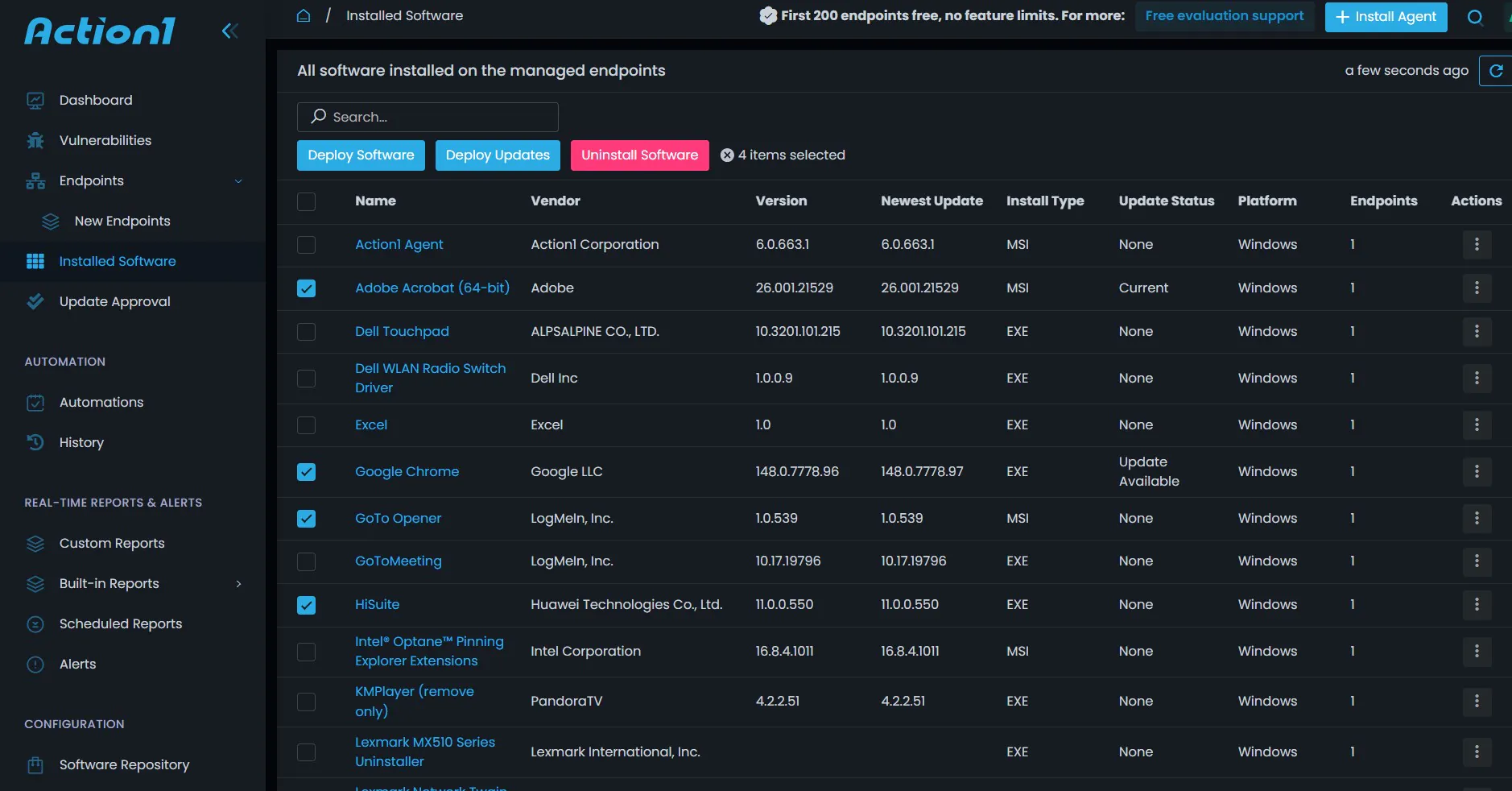
- Automated Third-Party Patching: Action1 maintains an extensive application library for common third-party applications such as Browsers, Slack, and Zoom, and automatic updates are pushed to all devices as soon as a new update is available.
- Vulnerability Discovery: Action1 automatically maps CVE IDs with global databases and combines them with patch management, ensuring a short window between finding and fixing vulnerabilities. It also prioritizes and highlights vulnerabilities with risk impact, such as high or critical, and their impact score.
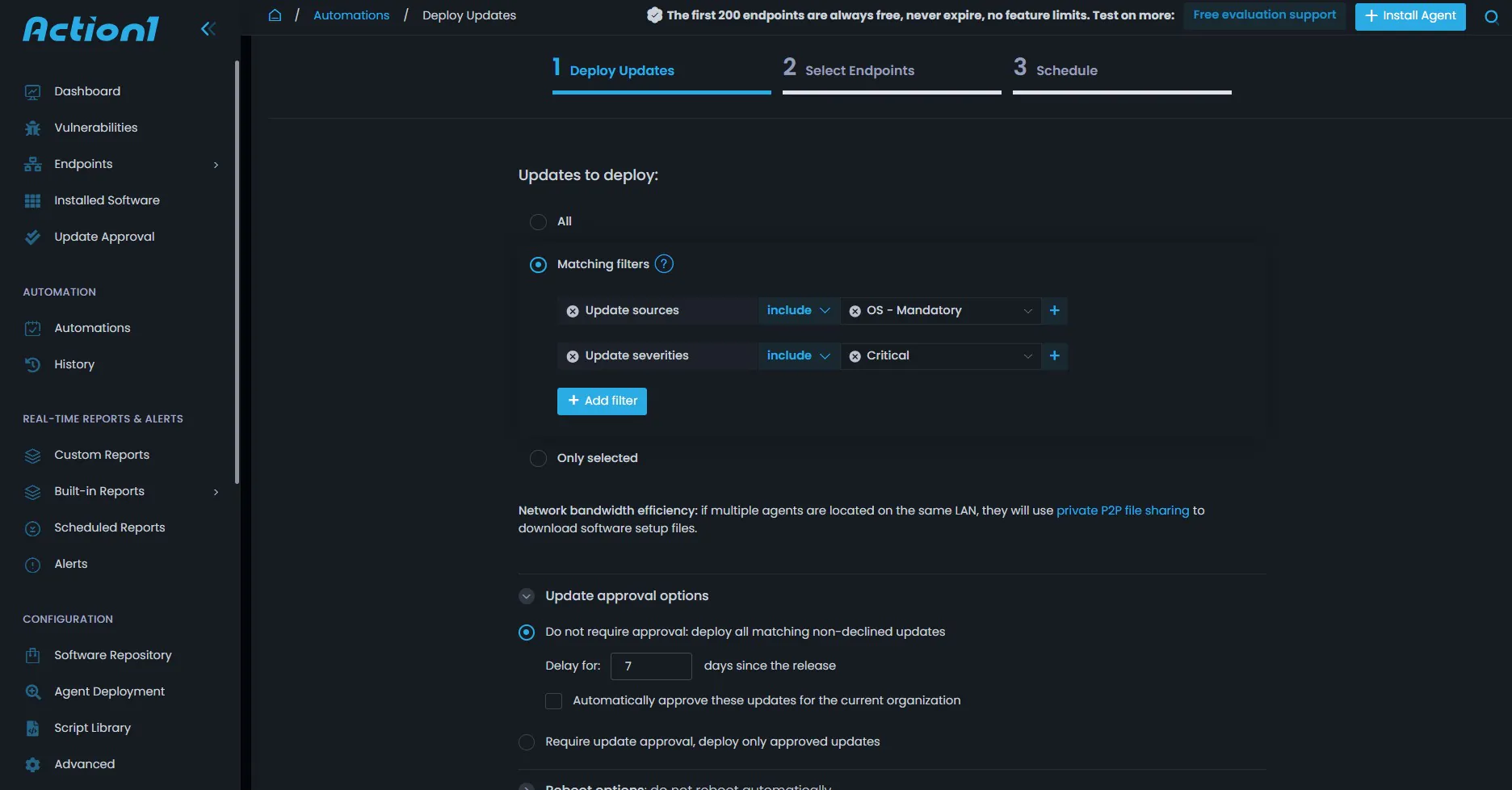
- Policy-Based Automation: Action1 offers scheduling for a maintenance window, with specific times defined for patching, ensuring uninterrupted business operations. Reboot management ensures that systems are scheduled for reboots when no one is logged in, and automated approval workflows for security updates, and manual approvals for feature-related updates.
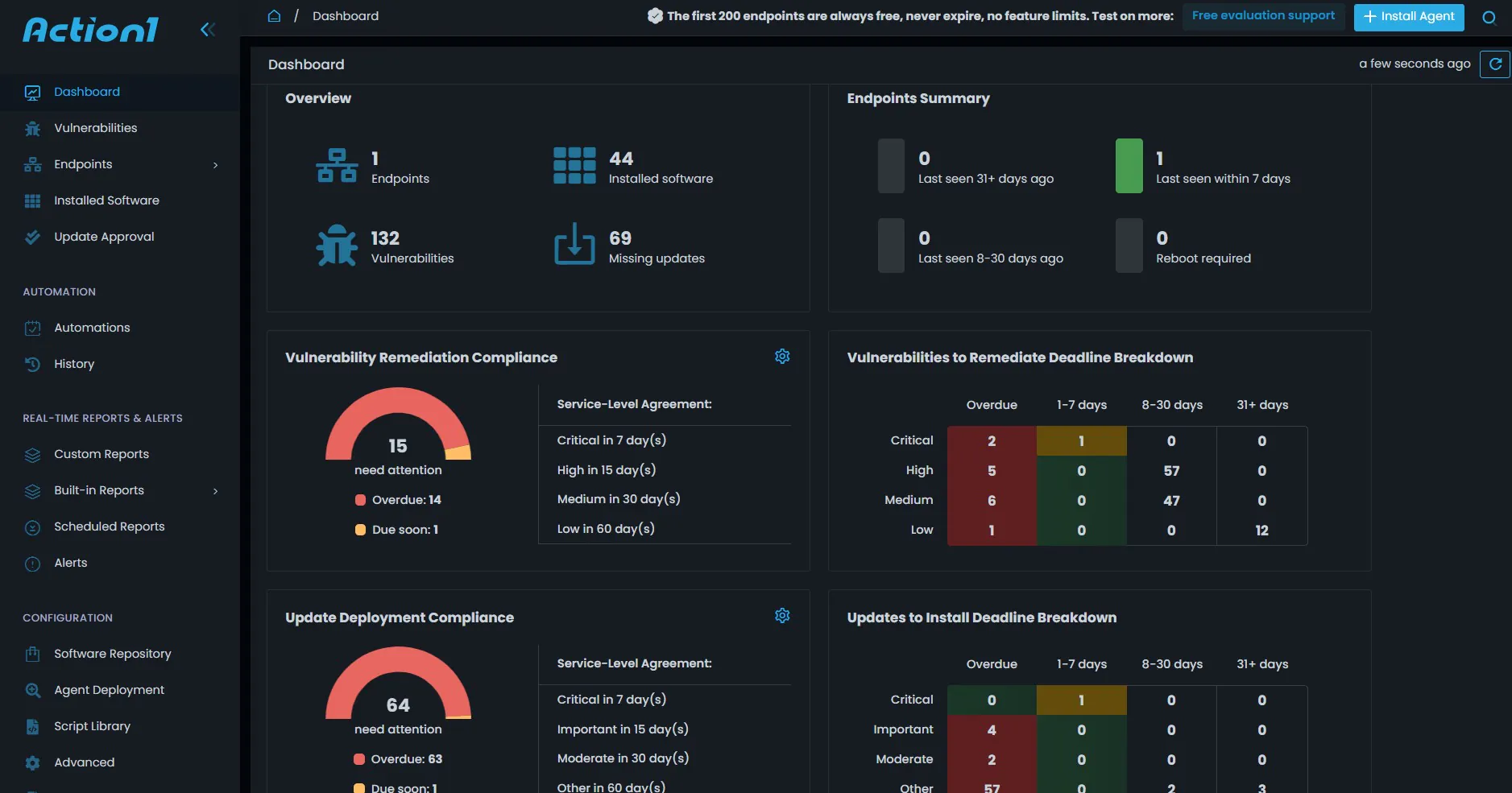
- Centralized Visibility and Reporting: Offers compliance dashboards with real-time charts for patch status, audit-ready reports for compliance adherence, and inventory management for the entire hardware and software fleet across the organization.
- Remote Management and Monitoring: Offers remote desktop support for IT to investigate and fix the failed patches, as well as employee issues with applications. Provides a pre-built custom actions and scripts library for admins to remotely run on thousands of devices simultaneously for cleanups and configurations.
- Cost-Effectiveness and Scalability: Action1 is known for offering high-end patch management to small organizations with the first 200 endpoints free; mid-size to large enterprises can leverage this offer for extensive testing on 200 devices and then scale to full production patch management.
Patch management is a journey, not a destination; it is both a cybersecurity requirement and an operational discipline. A strong patch management policy transforms patching from a reactive technical task into a controlled, measurable, and business-aligned process. The most effective programs move beyond installing updates and combine complete asset visibility, risk-based prioritization, clear ownership, testing and validation, automated deployment, exception governance, audit-ready documentation, continuous reporting, and continuous improvement. When implemented well, patch management provides a multi-layered benefit to the organization, such as reducing known security risks by closing the exploit window, improving system reliability by applying hotfixes, supporting compliance by ensuring that the organization is fully compliant, protecting business continuity by preventing system failures and data breaches, and strengthening the organization’s overall security posture.





