






If you are in a hurry – here is a TL;DR & Summary of main key points
- Best overall Patch My PC alternative: Action1
- Top alternatives include Atera, ManageEngine Patch Manager Plus, NinjaOne, PDQ Deploy & Inventory, Ivanti Neurons, and Heimdal
- Patch My PC is strongest for third-party patching in Microsoft-based environments
- Action1 stands out for cloud-native deployment, cross-OS support, automation, reporting, and a free tier for up to 200 endpoints
- Cloud-native tools are better suited for remote, hybrid, and distributed environments
- The right choice depends on endpoint count, OS mix, third-party app coverage, automation needs, and compliance requirements
The best Patch My PC alternatives in 2026 are Action1, Atera, ManageEngine Patch Manager Plus, NinjaOne, PDQ Deploy & Inventory, Ivanti Neurons for Patch Management, and Heimdal Patch & Asset Management.
Patch management platforms have a central place in the toolset of every company, from those managing 50 to those managing 50,000+ endpoints. And that’s perfectly normal, since they do one thing exceptionally well. They find vulnerabilities across operating systems and third-party apps, list the missing patches that remediate them, automate the entire patching process, and generate audit-ready reports in minutes.
But the real struggle for IT teams and their leaders is finding the perfect fit for the environment they manage, one that solves all their pain points and transforms patching from the hamster wheel it has always felt like into a fully automated, predictable workflow that literally runs on autopilot.
If you are currently using Patch My PC and feel like it doesn’t help you escape that vicious cycle, you’re in the right place. We’ve done the research, tested the options, and narrowed it down to the platforms that actually deliver their promises. Not just on paper but when you put them to work.
In this article, we cover the key features, pros, and cons of each platform to help you make an informed decision and finally move patching from a semi-automated process to a fully automated or even autonomous one.
And by the end, you’ll have clear answers to the most important questions that come up during patch management software evaluation, so you can find the best option for your company that actually works.
So let’s waste no more time and get to work.
How We Evaluated Patch My PC Alternatives?
Choosing the wrong patch management platform costs your organization time, money, and security. So we made sure our evaluation process was thorough, transparent, and grounded in real data.
We evaluated each platform based on four sources:
- Official vendor documentation and feature sets reviewed as of 2026;
- Current pricing pages verified directly from each vendor’s website;
- User reviews from G2 and Capterra, analyzing feedback from verified IT professionals and MSPs;
- Hands-on assessment of product capabilities across common enterprise and MSP environments.
These four factors serve one simple purpose. To give you 100% technically accurate, up-to-date information and a real point of view from customers already using these platforms, so you can make an informed decision about the best Atera alternative for your company based on an honest review that reveals the real-world advantages and limitations of each option on our list.
What is Patch My PC and Why Look for an Alternative?
Patch My PC is a reliable and popular patch management platform that integrates with Microsoft Intune and Configuration Manager (SCCM) to automate third-party application patching, something those tools only partially support natively. It fills that gap by automating the packaging and deployment of third-party app updates across hundreds of software titles, helping you remediate known vulnerabilities with minimal manual effort and keep your endpoints protected, up to date, compliant, and smoothly performing.
However, Patch My PC works well under a very specific set of conditions. Step outside them and the limitations start stacking up fast. Despite the massive catalog, many applications used across typical enterprise environments aren’t covered.
It doesn’t offer cross-OS support since it’s Windows-centric. The initial setup can be complex for users new to SCCM and Intune. The price point is higher than many alternatives. And without risk-based prioritization or truly cloud-native capabilities, you end up needing workarounds or additional platforms just to get complete coverage across your network.
That’s why many IT and security teams and business leaders who have outgrown Patch My PC, or never found it to be the right fit, are looking for a more capable, flexible, and infrastructure-independent patch management solution that covers their entire environment, not just their Windows application catalog.
Patch My PC Alternatives & Top Competitors: Quick Comparison Table
Before we get into the detailed reviews, here’s a quick look at what each platform is, its key strengths, limitations, deployment type, whether it offers a free tier, and which environments it fits best.
| Tool | Best For | Key Strengths | Limitations | Free Plan | Deployment Type |
|---|---|---|---|---|---|
| Action1 | SMBs, large enterprises, MSPs, government agencies, and hybrid or remote teams. | Cross-OS platform support. Third-party patching. Autonomous patching. Vulnerability management. Risk-based prioritization. P2P patch distribution. Advanced reporting. | No one-click rollback capability. No MDM. | Yes. Free tier for up to 200 endpoints, with no feature or time limitations. | Cloud-native. Agent-based. No VPN, on-premises hardware, or complex configuration needed. |
| Atera | MSPs and IT departments that need an all-in-one RMM and patch management platform. | Cross-OS support. Third-party patching. Risk-based prioritization. Strong reporting capabilities. | Frequent patch deployment failures. No P2P patch distribution. Patch management gaps. Steep learning curve. | No free tier. 30-day free trial only. | Cloud-native. Agent-based. No VPN or local appliances needed for managing your endpoints. |
| ManageEngine Patch Manager Plus | Enterprises, hybrid or remote-first teams, and MSPs. | Cross-OS platform support. Third-party patching. Risk-based prioritization. Advanced reporting. | Patching remote endpoints is challenging. Complex initial setup. Frequent patching failures. Patching gaps. | Yes. Free for up to 25 endpoints. 30-day free trial also available. | Cloud or on-premises. |
| NinjaOne | Enterprises, MSPs, and hybrid and remote teams. | Cross-OS platform support. Third-party patching. Risk-based prioritization. Advanced reporting. | Scripting and automation gaps. Frequent patch deployment failures. Steep learning curve. | No. 14-day free trial only. Fully featured. | Cloud-native. No VPN or on-premises infrastructure needed. |
| PDQ Deploy & Inventory | SMBs and enterprises with an on-premises, Windows-based IT environment. | Windows support. Third-party patching. Deep scripting automation. | Difficulty managing remote endpoints. Cannot patch macOS or Linux endpoints. Basic reporting. | Yes. Free tier with no time limitations, but not fully featured. | On-premises only. Requires VPN or local network connectivity for remote endpoints. |
| Ivanti Neurons for Patch Management | Large enterprises and MSPs. | Cross-OS platform support. Third-party patching. Risk-based prioritization. Threat context. | Setup complexity. Frequent patch deployment failures. macOS limitations. Reporting limitations. | No free tier. Demo available on request. | Cloud or on-premises. |
| Heimdal Patch & Asset Management | Large enterprises and MSPs. | Cross-OS platform support. Third-party app patching. Risk-based prioritization. Advanced reporting. | Limited dashboard customization. Limited third-party app catalog. Patch failures with insufficient root cause information. | No free tier. 30-day free trial only. | Cloud-based. |
Best Patch My PC Alternatives: Detailed Review
Now that you know the basics of each platform, it’s time to move on with the detailed review of the best alternatives to Patch My PC.
Action1 Patch Management Software
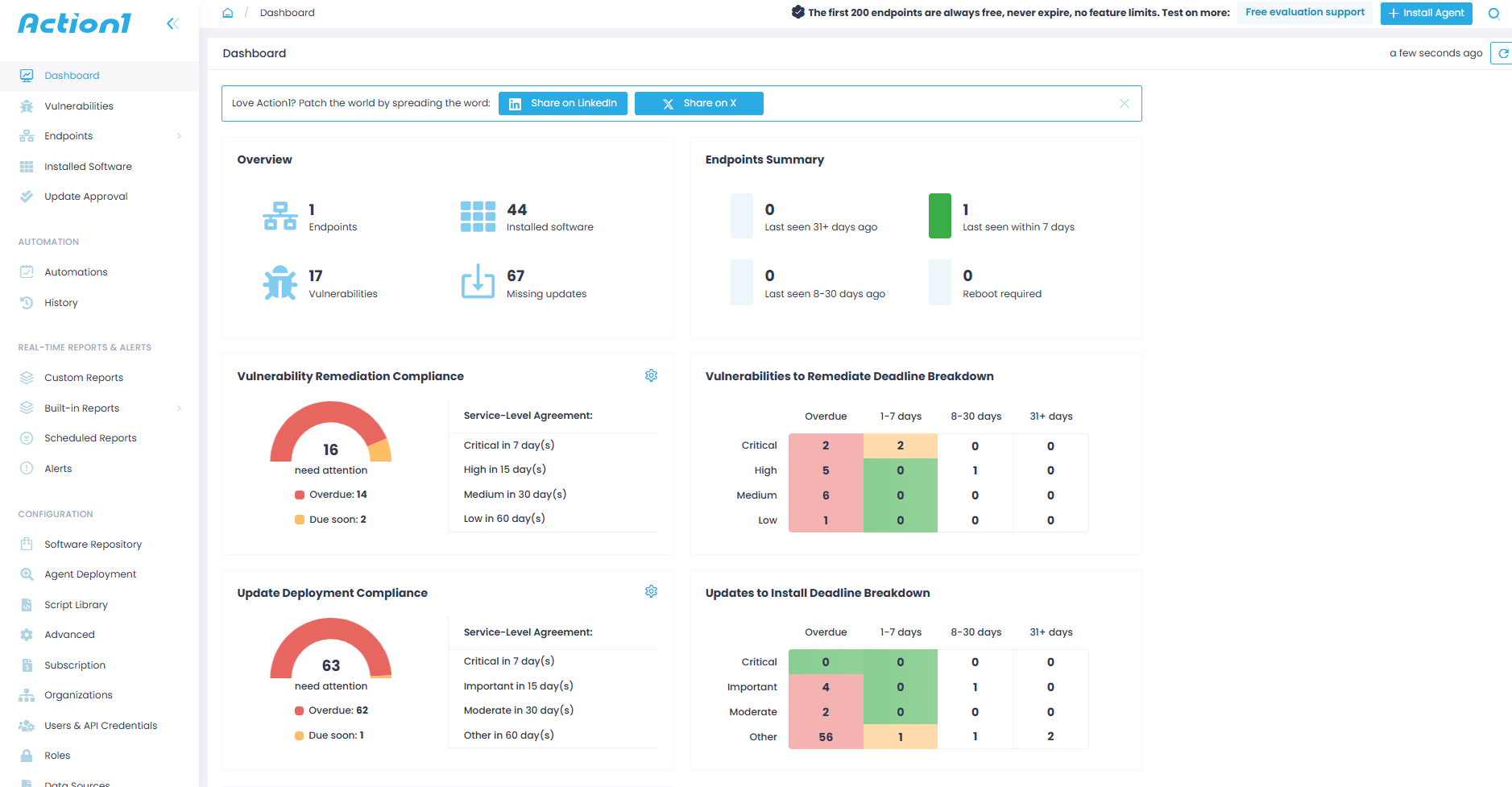
Action1 is a cloud-native autonomous endpoint management platform tightly focused on patching operating systems and third-party applications. It supports Windows, macOS, Linux, and a wide range of third-party apps. It automates each step of the process from vulnerability identification and missing patch detection to testing, deployment, and preparing audit-ready documentation.
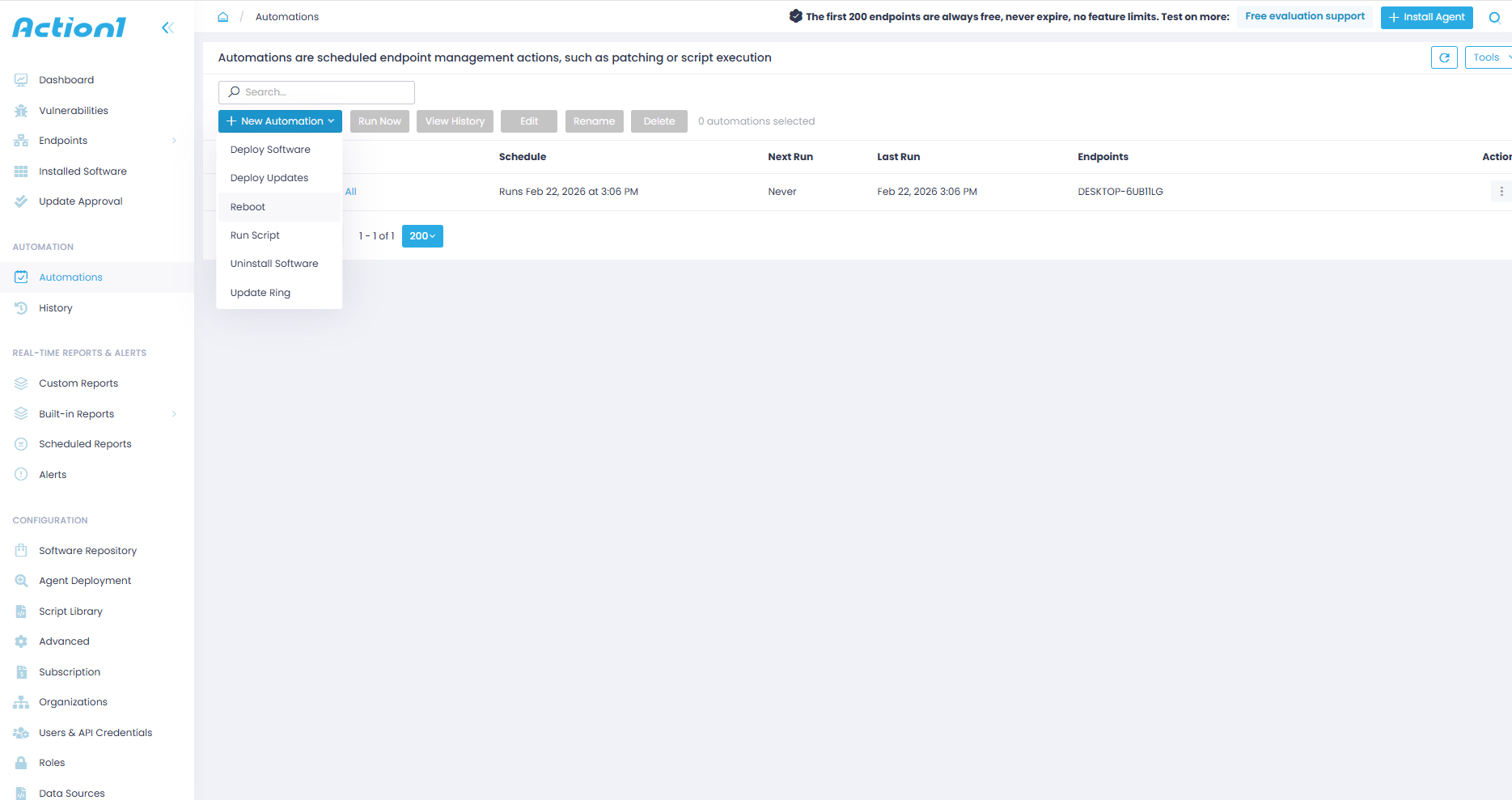
The platform lets you build your policy-driven automation based on your own vision, define when patches should be deployed, on which endpoints, organize your systems into groups, and decide whether they have to reboot immediately or at a convenient time after update installations.
Each vulnerability, once identified, gets prioritized according to the level of risk it poses to your company. That risk level is calculated based on CVSS scores, CVE numbers, CISA KEV information, and active exploitation in the wild, as well as usage in known ransomware campaigns.
This allows you to address those vulnerabilities in the correct order starting with the most severe ones, effectively minimizing the attack surface across your endpoints without losing time to patch non-critical software weaknesses.
Action1 is fast to deploy and easy to use, enabling you to start patching your systems in minutes, with almost no manual effort and greater efficiency. After each update deployment, you can generate audit-ready reports using 100+ customizable templates.
In simple words, it offers you the opportunity to protect your endpoints faster, smarter, and fully automatically, with no VPN, on-premises infrastructure, or complex configuration required.
Key Features:
- Cross-Platform OS Support → Windows, macOS, and Linux.
- Third-Party Patching → Automated patching of numerous software titles on Windows and macOS based on filters (severity, vendor, etc.) with real-time progress status and 99% coverage for typical enterprise environments (Adobe, Chrome, Zoom, etc.)
- Offline Catchup Window → If an endpoint is offline during a scheduled patch deployment, it’ll get patched once it comes back online automatically, with no additional actions needed on your side.
- Vulnerability Management → Real-time identification with built-in remediation capabilities.
- Risk-Based Patch Management → Prioritize and apply software patches and updates based on the level of risk they pose to your organization’s IT infrastructure and critical assets.
- IT Asset Inventory → Real-time visibility into the hardware details and online/offline status of your endpoints.
- Software Deployment → Streamlined deployment of prepackaged and custom apps.
- Software Uninstall → Bulk uninstallation of unauthorized or legacy software.
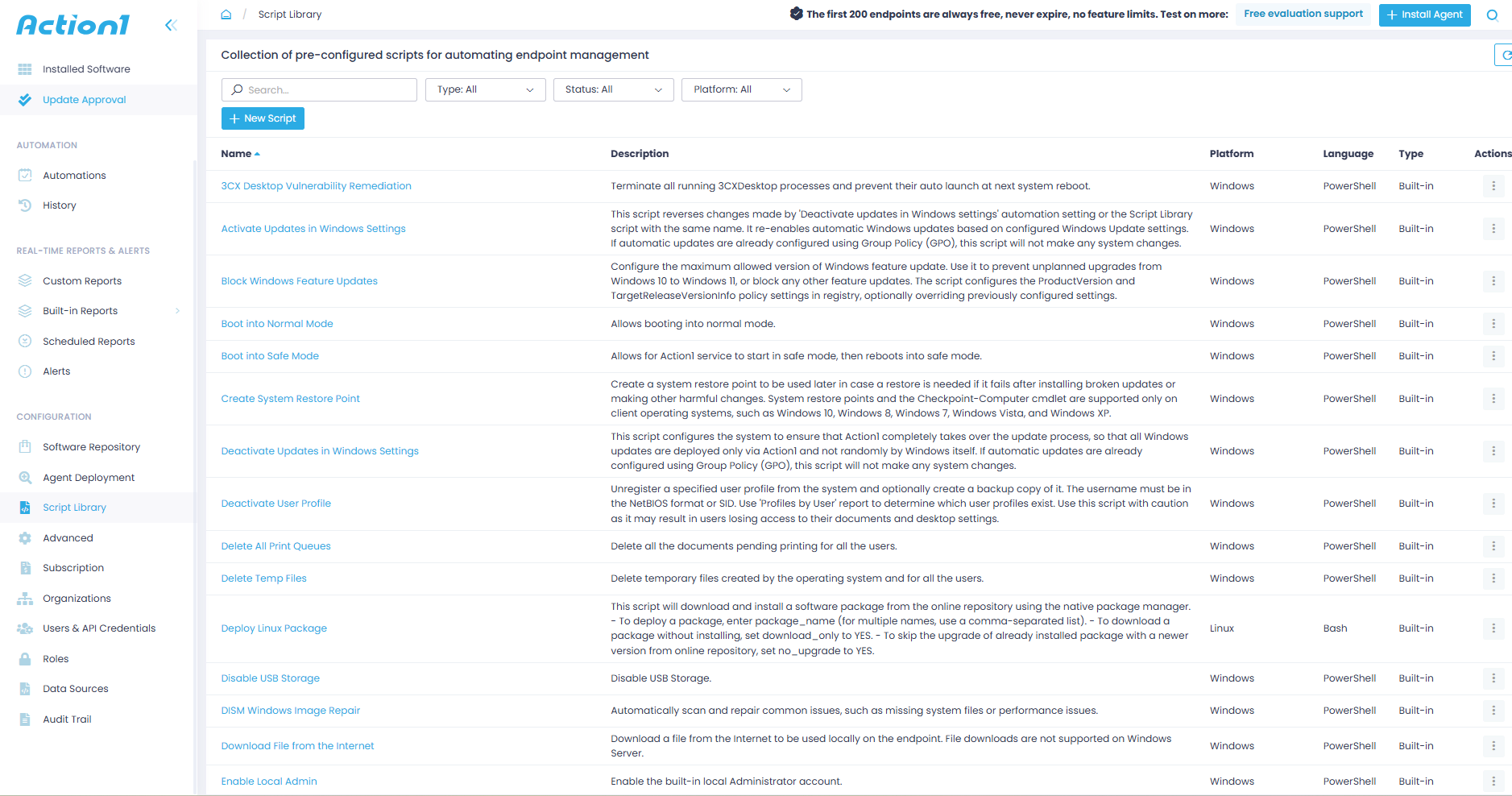
- Scripting Automation → Offers built-in scripts and supports custom PowerShell, CMD, or Bash scripting.
- Real-Time Reporting → 100+ built-in report templates with customization options.
- Role-Based Access Control (RBAC) → Granular levels of access for user accounts.
- Single Sign-On (SSO) → Leverage your existing identity provider for Single Sign-On: Entra ID (Azure AD), Okta, Google, or Duo.
- Multi-Factor Authentication (MFA) → Secure access to business-critical data and applications using multi-factor authentication through email verification or authenticator apps like Google Authenticator and Duo to protect user credentials and enforce access controls.
- Update Rings → Allows you to extensively test updates and patches before deploying them across your network, making the automated patch management process more intelligent, staged, and risk-free. With this feature, you can categorize your endpoints into groups (rings), set specific success rates, and update counts to minimize the risks of experiencing unexpected downtime.
- P2P Patch Distribution → Updates are downloaded only once and then shared internally across the rest of the endpoints in your local network. This minimizes external bandwidth consumption and speeds up update deployments.
- Private Software Repository → Each patch and update is thoroughly tested by Action1’s expert team, ensuring only reliable and secure files reach your endpoints.
- Real-Time Vulnerability Data → Provides CVE numbers, CVSS scores, and exploitation indicators to support real time patching decisions.
- Auto Repair of Windows Update Agent → Automatically detects and repairs broken Windows Update Agent configurations across your endpoints to help you maintain 99% patch compliance rates at all times.
- Custom Endpoint Attributes → Examples include attributes based on registry keys, installed or missing software, machine type (VM, physical, laptop, server, etc.), warranty expiration date, BitLocker status, free disk space, environment variables, BIOS version, and more.
- Remote Access → Manage on-premises and remote endpoints from anywhere, directly in your browser, without a VPN connection.
- Full REST API Access → With OAuth 2.0 at no extra charge.
- Windows Feature Updates → Upgrade Windows 10 to Windows 11.
- Free Tier → For up to 200 endpoints, fully featured, forever. No credit card required, no catch, just patching that works.
Pros:
- Fast initial setup taking up to 5 minutes from creating your account to deploying the agent.
- Turns OS and third-party patching into a fully autonomous process.
- Significantly reduces manual workload through automation. You set the patching rules, Action1 does the rest.
- User-friendly platform with an intuitive interface. No long training sessions for new users.
- Free forever for up to 200 endpoints.
- No VPN or infrastructure required. Works equally well for office-based and remote employee endpoints, servers, virtual machines, and cloud workloads.
- Your team always knows which vulnerabilities to fix first, so critical exposures get closed faster and low-priority issues never get in the way.
- Seamless scalability that allows you to expand from 200 to 200,000+ endpoints at a gradually lowering per-endpoint cost.
- Automates software deployments and uninstallations.
- Lets you generate audit-ready reports in minutes.
- Large-scale deployments stay fast and bandwidth-efficient, no matter how many endpoints you manage.
- Meets globally recognized security and compliance standards including SOC 2 Type II, ISO 27001, TX-RAMP, and GDPR, according to vendor documentation, so your organization stays protected and audit-ready without additional compliance tooling.
Cons:
- No one-click rollback capability. Currently, rollback is available through script automation.
- No MDM functionality.
- No third-party patching on Linux.

Action1 vs Patch My PC
The main difference between Action1 and Patch My PC is scope and infrastructure independence. Patch My PC is great when your main goal is to simply improve third-party patching and expand coverage inside Microsoft Intune, ConfigMgr, or WSUS. But it requires one of those platforms already in place to function at all. Action1 needs none of that. No Intune, no WSUS, no on-premises hardware, no VPN. Just create your account and start patching in minutes.
And that’s before you factor in that it covers macOS and Linux endpoints alongside Windows, minimizes external bandwidth usage, accelerates large update deployments, offers a free tier for up to 200 endpoints, and equips you with real-time reporting, multi-tenancy, RBAC, and a strong set of security features.
Put all of that together and you get a patch management platform that is a perfect fit for organizations of all sizes, from SMBs to large enterprises, MSPs, and even government agencies.
Atera
Atera is a cloud-native all-in-one IT management platform built for MSPs and IT departments that need RMM and patch management combined in a single solution. It supports Windows, macOS, and Linux systems and a wide range of third-party applications.
The software automates the patching process end to end. It monitors your devices 24/7, identifies known vulnerabilities and missing patches, and lets you configure automatic updates through scheduled deployments, approval workflows, and reboot policies. Once updates are installed, you can generate audit-ready reports in minutes.
But automation without control is just chaos on a schedule. That’s why Atera gives you flexibility over deployment windows through IT Automation Profiles, where you can create separate profiles for different groups of devices and stagger their schedules, essentially testing a patch on a smaller group first before rolling it out across every single endpoint in your organization. Once the profiles are configured and assigned, the entire process runs automatically. No oversight and no late nights in the office.
In short, it helps you improve your endpoints’ security posture, minimize their attack surface, get real-time visibility into their patch and compliance status, and stay audit-ready at all times with minimal manual effort on your part.
Key Features:
- Cross-Platform OS Support → Windows, macOS, and Linux.
- Third-Party Patching → Covers hundreds of third-party apps through Atera’s App Center.
- Centralized Monitoring → Monitor your IT infrastructure’s health, performance, patch status, and compliance status in real time.
- Built-In AI → Helps you automate different tasks like device troubleshooting, patch management, scripting, and more.
- Advanced Reporting and Analytics → Create audit logs and reports to prove regulatory compliance whenever needed.
Pros:
- Automates patch management from the first to the last step.
- Cuts down the time spent preparing regulatory reports from hours to minutes.
- Flexible deployment options let you control exactly when and how updates roll out across your environment.
- Automatically scans your network to identify missing patches and security risks before they become a problem.
- Gives you full control over which patches get approved, postponed, or excluded, so nothing gets deployed without your sign-off.
- Built-in AI helps you create custom PowerShell scripts for tasks that are specific to your company, without starting from scratch every time.
- Intuitive interface that most IT teams get comfortable with quickly.
Cons:
- Frequent patch deployment failures that require additional manual intervention to complete the installation.
- Limited third-party application coverage.
- The agent sometimes stops working without an obvious reason, based on user feedback from review platforms like G2, leaving endpoints unmanageable remotely until the agent is reinstalled.
- The cloud console can become slow and sluggish.
- Custom reporting needs improvement, with poor export options and very limited flexibility.
- Monitoring data in the console sometimes updates once per hour rather than in real time, though this is a known issue.
- The mobile app offers fewer features compared to the desktop version.
Atera vs Patch My PC
Patch My PC is a patch management tool designed to keep your third-party apps up to date, but it was never built to patch operating systems or offer cross-platform support. It works fine if you have a Windows-centric environment, and it delivers automation features that help you reduce your attack surface with minimal manual effort.
Atera, on the other hand, supports Windows, macOS, Linux, and hundreds of third-party applications. It comes with a deep level of automation, strong security features, and a cloud-native architecture that turns patching into a fully automated process.
Despite the more limited third-party catalog and occasional patch deployment failures, Atera is the better choice for organizations that rely on a mix of endpoints running different operating systems and need script automation, infrastructure independence, and a platform that is easy to deploy and use.
ManageEngine Patch Manager Plus
ManageEngine Patch Manager Plus is a tool that fully automates software maintenance across your endpoints. It supports Windows, macOS, and Linux, plus more than a thousand third-party applications. With it, you can automate the detection, testing, and deployment of critical patches across your systems from a single console and ensure they are secure, up to date, and compliant with the strict regulatory frameworks you’re obligated to follow.
Simply put, ManageEngine Patch Manager Plus turns the repeatable and exhausting manual or semi-automated patching process into a fully automated one, which not only protects your endpoints from vulnerability exploitation and potential regulatory penalties but also saves you time and manpower.
Key Features:
- Cross-Platform OS Support → Windows, macOS, and Linux.
- Third-Party Patching → Automatically identifies and deploys missing patches for 1,000+ third-party applications including Adobe, Java, Chrome, and other enterprise productivity tools.
- Flexible Deployment Policies → Provides customizable deployment policies allowing you to configure installation timing, user notifications, and reboot policies based on your organizational requirements.
- Remote Management → Enables you to deploy patches across LAN, WAN, and remote environments, including work-from-home systems, without requiring VPN connections.
- Decline/Delay Non-Critical Updates → You decide which patches to decline for legacy applications and which less critical ones to delay, all while keeping security updates front and center.
- Advanced Reporting → Equips you with fully customizable report templates, giving you the flexibility to create audit-ready reports based on your or your clients’ preferences in minutes.
Pros:
- Delivers fully automated patching end to end, from vulnerability identification and missing patch detection to testing, deployment, and reporting.
- Allows a single administrator to manage, monitor, and secure thousands of endpoints regardless of their location.
- Offers an intuitive console that lets new users start working with the platform without extensive training.
- Built-in reporting tools help you reduce the time spent preparing compliance paperwork.
Cons:
- Occasional patch deployment failures with not enough information about the root cause, which makes troubleshooting harder than it should be.
- Despite the massive third-party catalog, some users on G2 report that it lacks many software titles that are widely used across organizations of different sizes.
- Uninstalling patches should be faster and easier.
- Setting up automated reboots, patch policies, and deployment rules can be confusing, especially the first couple of times. It’s just not as straightforward as it should be.
- The price is higher than other alternatives on the market delivering the same capabilities.
- Limited direct support for specialized infrastructure patching, such as VMware ESXi and VCSA.
ManageEngine Patch Manager Plus vs Patch My PC
ManageEngine Patch Manager Plus is the better choice over Patch My PC because it offers cross-OS platform support, infrastructure independence, a deeper level of automation and customization, better reporting capabilities, and a more intuitive interface.
However, Patch My PC does have one significant advantage. Its third-party application catalog is considerably broader than ManageEngine’s, and that’s perfectly normal since it was built specifically to take third-party patching to a whole new level.
So the choice really comes down to your environment. Patch My PC is the better option if you need stronger third-party patching across your Windows and macOS endpoints and already have Intune in place. ManageEngine Patch Manager Plus is the logical choice when you need complete coverage across Windows, macOS, Linux, and third-party applications.
NinjaOne
NinjaOne is a cloud-native unified IT operations platform widely used by MSPs and IT departments to monitor, manage, and secure their endpoints. In terms of patching, it supports Windows, macOS, and Linux endpoints and a wide range of third-party applications.
The software allows you to create your own patching policies, setting rules for when, how, and on which endpoints patches are deployed, and whether to use a one-time or staged deployment with control over reboot management.
From there, the software automatically follows your instructions, identifies known vulnerabilities, prioritizes them based on severity, and tests and deploys the missing patches to remediate them as soon as possible with minimal downtime risks and maximum efficiency. After each successful deployment, you can use the platform’s built-in reporting capabilities to generate audit-ready reports for proving compliance.
Key Features:
- Cross-Platform OS Support → Windows, macOS, and Linux.
- Third-Party Patching → Automates the deployment of patches for hundreds of third-party applications.
- Risk-Based Prioritization → Prioritizes vulnerabilities using CVE numbers, CVSS scores, exploit context, and real-world threat intelligence to ensure your team always addresses the highest-risk exposures first.
- Automation Flexibility → Lets you create your own patching strategy that delivers the best results based on your company’s specifics, accomplishing complete coverage with fewer downtime risks and less manual intervention.
- Endpoint Remote Control → Deploy patches to endpoints regardless of their location with no VPN or local appliance dependencies.
- Real-Time Reporting → Gives you real-time visibility into the patch and compliance status of every endpoint across your network and lets you generate audit-ready reports in minutes.
Pros:
- Automates patch deployments across Windows, macOS, Linux, and third-party applications from a single centralized platform.
- Proactive patching with CVE/CVSS integration reduces vulnerabilities by up to 75%.
- Minimizes the time between vulnerability identification and remediation.
- Lets you control your on-premises and remote endpoints without a VPN or any additional infrastructure.
- Makes it possible for a single administrator to keep operating systems and applications up to date across thousands of endpoints, saving your team significant time and resources.
Cons:
- Reporting lacks depth and the customization options can be improved.
- Steep learning curve.
- Basic scripting capabilities.
- Problems with reboot management.
- Rollback capability works perfectly on Windows, but for macOS and Linux endpoints it requires scripting automation or manual intervention.
- Frequent patch deployment failures, as reported by users on G2 and Capterra.
NinjaOne vs Patch My PC
NinjaOne covers more ground as a patch management solution because it offers cross-OS platform support, third-party patching, customizable deployment options, detailed reporting, a cloud-native architecture, and reliable remote control.
Patch My PC specializes in third-party patching, particularly in improving the capabilities of Microsoft Intune, SCCM, and WSUS. Just keep in mind that it requires one of those platforms already in place to function. Without one of them, it simply isn’t an option.
So for companies with Windows environments and existing Microsoft infrastructure, it works great, but for those running macOS or Linux, the obvious choice is NinjaOne.
PDQ Deploy & Inventory
PDQ Deploy & Inventory is a patch management solution that automates Windows OS and third-party patching from the first to the last step. It automatically identifies known software flaws, lists the missing patches that address each one, and tests and deploys those patches across your endpoints based on your configured deployment rules and schedules.
The patch automation level it offers, bundled with detailed reporting, equips you with a platform that successfully minimizes downtime risks and keeps your on-premises endpoints secure, compliant, and running smoothly with almost no manual effort on your part.
At its core, the platform is built around two modules that each handle a distinct part of the process. PDQ Inventory is responsible for network discovery and maintaining a current asset inventory. PDQ Deploy, as its name suggests, handles the deployment of software patches and the automation options related to the process.
That structure also makes the platform’s limitations clear. It’s focused on supporting on-premises environments with Windows-only endpoints.
Key Features:
- Windows OS Support → Automated patching for Windows-based endpoints.
- Third-Party Patching → Automated third-party application patching.
- PDQ Package Library → Covers hundreds of software titles used across typical enterprise environments. It contains pre-built, tested, and silent-installation packages for Chrome, Zoom, Adobe, Java, Windows cumulative updates, and much more.
- Custom Device Groupings → Enables the grouping of your endpoints for testing or security purposes.
- Custom Scripts → Allows deploying and managing custom scripts on Windows devices.
- Auto Sync with Active Directory (AD) → Enables syncing with Active Directory to import computer records automatically.
- Compliance Reporting → Equips IT administrators with robust compliance reporting features to track software and hardware, identify non-compliant systems, and automate remediation.
Pros:
- Ideal for Windows-only environments that need script automation, automated software updates, and flexible device grouping.
- Self-hosted architecture that keeps all your data locally stored on your own network, giving you full control and offline operation capability.
- Automated software deployment and patch management across all your office-based or VPN-connected Windows endpoints.
- Built-in PowerShell Scanner for collecting custom device information and pulling it back as structured data.
- Automatic database backup and restore for recovering packages, collections, and deployment configurations.
- Reliable patch testing feature for deploying updates with confidence and minimal downtime risks.
Cons:
- No native support for remote monitoring and management of endpoints outside your local network. Agent-less platform that requires a VPN to reach and manage remote endpoints.
- Requires an initial investment in on-premises hardware.
- Increases the risk of creating blind spots across your network, especially if you have remote workers.
- Steep learning curve, especially for newbies. You must undergo training to understand how the platform works and how to use it properly.
- Relies on Active Directory and DNS, which complicates the patch management process for companies not using AD.
- Per-admin pricing model that makes it an expensive option for large IT teams.
- Uses local SQLite databases, which can limit scalability and integration options for larger environments.
PDQ Deploy & Inventory vs Patch My PC
PDQ Deploy & Inventory requires on-premises hardware and is designed specifically to support Windows-only environments and cover third-party applications.
Patch My PC takes a different approach entirely. It has only a software dependency, meaning it requires an Intune, SCCM, or WSUS license already in place to function. At its core, it is a platform designed to extend the capabilities of those tools by expanding their third-party application coverage.
Simply put, if your endpoints are all office-based, Windows-centric, and you don’t mind spending a couple of thousand dollars on hardware to build your own server, then go with PDQ Deploy & Inventory.
Go with Patch My PC if your company is already using Intune, WSUS, or SCCM and needs greater coverage of third-party application updates. Remote patching is handled through Intune, so remote endpoint management is covered as long as that infrastructure is already in place.
And if neither profile describes your environment, Action1 covers all the bases, free for your first 200 endpoints, with no infrastructure, no VPN, and no Microsoft licensing required.
Ivanti Neurons for Patch Management
Ivanti Neurons for Patch Management is a module within a broader all-in-one solution built specifically for the complexity and scale of large enterprise environments. Powered by AI automation, it helps you autonomously monitor, manage, and secure your endpoints and software assets across your entire organization, no matter how many endpoints you have or how distributed they are.
In terms of patching, it automates each step of the process from identifying vulnerabilities across your Windows, macOS, and Linux endpoints and their third-party applications to remediating them through tested patch deployments, immediately or on a schedule.
What sets it apart from most tools on this list is its proprietary Vulnerability Risk Rating system, which does more than just standard CVSS scoring by factoring in active threat intelligence, weaponization data, and real-world exploitation context to ensure your team always patches what matters most, not just what scored highest.
The software not only simplifies patching but also allows you to minimize manual work, maximize endpoint security, stay audit-ready at all times, and most importantly, reduce planned and unplanned downtime.
Key Features:
- Cross-Platform OS Support → Windows, macOS, and Linux.
- Third-Party Patching → Automates the deployment of patches and updates to a wide range of third-party apps.
- Policy Customization → Easily configure policies that fit your business needs, including patch testing and deployment scheduling, endpoint reboots, and more.
- Patch Compliance Management → Generate audit-ready reports after each successful patch deployment to prove regulatory compliance.
- Phased Rollout → Uses ring deployments to roll out patches in stages, starting with a testing ring, then automatically advancing reliable patches to the next rings containing your business-critical systems to minimize downtime risks.
Pros:
- Cloud-native architecture.
- Cross-OS support across Windows, macOS, and Linux.
- Patches a wide range of third-party applications.
- Uses a proprietary Vulnerability Risk Rating system that prioritizes patches based on active risk exposure, patch reliability, and device compliance.
- Automates the patch management process end to end.
Cons:
- The initial setup, configuration of patch policies, and scheduling deployments through update rings are complex, especially for new users. It really takes time to get used to the interface and unlock the platform’s full capabilities.
- Frequent patch deployment failures, as reported by users on G2 and Capterra. In such cases, you must restart the automation or deploy patches manually.
- Reporting needs improvement in terms of customization and flexibility.
- Reboot management issues. In some cases, you have to manually restart particular endpoints, though this happens rarely.
Ivanti Neurons for Patch Management vs Patch My PC
Ivanti Neurons for Patch Management is a far better option than Patch My PC because it offers cross-OS platform support, an extensive third-party app catalog, and no software or hardware dependencies since it’s cloud-native.
Patch My PC focuses on third-party patching and needs other tools like Intune, SCCM, and WSUS to function. It’s simply designed to improve their capabilities and works best for Windows-centric environments.
Ivanti Neurons for Patch Management, on the other hand, works equally well across any IT environment regardless of its size, scales seamlessly, and provides everything needed to protect your on-premises and remote endpoints from a single centralized dashboard.
Heimdal Patch & Asset Management
Heimdal Patch & Asset Management is a cloud-based patch management platform that helps you keep your Windows, macOS, and Linux endpoints and their third-party applications up to date and smoothly performing.
One of the greatest benefits of the software is speed. Heimdal deploys patches within 4 hours of their release (according to vendor documentation), and that’s critical when dealing with newly disclosed vulnerabilities because it minimizes the exposure window of your systems and effectively reduces the risk of vulnerability exploitation through known security flaws.
On top of that, after each patch or update deployment, you can easily generate the necessary documentation for proving compliance with various regulatory frameworks or use it for internal tracking purposes.
Key Features:
- Cross-Platform Support → Windows, macOS, and Linux.
- Third-Party Patching → Covers hundreds of software titles.
- P2P Patch Distribution → Patches are downloaded once and shared across your endpoints internally.
- Remote Access → Remote desktop module available through the Heimdal dashboard.
- Real-Time Reporting → Real-time visibility into patch status, compliance status, and device status across your systems. Advanced reporting capabilities reduce the time spent preparing regulatory reports.
- RBAC → Control user permissions and define access levels within the management dashboard.
- Secure Software Repository → Packages are tested, adware-cleaned, and repackaged before upload to ensure only clean and reliable patches reach your endpoints.
Pros:
- No infrastructure setup required. You’re up and running without spending a dollar on VPNs, appliances, or hardware.
- Patches reach your endpoints within 4 hours of vendor release, so your systems spend as little time exposed to newly disclosed vulnerabilities as possible.
- Covers Windows, macOS, and Linux from a single platform, so you don’t need separate tools for different operating systems.
- Every package is tested, adware-cleaned, and repackaged before it reaches your environment, so you never have to worry about a bad patch slipping through.
- Manage all your client environments under one license without paying extra for each one separately.
Cons:
- Limited third-party application catalog compared to other alternatives on this list.
- Asset management gaps, including outdated software titles showing up on the dashboard for endpoints where they no longer exist, and misleading patch status information that can’t be fully trusted without manual verification.
- Frequent patch deployment failures, as reported by users on G2 and Capterra.
- Limited dashboard customization that reduces the overall intuitiveness of the platform.
- Reporting, while advanced, feels complicated to navigate, especially for non-technical or new users.
- Higher pricing that is especially noticeable for SMBs working with tight budgets.
Heimdal Patch & Asset Management vs Patch My PC
Heimdal Patch & Asset Management is a cloud-based, agent-based patch management platform that automates patching for Windows, macOS, and Linux endpoints and their third-party applications. It offers great patch deployment flexibility, a strong feature set, and automation depth that makes it a solid choice for SMBs, large enterprises, and MSPs.
Patch My PC, on the other hand, doesn’t offer the same capabilities due to its lack of cross-OS support, its tight focus on third-party patching, and its dependency on Microsoft Intune, SCCM, and WSUS. Considering all of that, it’s only a reliable choice for Windows-centric organizations that are already using those tools.
How Much Does Each Patch My PC Alternative Cost?
Now let’s talk about the one factor that can make or break your decision. Price.
| Action1 Patch Management Software | Atera | ManageEngine Patch Manager Plus | NinjaOne | PDQ Deploy & Inventory | Ivanti Neurons for Patch Management | Heimdal Patch & Asset Management | |
|---|---|---|---|---|---|---|---|
| Pricing Model | Per endpoint, billed annually. | Per technician, unlimited endpoints. | Per endpoint, billed annually. | Per endpoint, billed annually. | Per admin, unlimited endpoints. | Platform fee plus device-based licenses. | Per device, per year. |
| Starting Price | $0.00 for up to 200 endpoints. According to vendor pricing pages (2026). | IT departments: from $149/month per technician. MSPs: from $129/month per technician, according to vendor pricing pages (2026). | On-premises version for 50 endpoints starts at $245/year. Cloud version for 50 endpoints starts at $345/year. According to vendor pricing pages (2026). | Custom quote required. Contact sales for pricing. | Starting at $1,650 per admin per year. According to vendor pricing pages (2026). | No publicly available information. Custom pricing model. Custom quote. | Custom quote required. Contact sales for pricing. |
| Free Tier | Yes. Free forever for up to 200 endpoints, fully featured, no credit card required. | No free tier. 30-day free trial only. | Yes. Free for up to 25 computers and 5 servers. Limited functionality but free to use forever. | No free tier. 14-day free trial only. | No free tier. 14-day free trial only. | No free tier. No free trial. Demo available on request. | No free tier. 30-day free trial only. |
How to Choose the Right Patch Management Tool to replace Patch My PC?
Choosing the right patch management platform is easier said than done, and picking the highest-rated option on the market isn’t always the right call. You have to consider the specifics of your environment, know what endpoints it contains, what operating system mix you have, and only then step into the evaluation process.
Evaluate Your Company Needs
Grab a paper and a pen and write down the most important criteria that will guide you to the right patch management tool for your company. They are:
- Count the number of endpoints across your network. Include desktops, laptops, servers, virtual machines, cloud workloads, and any other device that receives or sends information.
- Define whether all your devices run one operating system or a mix of Windows, macOS, and Linux.
- List all the third-party applications installed across your endpoints so you know exactly what to look for in a patch management tool.
- Consider the remote workers factor. If you have employees working from home or another location outside the office, make sure to take time zone differences into account too. Oh, and don’t forget scheduling conflicts that come with managing endpoints across different time zones.
- Take into account the regulatory frameworks your company is subject to, whether that’s GDPR, HIPAA, PCI DSS, NIST, or any other compliance standard your industry requires.
- Write down anything else that is unique to your environment, like air-gapped networks, strict change management policies, or specific software your team can’t live without.
What to Look for in a Patch Management Tool?
Now that you have a clear idea of what your company needs, it’s time to start looking for the right patch management tool that can respond to and resolve your patching challenges.
Let’s dig deeper into the specifics.
- Cloud vs. On-Premise Solutions → Cloud-native tools are the best choice, there’s no doubt about that. They don’t need a VPN or local appliances, deliver incredible automation speed, let you patch on-premises and remote endpoints, and are the most cost-effective option. Look for a cloud-native platform since on-premises solutions are legacy tools that only work well for purely office-based environments.
- Automated Patch Deployment and Flexible Scheduling → Make sure you have full control over shaping your policy-driven automation. Decide when, how often, on which endpoints, and in how many stages patches should be deployed. From there, everything else should be handled automatically by the patching tool.
- Cross-OS Platform Support → Pick a platform that supports Windows, macOS, and Linux. Even if you don’t currently have a mix of endpoints running different operating systems, it’s very likely you will in the near future. So prepare early.
- Third-Party Application Patching → Check if the patch management tool supports all the third-party applications used across your network. This is especially important given that disclosed vulnerabilities rose by 61% in 2025, with the majority found in third-party applications, according to Action1’s Software Vulnerability Ratings Report.
- Scalability and Pricing → Choose a platform that lets you go from 100 to 100,000+ endpoints effortlessly, without spending a dollar on VPNs or local infrastructure. You need the flexibility to expand your coverage at any time, ideally at a gradually lowering per-endpoint cost as your endpoint count grows.
- Ease of Deployment and Use → Go for a patch management tool that’s up and running in minutes, not hours or weeks. You need protection now. Because by the time some tools are finished deploying, attackers are already done with you.
- Reporting Capabilities → Choose a platform that gives you real-time reporting and a library of customizable templates so you can generate audit-ready reports in minutes.
Best Patch My PC Alternatives by Use Case
Same features on paper, different fit in practice. Here’s which platform actually works best for your specific situation.
Best for Small IT Teams
Action1 is the best Patch My PC alternative, especially for smaller IT teams. It offers a free tier for up to 200 endpoints, fully functional, forever. It also comes with cross-OS platform support, a broad third-party application catalog, P2P patch distribution, a privately maintained software repository, autonomous patch deployments, and advanced reporting capabilities.
It equips you with real-time reporting on patch status, compliance, and device online/offline status across your endpoints, eliminating blind spots and ensuring each of your systems stays up to date, secured, and compliant.
Best for Managed Service Providers (MSPs)
The best patch management tools for Managed Service Providers are Action1, NinjaOne, ManageEngine Patch Manager Plus, and Heimdal Patch & Asset Management.
They offer everything needed to fully automate every step of the process, like cross-OS support, a broad third-party app catalog, flexible scheduling and deployment options, testing and security features, and advanced reporting capabilities.
However, Action1 has four major advantages over the rest. First, it offers native P2P patch distribution that minimizes external bandwidth usage and accelerates update deployments across all your client environments. Second, it lets you create separate organizations for each client under one account, keeping their data completely isolated from each other, which is exactly what every MSP needs.
Third, you can assign each technician on your team the right level of access per client, so nobody sees what they shouldn’t. And fourth, you can test it for free across a real client environment of up to 200 endpoints before spending a single dollar, which none of the other tools on this list offer.
That combination of P2P distribution, clean multi-client management, granular access control, and a free tier that actually lets you kick the tires before committing is what makes Action1 the obvious choice for any MSP looking to simplify their patch management stack without blowing their budget.
Best for Enterprise Organizations
The best patch management tool for enterprise organizations is Action1. It’s cloud-native, easy to deploy and use, and lets you fully automate the patching process for your Windows, macOS, and Linux endpoints.
It covers 630+ third-party applications, representing most software titles found in typical enterprise environments, including Chrome, Zoom, and more (based on vendor documentation). It gives you complete visibility over each of your endpoints, letting you manage and update them from anywhere, directly in your browser.
Action1 minimizes external bandwidth usage, accelerates update deployments, offers remarkable scheduling flexibility, and prevents blind spots with a catchup window for devices that were offline during scheduled maintenance windows.
The platform equips you with MFA, RBAC, and multi-tenancy at no extra cost. Action1 is highly secure and infinitely scalable, certified for SOC 2 Type II, ISO/IEC 27001:2022, and TX-RAMP.
In short, it turns patch management into an autonomous process that maximizes your endpoints’ security posture, keeps their operating systems and third-party apps up to date, minimizes the manual workload on you and your team, shrinks the attack surface, and helps you stay compliant with the strict regulatory frameworks your organization is obligated to follow.
And last but not least, you can use the free tier to test the software for as long as needed before committing to a paid plan and expanding above the 200-endpoint count.
Best Free Patch Management Tool
Action1 is the best free patch management tool. It’s the only vendor in the world that offers a free tier (free version) with no feature limitations that you can use forever for up to 200 endpoints.
SMBs can use it for as long as they want, while large enterprises and MSPs have the opportunity to test it firsthand across their own environments before upgrading to a paid plan and scaling above 200 endpoints.
Simply put, for $0, you get a world-class patch management platform that autonomously patches Windows, macOS, and Linux endpoints alongside hundreds of third-party applications and helps you break free from manual or semi-automated patching.
Frequently Asked Questions
What is the best alternative to Patch My PC?
The best alternative to Patch My PC is Action1, because it offers everything that Patch My PC can’t. It’s cloud-native, comes with cross-OS platform support, a deep third-party app catalog covering 630+ software titles, and lets you generate detailed audit-ready reports in minutes.
And most importantly, it works equally well across on-premises and remote endpoints. Action1 is free for up to 200 endpoints, includes a rich feature set, and comes with strong security capabilities. With it, you can schedule update deployments according to your preferences, and everything happens autonomously, without babysitting the process.
Put simply, Action1 fills the gaps that Patch My PC leaves and gives you one platform for patching, vulnerability management, reporting, and endpoint control. It delivers a complete patch management solution that strengthens your company’s security posture, minimizes the chances of a cyberattack due to vulnerability exploitation, and enables you to generate the compliance documentation needed to meet the requirements of regulatory frameworks like NIST, GDPR, and PCI DSS.
Which patch management tools are cloud-based or cloud-native?
Action1, Atera, NinjaOne, and Ivanti Neurons for Patch Management are all cloud-native. ManageEngine Patch Manager Plus and Heimdal Patch & Asset Management are cloud-based patch management tools.
If you’re wondering what the difference is between cloud-native and cloud-based tools, here’s the answer. The core difference lies in their architecture. Cloud-native platforms are built for the cloud from the ground up, while cloud-based ones are typically legacy on-premises solutions that have been migrated to the cloud. Think of it as an upgraded version of the on-premises product.
Keep in mind that cloud-native tools deliver superior automation, seamless scalability, and better overall speed across different workflows. Cloud-based tools, on the other hand, still allow you to manage remote endpoints and offer good scalability, but they’re best suited for traditional, stable, or hybrid environments.
What features should I look for in patch management software?
The key features to look for in patch management software are cross-platform OS support covering Windows, macOS, and Linux devices, third-party application patching, cloud-native architecture, and automated vulnerability identification and remediation. On top of that, look for strong scheduling and testing capabilities, flexible reporting, P2P patch distribution, multi-tenancy, a private software repository, and staged autonomous patch deployments.
That combination of features guarantees that your endpoints stay secured, updated, compliant, and smoothly performing under any circumstances, with almost no manual effort on your part. And if you want a platform that delivers every single one of these out of the box, Action1 is your answer, free for your first 200 endpoints.
Final Verdict
Patch My PC is a patch management tool that doesn’t fit every organization’s environment and comes with a lot of conditions. You must have Microsoft Intune, SCCM, or WSUS already in place to patch your Windows OS, and then use Patch My PC as an add-on for greater third-party app coverage. But that’s just part of the limitations of the software itself.
Patch management isn’t a simple problem with a simple solution, but the right tool makes all the difference. Here’s the truth: Atera and Ivanti Neurons for Patch Management work well for MSPs, NinjaOne for unified IT operations, and ManageEngine Patch Manager Plus and Heimdal Patch & Asset Management for enterprise environments, but for the broadest coverage, the deepest automation, and the only free tier on this list, Action1 is the obvious choice.
The platform offers cross-OS platform support covering Windows, macOS, and Linux, an extensive third-party app catalog, cloud-native architecture, remote endpoint control, an incredible level of automation, vulnerability management and remediation capabilities, and real-time reporting, alongside plenty of other useful features.
In short, Action1 is a patch and vulnerability management platform that identifies known software flaws across your endpoints and their operating systems and applications, lets you create policy-driven automation that perfectly fits your company’s needs, and keeps every system regardless of its location secure, updated, compliant, and smoothly performing.
All of this happens with minimal downtime risks, almost no manual effort on your part, and greater efficiency. The result is a smaller attack surface, faster vulnerability remediation, broader patch coverage, and stronger patch compliance across distributed environments.
No blind spots, no hidden weak links, no fear of unexpected downtime or failed audits. Action1 is everything that Patch My PC isn’t. It fills every gap, addresses every weakness, and equips you with a patching solution that just works.
Start free today. Your first 200 endpoints are on us, forever.
Sources and Data Used in This Comparison: This comparison is based on vendor documentation and pricing pages (2026), user reviews from G2 and Capterra, and internal analysis of each platform’s patch management capabilities.





