






If you are in a hurry – here is a TL;DR & Summary of main key points
- RMM-based patch management helps MSPs and IT teams move from scheduled patching to vulnerability-driven remediation
- The biggest risk is the gap between “patched” endpoints and endpoints still exposed to known vulnerabilities
- Effective platforms prioritize patches using CVEs, CVSS scores, exploit activity, and CISA KEV data
- Core capabilities include centralized visibility, automated assessment, third-party patching, policy controls, testing, and compliance reporting
- Strong scheduling, reboot controls, and retry logic reduce user disruption while keeping endpoints protected
- Action1 is positioned as a cloud-native RMM option for autonomous patching, risk-based prioritization, multi-tenant management, and audit-ready reporting
How MSPs and IT teams are moving from reactive patching to real, vulnerability-driven security?
There is a version of patch management that looks functional from the outside. Patches run on a schedule, and clients receive a monthly report that shows all green flags. The week feels like a win.
But then a breach happens that traces back to a third-party application. It’s the worst nightmare of every MSP and IT technician because no one has touched this app in four months. It is running on an endpoint that was technically “patched”.
This is the gap that is rarely addressed. The gap between “a patching process” and “a patching program” is where most breaches live. The data is often unambiguous about how wide the gap has become. This gap has real consequences, including financial, operational, and reputational.
| 5 days | This is how long it took (on average) for threat actors to exploit a newly disclosed critical vulnerability actively. Source |
So, what is the workaround? Manual patching cannot scale, and reactive patching alone cannot protect dozens of client environments. This is why vulnerability-driven RMM patch management has moved from best practice to baseline rule.
In this article, we’ll understand why the gap exists and what it takes to close it. We’ll also cover what to look for on an RMM (Remote Monitoring and Management) platform designed to address it.
Why does Patch Management Matter for MSPs and IT Teams?
Patch management is the systematic process of identifying, testing, and deploying software updates. These updates (or patches) fix security vulnerabilities, bugs, and performance issues in operating systems, applications, and hardware.
Historically, patch management was a task deemed necessary but often considered unglamorous and easy to defer. Today, patch management is fundamental to IT operations. It enables MSPs and internal IT teams to manage complex and distributed environments.
|
r/cybersecurity • u/eliasgraywrites “Testing patches, avoiding downtime, juggling priorities… it’s no wonder so many teams are struggling to keep up. Honestly, patch management isn’t just a technical issue anymore,it’s an organizational culture problem.” |
60% of breach victims say they were compromised through a known, unpatched vulnerability where the patch had not been applied. For MSPs and IT teams, these numbers are not abstract but crucial to patch management. A breach in one environment creates liability and damages the entire client relationship. It is like a contagious disease that, if it spreads, can create chaos across managed accounts.
Getting the patch right isn’t about cybersecurity anymore. For MSPs and IT technicians, it’s about:
- Fortified Security Posture
- System Stability, Uptime, and Performance
- Regulatory Compliance and Risk Mitigation
- Operational Efficiency and Scalability
- Cost Savings
Security professionals describe the patching process as complex and time-consuming. It disrupts servers, workstations, operating systems, and third-party applications. In a world where attackers can move in 5 days and defenders need 7+ days, leading to increased downtime and poor compliance.
What Role does RMM Play in Patch Management?
Remote Monitoring and Management (RMM) transforms patch management from a manual, time-consuming task into a streamlined and scalable process. RMM tools support businesses in system monitoring, performance optimization, and security management.
Key roles RMM plays in patch management include:
- Centralized Patch Deployment: Technicians can schedule and deploy patches to thousands of devices across clients from a single console. RMM tools eliminate the need for manual updates with consistent patch deployment across the network.
- Automated Scanning and Identification: RMM agents automate endpoint scanning. This helps businesses identify missing security updates, OS patches, and application updates. It highlights vulnerabilities in real time.
- Scheduling and Policy Control: RMM allows for defining specific maintenance windows, scheduled overnight or on weekends. Organizations can apply patches automatically, ensuring minimal disruption to end-users.
- Third-Party Application Patching: Modern RMM tools extend patching capabilities beyond the OS to include third-party software. For example, browsers, Adobe, and Java are common entry points for malware.
- Compliance Reporting and Auditing: RMM tools generate detailed reports on patch status. These are essential for compliance with industry regulations such as HIPAA, GDPR, or PCI-DSS.
- Consistency and Scalability: RMM guarantees correct, consistent patch deployment across operating systems, including Windows, macOS, Linux, and some third-party applications. Scalability is important for MSPs and IT teams managing many devices. Patching across hundreds or even thousands of endpoints can be managed using RMM.
Note: Some environments may still require scripting during urgent or emergency patching situations.
Why is Vulnerability-Driven Patching a Practical Goal?
Most organizations that experience breaches through unpatched vulnerabilities have a patch management process. Yes, it is a hard truth to digest.
Traditional patch management operates on a schedule. It checks for updates, deploys what is available, and then moves on. In short, it answers the question: what updates are available?
Vulnerability-driven patching inverts that logic. It starts with the threat landscape. Instead of asking “what updates are available,” it asks “which of my endpoints are currently exposed to a known CVE?” It focuses on CVEs that are being exploited and appear on CISA’s Known Exploited Vulnerabilities (KEV) catalog. It then works backward to identify the exposed endpoints and prioritizes remediation by actual risk.
This is crucial for MSPs because not every patch carries the same urgency. When teams treat all patches the same, they end up spending time on low-risk updates while high-risk ones are open to vulnerabilities.
Example? A cosmetic UI fix in a productivity app is very different from a critical remote code execution vulnerability in a deployed VPN client. Or, a financial services firm and a small retail operation may run the same software, but they are not equally exposed to the same threats.
|
r/SecurityBlueTeam • u/A_Deadly_Mind “If you ask me, what things I look for regarding prioritization, I’d say asset exposure x criticality, respective industry exploitation/active exploitation, and remediation effort(resource to implement x remediation complexity).” |
A vulnerability-driven RMM patch management platform changes the traditional workflow in two important ways:
- Shifts from “Patching Everything” to “Risk-Based Prioritization”.
- Shifts from “Reactive Manual Tasks” to “Automated, Proactive Remediation”.
| 131 | vulnerabilities were disclosed, forcing organizations to evaluate which ones require urgent remediation. Source |
What are the Core Capabilities of Effective Patch Management Software?
Managing patches for a single organization is a process problem. Managing patches across dozens or hundreds of client environments simultaneously is an operational architecture problem. The core capabilities required are briefly discussed below:
Centralized Visibility and Monitoring
Know what you have before you can patch anything. Effective RMM patch management provides a real-time dashboard that shows patch status across every managed endpoint. Be it servers, workstations, or remote devices. It provides clear visibility into patch history – what is missing, pending, and deployed.
This approach matters at the MSP scale. When you are managing 30 client environments with mixed device configurations, endpoint visibility is not a convenience. It becomes the foundation of every other patching decision.
| 56% | of MSPs still rely on manual tracking to ensure patch compliance using spreadsheets, checklists, or custom tools. Source |
Automated Patch Assessment and Deployment
The invaluable automation in patch management is not the deployment itself. It is a continuous assessment between patch cycles, not at the start. An effective platform must continuously scan your environment and identify which endpoints need attention. It should build an inventory of installed versions and compare them against known patch levels.
Good patch management software must surface gaps or exposures without waiting for a technician to perform a manual check. This assessment layer closes the time gap between vulnerability disclosure and remediation. The goal is to reduce that time window from weeks to hours on critical exposures.
Operational Controls
An effective patch management platform balances cybersecurity needs with business uptime. It utilizes automation to manage scale rather than eliminating human oversight. Good operational control provides the “how” behind the “what”. It enables IT teams to manage complex environments and ensure high compliance rates with minimal effort.
The platform must have maintenance window controls, such as off-peak deployment and idle-time patching. Key feature also includes reboot and notification management, allowing users to postpone restarts and provide admins with customizable reboot policies.
What Environments and Patch Coverage Should Be Supported?
To maintain a strong security posture, organizations must support a wide range of environments. Be it traditional on-premises servers or dynamic cloud workloads. A robust patch management strategy should prioritize systems based on risk and criticality.
Operating System Coverage
Effective patch management must meet the following operating system requirements:
- Core OS Patching: The tool should deploy security updates, bug fixes, and feature enhancements to the operating system layer.
- Windows Ecosystem: The support must cover both workstations (Windows 10 or 11) and server environments (Windows Server 2016, 2019, 2022). This ensures the entire internal network is solid.
- Multi-Platform Support: To avoid security silos, support should extend to:
- macOS (for design, executive, or developer teams using Apple hardware);
- Linux (for web servers, DBs, and cloud infrastructure, including but not limited to Ubuntu, Red Hat, or PowerShell).
Third-Party Application Coverage
As mentioned above, third-party patching is where most gaps live.
| 30% | breaches in 2024 involved a third-party vendor, twice as many as the previous year. Source |
Expanding your coverage to include third-party applications is essential for closing security gaps.
- Risk Mitigation: Patching third-party apps is critical. They often have direct internet access and handle external files. When these tools remain outdated, they become high-priority targets for attackers.
- Common Targets: The most exploited apps include browsers, PDF readers, collaboration tools, and remote access software. Effective tools should automate updates for a wide library of business software. Common examples include:
- Developer & Utility Tools: Notepad++ and similar specialized applications.
- Productivity & Communication: Slack, Zoom, and Dropbox.
- Document Management: Adobe Acrobat Reader.
An effective patch management software should patch these applications with the same automation and consistency as the operating system. It cannot treat it as a manual add-on process or a separate tool.
How do Automation and Policy-Based Control Improve Patch Management?
Customizable Patch Policies
Different client environments need different patching behaviors. A financial services client with production database servers requires a different patching policy than a small professional services firm with standard workstations.
Effective patch management platforms allow teams to define policies at the device, site, or client level. Policy controls cannot operate globally.
Approval Workflows
Specify what gets patched, when, and under what approval conditions. For critical servers, manual approval workflows let senior technicians review patches before deployment.
Routine workstations require automated deployment during defined maintenance windows. This reduces manual overhead, enabling MSPs to block certain updates – without sacrificing control.
Large enterprises often implement a tiered “approval workflow” to ensure patches receive a comprehensive review.
How can Tested and Approved Updates Reduce Risk?
Patch Testing and Review
A patch deploys but fails installation or is not correctly installed. This leaves the endpoint exposed while creating false confidence in the dashboard. Failed deployments must surface in the dashboard immediately.
Effective patch management includes post-deployment verification. By testing updates in a staging environment, teams can identify potential instabilities before a rollout. This significantly reduces the risk of costly system downtime.
Expert-led review adds a layer of intelligence to the workflow. It is often conducted by a Network Operations Center (NOC) or security specialists. Experts assess and provide detailed patch testing reports with stability recommendations. This structured approach allows IT leaders to make faster and data-driven rollout decisions.
Managed Patching Support
Managed patch support has become a critical component of IT service delivery. It involves outsourcing the entire SDLC to MSPs or third-party experts. The specialists handle asset discovery and vulnerability prioritization. They perform patch testing and deployment across your operating systems and third-party apps.
| 84% | of MSPs focus primarily on security patches to combat rising vulnerabilities. Source |
This model closes security gaps while minimizing the risk of system downtime. It is possible through professional oversight and controlled rollout schedules. For organizations, this service provides a consistent security posture and predictable costs. It helps organizations meet strict compliance requirements such as HIPAA and PCI DSS, offering detailed audit trails and reporting.
What are the Operational Benefits for MSPs and IT Teams?
RMM-based patch management is strongest when you look at what it prevents rather than what it produces. The measurable operational benefits include:
- Automated assessment, scheduling, deployment, and verification enable technicians to reclaim hours. This redirects them from manual patching tasks to higher-margin work.
- Application issues caused by outdated software generate an excessive number of support tickets. Consistent patching of third-party apps reduces the number of preventable problems and tickets.
- Proactively patch stability bugs and security issues. This reduces the frequency of unexpected system failures and downtime.
- A unified patching platform that covers all managed environments from a single console. It reduces the cognitive overhead of patch management across different client configurations.
- Consistent and documented patching across regulated environments reduces audit and compliance risk. It demonstrates security hygiene to clients and their oversight bodies.
- From a security standpoint, the mean time between vulnerability disclosure and remediation is an important metric. Automated and prioritized patching compresses that window, leveraging faster vulnerability closure.
Why are Compliance, Reporting, and Visibility Important?
A patch management platform that cannot produce clear, exportable compliance reports is not ready for efficient service delivery.
Compliance Tracking
For MSPs, patch compliance is both a security requirement and a business deliverable. It provides the visibility needed to ensure your patching policies are working.
To manage this effectively, real-time dashboards allow teams to test the security posture of all endpoints. Admins can pinpoint where remediation is needed by viewing compliance scores on a per-device basis. This enables them to target high-risk systems with missed updates, safeguarding them against a breach.
Reporting and Governance
Auditors need documentation that regulatory requirements are being met. Reports need to show per-device compliance status, patch history, and gap analysis in a format that clients can understand. A dashboard that only makes sense to a technician is not useful for demonstrating security hygiene.
Maintaining organizational accountability transforms raw data into a clear record. It shows which systems are secure and which remain exposed.
How Flexible Should Scheduling and Deployment Be?
What is one of the least-discussed contributors to open vulnerability windows? It’s patch scheduling and deployment. An IT team that patches efficiently but disruptively triggers reboots during peak hours. They interrupt client workflows or apply major updates without notice. Hence, it generates more support tickets and impacts client trust.
| 81% | of CIOs and CISOs admit to deliberately delaying patches to avoid disrupting business operations. Source |
Effective patch scheduling is flexible enough to patch at the right time, by default. allows maintenance windows to be set by client, site, device group, and day of the week. Robust retry logic catches endpoints that were offline during a scheduled window after reconnecting them. Granular notification settings keep end users informed without creating an alarm.
For MSPs managing clients across different time zones and industries, this kind of scheduling flexibility is not optional. With targeted scheduling and automatic retries, organizations can reduce user disruption and maintain security coverage.
|
r/sysadmin • u/justposddit “What steps do you generally prefer while patching servers in your enterprise? Apart from the basic scheduling and deployment, is there any other best practice that can be considered?” |
How can Action1 RMM help with Patch Management?
Action1 is a cloud-native RMM platform built around one principle: every endpoint, always patched, with no blind spots. Action1 covers the full lifecycle. It covers vulnerability detection and risk-based prioritization through staged rollouts. It supports verified completion and compliance reporting.
Vulnerability Detection and Risk-Based Prioritization
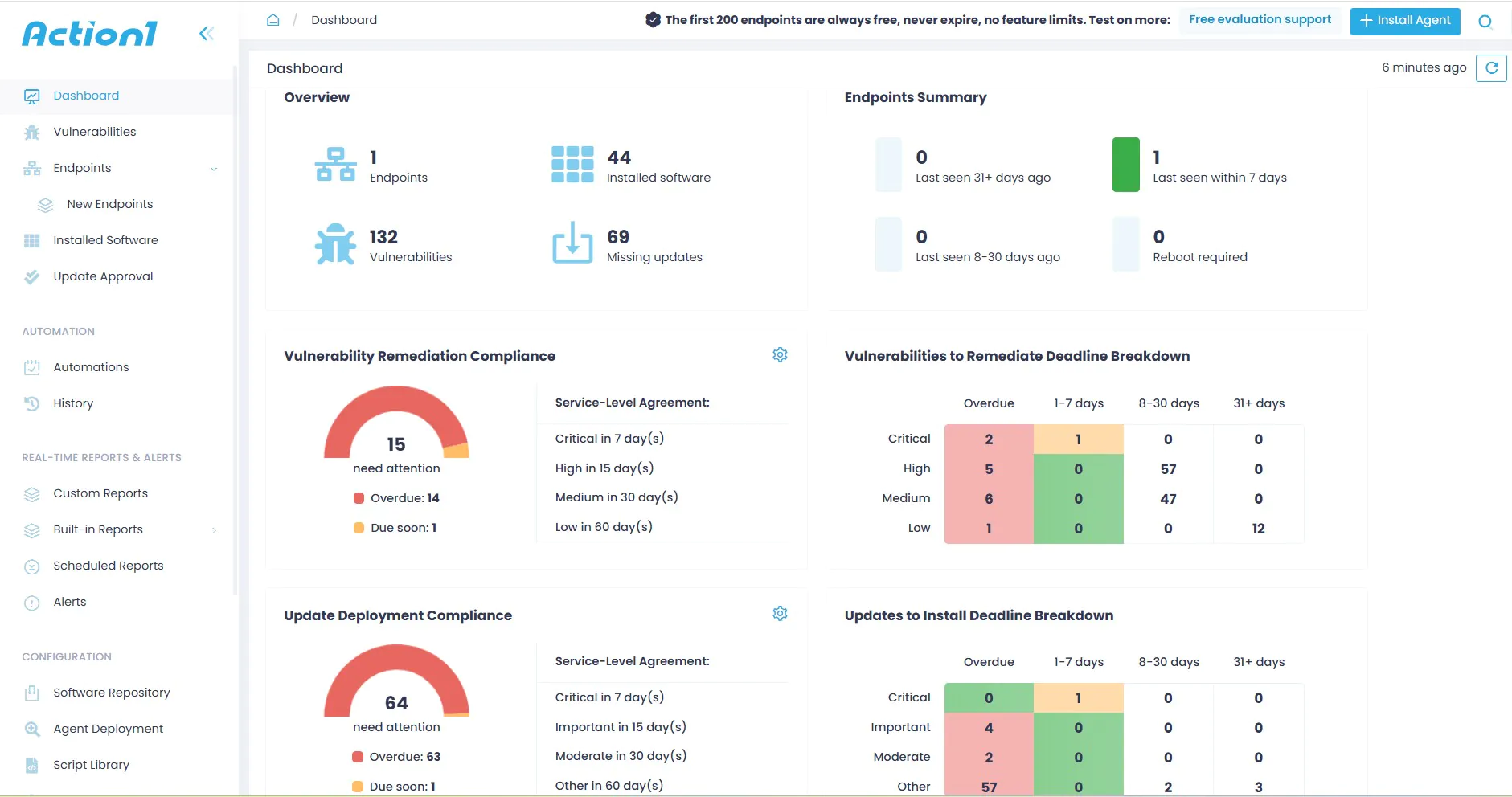
Action1 identifies all vulnerabilities in real time across Windows, macOS, and third-party applications. It supports automatic prioritization based on CVSS scores, CVE numbers, and active exploitation status from CISA’s Known Exploited Vulnerabilities catalog. The most dangerous exposures get closed first , without manual effort.
Cross-Platform and Third-Party Coverage
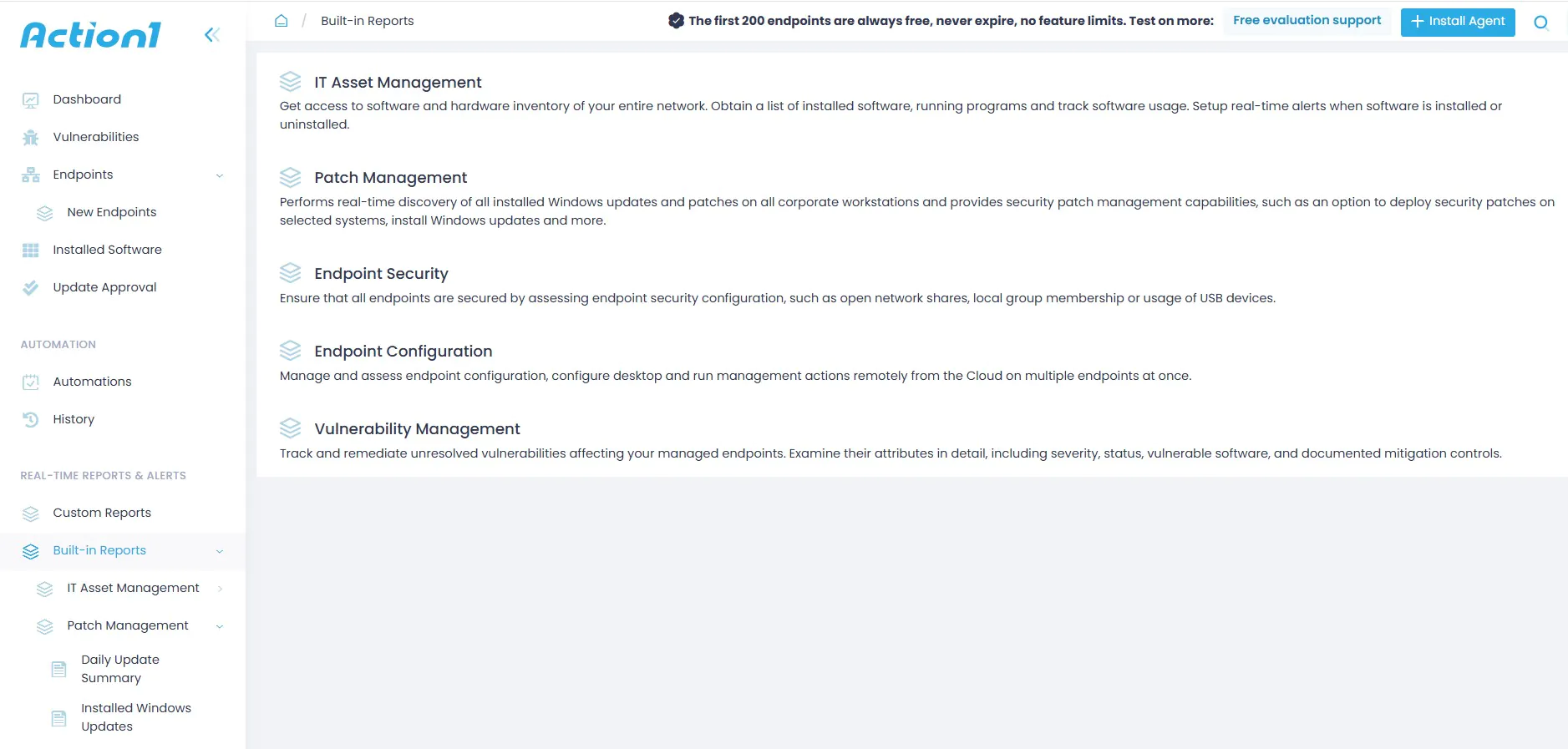
Action1 patches Windows, macOS, Linux, and third-party applications from a single console. Its privately maintained software repository provides 99% coverage of business-critical applications. Be it browsers, PDF readers, collaboration tools, or remote access clients. The platform patches them using the same automation as the OS itself, without any inconsistency.
Autonomous Update Rings
Update rings enable staged, risk-free, autonomous patch rollouts. It advances updates from inner to outer rings based on success rates. Only reliable patches advance to the next stage; problematic ones are automatically stopped. Action1 tests patches on a small group first, then automatically promotes them if they pass and halts if they don’t.
Cloud-Native, No VPN Required
Action1 requires no VPN or local infrastructure. All management happens from a browser. Offline endpoints receive patches automatically as soon as they reconnect. Peer-to-peer distribution keeps bandwidth usage low across large deployments.
Multi-Tenant Management for MSPs
A unified dashboard view aggregates patch status, vulnerability data, and compliance reporting across all client organizations. It helps in maintaining full account isolation between tenants. Granular RBAC controls what each technician can see and do, across every managed organization, at no extra cost.
Compliance Reporting
Action1 includes 100+ built-in report templates covering update management, software, and hardware inventory. It also supports customizable security configurations. You can export all for audit readiness. It logs every action: vulnerability detected, patch approved, deployment executed, and installation confirmed.
Free Tier
The first 200 endpoints are fully featured, with no functional limits and no expiration. Yes, it is not a trial. It’s a way to evaluate the platform in a real environment before committing.
|
r/Action1 • u/GeneMoody-Action1 Action1 is the #1 cloud native risk-based patch management platform for distributed enterprise networks, trusted by thousands of organizations globally. 200 free endpoints for everyone forever! |
Learn more: What is in the works for Action1
Action1 RMM vs MSP360 vs ConnectWise RMM
If you’re short on time, here’s what matters:
Action1 RMM
Cloud-native, autonomous patching, free for 200 endpoints with no feature limits. Built specifically around vulnerability-driven remediation with risk-based prioritization (CVSS + CISA KEV). Update rings automate staged rollouts with no manual intervention. Best fit for teams that want patching to run itself at scale, without infrastructure overhead.
|
r/msp • u/ToddSpengo “If Action1 were patching only, I wouldn’t be using it. The fact that it is a fantastic patching mechanism, includes good remote desktop access, and has nice scripting functionality is what sold me on the product (Along with a very competitive price). I have been pleased with all Action1 offers as it has become the most relied-upon tool to keep my organization running smoothly”. |
MSP360 RMM
Refreshingly simple and budget-friendly. Priced per admin with unlimited endpoints, with a free Community Edition for up to 50 endpoints. Provides patch management through a centralized dashboard. Clear visibility into installed updates and new patch deployment, covering Windows, macOS, Linux, and third-party applications. Help MSPs and SMBs stay ahead of security risks and downtime without unnecessary complexity.
|
r/msp • u/jeffofreddit “MSP360 – been trying it. Like the backups, RMM seems good, testing the security. 50 at a customer site”. |
ConnectWise RMM
The enterprise-scale option, built on the Asio platform. Emphasizes automated patching across endpoints. Comes with customizable patch policies, compliance dashboards, patch history, and scheduling visibility. Now covers over 7,000 third-party applications from a single platform. The standout differentiator is ConnectWise NOC. It tests and approves Windows OS security updates and offers managed server patching , including testing, deployment, and remediation. Positioned as a scalable option for IT teams managing anywhere from a few systems to thousands.
|
r/msp • u/DomoB90 “We switched to CW RMM when CW first released it, I believe that was April 2021. It has grown leagues better than what it first was when we signed up. We are extremely happy with the product and integrated entirely with our stack. I say go for it if you can afford it. I know there are a lot of detractors but for us, it is extremely easy to use and accessible from any web browser/device”. |
- All three: Support Windows, macOS, and Linux, plus third-party applications. Patching from a centralized console, no VPN required.
- Key difference: Action1 = autonomous and security-first. MSP360 = simple and affordable. ConnectWise = broad platform depth with human-backed NOC services.
- Best for MSPs prioritizing automation: Action1
- Best for budget-conscious smaller teams: MSP360
- Best for large MSPs wanting full platform consolidation: ConnectWise
| Action1 RMM for Patch Management | MSP360 RMM for Patch Management | ConnectWise RMM for Patch Management |
|
End-to-end patch management from detection to verified remediation, from a single cloud-native console. Prioritizes patches using real threat data: CVSS scores, CVE numbers, and CISA’s KEV catalog. Patches Windows, macOS, and Linux and third-party apps via a privately maintained repository. Update rings deliver staged, risk-free rollouts. No VPN, no infrastructure, no cache servers, browser-managed, with P2P distribution. Offline endpoints are patched automatically on reconnect; no manual follow-up needed. 100+ built-in compliance report templates with a full audit trail. Multi-tenant console with full client isolation and configurable policies. Free for the first 200 endpoints, fully featured, no limits, no expiration. |
Provides patch management through a centralized dashboard. Supports visibility into installed updates and deployment of new patches. Positioned for Windows, macOS, Linux, and third-party application patching. Helps MSPs and SMBs stay on top of security and downtime risks. |
Emphasizes automated patching across endpoints. Provides customizable patch policies, compliance dashboards, patch history, and scheduling visibility. Supports OS-level patching and third-party application patching from a single platform. Includes NOC-assessed Windows OS security updates. Offers managed server patching services, including testing, deployment, and remediation. Positioned as a scalable option for IT teams managing anything from a few systems to thousands. |
What To Consider When Choosing an RMM and Patch Management Tool?
The right platform depends on your environment, your clients, and your operational model. When evaluating RMM platforms specifically for patch management capability, the questions below matter operationally, not just the features.
Vulnerability and Coverage Fit
Vulnerability-driven patching is different from basic patch deployment. You are patching by schedule rather than risk. The platform must tell you which of your endpoints are currently exposed to an actively exploited CVE.
For example:
- How does the platform incorporate threat intelligence?
- Can it flag patches tied to actively exploited CVEs?
- Does it surface exposures from CISA’s KEV catalog?
- Does it only organize updates by release date and CVSS score?
Policy, Control, and Automation
This framework, often termed “Policy as Code,” uses code to define, test, and automate security or operational policies. It enhances consistency and accelerates processes across your security environments.
The right answer here determines whether the RMM patch management tool can serve a diverse MSP client base or requires treating all clients the same.
- Can policies be configured independently by client, by site, by device group?
- Can approval workflows be set per-device-type?
- Does it need manual approval for servers while automating workstation patching?
Visibility, Scale, and Integration
The true test of an MSP patching platform is what happens when you add your 20th client. If the administrative burden scales with client count, the tool is not designed for managed service delivery at scale. Look for platforms where the administrative overhead per client decreases as the client base grows.
Deployment is not the patch completion. Ask specifically how the platform verifies that patches have been successfully applied and what happens when deployment fails.
Get the specific list and confirm that the applications your clients run are covered. Ask whether the catalog is updated continuously. A third-party patching catalog that lags vendor releases does not provide the coverage it appears to offer.
Reporting that serves internal operations but cannot be shown to clients is only doing half the job. Ask to see a sample report. Evaluate if you could hand it to a client’s CFO or compliance officer and have them understand it. The answers to these questions determine whether the platform is designed for complex and multi-client MSP operations.
- Can you define separate policies for servers versus workstations?
- Can you set approval-required workflows for specific device groups?
- Can you exclude specific patches by client?
What are the Key Takeaways?
The gap between patching and being secure is narrowing. The threat environment has made vulnerability-driven, automated, comprehensive patch management the baseline for any MSP or IT team. The stakes are higher in protecting client environments.
The numbers are clear. Closing the gap requires an RMM platform that automates assessment and deployment. It must cover third-party applications, provide real-time visibility, support granular policy controls, and deliver compliance reporting that holds up to scrutiny.
For MSPs, this is not just a security question. It is the question of whether you can deliver on your service commitments at scale. The goal is to reduce risk, close vulnerability windows quickly, maintain uptime, and simplify patching across every managed endpoint. All this without burning out your team or accepting the liability of an avoidable breach.
Frequently Asked Questions about RMM-Based Patch Management
What are the 6 key patch management differentiators of Action1 Patch Management?
- Risk-based prioritization: Patches are ranked using CVSS scores, CVE data, and CISA’s KEV catalog.
- Autonomous update rings: Staged rollouts that advance only when success thresholds are met and stop automatically on failure.
- Third-party app coverage: 99% coverage via a privately maintained repository.
- No VPN or infrastructure required: Fully cloud-native, browser-managed, with P2P distribution.
- Offline endpoint handling: Devices are patched automatically on reconnect, no manual follow-up.
- Free for 200 endpoints: Fully featured, no trial limits, no expiration.
Why is patch management important for IT teams?
Unpatched software is the most exploited attack factor. Breach victims were compromised through a known vulnerability for which a patch existed but wasn’t applied. For IT teams, the cost isn’t just a security incident. It’s downtime, compliance failure, damaged client trust, and liability. Efficient patch management closes that exposure gap before it becomes a breach.
What is the best tool for patch management?
It depends on your environment. The right tool supports your OS mix, covers third-party apps, and scales without adding admin overhead. It also produces reports that your clients can read without an interpreter. For instance, Action1 is best for teams that need autonomous, vulnerability-driven patching at scale with no infrastructure overhead. MSP360 suits smaller MSPs that want a simple, affordable solution. ConnectWise fits larger MSPs that want full platform consolidation with NOC-backed patch review. There are more available in the market.
How can automated patch management improve operational efficiency?
Automation eliminates the manual effort that takes most of a technician’s time. It scans for missing patches, deployed updates, confirms installation, and tracks compliance. MSPs report saving hours per month after automating patch management. You can reduce helpdesk ticket volume from outdated software issues. IT teams can compress the time between vulnerability disclosure and remediation from weeks to hours.
Can I manage patching across multiple systems or environments?
Yes. Action1’s multi-tenant console aggregates patch status, vulnerability data, and compliance reporting across all client organizations from a single view. All this while maintaining full account isolation between tenants. Policies, schedules, and approval workflows are configurable independently for clients, sites, or devices.
How flexible is patch scheduling in this software?
You can define maintenance windows by client, site, device group, day, and time. Patches deploy outside business hours by default to avoid disruption. Retry logic catches endpoints that were offline during a scheduled window after they reconnect. You can also configure reboot behavior. Users are prompted to postpone restarts rather than being forced mid-session.
Does the platform support centralized patch compliance reporting?
Yes. Action1 includes 100+ built-in report templates. They cover update management, software inventory, hardware inventory, and security configurations. Reports are customizable, exportable, and backed by a full audit trail. Every action is logged and available for compliance audits under frameworks like HIPAA, GDPR, and PCI-DSS.
Can I customize patch approval workflows by system or priority?
Yes. Approval workflows are configurable at the device, site, or client level. Critical servers can be set to require manual approval before any patch deployment. Standard workstations can be fully automated within defined maintenance windows. Specific patches can be blocked, deferred, or excluded per client. This lets senior technicians retain oversight where it matters.
What security risks does patch management help mitigate?
Patch management primarily addresses the exploitation of known vulnerabilities. It also reduces exposure to malware infections and unauthorized access through third-party apps. Other benefits include improved compliance posture under HIPAA, SOC 2, and PCI-DSS.
Learn more: Action1 RMM Patching that works





