






TL;DR
- WSUS Offline Update is a free, open-source utility that downloads Microsoft updates to local media, enabling Windows systems to be patched without an active internet connection or a local WSUS server.
- The tool is designed for offline and isolated environments, making it useful for laboratories, air-gapped networks, disaster recovery scenarios, field deployments, and organizations with limited internet connectivity.
- The guide explains how WSUS Offline Update works, including downloading update repositories, creating offline installation media, deploying updates to target devices, verifying successful installations, and maintaining update repositories.
- Organizations should understand its limitations, including discontinued development, support for only selected Microsoft products, limited automation, no centralized endpoint management, and reduced suitability for large modern enterprise environments.
- Modern patch management solutions provide cloud-native deployment, centralized administration, automated patch approval, third-party application patching, vulnerability remediation, compliance reporting, and support for remote and hybrid workforces without relying on offline update media.
- The guide compares WSUS Offline Update with alternatives, helping IT teams determine when offline patching is appropriate and when migrating to modern endpoint management platforms offers greater security, scalability, automation, and operational efficiency.
- Best practices include testing updates before deployment, maintaining current offline repositories, validating update integrity, documenting offline patch cycles, and incorporating offline patching into a broader endpoint security and vulnerability management strategy.
What is WSUS Offline Update?
Imagine a technician needs to update Windows 10 lab computers, but they do not have internet access to download updates directly or access to a local WSUS server; they require a solution that lets them download updates offline. A German computer magazine named “c’t” has developed a tool for IT professionals to have a way of mirroring the Microsoft Update catalog locally, initially named ct offline update. The tool began as a magazine project but was later renamed WSUS Offline Update to better align with Microsoft’s Windows Server Update Services (WSUS) infrastructure, and it was managed by its original author, Torsten Wittrock. It is distributed as a free, open-source utility that securely downloads Windows and Microsoft Office packages to a local folder on an internet-connected computer, a USB drive, or an external drive. The tool does not require WSUS deployment infrastructure, a Windows Server, or Active Directory. The tool consists of two primary components: the download component, UpdateGenerator.exe, and the deployment component, UpdateInstaller.exe.
You can run UpdateGenerator.exe on a machine connected to the internet to download updates. You can select the update package, languages, Office editions, architecture (32-bit or 64-bit), and Windows versions, such as all updates related to Windows 10 x64 and Office 2016. The tool organizes all downloads into a structured local folder, which can be used later on the offline systems.
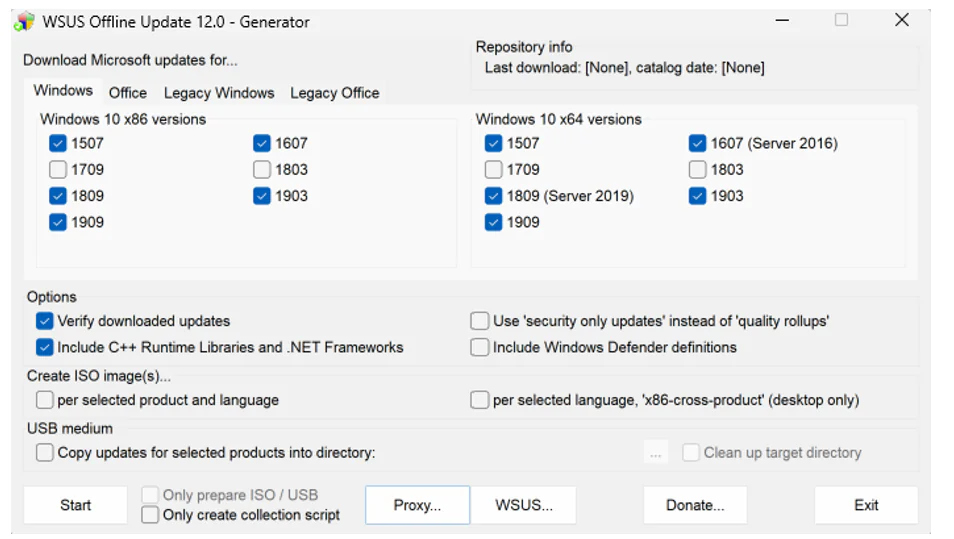
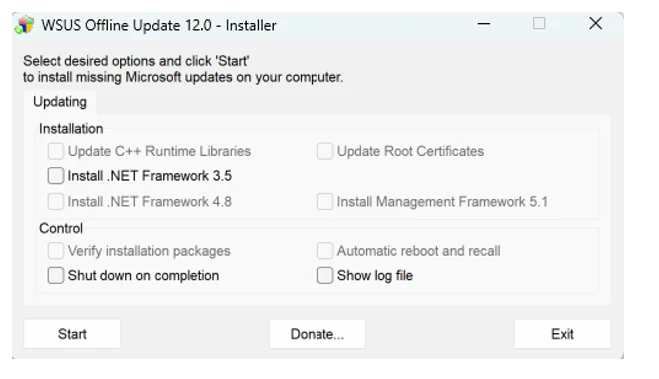
The deployment component UpdateInstaller.exe runs on the target machine; it reads all previously downloaded updates and handles sequencing and dependency checks, so updates can be installed in the correct order without requiring network or internet access. A technician can copy the update folder to a USB drive and use it on an air-gapped machine by running the UpdateInstaller.exe utility.
The development and maintenance of the original WSUS Offline Update tool are now deprecated; no further updates to the tool are available from the original source. Development is continuing via a community-maintained GitLab fork.
News / Latest Project Updates
The original WSUS Offline Update, which is still hosted on wsusoffline.net, is officially deprecated because its last release is version 12.0, dating back to March/April 2020. No further updates have been released by the original source since then; visitors still see version 12.0 as the latest.
Development and maintenance have continued under a community-maintained GitLab fork, labeled as Community Edition.
gitlab.com/wsusoffline/wsusoffline
This fork was created, and the source code of WSUS Offline Update was migrated there for the community to maintain it, including updating scripts, fixing bugs, and improving the feed with new Microsoft updates.
The latest and most stable Community Edition of WSUS Offline Update is version 12.6.1, maintained by a developer known as Aker. Another branch on GitLab is maintaining a new version 12.7 as a beta release, introducing support for updates for Windows 11 and newer Windows Server editions.
This section describing links to the latest builds of WSUS Offline Update also matters for new readers who somehow land on the older site after following a 5-year-old blog post or link; they can now go directly to the GitLab releases page using the link below.
WSUS Offline Update Community Edition 12.6.1
Download Most Recent Version
The final version 12.0 on the original wsusoffline.net project drops support for Windows 7 and Windows Server 2008 R2, as Microsoft has discontinued support for those platforms on 14th January 2020.
Version 12.0 and the latest community-maintained builds target the still-supported Windows platforms, such as Windows 10, 11, Windows Server 2016, 2019, and 2022. This also ensures that the tool is more focused on actively supported Windows versions Microsoft still maintains. The tool also downloads update packages for Microsoft Office editions alongside Windows updates, enabling admins to patch both the productivity suite and the operating system in a single offline package. This helps with full-system offline maintenance rather than just patching Office or Windows at a time; for example, a single download run can prepare an update package for both Windows 10 and Office 2016.
Users should always download the WSUS Offline Update utility from the official GitLab releases page below, which is still being maintained.
Each release’s hash/signature file is also provided on the release page so users can verify that the downloaded tool has not been tempered with before they run it in an offline machine in production environment. For example, a user can run a checksum tool on the provided hash file for the downloaded zip to verify that the package’s hash matches the original published hash.
Download ESR (Extended Support Release) Version
ESR stands for Extended Support Release; it is a separate branch of the WSUS Offline Update utility that continues to serve Windows and Office versions that Microsoft does not support. ESR version supports update downloads for Windows 7 and Windows Server 2008 R2, which the current Microsoft release line has officially dropped; the ESR tool preserves the older download definitions and configuration files required by these older OS versions. The current version of ESR on wsusoffline.net is 11.9.1 alongside 12.0, and Community Edition 11.9.11 on the GitLab releases page alongside Community Edition 12.6.1. Choosing the current version or ESR release is straightforward. If you want to download updates for the most recent versions of Windows 10, Windows 11, or modern Windows Server editions, choose the latest version. Choose the ESR version if you want to patch Windows 7 or Windows Server 2008 R2. Another noticeable limitation of the ESR version is that it retains the download mechanism used by legacy Windows versions but does not allow access to Microsoft’s Extended Security Updates (ESU) program, which enables organizations still using officially unsupported versions such as Windows 7 to pay extra for security updates.
Version Changelog
Modifications in Version 12.0
The key modifications in version 12.0 include:
- The biggest change was the dropped support for Windows 7 and Windows Server 2008 R2 due to Microsoft’s discontinuation of support for these platforms. Admins must use the ESR release to maintain those systems.
- Support was also removed for Microsoft Security Essentials, Windows Defender, Remote Desktop Client, Silverlight, and Service Packs, along with their command-line switches.
- Version 12.0 also removed support for Windows 10 version 1703 since Microsoft discontinued support for it. It also added split support for Windows 10 downloads based on version/build; users must select them in the generator executable, e.g., Windows 10 1809 or 1909.
- This version includes a complete rewrite of Linux script version 1.19, which is used on Linux versions to download Windows updates, and includes an improved XSLT filter for the determination of dynamic Office updates by Product ID rather than Product Family ID.
Modifications in Version 11.9.1
The key modifications in version 11.9.1 include:
- Last version of utility to still support Windows 7 and Windows Server 2008 R2, though support for those versions was ended in the previous utility version; this version was specifically created at ESR version.
- Updates download list reduced to “Security Only” updates for Windows 8.1 and Server 2012/2012 R2 for both x86 and x64 architectures.
- Replaced superseded Servicing stack updates for Windows 10 Version 1507, Windows 10 and Server 2016 Version 1607, Windows 10 Version 1703, 1709, 1803, and Windows 10 and Server 2019 Version 1809, along with Windows 10 Version 1903 and 1909.
- Included fixes for issues like “Invalid –no-check-certificate option for Aria2 download utility”, “Wget utility didn’t download root certificates properly due to user agent aware responses from microsoft.com,” and “Adjusted installation sequence to have root certificate packages installed before all others”.
Modifications in Version 11.9
Key modifications in version 11.9 include:
- Included new method for the determination of dynamic Office updates for DownloadUpdates.cmd.
- Integrated .NET Frameworks’ January 2020 Security Only Updates and Quality Rollups.
- C++ 2019 Redistributable Runtime Libraries updated to v. 14.24.28127.4.
- Replaced superseded Servicing stack updates for Windows 7, 8.1, 10 and Windows Server 2008 SP2, 2008 R2, 2012, and 2012 R2.
- Included fixes for issues such as “Download part missed several and didn’t properly exclude other Windows 10 updates due to new URLs”, “Wget utility refused to download from download.wsusoffline.net and others due to certificate verification failures”, and “Wget utility didn’t any longer follow HTTP redirections in download URLs for Windows Defender and Microsoft Security Essentials signature files”.
SSU Gap
One of the most important limitations users experience is that WSUS offline updates cannot download and install Servicing Stack Updates. SSU is a component responsible for installing Windows updates, as Microsoft usually requires the latest SSUE installed before you can download certain Cumulative Updates, vulnerability fixes, and security updates. Some critical security fixes such as Common Vulnerabilities and Exposures (CVEs) in Remote Desktop Protocol (RDP) depend on an updated servicing stack. Administrators are advised to download SSU from the Microsoft Update Catalog before running the UpdateInstaller.exe.
Supported Windows and Office Versions of SSU
| Product | v12.0 | v11.9.1 ESR |
| Windows 11 | Supported (V12.7Beta community Version) | Not Supported |
| Windows 10 | Supported | Supported |
| Windows 8.1 | Limited support | Supported |
| Windows 8 | Limited support | Supported |
| Windows 7 | Removed | Supported |
| Windows Server 2025 | Supported (V12.7Beta community Version) | Not Supported |
| Windows Server 2022 | Supported (community updates) | Not Supported |
| Windows Server 2019 | Supported | Supported |
| Windows Server 2016 | Supported | Supported |
| Windows Server 2012 R2 | Supported | Supported |
| Windows Server 2008 R2 | Removed | Supported |
| Office 2016 | Supported | Supported |
| Office 2019 | Supported | Supported |
| Office 2021 | Community support | Not Supported |
Typical Reboot Sequence During Installation
WSUS Offline Update tool installs updates in stages because some updates cannot be installed until other components, such as SSUs, are installed and the system is restarted. You should expect multiple reboots depending on how long the system was not updated, such as months or years; a two- to five-reboot cycle is common for systems that have not been updated recently. UpdateInstaller.exe in WSUS Offline Updates has an option of “Automatic reboot and recall”, which automatically restarts the machine after required updates have been installed and resumes further installation upon next login. This also enables admins to plan the next maintenance window, preferably after business hours, to avoid unexpected interruptions.
Archive / Previous Versions
WSUS Offline update official website download.wsusoffline.net contains all the previous versions in the Archive section, for legacy environment compatibility testing. Similarly, the GitLab fork below contains the latest build, 12.6.1, and lists all previous builds up to the date the project was moved to the GitLab fork.
https://gitlab.com/wsusoffline/wsusoffline/-/releases
RSS Feed
The original WSUS Offline Update project does not provide a dedicated RSS feed, but its GitLab fork offers one for automated release tracking, critical bug fixes, and security warnings. Users subscribe to the feed and are notified whenever a new release is available, rather than checking the releases page for updates.
Discover our complete WSUS Setup Guides
| Topic | Short Description |
| WSUS Alternatives | Compares seven leading WSUS replacements based on cross-platform and third-party patching, automation, reporting, remote endpoint support, deployment model, and suitability for different IT environments |
| WSUS Patch Management Guide | Explains how WSUS centrally synchronizes, approves, deploys, and monitors Microsoft updates, along with its benefits, limitations, and alternatives |
| WSUS EOL | Explains what Microsoft’s WSUS deprecation means, how long WSUS will remain supported, and which migration paths and modern alternatives organizations should consider. |
| WSUS vs SCCM | Compares WSUS with SCCM across patching, software deployment, device management, reporting, complexity, cost, and suitable deployment environments |
| WSUS Windows 11 Update Guide | Provides a practical guide to configuring WSUS to approve, deploy, monitor, and troubleshoot Windows 11 updates across managed devices |
| Managing Third-Party Apps with WSUS | Explains how third-party applications can be patched through WSUS using external catalogs and publishing tools, including setup, signing, deployment, and reporting |
| WSUS Ports Setup | Details the network ports, firewall rules, SSL, proxy, DNS, and routing configurations required for reliable WSUS synchronization and client communication |
| WSUS Registry Settings | Documents the key Windows Update and WSUS registry values used to control update sources, schedules, reboots, device groups, and deployment behavior |
| How to Disable WSUS Registry | Provides step-by-step instructions for removing WSUS registry configuration so Windows clients can reconnect directly to Microsoft Update. |
| WSUS Server Cleanup Wizard | Explains how to run and automate the WSUS Cleanup Wizard to remove obsolete updates, inactive devices, expired metadata, and unnecessary files |
| WSUS Maintenance Guide | Provides a complete recurring maintenance routine covering superseded updates, database reindexing, content cleanup, synchronization health, and performance monitoring |
| WSUS Synchronization Failed Fix | Troubleshoots common WSUS synchronization failures caused by TLS, IIS, firewall, proxy, operating-system compatibility, and SUSDB database issues. |
| Intune vs WSUS | Compares cloud-based Intune with on-premises WSUS across update control, supported devices, infrastructure, security, costs, and migration considerations. |





