TL;DR:
- Continuous vulnerability management (CVM) is an ongoing process: Discover assets, identify vulnerabilities, prioritize risks, remediate findings, and verify fixes without waiting for the next scheduled scan.
- Prioritize by real risk, not severity alone: Combine CVSS, EPSS, CISA KEV, asset criticality, and exposure to decide what needs fixing first.
- Don’t rely on scheduled scans alone: Use continuous monitoring and event-triggered assessments to catch new vulnerabilities, assets, and changes in exposure.
- A deployed patch doesn’t always mean a vulnerability is fixed: Verify remediation before closing findings, and keep unresolved risks visible.
- Automate the repetitive work: Use tools to handle discovery, patching, tracking, and reporting, while your team manages risk decisions and exceptions.
Continuous vulnerability management (CVM) is the ongoing cycle of discovering assets, assessing them for vulnerabilities, prioritizing findings by risk, remediating vulnerabilities, and verifying that fixes have worked. It shrinks the exposure window between a vulnerability’s disclosure and its fix on affected systems. Unlike periodic vulnerability assessments, CVM is a proactive process. Your security teams do not wait for a quarterly scan to reveal new risks. They run continuous vulnerability assessment and remediation, so newly discovered assets, newly disclosed vulnerabilities, and newly exploited flaws can trigger assessment and remediation workflows as soon as they are detected.
By combining automated tools with remediation priorities and defined deadlines, you can reduce exposure, improve your security posture, and make vulnerability management part of routine IT operations.
Your employees work from anywhere. Your vulnerability management should too.
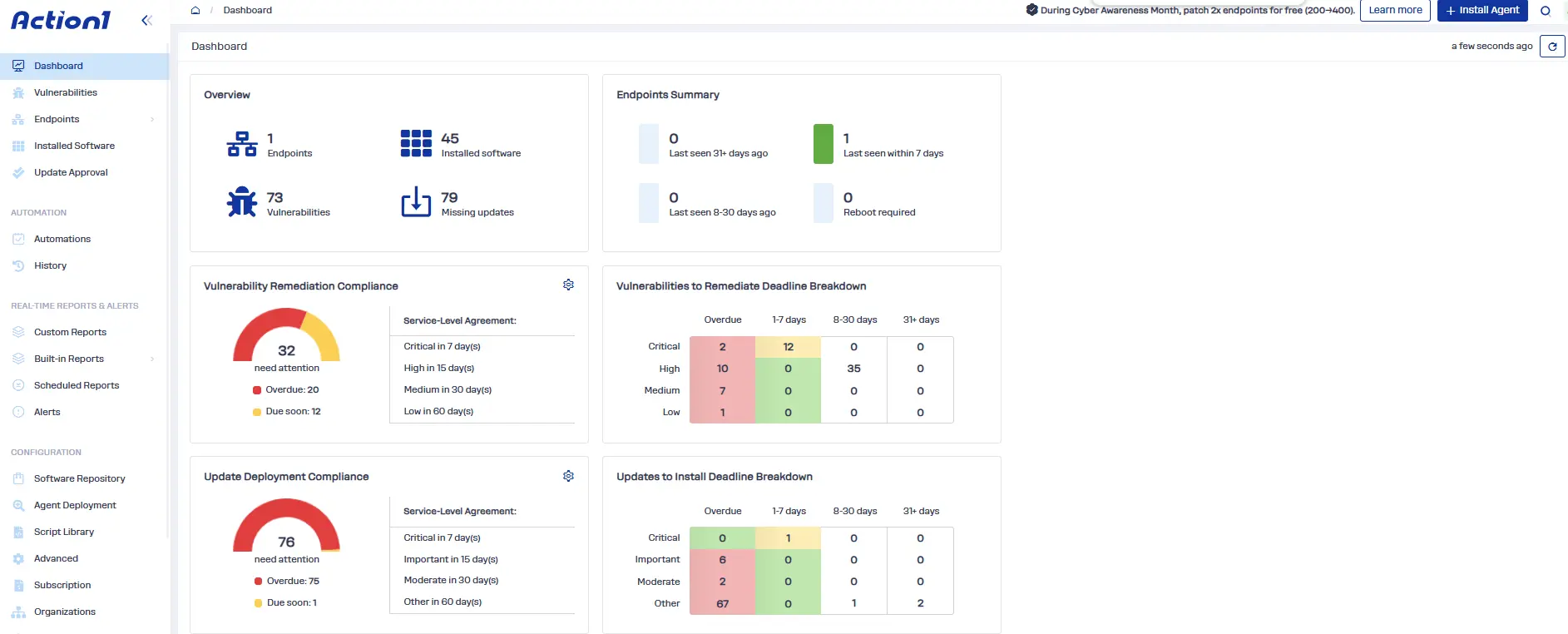
Action1 identifies vulnerable software and automates patching across supported remote endpoints without requiring a VPN, helping you keep track of devices outside the office.
Start with 200 endpoints, fully featured and free forever, or watch the demo.
Continuous Vulnerability Management Defined
CVM is a security program, not a single scan. It combines a current asset inventory, scheduled and event-driven vulnerability scans, risk-based prioritization, controlled remediation, and verification, then feeds the results back into discovery. This creates a repeatable, continuous workflow.
CIS Critical Security Controls v8.1 Control 7, titled “Continuous Vulnerability Management,” defines seven safeguards that support the vulnerability management lifecycle. The following table maps each safeguard to the corresponding stage of the CVM pipeline and summarizes its requirements, as given in the CIS Controls v8.1 text and its published safeguard list.
| CIS safeguard | What it requires | Pipeline step |
|---|---|---|
| 7.1 Establish and maintain a vulnerability management process | Documented process, reviewed annually or after significant enterprise change | Whole loop: policy, roles, SLAs, reporting |
| 7.2 Establish and maintain a remediation process | Risk-based remediation strategy, reviewed monthly or more often | Prioritize |
| 7.3 Perform automated operating system patch management | Automated OS patching, monthly or more often | Remediate |
| 7.4 Perform automated application patch management | Automated application patching, monthly or more often | Remediate |
| 7.5 Perform automated vulnerability scans of internal enterprise assets | Automated scans quarterly or more often; authenticated + unauthenticated | Assess |
| 7.6 Perform automated vulnerability scans of externally exposed enterprise assets | Automated scans, monthly or more often | Assess |
| 7.7 Remediate detected vulnerabilities | Remediate via processes/tooling monthly or more often, based on the remediation process | Remediate and Verify |
Control 7 relies on inventory work in Control 1 (Inventory and Control of Enterprise Assets) and Control 2 (Inventory and Control of Software Assets). The CIS cadences are minimums.
Where CVM Ends and Related Practices Begin
Teams use these terms interchangeably, which causes scope arguments. This table draws the boundaries.
| Practice | Core question | Scope |
|---|---|---|
| Vulnerability assessment | What is vulnerable right now? | A scan or review (manual or automated) that finds and reports weaknesses, often point in time |
| Patch management | Is the fix installed? | Acquire, test, deploy and verify patches and updates |
| Vulnerability management | How do we handle findings from detection to verified closure? | The overall program: scanning, triage, remediation, reporting |
| Risk-based vulnerability management (RBVM) | Which finding do we fix first? | Ranking using exploit likelihood, exposure and asset value |
| Continuous threat exposure management (CTEM) | What can an attacker reach and exploit? | A Gartner framework covering software flaws, misconfigurations, identity exposures and attack paths, validated by testing |
| Continuous vulnerability management | Are we finding, ranking and closing known software flaws faster than they are exploited? | Continuous, repeatable loop for known software vulnerabilities across all managed assets – from discovery through verified closure, with results feeding back into asset inventory |
Continuous vs. Traditional Vulnerability Management
Traditional vulnerability management runs on a calendar. A team scans monthly or quarterly to identify weaknesses, exports a report, and works the list until the next cycle. This model fits stable, on-premises environments where assets change slowly. However, it can leave newly introduced vulnerabilities and threats undetected between scans.
Continuous vulnerability management makes vulnerability discovery, risk assessment, remediation, and verification an ongoing process. Agents and cloud connections report asset and software changes as they happen. Scans run on a baseline schedule, daily for your highest-risk systems, and also trigger on events such as a new entry in CISA’s Known Exploited Vulnerabilities (KEV) catalog or a new asset on the network. Fixes flow through automated workflows, and every action bears a time-stamped record.
The difference between the two models shows up in the exposure window. A monthly scan leaves a new flaw undetected for about 15 days on average. Daily scanning cuts that to about half a day. The following table compares the two models.
| Aspect | Traditional vulnerability management | Continuous vulnerability management |
|---|---|---|
| Frequency | Monthly, quarterly or annual scan cycles | Daily or weekly plus event-triggered scans, with ongoing asset monitoring |
| Scope | Often focuses on known assets or selected systems | Tracks all managed assets across endpoints, servers, cloud environments, and applications |
| Response time | Findings may wait for weeks or months, tied to the next review or remediation cycle | Findings enter prioritization and remediation workflows as they emerge |
| Automation | Manual report review, ticket creation, and remediation coordination | Automated discovery, alerting, ticketing, deployment, and validation where supported |
| Visibility | Point-in-time view that can miss new, short-lived, and changing assets | Updated view of assets and vulnerabilities as the environment changes |
| Risk approach and prioritization input | Often ranks findings by Common Vulnerability Scoring System (CVSS) severity | Combines CVSS, Exploit Prediction Scoring System (EPSS), KEV status, and asset context |
| Resource use | Workload can spike after each scan | Work is distributed across recurring workflows, although urgent findings can create spikes |
| Audit evidence | Point-in-time reports and remediation records | A continuing record of findings, decisions, remediation actions, and verification, creating a time-stamped trail |
| Typical exposure window (average time undetected) | About 45 days (quarterly) or 15 days (monthly) | About 0.5 day (daily) |
Why Does Continuous Vulnerability Management Matter for Your Security Posture?
Your security posture depends on how quickly you identify and reduce exposure to vulnerabilities. Attackers often move from disclosure to exploit faster than a monthly or quarterly scan cycle can catch, so intervals between scans extend your exposure window and leave security teams with an incomplete picture of risk.
Meanwhile, organizations face a growing volume of vulnerabilities across endpoints, servers, applications, and cloud environments. According to Jerry Gamblin’s analysis of NVD and CVE List data, 48,185 CVE records were published in 2025, a 20.6% rise from 39,962 in 2024. Security teams that scan on a calendar cannot keep pace with faster threat actors. Worse still, undiscovered vulnerabilities that are already being exploited create invisible risks for the organization.
Regulatory and Compliance Requirements
Major compliance frameworks require documented vulnerability identification, assessment, and remediation processes, and several set minimum scan cadences.
- CIS Critical Security Controls v8.1, Control 7 is explicitly titled “Continuous Vulnerability Management.” It requires organizations to continuously assess and track vulnerabilities on all enterprise assets, so they can remediate them and minimize the window of opportunity for attackers. In practice, that means a documented vulnerability management process reviewed at least annually, a risk-based remediation process reviewed monthly, automated OS and application patching at least monthly, authenticated and unauthenticated internal scans at least quarterly, external scans at least monthly, and remediation of detected vulnerabilities at least monthly.
- The Payment Card Industry Data Security Standard (PCI DSS) v4.0.1, Requirement 11.3 requires internal and external vulnerability scans at least once every three months, with additional scans after significant changes and rescanning to verify remediation where applicable.
- For US federal agencies, the CISA KEV Catalog and BOD 26-04 establish risk-based remediation deadlines for covered vulnerabilities. Other organizations use those deadlines as a benchmark.
- The Health Insurance Portability and Accountability Act (HIPAA) Security Rule also requires regulated entities to conduct ongoing risk analysis and risk management for systems that hold electronic protected health information (ePHI).
Rapid Cloud Adoption and Infrastructure Modernization
Virtual machines, autoscaling groups and serverless functions can exist for hours only. A quarterly scan can easily miss them, so they run unassessed in your cloud environments. Continuous vulnerability management improves visibility across cloud and on-premises environments, including every account and region. Teams can identify newly deployed assets and assess them before temporary workloads become overlooked sources of risk.
Containerization and Microservices Architecture
Containerized applications introduce additional vulnerability sources, including outdated base images, vulnerable software dependencies, and images copied to multiple registries. Kubernetes can start hundreds of copies of one image, and registry sprawl leaves old, vulnerable images ready to deploy. Continuous vulnerability management can scan images in the build pipeline and again in the registry, then block deployment when a critical finding appears. Ongoing monitoring catches newly disclosed vulnerabilities in already deployed images.
High-Impact Vulnerability Events
Log4Shell (CVE-2021-44228), disclosed in December 2021, exposed a critical remote code execution vulnerability in the widely used Apache Log4j logging library. CISA reported active exploitation and urged organizations to identify affected systems and apply mitigations. Organizations that relied on quarterly scans faced a difficult inventory problem as vulnerable libraries could exist in applications, containers, and indirect dependencies. They spent weeks finding affected systems, providing attackers extended windows for exploitation before remediation efforts began.
A software bill of materials (SBOM), which inventories software components and dependencies, helps identify where vulnerable libraries may be present.
Operational Velocity and Decentralized Teams
DevOps teams can deploy code and change production hourly, introducing new assets and vulnerabilities between scheduled assessments. Mergers and acquisitions create further exposure windows when inherited systems, software inventories, and security processes are not immediately integrated. Continuous vulnerability management gives organizations a repeatable approach to discovering assets, assigning ownership, and tracking remediation across teams, business units, and newly acquired environments.
How Does Continuous Vulnerability Management Work?
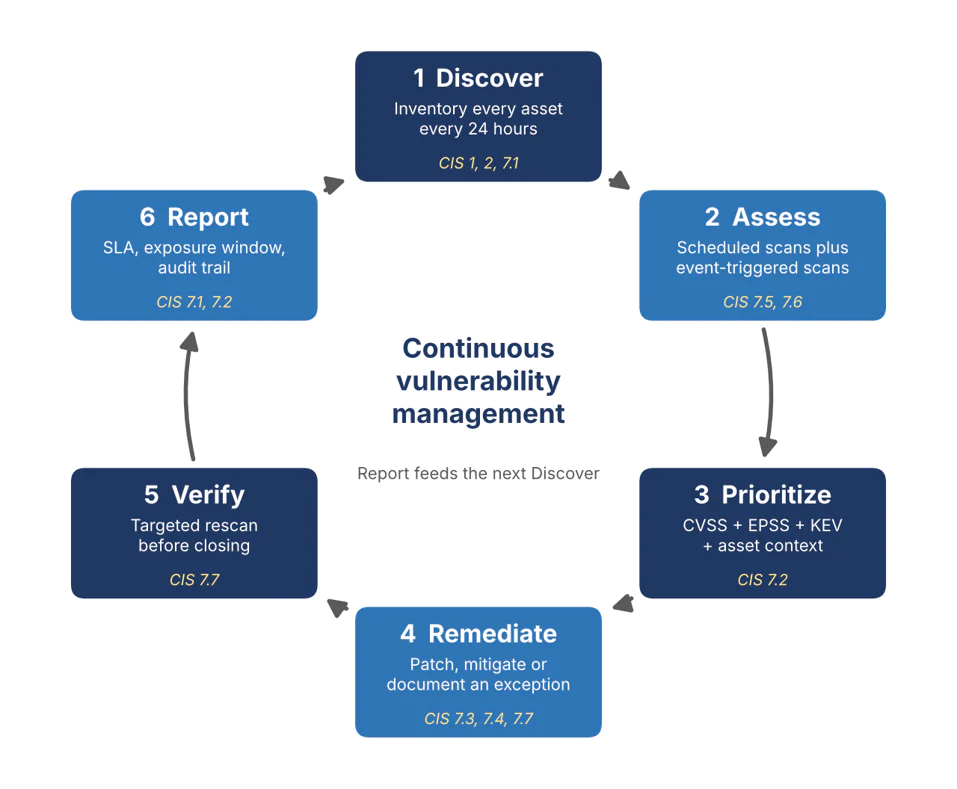
Continuous vulnerability management runs as a closed loop of six steps: asset discovery, vulnerability detection, risk-based prioritization, remediation, verification, and reporting. Each cycle updates your understanding of the environment and feeds new findings into the next cycle. In this process:
- Automated tools take over the repeatable work: inventory sync, scanning, ticketing and patch deployment.
- Manual judgment handles risk acceptance, change approval and production exceptions.
- With continuous monitoring, your team works from real-time data instead of last month’s export.
The objective is to shorten the time between discovering a vulnerability and confirming that the affected asset is no longer exposed.
The Continuous Vulnerability Management Pipeline
Five steps do the core work, and a sixth, reporting, closes the loop. The diagram shows the CVM cycle and maps each step to the CIS Critical Security Controls v8.1 Control 7 safeguards.
Asset Discovery and Inventory Management
Automated discovery combines network scanning, cloud APIs, and endpoint telemetry from agents to identify assets such as servers, workstations, IoT devices, containers, and ephemeral instances. Compare discovered assets with your approved inventory to identify unmanaged devices and shadow IT, including systems deployed without the security team’s knowledge.
Run discovery at least every 24 hours and flag any asset that has no owner or no agent. Reconcile inventory data continuously so that newly created, retired, and reassigned assets do not leave blind spots in coverage. This step draws on CIS Controls 1 and 2, which cover enterprise asset inventory and software inventory respectively.
Vulnerability Detection and Analysis
Once you know which assets exist, assess them for known vulnerabilities, missing patches, and insecure software versions. Choose the detection method for each asset.
- Network-based scans probe a host from outside.
- Authenticated scans log in to read patch levels and configuration.
- Agent-based scans gather information directly from managed endpoints, including devices outside the corporate network.
Scheduled scans provide predictable coverage while event-triggered scans can assess a system after a deployment or newly disclosed vulnerability, such as a rescan of every Windows server after Microsoft’s monthly Patch Tuesday release. Run both. Feed the analysis with intelligence from CERT/CC (Computer Emergency Response Team Coordination Center) Vulnerability Notes, OSV.dev (the open source vulnerability database), the National Vulnerability Database (NVD), and vendor security advisories.
Risk Scoring and Prioritization
A vulnerability’s severity does not tell you the full risk it poses. Stack four inputs: CVSS for severity, EPSS for the likelihood of exploitation, KEV for confirmed exploitation, and asset criticality for business impact. Consider internet exposure, sensitive data, and mitigating controls such as network isolation.
The following example uses illustrative scores. Fix Host B first. Its flaw is already exploited in the wild, attackers can reach it from the internet, and a high EPSS score indicates a greater likelihood of exploitation over the next 30 days. Track Host A for remediation. Recalculate priorities when exploit intelligence, asset exposure, or business impact changes.
| Factor | Host A | Host B |
|---|---|---|
| CVSS base score | 9.8 | 7.5 |
| Exposure | Isolated lab host with no inbound path | Internet-facing web server |
| CISA KEV | Not listed | Listed |
| EPSS | Low | High (above the threshold in your policy) |
| Asset criticality | Low: test data only | High: customer-facing |
| Priority | Next scheduled maintenance window | Fix first, through your emergency change path |
Automated Remediation and Orchestration
Connect vulnerability findings to patch management and IT service management (ITSM) workflows so remediation does not depend on manual report review. Automated workflows can create ServiceNow or Jira tickets, assign asset owners, deploy operating system and third-party application patches, and verify outcomes.
Use zero-touch patching for low-risk and approved updates, and require human approval for changes that could disrupt critical services. Schedule deployments within maintenance windows, test patch bundles, and define rollback procedures. In continuous integration and continuous delivery (CI/CD) pipelines, block vulnerable components from reaching production when they violate security policies.
Set remediation service-level agreements (SLAs) based on risk. The following are illustrative starting targets, not universal regulatory requirements.
| Severity | Confirm | Plan | Remediate |
|---|---|---|---|
| Critical | 1 day | 1 day | 3 days |
| High | 1 day | 5 days | 10 days |
| Medium | 5 days | 10 days | 30 days |
| Low | 10 days | 30 days | 90 days |
Validation and Continuous Monitoring
A successful deployment does not prove that a vulnerability is fixed. Rescan only the assets and software versions you fixed, usually within 24 hours of the patch window ending, and close the finding only when the rescan passes. For example, after deploying a patch to 200 endpoints, identify which endpoints still report the vulnerable version and investigate failures or pending restarts. Record every finding, owner, deadline, and outcome in a remediation tracking database, so you can answer audit and incident questions later.
If you cannot apply a fix, document risk acceptance, the reason for the delay, the threat level, the likelihood of compromise, the potential impact, compensating controls, and an expiration or review date. Continue monitoring accepted risks until remediation is verified.
Scanning Frequencies
Your scan cadence should reflect asset criticality, exposure, and the rate of change in your environment. High-risk systems need daily or more frequent assessment, while less exposed assets can follow a slower schedule if risk and compliance requirements permit. Use real-time alerts for new assets and vulnerability disclosures, where supported.
Use the following cadence as a starting point, then adjust for your risk and compliance requirements:
| Asset tier | Example | Suggested scan cadence | Scan type |
|---|---|---|---|
| Critical, internet-facing | Public web servers, systems with regulated data, identity systems | Daily + event-triggered | Authenticated or agent-based + external scan |
| High-value internal | Data-center servers, sensitive databases | At least weekly | Authenticated scanning |
| Standard endpoints | Employee laptops and desktops | Weekly or monthly, based on risk | Continuous agent-based assessment + scheduled scans |
| Cloud-native workloads | Availability-critical systems, containers, autoscaling instances, ephemeral instances | At deployment and on image changes + ongoing monitoring + monthly on a non-production clone | Image scanning + runtime assessment + clone scan |
| Lower-risk assets | Isolated test systems | Monthly + scans after significant changes | Scheduled vulnerability scans |
The interval between scans determines how long a newly introduced vulnerability can remain undetected. Assuming vulnerabilities appear uniformly between scans and no other detection mechanism intervenes, the average detection delay is approximately half the scan interval.
| Scan interval | Average time undetected |
|---|---|
| Quarterly (90 days) | 45 days |
| Monthly (30 days) | 15 days |
| Weekly (7 days) | 3.5 days |
| Daily (24 hours) | 12 hours |
These figures measure detection delay, not total exposure time.
Enterprise Integration Architecture
CVM plugs into the tools your security teams already run. Scanners and agents feed a central platform. That platform exchanges data with your log analytics, ticketing and endpoint tooling, so findings, threat signals and fixes stay in one workflow.
SIEM and Security Operations Integration
A SIEM platform correlates vulnerability findings with security events. If monitoring detects exploitation attempts against a server with a known, unpatched vulnerability, security teams can raise its priority, investigate potential compromise, and coordinate remediation with incident response.
Endpoint and Cloud Agent Integration
Agents on endpoints and workloads report inventory and vulnerabilities directly, covering remote and off-network devices that network scanners may not reach regularly. Agentless scanning can assess supported cloud resources through provider APIs without installing software on each asset. Endpoint detection and response (EDR) tools add security telemetry, while cloud security posture management (CSPM) tools identify cloud configuration risks. Together, these sources improve visibility into distributed environments, although coverage depends on integration and permissions.
Which Vulnerability Scanning Techniques Support Continuous Vulnerability Management?
Effective continuous vulnerability management relies on several vulnerability scanning techniques because no single method identifies every weakness. Each one performs a different kind of vulnerability assessment. Choose techniques based on your assets, technology stack, and risk level. The following table lists different techniques, what they find, where they fit, and typical frequencies.
| Technique | What it finds | Best for | Typical frequency |
|---|---|---|---|
| Agent-based scanning | Missing patches, installed software vulnerabilities (OS and applications), and endpoint configuration gaps | Managed laptops, workstations, and servers, including remote devices | Daily assessment or continuous telemetry, where supported |
| Network-based scanning | Open ports, exposed services, vulnerable versions, weak or default credentials, and reachable network weaknesses | Internal networks, data centers, and network-connected devices | Daily for critical assets; weekly or monthly for other assets, based on risk |
| Agentless / cloud API scanning | Cloud asset exposure, supported software vulnerabilities, and configuration weaknesses | Cloud environments where installing an agent is impractical | Continuous inventory updates or daily assessments, depending on tool support |
| Container image scanning in CI/CD | Vulnerable packages, base images, and software dependencies | Container images before deployment, build pipelines and registries | On every build or image change, plus periodic registry rescanning |
| Dynamic application security testing (DAST) | Runtime application vulnerabilities, including injection flaws and insecure responses | Web applications and APIs running in test or production environments | Each significant release and scheduled intervals |
| Configuration checks against CIS Benchmarks | Insecure settings, unnecessary services, and deviations from recommended hardening standards | Operating systems, cloud services, databases, and infrastructure | Weekly to monthly, after configuration changes and during recurring compliance checks |
| External attack surface scanning | Internet-facing assets, exposed services, unexpected public systems, and forgotten hosts | Public IP addresses, domains, and internet-accessible applications | Daily or continuous for high-risk environments |
Non-Authenticated vs. Authenticated Scans
Non-authenticated and authenticated scans provide different levels of visibility into a system.
- Non-authenticated scans probe a system over the network without credentials. They examine what an external or internal observer can detect without logging in. They are generally less intrusive and useful for checking exposed services.
- Authenticated scans use authorized credentials to inspect the system from within. They provide more complete findings and reduce false positives caused by incomplete version detection.
Both approaches support continuous vulnerability management. When used together, they give security teams a more accurate view of exposure.
| Non-authenticated scans | Authenticated scans |
|---|---|
| Identify open ports, operating system and software versions exposed through service banners, and reachable network services. | Identify installed applications, missing patches, detailed software versions, and system configuration weaknesses. |
| Can detect exposed file shares, some default credentials, and other remotely observable weaknesses, depending on scanner capabilities. | Can inspect local settings, installed packages, and vulnerabilities that are not visible from the network. |
| Require no system login credentials, making them useful for external exposure checks. | Require appropriately scoped credentials or an authorized scanning agent. |
| Generally less intrusive, although scan intensity can still affect services. | Provide deeper coverage but require careful credential management and access controls. |
| May miss vulnerabilities hidden behind authentication or report uncertain findings based on service banners. | Usually produce more complete results and fewer false positives. |
| Best for checking what an attacker could observe without credentials. | Best for assessing internal software and patch status. |
Before running a scan type in production, test the scanner configuration on a representative, non-production system. Confirm that credentials have only the required permissions and the results correctly identify known test vulnerabilities. Then expand coverage in stages.
What Should Trigger an Out-of-Cycle Scan or Emergency Patch?
A scan schedule establishes your minimum coverage, not the full continuous vulnerability management process. Continuous means combining a scheduled baseline with event triggers that prompt action when new information changes the risk to an asset. Without those triggers, you’re running a faster calendar, not a responsive vulnerability management program.
An out-of-cycle assessment helps you determine whether a newly disclosed vulnerability affects your environment and whether existing remediation priorities need to change. Use these triggers to start targeted investigations rather than waiting for the next routine scan.
| Trigger | What changed | What to do first | Benchmark or source |
|---|---|---|---|
| CVE added to CISA’s KEV catalog | Evidence indicates the vulnerability has been exploited in the wild. | Search your software inventory for the affected product and version; prioritize exposed, affected assets. | CISA KEV catalog and your policy deadline |
| Vendor releases an out-of-band security update | A vendor publishes an urgent fix outside its normal release cycle. | Identify affected versions, check deployment prerequisites, assess exposure, and stage the patch in a pilot group. | NIST SP 800-40 Rev. 4 |
| EPSS score rises above your policy threshold | The estimated probability of exploitation in the next 30 days increases. | Reassess affected vulnerabilities and move qualifying findings up the remediation queue. | FIRST EPSS and the threshold in your policy |
| New asset joins the network or cloud environment | An unassessed endpoint, server, workload, or application enters your environment. | Identify its software, owner, exposure, and criticality, then assess it for vulnerabilities. | CIS Critical Security Controls v8.1, Controls 1 and 7 |
| Asset becomes internet-facing | Exposure changed | Re-score findings on that asset and run an external scan | Your risk scoring policy |
| Container image or base image changes | A new build or dependency update may introduce vulnerable components. | Scan the changed image for vulnerabilities and search registry SBOMs to rebuild any affected downstream images before deployment. | NIST SP 800-190 |
When a disclosure arrives, start with an inventory lookup, not a scan. Ask, “Where do we run this software and version?” A current software inventory can answer in minutes and tells you which assets to rescan.
Establish an emergency change path before you need it, with predefined approvers, testing criteria, maintenance exceptions, and rollback procedures. That way, a KEV-listed vulnerability on an internet-facing server can move to urgent remediation instead of waiting for next month’s change advisory board.
End each trigger with a targeted re-assessment of only the affected assets. If findings persist after the patch, see the Why Do Vulnerabilities Still Show Up After You Patch Them section.
CISA’s BOD 26-04 sets risk-based security update requirements for covered US federal agencies, while other organizations can use its approach as a reference without treating the directive as a private-sector mandate. See Action1’s explanation of BOD 26-04 for details.
What are the Key Benefits of Continuous Vulnerability Management?
Continuous vulnerability management reduces risk exposure, improves visibility, and makes remediation more efficient than traditional periodic scanning. The main benefits include:
- A smaller exposure window: Moving from monthly to daily scanning cuts average time undetected from about 15 days to about half a day.
- Visibility across environments: One inventory covers endpoints, servers, cloud workloads, containers and every asset your teams add between scans.
- Fixes in the right order: Combining severity, exploit likelihood, known exploitation, and asset exposure directs engineers to the vulnerabilities attackers are most likely to exploit.
- Audit-ready evidence: A time-stamped trail of scans, fixes, and exceptions supports CIS Control 7 and PCI DSS Requirement 11.3 reviews without last-minute scrambling.
- Steadier workload: Work arrives daily in small batches rather than in a post-scan spike, so patching fits normal maintenance windows.
- A stronger security posture: Higher coverage and faster verified closure lower the number of exploitable weaknesses present at any given moment.
How Do You Measure Whether Continuous Vulnerability Management is Reducing Exposure?
Measure continuous vulnerability management by how current your asset coverage remains and how quickly actionable vulnerabilities move from discovery to verified closure. Total vulnerability count alone is a poor indicator of success. A rising count can reflect better discovery and more complete assessments, while a falling count can hide missed assets or stale scan data.
Track the following metrics together to understand where exposure accumulates, which process stages cause delays, and whether remediation is working.
| Metric | Formula | What It Shows | Failure Signal |
|---|---|---|---|
| Assessment coverage | Assets assessed within the required period ÷ total in-scope assets × 100 | The percentage of your environment with up-to-date vulnerability scan data | Coverage falls below your target or entire asset groups are missing |
| Stale assessment rate | Assets whose last successful assessment is older than the freshness threshold ÷ total in-scope assets × 100 | How much of your inventory relies on outdated findings | Stale data increases or critical assets exceed the threshold |
| Mean vulnerability age | Sum of current age in days for open vulnerabilities ÷ total open vulnerabilities | How long vulnerabilities remain unresolved | Older findings accumulate, especially in critical risk tiers |
| Exposure window | Verified remediation timestamp − disclosure or environmental detection timestamp, reported as median and 90th percentile | Time from the chosen starting event to confirmed closure | Exposure windows lengthen or exceed risk-based targets |
| Verified remediation rate | Vulnerabilities verified as fixed ÷ vulnerabilities targeted for remediation × 100 | Whether remediation results in confirmed closure | Tickets close without verification or findings remain open |
| Remediation SLA compliance | Vulnerabilities remediated within their applicable SLA ÷ vulnerabilities due in the period × 100, by risk tier | Whether teams meet risk-based remediation deadlines | Critical or high-risk findings repeatedly breach SLAs |
| Recurrence rate | Closed vulnerabilities reopened within 90 days ÷ findings closed × 100 | Whether fixes persist or weaknesses return | Vulnerabilities reappear after patching or configuration changes |
| KEV backlog age | Current date − identification date for each open KEV finding; report median and oldest age | How long KEVs remain unresolved | KEV findings exceed applicable deadlines or internal policy targets |
Break down elapsed time further to locate bottlenecks: disclosure to identification, identification to prioritization, prioritization to remediation, and remediation action to verified closure. Track temporary mitigations separately so that accepted exposure is reflected in reports.
For CISA KEV findings, measure the percentage resolved within the deadline applicable to your organization, whether that is a binding requirement or an internal policy target. Report open exceptions, their compensating controls, owners, and review dates.
Set freshness thresholds, SLA targets, and recurrence limits according to asset criticality and risk. Solid evidence of improvement is fresher coverage, shorter exposure windows, more verified fixes, and fewer overdue high-risk vulnerabilities, not a smaller vulnerability count.
How Should Continuous Vulnerability Management Handle Offline, Ephemeral, and Hard-to-Scan Assets?
Continuous vulnerability management does not require every asset to be reachable at every moment. It requires your teams to know when assessment data becomes stale, preserve unresolved findings, and trigger reassessment when an asset becomes observable again. Without these controls, offline endpoints and short-lived cloud workloads can disappear from reports while their vulnerabilities stay unresolved.
- Keep temporarily offline devices in your inventory and retain their open findings. Reassess them when they reconnect and flag them if their last successful assessment exceeds your freshness threshold.
- For ephemeral infrastructure, combine cloud APIs, workload metadata, CI/CD checks, and container image scanning. A virtual machine that exists for only a few minutes may disappear before a scheduled network scan reaches it, so assess its configuration and software during provisioning or deployment. Preserve its findings after termination until they are resolved or appropriately closed.
- For systems that cannot tolerate standard active scans, use authenticated assessment, passive evidence, or a representative non-production clone. Document compensating controls and accepted risks when direct assessment is not feasible.
- Separate decommissioned assets from unreachable ones: decommissioning is a recorded decision with an owner, not a missing heartbeat. Review any asset unreachable beyond your threshold, for example 30 days, every week. Record the last assessment date for every asset, because it lets you measure stale coverage.
The following table details tailored vulnerability assessment strategies, coverage risks, triggers, and audit requirements for different asset types.
| Asset state | Main coverage risk | Appropriate assessment method | Reassessment trigger | Evidence to retain |
|---|---|---|---|---|
| Temporarily offline endpoint | Open vulnerabilities remain unresolved while the device is unreachable | Agent check-in on reconnect; authenticated scan if no agent | Device reconnects or reports in again | Last assessment time, unresolved findings, last reconnection time, and remediation records |
| Ephemeral cloud workload | Workload disappears before a scheduled scan | Cloud API inventory, workload metadata, and assessment during provisioning | Workload creation, configuration change, or new vulnerability disclosure | Workload ID, image or software version, scan results, creation and termination times |
| Container image | Vulnerable dependencies persist in an image even when no container is running | Image and dependency scanning in the registry and CI/CD pipeline | New build, image update, or vulnerability disclosure | Image digest, component inventory, scan results, remediation status |
| Legacy system | No agent or API, unsupported software or scanning may disrupt operations | Authenticated scan, passive evidence, or controlled testing | Patch release, configuration change, scheduled review, new KEV or EPSS rise | Assessment limitations, scan log, known findings, compensating controls, risk acceptance, exception record |
| Availability-critical system | Active scanning may affect service availability | Representative non-production clone, carefully scoped authenticated read-only scans, or passive monitoring | Approved maintenance window, significant change, or new critical finding | Test results, approved scan scope, clone configuration match record, and formal exceptions |
| Decommissioned asset | Stale inventory entry inflates or distorts coverage | Decommissioning verification and inventory reconciliation | Retirement approval and confirmation that the asset is no longer active | Decommission ticket, retirement date, asset owner approval, final status, unresolved findings and disposition |
Why Do Vulnerabilities Still Show Up After You Patch Them?
A vulnerability can stay open after a patch deploys for three main reasons:
- The fix is not active yet.
- Vulnerable code still exists elsewhere on the device.
- The scanner’s data is out of date.
A successful deployment is evidence that a patching action is completed, not proof that the vulnerability is resolved. Treat patch deployed and vulnerability closed as separate states. A rescan tells you the exposure is gone, but it is not the only method. Depending on the vulnerability and environment, a fresh assessment, version check, configuration check, or other targeted verification can also confirm remediation. NIST SP 800-40 Rev. 4 treats verification as part of the patch lifecycle.
Patch deployment status and verified remediation status serve different purposes and should be tracked separately, even when they appear in the same platform or dashboard. Deployment status records whether the patch was installed successfully and whether a restart is pending. Verified remediation status indicates whether a follow-up assessment confirms that the vulnerability is no longer detected. One status must not overwrite the other.
The following table lists common reasons vulnerabilities remain open.
| Symptom | Likely cause | How to confirm | Fix |
|---|---|---|---|
| Patch reports success, but the vulnerability remains open | A reboot or service restart is required to activate the fix | Check pending reboot status, loaded modules, and the installed version | Complete the required restart, then reassess |
| The patched application still triggers a finding | Another copy or vulnerable component remains on the device | Search installed software, application directories, bundled libraries, and running processes | Update or remove the remaining vulnerable component |
| Update installed, but the finding for a Windows CVE remains | The fix is opt-in and needs a configuration setting, as with CVE-2013-3900 | Read the vendor advisory for required settings and check the policy value | Apply the setting through policy, then rescan |
| Only some endpoints remain vulnerable | Deployment failed, endpoints were offline, or a prerequisite was missing | Compare patch deployment results with findings for each affected asset | Retry deployment, resolve prerequisites, and reassess after reconnection |
| A vulnerability reappears after closure | The vulnerable version was reinstalled, a configuration reverted, or a new instance was created | Compare software versions, deployment history, asset identity, and timestamps | Correct the underlying cause and monitor for recurrence |
| The scanner reports a fixed version as vulnerable | Assessment data is stale, version detection is inaccurate, or the scanner’s vulnerability definitions need updating | Check the last assessment time for the asset, inspect the detected version, and check scanner content updates | Refresh assessment data, update scanner definitions, and correct detection rules if needed |
| A patch is installed, but a separate vulnerability remains | The update does not address every affected component or configuration | Check the vendor advisory and the precise vulnerability identifier | Apply additional updates or configuration changes as required |
To reconcile patch and vulnerability records, use a reconciliation workflow:
- Wait for activation. Allow the approved reboot or service-restart window to finish.
- Reassess the affected asset. Run a fresh scan or an equivalent verification check.
- Match results to patch records by CVE and asset. Compare the vulnerability identifier, endpoint identity, detected version, patch status, and timestamps.
- Route mismatches to triage. Assign a cause code, such as pending reboot, deployment failure, remaining vulnerable component, stale scan, or incorrect detection.
- Close only verified findings. Preserve the deployment record and the independent evidence that confirms remediation.
- Track reopened findings. Monitor how often closed vulnerabilities return and investigate recurring causes.
Finally, include reopened findings and verification delays in your vulnerability metrics. See the How Do You Measure Whether Continuous Vulnerability Management Is Reducing Exposure section to connect these reconciliation results to verified remediation rates, recurrence rates, and remediation SLA compliance.
What Should You Do When a Vulnerability Can’t Be Fixed Within its SLA?
When a vulnerability cannot be remediated within its SLA, don’t let it pass its deadline without documented action. Create a time-limited exception with an owner, an expiry date, and a re-review trigger. Apply compensating controls where appropriate or document formal risk acceptance by an authorized risk owner in accordance with organizational policy. Keep the vulnerability visible in reports until a fix is deployed and verified.
Common blockers include a missing vendor patch, an update that breaks a business-critical application, an availability-critical system that cannot reboot during the permitted window, end-of-support software, or a vendor-managed appliance that limits your control over updates.
NIST Special Publication (SP) 800-40 Rev. 4 describes four risk responses: accept, mitigate, transfer, and avoid. Compensating controls fall under mitigation and can include network segmentation, disabling an affected feature, restricting access, or increasing monitoring.
Use UC Berkeley’s three criteria to document why remediation is delayed: the threat level, the risk of compromise, and the potential impact of compromise. Record the evidence supporting the decision, the controls in place, and who approved the exception.
Give every exception an expiry date and an earlier review if the vulnerability is added to KEV, its EPSS score rises above your policy threshold, a vendor patch becomes available, or the asset becomes internet-facing. For KEV-listed vulnerabilities without a fix, CISA’s catalog commonly directs agencies to apply vendor-provided mitigations or discontinue use of the product.
Report exceptions under their own status, not as closed vulnerabilities. This keeps temporarily mitigated findings visible in your exposure metrics.
Use the following table to choose interim measures and define when to reassess each exception.
| Situation | Interim control | Re-review trigger | Exit condition |
|---|---|---|---|
| No vendor patch yet | Restrict access, segment the system, and monitor for exploitation | Vendor releases a patch, the vulnerability enters CISA’s KEV catalog, or EPSS rises | Apply the fix and verify remediation |
| Patch breaks a business-critical application | Test mitigations and the update in a representative non-production environment, limit access to trusted hosts; add monitoring | A compatible patch or validated workaround becomes available | Deploy the fix and confirm application stability |
| Availability-critical system cannot reboot | Restrict exposure and apply configuration mitigations without disrupting essential operations | Next approved maintenance window or a significant change in threat | Install the update, reboot if required, and verify |
| End-of-support software | Isolate the system, restrict access, and monitor for suspicious activity | Replacement becomes available or exploitation risk increases | Upgrade, replace, or decommission the system |
| Vendor-managed appliance | Apply vendor mitigation, restrict management access, and monitor relevant events | Vendor misses the committed fix date, issues guidance, or the risk changes | Vendor confirms the fix and assessment verifies the result |
Challenges of Continuous Vulnerability Management
Continuous vulnerability management programs run into resource constraints and rapidly evolving threats. Scanners, agents, and analysts cost money. Scanning rules, patch data, and threat intelligence need constant updates. Each challenge below comes with a fix.
Signal-to-Noise Optimization (Alert Overload)
Frequent vulnerability scans can generate duplicate findings and false positives that may obscure critical findings.
- De-duplicate findings across scanners.
- Correlate results by asset, vulnerability, and affected software.
- Apply risk-based thresholds that consider severity, exploitability, known exploitation, asset criticality, and exposure, so that only findings above your cutoff create tickets.
- Suppress accepted risks until their exceptions expire. Keep these findings visible in risk reports, with an owner, expiration date, and review trigger.
- Track tickets per 1,000 assets and the share of tickets that engineers close as noise.
Legacy System Integration Complexity
Legacy systems may not support endpoint agents or APIs, and active scanning can disrupt sensitive or business-critical applications.
- Use offline scans or controlled, credentialed assessments where supported.
- If production scanning presents unacceptable risk, assess a non-production clone configured to match the live system.
- Segment systems that cannot be patched or assessed reliably, restrict access, and apply compensating controls.
- Document coverage gaps, assessment dates, and residual risks so unsupported systems do not disappear from vulnerability management reports.
Organizational Change Management
Teams may resist remediation if patching threatens uptime, application compatibility, and delivery schedules.
- Secure executive sponsorship to establish accountability and give vulnerability management sufficient resources.
- Before deployment, agree on maintenance windows, remediation SLAs, testing requirements, rollback procedures, and emergency change paths with system owners.
- Assign responsibilities for prioritization, approval, remediation, and verification.
- Review overdue findings with the relevant owners and escalate unresolved high-risk issues according to the agreed process.
What are the Best Practices for Continuous Vulnerability Management?
An effective continuous vulnerability management program needs more than frequent scans. Organizations should define processes, assign ownership, automate tasks, and adapt their approach as assets and threats change. Use the following practices as your strategy checklist. Each one assigns an owner, a cadence, or a threshold, so your processes survive staff changes and audits.
Phased Rollout Strategy
Start with a pilot covering one business unit or a group of critical assets. The vulnerability management lead should compare scan results with known asset inventories, investigate false positives, and confirm that remediation workflows work as intended. Expand tier by tier once the pilot meets its SLA targets for two consecutive cycles. Set an exit criterion for each phase, such as meeting the required assessment coverage and validating the remediation process. The vulnerability management lead owns the rollout plan.
Automation and Orchestration Focus
Automate repetitive tasks such as finding de-duplication, ticket creation, patch deployment, deadline reminders, and post-remediation validation. Feed vulnerability findings into ITSM tools so each ticket has an owner, severity, due date, and status. Integrate security into DevOps by scanning at the commit and build stages in CI/CD, and reject builds on critical findings so developers fix flaws before release. Review automation rules each quarter. Keep human approval for changes to mission-critical systems, with testing and rollback plans for high-impact deployments.
Clear Reporting
Build role-based dashboards where analysts see open vulnerabilities, system owners see patch progress, and executives see SLA and compliance trends. Define responsibilities explicitly: security teams detect findings, assess risk, and set priorities; system owners approve changes and coordinate remediation; IT teams deploy fixes and confirm results. Provide leadership with a monthly summary of risk trends, exceptions, and overdue high-risk findings.
Ongoing Improvement
When a vulnerability recurs or an SLA is missed, the vulnerability management lead should investigate the root cause, such as failed deployment, an outdated image, or a configuration change. Track corrective actions to completion. Reassess scanning cadence, scope, and methods whenever new threats, infrastructure changes, or repeated blind spots call for it. Hold a quarterly program review that covers the metrics, the exception list, the policy, and the controls.
Centralized Scanning Services and Scanner Access
Choose between a centralized scanning service, a managed service provider, or team-run scanners based on staff expertise, asset distribution, and operational needs. A central service gives consistent policy and results while a managed service benefits teams short on resources. Allow scanner traffic through firewalls so it can reach in-scope systems. If a system cannot tolerate scanning, restrict only the minimum necessary traffic, such as a specific port rather than all traffic. Notify the security team about the restriction with the reason, and document the resulting coverage gap along with an alternative assessment method.
|
CVM Program checklist ☐ Asset inventory refreshed at least every 24 hours, with a named owner for every asset ☐ Scan cadence set per asset tier, with event triggers for KEV additions and new assets ☐ Remediation SLAs written by severity and approved by system owners ☐ Prioritization uses CVSS, EPSS, KEV and asset criticality ☐ Every closure confirmed by a targeted rescan ☐ Scanner access restrictions and alternative assessment methods documented formally ☐ Exceptions have an owner, compensating control and expiry date ☐ Ticketing, deployment, and verification automated where appropriate ☐ Metrics reviewed monthly, and the program reviewed quarterly |
|---|
FAQs
What Is Zero-Day Vulnerability Detection?
Zero-day vulnerability detection identifies previously unknown or newly disclosed vulnerabilities before a vendor fix is available or widely deployed. Signature-based scanners generally cannot identify an unknown flaw by matching it to a known vulnerability signature, although testing methods such as fuzz testing and dynamic application security testing (DAST) can uncover previously unknown weaknesses. Organizations should supplement scanning with behavioral detection, network segmentation, and endpoint monitoring. Continuous vulnerability management delivers its biggest payoff on disclosure day, when a current inventory shows within minutes which assets run the affected software.
What Is EPSS (Exploit Prediction Scoring System)?
EPSS, developed by FIRST.org, estimates the probability that a software vulnerability will be exploited in the wild within the next 30 days. FIRST publishes an EPSS score from 0 to 1 for most CVEs daily, which you can read as 0 to 100%. This helps security teams prioritize vulnerabilities by estimated exploitation likelihood. Unlike CVSS, which measures technical severity, EPSS estimates exploitation probability. Use both along with CISA’s KEV catalog and asset criticality to guide remediation priorities.
What Is an SBOM?
A software bill of materials (SBOM) is a machine-readable inventory of the components, libraries, and dependencies included in a software product. When a new vulnerability affects a particular library, teams can query SBOM data to identify applications and builds that contain the affected component. This speeds up impact analysis and helps teams prioritize investigation, updates, or other mitigations. Store an SBOM with every build and match it against new CVE data automatically.
What Is Vulnerability Correlation Analysis?
Vulnerability correlation analysis connects related findings across assets, configurations, identities, and network paths to reveal how attackers might combine weaknesses. For example, a medium-severity flaw that exposes a credential combined with a low-severity flaw that allows lateral movement can form a path to a critical asset. By assessing these relationships, security teams can prioritize exploitable attack paths rather than treating every finding in isolation.
How Does Continuous Vulnerability Management Improve Security Posture?
Continuous vulnerability management improves security posture by helping organizations maintain asset visibility, identify vulnerabilities as conditions change, prioritize findings by risk, and verify remediation. It also highlights stale assessments and unresolved exposure, giving security teams a clearer view of where defenses need attention. The result is measurable: coverage rises and time to verified closure falls.
What Tools Are Used for Continuous Vulnerability Management?
Continuous vulnerability management uses several tool categories that work together. Network and agent-based scanners identify vulnerabilities, while cloud security posture management (CSPM) and cloud-native application protection platforms (CNAPPs) assess cloud risks. Container image scanners and dynamic application security testing (DAST) tools cover applications and dependencies. Patch and endpoint management tools deploy fixes, ITSM platforms coordinate remediation tickets, and SIEM systems correlate findings with security events.
What Matters Most in Continuous Vulnerability Management?
The most important elements are accurate asset inventory, risk-based prioritization, timely remediation, and verification that fixes work. CVM follows a repeatable loop: discover assets, assess vulnerabilities, prioritize risk, remediate findings, verify results, and report, then feed the results back into discovery. To get started, build an inventory of in-scope assets and assign owners to them. Then define remediation SLAs by severity, exploitability, and business impact, including escalation rules for overdue findings and actively exploited vulnerabilities.
Conclusion
Continuous vulnerability management is an ongoing process. By maintaining an accurate asset inventory, assessing vulnerabilities regularly, prioritizing findings by exploitability and business impact, and verifying remediation, organizations can reduce exposure and respond more effectively as threats evolve.
The key is to connect discovery with action. Define remediation SLAs, automate repeatable tasks, investigate recurring findings, and track how long vulnerabilities remain unresolved. When immediate fixes aren’t possible, document exceptions, apply compensating controls, and set review deadlines.
Platforms such as Action1 can help teams identify vulnerable software on managed endpoints, deploy supported patches, and track remediation progress, shortening the time between discovering a vulnerability and taking action to address it.
How Does Action1 Shorten the Exposure Window in Continuous Vulnerability Management?
Action1 is a cloud-native autonomous endpoint management platform with vulnerability and patch management capabilities. It helps IT and security teams manage vulnerabilities across supported endpoints by connecting software and endpoint inventory, vulnerability identification, remediation workflows, and reporting in one platform.
Within a continuous vulnerability management (CVM) program, this connection helps teams move from identifying a vulnerable application or operating system to taking remediation action. Current inventory helps establish which managed endpoints may be affected, vulnerability context helps teams prioritize their response, and patching and automation capabilities help execute fixes and track their status.
Action1 supports this process through the following capabilities:
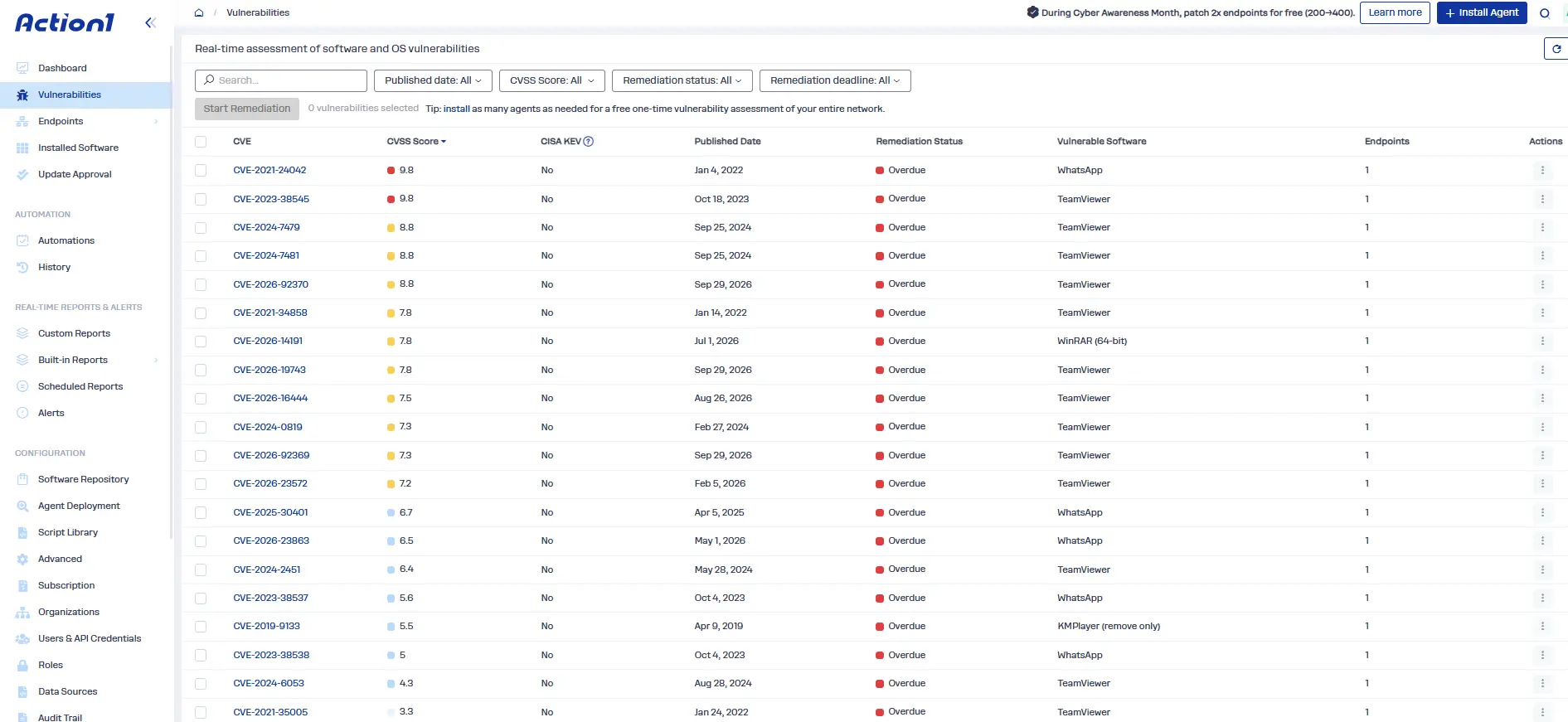
- Real-time vulnerability identification and prioritization: Identify vulnerable third-party software and operating systems on supported managed endpoints. Findings include CVE identifiers, CVSS scores, CISA KEV context, known ransomware use, affected software, and endpoints. This information helps teams identify relevant exposure and prioritize remediation.
- Real-time endpoint and software inventory: Maintain visibility into managed endpoint hardware, installed applications, software versions, and configurations. When a new vulnerability is disclosed, teams can use this inventory to identify potentially affected endpoints and determine where further assessment or remediation is needed.
- Built-in vulnerability remediation: Address findings by applying available patches, removing unsupported or vulnerable software, or centrally documenting compensating controls when immediate remediation is not possible. This helps teams manage unresolved risks.
- OS and third-party application patching: Connects findings to Windows and macOS patching and to supported third-party application patching. Vulnerability detection and patch coverage are separate scopes; support for patching an operating system does not necessarily mean every vulnerability on it is assessed.
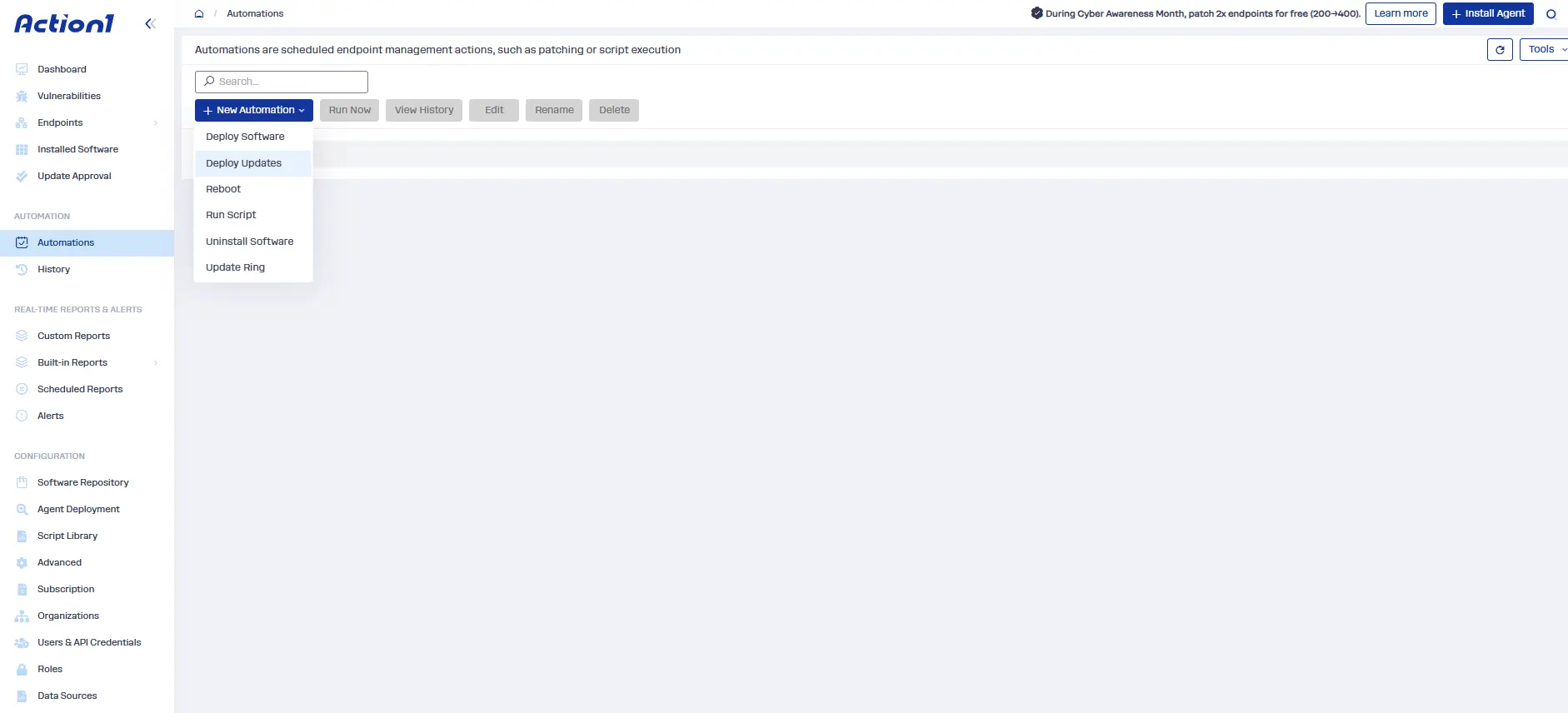
- Autonomous update rings: Define deployment groups, success metrics, and rollout thresholds. Patches that meet the criteria automatically progress to the next ring, while problematic updates are stopped. This allows teams to expand deployments while monitoring outcomes, balancing faster remediation with deployment controls.
- Patch approvals, release delays, scheduling, and reboot controls: Control when patches become eligible for deployment, which updates require approval, and when endpoints install them. Teams can delay selected releases to allow time for testing, schedule deployments around maintenance windows and each endpoint’s local time, and configure reboot behavior to reduce disruption to business-critical workloads. This lets teams balance remediation speed against production stability and maintenance requirements.
- Offline endpoint catch-up: When endpoints are offline during a scheduled deployment or automation, Action1 can run supported missed automations as soon as those endpoints reconnect, subject to configured execution limits. Combined with offline endpoint alerts, this helps teams identify devices that remain disconnected and may miss remediation deadlines, addressing a common blind spot in continuous vulnerability management.
- Cloud-native architecture: Manage distributed endpoints without VPN connectivity or on-premises patch infrastructure for routine endpoint remediation. This supports patching across remote and geographically distributed environments.
- Dynamic endpoint groups and custom attributes: Organize endpoints into groups using criteria such as operating system, installed software, organizational unit, or custom attributes that reflect business needs. Teams can apply separate schedules, approvals, and remediation workflows to different groups, such as production servers, employee workstations, and other endpoint classes. As endpoint inventory changes, dynamic grouping helps keep deployment scope aligned with the current environment.
- Scripting and configuration automation: Use Action1’s scripting and automation capabilities to run PowerShell, CMD, and Bash scripts for supported remediation tasks on managed endpoints. Teams can automate configuration changes, remove outdated software where supported, repair recurring patching issues, and address other operational blockers that delay remediation. Scripts can help resolve specific issues, but they do not replace a vendor patch or other required fixes to address vulnerabilities.
- SLA-based vulnerability and patch dashboards: Track unresolved vulnerabilities, overdue remediation, and patch compliance status. These views help teams identify backlogs and monitor progress against remediation deadlines.
- Customizable reporting and audit trail: Record remediation activity, exceptions, and administrative actions to support operational reviews and audit evidence. Teams can use reporting to understand what changed, what remains unresolved, and where follow-up is needed.
- Peer-to-peer (P2P) distribution: Action1 uses P2P distribution to share update packages between endpoints on the same network. This reduces repeated downloads from external sources and helps conserve bandwidth. It supports more efficient patch deployment for large, distributed endpoint environments.
The core problem in this article is the delay between identifying an actionable vulnerability and fixing it. Action1 addresses the endpoint part of that problem by keeping inventory and vulnerability data current and by moving each finding into controlled remediation through approvals, update rings, and reporting. Your exposure window shrinks because the fix starts from the finding instead of from a separate ticket queue.
Finding vulnerabilities is one thing. Fixing them before they’re exploited is another.
Action1 connects vulnerability identification with autonomous patching, helping you move from finding to fix without the usual manual back-and-forth.
Try Action1 with 200 free endpoints, fully featured and free forever, or watch the demo.