Automated vulnerability remediation uses policy-driven workflows to identify and prioritize vulnerabilities, apply available fixes or mitigations, and verify the results across your desktops, laptops, servers, virtual machines, and cloud workloads. It speeds up remediation, and with proper testing and staged rollouts, it lowers your downtime risk too.
Instead of manually scanning your systems, opening a ticket, scheduling a patch deployment, and then building a report to prove the vulnerability is gone, you let the right tool handle most of the process for you. That closes security gaps faster, which lowers your risk of data breaches and cyberattacks, and it helps you stay compliant with the regulations and frameworks your company is subject to.
In this article, we’ll walk you through how the process works end to end and how it compares to manual remediation. You’ll also learn how to roll out patches safely, what to do when a fix fails or no patch exists, and how to choose a platform that works not just on paper but in reality, plus the best practices and metrics that keep it all running smoothly.
Want to see autonomous remediation running on your own endpoints? Action1 is free for your first 200 endpoints, with no feature limits, forever. Create your account or watch the demo to see the cloud-native platform in action.
What is Automated Vulnerability Remediation?
Automated vulnerability remediation is the use of software and pre-approved policies to detect flaws in your operating systems and third-party applications, rank them by real-world risk, apply a fix such as a patch or a configuration change, and confirm the fix worked. You shape the whole process the way you envision it and the way it works best for your company, and then automation completes the repeatable steps while your team manages just the exceptions.
In practice, this speeds up the path from identification to remediation, saves you time and effort, and gives your company better protection because your endpoints are monitored continuously, blind spots shrink, and the human error that comes with manual remediation drops sharply.
The one distinction that matters most is between remediation and mitigation. Remediation removes the vulnerability by installing a patch that fixes the flawed code, upgrading to a fixed version, fixing an insecure configuration, or uninstalling the affected application. Mitigation, on the other hand, reduces the chance or impact of exploitation without removing the flaw, for example by isolating an endpoint from the rest of your network.
That’s why a remediated finding closes once the fix is verified, but a mitigated one stays open, with an owner and a review date, until a permanent fix, like a vendor patch, takes its place.
Manual vs. Automated Vulnerability Remediation
Manual vulnerability remediation relies entirely on you and your staff to triage, ticket, schedule, deploy, and verify every fix. Automated vulnerability remediation runs pre-approved fixes through policies, so you set the rules and deal only with the exceptions, while everything else gets done automatically.
The thing is, you’ll usually run both: automation for high-volume, repeatable fixes and manual remediation for business-critical, legacy, and irreversible changes.
| Key differences | Manual vulnerability remediation | Automated vulnerability remediation |
|---|---|---|
| How does it work? | You manually identify, prioritize, remediate, and verify every security vulnerability. | Automated vulnerability remediation tools identify, prioritize, remediate, and verify security vulnerabilities based on the policies you set. |
| Time from detection to remediation | It takes days or weeks. Fixes wait on triage, ticketing, approval, and the next maintenance window, and every handoff adds queue time. | Remediation can start within minutes or hours of detection, depending on your policies and maintenance windows. A full rollout through update rings can still take days, but no step sits waiting for someone to pick it up. |
| Prioritization | It’s time-consuming and frequently relies on CVSS severity alone. | It’s more accurate because, depending on the tool, it combines CVSS, EPSS, CISA KEV status, threat intelligence, and asset criticality for every finding. |
| Errors and consistency | Results depend on the person doing the work, which creates real risks like misclassified severity, missed assets, or patches pushed to systems that are already fixed. | It runs the same way every time, so it cuts errors significantly, as long as your policies are configured correctly. |
| Scale | Effort grows with every new endpoint and finding. | It’s easy to scale. You just add the new endpoints, and your existing automations cover them as soon as they join the right endpoint group. |
| Remote and offline endpoints | They’re hard to patch, usually require a VPN, and increase the risk of blind spots. | Offline endpoints get patched automatically once they reconnect within your catch-up window, so you get fewer blind spots with no extra work. Cloud-based agents patch remote devices without a VPN. |
| Third-party applications | It’s hard to cover every application, because every vendor has its own release schedule, so the risk of blind spots is high. | Supported applications get patched in the same workflow as the OS. |
| Rollout safety and downtime | Testing is limited, time-consuming, and hard to repeat consistently. If you push a rollout in one wave, a single bad patch can hit every machine at once. | Update rings make rollouts autonomous. Patches that meet your success thresholds move from one ring to the next, and the ones that don’t get stopped, so your downtime risk goes down. |
| Verification | Tickets often close on “patch installed,” and retesting lags behind deployments. | A rescan or real-time monitoring confirms the fix after any required restart and flags every endpoint where the vulnerability is still there. |
| Report generation | Reports are manual, time-consuming, and error-prone. | Reports are automated. Data from all endpoints feeds into built-in report templates, so you can create audit-ready documentation in minutes. |
At the end of the day, the gap between those two columns grows with your environment. Every manual step can add days to your exposure window, and that’s all cybercriminals need nowadays, especially now that AI helps them find and exploit vulnerabilities faster.
How Does Automated Vulnerability Remediation Work?
Automated vulnerability remediation works as a continuous four-stage process. It discovers your assets and their vulnerabilities, prioritizes them by real-world risk, remediates them, and verifies the result. Verification then feeds the next discovery cycle, and that’s what makes it a process that never stops.
Step 1. Discover Assets and Scan Continuously
Discovery builds your inventory of endpoints, like desktops, laptops, virtual machines, servers, and cloud workloads, along with the operating systems and third-party applications running on them. That inventory is the foundation your automated vulnerability remediation tool needs before it can start continuous scanning or real-time monitoring. Once that’s done, you’ll see all your systems listed on your tool’s dashboard, along with how many vulnerabilities each one has.
Step 2. Prioritize Vulnerabilities by Risk
Automated remediation tools use risk-based prioritization to show you which vulnerabilities pose a low, medium, high, or critical risk to your endpoints and your company. That way, you can start with the most dangerous ones first and work your way down. To do that, these tools combine the following signals:
- CVSS score: The Common Vulnerability Scoring System (CVSS) rates vulnerability severity on a scale from 0 to 10, based on how the flaw can be exploited and how much damage it can cause. Keep in mind that it measures severity, not how likely an attack is.
- EPSS (Exploit Prediction Scoring System): This shows the probability that a CVE will be exploited in the next 30 days.
- CISA KEV: The Known Exploited Vulnerabilities catalog lists flaws that have been exploited in the wild.
- Threat intelligence: Ransomware use, public exploit code, and active exploit campaigns.
- Business context: What the system does, how much the business depends on it, and whether it’s reachable from the internet.
Here’s an example with two findings that share the same CVSS score. The EPSS values are illustrative, just to show how the signals work together.
| Signal | CVE A | CVE B |
|---|---|---|
| CVSS base score | 9.8 (Critical) | 9.8 (Critical) |
| EPSS | 0.94 | 0.002 |
| CISA KEV | Listed | Not listed |
| Asset criticality/Exposure | Internet-facing web server, business-critical | Isolated lab endpoint, no network exposure |
| Decision | Emergency path: Patch it as soon as possible, or apply a compensating control if no patch is available | Remediate it in your next regular maintenance window |
Which one would you patch first? The answer is obvious. Both findings have the same score but completely different urgency. Layering these signals is how you ensure remediation efforts align with the real risk, rather than relying on severity scores alone.
Step 3. Remediate the Vulnerabilities
You have three ways to deal with the vulnerabilities you’ve identified and prioritized:
- Patching, upgrading, or removing software: Use your automated remediation tool to deploy security updates to all the affected desktops, laptops, servers, virtual machines, and cloud workloads. Schedule the deployment at a convenient time and roll it out in stages, starting with a test group and expanding from there. That lowers downtime risk, speeds up remediation, and keeps the manual work on your part to a minimum. If you don’t need the vulnerable software anymore, uninstall it.
- Configuration changes: Disable outdated protocols like SMBv1 or TLS 1.0, close unused ports, turn on the host firewall, or enforce stronger password policies.
- Compensating controls: When there’s no patch available to install, network segmentation, host isolation, disabling the vulnerable feature, or virtual patching through a web application firewall (WAF) can reduce your exposure until a permanent fix is released.
These three options give you a way back to safety in almost any situation. If there’s a patch, deploy it. If the problem is a setting, change it. If there’s no fix yet, apply a compensating control, document it, and set a reminder to review it. Once the vendor releases the update, your existing automation can deploy it to your systems if the patch is supported and meets your deployment rules.
It’s not rocket science, but it does need your attention and planning. Get it right, and you’ll make it much harder for cybercriminals to get into your systems and cause damage that’s hard to repair.
Step 4. Verify the Result
Verification is your real confirmation that the vulnerability is gone from your endpoints. After your patches are applied, and any required restart has happened, rescan your endpoints or check your real-time monitoring dashboard to see whether every vulnerability was eliminated. If some are still there, investigate why the fix didn’t work, retry it when appropriate, and recheck. Finally, make sure your endpoints still work the way they should.
What are the Benefits of Automated Vulnerability Remediation?
Automated vulnerability remediation helps you fix vulnerabilities faster, lower your breach risk, cut human error, reduce downtime, improve endpoint coverage, and support audit readiness, often without expanding your team. Here’s what each of those benefits looks like in practice:
- Lower mean time to remediate (MTTR): A tool that automates continuous monitoring, vulnerability identification, prioritization, and remediation shortens the time between when a vulnerability is discovered and when it’s remediated and verified.
- A shorter exposure window: Vulnerabilities get identified through regular automated scans or real-time monitoring, and remediation starts on its own from there (of course, once you’ve set up the automation), either immediately or in your next planned maintenance window, based on your patching policies. Cybercriminals get far less time to find and exploit the flaw.
- Lower breach risk and cost: Closing exploitable flaws faster through automation rules lowers the risk of experiencing a successful cyberattack, along with the costs and damage that come with it.
- Fewer errors and consistent policy enforcement: Once you set up an automation policy that fits your IT environment and your company’s needs, the risk of human error drops sharply. The policy follows the same steps, configuration, and logic every time, so you get consistent results.
- Better coverage: Cloud-native platforms monitor and patch remote laptops, desktops, servers, and virtual machines with the same level of automation as on-premises ones, without a VPN. Their agents connect directly to the cloud, so endpoints that were offline during a rollout still get patched once they reconnect within the catch-up window you set. That means fewer blind spots and no extra work on your part.
- Scale without adding staff: New endpoints join your existing remediation workflow as soon as you install the agent and add them to the right group. With a cloud-native platform, you won’t need extra hardware or extra people to keep up as you grow.
- Less planned and unplanned downtime: Flexible scheduling, update rings that advance patches automatically, and reboot control make patching more predictable. That means stronger business continuity and a lot less stress for your team.
- Audit readiness: PCI DSS and ISO 27001 explicitly expect you to find and remediate vulnerabilities in a timely, documented way, and PCI DSS sets hard deadlines for critical patches. HIPAA and GDPR are less specific, but both expect appropriate security safeguards that you can prove. Automated remediation tools help you meet these timelines and generate the audit-ready reports auditors expect to see as proof of compliance.
Where Can Automated Vulnerability Remediation Be Used?
You can use automated vulnerability remediation tools to keep your operating systems and third-party applications patched and up to date. Depending on what they can do, these solutions can also help you deal with actively exploited vulnerabilities, insecure configurations, end-of-life software, and even those pesky security flaws that don’t have a patch yet.
To make things clearer, we’ve created a table that shows each example and exactly what gets automated.
| Example | What gets automated |
|---|---|
| OS updates (Windows, macOS, and Linux) | Detects missing OS updates on your managed endpoints and rolls them out through update rings (or another staged rollout method, depending on the platform) during your maintenance windows. It can also schedule restarts where supported, without requiring manual intervention. For business-critical servers, you can add an approval step before anything gets installed. After the restart, post-update checks can confirm that the new build or kernel is actually running. That matters on Linux, where traditional kernel upgrades generally require a reboot to activate the new kernel. |
| Third-party application updates | Continuously monitors the third-party applications on each endpoint. Once a vendor releases an update, it gets listed on your dashboard. Then it rolls the update out through the automated remediation workflow you’ve already configured. It can also remove outdated or per-user copies that a machine-wide update leaves behind using a script, and prompt users to relaunch their browser, since a Chrome update only takes effect after Chrome restarts. Your IT or security team then checks the outcome: whether the patch reached all your on-premises and remote endpoints and whether the vulnerability findings are gone. |
| Remediating actively exploited vulnerabilities (CISA KEV) | Flags every KEV-listed CVE it detects on your endpoints, finds the available patch, and deploys it right away or on schedule, based on your policies. It’s best to set up a separate emergency maintenance window for fixes like these that can’t wait for your regular schedule, such as your monthly Patch Tuesday automation. |
| Insecure configurations | Applies secure settings by script, such as closing unused ports, turning on the host firewall, or disabling TLS 1.0. If a setting drifts back, for example after a reimage, a recurring script or policy applies it again automatically. All of that can be done remotely on your on-premises and remote endpoints, which improves your team’s operational efficiency. |
| Dealing with end-of-life software | Finds unsupported software on your endpoints and uninstalls it from every affected machine, either on a schedule or immediately in just a few clicks. |
| Mitigating security flaws until a patch gets released | Applies and records a compensating control, like isolating one or more endpoints from network traffic, disabling the vulnerable feature or service, or adding a firewall rule. Once the vendor releases a patch, it shows up as an available update, so you can deploy it and close the case. |
What are the Common Challenges of Automated Vulnerability Remediation?
Automated vulnerability remediation can push an unstable patch to most of your machines at once, act on false positives, surface regressions too late, and break legacy applications. It can also miss endpoints it doesn’t cover, leave tickets open because of integration gaps, and pile up scripts nobody maintains. And it can’t patch a zero-day until the vendor releases a fix. None of this happens every day, but each of those challenges has a known solution, and we’re going to share it with you.
| Challenge | Why it happens | Solution |
|---|---|---|
| False positives and false negatives | Sometimes your tool misreads a version number and flags software that’s already patched. You’ll see this most often on Linux, where distros like Red Hat Enterprise Linux backport security fixes without changing the upstream version number. It works the other way too. If your vulnerability data is outdated, newly published CVEs don’t get detected at all. | Before your vulnerability remediation automation acts, have it check the endpoint’s live state again to confirm the vulnerability is still there. Tune the detections that keep giving wrong results, and keep your vulnerability data up to date so new CVEs get caught. |
| Untested patches reach production | Your automated vulnerability remediation or patch management tool deploys patches quickly, without testing or defined success thresholds, so one unstable patch can cause unexpected downtime. | Use a test environment or update rings to roll out patches in stages, starting with a small test group and then expanding to more groups. Set the success rate and number of successful deployments a patch needs before it moves to the next ring, and keep a rollback path ready for updates you can uninstall. |
| A bad policy hits every matching endpoint at once | A filter, group rule, or piece of automation logic is broader than you meant it to be, so the change lands on far more machines than you planned. | Review the policy scope before you save it, and preview which endpoints it will target. It’s also a good idea to put policy edits themselves under change approval. |
| Regressions that show up late | Some problems only show up after a few days of real use or during month-end processing. By then, a problematic patch may have already reached most, if not all, of your endpoints. | Keep your monitoring window long enough to cover a full business cycle, and check vendor release health pages for known issues before a patch moves to the next ring. |
| Legacy and custom applications break | If you have applications that depend on old runtimes or protocols you haven’t documented, or just forgot about, a patch can break them and create operational problems. | Create a group for the endpoints that run these “fragile apps.” Require approval before anything gets installed, and test each update on one of them first. That way, you’re prepared, or at least you have a plan if something goes wrong. |
| Coverage gaps across hybrid environments | Your tool doesn’t support every OS on your network, can’t reach remote endpoints outside the office, or never sees workloads in your cloud environments because nobody enrolled them. Those endpoints stay outside the scope of your remediation tasks and create real risk. | Equip yourself with a tool that covers every OS in your company and reaches remote endpoints with agents that report over the internet without a VPN. Then compare its inventory against your CMDB and cloud asset inventory to catch hidden machines. |
| Integration gaps or conflicts | With a one-way sync, the fix lands on the endpoint, but the ticket stays open. Your reports then show work as open even though it’s done. Manual intervention is needed, valuable time gets lost, and productivity drops. | Use automation tools that integrate with your other platforms through APIs or built-in connectors. With a two-way sync, the tool closes tickets automatically once the fix is verified on the endpoint. |
| Script sprawl | Someone writes a quick script for one problem, nobody reviews it, and only that person knows how it works. Once they’re out of the office or leave the company, nobody can maintain it. | Store all scripts in shared, version-controlled playbooks with a clear description of how each one works. Make sure every script gets peer-reviewed before it runs. |
| Zero-days and other flaws that can’t be patched yet | Patching is how you permanently fix a vulnerability without uninstalling the software. With a zero-day, hackers can exploit the flaw before a fix exists, and the vendor may take anywhere from days to weeks, or even longer, to release one. | Apply a compensating control, like isolating the endpoint from network traffic or adding a firewall rule, or uninstall the software if you don’t need it. Document the action and give it an owner and an expiry date. When the vendor releases the patch, deploy it, remove the temporary control, and close the case. |
What are the Best Practices for Automated Vulnerability Remediation?
Automated vulnerability remediation solutions improve your endpoints’ overall security posture by keeping them up to date and protected against known threats. The best practices are to start small, set clear automation boundaries, prioritize with more than CVSS, test patches in stages, verify every fix, and keep a rollback plan ready. Get these right, and you’ll squeeze the most value out of your tool: faster remediation, lower security risk, less downtime, and fewer manual processes, without hitting too much turbulence along the way.
- Start small, then expand: Begin with low-risk, high-volume endpoints like standard workstations. Once your automations prove themselves there, extend them to more groups, one step at a time.
- Write down your automation boundaries: Decide upfront which fixes run automatically and which need human approval first, like Tier 1 servers, kernel or firmware updates, and changes you can’t undo. Define your exception handling rules here, too, so everyone knows who approves what.
- Prioritize with more than CVSS: Build your policies around multiple signals, such as CVSS scores, exploitability data from EPSS and CISA KEV, and business impact. Use your defined risk thresholds to decide which findings need emergency remediation. That way, patches and security fixes go to the vulnerabilities that pose the greatest risk to your company first.
- Test patches before full rollout: Deploy OS and third-party patches to a test group first to check for problems before they reach all your endpoints. Update rings automate this staged rollout for you, saving you time, headaches, and potentially a lot of downtime. We’ll show you how to structure them later in this article.
- Verify every fix: After each patch installation and any required restart, run a rescan or check the real-time monitoring dashboard. That’s how you confirm the vulnerability is actually gone and spot any gaps.
- Keep your tools in sync: If you use multiple vulnerability scanners alongside a separate remediation tool, make sure they integrate through APIs and work together. Otherwise, they can create conflicts or leave you unable to use the data from all those sources.
- Separate workflows per department: Large enterprises with multiple departments should create separate automated workflows. Use features that let you approve, decline, or hold update deployments, so you can keep a strong security posture without hurting each department’s productivity.
- Standardize on shared playbooks: Keep your scripts and automations in shared, version-controlled playbooks, and review automation logs regularly.
- Document every compensating control: When you apply a compensating control, document it, assign it to a specific owner, and give it an expiry date.
- Have a rollback procedure ready: Know exactly how you’ll get things back to where they were if a problematic update causes downtime or disruption on any of your endpoints. Just keep in mind that some updates, like Windows servicing stack updates, can’t be uninstalled.
- Review your strategy regularly: Reassess your vulnerability management strategy every month, quarter, or whatever interval works for you, because there’s always something to improve. Bring in everyone who’s part of the process, so you hear their ideas on which actions or configurations would make it more efficient.
What Types of Tools Can Automate Vulnerability Remediation?
There are five types of tools that can automate vulnerability remediation. These include vulnerability scanners, patch management and autonomous endpoint management platforms, configuration management tools, risk-based vulnerability management platforms, and ITSM and SOAR tools. Although some features overlap, each tool automates a different part of the process. Only a few provide full vulnerability management automation by detecting a vulnerability, remediating it, and verifying the fix.
The table below shows the automation capabilities of each tool and what you still need alongside it, so you can pick the right one for your company.
| Tool category | What it automates | What you still need |
|---|---|---|
| Vulnerability scanners | Scan your endpoints, servers, and network devices, match findings against known CVEs, and score each one by severity and risk. Then they give you a report, so you know exactly which security flaws to fix. | On their own, they can’t remediate a vulnerability. You need an add-on or integration with a separate patch tool to do that. |
| Patch management and autonomous endpoint management platforms | Automate OS and third-party app patching, from finding missing updates to installing them according to your policies. They can also schedule reboots and catch up on missed deployments when offline endpoints reconnect within the allowed window. Many go a step further by detecting vulnerabilities and helping you prioritize them using CVSS scores, CISA KEV status, and other threat signals. Depending on the platform, you can also remove unsupported software, fix insecure settings with scripts, document compensating controls, track remediation against your SLAs, and generate audit-ready reports. | For most of your endpoints, nothing else. You’ll still need other measures for devices these tools can’t manage, like routers or printers. On-premises platforms also need a VPN or an internet-facing gateway to reach remote endpoints. |
| Configuration management and policy-as-code | Apply and maintain the settings you choose, like firewall rules, disabled protocols, or required package versions, and restore them automatically if they drift. Some can install OS updates too, like Ansible with its win_updates module or Puppet Enterprise patch management. Cloud policy engines like Azure Policy can fix noncompliant cloud resources. | You have to write and maintain the playbooks or manifests yourself, so you need solid scripting skills. These tools don’t find vulnerabilities on their own, so you need another tool for vulnerability data. On Windows, third-party patching also depends on packages you build yourself or pull from community repositories. |
| Risk-based vulnerability management and exposure management platforms | Pull findings from all your scanners and security tools into one place, remove duplicates, and rank vulnerabilities by real risk, using exploit data and how critical each asset is. Then they route each fix to the right team and track it against your SLAs. | Some platforms require a separate patch management tool to deploy fixes, while others offer integrated remediation capabilities, either directly or through companion products. |
| IT service management platforms and SOAR tools | Create tickets, route approvals, and run playbooks that connect all your other tools. They usually make changes on endpoints through integrations or their own agents, and they can also run custom scripts and data workflows. | You need integrations with the tools that actually make the changes, like a patch management platform. If an integration breaks, playbooks with error handling, fallbacks, and retries keep the workflow running. |
What Should You Look for in an Automated Vulnerability Remediation Platform?
Look for a platform that covers every OS and third-party app you run, prioritizes vulnerabilities with exploit data, rolls out patches safely in stages, verifies every fix on the endpoint, and fits your budget and compliance requirements. Choosing one that works in reality and not just on paper comes down to two things. First, it has to match your organization’s needs and give you the coverage and automation you expect. Second, it has to offer the right features for vulnerability identification, remediation, verification, and reporting.
So, let’s start with your needs, and then go through what to check in each platform.
Know Your Company’s Needs
Grab a piece of paper and a pen and write down:
- All types of endpoints you have, such as desktops, laptops, servers, virtual machines, and cloud workloads.
- How many of these systems are exposed to the internet.
- All the operating systems and third-party applications used on each of these systems.
- How many endpoints are on-premises and how many are remote.
- How complex your IT infrastructure is. For example, do you have multiple offices, domains, or business units?
- Which systems can’t go down during business hours, like your ERP, POS, or production servers.
- What compliance requirements you have to follow.
- How many of your employees are going to manage the tool you’re about to buy. That matters more than it seems, because later on, you may need role-based access control to give each of them the right level of access.
- Any other specifics about your organization that aren’t listed here.
Coverage and Deployment
The platform has to cover every OS and app on your list, reach every endpoint wherever it is, and fit your budget without surprise add-ons.
- OS and third-party coverage: Make sure the tool can deploy patches to every operating system and third-party application on your list.
- Deployment model and costs: On-premises platforms usually need an upfront investment in servers, databases, and distribution points, plus someone to maintain them. Cloud-native tools don’t need any of that, but you still have to check what the license includes, so you don’t get hit with add-on costs once you start using the platform day to day.
- Offline and remote endpoints: Check how the platform reaches remote endpoints. Does it need a VPN, or does its agent connect on its own? An agent that connects directly to a cloud platform is the best option for remote endpoints. You get real-time data on every device, and systems that were offline during a scheduled deployment get patched automatically once they reconnect.
- Scalability and agent footprint: Make sure the platform can grow with you, say from 200 to 20,000+ endpoints, without slowing down. Cloud-native platforms make this much easier since you don’t have to add servers as you grow. Check the vendor’s documentation too, or just ask them, to find out how much the agent affects your endpoints. Is it lightweight, or can it drain a lot of CPU or RAM?
Prioritization and Automation Control
Look for a tool that tells you which vulnerabilities to fix first and lets you decide exactly how much of the work runs on its own.
- Risk-based prioritization: It must prioritize vulnerabilities based on CVSS scores (severity), EPSS (the probability that a CVE will be exploited in the next 30 days), the CISA KEV catalog (flaws known to be exploited in the wild), threat intelligence (which flaws hackers are actively targeting), and asset criticality (which systems matter most to your business).
- Policy-based automation: You must be able to set different approval rules for each asset group, like automatic approval for standard workstations and manual approval for business-critical servers. It should also let you delay automatic deployment for a few days after a patch is released. In short, you need the flexibility to shape your remediation workflows the way you envision them.
Safe Rollout and Verification
The platform must be able to test patches on a small group of endpoints before an organization-wide rollout, support rollback where the update allows it, and confirm on the endpoint that each vulnerability is fixed.
- Ring-based deployment: It must deploy patches in stages, starting with a small test group of endpoints, then expanding to a pilot ring, a broad ring, and, finally, a critical systems ring for your business-critical servers. A patch moves from inner to outer rings based on the success metrics and deployment counts you define. If it meets them, it moves forward. If it doesn’t, it gets stopped. That’s what turns patching into an autonomous process.
- Rollback: You must be able to roll back a patch with a one-click feature or a script if it causes unexpected problems. Just keep in mind that some updates, like Windows servicing stack updates, can’t be uninstalled, so have a recovery plan ready for those.
- Built-in verification: You must be able to confirm whether the remediation worked, either through a rescan or the real-time monitoring dashboard, after any required restart.
Reporting, Integrations, and Platform Security
The right platform lets you generate audit-ready documentation after every update cycle, works with the tools you already use, and gives you peace of mind with rock-solid security certifications.
- Reporting and audit trail: You must be able to generate audit-ready documentation in minutes, using built-in, customizable report templates that pull in your deployment data automatically. You should also be able to export evidence per CVE and per asset, showing when each vulnerability was found, what action was taken, and when it was fixed. You’ll need that evidence to prove compliance with PCI DSS, HIPAA, ISO 27001, and SOC 2.
- Integrations and API: Find a tool that offers a REST API, SIEM forwarding, two-way sync with ITSM tools like ServiceNow or Jira, and ingestion of findings from scanners like Tenable or Qualys.
- Security of the platform itself: Pick a vendor with a SOC 2 Type II attestation report and ISO/IEC 27001 certification, and whose platform supports MFA, SSO, and role-based access control (RBAC).
How Do You Roll Out Automated Vulnerability Remediation Safely?
Deploy patches autonomously in stages, using features like update rings, to minimize downtime risk and manual effort without slowing down remediation. Start with a small test group of endpoints (the test ring), then expand to a pilot ring, a broad ring, and finally a critical systems ring with your business-critical servers and endpoints. Set your success metrics upfront and let the autonomous process do the work. Only stable patches that meet them move on to the outer rings, while those that don’t get stopped automatically in the ring where they showed instability.
Even with staged rollouts, keep human oversight in place and always have a recovery plan ready before you start. Actively exploited vulnerabilities are the exception, since they get a faster path. That means you can shorten the testing time or relax the success metrics, but these patches should never skip verification or go out to every endpoint at once.
Here’s an example of how you can structure your update rings. Just remember that the thresholds and timing are examples, so adjust them to your own needs and the specifics of your environment.
| Ring | Which endpoints to include | When a patch moves to the next ring | How long to wait |
|---|---|---|---|
| Ring 0: Test | Your IT team’s own machines and test VMs, covering every OS version you run company-wide | The update reaches your success rate, installs without errors, systems restart normally, and core apps work after the update | On release day |
| Ring 1: Pilot | About 5 to 10% of your production endpoints, picked from every department | The patch hits your success rate and your helpdesk doesn’t see a spike in tickets | 1 to 7 days after Ring 0 |
| Ring 2: Broad | Include between 40-70% of your workstations and standard servers. | The success rate holds and verification confirms the vulnerabilities are actually gone, including on endpoints patched after they reconnected | 1 to 7 days after Ring 1 |
| Ring 3: Critical systems | Domain controllers, database servers, ERP and payment systems, and anything else where downtime directly hurts the business | The patch moves here automatically once it passes a stricter success rate in Ring 2, or once the application owner signs off. Run a health check after patching to confirm everything still works | 1 to 7 days after Ring 2, or your next approved maintenance window |
If you want to learn more about update rings, how they work, and how to set them up step by step, read our guide to update rings.
In practice, that faster path means patches for actively exploited CVEs move between rings in hours instead of days. Even in emergencies, NIST suggests deploying to a few canary assets first. The July 2024 CrowdStrike outage stemmed from a content update, not a patch, but the fix CrowdStrike committed to in its root cause analysis was staged ring deployment with more customer control. Rings limit the damage of a bad update from any vendor, as long as that update goes through your rings.
How Do You Measure Whether Automated Vulnerability Remediation is Working?
To measure whether automated vulnerability remediation is working, track MTTR to a verified fix, SLA compliance, patch compliance, automation success rate, rollback rate, reopen rate, coverage, and exception volume. Just make sure MTTR runs all the way to a verified fix, not just to “patch deployed.” Otherwise, every failed install and pending reboot quietly counts as a success. And give it several cycles before you judge your security posture, instead of relying on a single month’s report.
To keep things simple, we’ve put together the table below, so you can see the logic behind each of these metrics.
| Metric | How to calculate | Healthy direction | Warning sign |
|---|---|---|---|
| Mean time to remediate (MTTR) | Measure the time from when a vulnerability is first detected to when the fix is verified. Average it across remediated findings, preferably by severity or risk tier, and track unresolved findings separately. | Down | Findings get stuck waiting on validation, approval, or ring progression, so the clock keeps running even after the patch is ready. |
| SLA compliance | Using your remediation tracking data, divide the number of findings remediated within their SLA deadlines by the total number of findings due in that reporting period. | Up | KEV-listed vulnerabilities are still open after their deadline. Hackers are already exploiting those in the wild, so they should be first in line, not overdue. |
| Patch compliance | Check what percentage of your endpoints have the applicable patches required by your policy installed within their deadlines. | Up | The same machines keep showing up as unpatched. There might be a malfunctioning agent, a device that’s rarely online, or an update that keeps failing to install. |
| Automation success rate | Pay attention to the percentage of your automated remediation actions that complete successfully. | Up | Failures jump right after you add a new ring or patch source. Something in the change isn’t working, so fix it before rolling it out any further. |
| Rollback rate | Divide the number of rolled-back deployments by the total number of deployments. | Down | Rolling back more and more updates may indicate inadequate testing, problematic patches, or rings advancing too quickly. |
| Reopen rate | Measure the percentage of fixed vulnerabilities that return after you close them. | Down | The same vulnerabilities keep coming back. Maybe the fix wasn’t confirmed, a setting drifted back, or someone restored an old image. |
| Coverage rate | Check what percentage of all your known devices are actually managed by your automation. | Up | New endpoints, like laptops or servers, join your network, but nobody enrolls them, so they never get patched. |
| Exception volume and age | Count how many exceptions are still open and how long, on average, they’ve been open. | Stable or down | Exceptions have no end date. Once they’re approved, nobody comes back to check whether a permanent fix is available yet. |
What Should Happen When Automated Vulnerability Remediation Fails?
When automated vulnerability remediation fails, preserve the evidence, stop automated retries if the error isn’t temporary, and route the affected endpoint or endpoints to the right recovery or escalation path. Your tool will report the problem and keep showing the vulnerability as open, and in most cases, you’ll have to resolve it manually.
Two rules matter most for failed automated vulnerability remediation actions. Retry only when the failure is known to be temporary, and cap the retries so a persistent error can never loop forever. When you exclude a problematic endpoint, return it to automation only after you clearly understand what the real problem is.
| Failure state | Automated response | Manual fix |
|---|---|---|
| Temporary failure (download timeout, endpoint offline) | Retry within the deployment deadline, then stop and mark it as failed. | Check whether the endpoint can reach the update source and has enough free disk space. The problem might also be a proxy, a firewall rule, or a VPN-only route. |
| Same install error every time (not enough disk space, corrupted update files, dependency conflict) | Stop retrying after two or three attempts and log the exact error code. | On Windows, error 0x80070070 means the disk is full, so free up space first. For other errors, check the exact error code and installation logs. If they indicate component-store or system file corruption, run DISM /Online /Cleanup-Image /RestoreHealth and then sfc /scannow from an elevated command prompt. See our troubleshooting guide for help with common Windows errors. On Ubuntu or Debian, try apt –fix-broken install, and on RHEL, dnf check shows conflicting packages. |
| Installed, but the vulnerability is still detected | Check the endpoint’s live state again after the next restart or app relaunch. | Restart the endpoint, since some updates won’t apply until the next reboot. Then check whether an old copy is still installed side by side, like a per-user Chrome or older Java. If it is, remove or update it manually. |
| The patch broke something | Pause the ring so the patch doesn’t reach more endpoints, and roll it back where your platform supports it. | Roll back the patch with your tool’s built-in rollback option. If it doesn’t have one, run an uninstall script on affected endpoints. On Windows, use wusa /uninstall /kb: /quiet /norestart, or DISM /Remove-Package for combined SSU and LCU packages. On RHEL, use dnf history undo. If production is down, follow your incident response procedures and open a vendor case. |
| The vendor pulled the patch | Stop deploying it and exclude it from every ring, including scheduled jobs that haven’t run yet. | Read the vendor’s advisory. It tells you whether machines that already installed it need a rollback and when a replacement is coming. If the vulnerability is actively exploited, apply a temporary control in the meantime. |
| Endpoint stops reporting | Flag any endpoint whose agent hasn’t checked in for more than a couple of days, or sooner if it’s a critical system. | Check whether the device was retired, reimaged, or has a problem with the agent itself. Reinstall the agent if the device is still in use, or remove it from your inventory if not, so it doesn’t skew your coverage numbers. |
What Should You Do When a Vulnerability Has No Patch?
When you find a vulnerability across your systems but there’s no patch released to remediate it yet, apply a temporary fix that mitigates the risk. Your options are to isolate the affected endpoint or endpoints, disable the vulnerable feature or service, block the traffic it uses with a firewall rule, or apply virtual patching through a WAF. If you don’t need the vulnerable software anymore, or you can stop using it for a while, uninstall it. That removes the risk completely, and once a patch is available, you can install the updated version again.
Whatever you pick from these options, give it an owner and an expiry date, and replace it with the real patch as soon as the vendor ships it.
Here’s what to do if you find a vulnerability that can’t be patched right now:
- Confirm there’s really no patch: Visit the vendor’s website and check its advisories and release notes, because sometimes the fix exists in a newer version or a separate hotfix.
- Follow the vendor’s recommended mitigation: Many advisories for unpatched flaws list a workaround, like a registry change or a setting to turn off. It’s usually a good starting point because the vendor knows the affected product, but you should still assess the workaround’s impact on your environment.
- If there’s no vendor workaround, pick and apply a compensating control: Use the table below to match the control to your situation. Your automation tool can push most of these to your endpoints through scripts.
- Assign an owner, document the control, and set an expiry date: Record what you did, who owns it, and when someone is supposed to review it. NIST SP 800-40 Rev. 4 explicitly says schedules should be set and enforced for both patch deployment and mitigation removal. Without an end date, a temporary control quietly becomes permanent.
- Keep an eye on it: Watch for the patch release and for changes in risk, like new exploit activity reported through threat intelligence feeds or the vulnerability being added to the CISA KEV catalog. If that happens, tighten the control or speed up your timeline.
- Replace the control with the real fix: Once the patch is released, deploy it to the affected endpoints through your usual patch management workflow, with testing and a staged rollout. Then verify the fix and remove the temporary control.
We’ve created a table that shows you some of the situations you’ll run into most often:
| Situation | Temporary control | Owner | Documentation to keep | Review it when | Permanent fix |
|---|---|---|---|---|---|
| Zero-day with a vendor workaround | Apply the workaround through a script or policy | IT operations team | Proof the workaround is applied and verified on each asset | The vendor releases the patch | Install the patch, then remove the workaround |
| Vulnerable feature you don’t need | Disable the feature or service | IT operations team | Configuration before and after the change | The next major version comes out, or someone needs the feature again | Patch or upgrade |
| Internet-facing web app with no fix | WAF virtual patching rule plus tighter access | Security team | WAF rule ID and test results | The vendor releases a patch, or new exploit activity appears | Patch the application |
| End-of-life software | Restrict network access | Application owner | Exception record with an expiry date | The migration deadline arrives | Uninstall it or upgrade to a supported version |
FAQs
What is the Difference Between Vulnerability Remediation and Vulnerability Mitigation?
Vulnerability remediation is a permanent fix. It removes the flaw by patching, upgrading, fixing an insecure configuration, or uninstalling the vulnerable software. Vulnerability mitigation, on the other hand, isn’t a permanent fix. It lowers the risk without removing the flaw, for example through network isolation or a firewall rule. In practice, you use mitigation to protect your company from exploitation until a patch is released and the flaw gets closed for good.
Does Automated Vulnerability Remediation Replace Vulnerability Scanning?
No, because automated remediation depends on scanning. Remediation fixes the vulnerability, but scanning is what finds the flaw in the first place. Many automated vulnerability remediation tools combine both: scanning or real-time monitoring to identify security weaknesses across your endpoints and their software, and remediation capabilities to deploy the patch and close the gap. Together with prioritization, verification, and reporting, these capabilities form the core of automated vulnerability management.
What Should You Do When the NVD Hasn’t Scored a CVE Yet?
Don’t wait for the NVD to score a vulnerability before you remediate it. Instead, use the CVE Numbering Authority’s own CVSS score when one exists, CISA’s Vulnrichment data, EPSS, the remediation guidance in vendor advisories, and your asset context. If a patch is available, deploy it across your systems. If not, apply compensating controls until one is released.
Does CISA BOD 26-04 Apply to Private Companies?
No. CISA BOD 26-04 is mandatory only for U.S. Federal Civilian Executive Branch (FCEB) agencies, and it doesn’t apply directly to private companies or contractors. But if your company runs systems on behalf of a federal agency, that agency can pass the requirements on to you through your contract. So if you don’t work with these agencies, you’re not obliged to follow BOD 26-04. Still, if you want to improve your vulnerability remediation program, it’s a very good idea to follow the remediation timelines the directive defines, since they’ll help you lower your mean time to remediate (MTTR).
Is Automated Vulnerability Remediation a Good Fit for Small IT Teams?
Yes, because automation reduces human error, speeds up vulnerability identification and remediation, and lets one or two administrators manage hundreds or even thousands of endpoints. Automated vulnerability remediation tools help small IT teams monitor every endpoint in real time, identify security weaknesses across operating systems and third-party apps, find the missing patches, deploy them on schedule, verify the fix, and generate reports that prove it.
Even when no patch is available, you can use your tool to apply a compensating control until a patch is released. Simply put, the platform takes the time-consuming work off your plate. That’s what makes automated vulnerability remediation important for lean teams. You set the rules for how, when, and on which endpoints remediation happens, and the tool follows them.
So, Should You Automate Vulnerability Remediation?
- You need automation to keep up: CVE volume keeps climbing, and hackers exploited 28.3% of vulnerabilities with public exploits within 24 hours of disclosure. That’s something manual remediation can’t beat. Even using two separate tools, one for scanning and one for remediation, can slow you down. So find a platform that automates everything from continuous monitoring, vulnerability identification, and risk-based prioritization to remediation, verification, and reporting, to give yourself the best chance of lowering cyber risk.
- Prioritize with more than CVSS: Your automated vulnerability remediation tool should prioritize security weaknesses using multiple sources, like CVSS scores, EPSS, and the CISA KEV catalog, and it should account for your asset criticality. That’s how you remediate flaws in the right order.
- Roll out in stages using autonomous features like update rings: Separate your endpoints into rings (groups), starting with a test ring and expanding with each ring after that. Define your own success metrics and deployment counts, and let the autonomous deployments do the rest. Only stable patches that meet your criteria move on to the next ring, while problematic ones get stopped. This speeds up remediation, lowers unplanned downtime, and minimizes manual effort.
- “Installed” isn’t “fixed”: After each patch deployment and any required restart, rescan your endpoints or check your tool’s real-time dashboard to make sure the remediation worked and the vulnerabilities are gone. Then generate audit-ready documentation the same way every time.
- Plan for failures and missing patches: Retry only temporary failures, cap the retries, and have a rollback plan ready in case of unexpected disruptions, whether that’s a one-click rollback feature or a script. When there’s no patch available, apply compensating controls to mitigate the risk, document them, and give them an owner and a review date with a reminder.
- Measure and improve your remediation workflows: Track MTTR to verification, SLA compliance, rollback rate, and coverage, and watch whether they improve over several cycles. Meet with your team monthly to review these metrics and talk about how things can be improved at every stage.
How Does Action1 Automate Vulnerability Remediation?
Action1 is a cloud-native autonomous endpoint management platform with a tight focus on vulnerability and patch management. It automatically detects vulnerabilities in Windows and macOS, as well as in the third-party applications installed on those endpoints. It then prioritizes them using risk data from multiple sources and deploys available patches to fix them. After that, it monitors your endpoints in real time to verify that remediation worked. And last but not least, it lets you generate audit-ready reports in minutes using built-in templates you can clone and customize.
This automated vulnerability remediation tool gives you a lot of flexibility to shape the process the way you envision it. You can create both regular and emergency maintenance windows. The regular ones can be tied to Patch Tuesday or run daily, weekly, or monthly. The emergency ones are there for situations where a critical vulnerability can’t wait for the next scheduled deployment.
You get complete control over when, how, and on which endpoints patches get deployed, whether systems reboot right after or users can postpone the restart, and how long the catch-up window lasts, so offline endpoints get updated automatically once they reconnect.
On top of all that automation and flexibility, Action1 works equally well on on-premises and remote endpoints, and you manage all of them right from your browser, thanks to its cloud-native architecture. That also makes scaling easy. You can go from the fully featured free tier of 200 endpoints to hundreds of thousands of endpoints without adding a single server, as fast as you can roll out the agent.
To make things clearer, let’s look at the most important features Action1 gives you to automate your remediation workflow end to end, so you close security flaws faster, with less manual effort, less downtime, and higher patch success rates.
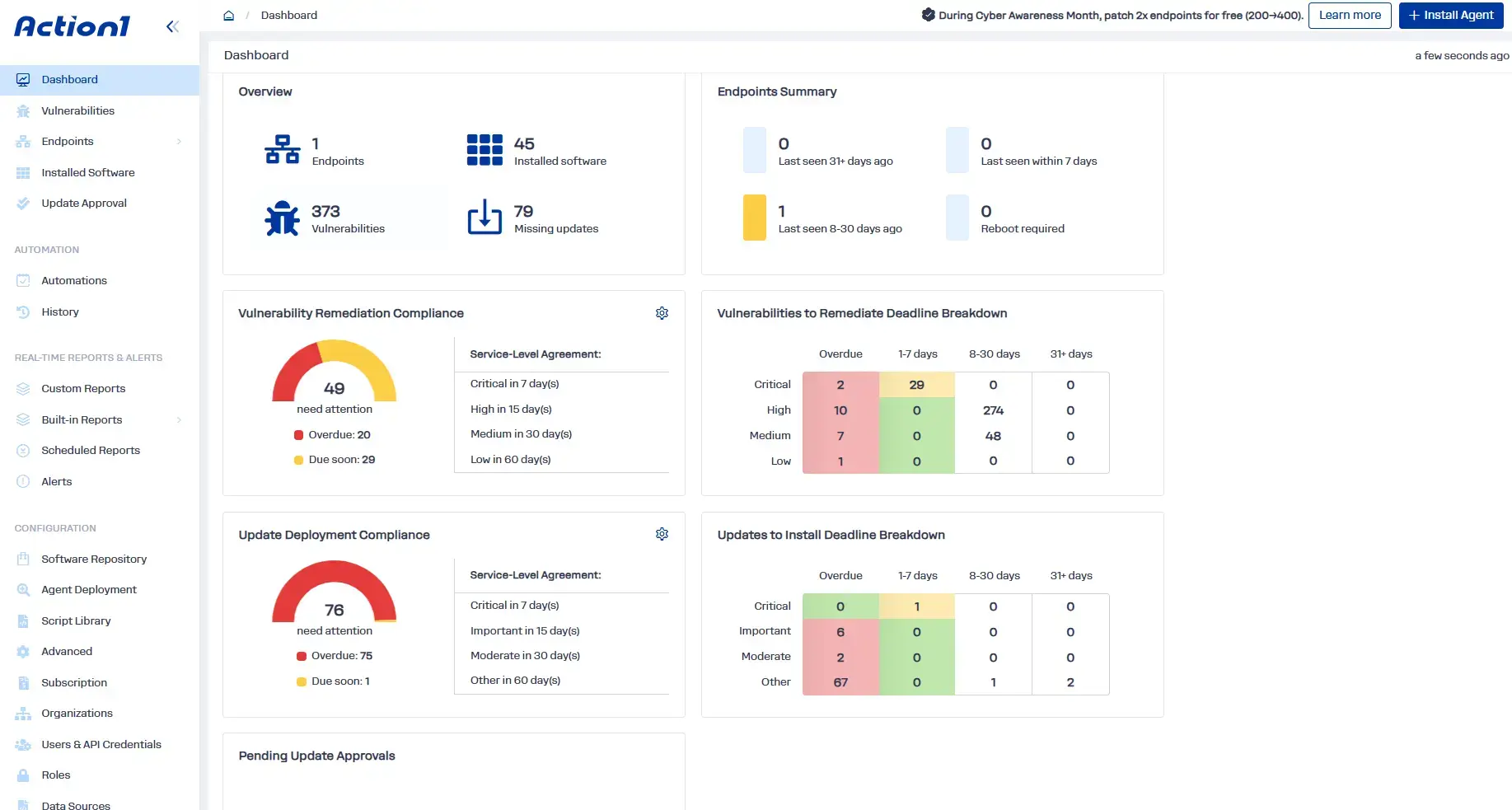
- Cross-OS platform support: Patch Windows, macOS, and Linux (Ubuntu, Debian, RHEL, and SLES) endpoints from one console, with vulnerability detection and third-party patching on Windows and macOS.
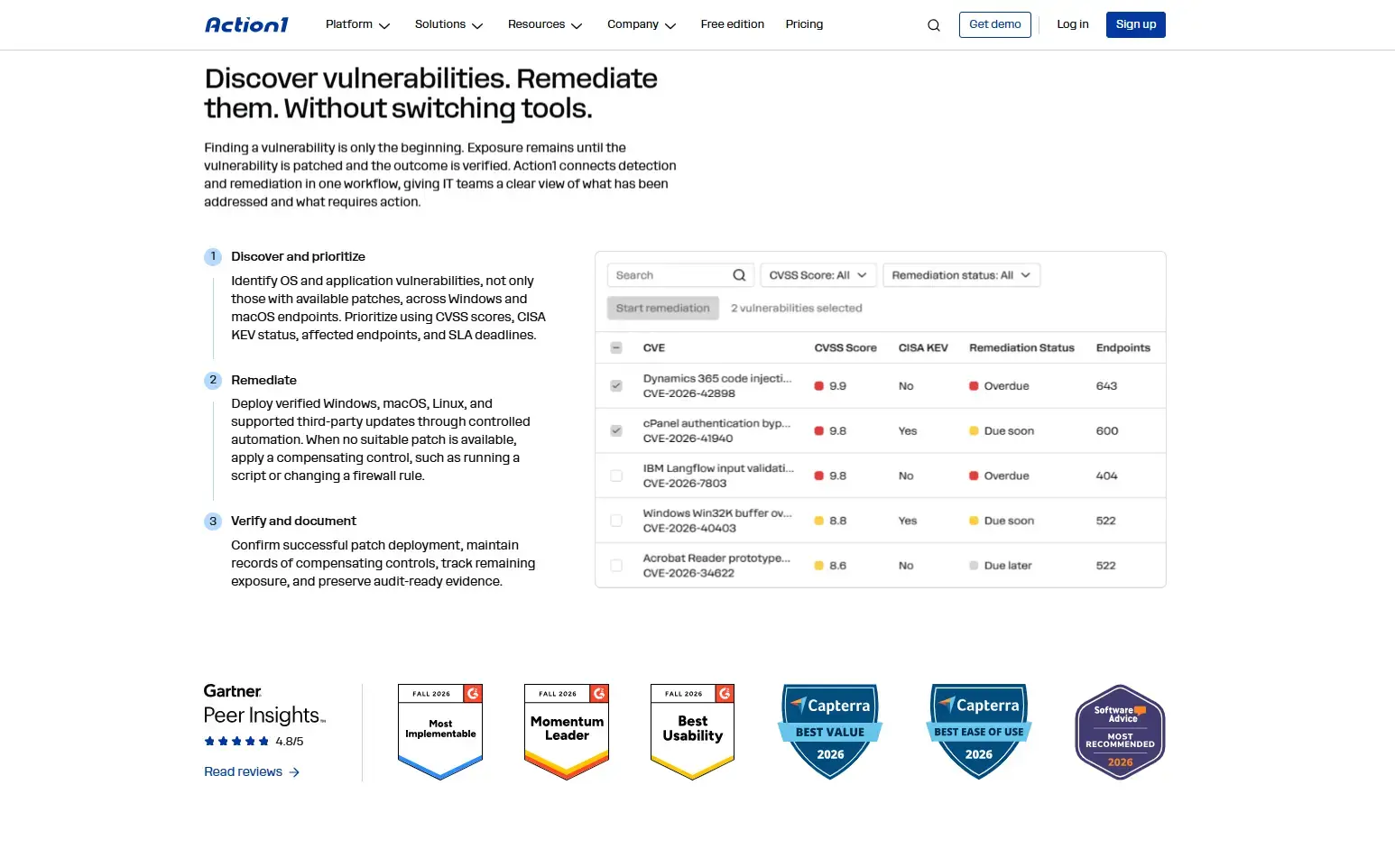
- Real-time vulnerability identification and prioritization context: See every vulnerable OS and third-party app on your Windows and macOS endpoints as soon as it’s detected, with full context for each finding: the CVE, CVSS score, CISA KEV status, ransomware associations, and every affected endpoint and software version.
- Automation flexibility: You can decide when, how, and on which endpoints the updates get installed.
- Multiple vulnerability intelligence sources: Action1 pulls from multiple vulnerability databases and sources, including VulnCheck NVD++, NIST NVD, CISA KEV, MSRC, and vendor release notes. You can also connect CVE data from Rapid7 InsightVM, Tenable, CrowdStrike Falcon Spotlight, Microsoft Defender for Endpoint, and Qualys.
- Dynamic endpoint groups and custom attributes: Group your endpoints by OS, business unit, environment, hardware, installed software, or your own custom conditions, so each asset tier gets the remediation rules that fit it.
- Built-in vulnerability remediation: For every known vulnerability, you decide how to deal with it: patch the vulnerable software, remove unsupported or legacy software, or document a compensating control when no patch exists.
- Autonomous patching with update rings and flexible windows: Patches get deployed in staged rings, moving from the test ring to the next ones only when predefined success rates and deployment counts are met. Unstable updates get stopped automatically to minimize downtime risk.
- Offline endpoint catch-up: If an endpoint is offline during a deployment, it gets patched automatically once it reconnects within the deadline you set.
- Software and script management: With just a few clicks, you can deploy or remove prepackaged and custom apps remotely. Action1 runs built-in or custom PowerShell, CMD, and Bash scripts across your fleet to complete different tasks.
- Multi-tenancy for MSPs and enterprises: Action1 allows the creation of multiple organizations under one account, each with its own endpoints, data, maintenance windows, and update approval workflows.
- Reboot control: Customize restart prompts and let employees postpone a reboot up to a deadline you set, so patches actually take effect without anyone losing their work.
- Configuration remediation and compensating controls: Fix insecure configurations with scripts, and record compensating controls for vulnerabilities you can’t patch yet, including what was done, who recorded it, and when. Just keep in mind that documenting a control and applying it are separate steps.
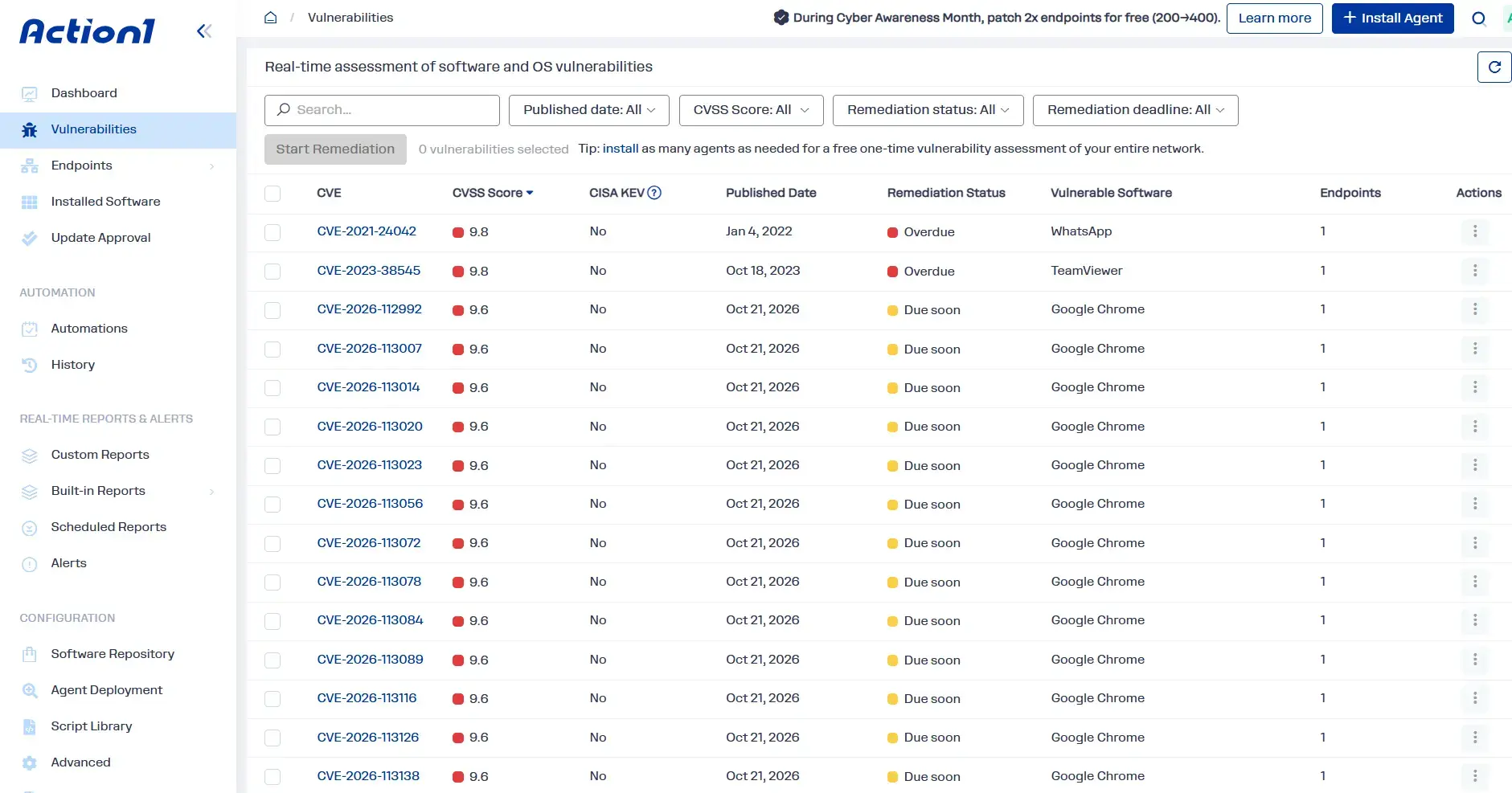
- Real-time vulnerability and SLA monitoring: Every CVE shows its remediation deadline and status (due soon, due later, or overdue), so you always know what needs attention first.
- Audit-ready reporting, audit trail, and REST API: Clone and customize the built-in reports, then schedule them or export them to show remediation outcomes, compensating controls, and remaining exposure. Every action is logged in the audit trail, and the REST API lets you feed remediation data into the SIEM or XDR tools your security operations team already uses daily.
- Real-time reporting and asset visibility: You get real-time insights about every endpoint’s patch, compliance, and health status, as well as its hardware and software.
- Cloud-native architecture: Patch remote endpoints wherever they are, without a VPN, an appliance, or a cache server.
- Private software repository and P2P distribution: Third-party updates come from Action1’s own repository, not community-maintained ones, and P2P distribution cuts bandwidth use on large rollouts.
- RBAC and organizational separation: Create custom roles and separate organizations, so every team gets access and approval rights only for the assets it owns.
- Free vulnerability assessment: Run a free one-time vulnerability assessment on an unlimited number of supported Windows and macOS endpoints before you commit.
- Free for the first 200 endpoints: Use Action1 free forever on your first 200 endpoints, with no feature limits.