- Rank by four signals: CISA KEV, EPSS, exposure, and asset criticality decide the order. CVSS adds severity context, but never decides priority on its own.
- Exploited flaws on exposed systems come first: Start remediation or mitigation immediately. For the highest-risk cases, a 72-hour target is a useful starting point. Don’t wait for the monthly patch window.
- Give every finding an owner and a deadline: Base the deadline on its risk tier, and verify the fix before you close it.
- Automate data collection and patching: Automate as much of the process as possible, and let your team handle only decisions like risk acceptance.
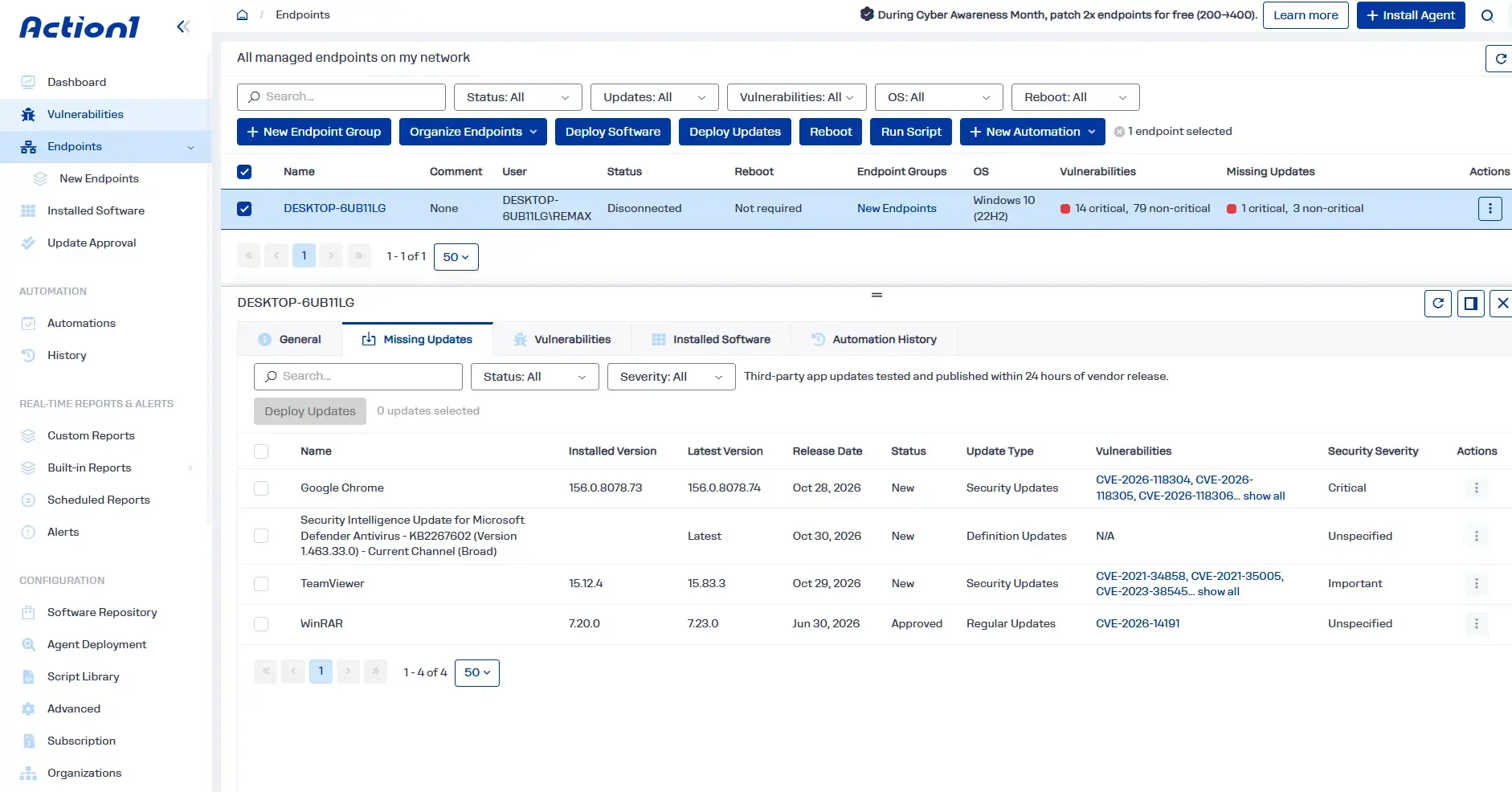
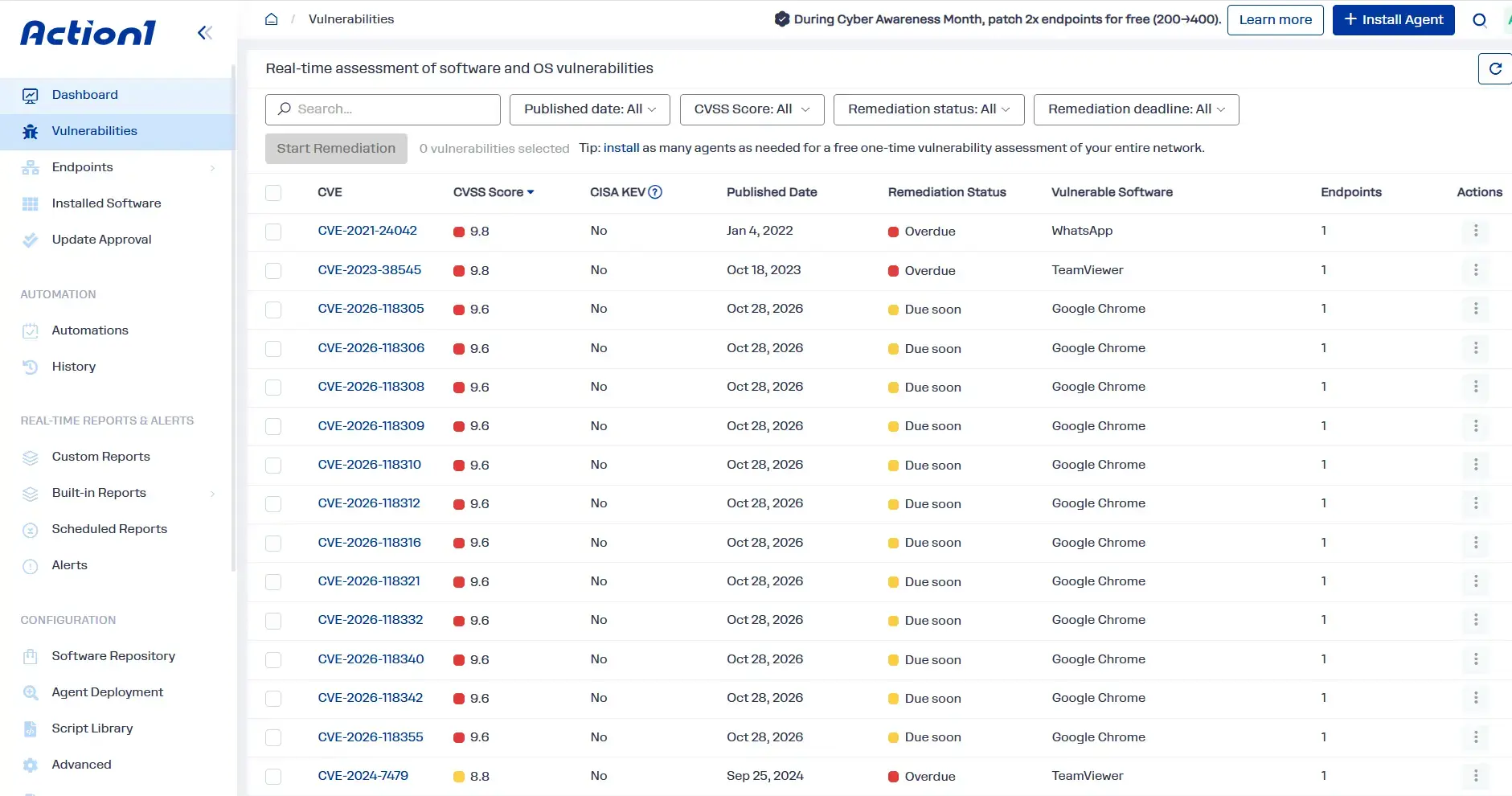
- Action1 brings detection, risk data, and patching into one place: It finds vulnerabilities in your Windows and macOS operating systems and third-party apps, shows CVSS, KEV, and ransomware data for each one, and can patch them autonomously, free for your first 200 endpoints.
Researched and updated November 2026.
Vulnerability prioritization ranks security weaknesses by real-world risk, so you or your team can fix the most dangerous ones first. That’s how you better protect your company against cyberattacks, data breaches, regulatory penalties, and, importantly, disappointed clients.
The real problem is that the pressure to get this right keeps growing enormously. According to the Action1 2026 Software Vulnerability Ratings Report, total disclosed vulnerabilities rose 92% in 2025 compared to 2024, and critical and high-severity ones each grew 103%. Your team’s remediation capacity almost certainly didn’t double with them. And it shouldn’t have to. You just have to know which lever to pull and when, and that’s exactly what proper vulnerability prioritization tells you.
It starts with ranking every finding by the risk it brings to your environment. That means understanding whether hackers are exploiting it, whether they can reach the vulnerable system, and how much damage a compromise would cause. You’ll find the answers by checking exploitation and exposure first, then adding asset criticality and business impact. From there, you set fix deadlines by risk tier. You can do all of that manually on a small network, but at scale, a tool that automates most of the work is what keeps you on schedule.
In this article, we’ll show you which factors decide real risk, how to prioritize vulnerabilities in six steps (manually or with a tool), which scoring methods to trust, what to do when they disagree, and how to set fix deadlines you can defend to leadership and auditors.
From finding to fix in one console. Action1 lists the vulnerabilities across your operating systems and third-party apps, shows which ones are actively exploited, and deploys the patches autonomously, even to laptops that were offline.
Your first 200 endpoints are fully featured and free forever.
What is Vulnerability Prioritization?
Vulnerability prioritization is the process of ranking identified security weaknesses by their actual risk to your systems and your entire organization, then assigning fix deadlines based on that rank. It weighs exploitation evidence, exposure, and potential business impact, not the severity score alone. A CVSS score tells you how bad a flaw could be. Risk tells you how likely it is to hurt you, here and now.
That’s why prioritization is the decision layer of every vulnerability management program. Scanning finds the weaknesses, and prioritization tells you which ones to fix first. It sits between assessment and remediation in the vulnerability management lifecycle, which runs discover, assess, prioritize, remediate, and validate.
Get that middle step right, and you know exactly where to start your remediation efforts, so you can lower your exposure window, especially for flaws attackers are already exploiting. It also keeps you from trying to patch everything blindly (impossible at scale) or fixing flaws that bring little real risk, like ones with no sign of exploitation on systems nobody can reach.
Why Does Vulnerability Prioritization Matter?
Vulnerability prioritization matters because it directs your limited patching capacity to the exploitable weaknesses that could cause the greatest business damage. It helps you cut urgent exposure first instead of treating every high CVSS score as an emergency. That way, you remediate security threats in a logical, strategic order that minimizes your attack surface, your exposure window, and the likelihood of exploitation, or, simply put, the chance of someone breaching your systems.
First of all, severity and exploitation don’t always move together. In the Action1 2026 Software Vulnerability Ratings Report, we found that active exploitation of office productivity software dropped 33% in 2025, but critical vulnerabilities in that category rose 229%. Low-severity software flaws also grew faster than high or critical ones in almost every category, and hackers increasingly chain them together. That obviously means severity and exploitation can go separate ways and take you to very different places.
Let’s look at an example of what this looks like in practice: the 2025 SharePoint “ToolShell” attacks. CVE-2025-49706, a spoofing flaw Microsoft rated 6.5 (Medium), was chained with a code injection weakness to take over on-premises SharePoint servers without authentication. CISA added it to the Known Exploited Vulnerabilities (KEV) catalog on July 22, 2025, with a federal due date the very next day. So if you’d used a tool or strategy that fixes only high-severity vulnerabilities first, this flaw would’ve landed in the middle of your patching schedule, if not at the end, behind lots of findings attackers don’t exploit.
Second, compliance raises the business risk. PCI DSS Requirement 6.3.1 requires you to risk-rank vulnerabilities based on their potential impact on your own environment, and frameworks such as SOC 2, HIPAA, and FedRAMP expect you to show documented, risk-based remediation, so you can prove your actions instead of relying on words in the air.
Last but not least, there’s a human cost. When every single security weakness gets labeled an emergency, IT teams stop treating any of them like one, simply because they get used to being buried under dozens of them. That’s when people start dropping the ball, which risk-based vulnerability prioritization helps prevent.
What are the Core Factors in Vulnerability Prioritization?
There are seven core factors in vulnerability prioritization, and they are technical severity, evidence of exploitation, network exposure, asset criticality, business impact, effective security controls (compensating controls), and available fixes. Each one plays a role in the contextual risk assessment that weighs them together to turn a score into a decision.
We’ve created a table for you that explains each factor, so you’ll see what question to ask, where to get the data, and what pushes a vulnerability up or down your remediation queue.
| Vulnerability prioritization factor | Question to ask | Where the data comes from | Raises priority when | Lowers priority when |
|---|---|---|---|---|
| Technical severity | How bad is the worst case scenario? | CVSS from the National Vulnerability Database (NVD) or the vendor | The flaw allows remote code execution, elevation of privilege, or total control of the system | The impact is limited, like minor information disclosure |
| Evidence of exploitation | Is anyone exploiting it, or could they easily? | CISA KEV, exploit availability, EPSS, threat intelligence feeds | It’s in KEV, public exploit code exists, or the EPSS score is high | No exploit is documented and the EPSS score is low |
| Network exposure | Can an attacker reach it? | Asset inventory, firewall rules, attack surface data | Attackers can reach it from outside, like internet-facing systems, VPN gateways, or laptops on home or public Wi-Fi | The system is internal and has no path from the outside |
| Asset criticality | How important is the affected system? | Asset tags, system owners | It affects key systems, like domain controllers, financial systems, or critical applications | It only affects dev, test, or low-value systems |
| Business impact | What happens to your business if it’s compromised? | Business owners, data classification | A compromise would expose sensitive data, disrupt revenue-critical services, or create regulatory exposure | The system holds no sensitive data and is easy to restore |
| Effective security controls (compensating controls) | Is something already blocking exploitation? | Endpoint detection and response (EDR) systems, next-generation firewall (NGFW) signatures, network segmentation, access control, MFA | Controls are missing or can’t cover the attack path | Tested controls block the known attack path |
| Available fixes | Can you fix it, and at what cost? | Vendor advisories, your patch tool | A tested fix exists and closes many findings at once | No patch exists yet, so the work shifts to mitigation and monitoring until one is released |
Just keep in mind that these factors are worth nothing if you haven’t tagged, for instance, the servers that process payments or the laptops that leave the office. In those cases, any scoring model is likely to fall back on incomplete assumptions, which can have a significant impact on your ranking.
Also, don’t mistake an installed control for a working one. A firewall rule reduces the likelihood of exploitation only when it blocks the relevant path. In the same way, vulnerable code in a package may be unreachable in a given configuration, but you need evidence before using that distinction to lower priority.
How to Prioritize Vulnerabilities Step by Step
To prioritize vulnerabilities properly, you have to identify your affected assets, add threat and business context, rank the findings by risk, assign an owner and a deadline, remediate or mitigate, and verify the outcome. These six steps help you prioritize vulnerabilities effectively and get the results you expect, instead of reacting to severity scores alone.
Note that you can run this process in two ways, so under each step you’ll see how to do it manually and how a cloud-native, agent-based tool handles it. Each has its benefits and challenges. Manual work helps you understand the logic and can cover a small fleet, but at scale, it’s almost impossible to keep up.
Asset Discovery, Inventory, and Visibility
List all your managed and unmanaged devices, servers, remote endpoints, cloud environments, and their operating systems, plus all the third-party applications installed on them. Next, tag each asset with its criticality and an owner, and keep the inventory current so laptops stay visible even when they’re off your network.
- Manually: Export the installed software from each device into a spreadsheet, tag every asset with an owner and a criticality level, and remember that you’ll have to repeat this often, since devices and installed apps change constantly.
- With a tool: An agent-based, cloud-native endpoint or patch management platform monitors and updates your inventory 24/7. The agent notices each change and reports it to the cloud platform, which updates what you see on the central dashboard. However, deciding which assets are critical and who owns them is still your job, so group them accordingly.
Business and Environmental Context Enrichment
Enrichment adds threat and business context on top of the severity score and turns it into a risk decision. You have to add six fields of vulnerability information to every finding: network exposure, asset criticality, data sensitivity, compensating controls, CISA KEV status, and EPSS score.
- Manually: Look up each CVE in the NVD, check it against the CISA KEV catalog, then check the daily EPSS data, and finally, add exposure and data sensitivity from your asset records.
- With a tool: Your platform pulls information like CVSS, CISA KEV status, and EPSS into every finding, but business context like data sensitivity has to come from you or your team. If you’ve already grouped and categorized your endpoints, many platforms can apply that context automatically.
Rank Vulnerabilities by Their Actual Risk
Next, rank each finding. Check exposure across internal and external surfaces, then put internet-facing assets with KEV entries first, all remaining KEV entries second, and the remaining critical and high-severity vulnerabilities after them. Also watch for medium flaws piling up on the same device or account, because attackers chain them into a full compromise.
- Manually: Add a rank column to your spreadsheet, filter by KEV and exposure, and group findings by device or account so piled-up flaws stand out.
- With a tool: The agent on each endpoint reports its installed software, and the platform matches it against known vulnerabilities and ranks them by severity and exploitation data, so you see every finding ranked automatically on one central dashboard.
Assign an Owner and a Remediation SLA
Once every finding has a rank, give it an owner and a deadline. The owner is the person on your team who fixes the vulnerability by deploying a patch or, if there isn’t one yet, documents why it can’t be fixed permanently. Keep in mind that the due date for remediation or mitigation should come from the finding’s risk tier, so the most significant threats get the shortest timeframe. That way, you can prioritize high-severity vulnerabilities when they carry real business risk, without overlooking exploited, lower-scoring flaws.
We’ll now look at an example you can adapt for vulnerability remediation on your endpoints. The deadlines you’ll see are borrowed from CISA’s BOD 26-04, which only binds federal civilian agencies, and from PCI DSS, which expects critical patches to be deployed within one month of release.
| Risk tier | Typical conditions | Example deadline | Reference point |
|---|---|---|---|
| Tier 1: Act immediately | It’s in KEV and gives attackers full control of the system, or it sits on an internet-facing system that attackers can exploit automatically | 72 hours, plus a check for signs of compromise | BOD 26-04 three-day tier |
| Tier 2: Accelerated | KEV lists it but the impact is partial, or a high EPSS score meets an exposed system | 14 days | BOD 26-04 14-day tier |
| Tier 3: Standard | Critical or high CVSS score, but no evidence of exploitation | 30 days | PCI DSS one-month window for critical patches |
| Tier 4: Routine | Rated medium or low, with no evidence of exploitation and no outside exposure | Next regular patch cycle, within 60 days | BOD 26-04 60-day tier |
| Tier 5: Defer | Found on isolated or noncritical assets and meets none of the risk criteria above | Next system upgrade, with documented risk acceptance | BOD 26-04 fix-on-upgrade tier |
For the full federal model, you can check our breakdown of BOD 26-04 and why its 72-hour window may still be too long.
- Manually: Turn each rank into a tier, then add an owner and a due date in your spreadsheet or ticketing system. Review overdue items each week.
- With a tool: Risk-based prioritization features in endpoint, vulnerability, or patch management platforms apply deadlines by tier and track them automatically, but your team sets the tier rules, approves exceptions, and owns the escalation path. Keep in mind that you do this once, when you set up your policy-driven automations. So in most cases, you won’t need to act on each step. Instead, you plan the steps, shape the process you want, and the tool automates the execution.
Remediate, Mitigate, or Record a Time-Limited Exception
Whenever possible, address vulnerabilities by applying supported vendor patches. If a patch isn’t available, apply compensating controls to mitigate the risk, or, when the risk is low enough, formally accept it with an expiry date.
Group the work by patch, not by CVE. One cumulative Windows update can close multiple software flaws. Microsoft’s risk cohorts apply a similar idea, grouping CVEs that depend on the same question about your environment so you can decide on them together.
If there’s no patch yet, apply compensating controls like blocking the port, disabling the vulnerable feature, or isolating the endpoint from the network. Then document what you did, put an owner on it, and set a review date. When that date comes, check for a patch. If one’s available, deploy it and remediate the vulnerability for good. Once the patch is deployed and verified, remove any temporary controls you no longer need, like a disabled feature, so they don’t cause conflicts later. Just don’t remove them before patching, or you’ll reopen the exposure.
In the third scenario, if the risk is low enough, for example, when the flaw is on an isolated system with no network access and nothing sensitive on it, you can accept the risk and give that exception an approver, an expiry date, and a review trigger. But keep in mind that recording an exception doesn’t remediate the vulnerability, and an untested compensating control shouldn’t be treated as proof of protection.
- Manually: Create one ticket per update, and either schedule it in your next maintenance window or push it as an emergency change. When there’s no patch, apply the control yourself, note it in the ticket with an owner and a review date, check the vendor’s advisory when that date comes, and remove the control once the patch is verified. For accepted risks, record the approver, expiry date, and review trigger, and put the expiry in your calendar so the exception doesn’t quietly become permanent.
- With a tool: Updates deploy automatically, in your regular maintenance window or an emergency one, following the rules you’ve set: test groups first, staged rollouts, and reboots scheduled so nobody loses work. When there’s no patch, many platforms can run a script to apply a configuration fix and record the compensating control against the finding, and your automation policy can deploy the patch once the vendor releases it. What the tool can’t do is decide which risks you’re willing to accept. So approving an exception stays with you, and the tool can flag it again when it expires.
Validate Remediation
Verify that the vulnerability is no longer on the affected assets before closing the finding. Patch deployment tools can report installation results, but a successful install doesn’t always mean the flaw is gone. A new authenticated scan, a supported software version check, or a configuration validation can confirm whether the relevant flaw was actually addressed.
- Manually: Rescan or check software versions on every affected device to confirm they’re running the fixed version and any required reboot is done. If they are, your remediation worked, and you can close the ticket.
- With a tool: The tool rescans, or uses real-time monitoring on each endpoint, to report each device’s current state after deployment. If the patch deployment went as expected, the fixed vulnerabilities disappear from the dashboard. Devices that were offline stay on the list until they check in and get the patch.
Which Vulnerability Prioritization Methods Should You Use?
You should use and trust CISA KEV for confirmed exploitation, EPSS for the likelihood of near-term exploitation (next 30 days), CVSS for technical severity, and business context for local impact. Also, SSVC can help turn those signals into a consistent response decision. Always remember that relying on all of these metrics together gives you the most accurate risk-based prioritization process, because none of them on its own comes anywhere close to a multi-source approach.
But let’s have a closer look at each of these to better understand their full value and how they help you effectively prioritize vulnerabilities.
CVSS (Common Vulnerability Scoring System)
As already mentioned in the article, CVSS tells you how technically severe a given vulnerability is, but its Base score alone isn’t enough to tell you how urgently you have to remediate it. The Common Vulnerability Scoring System gives a rating from 0 to 10. If you see a flaw with a score from 0.1 to 3.9, it’s low. Medium flaws hit the mark from 4.0 to 6.9, high ones from 7.0 to 8.9, and critical ones from 9.0 to 10.0.
CVSS v4.0 has four metric groups: Base, Threat (which replaces the old Temporal group), Environmental, and Supplemental. The Base score assumes the worst case, and FIRST’s guidance tells consumers to add Threat and Environmental metrics. But the NVD and most vendors publish only the Base score. That’s how a 9.8 on a host with no network path outranks a 7.5 on an internet-facing service running with admin rights.
EPSS (Exploit Prediction Scoring System)
EPSS estimates the probability, from 0 to 1, that a given CVE will see exploitation activity in the next 30 days. FIRST publishes a fresh score and a percentile for every CVE daily.
Here, the score is a probability, and the percentile tells you what share of scored CVEs sit at or below it. Most of you probably know that only a small share of CVEs see exploitation in any 30-day window, so a cutoff like “EPSS above 0.5” is far stricter than it sounds. FIRST’s guidance notes that a threshold of about 0.04 selects roughly as many CVEs as a CVSS Critical filter. However, the real-world limitation of EPSS, from your team’s perspective, is that it knows nothing about your environment. And one more thing: the model itself changes. EPSS v5 went live on June 15, 2026, so don’t compare today’s scores with ones you saved before that date.
CISA Known Exploited Vulnerabilities (KEV) Catalog
The KEV catalog lists CVEs with reliable evidence of exploitation in the wild and an available fix or mitigation. It’s your fast lane against cyberattacks already underway. But again, it doesn’t know your exposure, and it won’t flag a chain of individually low-risk findings.
KEV due dates bind US federal civilian agencies, not every company or federal contractor. Since June 10, 2026, those deadlines come from BOD 26-04, which replaced BOD 22-01 and BOD 19-02.
SSVC (Stakeholder-Specific Vulnerability Categorization)
SSVC is a decision tree created by Carnegie Mellon’s Software Engineering Institute, and CISA adapted it for its own use. CISA’s version weighs exploitation status, technical impact, automatability, mission prevalence, and public well-being impact, and then tells you to do one of four things: Track (standard timelines), Track* (standard timelines, closer monitoring), Attend (faster than standard, with supervisors engaged), or Act (as soon as possible, with your leadership engaged in the process).
Business-and-Runtime-Context-Based Prioritization
Context-based prioritization looks at where a vulnerability actually sits in your network. For instance, one CVE can be urgent on a payment server and unimportant on a test machine. Simply put, it checks how important the asset is, what your business loses if it’s hit, whether the vulnerable code is even running, whether a hacker can reach it, what kind of access they might get through the machine’s accounts, and how close it sits to any kind of sensitive data.
In reality, most days your SLA deadlines decide the order. But when a zero-day is being exploited everywhere, don’t follow the planned schedule. Act immediately by deploying a patch, if one’s available at all, or by taking mitigation steps to protect your affected systems.
How the Vulnerability Prioritization Methods Compare
| Method | What it measures | Limitation |
|---|---|---|
| CVSS | How bad the flaw could get in the worst case | Says nothing about whether anyone’s exploiting it or what it means for your systems |
| EPSS | How likely cybercriminals are to exploit it in the next 30 days | Based on global exploitation data, so it doesn’t know your network or what the flaw could do to your systems |
| CISA KEV | Whether attackers are already exploiting it | Only catches the vulnerability after the attacks start |
| SSVC | What to do about it: track it, attend to it, or act immediately | Only as good as the answers you feed it |
| Context-based | How it may affect your specific systems | Doesn’t tell you much if your asset records are out of date, incomplete, or poorly organized |
| Vendor risk scores | One score based on a vulnerability’s severity, threat context, and asset data | You can’t see exactly how the vendor calculates it |
What Should You Do When Vulnerability Prioritization Signals Conflict?
When vulnerability prioritization signals conflict, the most logical thing to do is to give the greatest weight to confirmed exploitation and verified exposure, then weigh asset criticality, business impact, exploit probability, and proven defenses.
Earlier in the article, we made it clear that an exploited medium-severity vulnerability on a reachable critical system should usually be addressed before an unexploited critical one on an isolated test host. FIRST’s guidance gives similar advice: when a vulnerability lands in KEV, treat it as actively exploited, regardless of its EPSS score.
So when conflicting signals get in your way, think strategically and focus on your systems: how they could be affected, which ones are the most critical and must be protected first, and, of course, whether the flaw is actually being exploited.
Let’s explore a few hypothetical situations to give you a better idea of how this works in practice.
| Situation | Conflicting signals | When to fix it | Why |
|---|---|---|---|
| Critical CVSS on an isolated endpoint | CVSS 9.8, not in KEV, low EPSS, no network path | Within 30 days, or at the next system upgrade if the machine stays isolated and the risk is signed off in writing | Nobody can reach or exploit it yet. |
| Medium CVSS, in KEV, internet-facing | CVSS 6.5, but it’s in KEV and reachable from the internet | Within 72 hours, and check whether you’ve already been hit | Exploitation plus exposure beats severity and makes it a top priority to fix as soon as possible. |
| High EPSS on a noncritical internal system | EPSS in the top percentiles, not in KEV, no sensitive data on the server | Within 30 days, or within 14 days if the server is reachable from outside | It’s likely to be exploited, but there’s little to steal or break. Check reachability before you decide. |
| Critical asset behind compensating controls | High CVSS on a finance server, but EDR and network segmentation block the known attack path | Within 30 days, during a scheduled maintenance window | Controls buy you time by blocking the attack path, but they don’t remove the flaw. |
When you override the default ranking, write down why you did that, so auditors see a decision based on facts, not a guess.
Turn conflicting signals into one clear queue. Action1 shows CVSS scores, CISA KEV status, and known ransomware use for every vulnerability it finds in the operating systems and third-party apps on your Windows and macOS endpoints, then lets you push the fix right away through an emergency deployment instead of waiting for the next maintenance window.
Get Action1 free for your first 200 endpoints, fully featured with no time limit, or watch the demo to see the full workflow.
When Should Vulnerabilities Be Reprioritized?
Reprioritize whenever new threat, exposure, asset, control, or remediation information materially changes the risk. In reality, reprioritization happens more often than you might think. EPSS scores are republished daily, and CISA adds KEV entries whenever new exploitation is confirmed, so make sure you always work with fresh data. Doing it manually takes quite a bit of time every day, but an automated solution updates these scores on its own.
| Trigger | What to recheck | Possible priority change |
|---|---|---|
| CVE added to CISA KEV | Every endpoint running the software, starting with any exposed ones | Into the fast lane immediately |
| The EPSS score climbs, or exploit code appears on GitHub | Whether the current deadline still makes sense | Usually gets a shorter deadline, often 14 days instead of 30 |
| You open a firewall port or give a cloud server a public IP address | Every open vulnerability on that server | Moves up fast, because anyone online can now reach it |
| A test server starts handling customer data or any other sensitive information | Its open findings and their deadlines | Climbs higher on your list to match what’s now at risk |
| A firewall rule changes, your EDR agent stops reporting, or you add a new control | Every vulnerability you’ve put on hold because of that control | Moves up if the protection is gone, or down if you’ve added a new one that works |
| An accepted risk hits its expiry date | Whether the reason you accepted the risk still holds, and whether you can now fix the issue for good | Goes back into the active queue |
How Should You Handle False Positives During Vulnerability Prioritization?
Before you spend time fixing a vulnerability, double-check that it’s real. Then write down every confirmed false positive so neither you nor anyone on your team wastes time on it again next month. False positives commonly come from version-based detection that misses a backported fix (a patch applied without changing the version number) or from leftover files of removed software.
If you want to keep false positives to a minimum, stick to these three habits:
- Give every suppression an expiry date: If a finding stays hidden forever, you’ll never notice if it becomes real later. So when that date comes, check the finding again.
- Check again after changes: A new configuration or a software update can turn a false positive into a real problem, so recheck your suppressed findings before you move on to your daily tasks.
- Don’t mix false positives with accepted risks: A false positive is when a vulnerability gets flagged, but in reality, it isn’t there. An accepted risk means it’s there, and you’ve chosen to take the risk and live with that decision. If you mix them up, there’s a real chance you’ll be looking at reports that say your systems are safe and up to date when they aren’t.
What Makes Vulnerability Prioritization Difficult in Practice?
The hardest part of vulnerability prioritization is dealing with scanner noise, assets that nobody can identify or that nobody owns, fear of breaking production, vendors that don’t ship patches, duplicate tickets, and laptops or BYOD devices that never check in or never get managed in the first place.
Any of these can ruin your vulnerability prioritization and turn it into a backlog that grows faster than your limited resources can keep up with. Most of them show up whether you work from spreadsheets or an automated platform. Honestly, tools can take care of some, but the ones about people and process are still on you. So here’s what each problem looks like in real life, and how to fix it:
- Too much scanner noise: Your vulnerability scanning returns hundreds, if not thousands, of findings, and some of them are on systems you retired a long time ago because old results never got cleaned out. So you’re left wondering why they’re still there. The fix is to run authenticated scans, remove devices and software from your inventory and scan scope as soon as you stop using them, set your platform to age out assets that haven’t reported in a while, and sort by three questions first: Is it in KEV? Is it exposed? Is there a fix? That alone can cut your list of identified vulnerabilities down to something you and your team can actually work with.
- You can’t tell what the asset is: Your scanner flags a vulnerable server by IP address, IT knows it by hostname, and the cloud console shows an instance ID. Before you can fix it, you or someone from your team has to play detective and find the source of truth. The fix is to keep one inventory where every asset has a single identity, an owner, and a business function. An agent-based platform with continuous monitoring solves most of this because the agent reports from the device itself instead of guessing from the network.
- Nobody owns the fix: Security teams find the vulnerability, IT says the app team owns the server, and the app team says it’s IT’s job. That back-and-forth is a mess, and deadlines pass easily until someone finally takes action. You can avoid it by assigning a named owner and a backup to every critical app and endpoint group before the next finding shows up, not after. Also, add an escalation path, so an ignored ticket lands on someone’s desk instead of sitting in a queue.
- Fear of breaking production: IT teams and app owners are often more afraid of a patch breaking a business-critical app and its operational dependencies than of the vulnerability itself. So the ranking says “fix now,” but the fix quietly waits for the next maintenance window, sometimes weeks away. Fixing that is simple: agree in advance on what counts as an emergency, who can approve an out-of-band deployment, and how much testing is enough when threat actors are already exploiting the flaw. Once that’s clear, a KEV finding on an exposed system won’t turn into an endless debate. It just goes out, through the test group and staged rollout you already use.
- There’s a vulnerability, but no patch to deploy: A finding can stay open for too long if the vendor hasn’t released a fix yet, or if the software reached end of life and lost support. That’s how it gets buried and forgotten. To avoid that, apply compensating controls right away, like blocking the port or isolating the system, and assign the finding to someone on your team, or yourself, with a review date and an alert. For end-of-life software, uninstall and replace it, or, until you can, restrict that endpoint’s network access. Either way, document the action.
- Duplicate tickets keep showing up daily: A single missing update can appear as multiple separate findings. If each one gets its own ticket, people often fix one and stop responding to the rest, or they try to answer them all and lose hours every week. Instead, open one ticket per fix, not per CVE, and attach the full list of affected devices and their deadlines. Many tools do this grouping for you. Your team works on fewer tickets, and you still know exactly what’s left.
- Remote laptops miss the patch deployment: Offline endpoints don’t get the patch during a planned deployment, and reports may show the update as sent even though it never installed. That leaves the laptop vulnerable and leaves you in no man’s land. You can fix that by tracking failed deployments and devices that haven’t checked in, and by using a tool that retries the update automatically when the laptop comes back online. For personal BYOD devices you don’t manage at all, set an access rule instead: no agent, no access to company data.
What are the Best Practices for Vulnerability Prioritization?
The best practices for building an effective and accurate vulnerability prioritization process come down to ranking findings by real risk, not CVSS alone, supporting that ranking with threat intelligence and asset context, automating routine work, and reassessing as often as the threats change. Together, these practices support cyber resilience by reducing exposure on systems your business depends on.
- Adopt a risk-based approach: Rank cybersecurity vulnerabilities by exploitation, exposure, asset criticality, and working controls, and use CVSS only to break ties. Check each finding for four things before you take remediation action: whether it’s in KEV or has a high EPSS score, whether attackers can reach your vulnerable endpoints, how critical the system is, and whether a tested control already blocks the attack.
- Map vulnerabilities to a central asset inventory: Create a central inventory that clearly records each device’s criticality, what data it touches, and who owns it. Tag internet-facing systems and servers that process customer or financial data, so your ranking gives those findings higher priority. Without these tags, every finding looks the same and you end up sorting by CVSS, which is inefficient.
- Reduce the noise first and group findings by fix: Remove duplicate findings and group the rest by fix before you rank anything. For any retired assets, remove them from your inventory and scan scope, merge findings that one update closes, and open one ticket per fix with the full list of affected endpoints. That stops you from wasting valuable resources fixing the same problem twice.
- Integrate threat intelligence: Check the KEV status and EPSS score of every vulnerability, and refresh them daily until the vulnerability is remediated. KEV status shows which vulnerabilities attackers are already exploiting, and EPSS shows how likely exploitation is in the next 30 days, so you can close the weaknesses most likely to hit you first. A finding with neither signal can usually follow your regular maintenance schedule.
- Verify exposure, compensating controls, and attack paths: Double-check whether your vulnerable systems are actually reachable and whether any compensating controls already block the attack. Always test firewall rules or network segmentation after you apply them to make sure they work the way you expect. Also, look for flaws that pile up on the same device or account. For example, a medium credential leak plus an unpatched privilege escalation flaw on one laptop can add up to a full compromise.
- Patch actively exploited vulnerabilities first: Set up an emergency patching process you can start anytime, and patch exposed systems first. Configure it in advance with a maximum deadline of 72 hours for exploited flaws on exposed systems, which still leaves time to test on a small group first and avoid unplanned downtime. This approach works best with an automation tool that lets you reuse a policy-driven patching process, so you just start it and monitor its progress.
- Automate the process: Automate the manual work so your team spends time making decisions and monitoring. Use a tool that discovers and monitors your endpoints in real time, adds KEV and EPSS enrichment, manages automated prioritization, creates tickets, and patches operating systems and third-party applications. Your manual effort then comes down to handling exceptions like risk acceptance, compensating controls, emergency approvals, and reviewing audit reports.
- Re-rank vulnerabilities when risk data changes: Re-rank vulnerabilities each time KEV, EPSS, exposure, or asset data changes. If you’re doing it manually, that means daily, not once a week, and you have to stay consistent. Set alerts for new KEV entries that match your software inventory, and recheck any server that becomes internet-facing.
- Document a policy aligned with NIST CSF or ISO 27001: Create a management-approved prioritization policy and map it to a framework like NIST CSF 2.0 or ISO/IEC 27001. It should include your SLA deadlines, escalation paths, emergency approval rules, and an owner and expiry date for every accepted risk. Keeping it current not only helps you prove compliance to auditors and regulators, but also helps you build more effective vulnerability management and look up any decision whenever you need to.
- Track MTTR and SLA compliance, then refine: Make it a weekly habit to track a few metrics that show whether your prioritization delivers real risk reduction, and adjust your model when it doesn’t. Closely watch mean time to remediate (MTTR) per tier, SLA compliance, and how many KEV findings you close on time. If critical vulnerabilities keep aging past their deadlines, find out why. Is it a third-party app, an endpoint that isn’t syncing, or a missing owner? Then fix the cause so it doesn’t happen again.
Which Tools Support Effective Vulnerability Prioritization?
Effective vulnerability prioritization depends on four types of tools: vulnerability scanners to find flaws across your systems, threat intelligence feeds to show which ones attackers are using, a prioritization platform to rank and route them, and a patch or endpoint management tool to fix them and verify the remediation worked. You can buy these tools separately or get them combined in one platform, under one license.
Vulnerability Scanners
Vulnerability scanners find vulnerabilities in the operating systems and third-party applications on your endpoints, but they don’t fix anything. Once installed on a system, agent-based scanners start scanning and monitoring it to find the flaws, then send that information to a central console, often in the cloud. When you open it, you get a clear picture of what’s vulnerable on each asset. They work for both on-premises and remote systems.
Agentless scanners check your devices over the network without installing anything, which works well for servers and network gear you can’t or don’t want to put an agent on. In practice, development teams also scan code in their CI/CD pipelines to catch vulnerable components before they ship. Whichever you use, look for one that covers your entire environment, meaning the operating systems and all the third-party apps your company uses, on every endpoint. Otherwise, you risk leaving blind spots that can undo all your other efforts to strengthen your security posture.
Threat Intelligence Feeds
Threat intelligence feeds track threat actor activities and tell you which vulnerabilities cybercriminals are already using, or are likely to use next. The two most important ones are free: the CISA KEV catalog for confirmed exploitation and FIRST’s EPSS for exploitation probability. Vendor advisories and exploit databases play an important role as well, adding detail on top. But as we mentioned earlier in the article, these feeds only pay off when you match them against a complete, constantly updated asset inventory, so you can see every affected endpoint and its software.
Prioritization Platforms
Prioritization platforms turn findings into a ranked work queue with owners and deadlines. They consolidate findings, prevent duplicate records from inflating vulnerability counts, enrich them with KEV and EPSS, rank them using your asset context (like asset value and data sensitivity), route them to the right owners, and track SLA deadlines. Some platforms only prioritize findings, while others offer integrated remediation or companion patching products. Their main role is to show you where to start, so you can narrow your attack surface, close the riskiest flaws as soon as possible, and get a better chance of protecting your company from cyber attacks.
Patch and Endpoint Management Tools
Patch and endpoint management tools identify your endpoints through agents, monitor them for vulnerabilities, and help you prioritize based on information from multiple sources, like CVSS scores, CISA KEV status, known ransomware use, and more. Then they let you automate patch deployment for OS and third-party apps, with endpoint grouping, testing, scheduling, reboot control, and the option to approve, hold, or decline updates for different departments. Some even offer autonomous patching through update rings. Finally, they verify the remediation, so you know the fix actually worked and the vulnerability is gone.
If no patch is available, they let you apply compensating controls to mitigate the risk, like isolating the endpoint from the network, blocking a port, applying a firewall rule, or uninstalling the vulnerable software until a fix is out. You can also document your actions, set alerts, create and export audit-ready reports, and much more. However, different tools cover different ground, so if you’re planning to buy this kind of platform, do your own research to make sure you get everything you need.
Frequently Asked Questions
What is the Difference Between CVSS and EPSS?
CVSS measures the technical severity of a vulnerability. EPSS tells you how likely it is to be exploited in the next 30 days. So a high CVSS score with a low EPSS score is a dangerous flaw, but one that’s not likely to be exploited soon. A medium CVSS score with a high EPSS score is one that hackers are likely to use to breach systems and start cyberattacks.
How Often Should You Perform Vulnerability Prioritization?
It’s best to do it every time you identify vulnerabilities across your systems and before taking any remediation actions. That’s the main idea of prioritization: to help you understand which security weaknesses hide the greatest risk for your company and address them in a logical order, starting with those that are actively exploited and then continuing with those that aren’t.
Can Vulnerability Prioritization Help Meet Compliance Requirements?
Yes, and many frameworks require it. PCI DSS Requirement 6.3.1 obliges you to risk-rank vulnerabilities considering your own environment, and Requirement 6.3.3 expects you to install critical security patches within one month of their release. Also, ISO/IEC 27001, SOC 2, and HIPAA want you to document the process so auditors can see detailed information about each step.
How Do You Choose Between Two Vulnerabilities with the Same Severity Score?
You just have to check KEV status first, then EPSS, and see whether your affected endpoint or group of endpoints is reachable from the internet. In cases where these also match, compare asset criticality and data sensitivity, then compensating controls, and finally patch availability and fix effort. Whichever one comes out ahead goes first.
Can Vulnerability Prioritization Be Automated?
Yes, a lot of platforms on the market automate the process by pulling information about each vulnerability from different sources like KEV, EPSS, CVSS scores, and others, to give you a clear idea of which ones need your attention first. These tools not only find vulnerabilities but also apply risk-based prioritization and give you a ready-to-act-on list, so you can shrink your exposure window even further by starting remediation in a logical order, where it’s needed most.
Should Low-Severity Vulnerabilities Ever Be Prioritized?
Yes, especially when they’re part of an attack chain or under active exploitation. That’s because a low CVSS score evaluates the flaw in isolation, not what a cybercriminal can do by combining it with others. So yes, even low-severity vulnerabilities must be prioritized and addressed promptly when that happens.
Final Recommendation
The main takeaway is that severity and risk aren’t the same thing. A vulnerability is most dangerous when attackers are already exploiting it, can reach it, and could hit a system your business depends on. Here’s what to apply in your own environment:
- Keep a complete asset inventory: Every device and app needs an owner and a criticality level, or it never makes it into your ranking.
- Rank by KEV, EPSS, exposure, and asset criticality: These four signals decide the order. CVSS adds severity context, but never decides priority on its own.
- Don’t skip medium and low findings: A medium flaw in KEV on an internet-facing server should be fixed before an unexploited critical one on an isolated test machine.
- Patch actively exploited flaws on exposed systems within 72 hours: Don’t wait for the monthly maintenance window.
- Give every finding an owner and a deadline: Base the deadline on its risk tier.
- Document every exception: Compensating controls and accepted risks need an owner and an expiry date.
- Re-rank when KEV, EPSS, or asset data changes: A new KEV entry can move a finding to the top of your list in a day.
- Verify the fix before closing the ticket: A “sent” status in a deployment report doesn’t mean the patch installed, so confirm it on every affected device.
- Automate data collection and patching: Use tools for the repetitive work, and keep your team’s time for decisions like risk acceptance and emergency approvals.
How Action1 Helps Prioritize Vulnerabilities
Action1 is a cloud-native autonomous platform that can identify vulnerabilities across your Windows and macOS operating systems and third-party applications. Then it prioritizes them based on CVSS scores, CISA KEV status, and known ransomware use, pulling data from multiple sources like VulnCheck NVD++, NIST NVD, CISA KEV, MSRC, and vendor release notes. Afterward, it finds and lists the missing patches that remediate the vulnerabilities and gives you the flexibility to shape the patching process the way you envision it, with autonomous deployment through update rings, control over deployment times, and reboot control. You can also use the offline catch-up window, which automatically patches endpoints that were offline during the deployment wave once they reconnect.
The platform works equally well for office-based and remote employee endpoints, servers, and cloud workloads. It needs no VPN, appliances, or sophisticated network configuration, thanks to outbound-only cloud connections. That makes it a great choice for companies of all sizes that rely on both on-premises and remote systems. It takes under 5 minutes to create your account, deploy the agent, and start identifying, prioritizing, and remediating vulnerabilities across your network. It’s also free for your first 200 endpoints, fully featured, forever. So you can use it in your SMB with no time limit, or test it thoroughly in your large enterprise to make sure it meets your requirements and expectations before expanding beyond the free tier.
Simply put, it automates the vulnerability and patch management process end to end, while you keep control of the decisions that matter. It also allows you to apply mitigation controls when no patch is available, like isolating endpoints from your network, blocking ports, or uninstalling software on vulnerable Windows-based devices, using built-in or custom scripts. Last but not least, it lets you create audit-ready reports in minutes using 100+ built-in customizable templates, so you can prove compliance with the regulatory frameworks your company is subject to.
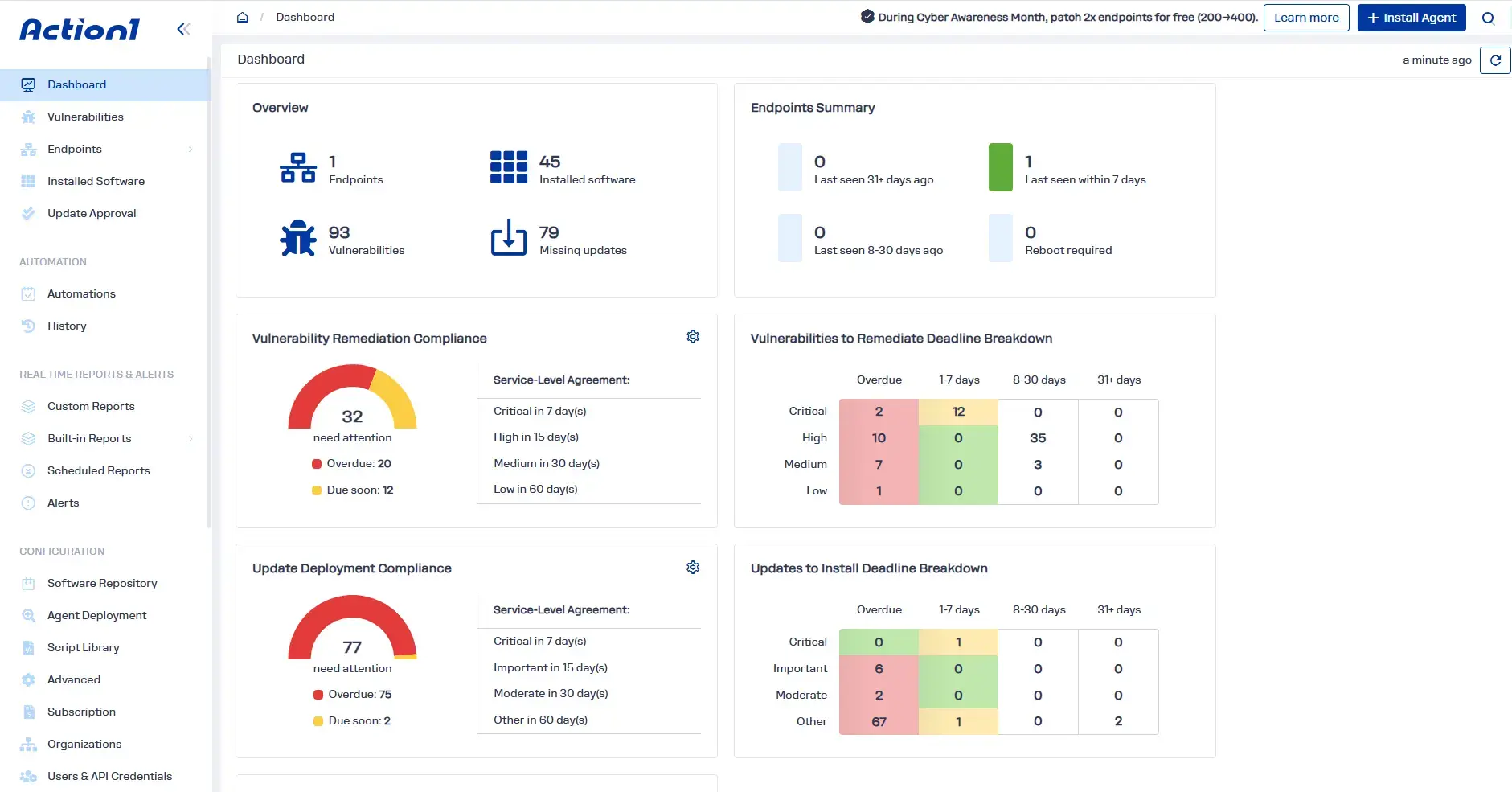
All of this is possible through these features the cloud-native platform offers you:
- Real-time vulnerability identification: See every vulnerable OS and third-party app on your Windows and macOS endpoints, with CVE numbers, CVSS scores, CISA KEV status, and known ransomware use, so you can judge the risk each vulnerability poses.
- Multiple vulnerability intelligence sources: Action1 pulls data from VulnCheck NVD++, NIST NVD, CISA KEV, MSRC, vendor release notes, and more, so you can prioritize effectively even when one source is delayed or incomplete.
- Real-time endpoint and software inventory: Know exactly which endpoints run which software versions, plus hardware details and configuration settings.
- Dynamic endpoint groups and custom attributes: Group endpoints by supported filters such as OS, name pattern, IP range, AD OU, and hardware. On Windows, you can also use up to 30 custom attributes to target higher-risk systems.
- Built-in remediation: Patch vulnerable software, install or uninstall applications in bulk, and remove unsupported or legacy versions from one console.
- Compensating controls: When no patch exists, apply controls with built-in or custom scripts, and document them centrally so every exception has a record.
- Autonomous patching with update rings: Updates move from inner to outer rings only after they meet your success criteria.
- Regular and emergency deployments: Patch on a schedule, even in each endpoint’s local time, or immediately when a flaw is actively exploited, with automatic or manual approval.
- Offline endpoint catch-up: Missed schedules run as soon as a laptop reconnects, from anywhere.
- Cross-OS and third-party patching: Patch Windows, macOS, and Linux operating systems, plus 360+ third-party apps on Windows and macOS, from one place.
- Private software repository: Action1 maintains its own secure repository instead of relying on community repos like Chocolatey or Winget, which can expose you to supply chain risk.
- P2P distribution: Large updates spread between endpoints on the same network, saving bandwidth without cache servers.
- Reboot control: Customize reboot prompts, and let users postpone up to a deadline you set.
- Built-in script library and custom scripts: Use ready-made scripts, like turning the firewall on or off or disabling USB, or run your own verified PowerShell, CMD, or Bash scripts.
- Real-time monitoring and SLA tracking: Dashboards show active vulnerabilities and patch compliance against your SLAs as they change, with alerts when software, hardware, or endpoint status changes.
- 100+ built-in, fully customizable reports: Create audit-ready reports and documentation in minutes, schedule them by email, or export them to CSV, including cached data from offline endpoints.
- Audit trail and REST API: Every action is logged, and the API feeds your vulnerability and patching data to your SIEM or XDR.
- Cloud-native architecture: No VPN, on-premises servers, or inbound firewall rules. Endpoints connect outbound over port 443, whether they’re in the office or remote.
- Browser-based remote access: Connect to any endpoint from your browser when you need to fix something by hand.
- MFA, SSO, and RBAC: Mandatory MFA and single sign-on through Entra ID, Okta, Google, or Duo protect access, and custom roles control who can approve, deploy, or only view.
- Multi-tenancy: Separate departments or MSP clients, each with its own endpoints, settings, and approvals.
- Free one-time vulnerability assessment: Assess an unlimited number of endpoints to see your exposure before you commit.
- Free for your first 200 endpoints: Fully featured, with no functional limits, and it never expires.
Put your new priority list to work today. Start free on your first 200 endpoints, fully featured and free forever, or watch the demo to see the full workflow.