If you are in a hurry – here is a TL;DR & Summary of main key points
- Third-party patch management keeps external applications secure, updated, and compliant
- Common third-party apps include Chrome, Firefox, Adobe Reader, Zoom, Slack, AutoCAD, Creative Cloud, and custom internal tools
- The process includes discovery, risk prioritization, packaging, deployment, monitoring, and remediation
- Manual patching is difficult because apps require different installers, scripts, testing, and update workflows
- Automation helps detect outdated apps, package updates, deploy silently, and track failed installations
- Risk-based prioritization ensures critical security updates are patched before lower-impact feature updates
- Enterprise patch management tools reduce manual work, improve compliance, and minimize exposure to known vulnerabilities
Common Examples of Third-Party Applications
The most widely used tools are:
- Productivity Essentials: Browsers (Chrome, Firefox), PDF viewers (Adobe Acrobat Reader), and communication tools (Zoom, Slack). These are the most common targets for attackers.
- Specialized Tools: Industry-specific software like AutoCAD, Creative Cloud, or accounting packages.
- Internal/Custom Apps: The hardest to manage are the in-house apps. They need custom packaging and rigorous testing before every update.
|
r/sysadmin • u/YungButDead “What are people using for patching and remediation? And I don’t mean windows patches, I mean specifically software patches for 3rd party applications that require little human input and are compatible with security standards like ISO27001, NIST or Cyber Essentials (UK)”. |
Why Patch Management Matters in Modern IT?
Patch management is no longer an option for operational security. It is a cornerstone of operational health. It addresses the primary entry point for cyberattacks, i.e., unpatched third-party applications.
Organizations manage hundreds of third-party apps across endpoints, servers, and even enterprise environments. They are making automated patching essential for maintaining a secure and stable infrastructure.
Keeping these applications patched is essential for:
- Reducing vulnerabilities: Outdated applications are consistently exploited as initial access points, for which patches are already available. Rapid patching closes these “exposure windows” before attackers can leverage them.
- Maintaining compliance: HIPAA, PCI-DSS, and SOC 2 require documented patching across all software. It helps organizations to protect sensitive data. A study shows a 32% decrease in compliance violations due to automation.
- Improving security resilience: A patched environment strengthens the defensive posture against evolving threats. It prevents breaches that cost U.S. organizations an average of $4.88 million in 2024.
- Supporting stable IT operations: Beyond security, patches often address bugs affecting reliability, not just security. These fixes ensure system uptime and prevent software-driven downtime.
- Accelerating remediation: Automation closes exposure faster than any manual process. Some studies show an 80% improvement in deployment speed compared to manual methods.
- Saving IT team time: Automated patching reclaims hours spent on manual packaging and verification. It acts as a “force multiplier,” shifting focus from routine maintenance to strategic security.
To balance speed with stability, IT teams often use phased deployments. They test patches on a pilot group before rolling them out to the entire production environment.
The Challenge of Third-Party Application Updates
Unlike OS patches, third-party updates come from hundreds of vendors on inconsistent schedules. They lack a unified delivery system. Each vendor has its own installer type, update frequency, and reboot requirements. All this forces IT teams into a grueling manual cycle.
To overcome the challenges, modern IT teams generally adopt these strategies:
- Standardized Packaging: Instead of manually building installers for every app, teams use pre-packaged libraries from patch management providers. This ensures the “silent install” parameters are already configured.
- Automated Testing: To handle testing and remediation failures, patches are first pushed to a small subset of non-critical devices. If no issues arise within 24–48 hours, the patch automatically moves to the rest of the fleet.
- User-Centric Notifications: To avoid disrupting productivity, teams use tools that allow users to snooze updates or set “quiet hours”. It ensures the deployment doesn’t happen during a presentation or a deadline.
- Closed-Loop Reporting: Dashboards simplify compliance tracking that provides real-time status. It shows exactly which machines are lagging and why a specific deployment failed.
- Automated Rollbacks: Some updates break custom workflows. Having a mechanism to revert to a previous snapshot or uninstall a specific version acts as a safety net. This prevents localized issues from becoming site-wide outages.
In simple terms, the above strategies help IT teams shift from “manual packaging” to “automated orchestration”. They move from being reactive firefighters to proactive gatekeepers.
The Need for Automation and Unified Management
Automation handles the steps that do not need human judgment. A consolidated platform brings IT and security teams onto shared data and operational workflows.
A consolidated approach replaces fragmented tools with centralized visibility. This allows IT and security teams to:
- Share Data and Workflows: Instead of security sending spreadsheets to IT, both teams work from a consistent view of device inventory and patch status.
- Align Priorities: By integrating vulnerability monitoring with patch deployment, teams can prioritize fixes. They do this based on actual risk and business impact, and not vendor release dates.
- Simplify Compliance: Centralized dashboards automate the logs for GDPR or SOC 2 audits. This proves consistent hardening across the entire fleet.
Automation transforms patching into a reliable, self-sustaining loop that reduces organizational risk:
- Machine-Speed Defense: Automated solutions can reduce the time to patch from over 30 days to less than a week. This closes security gaps before attackers can act.
- Eliminating Human Error: Automation ensures patches are applied consistently across thousands of endpoints. This prevents minor mistakes such as missed devices that often lead to deeper breaches.
- Operational Resilience: Advanced platforms can automate complex pre- and post-patch tasks. They include creating snapshots, managing ITSM tickets, and orchestrating reboots.
- Team Productivity: By handling routine tasks, automation saves IT teams an estimated 10/25 hours per week. This allows them to focus on high-level technical initiatives.
What are the Key Business Drivers for Third-Party Patch Management?
They are the ones that shift the focus from routine maintenance to strategic risk reduction and cost efficiency. By moving away from manual updates, organizations achieve four major business outcomes:
Strengthening organizational resilience
Continuous monitoring detects exposure as it emerges and directs efforts toward the highest-risk vulnerabilities. Integrated remediation closes the gap between detection and action.
Improving it and security alignment
A unified platform puts IT operations and security teams on shared workflows. When vulnerability data and patch deployment live in the same system, there is no need for manual coordination between finding and fixing.
Increasing operational agility
Real-time intelligence enables faster decisions. Automation means the response to new CVEs begins immediately. It is not when a technician initiates it.
Reducing costs and patching overhead
Automated packaging, testing, and deployment end the most time-consuming manual steps. Centralized management reduces per-client overhead. Built-in compliance reporting removes the manual effort of audit preparation.
What are the Most Common Third-Party Patching Pain Points?
The most common pain points in third-party patching stem from the sheer volume of applications. They derive from the fragmented nature of vendor updates. They all fall outside the unified systems of major operating systems.
Manual packaging and deployment
Manual patching requires sourcing, packaging, and publishing each update individually. It is slow, inconsistent, and error-prone. The remediation speed depends entirely on technician availability.
Fragmented tools and workflows
Most environments separate endpoint management, security monitoring, and vulnerability reporting. They do the same with patch publishing and compliance dashboards across different systems. Every handoff adds latency and creates gaps in where tasks fall through.
Lack of visibility
Teams need real-time insight into which systems are missing updates and which updates are critical. They need to know which applications are vulnerable, which patches failed, or which devices are noncompliant. Without it, teams make patching decisions on incomplete data.
Delayed patch rollout
The gap between patch availability and deployment is exactly where that exploitation occurs. Without severity-based routing, everything moves at the same pace regardless of urgency.
|
34% |
increase in vulnerability exploitation was reported in 2025 as an initial attack vector. Source |
Managing multiple tenants or environments
Without centralized tools, managing third-party patching across many client environments means duplicating effort. It ends with maintaining separate configurations per account, which does not scale for MSPs.
To reduce the above headaches, many teams move to risk-based prioritization. They focus first on the highest exploitability apps rather than trying to patch everything at once.
How does Third-Party Patch Management Integrate with Existing Enterprise Tools?
The biggest headache with third-party patching is that there is no “one-size-fits-all” solution. Unlike Windows or macOS updates, each third-party app follows its own rules. They create several critical friction points:
ConfigMgr Integration
Integration automates creation and deployment for third-party patches through ConfigMgr’s software update model. It is extending coverage to third-party apps while keeping existing approval processes and deployment infrastructure intact.
|
r/SCCM • u/ryokogirle “We have a third party anti-virus that says the patch is critical and ALL systems require it- and I need to be able to speak to how Microsoft Updates, being pushed by a Microsoft product are the definitive source of the “required” flag; but I can’t seem to find anything other than vague references to WMI and WUA… I guess I’m asking how does Windows Update (and thereby SCCM) determine what is a “required” patch? What sets that status?”. |
WSUS Integration
Third-party updates can be published through WSUS. They flow into existing Microsoft update management processes. They include approvals, group policies, and deployment schedules, without a parallel system.
Intune Integration
Intune integration manages application updates within modern endpoint management workflows. It uses an Entra ID Enterprise application, app registration, and the Intune Management Extension on the client side.
Working Within Existing Workflows
Effective third-party patch management extends coverage into tools already deployed. It reduces fragmentation rather than adding to it. The goal is to have a single workflow covering all applications. It is to avoid having separate processes per application category.
How does Third-Party Patch Management Support Security and Vulnerability Management?
While vulnerability management identifies the gaps, patch management provides the treatment by closing them. Attackers use security gaps as entry points.
|
46% |
share of organizations that pay ransom after a ransomware attack. Source |
Third-party patch management supports these broader security disciplines in five critical ways:
Continuous Vulnerability Monitoring
It identifies outdated or vulnerable applications in real time. It surfaces endpoints immediately that become newly vulnerable due to a disclosed CVE.
CVE Reporting and Analytics
Vulnerability reporting maps installed versions to published CVEs. It gives teams clear visibility into which updates address specific known risks. The analytics show which applications carry the most open CVEs and how remediation progress is trending.
Real-Time Risk Scoring and Prioritization
A CVSS 9.8 remote code execution vulnerability is not the same risk as a CVSS 4.3 information disclosure flaw. Real-time scoring routes effort toward the exposures that matter most.
Integrated Remediation
When detection and deployment share the same platform, the path from vulnerability to fix is direct. No manual coordination between systems, no latency from tool handoffs.
Threat Detection and Response Alignment
Consistent patched endpoints reduce the available attack surface. They strengthen detection and response. They do it by eliminating the low-hanging attack paths that threat actors rely on for initial access.
Read more: Automated Patch Management – Risks & Best Practices
How do Reporting, Dashboards, and Compliance Improve Patch Management?
Reporting and dashboards are the control center of the entire patch management strategy. They transform raw and fragmented data into actionable insights. This ensures that IT teams focus on the right risks and can prove their security posture to auditors.
Patch compliance reporting
Reporting must show whether patches were successfully installed and not just deployed. Compliance dashboards give IT and security leaders a current and accurate view. It shows what is installed, pending, failed, and noncompliant.
Visual reporting
Complex ConfigMgr data becomes easy to read through trend lines, compliance rate charts, and risk exposure graphs. Visual reporting communicates operational status to managers and clients, not just technicians.
Identifying unpatched systems
Reports must surface which specific devices are missing required updates. Targeted remediation requires knowing exactly which endpoints are exposed.
Tracking failed deployments
Detailed failure logs with diagnostic context (offline device, configuration conflict, package issue). It allows faster corrective action. A failed deployment that surfaces immediately is addressed in hours. Imagine the one that appears in a monthly report and has been an open vulnerability for weeks.
Customizable dashboards
Security teams need CVE coverage data. IT operations need deployment success rates. Compliance officers need a framework-aligned documentation. Customizable dashboards let each team work from a view relevant to their function.
What should an Application Catalog Cover in Third-Party Patch Management?
A comprehensive application catalog for third-party patch management is more than a software list. It is a curated library of metadata and pre-packaged installers. It allows IT teams to move from discovery to remediation without manual packaging. To be effective, an application catalog should cover these key areas:
Broad third-party application support
Coverage must include both commonly deployed apps and custom tools used in specific industries or workflows.
Popular software examples
Adobe Acrobat Reader and Google Chrome represent the minimum baseline. Both are near-universal apps in enterprise environments. They are consistently targeted in exploitation campaigns.
|
CVE-2026-34621 |
is an actively exploited flaw in Adobe Acrobat Reader. Source |
Specialized and line-of-business applications
Organizations running internally developed software need patching alongside coverage of commercial software. The patching program should cover the full program, not a curated subset.
Updating already-installed applications
Patches must apply to applications regardless of how they were originally installed. It doesn’t matter if it was through the management platform, by a technician, or by an end user. Coverage that only applies to platform-deployed applications leaves unsanctioned installs unmanaged.
Quick Tip? When you are evaluating a solution, ask how quickly their catalog reflects new vendor releases. A platform that takes weeks to package a critical browser update leaves you exposed.
How should Organizations Control Automation and Deployment Strategy?
To maintain stability during automation, organizations should move away from “all-at-once” patching. They should go toward a phased orchestration strategy.
Controlling automation isn’t about doing everything instantly. It’s about creating a repeatable and low-risk workflow. This workflow must prevent failures before they reach the entire company. Here is how to structure that control:
Scheduled automatic deployments
Automation publishes and deploys updates on a defined schedule. It ensures patches do not wait in a queue for manual initiation. Once configured, schedules run regardless of team workload.
Update rings
Staged rollouts send patches to inner rings first. Successful deployments advance to the next ring, and failures stop there. Before reaching the full environment, you can catch problems in a small group.
Delay times for testing
Configured delays between ring advancements give teams time to validate patches. Before broader rollout, they can balance speed with stability. They do it without requiring manual oversight at each stage.
Severity-based deployment
Critical patches with active exploitation take an accelerated path. Routine updates follow the full ring progression with standard delays. Deployment speed reflects risk level, but do not update the release order.
Same-day patch availability
Patches can be available in the management platform the same day a vendor releases a new version. Actual rollout timing depends on configured rings, delay times, and approval policies.
How do Operational Resilience and Remediation Workflows Support Patch Management?
Operational resilience and remediation workflows act as the fail-safe infrastructure for patch management. They ensure that updates don’t just happen. These updates happen with a clear path to recovery if something goes wrong.
Monitoring patch status
Real-time monitoring confirms deployment progress and surfaces failures as they occur. It also identifies endpoints that missed a deployment window and can be caught on the next cycle.
Handling patch failures
Failures should surface immediately with diagnostic context. It’s too late if they appear at the next monthly report. A failure that appears immediately is addressed in hours. As mentioned above, a failure that was waiting for weeks has been an open vulnerability the entire time.
Rollback readiness
Retention settings keep prior application versions available. This way, when a patch causes instability, rollback to a known-good state takes minutes. No need to do a full reinstallation.
Continuous improvement
Analysis of failure rates, compliance gaps, and deployment timing produces data. Teams use this data to refine rings, schedules, and processes over time. This turns operational history into process improvement rather than just incident records.
What are the Platform-Level Benefits of Third-Party Patch Management?
A platform-level approach provides a single source of truth that unifies security and IT operations. No more managing hundreds of individual vendor updates manually. A unified platform standardizes the entire lifecycle across diverse endpoints.
Key platform-level benefits include:
Unified it and security operations
Platforms allow administrators to view the configuration of every endpoint. It also shows pending patches regardless of location, domain, or operating system.
By integrating OS, third-party, and even firmware patching into one policy framework, organizations eliminate the gap. It is where “OS dashboards stay green” while critical apps remain vulnerable.
Autonomous operations
Automated scanning, prioritization, deployment, and verification run consistently without manual initiation at each step. It improves both speed and consistency.
Real-time intelligence
Continuously updated vulnerability and compliance data support faster decisions. It speeds up the response to changing risk conditions without relying on outdated scan results.
Workflow streamlining
Integration with ConfigMgr, WSUS, and Intune eliminates parallel patching workflows. The full software estate is managed through familiar processes.
Cost savings
Organizations making extensive use of security AI and automation incurred an average of $2.2 million less in breach costs in 2024. Centralized automation reduces labor overhead; built-in reporting reduces audit preparation time.
How do Support, Onboarding, and Customer Enablement Strengthen Patch Management?
All act as the “force multipliers” that turn a software buy into a mature security operation. They ensure that a platform’s technical capabilities are fully utilized.
Tailored Onboarding
Skilled engineers configure app catalogs, update rings, and approval workflows. They align these to the specific environment. This accelerates time-to-value beyond that of a generic setup.
In-House Support
Multi-channel availability includes email, live chat, phone, and forums. It ensures teams are not blocked on production issues while endpoints remain exposed.
Knowledge Base Resources
Self-service documentation covers configuration, integrations, and troubleshooting. It reduces dependency on support and enables faster platform optimization.
Training And Certifications
Structured training from introductory to expert level builds a consistent platform capability. Certifications provide a defined way to prove competency.
Community And Partner Ecosystem
Partners extend the platform through managed services, consulting, and integrations. This connects customers with expertise in specific industries, compliance frameworks, and deployment scenarios.
What Customer Success and Adoption Signals Matter?
Measure customer success by how the tool moves an organization from “reactive firefighting” to “proactive defense.” The most critical signals revolve around velocity, coverage, and reduced manual effort. Here are the key signals that matter:
Customer trust
A platform trusted by over 10,100 customers validated across diverse environments, industries, and compliance requirements. It is a more reliable signal than vendor feature claims alone.
Customer feedback
Check consistent themes in customer feedback. From automation-led reduced manual work, simplified onboarding, and responsive support. It also includes improved vulnerability visibility and compliance reporting that withstands audits.
Practical value for its teams
The strongest value comes from platforms that automate complex tasks. And it happens while keeping control over the deployment strategy. So, speed and safety are not a tradeoff.
What are the Best Practices for Third-Party Patch Management?
Third-party patch management must focus on balancing speed of protection with system stability. Third-party apps are prone to compatibility issues, so the goal is to create a repeatable and low-friction process.
Establish visibility first
Identify all installed applications and detect vulnerable versions. Understand coverage and compliance gaps before configuring any deployment policy.
Prioritize based on risk
Use CVE data, CVSS scoring, and CISA’s KEV catalog. Address exploited vulnerabilities first on an accelerated path. do not mix them into the standard update queue.
Automate repeatable work
Automate packaging, publishing, and routine deployment. Reserve manual approval only for environments where automated deployment introduces unacceptable operational risk.
Test before broad rollout
Use update rings and delay times. Define success thresholds and ring advancement criteria before deploying. Implement this practice but not after a problem has already occurred in production.
Integrate with existing tools
Use ConfigMgr, WSUS, and Intune integrations. Avoid adding a separate patching system that runs parallel to the existing infrastructure.
Monitor continuously
Track deployment success, failures, vulnerability exposure, and compliance in real time. Set alerts for failed deployments so open vulnerabilities surface immediately.
Prepare for rollback
Configure retention settings and define the recovery process. Test rollback procedures before they are needed under operational pressure.
Support long-term improvement
Review failure rates and compliance trends regularly. Refine rings and schedules based on operational data rather than initial assumptions.
Bonus tip! Avoid “all-at-once” rollouts, which can lead to company-wide outages. Use a tiered schedule: pilot, early-adopters, and then production.
Read Full Story: Lincoln City Libraries Saves 40 Hours on Third-Party Patching and Enhances Security
How can You Choose the Right Third-Party Patch Management Solution?
It requires looking beyond basic OS updates to ensure the tool can handle the unique packaging and testing needs of non-native applications.
What application coverage do you need?
Verify coverage against your actual installed estate. This includes specialized and line-of-business applications. do not forget to confirm how quickly new versions are added after vendor release.
|
r/sysadmin • u/GeneMoody-Action1 “The first thing you will have to drop is “All” there is no such things as an application that updates all third party, because what people need third party is so vast in business land, that there is no way to maintain it all. So no matter what you do, there will likely be some manual packaging and mitigation”. |
Which endpoint management tools must it integrate with?
When exploring, confirm native, maintained integration with ConfigMgr, WSUS, or Intune. double-check about community connectors that may lag platform updates.
How much automation control do you require?
Define the balance between automation and oversight per environment type. Confirm the platform supports both models simultaneously (at the device, site, or client level).
What reporting and compliance needs should it support?
Identify applicable frameworks, such as HIPAA, PCI-DSS, SOC 2, and NIST. Verify that the report outputs satisfy auditors and not just technicians.
How important are support, onboarding, and documentation?
For a tool running continuously across production, supporting responsiveness and documentation quality are operational requirements. They are not considered as preferences.
Pro Tip: During your evaluation, perform a “First-Pass Success” test in your own environment. A tool that fails to install a common app like Chrome on your specific hardware configuration will likely cause significant manual rework later.
What are the Core Capabilities of an Advanced Third-Party Patch Management Solution?
Solutions that go beyond simple software delivery to provide a comprehensive and automated ecosystem for risk reduction. They act as an intelligent bridge between vulnerability detection and system hardening.
|
r/sysadmin • u/Sh3rL0cK01 “What is everyone using to patch 3rd party software. From my research so far there doesn’t seem to any one product that will patch anything and everything. is that true or is there something I am missing? I know there is always powershell but looking for something that has some more visiblity as to what is installed what versions and what needs to be patched. Even if it is a combo of packages, just wondering what everyone else is doing?” |
The core capabilities include:
Automated packaging
Automates sourcing, configuring, and preparing application updates for deployment. All this eliminates the per-application manual effort, making third-party patching unsustainable at scale.
Automated testing support
Delay times and ring-based advancement validate updates before broad deployment. It ensures testing happens consistently rather than being skipped under time pressure.
Automated publishing
Updates are published automatically on a defined schedule through ConfigMgr, WSUS, or Intune. There is no need for a separate deployment mechanism.
Dynamic deployment
Critical patches take an accelerated path. Routine updates progress through full ring validation. Deployment speed reflects risk and not release order.
Customization options
Installation behavior, deployment timing, and update handling are adjustable per environment. These ensure updates install correctly across diverse endpoint configurations.
User notifications
Interactive notifications inform users of pending updates. It reboots requirements and provides options to defer. It doesn’t force changes without warning.
Rollback and retention
Prior application versions remain available for recovery. This is very useful. These rollbacks return an endpoint to a known-good state in minutes. It prevents your organization from needing a full reinstallation.
Multi-tenant management
A central portal manages multiple tenants with full account isolation. This supports independently configurable policies per tenant and aggregated reporting across all environments.
How Action1 Helps with Third-Party Patch Management?
Action1 covers the full third-party patching lifecycle from a single cloud-native console — discovery, prioritization, staged deployment, verification, and compliance reporting without separate tools for each stage.
Common Examples of Third-Party Applications
The most widely used tools are:
- Productivity Essentials: Browsers (Chrome, Firefox), PDF viewers (Adobe Acrobat Reader), and communication tools (Zoom, Slack). These are the most common targets for attackers.
- Specialized Tools: Industry-specific software like AutoCAD, Creative Cloud, or accounting packages.
- Internal/Custom Apps: The hardest to manage are the in-house apps. They need custom packaging and rigorous testing before every update.
|
r/sysadmin • u/YungButDead “What are people using for patching and remediation? And I don’t mean windows patches, I mean specifically software patches for 3rd party applications that require little human input and are compatible with security standards like ISO27001, NIST or Cyber Essentials (UK)”. |
Why Patch Management Matters in Modern IT?
Patch management is no longer an option for operational security. It is a cornerstone of operational health. It addresses the primary entry point for cyberattacks, i.e., unpatched third-party applications.
Organizations manage hundreds of third-party apps across endpoints, servers, and even enterprise environments. They are making automated patching essential for maintaining a secure and stable infrastructure.
Keeping these applications patched is essential for:
- Reducing vulnerabilities: Outdated applications are consistently exploited as initial access points, for which patches are already available. Rapid patching closes these “exposure windows” before attackers can leverage them.
- Maintaining compliance: HIPAA, PCI-DSS, and SOC 2 require documented patching across all software. It helps organizations to protect sensitive data. A study shows a 32% decrease in compliance violations due to automation.
- Improving security resilience: A patched environment strengthens the defensive posture against evolving threats. It prevents breaches that cost U.S. organizations an average of $4.88 million in 2024.
- Supporting stable IT operations: Beyond security, patches often address bugs affecting reliability, not just security. These fixes ensure system uptime and prevent software-driven downtime.
- Accelerating remediation: Automation closes exposure faster than any manual process. Some studies show an 80% improvement in deployment speed compared to manual methods.
- Saving IT team time: Automated patching reclaims hours spent on manual packaging and verification. It acts as a “force multiplier,” shifting focus from routine maintenance to strategic security.
To balance speed with stability, IT teams often use phased deployments. They test patches on a pilot group before rolling them out to the entire production environment.
What are The Challenge of Third-Party Application Updates?
Unlike OS patches, third-party updates come from hundreds of vendors on inconsistent schedules. They lack a unified delivery system. Each vendor has its own installer type, update frequency, and reboot requirements. All this forces IT teams into a grueling manual cycle.
To overcome the challenges, modern IT teams generally adopt these strategies:
- Standardized Packaging: Instead of manually building installers for every app, teams use pre-packaged libraries from patch management providers. This ensures the “silent install” parameters are already configured.
- Automated Testing: To handle testing and remediation failures, patches are first pushed to a small subset of non-critical devices. If no issues arise within 24–48 hours, the patch automatically moves to the rest of the fleet.
- User-Centric Notifications: To avoid disrupting productivity, teams use tools that allow users to snooze updates or set “quiet hours”. It ensures the deployment doesn’t happen during a presentation or a deadline.
- Closed-Loop Reporting: Dashboards simplify compliance tracking that provides real-time status. It shows exactly which machines are lagging and why a specific deployment failed.
- Automated Rollbacks: Some updates break custom workflows. Having a mechanism to revert to a previous snapshot or uninstall a specific version acts as a safety net. This prevents localized issues from becoming site-wide outages.
In simple terms, the above strategies help IT teams shift from “manual packaging” to “automated orchestration”. They move from being reactive firefighters to proactive gatekeepers.
The Need for Automation and Unified Management
Automation handles the steps that do not need human judgment. A consolidated platform brings IT and security teams onto shared data and operational workflows.
A consolidated approach replaces fragmented tools with centralized visibility. This allows IT and security teams to:
- Share Data and Workflows: Instead of security sending spreadsheets to IT, both teams work from a consistent view of device inventory and patch status.
- Align Priorities: By integrating vulnerability monitoring with patch deployment, teams can prioritize fixes. They do this based on actual risk and business impact, and not vendor release dates.
- Simplify Compliance: Centralized dashboards automate the logs for GDPR or SOC 2 audits. This proves consistent hardening across the entire fleet.
Automation transforms patching into a reliable, self-sustaining loop that reduces organizational risk:
- Machine-Speed Defense: Automated solutions can reduce the time to patch from over 30 days to less than a week. This closes security gaps before attackers can act.
- Eliminating Human Error: Automation ensures patches are applied consistently across thousands of endpoints. This prevents minor mistakes such as missed devices that often lead to deeper breaches.
- Operational Resilience: Advanced platforms can automate complex pre- and post-patch tasks. They include creating snapshots, managing ITSM tickets, and orchestrating reboots.
- Team Productivity: By handling routine tasks, automation saves IT teams an estimated 10/25 hours per week. This allows them to focus on high-level technical initiatives.
What are the Key Business Drivers for Third-Party Patch Management?
They are the ones that shift the focus from routine maintenance to strategic risk reduction and cost efficiency. By moving away from manual updates, organizations achieve four major business outcomes:
Strengthening organizational resilience
Continuous monitoring detects exposure as it emerges and directs efforts toward the highest-risk vulnerabilities. Integrated remediation closes the gap between detection and action.
Improving it and security alignment
A unified platform puts IT operations and security teams on shared workflows. When vulnerability data and patch deployment live in the same system, there is no need for manual coordination between finding and fixing.
Increasing operational agility
Real-time intelligence enables faster decisions. Automation means the response to new CVEs begins immediately. It is not when a technician initiates it.
Reducing costs and patching overhead
Automated packaging, testing, and deployment end the most time-consuming manual steps. Centralized management reduces per-client overhead. Built-in compliance reporting removes the manual effort of audit preparation.
What are the Most Common Third-Party Patching Pain Points?
The most common pain points in third-party patching stem from the sheer volume of applications. They derive from the fragmented nature of vendor updates. They all fall outside the unified systems of major operating systems.
Manual packaging and deployment
Manual patching requires sourcing, packaging, and publishing each update individually. It is slow, inconsistent, and error-prone. The remediation speed depends entirely on technician availability.
Fragmented tools and workflows
Most environments separate endpoint management, security monitoring, and vulnerability reporting. They do the same with patch publishing and compliance dashboards across different systems. Every handoff adds latency and creates gaps in where tasks fall through.
Lack of visibility
Teams need real-time insight into which systems are missing updates and which updates are critical. They need to know which applications are vulnerable, which patches failed, or which devices are noncompliant. Without it, teams make patching decisions on incomplete data.
Delayed patch rollout
The gap between patch availability and deployment is exactly where that exploitation occurs. Without severity-based routing, everything moves at the same pace regardless of urgency.
| 34% | increase in vulnerability exploitation was reported in 2025 as an initial attack vector. Source |
Managing multiple tenants or environments
Without centralized tools, managing third-party patching across many client environments means duplicating effort. It ends with maintaining separate configurations per account, which does not scale for MSPs.
To reduce the above headaches, many teams move to risk-based prioritization. They focus first on the highest exploitability apps rather than trying to patch everything at once.
How does Third-Party Patch Management Integrate with Existing Enterprise Tools?
The biggest headache with third-party patching is that there is no “one-size-fits-all” solution. Unlike Windows or macOS updates, each third-party app follows its own rules. They create several critical friction points:
ConfigMgr Integration
Integration automates creation and deployment for third-party patches through ConfigMgr’s software update model. It is extending coverage to third-party apps while keeping existing approval processes and deployment infrastructure intact.
|
r/SCCM • u/ryokogirle “We have a third party anti-virus that says the patch is critical and ALL systems require it- and I need to be able to speak to how Microsoft Updates, being pushed by a Microsoft product are the definitive source of the “required” flag; but I can’t seem to find anything other than vague references to WMI and WUA… I guess I’m asking how does Windows Update (and thereby SCCM) determine what is a “required” patch? What sets that status?”. |
WSUS Integration
Third-party updates can be published through WSUS. They flow into existing Microsoft update management processes. They include approvals, group policies, and deployment schedules, without a parallel system.
Intune Integration
Intune integration manages application updates within modern endpoint management workflows. It uses an Entra ID Enterprise application, app registration, and the Intune Management Extension on the client side.
Working Within Existing Workflows
Effective third-party patch management extends coverage into tools already deployed. It reduces fragmentation rather than adding to it. The goal is to have a single workflow covering all applications. It is to avoid having separate processes per application category.
How does Third-Party Patch Management Support Security and Vulnerability Management?
While vulnerability management identifies the gaps, patch management provides the treatment by closing them. Attackers use security gaps as entry points.
| 46% | share of organizations that pay ransom after a ransomware attack. Source |
Third-party patch management supports these broader security disciplines in five critical ways:
Continuous Vulnerability Monitoring
It identifies outdated or vulnerable applications in real time. It surfaces endpoints immediately that become newly vulnerable due to a disclosed CVE.
CVE Reporting and Analytics
Vulnerability reporting maps installed versions to published CVEs. It gives teams clear visibility into which updates address specific known risks. The analytics show which applications carry the most open CVEs and how remediation progress is trending.
Real-Time Risk Scoring and Prioritization
A CVSS 9.8 remote code execution vulnerability is not the same risk as a CVSS 4.3 information disclosure flaw. Real-time scoring routes effort toward the exposures that matter most.
Integrated Remediation
When detection and deployment share the same platform, the path from vulnerability to fix is direct. No manual coordination between systems, no latency from tool handoffs.
Threat Detection and Response Alignment
Consistent patched endpoints reduce the available attack surface. They strengthen detection and response. They do it by eliminating the low-hanging attack paths that threat actors rely on for initial access.
Read more: Automated Patch Management – Risks & Best Practices
How do Reporting, Dashboards, and Compliance Improve Patch Management?
Reporting and dashboards are the control center of the entire patch management strategy. They transform raw and fragmented data into actionable insights. This ensures that IT teams focus on the right risks and can prove their security posture to auditors.
Patch compliance reporting
Reporting must show whether patches were successfully installed and not just deployed. Compliance dashboards give IT and security leaders a current and accurate view. It shows what is installed, pending, failed, and noncompliant.
Visual reporting
Complex ConfigMgr data becomes easy to read through trend lines, compliance rate charts, and risk exposure graphs. Visual reporting communicates operational status to managers and clients, not just technicians.
Identifying unpatched systems
Reports must surface which specific devices are missing required updates. Targeted remediation requires knowing exactly which endpoints are exposed.
Tracking failed deployments
Detailed failure logs with diagnostic context (offline device, configuration conflict, package issue). It allows faster corrective action. A failed deployment that surfaces immediately is addressed in hours. Imagine the one that appears in a monthly report and has been an open vulnerability for weeks.
Customizable dashboards
Security teams need CVE coverage data. IT operations need deployment success rates. Compliance officers need a framework-aligned documentation. Customizable dashboards let each team work from a view relevant to their function.
What should an Application Catalog Cover in Third-Party Patch Management?
A comprehensive application catalog for third-party patch management is more than a software list. It is a curated library of metadata and pre-packaged installers. It allows IT teams to move from discovery to remediation without manual packaging. To be effective, an application catalog should cover these key areas:
Broad third-party application support
Coverage must include both commonly deployed apps and custom tools used in specific industries or workflows.
Popular software examples
Adobe Acrobat Reader and Google Chrome represent the minimum baseline. Both are near-universal apps in enterprise environments. They are consistently targeted in exploitation campaigns.
| CVE-2026-34621 | is an actively exploited flaw in Adobe Acrobat Reader. Source |
Specialized and line-of-business applications
Organizations running internally developed software need patching alongside coverage of commercial software. The patching program should cover the full program, not a curated subset.
Updating already-installed applications
Patches must apply to applications regardless of how they were originally installed. It doesn’t matter if it was through the management platform, by a technician, or by an end user. Coverage that only applies to platform-deployed applications leaves unsanctioned installs unmanaged.
Quick Tip? When you are evaluating a solution, ask how quickly their catalog reflects new vendor releases. A platform that takes weeks to package a critical browser update leaves you exposed.
How should Organizations Control Automation and Deployment Strategy?
To maintain stability during automation, organizations should move away from “all-at-once” patching. They should go toward a phased orchestration strategy.
Controlling automation isn’t about doing everything instantly. It’s about creating a repeatable and low-risk workflow. This workflow must prevent failures before they reach the entire company. Here is how to structure that control:
Scheduled automatic deployments
Automation publishes and deploys updates on a defined schedule. It ensures patches do not wait in a queue for manual initiation. Once configured, schedules run regardless of team workload.
Update rings
Staged rollouts send patches to inner rings first. Successful deployments advance to the next ring, and failures stop there. Before reaching the full environment, you can catch problems in a small group.
Delay times for testing
Configured delays between ring advancements give teams time to validate patches. Before broader rollout, they can balance speed with stability. They do it without requiring manual oversight at each stage.
Severity-based deployment
Critical patches with active exploitation take an accelerated path. Routine updates follow the full ring progression with standard delays. Deployment speed reflects risk level, but do not update the release order.
Same-day patch availability
Patches can be available in the management platform the same day a vendor releases a new version. Actual rollout timing depends on configured rings, delay times, and approval policies.
How do Operational Resilience and Remediation Workflows Support Patch Management?
Operational resilience and remediation workflows act as the fail-safe infrastructure for patch management. They ensure that updates don’t just happen. These updates happen with a clear path to recovery if something goes wrong.
Monitoring patch status
Real-time monitoring confirms deployment progress and surfaces failures as they occur. It also identifies endpoints that missed a deployment window and can be caught on the next cycle.
Handling patch failures
Failures should surface immediately with diagnostic context. It’s too late if they appear at the next monthly report. A failure that appears immediately is addressed in hours. As mentioned above, a failure that was waiting for weeks has been an open vulnerability the entire time.
Rollback readiness
Retention settings keep prior application versions available. This way, when a patch causes instability, rollback to a known-good state takes minutes. No need to do a full reinstallation.
Continuous improvement
Analysis of failure rates, compliance gaps, and deployment timing produces data. Teams use this data to refine rings, schedules, and processes over time. This turns operational history into process improvement rather than just incident records.
What are the Platform-Level Benefits of Third-Party Patch Management?
A platform-level approach provides a single source of truth that unifies security and IT operations. No more managing hundreds of individual vendor updates manually. A unified platform standardizes the entire lifecycle across diverse endpoints.
Key platform-level benefits include:
Unified it and security operations
Platforms allow administrators to view the configuration of every endpoint. It also shows pending patches regardless of location, domain, or operating system.
By integrating OS, third-party, and even firmware patching into one policy framework, organizations eliminate the gap. It is where “OS dashboards stay green” while critical apps remain vulnerable.
Autonomous operations
Automated scanning, prioritization, deployment, and verification run consistently without manual initiation at each step. It improves both speed and consistency.
Real-time intelligence
Continuously updated vulnerability and compliance data support faster decisions. It speeds up the response to changing risk conditions without relying on outdated scan results.
Workflow streamlining
Integration with ConfigMgr, WSUS, and Intune eliminates parallel patching workflows. The full software estate is managed through familiar processes.
Cost savings
Organizations making extensive use of security AI and automation incurred an average of $2.2 million less in breach costs in 2024. Centralized automation reduces labor overhead; built-in reporting reduces audit preparation time.
How do Support, Onboarding, and Customer Enablement Strengthen Patch Management?
All act as the “force multipliers” that turn a software buy into a mature security operation. They ensure that a platform’s technical capabilities are fully utilized.
Tailored Onboarding
Skilled engineers configure app catalogs, update rings, and approval workflows. They align these to the specific environment. This accelerates time-to-value beyond that of a generic setup.
In-House Support
Multi-channel availability includes email, live chat, phone, and forums. It ensures teams are not blocked on production issues while endpoints remain exposed.
Knowledge Base Resources
Self-service documentation covers configuration, integrations, and troubleshooting. It reduces dependency on support and enables faster platform optimization.
Training And Certifications
Structured training from introductory to expert level builds a consistent platform capability. Certifications provide a defined way to prove competency.
Community And Partner Ecosystem
Partners extend the platform through managed services, consulting, and integrations. This connects customers with expertise in specific industries, compliance frameworks, and deployment scenarios.
What Customer Success and Adoption Signals Matter?
Measure customer success by how the tool moves an organization from “reactive firefighting” to “proactive defense.” The most critical signals revolve around velocity, coverage, and reduced manual effort. Here are the key signals that matter:
Customer trust
A platform trusted by over 10,100 customers validated across diverse environments, industries, and compliance requirements. It is a more reliable signal than vendor feature claims alone.
Customer feedback
Check consistent themes in customer feedback. From automation-led reduced manual work, simplified onboarding, and responsive support. It also includes improved vulnerability visibility and compliance reporting that withstands audits.
Practical value for its teams
The strongest value comes from platforms that automate complex tasks. And it happens while keeping control over the deployment strategy. So, speed and safety are not a tradeoff.
What are the Best Practices for Third-Party Patch Management?
Third-party patch management must focus on balancing speed of protection with system stability. Third-party apps are prone to compatibility issues, so the goal is to create a repeatable and low-friction process.
Establish visibility first
Identify all installed applications and detect vulnerable versions. Understand coverage and compliance gaps before configuring any deployment policy.
Prioritize based on risk
Use CVE data, CVSS scoring, and CISA’s KEV catalog. Address exploited vulnerabilities first on an accelerated path. do not mix them into the standard update queue.
Automate repeatable work
Automate packaging, publishing, and routine deployment. Reserve manual approval only for environments where automated deployment introduces unacceptable operational risk.
Test before broad rollout
Use update rings and delay times. Define success thresholds and ring advancement criteria before deploying. Implement this practice but not after a problem has already occurred in production.
Integrate with existing tools
Use ConfigMgr, WSUS, and Intune integrations. Avoid adding a separate patching system that runs parallel to the existing infrastructure.
Monitor continuously
Track deployment success, failures, vulnerability exposure, and compliance in real time. Set alerts for failed deployments so open vulnerabilities surface immediately.
Prepare for rollback
Configure retention settings and define the recovery process. Test rollback procedures before they are needed under operational pressure.
Support long-term improvement
Review failure rates and compliance trends regularly. Refine rings and schedules based on operational data rather than initial assumptions.
Bonus tip! Avoid “all-at-once” rollouts, which can lead to company-wide outages. Use a tiered schedule: pilot, early-adopters, and then production.
Read Full Story: Lincoln City Libraries Saves 40 Hours on Third-Party Patching and Enhances Security
How can You Choose the Right Third-Party Patch Management Solution?
It requires looking beyond basic OS updates to ensure the tool can handle the unique packaging and testing needs of non-native applications.
What application coverage do you need?
Verify coverage against your actual installed estate. This includes specialized and line-of-business applications. do not forget to confirm how quickly new versions are added after vendor release.
|
r/sysadmin • u/GeneMoody-Action1 “The first thing you will have to drop is “All” there is no such things as an application that updates all third party, because what people need third party is so vast in business land, that there is no way to maintain it all. So no matter what you do, there will likely be some manual packaging and mitigation”. |
Which endpoint management tools must it integrate with?
When exploring, confirm native, maintained integration with ConfigMgr, WSUS, or Intune. double-check about community connectors that may lag platform updates.
How much automation control do you require?
Define the balance between automation and oversight per environment type. Confirm the platform supports both models simultaneously (at the device, site, or client level).
What reporting and compliance needs should it support?
Identify applicable frameworks, such as HIPAA, PCI-DSS, SOC 2, and NIST. Verify that the report outputs satisfy auditors and not just technicians.
How important are support, onboarding, and documentation?
For a tool running continuously across production, supporting responsiveness and documentation quality are operational requirements. They are not considered as preferences.
Pro Tip: During your evaluation, perform a “First-Pass Success” test in your own environment. A tool that fails to install a common app like Chrome on your specific hardware configuration will likely cause significant manual rework later.
What are the Core Capabilities of an Advanced Third-Party Patch Management Solution?
Solutions that go beyond simple software delivery to provide a comprehensive and automated ecosystem for risk reduction. They act as an intelligent bridge between vulnerability detection and system hardening.
|
r/sysadmin • u/Sh3rL0cK01 “What is everyone using to patch 3rd party software. From my research so far there doesn’t seem to any one product that will patch anything and everything. is that true or is there something I am missing? I know there is always powershell but looking for something that has some more visiblity as to what is installed what versions and what needs to be patched. Even if it is a combo of packages, just wondering what everyone else is doing?” |
The core capabilities include:
Automated packaging
Automates sourcing, configuring, and preparing application updates for deployment. All this eliminates the per-application manual effort, making third-party patching unsustainable at scale.
Automated testing support
Delay times and ring-based advancement validate updates before broad deployment. It ensures testing happens consistently rather than being skipped under time pressure.
Automated publishing
Updates are published automatically on a defined schedule through ConfigMgr, WSUS, or Intune. There is no need for a separate deployment mechanism.
Dynamic deployment
Critical patches take an accelerated path. Routine updates progress through full ring validation. Deployment speed reflects risk and not release order.
Customization options
Installation behavior, deployment timing, and update handling are adjustable per environment. These ensure updates install correctly across diverse endpoint configurations.
User notifications
Interactive notifications inform users of pending updates. It reboots requirements and provides options to defer. It doesn’t force changes without warning.
Rollback and retention
Prior application versions remain available for recovery. This is very useful. These rollbacks return an endpoint to a known-good state in minutes. It prevents your organization from needing a full reinstallation.
Multi-tenant management
A central portal manages multiple tenants with full account isolation. This supports independently configurable policies per tenant and aggregated reporting across all environments.
How Action1 Helps with Third-Party Patch Management?
Action1 covers the full third-party patching lifecycle from a single cloud-native console — discovery, prioritization, staged deployment, verification, and compliance reporting without separate tools for each stage.
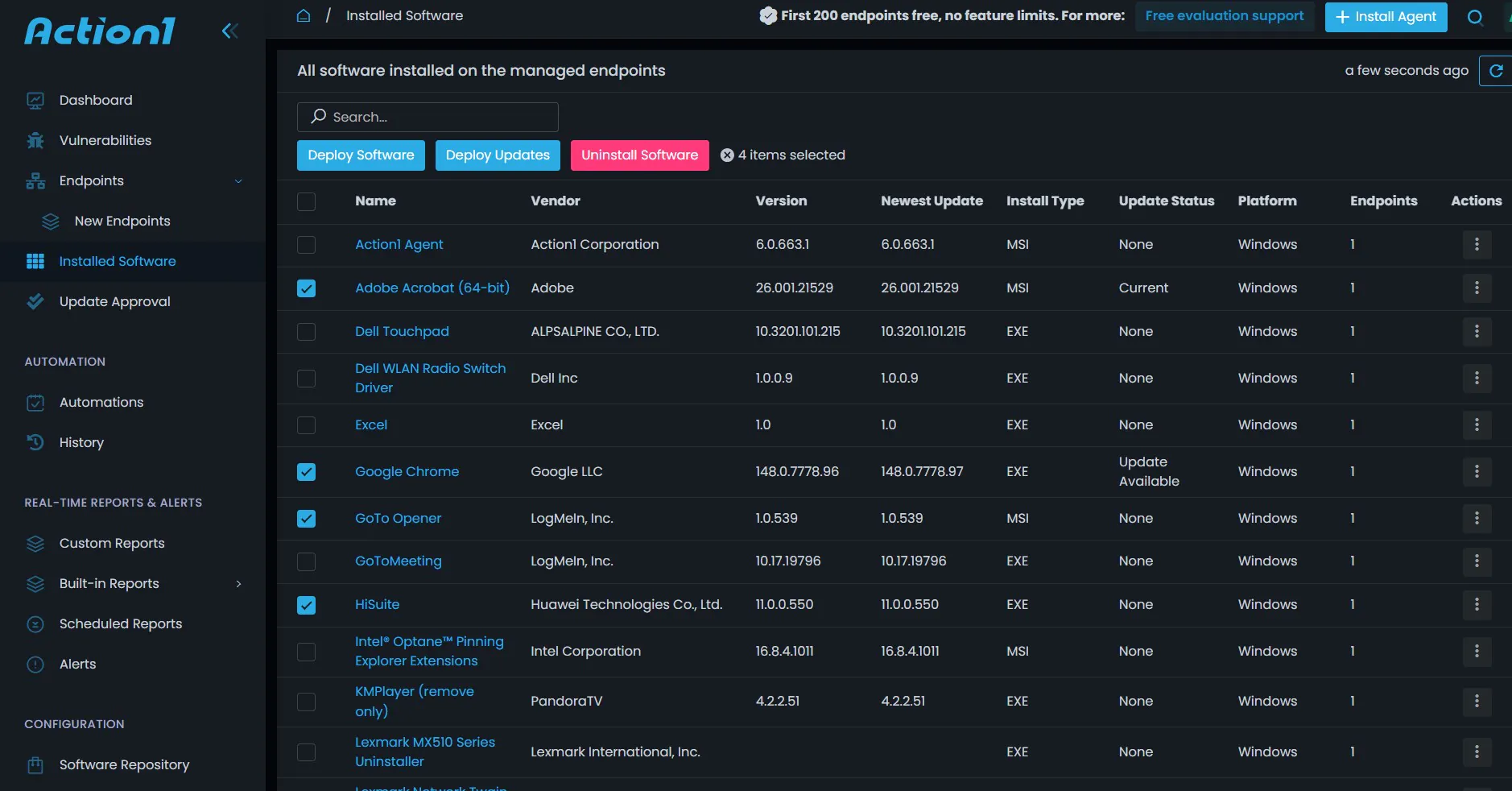
Action1 supports:
- Privately maintained software repository: Internally tested packages, not community-sourced feeds, eliminating the inconsistency of Chocolatey or Winget.
- 99% coverage of business-critical applications: Browsers, PDF readers, collaboration tools, remote access clients, patched through the same workflows as the OS.
- Autonomous update rings: Self-governing staged rollouts. Patches advance on success thresholds and stop automatically on failure.
- CVE-linked prioritization: Patches ranked by CVSS scores, CVE data, and CISA’s KEV catalog.
- Cross-platform coverage: Windows, macOS, and Linux from a single console.
- Multi-tenant console: Unified enterprise view with full client isolation. Policies are configurable by client, site, or device group.
- 100+ compliance report templates: Customizable, exportable, and backed by a full audit trail from detection through confirmed installation
- Free for the first 200 endpoints: Fully featured, no trial limits, no expiration.
|
r/msp • u/Lad_From_Lancs “I find the scripting function to be very useful and support when needed are always great and responsive to deal with as well”. |
What should You Check Before Rolling Out Third-Party Patch Management?
You must verify both your technical environment and your operational policies. Ensure updates don’t cause widespread business disruption.
Inventory your existing third-party applications
Complete a full discovery before configuring any policy. Include unsanctioned installs and legacy software in the list. Why? Because coverage gaps always start with inventory gaps.
Identify high-risk and business-critical software
Map both categories separately. High-CVE applications need fast patching. Business-critical applications need careful patching to avoid disruption. Both need defined handling before deployment begins.
|
48,448 |
new common IT security vulnerabilities and exposures (CVEs) were discovered by internet users in 2025. Source |
Define testing groups and deployment rings
Inner rings should represent the diversity of the production environment. Log examples for inner rings, if production includes specific configurations or integrations.
Confirm rollback and retention requirements
Define recovery time requirements and verify that the platform’s retention settings meet them. Test the rollback process under pressure before it is needed.
Align it, security and help desk teams
Patching affects all three teams. Get them on shared workflows, a shared dashboard, and a shared escalation process. This removes the friction that delays remediation.
What Mistakes Should You Avoid in Third-Party Patch Management?
Mistakes in patch management usually involve a set-it-and-forget-it mentality. The failing accounts for the human element of IT. To keep your environment stable and secure, avoid these pitfalls:
Automating patches without testing
Automation without ring validation removes the safety net. It is crucial because it catches compatibility issues before they reach production at scale.
Ignoring applications outside the standard catalog
Line-of-business and custom applications carry the same vulnerability risk as commercial software. If they are not in the catalog, they need a defined manual process. You cannot neglect them.
Relying on incomplete inventory data
Continuous discovery is necessary. Periodic sweeps miss applications installed between scan cycles.
Treating all patches with the same urgency
A critical CVE with active ransomware exploitation cannot wait in the same queue as a routine feature update. Severity-based routing is not optional for organizations.
Failing to monitor failed deployments
An undetected failed deployment leaves the endpoint exposed while appearing patched. It is the worst possible outcome for a patching program.
Quick Tip: Avoid using five different tools to patch five different app families. It leads to visibility gaps. Aim for a single platform that can manage your entire third-party catalog in one place.
How does Third-Party Patch Management Affect End Users?
Third-party patch management creates a balance between a secure organization and productive employees. For end users, the impact can range from completely invisible to highly disruptive. It depends on how the IT team manages the rollout.
Here is how it affects them:
Reducing update interruptions
Maintenance windows aligned to off-hours ensure patching does not interrupt productive work.
Using notifications to improve transparency
Users who understand what is being installed and have options such as deferring a reboot respond better. Knowing is better than users who experience unexplained changes.
Scheduling updates around work patterns
Different user populations have different schedules. Per-device-group maintenance windows accommodate shift workers, remote employees, and time zone differences.
Balancing security with productivity
Update rings catch application conflicts in a small group before they affect the broader workforce. It addresses the tension between fast patching and operational stability.
Improving trust in it-managed updates
Consistent, transparent, and minimal disruptive patching builds user confidence in the IT process over time. Disruption-driven resistance leads to deferred cooperation, including widening vulnerability windows.
What Metrics Should You Track for Third-Party Patch Management Success?
To move from basic maintenance to a mature security posture, you need to track both risk reduction and operational health.
The following KPis are the most critical for proving the success of a third-party patch management program:
Patch compliance rate
It is the percentage of endpoints running the current version of each managed application. Organizations must track it per application, device group, and client.
Time to deploy critical updates
Elapsed time from vendor release to confirmed installation across all managed endpoints. The increase in vulnerability exploitation compresses this window. It is the most direct security improvement available.
Number of vulnerable applications
It is the live count of applications running versions with known CVEs. It is a real-time measure of current attack surface exposure.
Failed deployment rate
Percentage of deployments that do not complete successfully. High rates indicate package quality issues, configuration problems, or infrastructure gaps.
Rollback frequency
How often are patches reversed post-deployment? Frequent rollbacks show testing processes are not catching compatibility issues before production.
Endpoint coverage by application
Which applications have full managed coverage, and which have gaps? are they from catalog limitations, policy exclusions, or unsanctioned installs outside the managed channel?
How can Third-Party Patch Management Support Zero Trust Security?
Third-party patch management is a core enabler of Zero Trust Security. It acts as the essential enforcement backbone for device health and compliance. In a Zero Trust model where no device is trusted by default, patch status serves as a critical signal for continuous verification.
Third-party patch management supports Zero Trust in several ways:
Reducing exploitable endpoint weaknesses
Unpatched third-party applications are documented and have exploitable weaknesses. They undermine device trust claims. Consistent patching removes them from the attack surface.
Improving device posture
Patch compliance is one of the most measurable components of device posture. It is a direct input to Zero Trust access decisions.
Supporting continuous verification
Zero Trust requires continuous verification. Continuous vulnerability monitoring updates device posture data in real time. It does not rely on scheduled assessments.
Strengthening vulnerability-based access decisions
Access policies based on patch compliance need accurate, real-time compliance data. Third-party patch management provides the reliable inputs that make these policies actionable.
Connecting patch status to broader risk management
Exposed patch compliance data through APis or SIEM integrations is a risky organizational decision. The data is no longer a siloed operational metric.
How should Small, Mid-Sized, and Enterprise Teams Approach Third-Party Patching Differently?
The approach to third-party patching changes as you move from small shops to massive enterprises. How? From “everyone does everything” to “compliance is king.” Scaling your strategy is about moving from manual visibility to automated orchestration.
Small teams need simplicity and automation
One to three-person IT teams need automation that runs reliably without constant attention. It must have out-of-the-box catalog coverage and a free tier that fits constrained budgets.
Mid-sized teams need scalable workflows
Automation that handles increasing volume without proportional administrative overhead. It can be from 200 to 2,000 endpoints without requiring reconfiguration.
Enterprises need multi-tenant and compliance visibility
Multi-tenant management with full account isolation, granular RBAC, and compliance reporting mapped to specific regulatory frameworks. Aggregated executive reporting alongside operational separation between units.
Managed service providers need centralized control
A single console for all client environments. Such as per-client policy customization, client-ready compliance reports, and pricing models. They must not scale cost linearly with endpoint count.
Regulated industries need stronger reporting
HIPAA, PCI-DSS, and SOC 2 require documented patch timelines and audit-ready records. The platform must produce outputs that satisfy auditors. It can be per-device compliance history, remediation timelines, and framework-mapped gap analysis.
What is the Future of Third-Party Patch Management?
Third-party patch management is shifting from manual maintenance to autonomous resilience. The gap between vulnerability discovery and exploitation continues to shrink. Today, the industry is moving toward systems that can detect, test, and heal themselves without human intervention.
Here are the key trends defining the next generation of patching:
More ai-driven prioritization
Static CVSS scoring will give way to dynamic prioritization. It will incorporate real-time exploitation data, attacker campaign tracking, and environmental context. It will also handle the CVE volume that has made manual prioritization unworkable.
Greater automation across it and security
Detection, prioritization, deployment, verification, and compliance documentation will increasingly run as a continuous automated workflow. They will no longer be a series of manually initiated steps.
Real-time endpoint intelligence
Patch compliance and vulnerability exposure will reflect the current state of every endpoint continuously. It will enable faster response to newly disclosed CVEs. This will create more accurate device posture for Zero Trust decisions.
Deeper integration with security platforms
Patch compliance data will become an active input to SIEM, XDR, and vulnerability management platforms. It will not remain a siloed metric requiring manual correlation.
More proactive vulnerability remediation
The Verizon 2025 DBIR’s findings reflect a threat environment where reactive patching is no longer viable. Proactive, automated, continuous third-party patch management is the baseline. The current threat landscape will require all this.
The Bottom Line
The future is Zero-Touch. IT teams will stop being “patchers” and start being “policy makers”. They will oversee automated systems that keep the environment hardened 24/7.