






If you are in a hurry – here is a TL;DR & Summary of main key points
- Automated patch management reduces security risks by fixing vulnerabilities faster
- 20% of breaches now stem from exploited known vulnerabilities
- Manual patching is slow, error-prone, and difficult to scale
- Automation handles scanning, prioritization, deployment, and reporting
- Improves compliance with frameworks like GDPR, HIPAA, and SOC 2
- Reduces downtime through scheduled, tested deployments
- Enhances visibility with real-time dashboards and reporting
- Enables consistent patching across cloud, hybrid, and multi-OS environments
- Saves IT teams 10–25 hours per week by eliminating manual tasks
- Critical for modern IT environments with remote and distributed systems
Why does Automated Patch Management Matter?
Modern organizations rely on a sprawling mix of operating systems, applications, endpoints, cloud resources, and third-party tools. Keeping every tier of this stack secure and up to date is critical because unpatched software can expose organizations to cyberattacks, malware, compliance violations, and system instability.
The numbers make the stakes clear. The 2025 Verizon Data Breach Investigations Report found that exploitation of known vulnerabilities now accounts for 20% of all breach initial-access vectors, a 34% year-over-year increase. In 2024 alone, the average cost of a data breach was estimated at 4.88 million per incident, up from $3.86 million in 2020.
Manual patching may be manageable in small environments, but it becomes difficult, slow, and error-prone in large, hybrid, cloud, remote, and multi-OS environments. Ivanti research found that 71% of IT and security professionals describe the patching process as overly complex and time-consuming, with many teams spending 10 to 25 hours per week just trying to stay current. Automated patch management addresses this challenge by enabling IT teams to identify, test, deploy, and verify patches across hundreds or thousands of systems with lesser manual effort and greater consistency.
What is Patch Management?
Patch management is the process of identifying, testing, installing, and verifying software updates in an organization’s IT environment. These updates, known as patches, are released by software vendors to improve security, fix issues, and maintain system performance. They are not full version upgrades or platform replacements, but provide targeted modifications to existing software. A patch may:
- Fix software bugs that affect stability or usability
- Close security vulnerabilities that attackers could exploit
- Improve system performance and reliability
- Introduce new features or improvements to existing functionality
- Apply configuration changes required by vendors or compliance frameworks
Effective patch management is continuous. Organizations must regularly monitor for new patches, assess their relevance, prioritize them based on risk severity, test deployments, and verify successful installation. This ensures that the right patches are applied to the appropriate systems at the right time without disrupting business workflows or creating new problems in the process.
Patch management is a subset of the vulnerability management lifecycle. Vulnerability management is the broader process of identifying, assessing, and mitigating security risks across an organization’s environment. Patch management is one of several remediation methods within that framework.
What is Automated Patch Management?
Automated patch management is the use of software tools and defined workflows to streamline the patching lifecycle, removing manual effort wherever possible. Rather than requiring IT administrators to check, download, and deploy updates for every device in the environment, automated systems handle the legwork.
At a high level, an automated patch management solution will:
- Continuously scan systems and endpoints for missing or outdated patches.
- Automatically download new patches from vendors as they become available.
- Prioritize patches based on severity, business impact, and risk exposure.
- Test patches before broad rollout to catch compatibility issues.
- Schedule and execute patch deployments across devices and environments.
- Monitor results, generate compliance reports, and flag failures.
Moreover, it can automate pre- and post-patching tasks within a workflow, such as creating snapshots, managing ITSM tickets, and generating infrastructure health reports.
Automated patching frees IT teams from manually managing every update on every device. This results in a faster, more consistent, and less human-dependent patching program.
Insight: Once a critical vulnerability is disclosed, threat actors begin scanning for exposed systems within five days, yet organizations typically take 55 days or more to patch half their fleet. Automation closes that gap.
Why does Manual Patching Become Difficult?
At small scale, manual patching is manageable. An administrator can track a handful of servers, check vendor bulletins weekly, and deploy updates in a reasonable timeframe. But as environments grow, manual processes tend to break down.
Enterprise IT environments consist of hundreds or thousands of endpoints running a mix of operating systems, applications, and third-party tools, each with its own patching schedule, toolset, and terminology. The categories of updates that teams need to track include:
- Security patches for OS vulnerabilities
- Bug fix updates for applications
- Configuration changes required by vendors or regulators
- Operating system version updates
- Application and middleware updates
- Third-party software patches for dozens of vendors
When teams attempt to manage this volume manually, consequences include:
- Delayed vulnerability remediation: Critical patches sit in a backlog while administrators work through queues
- Human error: Fatigue and manual data entry lead to misconfigured settings, skipped steps, or the deployment of incorrect patch versions.
- Missed endpoints: Disconnected laptops, shadow IT, and remote devices fall through the cracks.
- Inconsistent patching across systems: Different versions of the same app across teams create a ‘patchwork’ environment that is difficult to handle.
- Poor compliance visibility: No centralized or automated record of what was patched and when.
- Increased downtime risk: Ad-hoc patching during business hours or without testing.
- Burnout: Repetitive, low-value work consuming senior IT staff time.
Differences between Linux and Windows tools, processes, and terminology can further complicate patching in mixed environments.
How does Automated Patch Management Work?
Automated patch management follows a lifecycle. Each phase builds on the last, creating a continuous loop of discovery, evaluation, deployment, and verification.
Scan and Identify Missing Patches
The patch management lifecycle begins with discovery. Automated tools continuously scan devices, servers, applications, and endpoints in the environment, whether on-premise, cloud-hosted, remote, or hybrid. Scans can be scheduled on a recurring basis (daily scans are considered best practice) or triggered on demand (when a critical vulnerability is disclosed).
The scanning engine compares the current software state of each device against a database of patches and vendor releases. The outcome is a complete picture of:
- Which patches are missing on which devices
- Which systems are running outdated or unsupported software versions
- Which endpoints are non-compliant with defined patch policies
- Which devices require immediate attention based on exposure
Without an accurate, real-time inventory of patch status for every endpoint, it is impossible to prioritize or deploy updates intelligently. Automated scanning eliminates the blind spots that plague manual processes, including remote devices that rarely connect to the corporate network.
Assess and Prioritize Patches
Deploying every update using a ‘first-in, first-out’ approach may not effectively mitigate risk, as it treats minor bug fixes with the same urgency as critical vulnerabilities. Therefore, automated patch management tools prioritize patches considering multiple dimensions:
- Security severity rating: mapped to CVSS (Common Vulnerability Scoring System) scores to assess how easily a vulnerability can be exploited and the potential damage it could cause.
- Active exploitation: whether the vulnerability is being actively targeted in the wild.
- Asset criticality: the business value of the affected system, such as a customer-facing database vs. a breakroom printer.
- Potential business impact: what disruption would result if the vulnerability is exploited.
- Regulatory exposure: whether the vulnerability affects systems covered by compliance mandate
- Time required to deploy: factoring in testing, scheduling, and reboot requirements.
Critical security fixes and high-risk vulnerabilities receive the highest priority and may be deployed outside of normal maintenance windows. Lower-severity patches are batched and deployed on a standard schedule. Modern platforms integrate with threat intelligence feeds to dynamically adjust patch priority based on real-world attack data, ensuring that patches closing high-stakes exposures are deployed first.
Test and Approve Patches
Testing is one of the most important steps in the patch management lifecycle. A patch that breaks a critical business application can cause as much damage as the vulnerability it was meant to address. Microsoft’s 2017 patch rollout is a well-known example, where compatibility issues triggered widespread system crashes in enterprise environments.
A mature automated patch management workflow includes a testing stage that deploys patches to a representative subset of devices, such as a staging ring or test group, before rolling them out broadly. Testing helps identify:
- Compatibility conflicts with existing applications and system configurations
- Unexpected errors or installation failures
- Performance regressions or system instability
- Dependency conflicts, where a patch requires a version of a component that is not present
Once testing is complete, patches move through an approval workflow. Depending on the organization, this may be fully automated for low-risk updates and require human sign-off for critical patches. Approval workflows create an audit trail that assists in compliance reporting and incident response.
Schedule Patch Deployment
Automated patch management tools enable you to define flexible schedules for patch deployment, including:
- Specific deployment windows: Deployments can be scheduled during low-use periods or planned downtime to reduce disruption.
- Target devices or device groups: Applying different policies to servers, workstations, remote endpoints, and specific business units.
- Phased rollouts: Deploying to a small group first, then expanding based on results.
- Patching policies: The rules for how patches are deployed, including maintenance windows, approval requirements, target devices, reboot behavior, and compliance enforcement.
Scheduling curtails the disruption associated with patching. Patches are queued, staged, and applied in a coordinated manner. For organizations with 24/7 operations or distributed global teams, scheduling tools allow IT to identify low-traffic windows across time zones and deploy accordingly.
Deploy Patches Across Systems
Once approved and scheduled, patches are automatically installed on all applicable devices without requiring human intervention. Automated deployment can span:
- On-premises servers and workstations
- Remote and hybrid endpoints, including devices connected via VPN or direct cloud access
- Windows and Linux operating systems
- First-party applications from major OS vendors
- Third-party software from independent vendors
- Cloud-hosted virtual machines and infrastructure
The deployment engine manages the installation silently in the background, with minimal disruption to user activity. When patches must be distributed across slow or bandwidth-constrained network links, modern tools can use techniques such as local caching or peer-to-peer distribution. This ensures that large updates do not overwhelm the network or degrade performance.
Monitor Results and Generate Reports
Deployment is not the end of the lifecycle. Verification follows. After patches are applied, automated tools monitor each device to check whether installation was successful. Results are aggregated and displayed on centralized dashboards and reports, giving IT teams and leadership a clear view of:
- Successful patch deployments by device, group, and environment
- Failed deployments with error codes and root cause context
- Remaining missing patches after deployment
- Non-compliant endpoints that missed the deployment window
- Overall environment health
Reporting also plays a critical role in compliance and audit readiness. Regulatory frameworks, including HIPAA, PCI DSS, SOC 2, and ISO 27001, require organizations to demonstrate that systems are maintained and updated within defined timeframes. Automated reports provide complete, tamper-resistant evidence to satisfy auditors and stakeholders.
Reboot and Post-Patching Tasks
Some patches, such as kernel updates, require a system reboot to take effect. Automated patch management tools can orchestrate these reboots intelligently, scheduling them to occur at defined times instead of prompting users in the middle of sessions.
In environments with interdependent servers and multi-tier applications, reboot sequencing is important. Rebooting a database server while its dependent application servers are still active can trigger cascading failures. Automation tools can define the correct reboot order to prevent these scenarios.
Post-patching workflows may also include:
- Creating system snapshots or rollback points before deployment.
- Generating and updating ITSM tickets to track patch activity.
- Producing infrastructure health reports to confirm system stability after patching.
- Verifying application availability and performance after updates are applied.
These automated post-patch checks close the patch management cycle, ensuring that patching activity does not introduce undetected glitches into production systems.
What are the Key Benefits of Automated Patch Management?
Automated patch management offers measurable improvements in terms of security, compliance, and operational efficiency.
Stronger Security
Security is the primary concern that drives organizations to automate the patch management process, and the impact is measurable. According to Ponemon Institute research, 60% of successful cyberattacks exploited vulnerabilities for which a patch was already available but had not been applied. When organizations close vulnerabilities faster, attackers have fewer opportunities to exploit them.
The security benefits of automated patching are:
- With continuous scanning, missing patches are identified immediately, not during the next scheduled review.
- The latest patches from vendors are downloaded automatically.
- Rapid deployment allows critical patches to be rolled out in a matter of hours.
- Zero-day patches can be prioritized and deployed as soon as vendors release them.
- Consistent coverage eliminates the likelihood of missed endpoints and forgotten devices that create exploitable gaps.
The 2025 Sophos State of Ransomware report found that 30% of ransomware attacks begin with unpatched software. Addressing that exposure is perhaps the most impactful step organizations can take to reduce exposure to malware, breaches, and cyberattacks.
Better Compliance
Regulatory compliance is another urgent driver for investing in patch management. Frameworks like HIPAA, PCI DSS, GDPR, SOC 2, and ISO 27001 include requirements for timely system updates and vulnerability remediation, with specific timeframes for applying critical patches. Some regulatory windows are as tight as 7 to 21 days.
Automated patch management supports compliance in three ways:
- It consistently enforces patching policies across systems.
- It generates automated audit-ready reports that document what was patched, when, and to what systems. This helps demonstrate compliance to auditors and stakeholders.
- Centralized dashboards allow compliance teams to quickly locate non-compliant endpoints.
Without automation, it requires exhaustive manual documentation and coordination to meet these requirements.
Reduced Human Error
Manual patching is inherently error-prone. When teams work from spreadsheets or individual system consoles, they will inevitably miss devices, skip updates, and apply patches inconsistently to similar systems. These errors can create security gaps over time.
With automation, you can apply consistent patch policies regardless of staff availability, workload, or human judgment. Every device in a defined group receives the same patches, in the same sequence, and at the same time, irrespective of who happened to be on shift.
Operational Efficiency
IT teams are usually understaffed relative to the environments they manage. A 15-person IT team supporting a mid-sized organization simply cannot manually manage patching for hundreds of servers and thousands of endpoints while also handling support tickets and infrastructure projects.
Automation rewrites the rules of engagement. Rather than spending 10 to 25 hours per week manually scanning, testing, deploying, and reporting on patches, administrators can define policies once and let automation handle execution. This frees senior IT staff to focus on higher-value tasks, such as architecture improvements and strategic planning.
Reduced downtime
When teams attempt to deploy updates during business hours without coordination, it can result in unplanned outages. Automated scheduling eliminates this risk by ensuring that patches are applied during defined maintenance windows or low-use periods, in planned phases, and after appropriate testing.
When workflows orchestrate pre-patch snapshots, phased rollouts, and reboot management, it becomes unlikely that a patch deployment will trigger unexpected downtime. The result is a patching program that is more thorough and less disruptive than manual processes.
Improved Visibility and Control
Automated patch management provides visibility. Centralized dashboards and reports give IT teams and leadership a real-time view of patch status for every managed device, including missing patches, failed deployments, endpoint health, and overall compliance posture. This visibility enables:
- Informed prioritization decisions based on data
- Early identification of problematic devices or device groups
- Accurate reporting to leadership and stakeholders on security posture
- Faster incident response when a new vulnerability is disclosed
The following table summarizes the goals that an automated patch management solution should achieve.
| Goals | Description |
| Security | Close vulnerabilities faster to limit the window of exploitation |
| Compliance | Maintain compliance with security standards and audit readiness |
| Productivity | Reduce repetitive manual workload for IT teams, freeing capacity for strategic work |
| Service Consistency | Minimize service interruptions through coordinated, scheduled patch deployments |
| Improved Visibility | Provide real-time insight into patch status, compliance posture, and endpoint health. |
| Process Standardization | Standardize patching processes across operating systems, endpoints, cloud resources, and applications |
| Scalable Patching | Support scalable patching across large, distributed, remote, and hybrid environments without adding headcount |
What are the Common Challenges and Risks?
Automation improves patching, but it comes with risks and challenges.
Compatibility issues
Patches can occasionally conflict with existing applications, system configurations, and software dependencies. A patch may successfully resolve a security vulnerability in one component. However, it can inadvertently break other applications that rely on that component’s original functionality. To mitigate this risk of unexpected failure, you must test patches in lab environments and consider staged rollouts.
Time-Intensive Testing
Thorough testing takes time, which creates a tension between speed (closing vulnerabilities quickly) and safety (ensuring patches do not destabilize systems). Skipping testing fast-tracks deployment but exposes systems to compatibility failures. Moving too slowly on testing leaves vulnerabilities open longer. Patch programs should resolve this tension by linking test requirements to patch severity: critical security patches get a quick review while lower-priority updates go through standard testing cycles.
Resource Constraints
Even with automation, IT teams must account for available staff, network bandwidth, infrastructure capacity, and budget. Deploying large patches to thousands of devices simultaneously can saturate network links. To manage these constraints without straining resources or compromising coverage, consider scheduling, local distribution caching, and phased rollouts.
Legacy Systems
Older systems may not support modern automated patching agents or tools. Moreover, some legacy applications and operating systems may no longer receive vendor patches at all. These systems pose a significant security risk to your environment and may require alternative controls (network segmentation, enhanced monitoring) or a roadmap to modernize them.
Hybrid and Multi-Platform Complexity
Organizations find it complex to manage both Linux and Windows systems in on-premises, cloud, edge, remote, and containerized environments. Different operating systems have different update mechanisms, terminology, and tool support. Without a central automation platform, patching workflows can become disconnected steps, leading to delays and inconsistencies.
How Should Patch Management Work for Cloud and Containerized Environments?
Cloud and containerized resources require a different patching model than traditional on-premise systems. Instead of patching running instances directly, organizations maintain secure base images. When updates become available, they update those images, rebuild containers or cloud workloads from them, and redeploy the updated versions.
Organizations should:
- Ensure that all base images meet defined security baselines before deployment.
- Scan base images regularly for known vulnerabilities.
- Patch base images when updates are available, then rebuild and redeploy dependent containers or cloud resources.
- Integrate container image scanning into CI/CD pipelines so that vulnerabilities are caught at build time, not in production.
You should not treat cloud and container patching as a separate program. Integrate it into the organization-wide patch management strategy with the same governance, reporting, and compliance requirements as any other environment. Many organizations are adopting cloud-native patch management solutions because they are better suited to the scale and dynamic nature of cloud environments.
How does Automation Support Mixed Linux and Windows Environments?
Organizations usually run both Linux and Windows systems, with separate teams, patching tools, and workflows for each. This creates delays, inconsistencies, and compliance gaps that attackers can exploit. A unified automation approach addresses this by:
- Standardizing patching policies across both operating systems from a central management console.
- Improving coordination between separate Linux and Windows patching teams.
- Making patch execution more predictable and auditable regardless of the operating system.
- Treating patches as repeatable, policy-driven workflows.
- Supporting on-premises, cloud, and edge endpoints within the same patching program.
These capabilities are difficult to achieve in heterogeneous environments with separate, siloed tools.
What are the Important Features of Automated Patch Management Tools?
Automated patch management tools help organizations identify vulnerable systems, prioritize remediation, automate deployments, monitor results, and maintain compliance across diverse environments. The features discussed below are especially important.
Discovery & Visibility
- Automatic network and endpoint scanning: Continuously discovers devices and systems connected to the environment so that unmanaged or unpatched assets are not overlooked.
- Missing patch detection: Identifies systems that do not have the required security updates, bug fixes, or software patches.
- Infrastructure and health reporting: Provides visibility into device status, patch health, deployment trends, and operational issues that may affect patching.
Risk Assessment and Prioritization
- Severity-based and risk-based patch prioritization: Helps teams focus first on critical vulnerabilities that pose the highest security or operational risk.
- Integration with vulnerability management or threat intelligence platforms: Helps organizations prioritize patching based on real-world risk, known exploits, active threats, and vulnerability severity.
Planning, Control, and Governance
- Device grouping and targeted deployment policies: Enables you to organize systems by department, location, operating system, criticality, or risk level for enforcing different deployment policies, especially for more controlled deployments.
- Patch downloads: Automatically downloads new OS and third-party patches from vendors as soon as they are available, so that you do not fall behind on critical updates.
- Prebuilt deployment packages: These packages include the files, commands, prerequisites, and installation steps needed to deploy patches or applications successfully. Automation uses these preconfigured packages to deploy updates consistently on multiple systems without requiring repeated manual setup.
- Patch testing and approval workflows: Supports testing patches on selected systems before wider deployment to decrease the chance of instability or compatibility issues.
- Flexible deployment scheduling: Allows patches to be deployed during maintenance windows or low-usage periods to minimize operational disruption.
- Integration with ITSM workflows: Connects patch management processes with change management, ticketing workflows, approval systems, and incident response for better coordination.
Deployment and Execution
- Support for operating systems and third-party applications: Extends patch management beyond multiple operating systems to include browsers, business apps, collaboration tools, and other commonly targeted applications.
- Remote and hybrid endpoint support: Ensures that patches can be deployed to devices outside the corporate network, including remote and hybrid work environments.
- Package distribution: Automatically distributes patch deployment packages across the network. Teams can control the patch distribution process by defining policies, creating schedules, and specifying target collections.
- Reboot orchestration with sequencing controls: Manages reboot intelligently to prevent user disruption while ensuring that updates are fully applied.
- Rollback capability: Allows teams to revert problematic patches or updates if they cause system instability, application failures, or operational disruptions.
Monitoring and Validation
- Centralized dashboards: Provides a real-time view of patch status, deployment progress, compliance levels, and outstanding risks in the environment. Auto generated reports enable teams to quickly verify deployment results and identify patched vs. unpatched endpoints.
- Deployment tracking and failure visibility: Tracks successful, failed, and pending patch deployments with error diagnostics so that issues can be identified and remediated quickly.
- Compliance and audit reporting: Generates reports that show evidence of conformance to internal policies, regulatory requirements, and security frameworks.
How do You Choose an Automated Patch Management Solution?
To select the right patch management platform, start with an honest assessment of the organization’s environment, risk profile, and operational constraints. Your evaluation criteria should include:
- Scale and complexity: how many devices, endpoints, servers, and applications need to be managed, while also considering the diversity of the infrastructure.
- OS and application coverage: Does the solution support the operating systems, applications, and third-party tools used by the organization?
- Automatic patch download: Can it automatically download OS and third-party patches as soon as they are released?
- Remote and hybrid support: can the platform patch off-network, mobile, and cloud-hosted devices without requiring a VPN.
- Ease of use: Is the dashboard intuitive, and is the learning curve manageable for the team?
- Integration capabilities: Does the tool support native or API-based connections to existing ITSM, vulnerability management, and security platforms?
- Vendor support quality: is responsive, knowledgeable support available when issues arise, and how quickly reliable troubleshooting leads to issue resolution.
- Pricing model: Is pricing justified in relation to the features provided and the available budget, and does the licensing structure align with the organization’s growth trajectory?
- Scalability: can the solution scale as the environment expands without requiring replacement, and can it handle increasing workloads without performance issues?
- Security and Compliance features: Do platform capabilities help meet regulatory standards and provide automated, audit-ready reporting?
How Action1 Can Help with Automated Patch Management?
Action1 is a cloud-native patch management platform that can meet the demands of distributed, hybrid, and remote environments. It provides a unified approach to patching endpoints, including servers, workstations, laptops, and remote devices, without requiring on-premises infrastructure or VPN access. The main capabilities of Action1 include:
- Real-time endpoint visibility: Continuous scanning provides an up-to-date inventory of patch status for all managed devices.
- Policy-based automation and grouping: You can define policies to automatically deploy operating system and third-party patches based on schedules or priority rules. Devices can be grouped by role, location, or risk level, allowing targeted deployment policies and automated approval rules.
- Third-party application support: Action1 covers hundreds of popular third-party applications in addition to Windows updates.
- Risk-based prioritization: Patches are prioritized based on severity and exposure to help teams attend to the most critical issues first.
- Rollback and remediation support: If a patch causes issues, it can be uninstalled or rolled back to restore system stability. You can also deploy automated scripts or compensating controls to mitigate vulnerabilities when no official patch is available.
- Compliance reporting: It provides 100+ built-in reports that support audit readiness and regulatory requirements with evidence of patch status and compliance.
- Remote endpoint management: Devices connect via a lightweight agent, enabling secure patching regardless of physical location.
- Security-focused architecture: Uses an agent-based model with encrypted communication, eliminating the need for VPN access.
- Seamless Integrations: Connects with ITSM and security platforms like ServiceNow, Rapid7, CrowdStrike, and Microsoft Defender to correlate vulnerability data with patching and remediation workflows.
Let’s take a deeper look at each of these capabilities at the product level.
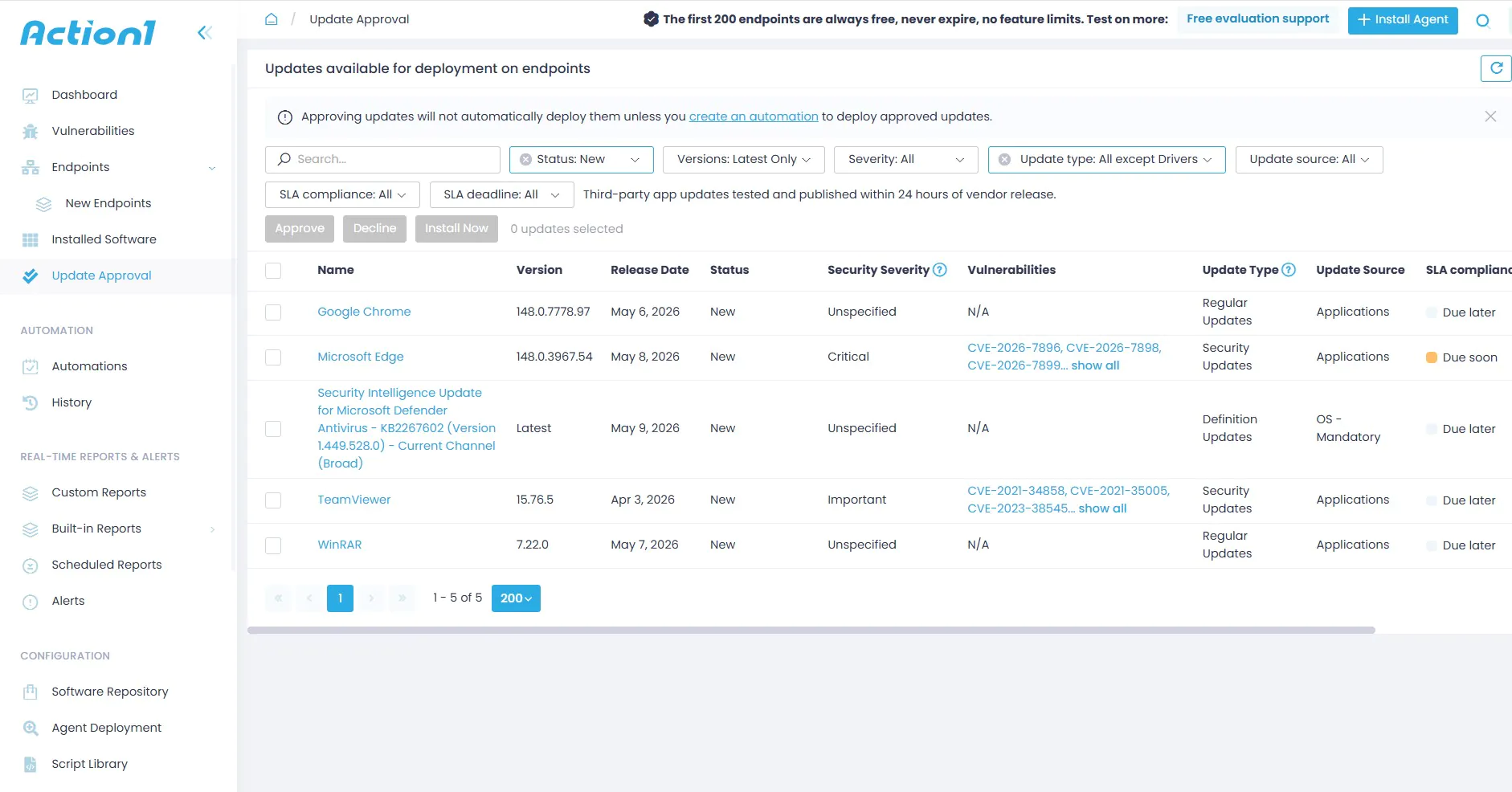
Below are key features of the Action1 patch management solution.
- Cloud-Native Architecture: Unlike traditional tools such as SCCM or WSUS, which require connection to local servers or endpoints, e.g., VPN. Action1 patches remote endpoints over the internet and leverages P2P distribution to save bandwidth by sharing the patch downloaded by one machine with others, preventing network congestion.
- Unified Cross-OS Patch Management: Action1 provides a centralized console for managing patching across Windows devices, macOS systems, and Linux servers.
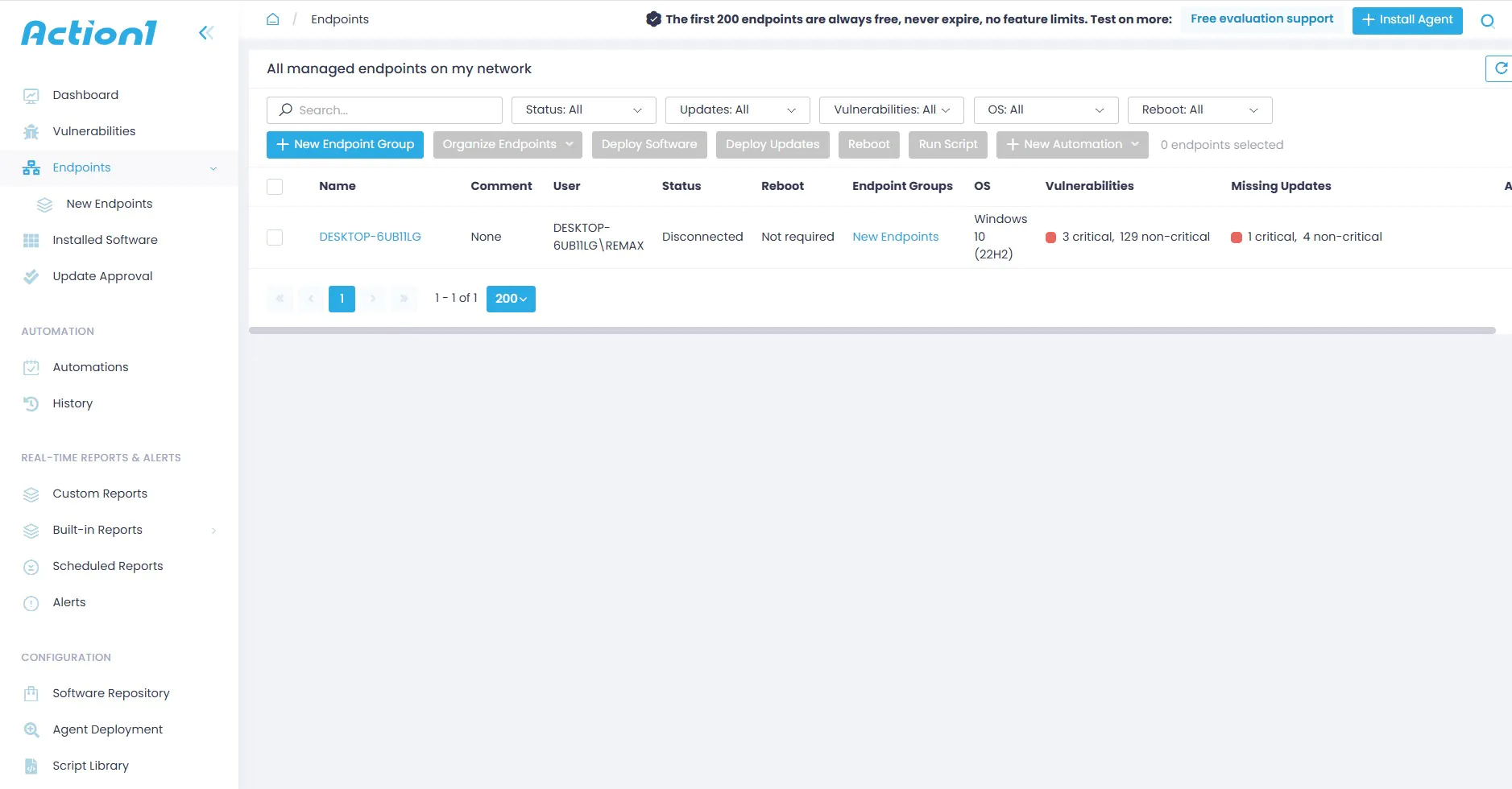
- Automated Third-Party Patching: Action1 maintains an extensive application library for common third-party applications such as browsers, Slack, and Zoom, and automatically pushes updates to all devices as soon as a new update is available
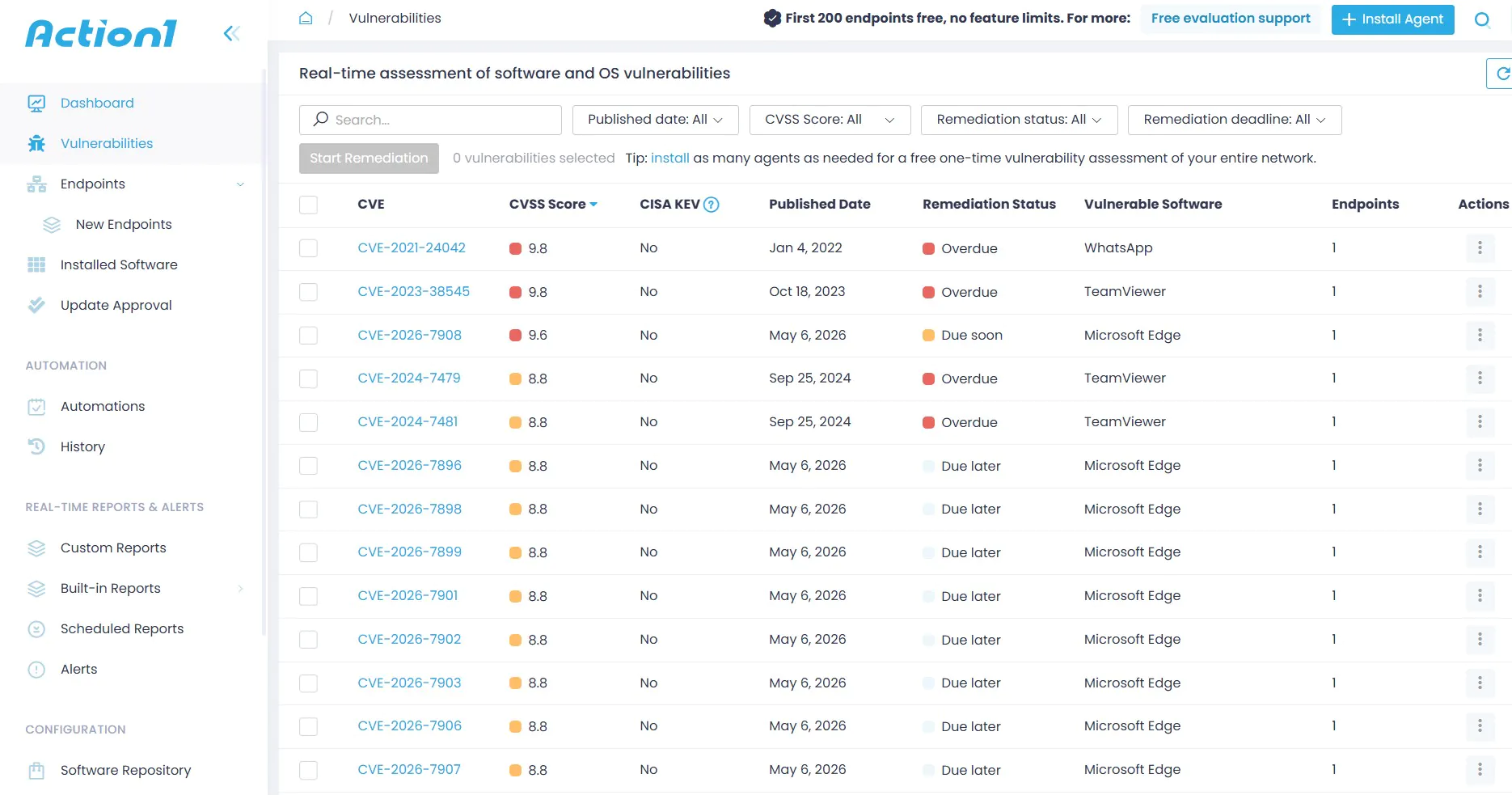
- Vulnerability Discovery: Action1 automatically maps CVE IDs to global databases and integrates them with patch management, helping reduce the time between vulnerability detection and remediation. It also prioritizes and highlights vulnerabilities based on risk impact, including high or critical severity, along with their impact scores.
- Policy-Based Automation: Action1 offers maintenance window scheduling, allowing specific patching times to be defined to help ensure uninterrupted business operations. Reboot management ensures systems are scheduled to restart when no one is logged in, while automated approval workflows can be used for security updates and manual approvals for feature-related updates
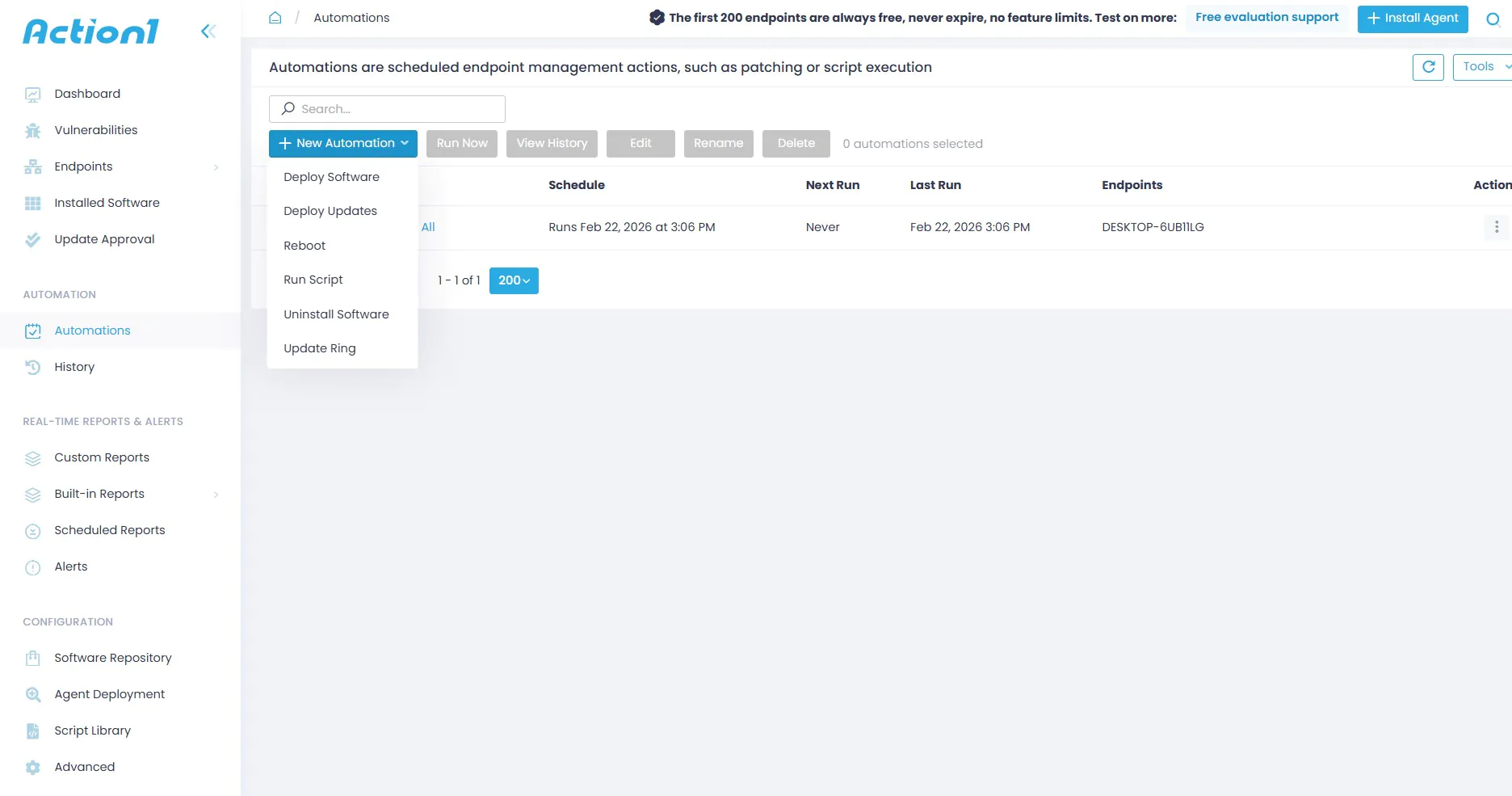
- Centralized Visibility and Reporting: Action1 offers compliance dashboards with real-time charts for patch status, audit-ready reports for compliance adherence, and inventory management across the organization’s entire hardware and software fleet.
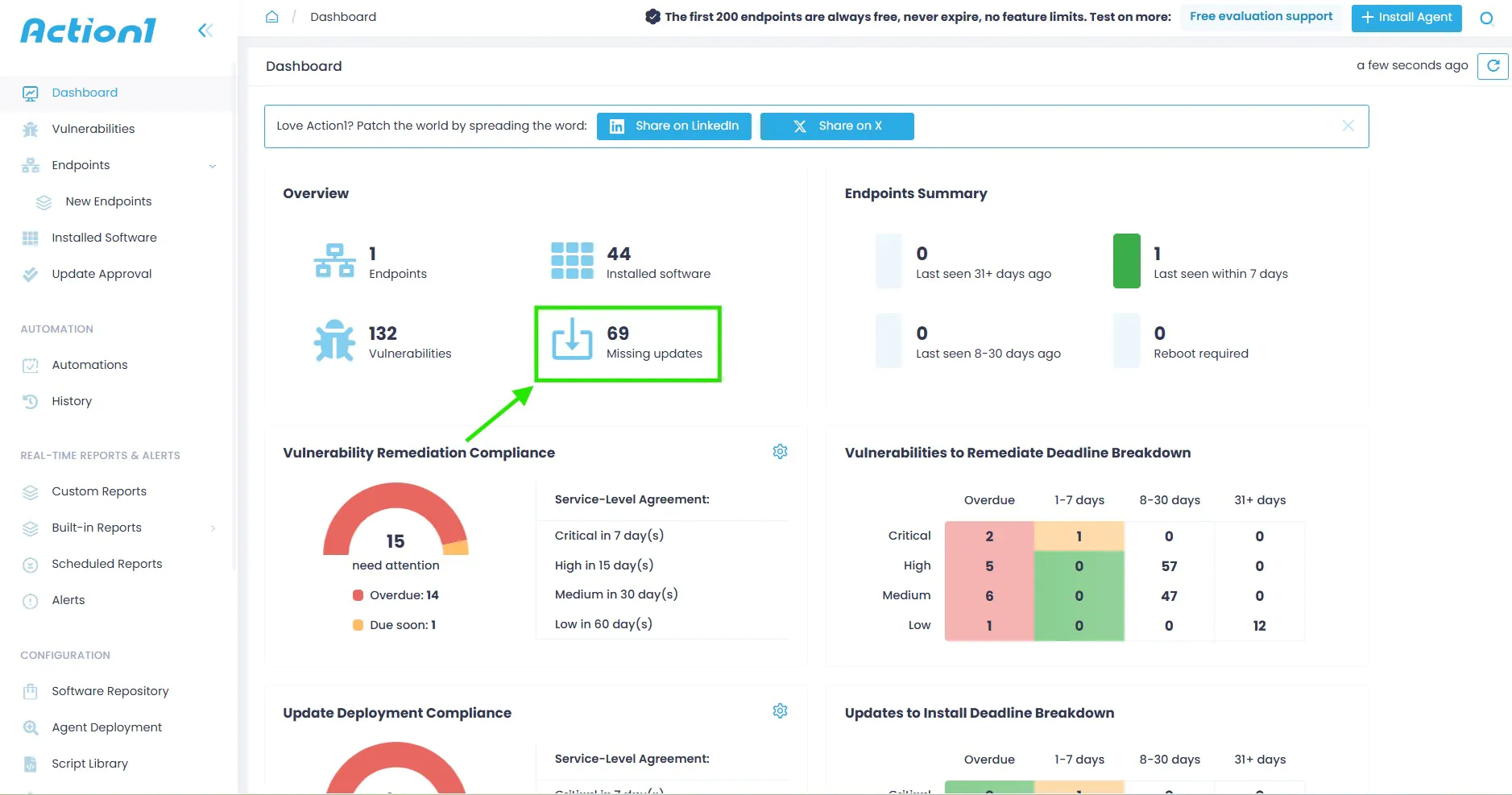
- Remote Management and Monitoring: Action1 offers remote desktop support, enabling IT teams to investigate and resolve failed patches as well as employee application issues. It also provides a pre-built library of custom actions and scripts that admins can remotely run across thousands of devices simultaneously for cleanups and configurations.
- Cost-Effectiveness and Scalability: Action1 is known for offering high-end patch management to small organizations with the first 200 endpoints free. Mid-size to large enterprises can leverage this offer to extensively test on 200 devices before scaling to full production patch management.
Frequently Asked Questions on Automated Patch Management
What are the Best Practices for Automated Patch Management?
A high-performing patch management program follows these best practices:
- Scan systems regularly, ideally on a daily basis, to maintain an accurate patch inventory.
- Patch frequently because patches are often released monthly or in response to specific vulnerabilities. Waiting for a quarterly cycle creates unnecessary exposure.
- Prioritize patches based on severity, risk, and business impact. Focus on critical and actively exploited vulnerabilities first.
- Test patches before deploying them to production. Use staging rings or test groups to catch compatibility issues.
- Schedule deployments to minimize disruption. Use maintenance windows during low-use periods.
- Monitor deployment results after patching. Verify that patches were applied successfully and investigate failures.
- Use reports to identify noncompliant or failed systems.
- Include cloud, container, and base image patching in the patching strategy.
- Automate pre- and post-patching tasks, such as creating snapshots, managing ITSM tickets, and generating health verification reports.
- Maintain centralized visibility, so that all stakeholders are able to see patch status across the environment.
- Use unified workflows for mixed operating system environments, as separate tools can create gaps between Windows and Linux patching.
What is the Business Impact of Automated Patch Management?
Automated patch management improves business security and efficiency by handling updates proactively instead of reacting to issues after they occur. It helps organizations fix vulnerabilities faster, strengthening their overall security posture and supporting compliance with regulations. At the same time, it also reduces the workload on IT teams by automating repetitive patching tasks.
By scheduling and controlling updates more effectively, automation helps maintain system uptime with minimal disruptions. In addition, it gives organizations better visibility into risks, compliance status, and the health of their endpoints, helping them make more informed decisions.
Why is Automated Patch Management Essential for Modern IT Security and Operations?
Automated patch management is essential because it helps organizations quickly identify and fix vulnerabilities, reducing security risks. It improves efficiency by automating patch deployment and reducing human error, while also supporting compliance requirements. It ensures systems stay stable and secure through processes like scanning, prioritization, testing, scheduled deployment, reporting, and continuous monitoring. In complex IT environments with cloud systems and remote devices, automation provides the consistency and scalability needed to keep systems protected and up to date.





