

Threat and vulnerability management (TVM) is a continuous, risk-based discipline that combines vulnerability assessment with threat intelligence to identify, prioritize, and remediate the security weaknesses attackers are most likely to exploit across your organization’s IT environment.
TVM connects technical findings with active threats, exploit likelihood, asset criticality, and exposure. This approach helps you direct remediation efforts toward the weaknesses that pose the greatest risk to your security posture. Effective risk-based prioritization has become especially critical as the window between vulnerability discovery and exploitation continues to shrink. Google’s Mandiant M-Trends 2026 report estimates that the average vulnerability is now exploited 7 days before a patch is publicly available.
The sections below cover how threats and vulnerabilities interact, the TVM lifecycle, how threat intelligence should change your priorities, and the metrics that show whether your exposure is actually decreasing.
What is Threat and Vulnerability Management (TVM)?
A threat is a potential event, action, or activity that could harm your organization’s systems, networks, applications, or data. Threats can originate inside or outside your organization and may involve deliberate attacks or accidental actions. Common types of cybersecurity threats include:
- Malware: Malicious software, including ransomware, spyware, and viruses, designed to disrupt systems, steal information, and gain unauthorized access.
- Phishing: Deceptive emails, messages, or websites designed to trick users into revealing credentials or downloading malicious files.
- Advanced persistent threats (APTs): Prolonged, targeted attacks in which threat actors maintain unauthorized access to systems while expanding their foothold and gathering information.
- Insider threats: Security risks caused by employees, contractors, or other trusted individuals, whether through malicious actions or negligence.
A vulnerability is a weakness in software, hardware, system configurations, or security controls that an attacker could exploit to compromise an asset. Common sources include:
- Unpatched software: Known security flaws in operating systems, applications, network devices, firmware, or other software components that have not received available fixes.
- Weak credentials: Easily guessed, default, reused, or compromised passwords that make unauthorized access easier.
- Misconfigurations: Incorrect security settings, such as excessive permissions, publicly accessible storage, and unhardened services.
- Zero-day vulnerabilities: A vulnerability that’s unknown to the software vendor and has no official fix or patch. Zero days can be found by cybersecurity experts or by cybercriminals.
Threat and vulnerability management (TVM) brings these two concepts together. It combines vulnerability assessment, threat intelligence, and risk-based prioritization to identify security weaknesses, understand which threats could exploit them, and direct remediation toward the most critical assets.
TVM is an ongoing operational process, not a one-time security assessment. It requires continuous visibility into your environment, regular reassessment of cyber risk, and verification that remediation has reduced exposure. It also complements penetration testing, which evaluates how effectively security controls withstand simulated attacks at a specific point in time.
Threats vs. Vulnerabilities: How They Interact
A vulnerability creates an opening, while a threat represents the potential danger that can exploit it, such as a threat actor or an event. Picture a hairline crack in a dam wall and a river in flood. The crack does little on a dry day, and the flood does little against a sound wall. Danger appears when the flood reaches the crack and a town sits downstream.
Your environment works the same way. A vulnerability on an isolated, non-critical server with limited business value is typically a finding. The same vulnerability on an internet-facing system that stores customer data, with attackers already scanning for it, constitutes a security risk. The vulnerability creates the opportunity, but the actor’s intent and ability to exploit it elevate that opportunity into a security risk. The value of the asset decides how much damage follows. TVM is designed to distinguish these situations quickly and accurately.
Risk-based TVM principle: Risk increases when an exploitable vulnerability, a credible threat, and a valuable or exposed asset intersect.
What is the Difference Between Threat Management and Vulnerability Management?
Threat management and vulnerability management address two different sides of cybersecurity risk.
- Vulnerability management (VM) focuses on finding and fixing security weaknesses before attackers exploit them.
- Threat management (TM) focuses on identifying potential and active threats, analyzing attacker behavior and tactics, and detecting malicious activity early so it can be contained before it can cause damage.
Each one alone leaves a blind spot. A vulnerability scan can reveal an unpatched application, for example, but it cannot establish whether attackers are actively targeting that application. Similarly, threat monitoring may detect suspicious activity without identifying the underlying weaknesses that made the attack possible.
TVM combines these perspectives. It connects information about security weaknesses with threat intelligence and observed attack activity, helping your team decide which risks need attention first.
Distinct Perspectives on Risk
Vulnerability management asks, “What could be exploited?” It identifies weaknesses across your systems, applications, and infrastructure, then evaluates their severity and potential impact. Threat management asks, “Who is targeting us, and how?” It examines attacker techniques, indicators of compromise, emerging campaigns, and suspicious activity. One question looks inward at your exposure and establishes where your defenses are weak. The other looks outward at adversary intent and capability, revealing which dangers could take advantage of those weaknesses.
Time Horizons and Action Focus
VM is preventive and runs on scheduled cycles: teams discover assets, scan for vulnerabilities, assess findings, remediate weaknesses, and verify remediation. Its goal is to remove weaknesses before anyone exploits them.TM operates across a more immediate threat horizon. Security teams monitor activity, investigate alerts, identify attack patterns, and respond when they detect suspicious behavior. Both disciplines operate continuously but their pace differs. Combined, signals from TM can change the order of the VM queue.
The Risk-Elimination Synergy
Combining VM and TM gives your team a more useful basis for remediation decisions. Your team stops fixing by severity alone and starts fixing by evidence. As a result, an actively exploited vulnerability on an exposed business-critical system can move ahead of a higher-scoring flaw with limited exposure.
The following comparison shows how each discipline contributes to the same security decision.
| Aspect | Vulnerability management | Threat management | Combined TVM |
|---|---|---|---|
| Primary focus | Finding and reducing security weaknesses in your systems and environment, such as missing patches, flawed code, and risky configurations | Identifying and monitoring potential or active attacks, including attacker behavior (who is acting, with what tools, toward what goal) | Connecting exploitable weaknesses with real-world threats |
| Key question | What could go wrong? | What is going wrong? | What should we fix first, and why? |
| Time orientation | Before an attack, through recurring assessments and remediation cycles | Before, during, and after potential attacks, using continuous monitoring, threat intelligence, and investigation | Continuous: slow scans refreshed by fast threat signals |
| Activities | Asset discovery, vulnerability scanning, patching, configuration hardening, remediation verification | Monitoring, detection, threat intelligence, hunting, investigation, incident response | Correlating vulnerability findings, exploit intelligence, asset exposure, and attack indicators, plus shared workflows from alert to fix |
| Decision driver | Technical severity, exploitability, and asset importance | Attacker behavior, indicators of compromise, and observed activity | Combined exploit likelihood, observed attacks, exposure, and business impact |
| Metrics | Open findings, age of findings, patch coverage, mean time to remediate (MTTR) | Mean time to detect (MTTD), mean time to respond to incidents (MTTR, incident response definition), mean time to contain (MTTC), incident count | Risk-based remediation time, exposure window, and percentage of exploited vulnerabilities remediated within SLA |
| Example | A scan flags an unpatched web server. | An EDR alert shows suspicious activity on that same server | The scan finding, the alert, and a KEV listing push that server’s patch to the front |
From Theory to Practice: The Log4Shell Example
Log4Shell (CVE-2021-44228), shows the TVM approach at work. Researchers publicly disclosed the flaw in Apache Log4j 2, a widely used Java logging library, on December 9, 2021. It carried a CVSS score of 10.0, and CISA added it to its KEV catalog on December 10. Mature TVM programs made four moves:
- Find affected assets. Scans and software inventories showed which servers and applications ran Log4j, including copies bundled inside vendor products. Teams without an inventory struggled most.
- Watch for exploitation attempts. Threat teams searched web, application, and firewall logs for Java Naming and Directory Interface (JNDI) lookup strings and watched endpoint and network tools for suspicious callbacks. GreyNoise saw exploitation attempts starting December 9.
- Prioritize by exposure and observed attacks. Internet-facing systems with hits in the logs went first, and internal-only systems followed.
- Deploy temporary mitigations. The first fix, Log4j 2.15.0, proved incomplete in some non-default configurations, as Mandiant reported on December 14. Teams used interim measures, which CISA’s Emergency Directive 22-02 allowed only until updates were available.
The MOVEit Transfer vulnerability (CVE-2023-34362), a Structured Query Language (SQL) injection flaw in the MOVEit Transfer file transfer product, illustrates an even more urgent problem: exploitation before public disclosure.
MOVEit disclosure-to-exploitation timeline:
| Date | Event |
|---|---|
| May 9, 2023 | Fastly observed SQL injection attempts against MOVEit endpoints. |
| May 27, 2023 | Mandiant identified the earliest evidence of exploitation and data theft. |
| May 31, 2023 | Progress Software publicly announced the vulnerability. |
| June 2, 2023 | CVE-2023-34362 was published and added to CISA’s Known Exploited Vulnerabilities (KEV) catalog. |
The May 9 activity was observed by Fastly, while May 27 is Mandiant’s earliest identified evidence of successful exploitation. These are different stages and should not be presented as interchangeable dates.
The MOVEit example demonstrates zero-day exploitation, where attackers exploited a vulnerability before the vendor publicly disclosed it. Traditional patch scheduling could not address that exposure. This underscores why mature TVM programs must combine continuous asset inventory, real-time detection of exploitation attempts, and the ability to apply temporary mitigations even when no official patch yet exists.
How Does the Threat and Vulnerability Management Lifecycle Work?
The TVM lifecycle is a continuous process that helps your organization discover assets, identify security weaknesses, understand relevant threats, and reduce exposure through risk-based remediation. Each stage builds on the previous one, turning vulnerability scanning results and threat intelligence into practical security decisions. The process also requires verification: deploying a patch or changing a configuration does not prove that a vulnerability is resolved. Your team must confirm that the fix works and that affected assets are protected.
The following lifecycle combines asset discovery, vulnerability assessment, threat intelligence, prioritization, remediation, validation, reporting, and improvement into one workflow. The loop is continuous and automated wherever possible, so new vulnerabilities and new exploitation evidence re-enter at any point.
Asset Discovery and Inventory
Asset discovery establishes which systems, applications, devices, and cloud resources need assessment. Your inventory should cover:
- Hardware: Servers, workstations, laptops, network equipment, and storage devices
- Software: Operating systems, business applications, libraries, and third-party components
- Cloud resources: Virtual machines, containers, storage, databases, and cloud services
- Internet of Things (IoT) and operational technology (OT): Connected devices, industrial equipment, and control systems
- Remote endpoints: Devices used by employees and contractors outside the corporate network
- Shadow IT: Applications and services deployed without formal IT approval
Use network discovery tools, endpoint agents, application programming interface (API) integrations, and configuration management databases (CMDBs) to identify assets. Cloud security posture management (CSPM) tools can help discover cloud resources and identify configuration risks. Add external attack surface discovery, which maps your internet-exposed assets from the outside the way an attacker would.
Maintain continuous discovery rather than relying on periodic inventory exercises. New cloud instances, temporary workloads, and remote devices can appear between scheduled assessments.
Classify each asset by business criticality, data sensitivity, and network exposure. This context also supports more accurate vulnerability prioritization later in the lifecycle.
Vulnerability and Configuration Scanning and Assessment
Once you have an asset inventory, perform vulnerability scanning to identify known security weaknesses. A vulnerability assessment examines the findings, evaluates their severity, and determines which systems require remediation.
Use multiple scanning approaches to cover different environments:
- Authenticated scans: Use approved credentials to inspect operating systems, installed software, missing patches, and internal configurations in greater depth.
- Unauthenticated scans: Examine systems from an external or unauthenticated perspective to identify weaknesses visible without valid credentials.
- Agent-based scans: Use software installed on endpoints to collect local vulnerability data, including from remote devices.
- Network-based scans: Examine reachable devices and services without requiring an agent on every asset.
- External perimeter scans: They cover your internet-facing addresses.
- Specialized scans: Assess web applications, APIs, containers, and cloud configurations for weaknesses that general infrastructure scans may miss.
Configuration scanning is equally important. Compare system settings against security baselines and hardening guides to identify exposed services, excessive permissions, weak encryption settings, and other misconfigurations.
Set scan frequencies according to exposure and business risk. The following is a starting point, not a universal compliance schedule.
| Asset type | Recommended scan frequency |
|---|---|
| Critical production systems | Weekly, with scans after significant changes |
| Internet-facing servers and applications | Daily or continuous where supported |
| Cloud workloads and configurations | Daily or continuous |
| Internal workstations and servers | Weekly |
| Containers and deployment images | At build time and before deployment |
Microsoft describes using custom security agents to perform automated daily vulnerability and configuration scans of production assets with current vulnerability signatures, and sending results to dashboards for trend analysis.
Threat Intelligence Integration
Vulnerability scanning tells you which weaknesses exist. Threat intelligence helps you understand whether attackers are interested in exploiting them and which attack methods they use.
Integrate information from several sources:
- Commercial threat intelligence feeds: Provide information about emerging vulnerabilities, malicious infrastructure, exploit availability, and attacker campaigns.
- Information Sharing and Analysis Centers (ISACs): Share sector-specific threat information, such as attacks targeting healthcare, finance, or energy organizations.
- Government sources: Monitor advisories from CISA, CERTs, and other security authorities.
- Open-source intelligence (OSINT): Collect publicly available information from security research, vulnerability disclosures, technical blogs, and trusted community reports.
- Internal telemetry: Use endpoint alerts, security logs, incident reports, and previous investigations to identify threats affecting your environment.
A threat intelligence platform (TIP) can aggregate information from these sources, remove duplicate indicators, and correlate related findings. Integrating the platform with your vulnerability management system also helps connect threat indicators and exploit information to existing vulnerability records. For example, when CISA adds a vulnerability to its KEV catalog, your system should identify whether affected software exists in your inventory and flag matching records for review.
Start with a small number of feeds that match your technology stack and industry. A focused feed that’s relevant to your environment is more useful than dozens of feeds generating duplicate or irrelevant alerts.
Risk-Based Prioritization and Contextual Risk Scoring
Raw severity alone is not enough to determine which vulnerabilities your team should fix first. A vulnerability’s priority depends on its exploitability, the threats targeting it, the affected asset, and the controls already protecting that asset. It also depends on temporal factors, such as how the risk changes over time as exploit code matures, patches become available, or new evidence of active exploitation emerges.
Use several signals together:
- Common Vulnerability Scoring System (CVSS): Rates technical severity (not risk) on a scale of 0.0 to 10.0, considering factors such as attack complexity, required privileges, and potential impact. In CVSS v4.0, the Threat metric group (which replaced the earlier Temporal metrics) further adjusts the score based primarily on exploit maturity.
- Exploit Prediction Scoring System (EPSS): Estimates the probability that a vulnerability will be exploited in the wild within the next 30 days. Scores range from 0 to 1 and are updated daily by FIRST.
- CISA KEV catalog: Identifies vulnerabilities CISA has confirmed attackers are exploiting in the wild. KEV inclusion is evidence of exploitation, not a prediction.
- Exploitation evidence: Security alerts, incident investigations, and observed attack attempts help establish whether attackers are targeting the vulnerability.
- Exposure: An internet-facing application generally presents a different risk from an isolated internal system.
- Asset criticality: Systems supporting essential business operations or storing sensitive information deserve greater protection.
- Exploit availability: Public proof-of-concept code or weaponized exploits can make a vulnerability easier to abuse.
- Compensating controls: Segmentation, access restrictions, and other safeguards may reduce the likelihood or impact of exploitation.
- Lateral-movement paths: A compromised low-priority endpoint may provide a route to critical systems, increasing its risk.
Worked example: Why a medium-severity vulnerability can come first
Consider two hypothetical findings in the same organization:
| Risk signal | Finding A | Finding B |
|---|---|---|
| CVSS score | 6.5 (Medium) | 9.8 (Critical) |
| EPSS score | 0.78 (78%) | 0.02 (2%) |
| CISA KEV status | Yes | No |
| Observed exploitation | Yes | No |
| Asset criticality | 5/5 | 1/5 |
| Exposure | Internet-facing | Isolated test server |
| Compensating controls | Limited | Network-isolated |
Finding A should receive priority. Although its CVSS score is lower, attackers are actively exploiting it, its EPSS score indicates a high predicted probability of exploitation, and it affects an exposed business-critical system. Finding B has a higher technical severity, but its isolated environment and lower exploit likelihood reduce its immediate risk.
These values illustrate a risk-based decision, not a standardized composite scoring formula. Your organization must combine these signals with its own asset and exposure data.
Remediation and Mitigation
Once your team establishes priorities, it must reduce the identified risk. Remediation removes or corrects the underlying weakness, while mitigation reduces the likelihood or impact of exploitation when a permanent fix is unavailable.
Common remediation and mitigation actions include:
- Applying security patches and software updates.
- Changing insecure configurations and removing unnecessary services.
- Hardening systems through MFA, encryption, and least-privilege access.
- Applying temporary restrictions or compensating controls when no permanent fix exists.
Remediation requires coordination across teams. Security teams validate findings and set priorities; IT operations teams manage infrastructure changes and patch deployments; development teams fix vulnerable application code, dependencies, and configurations. Service owners approve downtime. Document these roles so a finding never sits in a queue with no owner.
Patch Management: Risk-Ranked, Tested, Staged Deployment
Patch management turns remediation priorities into controlled software updates. Use a five-step workflow:
- Rank patches: Assess CVSS severity along with exploit activity, asset criticality, and exposure. Address actively exploited vulnerabilities first.
- Test updates: Test patches in a representative environment under your change management process. Obtain approval before production deployment.
- Deploy in stages: Start with a pilot group, monitor results, and expand deployment in controlled waves. Maintain a rollback plan if an update disrupts services.
- Verify installation: Re-scan affected systems and confirm the patch installation status or the updated software version to ensure the vulnerability has been properly eliminated. A clean scan alone shouldn’t be treated as conclusive evidence that every patch installed successfully.
- Review overdue patches: Generate daily reports of unresolved vulnerabilities and review patch coverage and overdue findings with management monthly.
This approach balances rapid patching with operational stability. Microsoft follows a similar model, using risk-based patch selection, change management approval, staged deployment, scan-based validation, and management reviews of overdue vulnerabilities.
Risk-Based Remediation SLAs
A remediation SLA defines how quickly your team must address a vulnerability after it is identified or confirmed. Set deadlines according to risk rather than assigning the same timeline to every finding.
The following example sets remediation deadlines by risk tier.
| Risk category | Example remediation deadline |
|---|---|
| Critical: Actively exploited, business-critical asset | 24–48 hours |
| High: Exploitable vulnerability on an important system | 7 days |
| Medium: Lower exploitability or less critical asset | 30 days |
| Low: Difficult to exploit, minimal business impact | 90 days or next maintenance window |
Define escalation procedures for missed deadlines. Notify the vulnerability owner first, then escalate unresolved critical and high-risk findings to security leadership and IT management. Establish SLAs jointly with IT operations so deadlines reflect actual deployment constraints. Unrealistic timelines encourage exceptions and non-compliance rather than faster remediation.
Treat compliance limits as a ceiling. PCI DSS v4.0.1 allows one month for critical patches, which is far looser than a 48-hour target for exploited flaws.
Exception Handling and Compensating Controls
Some vulnerabilities cannot be patched immediately. Legacy applications, unsupported operating systems, and compatibility requirements can prevent teams from applying an available update without disrupting essential services. In these cases, document an exception that identifies the affected assets, vulnerability, the compensating controls applied, business justification, risk owner, approval authority, and expiration date. Make exceptions time-bound and review them regularly.
Compensating controls can reduce exposure while the underlying weakness remains:
- Network segmentation: Isolate vulnerable systems from sensitive networks.
- Virtual patching: Use web application firewalls or intrusion prevention rules to block known exploit attempts.
- Application allowlisting: Restrict execution to approved software, so only approved code runs.
- Access restrictions: Limit administrative privileges, remote access, and connections to vulnerable services.
Keep each exception visible in your vulnerability records until permanent remediation is completed and verified.
Verification and Validation
Re-scan affected assets after remediation to verify that the vulnerability no longer appears. For example, confirm that the patch installed correctly, the vulnerable software version is no longer running, or the configuration now meets the required security baseline. If a finding persists, investigate deployment failures or overlooked components.
Use penetration testing to identify residual weaknesses that automated scans may miss, such as chained flaws and logic errors. Also review changes against internal security policies and applicable compliance requirements. Close a finding on a clean verification, and record the date, the scan reference, and who verified it.
Documentation, Reporting, and Dashboards
Document each finding from discovery through verified remediation. Records should include the affected asset, vulnerability identifier, severity, risk rationale, assigned owner, remediation deadline, actions taken, and validation results. Build role-based dashboards as different stakeholders need different views of the same data:
- IT operations teams: Need affected asset details, patch status, deployment failures, and outstanding tasks.
- Security leaders: Need vulnerability trends, exploitation activity, SLA compliance, and unresolved high-risk findings.
- Executives and boards: Need concise summaries of organizational exposure, critical risks, remediation progress, and resource requirements.
Maintain historical records to support compliance audits, management reviews, and post-incident investigations.
Measure, Monitor, and Continuously Improve
TVM is continuous because the conditions that determine risk keep changing. New vulnerabilities appear daily. Threat intelligence shifts. Exploitation activity rises or falls. Assets change exposure when someone opens a firewall port. Remediation succeeds or fails, and compensating controls degrade.
Feed these changes back into vulnerability assessment and risk prioritization rather than treating the original risk score as permanent. Review recurring remediation delays, scan coverage gaps, and workflow bottlenecks to identify where the process needs improvement. The goal is to reduce the number of exploitable weaknesses in your environment. The How Do You Measure Whether TVM Is Reducing Exploitable Exposure section explains which metrics help demonstrate that progress.
How Should Threat Intelligence Change Vulnerability Priorities?
Threat intelligence should change vulnerability priority when credible and relevant evidence materially changes the likelihood of exploitation, exposure, or urgency for assets that exist in your environment. Your team must establish whether the intelligence applies to your technology, whether affected assets are present, and whether attackers can reach them.
Use the following process before changing a vulnerability’s priority:
- Match the intelligence to a specific target: Identify the specific CVE identifier, affected product, software version, vulnerability type, or attack campaign.
- Confirm affected assets and technology: Query your asset inventory to establish whether the vulnerable product and version exist. Account for embedded components and software dependencies too.
- Assess exploitation evidence: Treat inclusion in CISA’s KEV catalog or confirmed exploitation as stronger evidence than a generic threat-feed mention. Use EPSS to understand predicted exploitation probability, not business impact.
- Reassess environmental risk: Check asset criticality, internet exposure, reachable attack paths, and existing compensating controls. A vulnerability on an isolated system requires attention if attackers can reach it through lateral movement.
- Update the priority: Change the remediation priority or applicable SLA only when the combined evidence justifies a different response deadline.
Keep the vulnerability’s original discovery date and age when its priority changes. Record which signal caused the change and notify the remediation owner.
The following matrix shows how different threat signals can affect vulnerability priority:
| Threat signal | What it tells you | Required correlation | When it should change priority | Evidence to record |
|---|---|---|---|---|
| CISA KEV listing | Exploitation in the wild is confirmed | Match the CVE to affected products and software versions in your inventory | Raise priority when you use the product, and faster still when it is exposed or business-critical | CVE, KEV listing date, affected assets, and remediation deadline |
| EPSS increase | Exploitation is becoming more likely in the next 30 days | Check asset criticality and exposure | Raise priority when EPSS increases significantly, considering asset exposure, criticality, reachable attack paths, and existing controls | EPSS value and date before and after, asset tier |
| Confirmed exploitation campaign | A named actor is using the flaw against targets like you | Match the campaign’s product and version to yours; check your sector | Escalate when the campaign targets technology deployed in your environment | Report link, actor name, matching assets, owner notified |
| Known ransomware use | Ransomware operators have exploited the flaw | Same as above, attacker path, plus data and backup exposure on the asset | Raise priority to the top tier for reachable systems that hold critical data | KEV ransomware flag or report, impact assessment |
| Public exploit availability | Attack code exists and lowers the skill needed | Confirm the exploit works against your version and configuration | Raise priority one tier on exposed assets; hold on internal assets until other signals appear | Exploit source, tested version, test result |
| Internal detection or incident evidence | Your security tools or investigations have identified suspicious activity or possible exploitation | Tie the alert to the asset and the specific CVE | Escalate immediately, and start incident response in parallel | Alert ID, log excerpts, affected hosts, incident ticket |
| Generic threat-feed mention | A source mentioned a vulnerability or threat without establishing direct relevance or proof of use | Seek confirmation from KEV, vendor, or a second source | Do not change priority on its own; watch for confirmation | Feed name, date, decision to wait |
What are the Key Components of a Threat and Vulnerability Management Program?
A TVM program needs vulnerability scans along with capabilities that help your team detect suspicious activity, understand attacker behavior, coordinate incident response, and investigate potential compromises. The following components support that work. The How Does the Threat and Vulnerability Management Lifecycle Work section explains the vulnerability-management activities, from asset discovery to reporting and improvement. The table focuses on the threat-side capabilities that complement them.
| Component | What it does | Typical tools |
|---|---|---|
| Real-time threat detection | Monitors network traffic, endpoints, and cloud environments to identify potentially malicious activity as it occurs. Detection depends on telemetry coverage, configured rules, supported attack techniques, and attacker behavior. | Network detection and response (NDR), endpoint detection and response (EDR), network sensors, and cloud threat detection and response tools |
| Event correlation | Collects and correlates logs and alerts across systems to identify patterns that may indicate an attack. | Security information and event management (SIEM), log management tools |
| Threat intelligence | Collects, de-duplicates, and links outside and inside threat data to your assets | Threat intelligence platform (TIP), commercial and open-source feeds |
| Automation and orchestration | Connects security tools and automates scans, repeatable investigation, ticketing, and response workflows | Security orchestration, automation, and response (SOAR), workflow automation |
| Threat actor profiling | Maps the groups that target you to known techniques | MITRE ATT&CK, intelligence reports |
| Threat hunting | Searches for hidden compromise before an alert fires | SIEM queries, EDR search, hunting playbooks |
| Incident response integration | Gives responders vulnerability context during an incident | Case management, runbooks, ticketing |
| Security awareness training | Teaches employees to recognize phishing, social engineering, and other common attack methods | Awareness and phishing-simulation platforms |
These capabilities work together. For example, a SIEM can correlate an EDR alert with network activity, while a TIP supplies context about the threat.
Real-Time Threat Detection and Malware Defense
Real-time threat detection combines signals from endpoints, networks, and cloud environments to identify suspicious behavior before it causes wider damage.
- NDR monitors traffic for unusual connections and lateral movement.
- EDR identifies malicious processes and activity on devices.
- CSPM alerts teams to risky configuration changes.
- SIEM tools correlate events across these sources.
- Artificial intelligence and machine learning can help identify patterns that rule-based detection may miss.
Microsoft’s practice gives concrete cadences for malware defense in its online services environment. Every endpoint runs a full anti-malware scan at least weekly. Real-time scans run on files when they are downloaded, opened, or executed. Malware signatures are updated daily. Behavior-based detection identifies suspicious program activity, with alerts sent automatically to security response teams. In many cases, the software blocks execution without human help.
Incident Response Integration
TVM should feed directly into your incident response plan. When an alert indicates possible exploitation, vulnerability records can provide responders the affected device name, which software versions are exposed, how the attacker may have gained access, and whether the same weakness exists elsewhere. Threat intelligence adds context about the campaign and its techniques, while endpoint and network telemetry help establish the incident’s scope. This information supports containment decisions, investigation, and remediation. After each incident, feed the lessons back into scan rules and priorities.
Automation and Orchestration
SOAR platforms connect security products and automate repeatable tasks. Workflows can launch vulnerability scans, collect threat intelligence, enrich alerts, create tickets, notify owners, and even trigger approved remediation actions. Microsoft describes using custom security agents and automated scanning and reporting to assess production assets continuously.
Automation matters most for volume, because manual TVM does not scale to modern environments. Use a simple split.
- Automate predictable, low-risk tasks such as scheduled scans, enrichment with KEV and EPSS data, duplicate-alert handling, ticket creation and routing, patch deployment to low-risk groups, and verification re-scans.
- Keep human approval for high-impact actions, such as risk acceptance, exception approval, patches to critical production systems, isolating critical systems, threat hunting, and any action that could take a business service offline.
Automation should accelerate decisions, not remove accountability. Define approval points, rollback procedures, and audit records before allowing a workflow to make changes.
Threat Actor Profiling with MITRE ATT&CK
Research the threat groups that target your industry, then map their tactics, techniques, and procedures (TTPs) to the MITRE ATT&CK framework. ATT&CK describes adversary behavior through tactics (why an attacker acts), techniques (how they act), and procedures (how a specific group implements a technique). Use these mappings to check whether your controls can detect or prevent the relevant behavior. For example, if a group commonly uses stolen credentials for initial access, review your identity controls and detection coverage.
Proactive Threat Hunting
Threat hunting is proactive, hypothesis-driven, and query-based. Analysts form a testable question based on threat intelligence, vulnerability findings, or unusual activity, then query endpoint, network, identity, and cloud telemetry for supporting evidence. For example, an analyst may ask whether any host contacted a known command-and-control server after a vulnerable service was exposed. Use vulnerability findings to decide where to hunt first. Unpatched internet-facing systems and unmanaged devices deserve priority. Hunting can uncover activity that automated alerts have missed.
Finding Unknown Vulnerabilities: Penetration Testing, Red Teams, and Bug Bounties
Automated scanning provides continuous visibility into known vulnerabilities, but it misses logic flaws and complex attack paths. TVM programs supplement scanning with offensive testing and advanced detection:
- Penetration Testing: Delivers point-in-time assessments that prove whether vulnerabilities can be chained and exploited in practice.
- Red Teaming: Simulates active adversary behavior to evaluate how well detection and response controls perform.
- Bug Bounties & External Audits: Engages independent researchers to report previously unknown vulnerabilities.
- Machine Learning: Analyzes telemetry for anomalous behavior that may signal zero-day exploitation.
For example, Microsoft supplements automated vulnerability scanning with machine learning to identify suspicious activity that might indicate unknown vulnerabilities. It also uses internal Red Teams, independent penetration testing, and bug bounty programs to uncover previously unknown security flaws and support their remediation.
Benefits of Threat and Vulnerability Management
TVM’s main benefit is that your team fixes the vulnerabilities attackers are actually exploiting first, instead of working through findings by severity alone. It also brings several related benefits:
- Reduced attack surface: Identify and address weaknesses before attackers can exploit them.
- Clearer prioritization: Direct resources toward vulnerabilities that pose the greatest business risk.
- Faster response: Connect threat intelligence with remediation and incident response workflows.
- Business continuity: Reduce the likelihood and operational impact of security incidents.
- Audit evidence: Maintain records of findings, risk decisions, remediation, and verification.
- Stakeholder trust: Demonstrate that your organization actively manages security risks.
The financial impact can also be significant. IBM’s 2026 Cost of a Data Breach Report found that organizations using AI and automation in security operations reported nearly $1.93 million in average breach-cost savings compared with organizations that did not use these technologies. This is not a TVM-specific return on investment, but it illustrates the potential financial value of more efficient security operations.
Better Risk Decisions and Resource Allocation
TVM gives security teams the context to distinguish theoretical weaknesses from risks that attackers are actively exploiting. Instead of assigning equal urgency to findings, teams can consider threat activity, asset exposure, business criticality, and available controls. The prioritization example in the Risk-Based Prioritization and Contextual Risk Scoring section shows how this context can change remediation order, even when a vulnerability has a lower CVSS rating. This helps organizations allocate limited staff, time, and budget to issues that reduce the most risk.
Operational Efficiency Gains
TVM improves operational efficiency in three ways. First, correlating vulnerability data with threat intelligence reduces alert fatigue since teams can filter out findings with limited relevance. Second, evidence of active exploitation can trigger faster patching workflows for affected systems. Third, shared findings and clear ownership improve handoffs between security and IT operations. Automation connects these activities through ticketing, notifications, and remediation workflows. Teams that spend less time on noise spend more time fixing.
Coverage for Cloud, Hybrid, and Remote Environments
TVM extends visibility across on-premises infrastructure, cloud environments, containers, and remote endpoints. Integration with CI/CD pipelines and DevSecOps practices helps identify weaknesses earlier in development. Automated discovery also improves visibility into temporary or short-lived cloud workloads. Cloud API integrations or event-based monitoring can capture assets that are created and removed between discovery intervals. TVM also covers the exposure created by remote work and bring-your-own-device (BYOD) policies, which expand the attack surface beyond the traditional network perimeter. Without this level of coverage, security teams can miss exposed infrastructure and unmanaged devices.
When Do Organizations Need Threat and Vulnerability Management?
You need TVM when vulnerability scanning alone no longer tells you what to fix first. Common signs include:
- You lack continuous visibility into your assets and security weaknesses, and a yearly assessment no longer covers it. You cannot reliably identify which devices, applications, services, and cloud resources are active or exposed.
- Unpatched systems and misconfigurations create ongoing exposure. Vulnerabilities remain unresolved because teams lack a consistent process to assess and prioritize them.
- Your IT environment is complex or changes frequently. Cloud adoption, hybrid infrastructure, SaaS applications, remote work, and BYOD policies expand your attack surface and make manual tracking difficult.
- You must meet security or compliance requirements. Regulations, industry standards, or internal policies require recurring vulnerability assessments, remediation, and evidence of corrective action.
- Your team has scan results but cannot prioritize findings effectively. Security staff lack the time, threat intelligence, or technical context to distinguish urgent risks from lower-priority issues.
- Leadership asks whether you are exposed to this week’s headline vulnerability and you cannot answer within an hour.
How Do You Measure Whether TVM Is Reducing Exploitable Exposure?
TVM performance should show whether exploitable, exposed, and actively targeted vulnerabilities remain open for less time, not simply whether the total number of vulnerabilities decreases. A raw count is a poor standalone measure. It can rise when asset discovery or scanning coverage improves, and that is progress, not failure. Define the base terms once, then track the eight measures in the table.
- Mean time to remediate (MTTR): the average time from detection to verified fix.
- Patch remediation SLA compliance: the share of patchable findings fixed by their deadline.
- Exposure window: the time a vulnerability stays both exploitable and reachable, from discovery to verified remediation or mitigation. Note that actual exposure may begin before detection, and mitigation may only reduce rather than fully eliminate the vulnerability or its reachability.
| Metric | How to Calculate It | What It Shows | Important Limitation |
|---|---|---|---|
| Actively exploited vulnerability backlog | Count unresolved vulnerabilities with credible evidence of exploitation on in-scope assets | How many known exploitable weaknesses remain open | Depends on reliable threat intelligence and accurate asset matching |
| Age of CISA KEV findings | Track elapsed time from identification or KEV listing to verified remediation for affected in-scope assets | How long KEV-listed vulnerabilities remain unresolved | KEV listing date and your discovery date measure different periods. Keep both timestamps |
| Threat-prioritized SLA compliance | Threat-prioritized findings remediated and verified within their applicable SLA ÷ all threat-prioritized findings due in the period × 100 | Whether teams meet deadlines for vulnerabilities elevated by threat context | Define the SLA start date and treatment of approved exceptions consistently |
| Threat-signal-to-remediation time | Time from actionable threat information received to verified remediation | How quickly threat intelligence leads to a confirmed fix | Varies with fix availability; track patchable and unpatchable cases apart |
| Verified remediation rate | Threat-prioritized findings confirmed resolved ÷ threat-prioritized findings marked as remediated × 100 | Whether reported fixes actually close the exposure | Needs reliable re-scan coverage |
| High-risk backlog trend | Compare the number of open exploitable, exposed, or business-critical findings across reporting periods | Whether the most consequential exposure is shrinking | New discoveries can push the trend up even when teams work well |
| Open mitigated vulnerabilities | Count unresolved findings protected by temporary compensating controls | How much exposure depends on interim protection rather than a permanent fix | A mitigation can fail without notice; review each one on a schedule |
| Exposed high-risk assets | Count internet-facing or reachable assets with high-priority vulnerabilities | Whether critical exposure remains on internet-facing or otherwise accessible systems | Requires current, reliable asset and exposure data |
Set targets from your own baseline and your SLA policy. For an outside reference point, Verizon’s 2026 Data Breach Investigations Report put the median time to fully remediate known exploited vulnerabilities (KEVs) at 43 days (up from 32 days the prior year). Note that this figure reflects full remediation across all affected systems in an organization, not merely the time required to patch a single endpoint.
How Does Threat and Vulnerability Management Support Compliance and Audit Readiness?
TVM can support compliance by producing evidence such as asset inventories, vulnerability scan results, risk assessments, remediation tickets, exception approvals, and verification records.
The following table maps TVM evidence to current control identifiers.
| Framework | Relevant requirement | TVM evidence that satisfies it |
|---|---|---|
| ISO/IEC 27001:2022 (International Organization for Standardization) | Annex A 8.8, Management of technical vulnerabilities (with 8.9 Configuration management and 8.32 Change management) |
|
| PCI DSS v4.0.1 |
|
|
| NIST SP 800-53 Rev. 5 |
|
|
| HIPAA Security Rule (45 CFR 164.308) |
|
|
TVM supports governance by giving auditors evidence that security controls operate as intended. However, TVM is not a certification and does not guarantee compliance. An assessor or auditor still decides whether you comply, and each framework asks for more than vulnerability management. Verify exact wording against the current standard before you cite it in an audit.
Takeaway: A TVM Policy Outline
Use this outline as the skeleton of a written policy. It gives teams a reference when priorities collide
- Purpose and scope: systems, environments, and data covered, including cloud and remote endpoints
- Roles and responsibilities: who discovers, who prioritizes, who patches, who approves exceptions
- Asset inventory and classification: criticality tiers and data sensitivity labels
- Scanning cadence: frequency by asset type, authenticated scanning, and post-change scans
- Prioritization method: the inputs you use, such as CVSS, EPSS, KEV, exposure, and criticality
- Remediation SLAs and escalation: targets by tier and the steps when a deadline passes
- Exception process: justification, approver, expiry, compensating controls
- Verification: re-scan requirements and closure criteria
- Reporting and metrics: audiences, frequency, and the measures you track
- Review cycle: policy review at least yearly and after major incidents
What Common Problems Cause Threat and Vulnerability Management Programs to Break Down?
Most failures in TVM programs can be traced back to the following problems:
| Challenge | Why it happens | How to fix it |
|---|---|---|
| Rising threat volume | New vulnerabilities, attack techniques, and threat intelligence alerts overwhelm security teams. | Correlate threat intelligence with asset and vulnerability data. Automate scanning and enrichment; use a TIP to filter feeds and focus only on relevant risks. |
| Insider threats and human error | Employees mishandle sensitive data, fall for phishing, reuse passwords, misuse privileges, or make unsafe configuration changes. | Enforce least privilege and MFA, monitor unusual user behavior, run regular security awareness training, and review access rights. |
| Complex IT environments | Hybrid infrastructure, cloud services, SaaS applications, and remote endpoints create visibility gaps. | Maintain a continuously updated asset inventory. Unify discovery, scanning, and monitoring across environments. Segment networks. |
| Slow patching | Testing, approval processes, maintenance windows, and limited IT resources delay remediation. | Set risk-based remediation deadlines, stage and automate routine patch workflows, apply interim controls (such as access limits), and track overdue findings through verified closure. |
| Alert fatigue and low signal-to-noise ratio | Duplicate, low-confidence, or irrelevant alerts make important warnings harder to identify. | Tune detection rules, correlate related alerts, enrich findings with threat context, and filter using KEV, EPSS, exposure, asset tier, and VEX statements. |
| Prioritization bias | Teams may focus on high CVSS scores, headlines, familiar systems, or loud stakeholders instead of real risk. | Score every finding with a consistent model that combines severity, exploitability, asset criticality, reachability, and compensating controls. Review exceptions. |
| Vulnerability debt | Unresolved findings accumulate because remediation is repeatedly deferred, ownership is unclear, or exceptions become permanent. | Assign owners, track backlog age and risk tier, review exceptions and expiry dates, and reserve capacity for older high-risk findings. |
What Else Should Teams Know About Threat and Vulnerability Management?
A successful TVM program depends on certain practices, such as those discussed below.
- Maintain a complete asset inventory and update records as your infrastructure changes. Combine agents, network discovery, and cloud APIs, and reconcile them monthly.
- Classify assets by criticality. Ask each business owner which systems stop revenue or expose regulated data, and tag them.
- Combine manual and automated scanning. Use automated tools for recurring coverage and manual assessments to investigate complex systems, validate findings, and examine areas automated tools may miss.
- Document your TVM policy. Define scope, roles, scanning frequency, risk-rating criteria, remediation SLAs, exception approvals, and reporting responsibilities. Use the outline in the Takeaway: A TVM Policy Outline section and get leadership to sign it.
- Apply least privilege. Limit user and service-account permissions to what each role requires, remove standing admin rights, and review access every quarter.
- Test your incident response (IR) plan. Run tabletop exercises and technical simulations to check whether teams can identify, contain, investigate, and recover from realistic incidents.
- Document decisions and results for audits. Retain scan reports, risk assessments, remediation records, exception approvals, and verification results to support audits.
Align TVM with Adjacent Security Processes
TVM works best when it shares data with the processes around it. For example:
- Feed vulnerability and threat data into incident response and threat hunting to help teams investigate suspicious activity and identify exposed systems.
- Coordinate remediation with change management so patches and configuration updates follow appropriate testing and approval.
- Map findings to compliance reporting for frameworks such as SOC 2, HIPAA, and PCI DSS.
- Connect scanning with DevSecOps and CI/CD pipelines to identify weaknesses earlier in development.
Start with simple data sharing between tools, then build automated workflows as the program matures.
Phased Implementation Roadmap
Build TVM capabilities in phases, using the roadmap from Palo Alto Networks as the base.
| First 90 days | 6 to 12 months | 12 months and beyond |
|---|---|---|
|
|
|
Review progress at each phase and adjust the roadmap as your asset inventory, threat exposure, and operational capacity change.
FAQs
How Can Organizations Improve Their Threat and Vulnerability Management Process?
To improve the TVM process, organizations should take these steps:
- Complete your asset inventory and criticality tiers.
- Add KEV and EPSS data to your risk scoring and prioritize by risk.
- Agree risk-based SLAs with IT operations.
- Track high-risk backlog, remediation time, SLA compliance, and whether fixes have been confirmed.
What is the Role of a Threat and Vulnerability Management Policy?
A TVM policy defines how an organization identifies, evaluates, prioritizes, and addresses security risks. It should specify the program’s scope, asset ownership, scanning cadence, risk-rating criteria, remediation SLAs, exception and approval process, team responsibilities, and reporting requirements. It also establishes how teams document findings, verify remediation, and review the program. A written policy makes TVM repeatable and gives security, IT, and compliance teams a shared basis for decisions.
Is TVM the Same as Penetration Testing?
No. TVM is an ongoing process for identifying, prioritizing, and managing threats and vulnerabilities across an environment. Penetration testing is a point-in-time assessment in which authorized testers attempt to exploit weaknesses to demonstrate their potential impact. Penetration testing can reveal vulnerabilities and validate controls, but it does not replace continuous asset monitoring, threat intelligence, or remediation tracking.
What is the Exploit Prediction Scoring System (EPSS)?
EPSS is a data-driven model that estimates the probability that a publicly disclosed vulnerability will be exploited in the wild within the next 30 days. Its score ranges from 0 to 1 and is updated daily by FIRST. Unlike CVSS, which rates vulnerability severity, EPSS estimates exploitation likelihood. It does not measure business impact or account for your specific environment.
What is Exposure Management?
Exposure management, often called continuous threat exposure management (CTEM), is the continuous practice of identifying, assessing, validating, and reducing the security weaknesses and attack paths that could let attackers compromise an organization. It considers more than known software vulnerabilities, including misconfigurations, exposed assets, excessive permissions, and weaknesses across cloud and on-premises infrastructure. TVM supplies the vulnerability and threat data that feeds into this broader model, while exposure management adds attack path analysis, identity context, and business prioritization across the whole environment. Organizations may integrate vulnerability and threat management into CTEM in different ways depending on their structure and maturity.
What is the Vulnerability Exploitability eXchange (VEX)?
VEX is a machine-readable security advisory that communicates whether a software product is affected by a known vulnerability and provides relevant status information. Used alongside a software bill of materials (SBOM), VEX helps teams understand which vulnerabilities apply to a product, and which do not, reducing false positives and unnecessary remediation work. However, an affected status does not, by itself, establish that attackers can exploit the vulnerability in a specific environment.
What is Time-to-Exploit (TTE)?
TTE measures the time between a vulnerability becoming known or disclosed and attackers first exploiting it. Researchers may use different starting points, such as vulnerability discovery, public disclosure, or patch availability, so the measurement depends on the methodology. In its M-Trends 2026 report, Google Cloud’s Mandiant estimated a mean TTE of -7 days for 2025 incidents, using patch availability as the reference point. This means attackers exploited vulnerabilities, on average, seven days before patches became available. Primarily driven by zero-day exploitation targeting edge devices and enterprise appliances, this finding highlights why organizations need early threat intelligence, exposure monitoring, and temporary mitigations when fixes are unavailable.
Does TVM Satisfy Compliance Requirements?
No. Each framework has its own compliance requirements and assessment or validation process. TVM records can support those requirements by documenting vulnerability assessments, remediation activities, and verification results, but they don’t establish compliance on their own. See the How Does Threat and Vulnerability Management Support Compliance and Audit Readiness section for relevant control IDs.
What Matters Most in Threat and Vulnerability Management?
Keep these key principles in mind:
- TVM combines vulnerability data with threat intelligence so remediation priority reflects actual exploitation risk, exposure, and business context rather than severity alone. Threat management and vulnerability management remain distinct disciplines, even when TVM connects their data and workflows.
- Use threat intelligence selectively. Change a vulnerability’s priority only when credible, relevant intelligence matches affected assets and materially changes its exploitation risk or urgency.
- Keep the vulnerability lifecycle moving. Asset discovery, scanning, prioritization, remediation, and verification remain essential. Threat context continually changes which findings need attention first.
- Temporary mitigation lowers risk but does not equal verified remediation. Track the two separately.
- Judge program performance by whether actively exploited and highly exposed vulnerabilities stay open for less time, not by whether total vulnerability counts fall.
Which Parts of a TVM Program Can Action1 Automate on Endpoints?
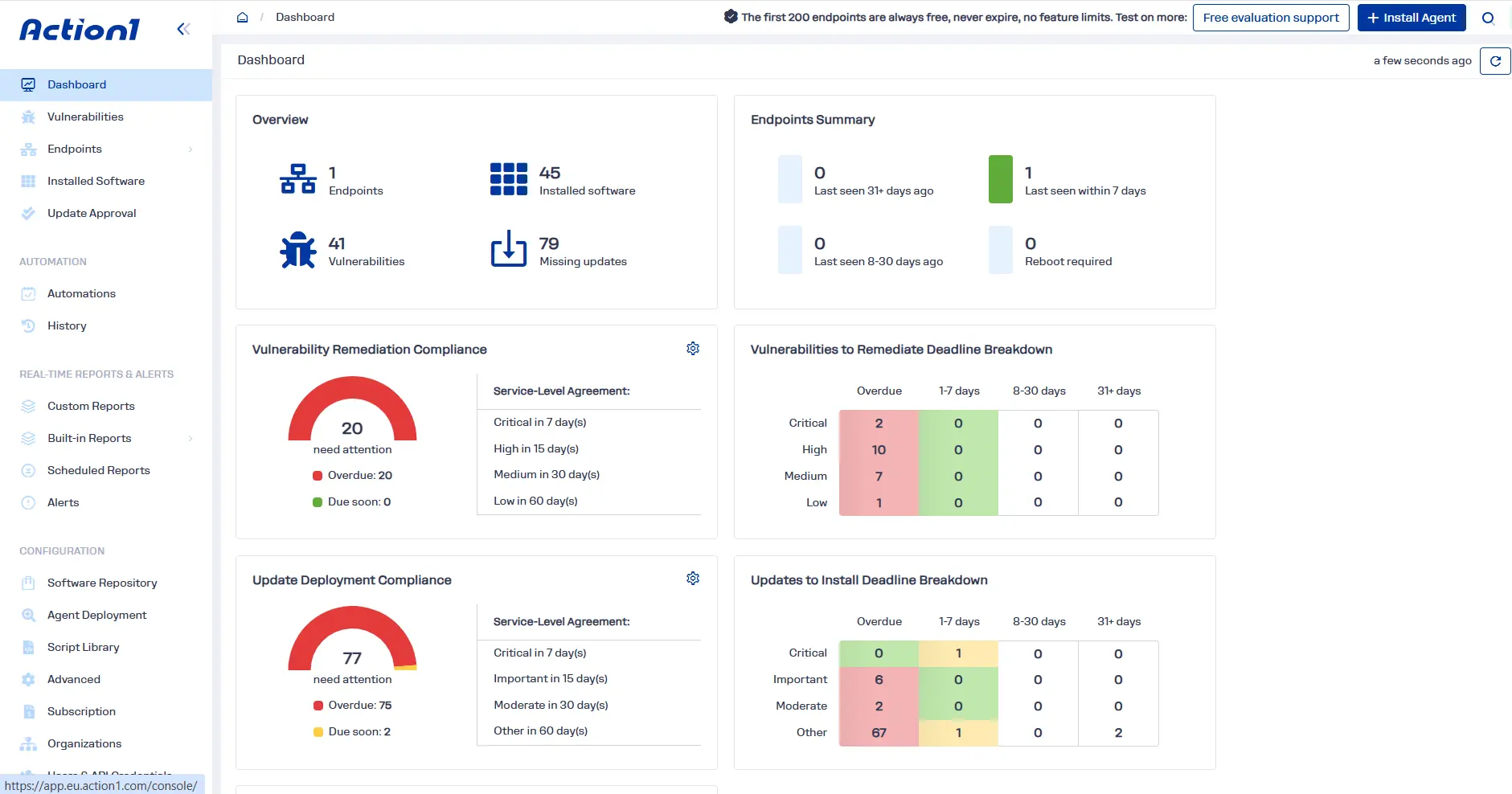
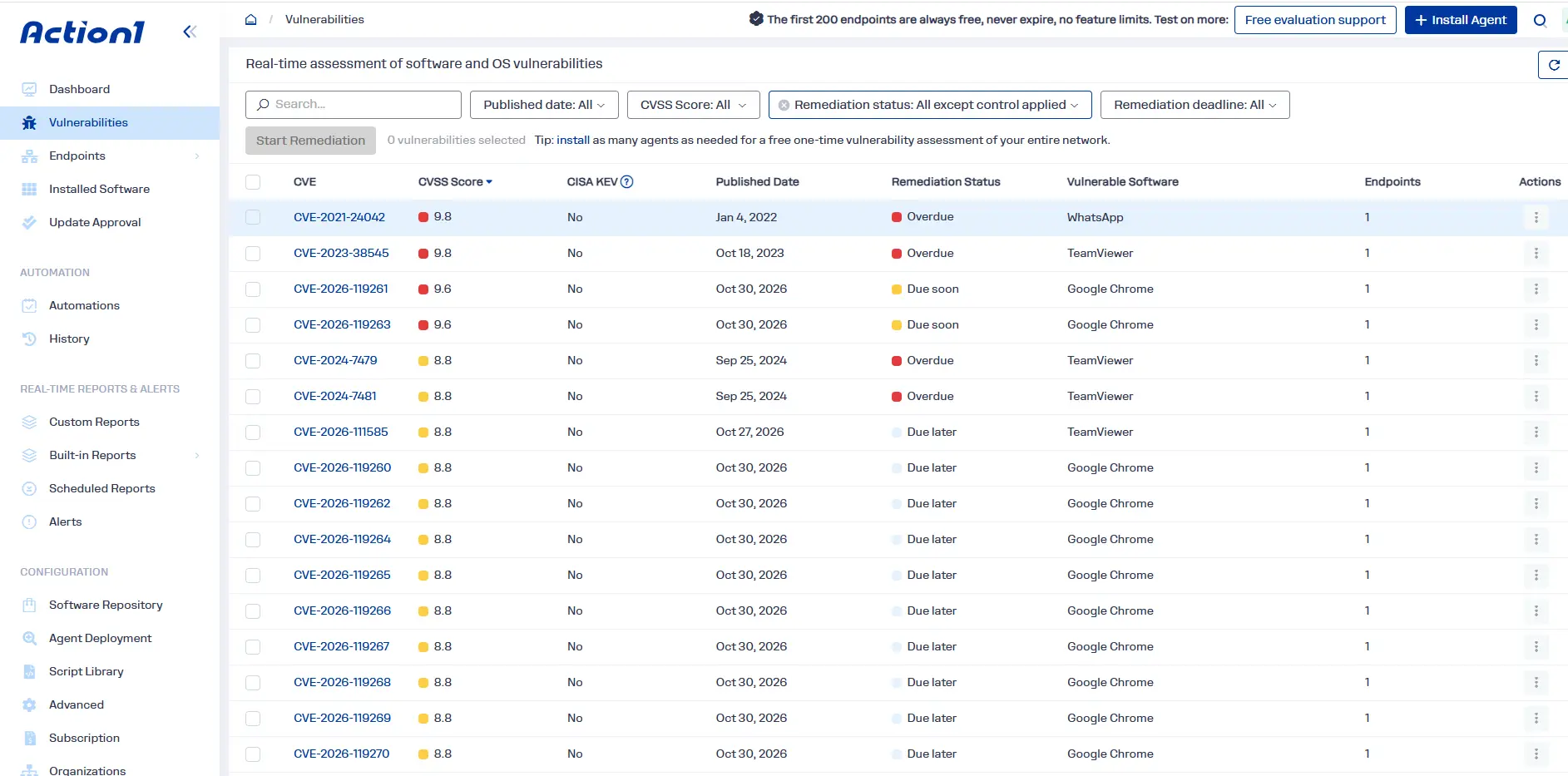
Action1 is a cloud-native autonomous endpoint management platform with a strong focus on vulnerability and patch management. Within a TVM program, it supports the endpoint-focused vulnerability workflow: identifying vulnerable software and operating systems on supported managed endpoints, adding exploitation context (such as CISA KEV status and known ransomware usage), showing which devices are affected, and connecting patchable findings to remediation.
Action1 provides vulnerability assessment for supported Windows and macOS endpoints. Its patch management capabilities extend across Windows, macOS, Linux, and supported third-party applications.
Teams can use a single cloud-based workflow to move from endpoint visibility and vulnerability prioritization to controlled remediation across office-based and remote endpoints, reducing manual work and coverage gaps. However, Action1 supports the endpoint vulnerability-management side of TVM. It does not replace broader threat detection, threat hunting, incident response, or business-risk management.
The following capabilities show how Action1 supports endpoint vulnerability management:
- Real-time vulnerability identification and prioritization: Action1 continuously assesses supported managed Windows and macOS endpoints for operating system and installed-software vulnerabilities. Its vulnerability views surface CVE identifiers, CVSS scores, CISA KEV status, known ransomware exploitation information, affected software, affected endpoints, and remediation status. Teams can see which devices need attention and prioritize findings using both vulnerability severity and exploitation context.
- Multiple vulnerability intelligence sources: Vulnerability identification depends on current information about software flaws, vendor updates, and known exploitation. Action1 draws on multiple sources, including VulnCheck NVD++, the National Vulnerability Database (NVD), CISA KEV, Microsoft Security Response Center (MSRC) advisories, vendor release notes, and other vulnerability intelligence. Using multiple sources helps connect vulnerability records with current advisories and exploitation information instead of depending on a single feed.
- Real-time endpoint and software inventory: Threat intelligence is useful when teams can establish whether the affected technology exists in their environment. Action1 provides endpoint and installed-software inventory, including software versions, hardware details, and configuration information. IT teams can use this visibility to identify which managed devices run affected applications or operating systems, check the scope of a vulnerability, and target remediation. Inventory also helps distinguish a relevant threat signal from one that does not apply to the organization’s managed endpoints.
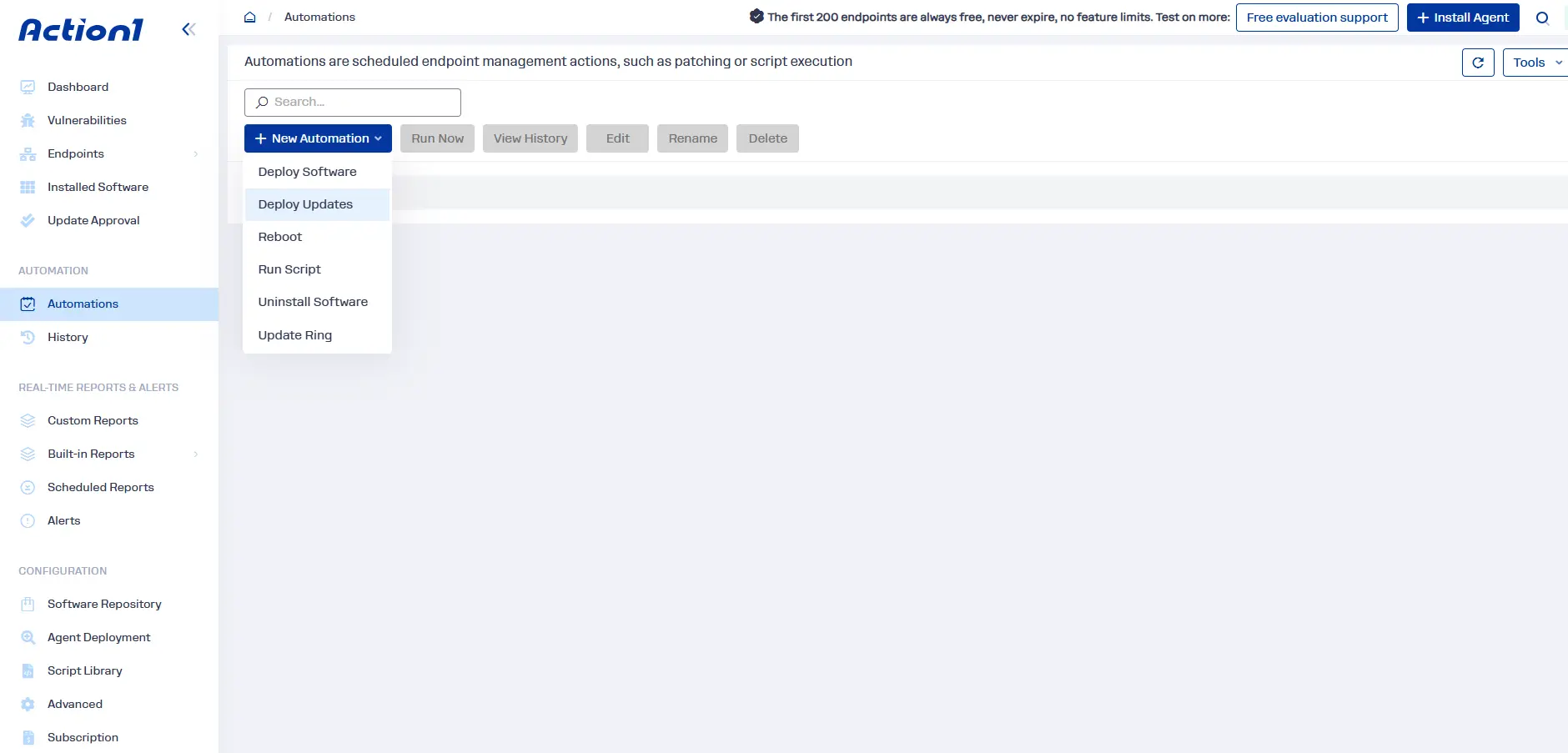
- Built-in remediation: Action1 connects vulnerability findings with available remediation options in a closed-loop workflow. When a suitable update exists, it can automatically deploy pre-tested patches to affected endpoints through policy-driven automations (with scheduling, approval rules, staged rollouts, and real-time result tracking), or administrators can trigger deployments on demand and review outcomes. Vulnerable or unsupported applications can likewise be removed via automated policies. When immediate patching is not possible, teams can document compensating controls for tracking and compliance.
- Cross-platform patch management: Action1 supports operating system patch management for Windows, macOS, and Linux, along with supported third-party application patching. Action1 supports vulnerability assessment for Windows and macOS, not Linux.
- Custom software remediation: Not every application in your environment appears in a vendor’s standard patch catalog. Action1 lets administrators package and deploy internally developed, proprietary, or otherwise unsupported software through custom software workflows. For example, Windows packages can include MSI or EXE installers, while macOS vendor PKG installers can be included inside a ZIP upload with the required installation scripts and installer files. This lets IT teams distribute approved application updates through the same endpoint-management platform.
- Scripting and configuration automation: Action1 supports PowerShell, Command Prompt (CMD), and Bash scripts for endpoint administration. Teams can use scripts to change configurations, adjust settings, collect diagnostic information, or perform other operational remediation actions. For example, a script might disable an insecure service or apply a configuration change while a permanent software fix is not available. Scripts are useful for specific, repeatable actions, but they are not a universal substitute for vendor patches or vulnerability-specific remediation.
- Autonomous update rings: Action1 uses update rings to roll out updates in stages. For example, IT can begin with a small testing group, then allow updates to automatically progress to broader endpoint groups when deployment success rates and endpoint counts meet configured criteria. Updates that fail to meet those criteria do not automatically advance. This reduces manual coordination and helps limit the impact of problematic updates before they reach the wider environment.
- Patch approvals, release delays, schedules, and reboot controls: IT teams can decide whether updates require manual approval or can be deployed automatically after a configured delay. They can schedule deployments around maintenance windows, select target endpoints, and control restart behavior. Reboot options can include notifying users and allowing time to save their work.
- Dynamic endpoint groups and custom endpoint attributes: Action1 lets administrators create endpoint groups using filters such as operating system, endpoint name, IP address, and Active Directory (AD) organizational unit. Groups can also use custom attributes, such as machine type or business role, to target specific systems. Teams can then apply patching policies, scripts, and other automations to the relevant group instead of selecting devices individually. Custom endpoint attributes are currently supported for Windows endpoints.
- Cloud-native architecture with no VPN or on-premises patch infrastructure: Action1 uses a cloud-based management architecture. Its agents initiate outbound connections to Action1 Cloud, allowing administrators to manage connected endpoints without a VPN or dedicated on-premises patch servers. This helps keep office-based, remote, and distributed endpoints within the same remediation workflow, provided they can connect to the cloud service.
- Offline endpoint catch-up: An endpoint may be switched off or disconnected when a scheduled patch, script, or other supported automation is due. Action1 can retry the missed task when the device reconnects, provided it comes online within the configured missed-schedule execution window. Administrators define this deadline when configuring the automation, so offline devices do not remain indefinitely eligible for an outdated task.
- P2P patch and software distribution: When devices on the same local network need the same update or software package, one endpoint can share downloaded file segments with other devices. This reduces repeated external downloads and bandwidth use without requiring dedicated local cache servers or distribution appliances.
- Privately maintained software repository: For supported third-party applications, Action1 maintains its own software repository rather than relying on community-maintained catalogs such as Chocolatey or WinGet. Its in-house team sources, tests, scans, and validates packages before making them available for deployment. This gives IT teams a centrally maintained catalog for supported application updates, while custom packaging provides another route for applications outside that catalog.
- SLA-based vulnerability and patch tracking: Action1 dashboards help teams track unresolved vulnerabilities, remediation deadlines, and vulnerability remediation compliance against configured SLAs. Administrators can see which findings require attention, which deadlines are approaching, and where remediation is overdue. This makes it easier to assign work and monitor whether endpoint vulnerabilities are being addressed within the organization’s defined timeframes.
- Real-time and customizable reporting: Action1 provides reports covering vulnerability status, known exploited vulnerabilities, documented compensating controls, patch deployments, installed software, endpoint inventory, and endpoint configuration. Teams can export reports, schedule delivery, create alerts, and customize reports to include additional fields. These records help IT and security teams review remediation progress, identify gaps, and prepare evidence for compliance audits.
- RBAC, audit trail, and REST API: Role-based access control (RBAC) lets administrators assign permissions for tasks such as approving updates, running automations, and viewing reports. The audit trail records administrative activity, including user actions and changes, and can be exported or accessed through the API. Action1’s REST API also provides a way to integrate endpoint and remediation data with other IT and security workflows. Together, these capabilities support delegated responsibilities, accountability, and audit preparation.
- Browser-based remote access: When a Windows endpoint needs hands-on investigation or troubleshooting, authorized administrators can use Action1’s browser-based remote desktop to connect without a VPN or a separate remote-access client. This can help IT teams investigate a device, assist its user, or troubleshoot a remediation issue. Remote access is an endpoint support capability, not a threat-detection or vulnerability-assessment function.
- Free one-time vulnerability assessment: Organizations can use Action1’s free one-time vulnerability assessment to establish an initial endpoint vulnerability baseline across an unlimited number of endpoints. The assessment identifies operating system and third-party software vulnerabilities on supported Windows and macOS devices. Endpoints beyond the free ongoing-management allowance are assessed once and then become inactive.
- Start with 200 free endpoints: Action1 offers full platform functionality for the first 200 endpoints at no cost, with no expiration date. Organizations can use this allowance to introduce endpoint vulnerability assessment, patch management, and remediation workflows before expanding coverage.