New vulnerabilities are discovered every day, sometimes by security experts and sometimes by cybercriminals. That’s why vulnerability management is a repeatable, never-ending effort that takes every finding from discovery all the way to verified closure.
A security vulnerability is any flaw or imperfection in software, hardware, configuration, or process that cybercriminals can use to gain unauthorized access to your systems, steal data, disrupt operations, launch a malware attack, or lock everything down and demand a ransom for the decryption key.
That’s why the big security frameworks don’t leave vulnerability management to chance. The CIS Critical Security Controls have established Control 7 for vulnerability management, and ISO/IEC 27001:2022 addresses it in Annex A8.8. The main goal of both is to get organizations that follow them, especially those handling sensitive information, to remediate vulnerabilities in a timely manner and minimize the exposure window.
In this article, we’ll talk about what vulnerability management is and why it matters. We’ll explore the types of vulnerabilities, how the whole process works, and why risk-based vulnerability management is so effective. We’ll also look at the tools and technologies on the market, share the best practices for building your own vulnerability management strategy, and show how Action1 turns that process into an autonomous one.
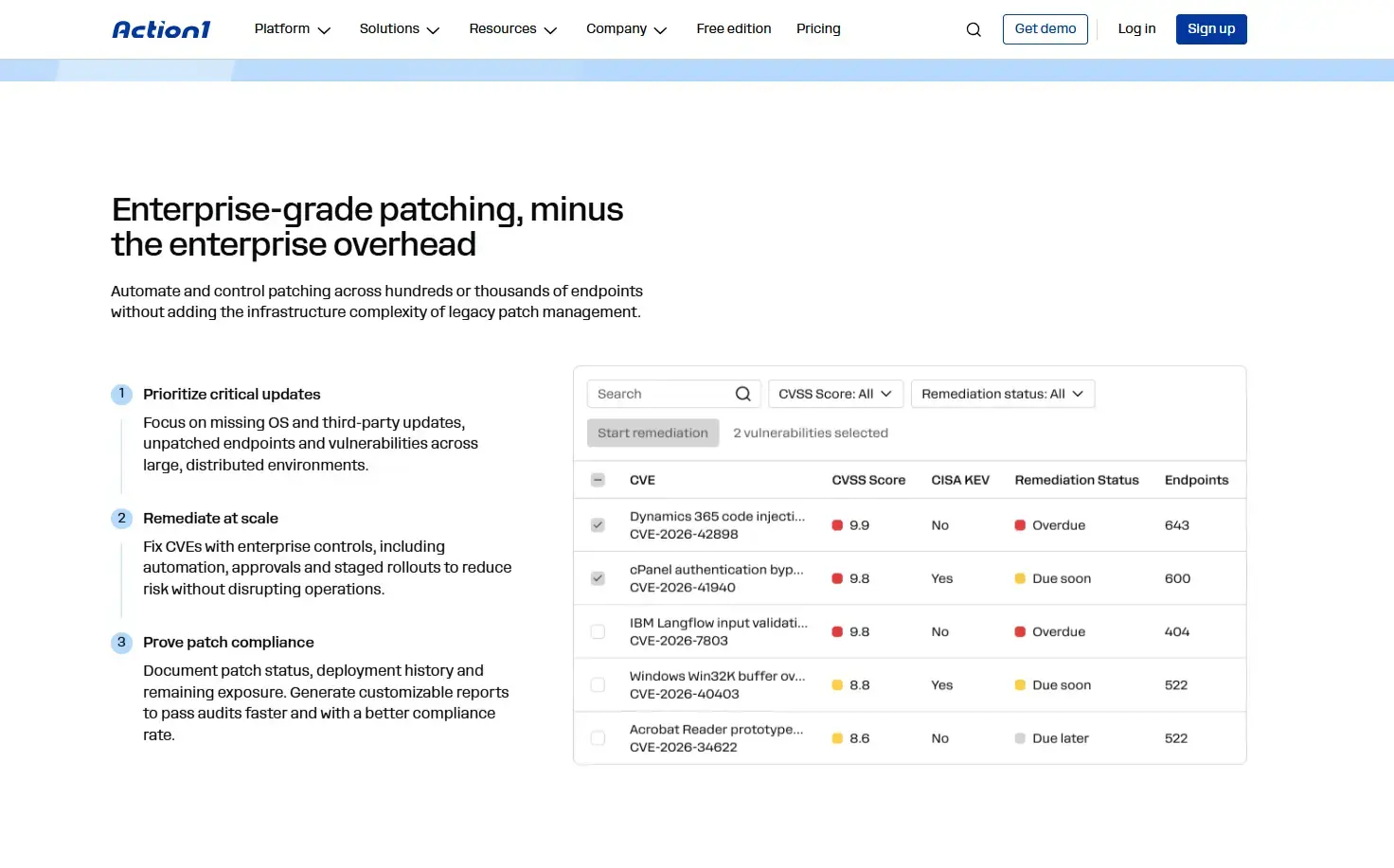
Find it and fix it in the same place. A scanner hands you a list. Action1 hands you the fix, too. It autonomously detects OS and third-party vulnerabilities and deploys the patches that close them, with no VPN, patch server, or appliance to maintain. It’s free for your first 200 endpoints.
Sign up for free for up to 200 endpoints, or watch the demo to see Action1 in action.
Why Does Vulnerability Management Matter?
Vulnerability management matters because it protects your systems from hackers by identifying and remediating known vulnerabilities across your operating systems and third-party applications. By taking these steps, you defend against cyberattacks, data breaches, regulatory penalties, and reputational damage, and most importantly, you save thousands of dollars you would otherwise spend on recovery.
Action1’s 2026 Software Vulnerability Ratings Report revealed that disclosed vulnerabilities across the enterprise software categories it analyzed rose 92% in 2025, and critical and high-severity flaws each increased 103%. Even worse, active exploitation of enterprise applications soared 800%, which was the largest spike in the report.
It’s not just the volume, either. Since April 15, 2026, NIST no longer enriches every CVE in the National Vulnerability Database (NVD). Now, the focus is on CVEs in CISA’s Known Exploited Vulnerabilities (KEV) catalog, federal software, and critical software. This leaves many new records without an NVD severity score. If your process waits for NVD, you are building in a delay.
You can’t control NVD, but you can control your process. An effective, automated vulnerability management program gives you:
- Smaller attack surface: Fewer exploitable vulnerabilities remain open, and the rest are known, tracked, and remediated.
- Faster remediation: When a critical flaw is disclosed, you already know which assets run the affected software. Your tool quickly identifies the affected endpoints, matches the flaw to its patch if one has been released, and lets you focus your remediation efforts where they matter most so you can deploy fixes faster.
- Compliance evidence: Your tool generates the documentation auditors expect to see for frameworks like NIST CSF, ISO 27001, and PCI DSS.
- Proof for leadership: Remediation times and risk trends show whether cyber risk is actually going down. Tracking these metrics reveals the true results of your remediation work.
What are the Main Types of Security Vulnerabilities?
Security vulnerabilities fall into seven main types, from third-party application and operating system flaws to cloud misconfigurations and human error. Each type creates different security risks, and it’s almost impossible to catch every one with a single tool. That’s why you’ll likely need more than one solution to cover your environment completely.
| Vulnerability type | Common example | What usually catches it? |
|---|---|---|
| Third-party applications | Unpatched code flaws in browsers, PDF readers, and other programs | Agent-based or network vulnerability scanning, vendor advisories |
| Operating system | Missing OS security updates, insecure default settings | OS patch assessment, configuration baseline checks |
| Network | Open ports, permissive firewall rules, flat networks without segmentation | Network scans, external attack surface checks, penetration tests |
| Cloud configuration | Publicly readable storage, overly permissive identity roles | Cloud security posture management |
| Hardware and firmware | Outdated BIOS or UEFI, unpatched IoT firmware | Firmware inventory, vendor advisories, network discovery |
| Encryption and data exposure | Unsupported or deprecated TLS versions, sensitive files on an open share | Configuration scans, data discovery tools |
| Human | Weak or reused passwords, phishing susceptibility | Identity controls, phishing simulations, security awareness programs |
One thing we should make clear is that zero-day vulnerabilities are the exception to every rule. With no patch available yet, you can’t remediate them. You can only reduce their risk with compensating controls, like adding firewall rules, isolating affected endpoints from network traffic, or removing the vulnerable software altogether.
Compensating controls are halfway measures you use until a patch is released and you can apply it to fully address that particular vulnerability. If you find yourself using mitigation approaches, don’t forget to document them. Otherwise, you’ll run into problems during audits because you won’t be able to prove what actions were taken, at least not on paper.
How Does the Vulnerability Management Process Work?
The vulnerability management process works as a continuous cycle made up of five stages. These are identification, assessment, prioritization, remediation, and verification and reporting.
Vulnerability Identification
Identification happens through scanning or ongoing monitoring, but you first need a constantly updated inventory of all your endpoints and software. That inventory should include desktops, laptops, servers, virtual machines, cloud workloads, IoT devices, containers, their operating systems, and third-party applications. Only then can you use tools for scanning or monitoring to identify existing vulnerabilities by comparing installed software against known CVEs and checking for other weaknesses.
Scheduled network scans probe devices over the network, while endpoint agents report installed software continuously, even when those devices are off the corporate network. Penetration tests add the occasional human check to catch what automated scanners might miss.
Vulnerability Assessment
Assessment determines how serious each finding is. Each one is categorized as a missing patch, misconfiguration, encryption issue, or data exposure. It’s then matched to a Common Vulnerabilities and Exposures (CVE) record if one exists and, where applicable, scored for technical severity on a scale from 0 to 10 using the Common Vulnerability Scoring System (CVSS). Automated tools handle this part pretty well, but the score is just a baseline. In reality, it describes the flaw itself, not its true impact on your environment.
Vulnerability Prioritization
Prioritization shows you what to fix first. This is the step that most relies on human judgment. Automation can help by enriching findings with CISA KEV status and Exploit Prediction Scoring System (EPSS) scores, but your team must decide how internet exposure, asset importance, and business impact shape the order of work. The goal is to address the most critical risks first, especially vulnerabilities that are being actively exploited on exposed systems. The risk-based approach behind this step is covered in detail further below.
Vulnerability Remediation
Every prioritized vulnerability follows one of three paths: remediation, mitigation, or formal risk acceptance. Each approach fits different situations.
- Remediate: Patch the vulnerability, fix the configuration, or retire the asset.
- Mitigate: Reduce risk when no permanent fix is available, for example, by segmenting the device.
- Accept: Formally accept a vulnerability’s residual risk when an authorized risk owner determines that acceptance is justified under your organization’s risk policies. Document the reasoning, assign an owner, and set a review date.
Of these three paths, patch deployment is the most automatable. Risk acceptance is the least automatable and should always be a documented human decision.
Verification and Reporting
Verification is the final step, and it confirms whether your remediation actions have actually resolved the vulnerabilities. This means rescanning or rechecking the installed version. A deployment that shows “success” doesn’t guarantee the vulnerability is fixed, especially if the endpoint hasn’t rebooted. Many security patches require a reboot to take full effect. If you use a scanning tool, run another scan after deployment.
If you use endpoint management, patch management, or vulnerability management solutions, check the dashboard to be sure the vulnerability is cleared. Once remediation is confirmed, turn to reporting. Reporting transforms vulnerability data into risk trends for executives, documented proof for auditors, and actionable lists for asset owners. Track your mean time to detect and mean time to remediate. Keep a record of every finding, and send vulnerability data to your security information and event management platform.
One Vulnerability Through All Five Steps
For greater clarity, here’s an example of how a single vulnerability moves through all five stages of the vulnerability management lifecycle. Under a sample internal policy, a finding might move from identification to verified closure in about a week, though this time frame could be shorter or longer. Always treat these timings as examples, not regulatory requirements.
| Step | What happens | Example timing |
|---|---|---|
| Identification | Agents flag a new remote code execution flaw in a third-party file transfer client on 140 laptops and 2 servers. | The same day the CVE is published. |
| Assessment | The CVE carries a High CVSS score, and the vulnerable version is confirmed on all 142 devices. | Same day. |
| Prioritization | CISA adds the CVE to its Known Exploited Vulnerabilities catalog, and both servers are internet-facing, so they move to the front of the queue. | Within 24 hours. |
| Remediation | The servers are patched in an emergency maintenance window. For the laptops, the patch goes to a pilot group first, then moves to the remaining update rings. | Servers in 72 hours, laptops in 7 days. |
| Verification and reporting | A rescan or real-time monitoring confirms the patched version is installed. Three offline laptops remain vulnerable until they reconnect. Each closed finding feeds the mean time to remediate calculation. | As each device checks in. |
What is Risk-Based Vulnerability Management (RBVM)?
Risk-based vulnerability management, or RBVM, ranks vulnerabilities by the real risk they pose to your organization. It doesn’t rely just on the severity score. RBVM considers technical severity, threat intelligence, exploit probability, exposure, and asset criticality. All of these factors combine to show you the real risk that a single software flaw brings, so you can prioritize the most critical vulnerabilities and focus remediation efforts where they will reduce the most risk.
Prioritizing flaws based only on the CVSS score doesn’t work well, and the Heartbleed (CVE-2014-0160) incident proves that point. In 2014, NVD scored it 5.0, Medium, under CVSS v2. Yet that same year, expert investigators traced the Community Health Systems breach back to Heartbleed, and hackers stole records of 4.5 million patients. NVD now lists it at 7.5 under CVSS v3.x, but by then the damage was done.
The opposite problem is just as real. Plenty of high-scoring flaws never get exploited at all. According to FIRST, the share of known vulnerabilities exploited in any 30-day window sits in the low single digits. This means a queue organized purely by CVSS scores puts most of your effort into flaws nobody is attacking.
RBVM solves these problems by layering in KEV status, EPSS scores, threat intelligence, asset criticality, internet exposure, sensitive data or stored secrets, privileged roles, and lateral movement paths. This process clarifies your entire risk picture and lets you weigh software vulnerabilities with all the context you need.
Now you can answer the key questions. What’s the score? Is it actively exploited in the wild? Which of my endpoints are actually at risk? What’s the real threat for my organization, and how quickly do I need to fix it? RBVM gives you real answers to all of these.
The following table shows how RBVM compares with old-school CVSS-only approaches.
| Question | CVSS-only prioritization | Risk-based vulnerability management |
|---|---|---|
| What drives the ranking? | Technical severity of the flaw. | Severity plus threat activity, exposure, and business impact. |
| Is active exploitation considered? | Rarely, because most published scores include only Base metrics and omit CVSS Threat metrics. | Yes, through the KEV catalog, Exploit Prediction Scoring System scores, and threat intelligence feeds. |
| Does the affected asset matter? | No, a CVE carries the same base score on every asset. | Yes, critical assets and internet-facing systems rank higher. |
| What does the queue look like? | Long lists of critical vulnerabilities, most of which are never exploited. | Shorter lists focused on vulnerabilities that are actively exploited or likely to be. |
How Should Teams Prioritize Vulnerabilities When CVSS, CISA KEV, EPSS, and Asset Criticality Disagree?
When managing vulnerabilities, a single score should never decide your remediation order. CVSS, CISA KEV, EPSS, exposure, asset criticality, and existing controls each answer a different question, and you only get the right order by having all the answers in front of you.
| Signal | What it tells you | What it doesn’t tell you | When should it change priority? |
|---|---|---|---|
| CVSS | Technical severity | Organization-specific risk | When severity materially raises potential impact |
| CISA KEV | If it’s exploited in the wild | Business impact on your endpoints | When the vulnerability affects an asset in your network |
| EPSS | How likely it is to be exploited in the next 30 days | Business consequence | When exploitation likelihood is meaningfully elevated |
| Asset criticality | Importance of the affected asset | Technical exploitability | When disruption or compromise would have major business impact |
| Internet or external exposure | How reachable your asset is | Vulnerability severity | When attackers can reach the affected service or system |
| Compensating controls | Existing reduction in exposure or impact | Whether the vulnerability has been remediated | When effective controls materially change residual risk |
CISA has worked this way too since June 2026. Its BOD 26-04 tells federal civilian agencies to rapidly remediate KEV-listed CVEs on publicly exposed assets where exploitation grants total control, while giving lower-risk findings more time. Federal contractors are covered only when their contracts require it.
Read more about BOD 26-04, and learn how Action1 helps you minimize the 72-hour remediation window.
In practice, a CVSS 7.5 flaw that just landed in KEV on an internet-facing payment server should jump ahead of a CVSS 9.8 flaw on an isolated lab machine with no sensitive data. Attackers are already exploiting the first one and can reach it, while the second is much harder to get to, especially if the lab machine is completely air-gapped.
Make a 72-hour deadline easy to hit. When a KEV-listed flaw lands on an internet-facing server, you do not have time to build a deployment from scratch. Action1 lets you set emergency deployments ahead of time, so critical patches go out as soon as you approve them.
What is the Difference Between Vulnerability Management and Vulnerability Assessment?
A vulnerability assessment is a point-in-time snapshot of the weaknesses across your endpoints, especially their software. Vulnerability management is the continuous process of identifying flaws, prioritizing them, remediating them, and verifying they’re no longer present across your systems. Long story short, an assessment tells you what the existing weaknesses are at that moment. Vulnerability management focuses on what matters and gets it fixed.
| Factor | Vulnerability assessment | Vulnerability management |
|---|---|---|
| Relationship | One step within vulnerability management | The full program, which runs assessments on a recurring or continuous basis |
| Timing | Periodic or one-time | Continuous |
| Scope | Assets defined for that specific assessment | All assets in the inventory, plus new ones as they appear |
| Output | A list of findings with severity ratings | Prioritized, owned, and verified remediation |
| Ownership | Security team or external assessor | Your organization, shared across security, IT operations, and asset owners |
| Governance | Nothing outside the report | SLAs, named owners, exception handling, and change control |
How Does Vulnerability Management Relate to Exposure Management and Attack Surface Management?
Vulnerability management is one piece of exposure management, and attack surface management is another. In simple terms, attack surface management finds the assets you have across your organization, even the ones you never listed before. Vulnerability management then finds, prioritizes, and remediates known flaws on those assets. Exposure management sits on top of both and looks at everything a cybercriminal could actually use against you, including identities, misconfigurations, and the paths between your systems. If you need to deal with cloud configuration issues, you may also require cloud security capabilities that go beyond traditional endpoint patching.
Let’s make this even easier to understand with the table below.
| Discipline | Question it answers | What it covers | What you get |
|---|---|---|---|
| Vulnerability management | Which known vulnerabilities do we have, and are they addressed? | CVEs and misconfigurations on assets in your inventory | Prioritized, verified remediation |
| Exposure management | What could a hacker chain together to hurt us? | Vulnerabilities, misconfigurations, identities, and attack paths across your whole IT environment | A risk picture tied to business impact |
| Attack surface management | What could a cybercriminal see and reach? | Known and unknown internet-facing assets, including shadow IT and third-party systems | An up-to-date map of your exposed assets |
Vulnerability Management vs Attack Surface Management
The difference comes down to scope and perspective. Vulnerability management starts from an inventory you already control, like the devices on your network. Attack surface management starts from the outside looking in, a lot like a real attacker would, and hunts for anything linked to your company. That could be forgotten or unmanaged servers, stray cloud resources, or domains registered to impersonate you. In practice, these two approaches build off each other. Every server or cloud resource that attack surface management uncovers is one more asset your vulnerability management program needs to cover. Once those blind spots are managed, your odds of a breach go down.
Vulnerability Prioritization Technology vs Continuous Threat Exposure Management
Vulnerability prioritization technology, or VPT, is the tool that pulls in threat intelligence, exploit data, and details about your assets, then combines them into a ranked list. Continuous threat exposure management, or CTEM, is a broader and more complex framework that Gartner introduced in 2022. It includes five stages that keep repeating: scoping, discovery, prioritization, validation, and mobilization. In other words, VPT covers only one part of this cycle.
CTEM may look a lot like vulnerability management at first, but there’s one major difference. CTEM includes validation. Instead of assuming a vulnerability is exploitable, you actually test whether an attacker could reach and use it. You do this with things like breach and attack simulation or penetration testing.
From Vulnerability Management to Continuous Threat Exposure Management
The most mature programs move from one-off fixes to continuous reductions in exposure, using risk and exposure metrics tied to business objectives. Scorecards and prioritized roadmaps help communicate risk to decision-makers, while regular red-team exercises help you see whether your exposure is truly shrinking.
If there’s one thing to remember, it’s that exposure management builds on vulnerability management and can never replace it. If your team is falling behind and can’t close known-exploited vulnerabilities on time, starting a CTEM program won’t solve that.
It’ll just give you an even longer list of items you aren’t fixing. The only way to build a resilient vulnerability management program is to start with dependable identification, prioritization, and patching. Once those work smoothly, you can broaden your scope and take on exposure management.
What Tools are Used for Vulnerability Management?
Vulnerability management relies on four main types of tools. These are vulnerability scanners, risk-based vulnerability management platforms, patch management solutions, and configuration and scripting tools. In short, scanners find the weaknesses, risk-based platforms tell you which ones matter most, and patch management and configuration tools are what actually fix them.
Vulnerability Scanners
Vulnerability scanners automate vulnerability detection by checking your systems for known software flaws, misconfigurations, and missing patches. They come in two types.
- Network-based scanners: These test your endpoints over the network.
- Agent-based scanners: These run on each device and give detailed information about installed software, known unpatched vulnerabilities, hardware, IP addresses, and more. Their big advantage is that, when they report to a cloud console, they can cover laptops or desktops outside your network with no VPN required. Even if they’re thousands of miles away, as long as the device has an internet connection.
Both types of scanners help identify vulnerabilities, but scanning alone doesn’t remediate them. You’ll also need remediation capabilities, whether they’re built into the same platform or provided through an integrated patch management or endpoint management solution.
Risk-Based Vulnerability Management Platforms
Risk-based vulnerability management platforms do more than just identify software flaws. They also prioritize vulnerabilities by risk and help you make decisions based on that information. These platforms pull from many sources, including CVSS severity scores, CISA’s Known Exploited Vulnerabilities catalog, established in 2021, and exploitation probability data like EPSS. This gives you much better prioritization than CVSS scores alone.
With this approach, you can clearly see which issues actually put your business at risk. Some platforms assign tasks to responsible teams, track deadlines, and check if the vulnerabilities have really been fixed. Others integrate with patch management or endpoint management platforms so you can use their findings for real remediation, without using multiple tools.
Patch Management Platforms
Patch management solutions are what actually fix the vulnerabilities on your endpoints, including laptops, desktops, virtual machines, cloud workloads, and servers. These solutions find missing operating system or third-party patches, download them from vendors or repositories, deploy them according to your schedule, handle failed installs and reboots, and report everything that’s installed.
Some tools also offer advanced vulnerability management capabilities. They identify known vulnerabilities, rank them with multiple risk factors, and allow you to remediate by deploying patches or by applying and documenting compensating controls if patching isn’t an option.
Patch management solutions can be on-premises or cloud-based. With on-premises tools, you need to pay for the setup and infrastructure first, then for the license. Cloud-based options are more cost-effective. They don’t require extra hardware or a VPN, since lightweight agents on each endpoint connect straight to the cloud. They also make it easy to manage both on-site and remote devices, which is a huge advantage.
Configuration and Scripting Tools
You need these whenever there is no patch available. Sometimes a settings change handles the problem, like turning off the older SMBv1 protocol or blocking risky ports. Other times, you may need to uninstall a vulnerable app that is no longer supported or isolate affected endpoints from the network. Endpoint management tools help by letting you set configuration policies, push remote uninstalls, or run PowerShell or Bash scripts on every affected endpoint at once.
What are the Best Practices for Effective Vulnerability Management?
Effective vulnerability management for your endpoints’ operating systems and third-party apps comes down to three things. Know exactly what software runs on every endpoint, fix what hackers are actually exploiting first, and prove every fix worked.
Let’s be honest, though. Nobody does this by hand anymore, at least not in 2026. Tracking every app version on even two or three devices, matching them against new CVEs, and pushing patches manually would eat up a lot of your time, and you’d have to do it again and again. It’s just not an option. Frankly, it’s ridiculous.
That’s why the best practices below assume you’re using an automated vulnerability management or patch management tool. Each one covers what you should set up in your tool and, where it matters, what you still need to keep an eye on yourself.
Gain Complete Asset Visibility
Install the agent on every endpoint, including servers, remote laptops, and virtual machines. This way, you build a real-time asset inventory and keep continuous visibility into the operating systems and third-party applications on your managed endpoints as they report in.
If you’re using such software for the first time, compare the device count in your tool against your other records, like Active Directory or purchase history. You can’t afford mistakes here, since any device without the agent is a blind spot your scans or monitoring will never cover. That one device could ruin your whole vulnerability remediation strategy.
Scan for Vulnerabilities Continuously
With agents in place, a tool that supports continuous scanning regularly checks your managed endpoints and matches installed software against new CVEs as vulnerability data becomes available. The tool does all the hard work, and you’ll see a prioritized list of vulnerabilities on your endpoints, with CVSS scores and risk ratings from every source it uses.
A nice bonus here is that remote endpoints that haven’t checked in for a while will get scanned as soon as they come back online. This means you don’t end up with blind spots just because a device was temporarily offline.
Remediate Known-Exploited Vulnerabilities First
Make sure your tool shows the CISA Known Exploited Vulnerabilities status on every finding, plus Exploit Prediction Scoring System scores if it includes them, and sort your vulnerability views by those. Tag your internet-facing systems so KEV-listed flaws on them rise to the top automatically. That way, the tool does the sorting for you, and you don’t waste valuable time doing it manually.
Set Risk-Based Patch Deadlines
Configure your deadlines to match the regulatory frameworks your company must follow, and build them into your automation rules. Create an emergency remediation window where fixes get approved and deployed right away, often with less testing than usual. Then set up a regular maintenance window for standard updates. You need both windows so that if you have to act immediately, everything is ready and you just press go. Use the maintenance window for Patch Tuesday, or line it up with whatever fits your process best.
To make this simple, here’s a sample policy you can adapt.
| Priority | Example | Sample deadline |
|---|---|---|
| Emergency | KEV-listed flaw on an internet-facing server | Within 72 hours |
| High | Critical CVE on workstations, or a KEV-listed flaw on internal systems | Within 7 days |
| Standard | Other high-and medium-severity vulnerabilities | Next monthly patch cycle |
| Low | Low-severity flaws on isolated systems | Within 90 day, or documented risk acceptance |
One extra tip: Keep an eye on what’s overdue each week and who owns it. Also, start the clock when the vulnerability is detected on your endpoints, not when the National Vulnerability Database scores it. Since April 2026, NIST no longer enriches every CVE, so some records may never get an NVD score at all.
Treat Third-Party Apps Like the Operating System
Third-party application updates are just as important as your OS updates, so make sure you patch every program your tool supports. According to Action1’s 2026 Software Vulnerability Ratings Report, critical browser vulnerabilities climbed 154% in 2025. If you patch only the OS and skip your other apps, you risk a cyberattack or data breach.
For in-house or niche apps that fall outside your tool’s catalog, decide how you’ll handle each one. You might need a custom package so it fits your workflow, or you may need to replace or remove it. Whatever you choose, take action today, not tomorrow.
Automate Patch Remediation
Shape your automated patch remediation process the way you envision it and the way it works best for your company. Still, the basics are almost always the same:
- Tie deployments to your emergency and regular maintenance windows. The first is for urgent cases, and the second is your regular schedule.
- Use risk-based prioritization so critical vulnerabilities get fixed first.
- Roll out patches and updates in stages to minimize disruption.
- Use autonomous patching. Features like update rings let the software make smart rollout decisions, holding back unstable patches and promoting stable ones.
- Set up offline endpoint catch-up. If a system was offline, it gets patched as soon as it reconnects.
- Configure a retry process for failed deployments.
Remove Software that No Longer Gets Patches
Use your inventory to spot end-of-life operating systems or unsupported third-party applications. Upgrade or uninstall them using your tool’s deployment or removal features, or by running a script. If you can’t upgrade or remove a particular program, isolate the device, document any compensating controls you put in place, and set a review date so it doesn’t stay exposed forever.
Verify Every Fix
After every patch deployment, many platforms automatically recheck your endpoints and flag anything still waiting for a reboot or with a failed install. Make sure you set a reboot deadline, because many OS updates don’t take effect until the device restarts. In other words, a patch might be installed, but your device stays vulnerable until that reboot happens.
Failed deployments are where your retry process proves its value. If a patch fails due to a bad connection or gets canceled, your patching tool should automatically try again.
One more tip: Keep an eye on your “pending reboot” and “failed install” lists each week. Check to see if those lists are shrinking and take action when they aren’t.
Generate Reports After Each Patch Deployment Cycle
Every time you push out a patch across your network, make it a habit to create a report on the outcome. Many platforms offer built-in templates that make this simple and quick. Reviewing these results lets you see what works, strengthens your audit evidence, and helps you keep track of your network’s real state.
How Do You Measure Vulnerability Management Success?
You measure vulnerability management success by how fast and how completely risk goes down, not by how many vulnerabilities you find. A rising count of findings can simply mean your coverage improved. The seven metrics below show whether your risk is actually decreasing.
| Metric | What it measures | Why it matters |
|---|---|---|
| Scan coverage | Share of known assets assessed in the last scan cycle. | Unscanned assets are blind spots, and every other metric depends on this one. |
| Mean time to detect (MTTD) | Time from a vulnerability’s public disclosure to its detection in your environment. | Shows how quickly new vulnerabilities reach your queue. |
| Mean time to remediate (MTTR) | Time from detection to verified fix. | The core speed metric, best tracked per severity tier. |
| Critical vulnerabilities resolved within SLA | Share of critical and KEV-listed findings fixed by their service-level agreement deadline. | Shows whether the program meets its own commitments. |
| Backlog age and trend | How long open findings have existed and whether the backlog is shrinking. | Exposes stalled remediation that averages can hide. |
| Exceptions granted | Number of accepted risks and how many are overdue for review. | Keeps risk acceptance from becoming a quiet backlog. |
| Reopen rate | Share of findings that come back after being marked fixed. | Reveals weak verification or recurring configuration drift. |
In practice, MTTR (mean time to remediate) across all severities can hide problems. A fast average might mask a handful of critical findings that have been open for months, so report MTTR by severity tier.
How Do You Start a Vulnerability Management Program?
You can start a vulnerability management program in six clear steps. First, pick a tool that can both detect and remediate vulnerabilities. Next, inventory your endpoints. Then, assign owners and set risk-based deadlines. After that, set up your remediation workflow, address known-exploited flaws first, and, finally, verify every fix.
When you put it all together, a vulnerability management program is just the set of people, rules, tools, and timelines you use to find and fix weaknesses continuously.
- Choose software that can automate vulnerability management end to end: You need a tool that finds vulnerabilities, shows you which ones matter most, and patches them across your operating systems and third-party apps. That can be a vulnerability scanner paired with a patch management solution, or one platform that does it all. Just don’t stop at a scanner. On its own, it leaves you with a long list of vulnerabilities and no built-in way to fix them.
- Inventory your endpoints and software: Use asset discovery to find every device you need to manage. If you use an agent-based platform, make sure you install the agent on every laptop, desktop, server, and virtual machine. This way, you get a live inventory of every OS and app version.
- Assign owners and risk-based deadlines: If your process involves more than one person, assign tasks clearly. Decide who fixes what, who can approve exceptions, and how fast each priority should be resolved. Base those deadlines on KEV status, severity, and business impact rather than the CVSS score alone. Many platforms can track these deadlines automatically once you set them. Use role-based access control, also known as RBAC, to delegate authority at every stage in a way that matches your process.
- Set up your remediation workflow to match your actual operations: Configure patch deployments for both emergency situations and regular maintenance windows, using staged rollouts and offline catch-up for devices that miss the first round. Enable reboot control so patches actually take effect without unnecessary downtime. For vulnerabilities without a patch, use remote uninstalls or configuration change scripts, and make sure you document every compensating control.
- Tackle known-exploited vulnerabilities first: Start with KEV-listed and internet-facing critical vulnerabilities, then work your way down the backlog. Make this your default filter so your team always sees and addresses the biggest risks before anything else.
- Verify fixes and report your progress: After a deployment, rescan your endpoints or check real-time monitoring to confirm the fix. Chase down pending reboots and failed installs to eliminate any lingering weakness. Always generate audit-ready reports so you can show proof of remediation to management and auditors whenever needed.
Starting a vulnerability management program is simpler than it sounds when you break it into these steps. The trick is to automate wherever possible, define clear responsibilities, and keep verification and reporting woven through every part of the process. With this foundation, you’ll build not just compliance, but real security, and you’ll do it in a way that scales as you grow.
Frequently Asked Questions
Does Finding a Vulnerability Mean it Must Be Patched Immediately?
No. The level of urgency depends on several factors, such as the likelihood of exploitation, technical severity, asset criticality, patch availability, operational impact, compensating controls, and specific regulatory requirements. A flaw listed in CISA’s Known Exploited Vulnerabilities (KEV) catalog on an internet-facing server should absolutely be patched as fast as possible, ideally within hours.
On the other hand, low-severity flaws on isolated systems can usually wait for the next maintenance window without adding much risk. If a patch isn’t available yet, you can reduce risk in the meantime with mitigation strategies like network segmentation or isolating the system, or remove the risk entirely by uninstalling the vulnerable software.
Can a Vulnerability Be Closed if a Compensating Control is in Place?
Not automatically. A compensating control reduces risk, but it doesn’t remove the underlying vulnerability, because mitigation is not the same as remediation. Compensating controls are temporary measures you use while waiting for a patch to be released. Once the patch is deployed and verified, you can close out the vulnerability. Until then, keep the mitigation status clearly visible in your tracking system, assign an owner, and set a review date so the issue resurfaces if the control changes or a real fix becomes available.
Who Should Approve Vulnerability Risk Acceptance?
In most cases, it’s the business, system, or risk owner of the affected asset. The specific approval chain depends on your organization’s governance model. Whoever signs off, always record who accepted the risk, the reason behind the decision, and when the next review will take place.
How Should Vulnerability Management Handle Assets That are Temporarily Offline?
Offline assets should get assessed and patched automatically as soon as they reconnect. For that, you need a vulnerability management tool with an offline catch-up feature. During remediation, it should flag any endpoints that are currently offline, queue the patch deployment for when they reconnect, and notify you once the process is complete. This way, offline endpoints don’t turn into blind spots across your network.
Can Vulnerability Management Eliminate All Cybersecurity Risk?
No. Vulnerability management helps reduce risk by remediating known or detectable software security weaknesses, but it can’t eliminate zero-day threats, identity-based attacks, phishing and other social engineering, malicious insiders, or every possible configuration issue. You still need complementary controls, like identity protection, network security, security awareness training, and cloud configuration monitoring, to cover those gaps.
What are the Key Takeaways About Vulnerability Management?
What you should remember is that vulnerability management works only when findings turn into verified fixes. Also, keep in mind:
- It’s a continuous program that discovers, prioritizes, addresses, verifies, and reports on vulnerabilities.
- Risk-based prioritization combines severity with evidence of active exploitation, exposure, asset criticality, and business context.
- Remediation needs clear owners and a clear escalation path, or findings stall.
- Scanning alone isn’t vulnerability management. Every finding needs remediation, mitigation, or documented acceptance, followed by verification.
- Measure coverage, remediation speed, backlog, and risk reduction, not just vulnerability counts.
- Tools support the process, but they don’t replace ownership, policy, and real-world operational discipline.
In the end, this is an active process, not just a list of findings. True vulnerability management happens when you fix what you find and know for sure it worked.
How Does Action1 Help Teams Identify, Prioritize, and Remediate Software Vulnerabilities?
Action1 helps you identify, prioritize, and remediate software vulnerabilities from one cloud console. It’s a cloud-native, agent-based, autonomous endpoint management platform with vulnerability management and patching capabilities supporting Windows, macOS, Linux, and hundreds of third-party applications. It automatically identifies vulnerabilities on Windows and macOS endpoints in real time, adds risk context from multiple sources so you can prioritize them, shows you which patches are missing, and deploys them to fix security flaws. Linux vulnerability assessment and prioritization aren’t supported yet (expected by the end of Q4, 2026), although Linux patching is.
The platform gives you the flexibility to shape the vulnerability management process the way you envision it and the way it fits your organization’s needs. It helps you remediate software security weaknesses faster, with minimal downtime and manual effort, by automating most of the process.
Because it’s cloud-native and agent-based, Action1 doesn’t need a VPN, patch server, or appliance. It works equally well for office-based and remote endpoints, servers, virtual machines, and cloud workloads. It’s highly scalable, and it takes under five minutes to create an account, deploy the agent, and start remediating vulnerabilities across your systems. It’s best for IT and security teams at SMBs, large enterprises, and MSPs that need one tool to identify and address vulnerabilities, with precision they can trust.
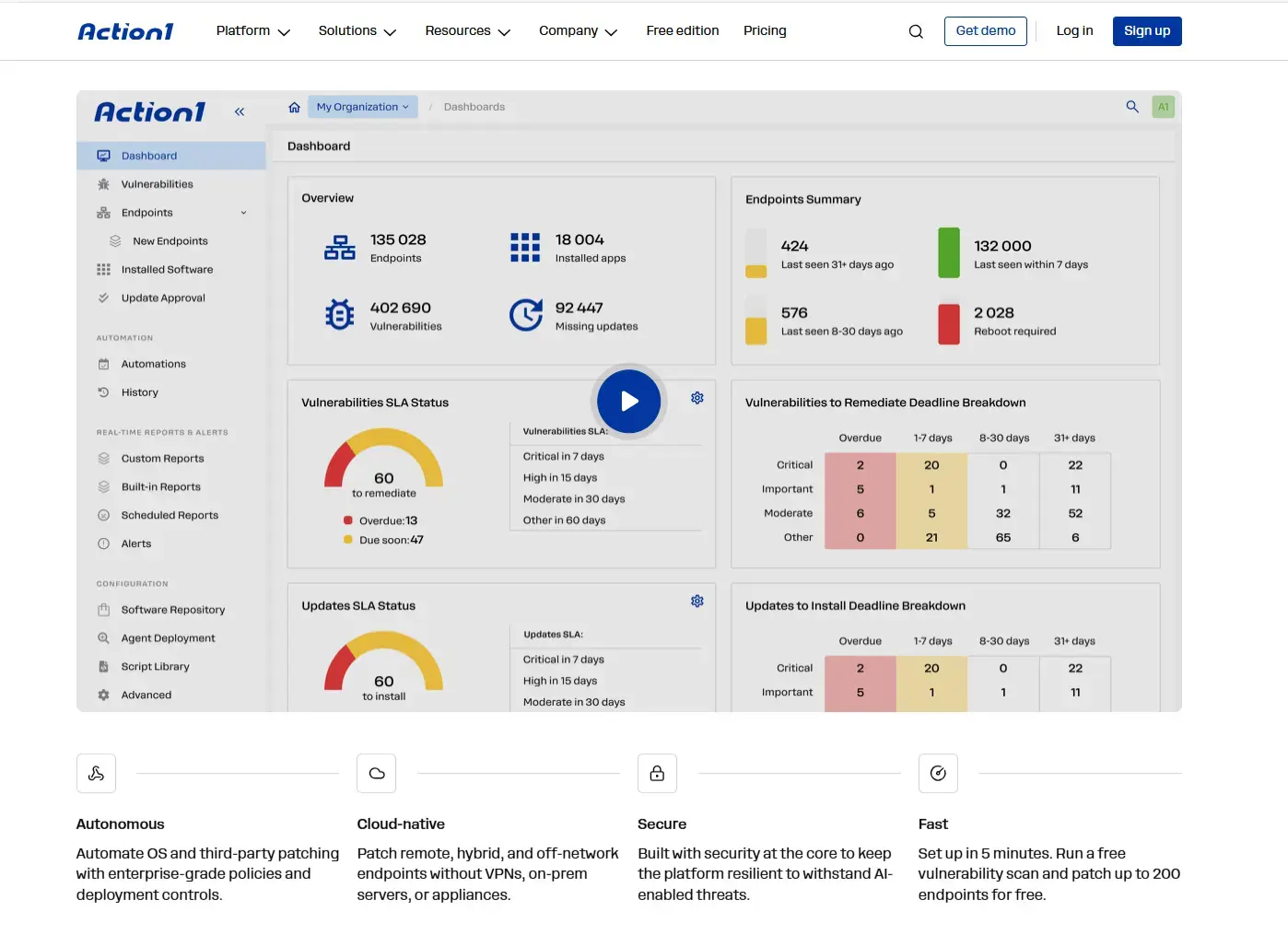
It does all of this through the following features:
- Endpoint and software visibility: A real-time inventory shows every installed app and version across your endpoints, no matter where they are.
- Risk context on every finding: Detected vulnerabilities display CVE IDs, CVSS scores, CISA KEV status, and known ransomware use. The data comes from VulnCheck NVD++, NIST NVD, CISA KEV, Microsoft, and vendor release notes, not just a single feed.
- SLA-based tracking: Dashboards monitor active vulnerabilities and patch compliance against your remediation deadlines in real time.
- Built-in remediation: Deploy the available update or bulk-uninstall vulnerable, unsupported, or legacy software, whether that’s a specific version, all versions, or everything below a version you set. For configuration fixes that go beyond a patch, run PowerShell, CMD, or Bash scripts.
- Cross-platform OS patching: Install OS updates and security patches to Windows, macOS, and Linux endpoints from one place.
- Secure third-party app repository: Third-party apps come from Action1’s privately maintained software repository, not community-maintained ones like Chocolatey or Winget. An in-house team of patch management experts packages each new app version and tests it in a secure environment before releasing it, which greatly reduces the risk of software supply chain attacks.
- Autonomous update rings: Patches start with a test group and advance to broad deployment on their own once they meet your rollout success metrics. A patch that doesn’t meet them doesn’t move forward. You get faster remediation with less risk of downtime and less manual effort.
- Release controls: Choose automatic approval with an optional delay after release, or require manual approval for critical systems. Scheduling then lets you decide exactly when a fix reaches production.
- P2P patch distribution: Endpoints on the same network share large updates, which cuts external bandwidth use and speeds up deployment without needing any on-premises cache servers.
- Reboot control and update agent repair: Customize reboot prompts and let users postpone reboots up to a deadline you set. Action1 also automatically repairs a broken Windows Update Agent, so OS updates don’t silently fail.
- Offline catch-up and dynamic targeting: If an endpoint misses a scheduled deployment while it’s offline, Action1 runs it once the endpoint reconnects within the completion window. Dynamic groups target endpoints by OS, hardware, user, IP range, Active Directory membership, or custom attributes.
- Audit-ready reporting: Vulnerability reports track CVE, CVSS, KEV status, affected endpoints, and remediation status. A Documented Compensating Controls report shows what was recorded, when, and by whom. You can build or tailor your own reports, and 100+ built-in customizable report templates make it quick.
- RBAC, multi-tenancy, audit trail, and REST API: Granular roles control who can view findings or remediate them. Multi-tenancy keeps MSP clients or departments in separate organizations with their own approval processes. The audit trail keeps admin actions traceable, and the API connects vulnerability data to your other systems.
- Free tier: Action1 is free for up to 200 endpoints, fully featured, and yours forever. Plus, you get a one-time vulnerability assessment on unlimited endpoints across your network.
Curious how many vulnerabilities are hiding in your fleet right now? Sign up for free for up to 200 endpoints, or watch the demo to see Action1 in action.