Third-Party Patch Management
Keep supported third-party applications up to date without tracking every vendor release – no VPN or on-prem infrastructure needed. Action1 finds missing updates and CVEs, deploys patches from its expert-curated PatchAssurance™ catalog, and shows which deployments succeeded and which endpoints still need attention.
Status: Active
Coverage: Supported third-party apps on Windows and macOS; Linux app updates via configured repositories on supported distributions.
Availability: Global
New to Action1? See this capability in action!
How unpatched third-party applications
increase exposure
A fully patched operating system can still run a vulnerable browser, PDF reader, or collaboration app. These applications have their own release schedules and update methods, so a successful OS patching cycle does not mean that third-party app vulnerabilities have been addressed.
IT teams must identify affected endpoints, prioritize updates, schedule deployments and investigate failures. When that work spans different tools, scripts, and reports, it becomes harder to confirm which updates installed and which endpoints still need patching – especially for remote or offline devices.
How Action1 third-party patching works
Action1 brings supported third-party application and OS updates into a single workflow, helping IT teams close security gaps and verify patch deployment results without piecing together vendor tools, scripts, and reports. From a browser-based console, IT teams can:
Discover
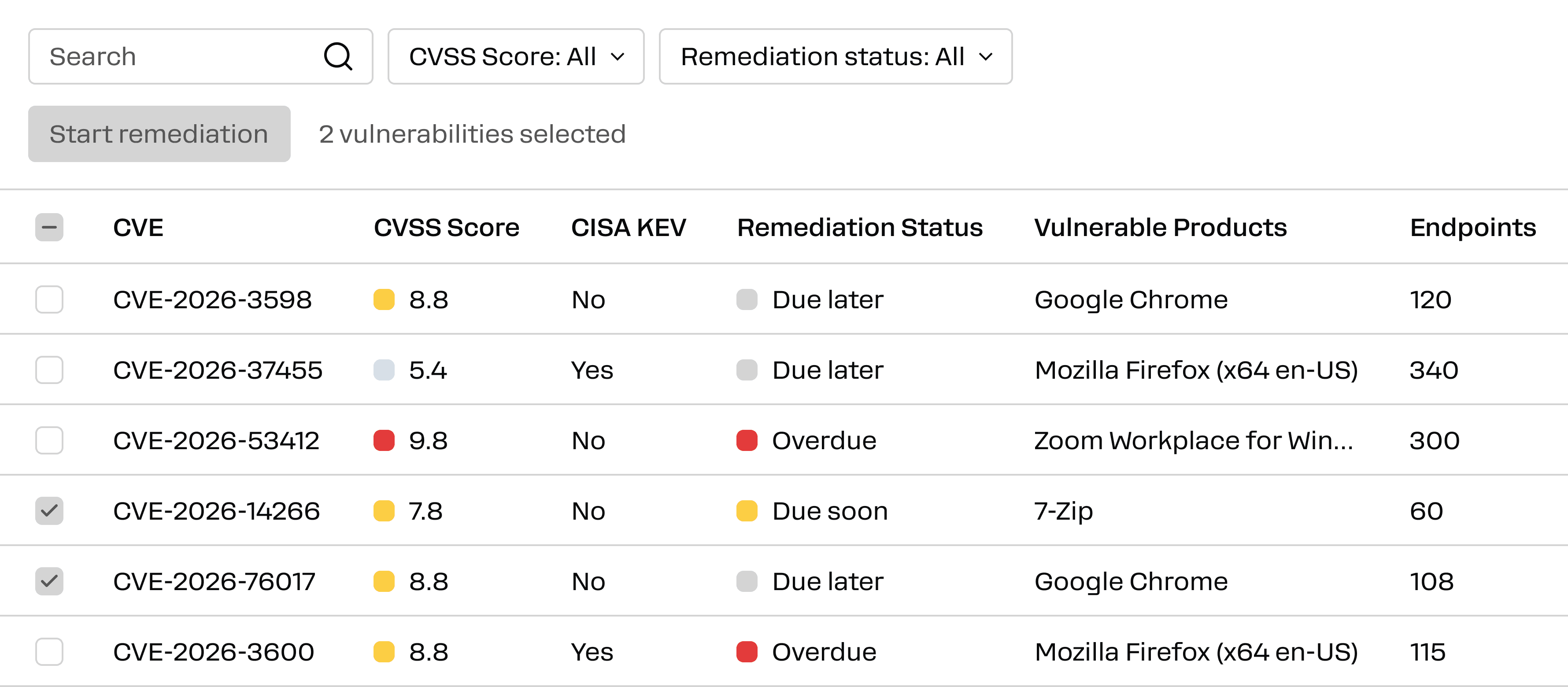
See missing application updates, affected endpoints, vendor and version details, and the CVEs that updates address.
Prioritize and approve
Use severity, endpoint counts, and remediation deadlines to decide what to patch first. Approve updates individually or set rules for deployments.
Deploy
Target endpoint groups, schedule installation, and use update rings to expand a pilot rollout when installation success meets your criteria. Remote endpoints need no VPN; offline devices can retry within the configured window.
Verify
Check successful, pending, and failed installations. Use patch reports to find updates that remain missing and follow up on exceptions.
Enterprise third-party patching features
Action1 experts source, test, and validate patches for supported third-party apps through the PatchAssurance™ catalog. IT teams can approve and roll out those updates alongside OS patches, then see which endpoints still need attention.
Expert-maintained PatchAssurance™ catalog
Action1 experts source, scan, and validate packages for supported Windows and Mac apps before publishing them in the private software repository.
Third-party update prioritization
See affected endpoints, vendor and version details, severity, and the vulnerabilities an available update addresses. Use remediation deadlines to prioritize work.
Policy-based deployment
Select updates or filter them by criteria such as source and severity. Set approval requirements, endpoint groups, and deployment schedules.
Staged rollouts with update rings
Start with pilot endpoints. Advance updates when installation counts and success rates meet your thresholds or pause an update that needs investigation.
Maintenance and reboot controls
Schedule updates within maintenance windows and configure how required endpoint reboots are handled.
Patching for offline and remote endpoints
Patch internet-connected endpoints without a VPN. If a device is offline during a scheduled deployment, Action1 retries when it reconnects within the configured retry window.
Peer-to-peer (P2P) distribution
Endpoints on the same network can share third-party update files locally, so a large rollout does not require every device to download the same package from the cloud.
Deployment status and reporting
Review successful, pending, and failed installations. Use built-in reports to identify endpoints still missing updates and document deployment results for compliance audits.