Secure Remote Access
for Windows Servers
and Workstations
Connect to managed Windows workstations and servers from your browser to troubleshoot software issues or perform unattended maintenance. Investigate an endpoint directly, then deploy updates and verify results from the same cloud console – no VPN or separate remote desktop client needed.
Trusted by many Fortune 500 companies
99%Patch success rate10M+Endpoints protected5K+Customers














Investigate Windows endpoint issues
without switching tools
Troubleshoot software problems and maintain Windows workstations and
servers without going onsite or walking employees through every step. Connect
through Action1’s web console when a user is signed in or when no one is logged
in, including endpoints outside the corporate network.
Locate the endpoint
Find the managed Windows workstation or server in Action1 and check that it is online before connecting.
Connect to the desktop from your browser
Launch Remote Desktop from the endpoint dashboard. A signed-in user receives a connection request according to your settings. If nobody is signed in, the session opens at the Windows sign-in screen.
Troubleshoot or perform maintenance
Use the remote screen, mouse, and keyboard to investigate the problem or maintain the endpoint. If the work calls for a patch or software change, use Action1’s deployment tools and check the result in the same console.





Remote support and unattended
maintenance in your browser
Start a remote session from Action1’s web console to troubleshoot a problem
on an employee’s workstation or maintain an unattended Windows
workstation or server.
Remote support
Connect to a managed Windows workstation while an employee is signed in. See their screen and troubleshoot software, system, or patching problems directly. Configure the connection request to fit your organization’s consent policy.
Unattended access
Connect to a managed Windows workstation or server when nobody is signed in. The session opens at the Windows sign-in screen, so an administrator can log in and perform maintenance without waiting for someone at the endpoint.
Browser-based remote access
Launch remote desktop sessions from the Action1 web console without a VPN or separate desktop client for the administrator. The managed Windows workstation or server needs the Action1 agent and a connection to Action1.
Why IT teams choose Action1
for remote access
Cloud-native by design
Connect to managed Windows workstations and servers from your browser, even when they are outside the corporate network. Remote Desktop requires no VPN, on-premises infrastructure or internet-facing inbound port on the endpoint.
Up and running in 5 minutes
Set up Action1 in as little as five minutes. Once the Action1 agent is installed on a managed Windows workstation or server, an administrator can start a remote session from a browser on any device without downloading a separate remote desktop client.
Remote troubleshooting and patching in one console
Connect to a managed Windows workstation or server to troubleshoot an issue or perform unattended maintenance. When the work involves an update or application, review its status, deploy patches or software, and check the result in the same Action1 console.
Remote Access for your first 200 Windows endpoints free forever
Use Remote Access on your first 200 managed Windows endpoints for free, with no feature restrictions or expiration date. Test support and unattended maintenance in your own environment before expanding.
Secure remote sessions
Action1 supports MFA, role-based access, and TLS 1.2 / 256-bit AES encryption. Control who can start remote sessions, configure connection requests for signed-in users, and use audit trail to review remote desktop activity.
Action1 in the analyst spotlight

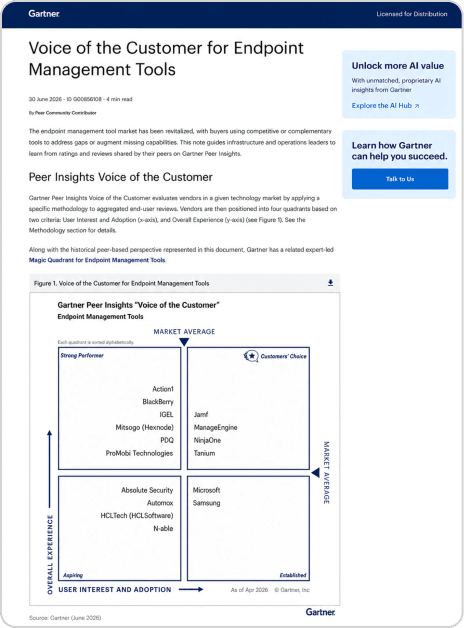
Action1 named Strong Performer in Gartner® Peer Insights™ Voice of the Customer for Endpoint Management Tools, 2026.
View full report
